January kicks off 2026 with one of the most EXCITING updates to date. While the end of 2025 focused on bringing every feature you need, January brings refinement, clarity, and control, along with new features. This release sharpens how you interact with xCloud every single day.
The highlight of the month is xCloud UI 2.0, a major step forward in usability and performance. Alongside the new interface, January also delivers important security patches, smarter infrastructure behavior, and developer-focused improvements that quietly remove friction across workflows.
From redesigned dashboards and docker compose and performance tuning, these updates aim to help you manage more sites, more confidently, with less effort.
So take a short pause ☕, and let’s walk through the January 2026 release highlights that set the tone for the year ahead.
📸 Highlights of xCloud January 2026 Release
This month focuses on speed, visibility, and safety. Here is a quick snapshot of the most important updates shipped in January:
🎉 xCloud UI 2.0 – A redesigned dashboard built for faster navigation, clearer visibility, and simpler daily workflows.
📊 New Overview Dashboard – See servers, sites, vulnerabilities, backups, and billing activity in one place.
🗂️ Redesigned Site Lists – Manage multiple sites with bulk actions, filters, sorting, and clearer status indicators.
🧱 Default & Grid Views for Sites – Switch between efficiency-focused bulk management and visual site overview.
🖥️ Improved Single Site Dashboard – Resource usage, backups, security, performance, and activity in one clean layout.
🎨 Updated Dark & Light Modes – Better contrast and consistency for long working sessions.
🛡️ Critical Security Patch Applied – Automatic mitigation of CVE-2026-23800 with forced updates for all affected sites.
📦 Site Snapshots – Instantly clone and deploy reusable WordPress site setups across servers.
⚙️ Node.js v24 Support – Deploy modern Node.js applications with the latest runtime.
🔐 Centralized Credential Security – Sensitive credentials stay inside the dashboard, not email inboxes.
These updates are designed to reduce clutter, prevent mistakes, and give you faster control over growing infrastructure.
❇️ Introducing xCloud UI 2.0: Faster, Clearer, Built for Daily Work
The biggest highlight of the January 2026 release is xCloud UI 2.0, a redesigned dashboard experience focused on speed, clarity, and real-world usability. This update is not just a visual refresh. It rethinks how teams manage servers and sites inside xCloud every day.
The new interface brings better structure, clearer data hierarchy, and smoother navigation across the platform. Tasks that once required jumping between pages now feel more connected and easier to complete.
✨ Revamped Overview Dashboard
The new Main Overview Dashboard gives you a high-level view of everything that matters the moment you log in. Instead of hunting through multiple sections, you can now see the full picture in one place.
From this dashboard, you can quickly review:
- Total servers and sites
- Vulnerable sites and security status
- Backup activity and health
- Billing overview and account usage
This makes it easier for teams, agencies, and resellers to monitor activity at a glance and spot issues early.
✨ New All Sites List Dashboard
Managing multiple sites becomes far simpler with the redesigned All Sites List Dashboard. Site statuses are now clearer, actions are easier to find, and bulk management feels natural instead of tedious.
You can now perform common actions directly from the list, including:
- Run or manage backups
- Enable or disable sites
- Apply security actions
- Filter, sort, and search across large site collections
This update reduces repetitive clicks and saves time when managing dozens or hundreds of sites.
✨ Default View and Grid View for Site Management
The All Sites List opens in Default View, optimized for efficiency and bulk operations. This view works best when you need to take action across many sites quickly.
You can switch to Grid View when you want clearer visibility into individual sites. Grid View presents site details and statuses in a more visual layout, making it easier to review each site at a glance.
Both views serve different workflows, giving you flexibility without sacrificing speed.
❇️ Redesigned Single Site Dashboard: Everything in One Place
January’s update also brings a cleaner, more practical Single Site Overview Dashboard. This redesign focuses on visibility and control, so you can understand a site’s health and take action without jumping between sections.
The new layout organizes information more logically and surfaces what matters most upfront. You can now review and manage the following from a single screen:
- Resource usage and performance signals
- Backup status and history
- Security alerts and vulnerability details
- Domains, SSL, and DNS-related settings
- Updates, caching, and optimization controls
- Recent activity and operational changes
This redesign helps reduce context switching and speeds up routine checks, especially when managing many client sites.
❇️ Updated Top Bar and Sidebar Navigation
Navigation across xCloud now feels more consistent and predictable. The Top Bar and Sidebar have been refined to improve flow between servers, sites, and settings.
Key actions stay within reach, while menus follow a clearer structure. This makes it easier to move between related tasks without losing your place or repeating steps.
For teams working inside xCloud daily, these changes add up to a noticeably smoother experience.
❇️ Bulk Actions, Filters, and Smarter Sorting
Managing infrastructure at scale often means repeating the same actions across many sites. January’s release reduces that friction with improved bulk actions, filters, and sorting tools.
You can now:
- Filter sites by status, environment, or issues
- Sort lists to surface what needs attention first
- Apply actions to multiple sites in one step
These tools help teams stay organized and respond faster, especially during maintenance windows or security events.
❇️ Improved Dark and Light Modes
Dark and light modes have received thoughtful refinements across the dashboard. Spacing, contrast, and readability have been improved to make long working sessions more comfortable.
The updated styles also bring better consistency across different pages, so switching between views feels seamless instead of jarring.
❇️ Standardized Icons, Tooltips, and Color System
Small UI details often create big clarity gains. January introduces a standardized icon set and clearer tooltips across the platform. Actions are now easier to understand at a glance, which reduces mistakes and speeds up onboarding for new team members.
The updated color system improves contrast and visual hierarchy. System states and site statuses stand out more clearly, helping you identify issues faster without scanning dense text.
❇️ Critical Security Updates and Platform Stability
Security remains a top priority in the January 2026 release. This month includes proactive mitigation of a critical vulnerability, applied automatically across the platform to protect all users without manual intervention.
A high-severity vulnerability CVE-2026-23800 (CVSS 10.0) was identified in the Modular DS (Modular Connector) plugin. xCloud responded by force-updating all affected sites to version 2.6.0, closing the issue immediately.
No action was required from users. All affected customers were protected automatically, reinforcing xCloud’s commitment to secure-by-default infrastructure.
This release also resolves a visual issue with the reseller pane logo on signup and login pages, improving consistency for white-label and reseller accounts.
❇️ Site Snapshots: Reusable WordPress Sites in Minutes
January introduces Site Snapshots, a powerful new feature for agencies, developers, and teams that deploy similar WordPress setups repeatedly.
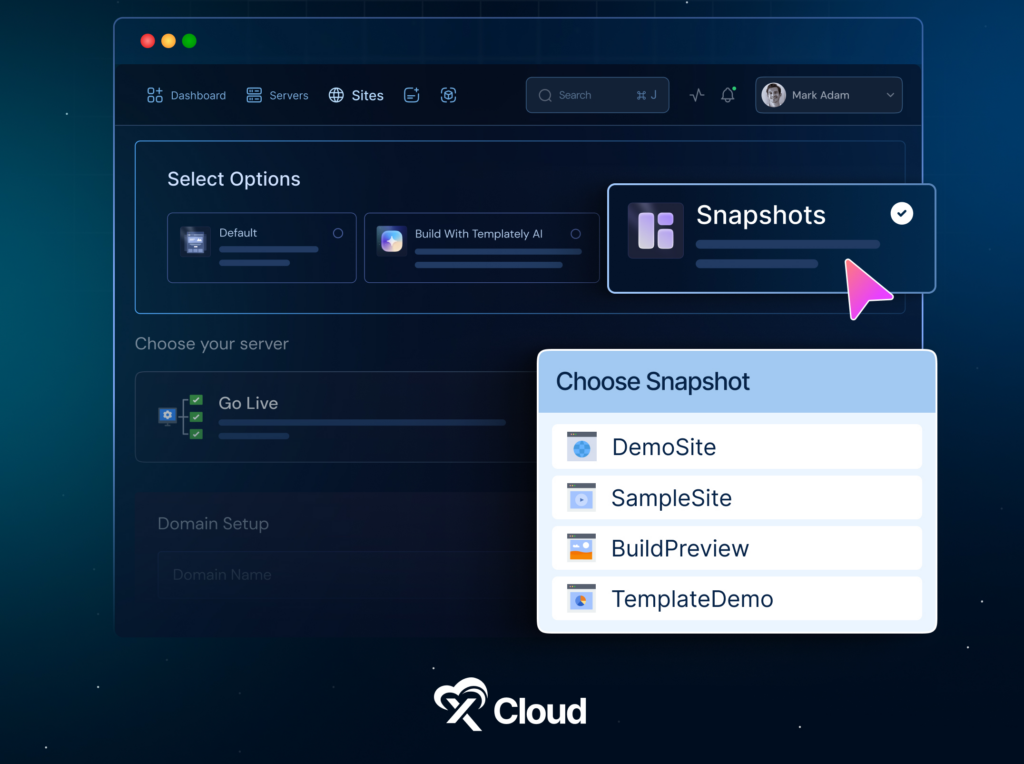
You can now create reusable snapshots of a WordPress site, including both files and database, and deploy them instantly on the same server or across different servers.
Key benefits of Site Snapshots include:
- Rapid deployment of pre-configured WordPress sites
- Consistent environments across client projects
- Reduced setup time for staging, demos, and production
Snapshot creation progress is tracked in real time, and all snapshots are managed from a dedicated section in your profile. This makes it easy to organize, reuse, and scale proven site configurations.
❇️ Node.js v24 Now Available
xCloud now supports Node.js v24, giving developers access to the latest runtime for modern applications.
With Node.js v24 available directly on servers, you can deploy faster, more secure, and more efficient JavaScript applications without manual runtime management. This update supports teams building APIs, real-time services, and modern web apps that rely on the newest Node.js features.
❇️ Centralized Credential Security: Sensitive Data Stays in the Dashboard
Credential handling has been significantly improved in January. Sensitive information such as server, database, and Redis credentials are no longer sent via email by default.
Instead, credentials are now securely accessible from the xCloud dashboard with:
- Masked display by default
- Reveal and copy options when needed
- Reduced exposure risk from email forwarding or inbox leaks
Email notifications now include a “Send Sensitive Info” toggle, which stays disabled by default. This gives teams full control over how and when credentials are shared.
❇️ Custom Docker with Docker Compose
January continues with a strong focus on developer flexibility and tighter server-level control. These updates help advanced users deploy modern applications, lock down access, and squeeze better performance out of existing infrastructure without added complexity.

You can now deploy full multi-container applications on xCloud using Docker Compose. Instead of managing containers manually, you can launch complex application stacks by providing a public Docker Compose file URL or pasting the file directly into the dashboard.
This makes it easier to run modern stacks that rely on multiple services, such as APIs, workers, databases, and background jobs, all within a single deployment flow.
With Custom Docker and Docker Compose, you get:
- Faster deployment of complex applications
- Cleaner configuration for multi-service environments
- Less manual setup and fewer deployment errors
This feature is ideal for developers, SaaS builders, and teams running non-traditional workloads on xCloud.
❇️ SSH Access Lockdown for Better Server Security
Server access security gets a major upgrade with SSH Access Lockdown. You can now restrict SSH port 22 access to trusted IP addresses only.
Your current IP address and required xCloud infrastructure IPs are automatically whitelisted, so you stay secure without locking yourself out. This feature dramatically reduces exposure to brute-force attacks and unauthorized access attempts.
It is a simple but powerful layer of protection for production servers.
❇️ Cache URLs With Query Strings
Performance optimization now extends to URLs that include query parameters such as utm_source, gclid, or fbclid.
You can choose which query parameters to ignore directly from the xCloud dashboard, allowing these pages to be cached properly without breaking tracking or analytics.
This results in:
- Faster page load times
- Lower server load
- Better performance for marketing and campaign traffic
⭐ xCloud January 2026 Release: Improvements and Bug Fixes
Alongside the UI 2.0 launch and major feature additions, the January 2026 release includes a wide range of improvements and bug fixes focused on stability, security, and smoother day-to-day operations, especially for teams managing many sites and servers. Below is a summary of the key refinements included in this release:
⏺️ Centralized credential handling now prevents sensitive server, database, and Redis credentials from being sent by email by default, improving overall security hygiene.
⏺️ OpenLiteSpeed now calculates the optimal number of PHP workers automatically based on server CPU and RAM, improving performance and resource utilization.
⏺️ Server reboot notifications have been refined with snooze options, smarter defaults, and reduced alerts for new or auto-reboot enabled servers.
⏺️ Git repository setup now auto-appends .git to repository URLs and defaults the branch name to main, reducing deployment errors.
⏺️ Staging and demo domains can now be customized before deployment for Custom PHP, Laravel, Node.js, Lovable, manual migrations, and site migrations.
⏺️ WordPress bulk operation history has been optimized to fix memory allocation issues for large teams by improving database queries and indexing.
⏺️ SSH access restriction notices are now clearer, helping teams avoid accidental lockouts while securing server access.
⏺️ A critical zero-day vulnerability in the Modular DS plugin was automatically mitigated across all sites, with forced updates applied and users notified.
⏺️ Invoice filter links have been fixed to work correctly across billing views.
⏺️ Nginx configuration updates now correctly respect upload size limits, improving large file uploads for applications such as Nextcloud.
⏺️ Patchstack now activates correctly during staging-to-production pushes, ensuring consistent security coverage.
⏺️ SSL configuration sync issues in OpenLiteSpeed have been resolved.
⏺️ Delayed UI updates after team deletion have been fixed for better dashboard accuracy.
⏺️ Hidden action menus on White Label invoices are now visible and accessible.
⏺️ Cache rule validation has been corrected to prevent false test errors.
⏺️ Reseller pane logo display issues on signup and login pages have been resolved.
Each of these updates removes friction from real workflows and reinforces xCloud’s focus on secure, predictable, and efficient hosting operations as we move into 2026.
⛳ Wrapping Up the January 2026 Release
January sets the foundation for everything coming next in 2026.
With xCloud UI 2.0, the platform becomes faster, clearer, and easier to operate at scale. Site Snapshots reduce repetitive work. Docker Compose and Node.js v24 unlock more advanced application workflows. Security improvements protect users automatically, while performance tuning and smarter notifications reduce noise.
These updates focus on one theme. Let teams do more without adding complexity.
This is only the beginning. More UI 2.0 pages, deeper automation, and stronger tooling are already in progress. Your feedback continues to guide how xCloud evolves, and the new feedback button inside the dashboard makes sharing ideas easier than ever.
Try the January additions and let us know what you think. Stay tuned for more improvements, guides, and insights as we continue building a faster, safer, and more intuitive hosting platform together.