














The biggest threat to a website maintenance retainer isn’t downtime. It’s silence.
When everything works, clients assume nothing is happening. Every month, your team updates plugins, patches vulnerabilities, runs backups, monitors performance, fixes issues, and keeps websites secure and fast.
But from the client’s perspective, none of it exists. No visible output. No tangible proof.
No sense of progress. And that’s where retainers start to break. Because when the value isn’t visible, it eventually gets questioned.
Website maintenance reports solve that problem. They turn invisible technical work into something clients can actually understand and trust.
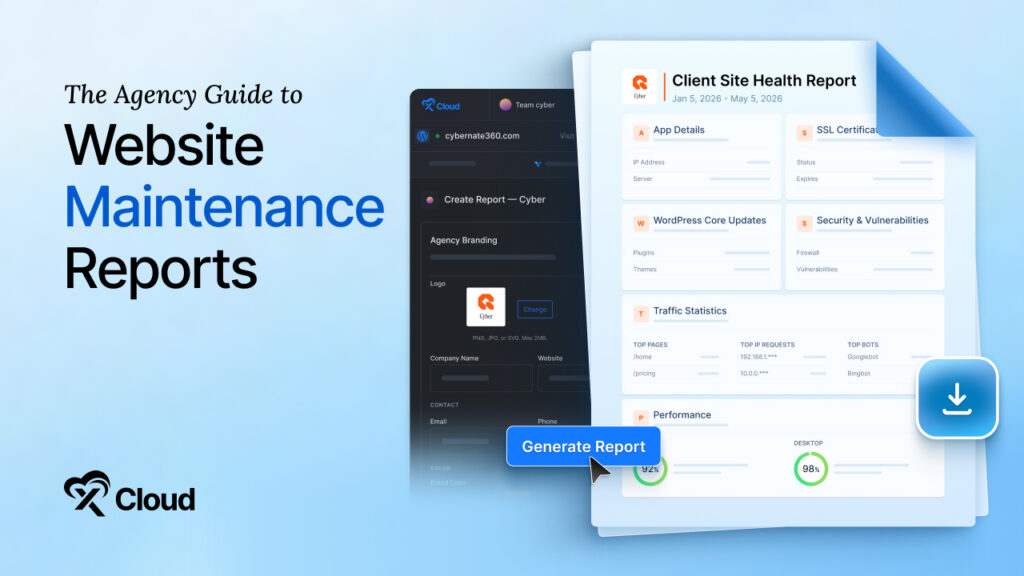
They show exactly what was done, what risks were prevented, and how the website stayed stable and secure throughout the month.
In other words, they justify the retainer before the client ever asks the question.
In this guide, you’ll learn:
- What a website maintenance report should include
- How often agencies should send reports
- Why reporting directly improves client retention
- How to automate reporting as your agency scales
- How to generate branded client reports in minutes
What a Maintenance Report Actually Does for Your Agency
Reporting is usually filed under admin, somewhere beneath the work that feels more real. That instinct is backwards, because the report is often the single part of your service the client directly experiences each month.
It helps to look at how these relationships tend to fray. Agencies assume the client understands the value being delivered, while the client reads silence as a sign that nothing is happening. A report dissolves that standoff by trading assumption for a visible record.
- Removes Doubt: A documented history of completed work answers the unspoken “what am I paying for” question before it ever turns into a complaint.
- Proves the Spend: Laying the month out plainly lets a client tie their fee to specific, finished work rather than a vague sense of upkeep.
- Surfaces Risk Early: A recurring report is where a looming issue gets raised while it is still cheap to fix, not after it has become a fire.
The stakes are commercial rather than cosmetic. Industry analysis places agency churn for teams running on manual or inconsistent communication at roughly 8 to 12 percent a quarter, and research compiled by AgencyAnalytics keeps returning to reporting clarity as a deciding factor in whether clients stay. Sitting on top of dependable managed WordPress hosting, a strong report becomes one of the most affordable retention tools you can put to work.
Why Maintenance Reports Directly Improve Client Retention
Most agencies don’t lose clients because of bad work. They lose them because of unclear value. When communication is inconsistent, clients start filling the gaps themselves. And those gaps rarely work in your favor. Maintenance reports fix that in three ways:
- They remove doubt – Clients stop guessing what you’re doing behind the scenes. They see it.
- They reinforce value every month – Instead of remembering one big project from a year ago, clients see continuous work being delivered.
- They reduce pricing pressure – When value is visible, price becomes easier to justify. Without visibility, even a small retainer starts to feel expensive.
What Every Website Maintenance Report Should Include
A report performs best when it is selective rather than exhaustive. The goal is to prove diligence without burying the reader, so the elements below form the backbone of almost any report worth sending.
The Work That Happened
A single WordPress site can absorb dozens of plugins, themes, and core updates over a month, and the owner sees none of them. Logging that activity converts invisible routine into demonstrated care, and an Updates Manager keeps the record without any manual note-taking. A clear update log should show:
- Core version changes and the dates applied
- Plugins and themes are brought current
- Any rollbacks, manual patches, or compatibility fixes
Speed, Uptime, and the Numbers Clients Feel
Speed and availability are where technical health meets the client’s revenue. A homepage that drifts from a two-second load to a five-second one will quietly shed visitors well before anyone in the business connects the two, which is exactly why these figures belong in the report. Since Google factors Core Web Vitals into its rankings, this section doubles as an SEO update. Include:
- Uptime across the reporting window
- Load-time trends and Core Web Vitals, drawn from PageSpeed Insights
- Confirmation that recent backups completed successfully
What You Kept Out
This is the part that quietly justifies the whole retainer. Most clients never witness an attempted breach, so they tend to underrate the work that prevents one, particularly now that attackers act on freshly disclosed vulnerabilities within hours, as the State of WordPress Security documents. Report:
- Results from a vulnerability checker and any flaws closed
- Malware scans run and threats neutralized
- Firewall activity, blocked login attempts, or other protective measures
Tracking all of this on one site is manageable, but doing it across twenty by hand is where omissions start to creep in. This is precisely the load that platforms like xCloud absorb, monitoring sites and running security scanning continuously, so the data is ready the moment you need it.
The Hidden Cost of Manual Reporting
The early instinct is to assemble reports manually, because with two or three clients, it feels perfectly fine. The catch is that this approach does not degrade gradually.
It tends to break all at once, usually right as your client list begins to grow. Three pressures make automation the clear long-term winner.
- Hours Reclaimed: A manual report means logging into several tools, exporting screenshots, and reshaping everything into a presentable document. Across a growing roster, that adds up to a full working day gone before the month has even started.
- Fewer Errors: Moving numbers between systems by hand is exactly where a wrong figure or a forgotten update sneaks in, and one visible mistake can undo months of accumulated trust. Generated reports read straight from the source, so the data holds up every time.
- Growth Without Drag: Each new client adds fixed overhead to a manual process, which slowly turns expansion into a chore. Automated reporting carries a larger portfolio at the same effort, so taking on more work no longer means taking on more late nights.
How To Generate Client Reports In xCloud
Instead of treating reporting as a separate task, xCloud builds it into the platform that already runs the site, so the data never has to move between tools. The client reports feature is included on every plan and works across both self-managed and managed servers.
From Site to Finished PDF
Producing a report takes only a handful of steps:
- Open Sites from the dashboard and select the website in question.
- Choose Client Reports in the site sidebar, then click Generate Report.
- Give the report a title and choose a window of 7, 15, or 30 days.
- Pick the sections to include, from Application Overview and Backup Summary through Snapshots, SSL Certificate, WordPress Health, Security and Vulnerabilities, and Traffic Statistics.
- Watch the live preview update, then generate and download the PDF.
With those choices saved, xCloud collects the live data, applies your branding, and compiles the selected sections into a finished document on its own.
Make It Look Like Your Agency
A report should look like it came from you, not from your hosting provider. Through agency branding and white label hosting, you set your logo, company name, website, and contact details once, and they carry across every report you generate. A custom intro and closing note let you address each client directly.
Where the Reclaimed Hours Go
The honest saving is not really measured in minutes per report. It is measured in what those minutes were taking away from, since the afternoon lost to manual reporting is an afternoon that cannot go toward billable work or winning the next account.
Automation hands that time back while still delivering polished, on-schedule reports. The client notices no drop in quality, and you stop trading growth for formatting.
Send Reports That Sell the Renewal. Generate your first branded client report in minutes with xCloud and give clients a clear, recurring reason to stay. Get started for free.
What Makes a Maintenance Report Actually Effective
A generated report is only as good as the judgment behind it. Automation handles the data, but these habits decide whether the document actually lands with the person reading it.
Lead with outcomes, not logs
A client does not need every log entry, only the few that touch their business. Lead with uptime, security, and meaningful changes, and let the platform hold the granular detail in reserve for the rare moment it gets requested.
Highlight what changed
If something notable happened, an outage caught early or a vulnerability sealed off, it should be the first thing the eye meets. Reports are skimmed rather than studied, so the moments that matter have to survive a ten-second glance.
Translate Technical Work into Business Impact
Turn the technical into the consequential. “Patched an outdated contact form plugin” reads as noise, while “closed a gap that could have exposed customer enquiries” lands instantly. The work and the wording should both point squarely at the client’s interests.
Let the Visuals Carry the Point
A chart of uptime or a load-time graph achieves in one glance what a paragraph can barely manage at all. Clients trust a trend line they can see for themselves, so wherever a figure can become a simple visual, let it.
Own the Bad Weeks
Hiding a rough patch buys short-term comfort and long-term risk. Naming the issue, the fix, and the safeguard you added afterward turns a problem into evidence that you are watching closely. Clients forgive incidents far more readily than they forgive being kept in the dark.
Tailored, Without the Busywork
Reports that feel generic get treated as generic. Auto-filled branding and a short, specific note about the client’s site give the document a tailored feel without adding effort to every send.
Always Point to What Is Next
The most valuable line in a report is often the one about what happens next. Whether that is signing off on a major update or weighing an extra layer of protection, a clear recommendation keeps the client engaged and the relationship in motion.
Never Miss the Cadence
Predictability is its own form of reassurance. A report that lands in the same week each month tells clients the work is ongoing, while an irregular one, however thorough, plants a quiet suspicion that attention only arrives in bursts.
How Often Should You Send Maintenance Reports?
There is no universal rule, only context. But here’s what works in practice:
- Standard business sites → Monthly
- Ecommerce stores → Bi-weekly or monthly
- High-traffic sites → Weekly or bi-weekly
- Membership / SaaS sites → Weekly
The goal is simple: Stay visible without becoming noise.
Turn Reporting Into a Retention System:
Strip everything else away, and a maintenance report is a trust-building instrument. It takes work the client cannot see and makes it impossible to overlook, which is the quiet mechanism behind most long-running agency relationships.
Build that instrument once, automate the assembly, and reporting stops being a monthly tax on your time. What is left is a recurring, low-effort proof of value, arriving on schedule, doing the slow work of keeping clients where you want them.
Frequently Asked Questions
What tools can generate website maintenance reports?
A platform such as xCloud produces them automatically, pulling updates, uptime, backups, SSL, security, and traffic into a single branded PDF. That removes the need to log into several services and stitch the pieces together by hand.
Should a report include financial information?
It is optional and depends on the client. Listing logged hours or the cost of premium tools can reinforce the value of the retainer, especially for clients who like to see exactly where their budget is going.
When does automating reports stop being optional?
Roughly the moment you can no longer build every report in a single sitting. Once a growing client list turns reporting into a recurring time sink, automation shifts from a convenience to the only way to keep the quality and the schedule intact.
If you have found this blog helpful, feel free to subscribe to our blogs for valuable tutorials, guides, knowledge, and tips on web hosting and server management. You can also join our Facebook community to share insights and engage in discussions.