This site uses cookies and tracking technologies. You may accept all or customize according to your preferences.
Customize Consent Preferences
Please select whether you consent to our use of cookies and related technologies ("Cookies"), as described in our Privacy Policy and Cookie Policy. Expand each section below for more information. You can return at any time from the same web browser to update your preferences. Please note that resetting your browser's cookies will reset your preferences.
▶
Required Cookies
Enabled
These Cookies are necessary for core features of this site to operate properly. Because they are needed for the site's operation, they are always set to "Active".
Company
Domain
Userback
app.userback.io
FirstPromoter
xcloud.firstpromoter.com
Crisp
https://crisp.chat
▶
Functional Cookies
These Cookies allow us to analyze site usage in order to evaluate and improve performance.
Company
Domain
Microsoft Clarity
clarity.microsoft.com, www.clarity.ms
Google Analytics
analytics.google.com, www.google-analytics.com
▶
Advertising / Marketing Cookies
These Cookies help us measure the effectiveness of our marketing efforts, referral programs, and promotional activities.
Company
Domain
Google Tag Manager
www.googletagmanager.com, googletagmanager.com
Meta (formerly Facebook)
connect.facebook.net, facebook.com
Run a Self-Improving AI Agent On Managed Hermes Agent Hosting
🚀 Introducing the xCloud Infrastructure Upgrade: A Faster and More Secure Dashboard
The xCloud infrastructure upgrade brings major improvements to the performance, security, and long-term stability of your dashboard. This release focuses on faster operations, near-instant navigation, and a modern foundation that keeps xCloud reliable as it continues to grow.
✨ What this upgrade brings for you
No more waiting on slow operations – provisioning servers, managing DNS, billing, API calls – all ~40% faster on average
Pages load before you expect them to – xCloud now prefetches the next page before you click, so navigation feels instant
Dashboards show content first – no more staring at a loading screen while everything catches up. Your content appears immediately; heavy data loads behind the scenes
Better security – every package is patched and up to date, with fewer dependencies, meaning fewer things that can go wrong
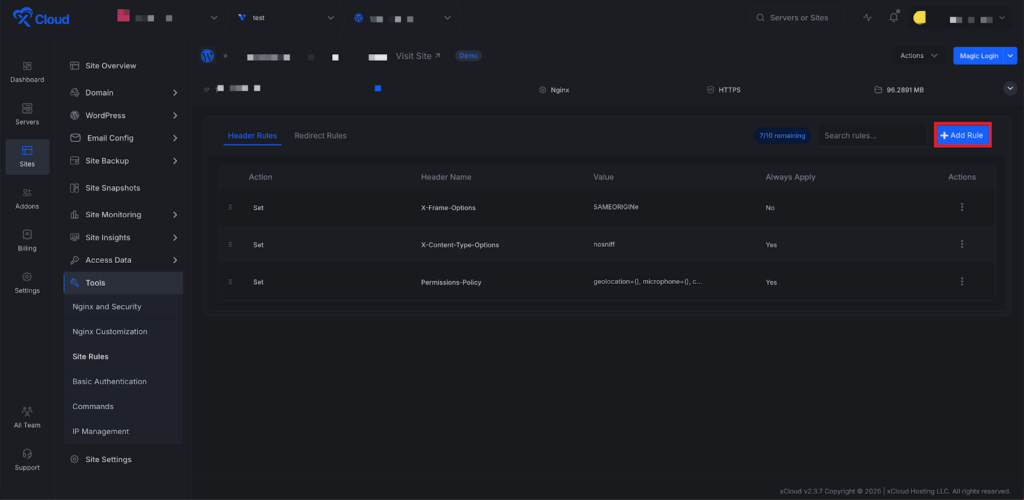
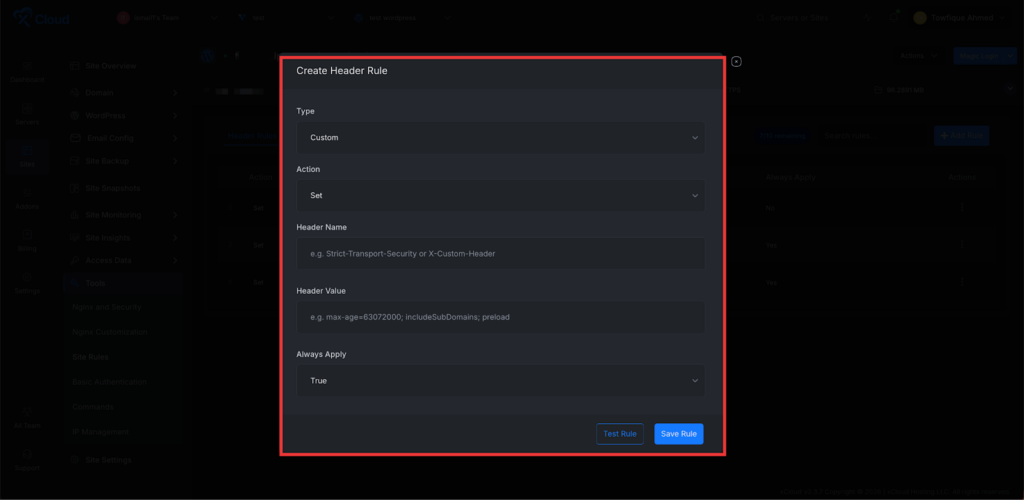
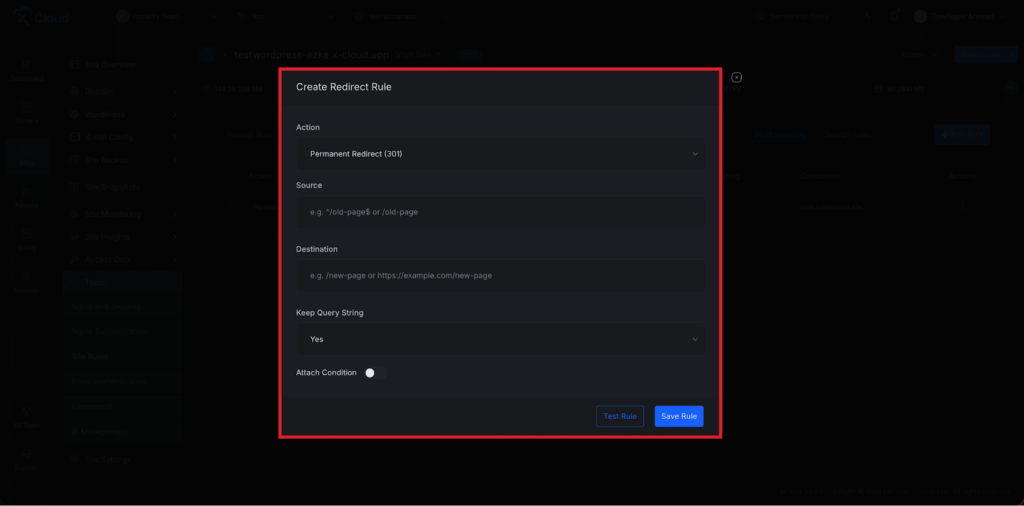
Create and manage HTTP header and redirect rules for WordPress sites running NGINX directly from the xCloud UI – no manual nginx config editing required.
Add Custom Headers
Define custom HTTP response headers (security headers, caching headers, CORS, etc.) for your WordPress site directly from the dashboard. Strengthen site security, control browser caching, and manage cross-origin policies without manually editing nginx configuration files.
Redirects
Set up 301/302 redirects for URLs, paths, or patterns from a clean, intuitive interface. Manage post-migration URL changes, enforce trailing slashes, or route legacy paths to new destinations — all without writing a single rewrite rule by hand.
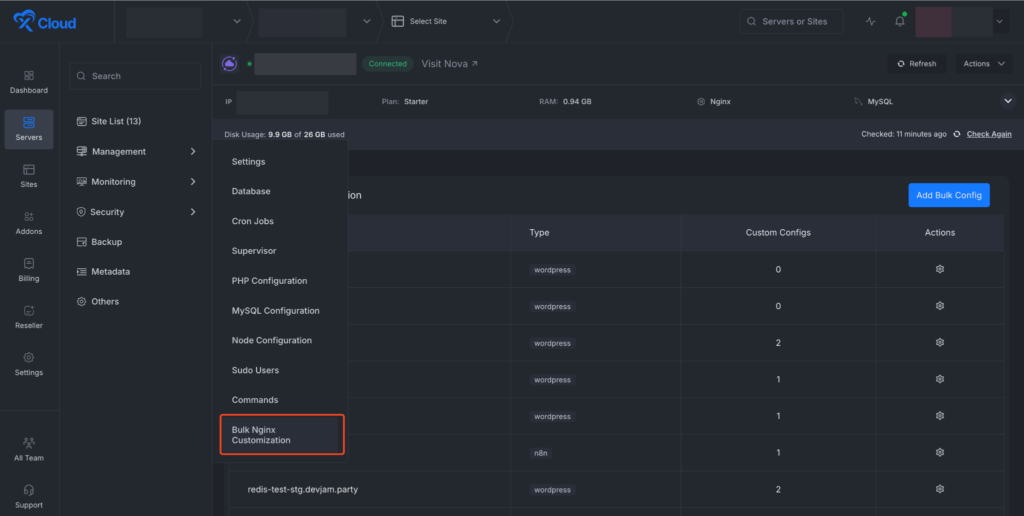
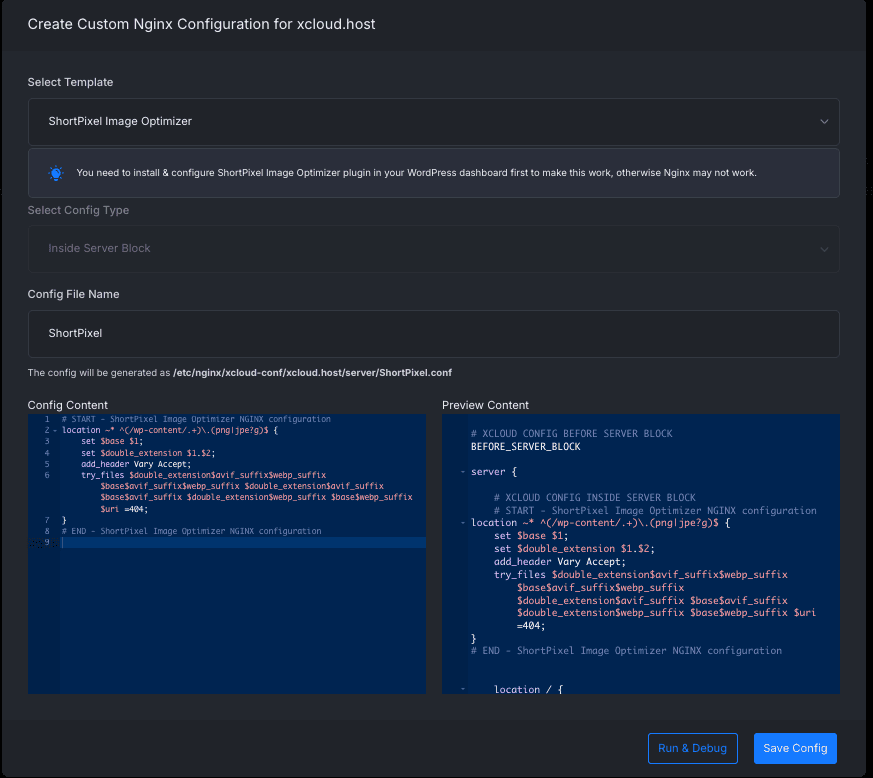
Apply NGINX Configs Across Multiple Sites at Once on xCloud. You can now push custom NGINX configurations to multiple sites on a server in a single operation directly from the dashboard without editing each site individually. 🚀
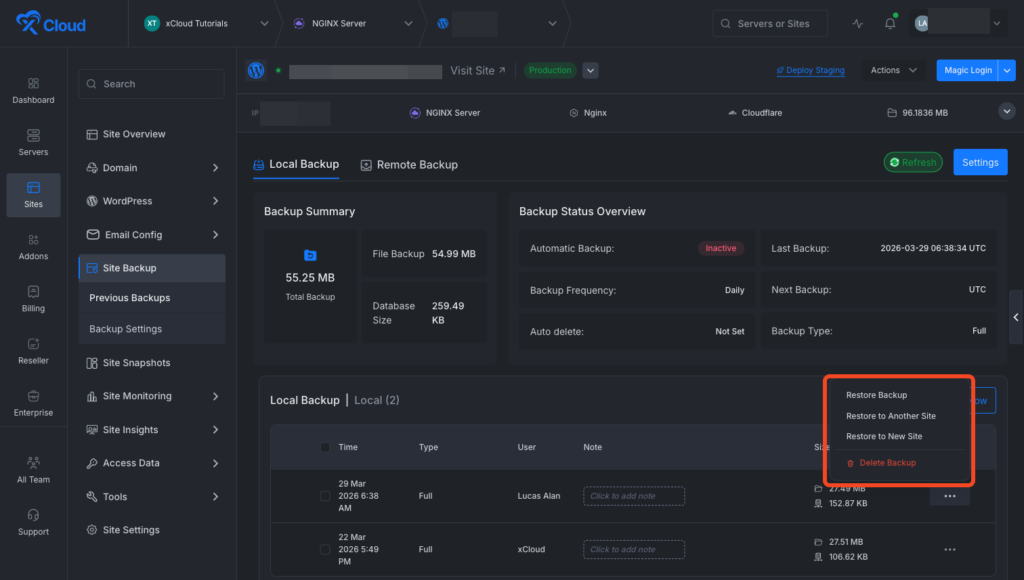
Seamless Cross-Site Backup Restoration Is Now Available on xCloud. You can now restore a WordPress backup directly to another existing site without rebuilding anything from scratch. This feature helps you clone live sites to staging, recover broken environments instantly, or reuse recent backups across projects. It simplifies migration workflows, reduces downtime, and gives you full control.
🌟 Sidebar Menu Search Is Now Available Again
Search improves navigation speed across the xCloud dashboard with sidebar menu search. Now users can instantly find exact page locations more easily.
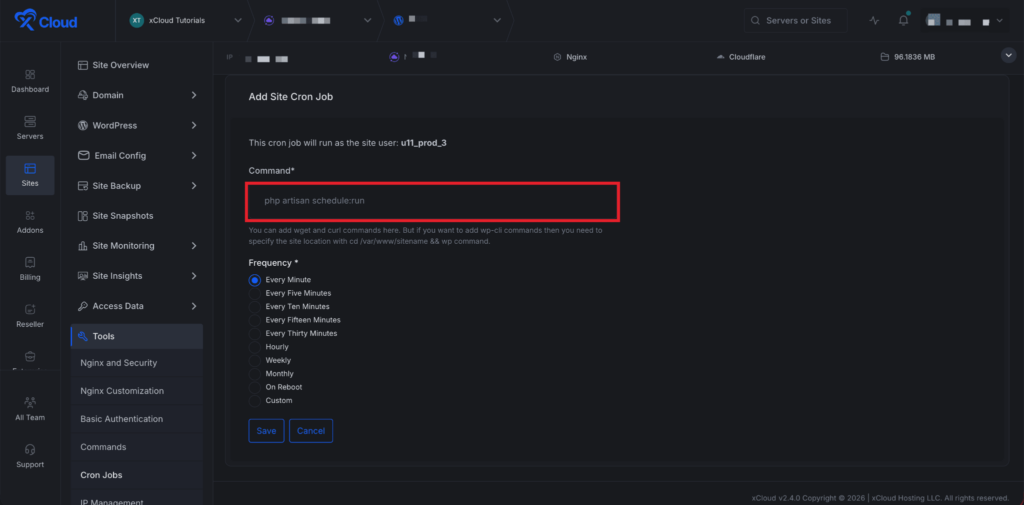
Added comprehensive Cron Job Management directly in the xCloud dashboard at the site level. Users can now create, edit, and delete cron jobs without SSH access, with support for custom schedules, command validation, and execution logs.
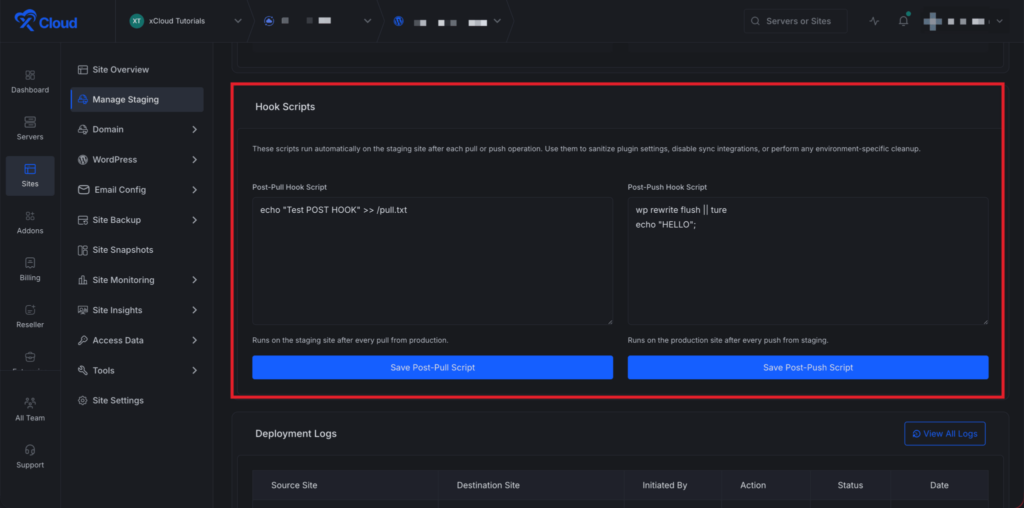
Add your own Post-Pull and Post-Push scripts from the Staging Management page. These scripts run automatically after each pull or push, so you can execute custom bash commands without manual work.
Use them to deactivate sync plugins, clear caches, or apply environment-specific settings instantly.
✨ Improvements
Easy Upgrade From Free To PRO – A new global upgrade modal accessible from anywhere in the app, allowing free plan users to upgrade to the Starter plan without leaving their current page.
Fatal Error Banners & Notifications – When a fatal PHP error occurs on a site, xCloud now shows a banner on the site dashboard. It also includes a direct link to the error logs for faster debugging. Also, users will get real-time integrated notifications channels and a dashboard.
Improved warning banner system consistency across dashboard
Added searchable sidebar navigation
Improved search component flexibility
Improved safety during site and server deletion
Improved cross-server navigation state handling
Improved gateway health check handling
Improved backup deletion handling across storage types
✨ Bug Fixes
Fixed checkout security issues related to duplicate accounts and charges
Fixed whitelabel server creation failures
Fixed session handling on password change
Fixed issues with salt handling during production push
Fixed staging visibility indexing after database pull
Fixed SSL-related deletion crashes
Fixed cache helper CPU loop issue.
Fixed MySQL install hang in non-interactive environments.
Fixed PM2 startup issues on reboot for Node.js Git sites.
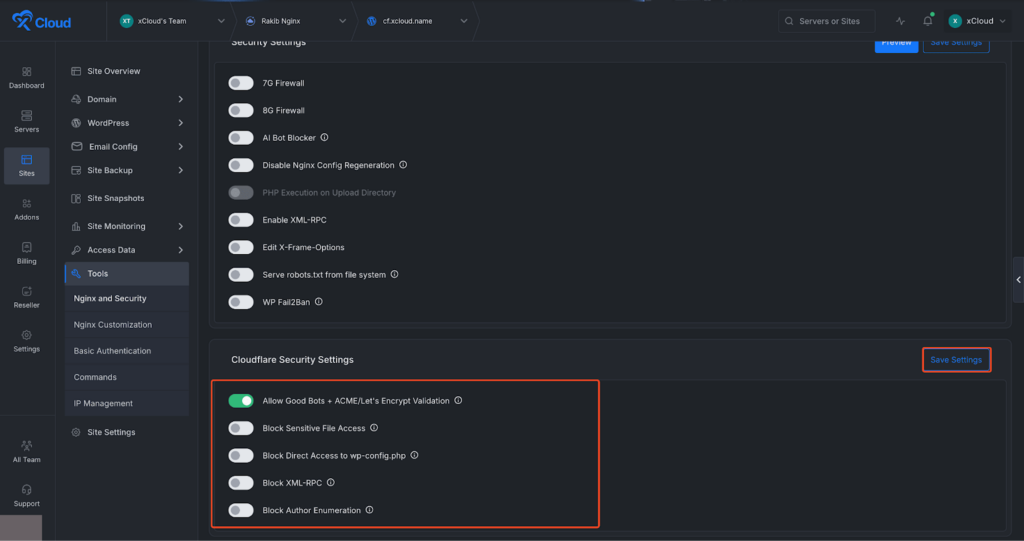
Cloudflare WAF rule management is now available directly inside xCloud. You can apply common WordPress security protections without creating manual rules in the Cloudflare dashboard.
Cloudflare WAF Security Settings – Configure essential WordPress protection rules directly from the xCloud dashboard.
Allow Good Bots & ACME Validation – Ensures trusted crawlers and Let’s Encrypt validation requests continue to function normally.
Sensitive File Protection – Blocks direct access to files that should not be publicly exposed.
wp-config.php Protection – Prevents direct access to the WordPress configuration file.
XML-RPC Blocking – Reduces exposure to XML-RPC abuse and brute-force attacks.
Each rule is applied as a Cloudflare WAF custom rule via API and managed per site directly from xCloud.
🔄 New: Easy WordPress Rollback with Backup
You can now roll back plugins, themes, or WordPress core in a few clicks. Just pick a version from a searchable list and revert instantly. You can also enable automatic backups before rollback.
⚙️ New: Auto-Tune PHP, FPM & OPcache
Added auto-tunes for PHP, FPM, and OPcache settings based on your server RAM. It suggests optimized values instantly and lets you manage full OPcache configuration. Works seamlessly with both Nginx and OpenLiteSpeed.
✨Improvements
Improved access log view with search, filters, and bot traffic insights
Better default OPcache settings applied during PHP installation
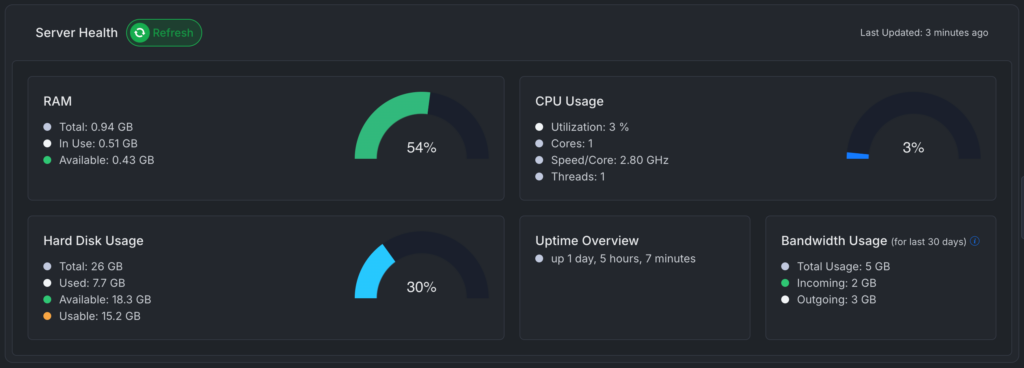
Improved disk usage with clearer stats such as total, used, and free space
Refreshed support portal design with better visibility and layout
Improved site controls with “Enable Site” action and quick recovery option
General UI improvements for spacing, colors, and responsiveness
✨Bug Fixes
Reduced false alerts from PageSpeed errors caused by external issues
Improved retry handling for PageSpeed connection failures
Fixed incorrect sorting and pagination issues in Site Insights
Resolved Site Pro deployment-related errors
Fixed Slack notification issue in vulnerability alerts
Fixed duplicate DNS record issue in Cloudflare sync
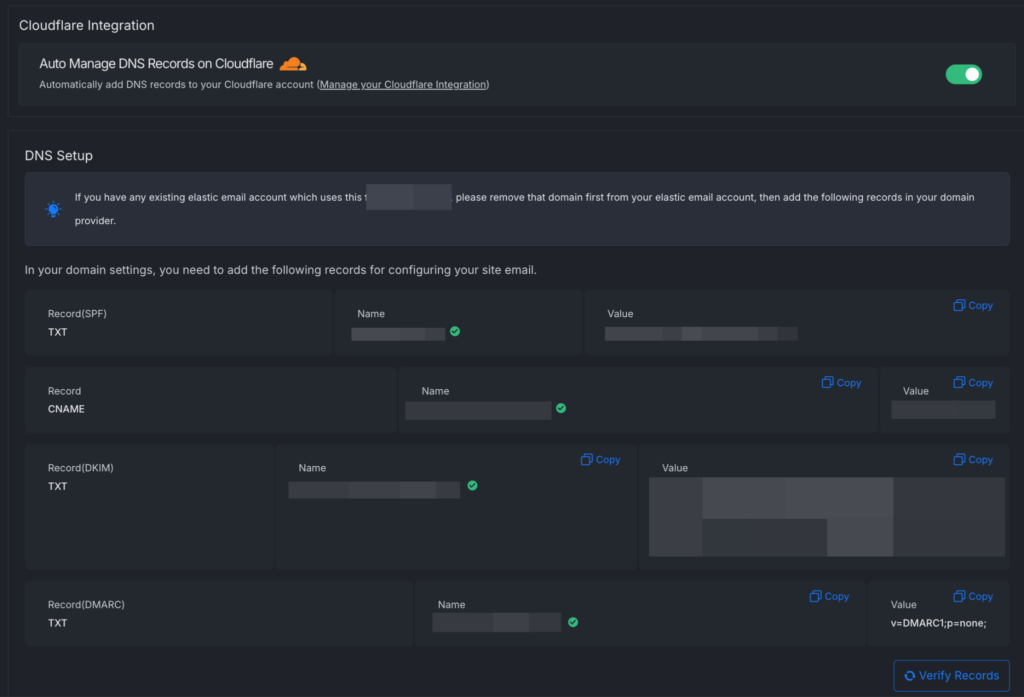
Transactional emails are essential for WordPress websites. When an email quota runs out unnoticed, emails can suddenly stop sending. This update introduces smarter Mail Delivery subscription management with Auto Upgrade and 1-click Cloudflare DNS setup to keep email delivery uninterrupted.
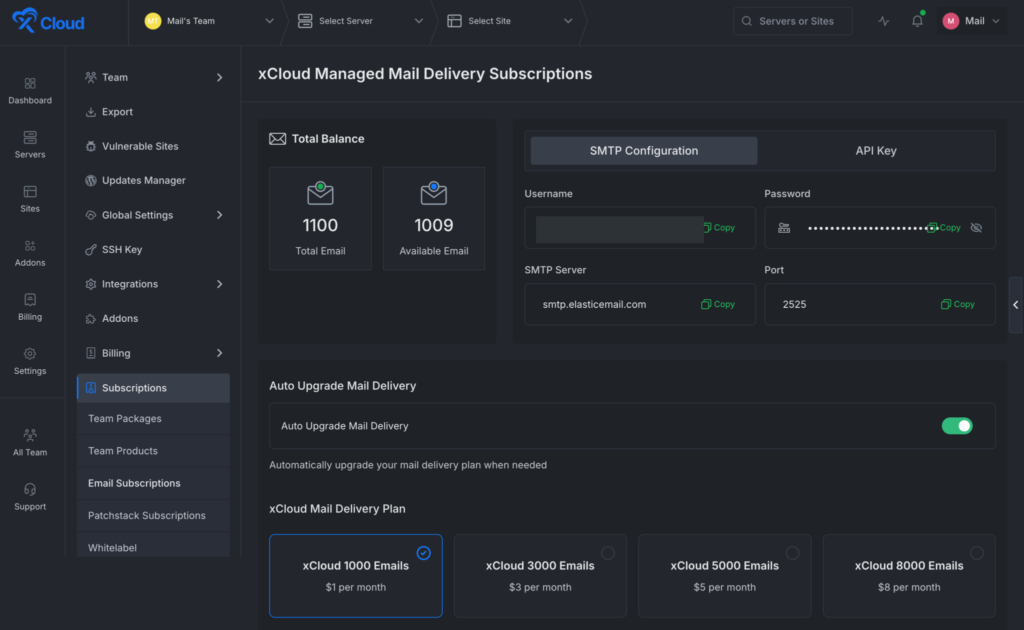
Auto Upgrade Mail Delivery: Automatically upgrades your email plan when usage reaches the limit. xCloud will notify you when your email usage reaches 90% of your available quota. This ensures transactional emails continue sending without disruption.
Cloudflare One-Click DNS Verification — If your domain uses Cloudflare integration, xCloud can automatically add and verify the required DNS records with a single click, eliminating manual DNS configuration.
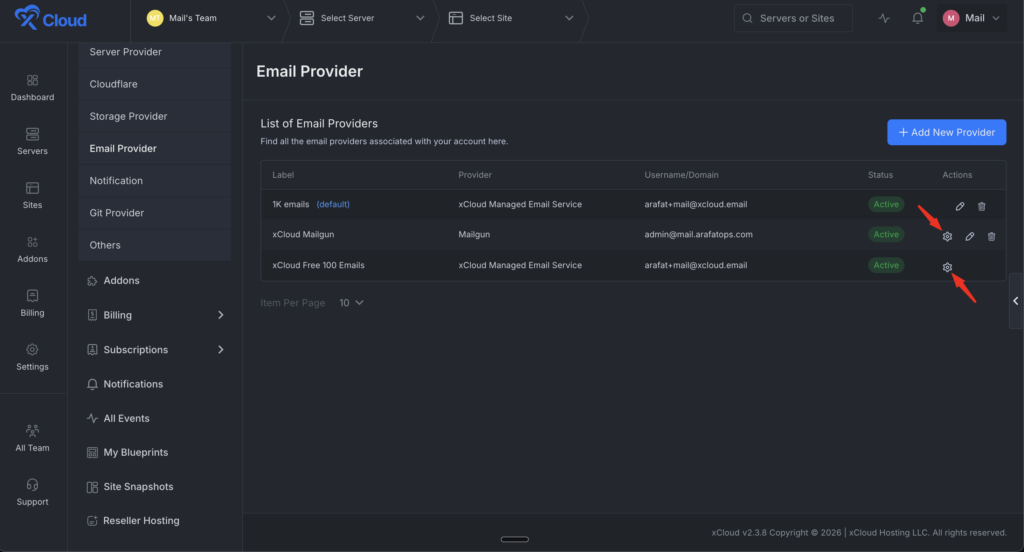
Default Mail Delivery Provider — Set a default provider so newly created sites automatically use your preferred email delivery configuration.
Email Usage Visibility — View total email quota and available emails directly from the dashboard for better monitoring and planning.
Built-in SMTP Configuration — Access SMTP credentials including username, password, SMTP server, and port directly from the dashboard.
API Key Access — Manage API keys for custom integrations or external applications.
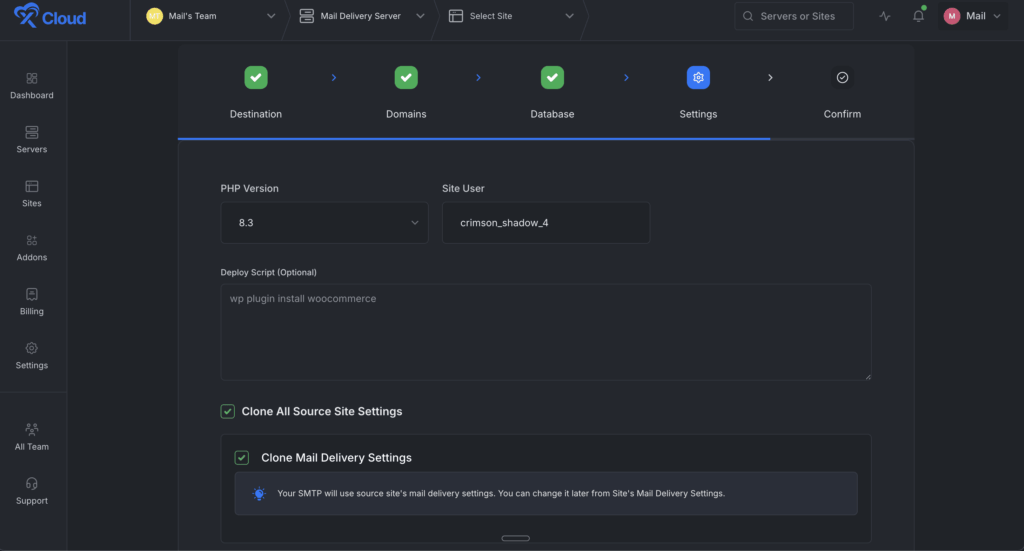
Clone Mail Delivery Settings — When cloning a site, the Mail Delivery configuration is automatically copied so the cloned site inherits the same email setup.
🌟Multi-Port Domain Mapping for Docker Compose Sites
Custom Docker Compose sites can now map multiple domains to different container ports. Perfect for running multiple services under separate domains from a single site.
🌟 PHP 8.5 Support for OpenLiteSpeed
PHP 8.5 is now available for OpenLiteSpeed servers on Ubuntu 24. All PHP extensions are now consistently available across all PHP versions.
🌟GridPane OpenLiteSpeed Server Migration
Migrate your servers from GridPane’s OpenLiteSpeed stack to xCloud. The migration wizard handles the full transfer including sites, databases, and configurations.
✨Improvements
Optimized server provisioning by deferring non-essential packages during setup.
✨Bug Fixes
Fixed WordPress Bulk Management issue where the Refresh All button failed when groups were collapsed or expanded.
Fixed dropdown menus being cut off on Mail Delivery, Mailbox, and Security addon pages.
Fixed SSH Key Editor showing system and migration keys in the sudo user SSH key selector.
Fixed site cloning error that occurred when the PHP version was not set.
A brand-new Site Insights menu providing real-time analytics for PHP performance, MySQL queries, and traffic patterns directly from the site dashboard. Gives site owners deep visibility into their application performance without needing external tools.
Real-Time Performance Monitoring — Track live activity across PHP processes, MySQL queries, and website traffic directly from the xCloud dashboard.
Traffic & Visitor Insights — Analyze requests, unique IPs, bots, bandwidth usage, and top URLs to understand how users and crawlers interact with your site.
PHP Process Visibility — Monitor active PHP-FPM processes, detect CPU or memory-heavy scripts, and identify slow pages using PHP slow logs.
MySQL Database Analytics — View active connections, running queries, query performance, slow query logs, and database health metrics.
Faster Troubleshooting & Optimization — Detect slow pages, database bottlenecks, traffic spikes, and server errors quickly to keep your website fast and stable.
🌟 OpenClaw – Codex OAuth Token Generator & New Provider Support
In-app OpenAI Codex OAuth token generator — ChatGPT Plus/Pro subscribers can now generate Codex OAuth tokens directly within xCloud, without needing an external service. A secure PKCE-based flow authenticates with your ChatGPT account and returns a copyable token with next-step instructions. Manual callback fallback included for browsers that block automatic redirects.
OpenAI Codex (ChatGPT OAuth) — Connect your ChatGPT Plus/Pro subscription as an AI provider for your OpenClaw server without a separate API key
Z.AI (GLM) — Zhipu AI’s GLM-4.7 model is now a fully active provider option (previously “coming soon”), offering a capable, cost-effective alternative for OpenClaw users
Gateway mode fix — gateway.mode is now correctly set to local during new OpenClaw server creation, preventing gateway start failures on first setup
Model persistence fix — Selected AI model now correctly persists after provider updates, written directly to openclaw.json so it survives gateway restarts
🌟 xCloud UI 2.0 – Pin/Unpin Sites & Servers
Pin important sites and servers to keep them at the top of all list views. Pinned items show a visual badge and persist across sorting, filtering, and pagination.
Easily migrate your existing servers from Cloudways to xCloud with full server migration support, helping you move infrastructure smoothly without complex manual setup.
🌟 Vultr Bandwidth Monitoring
Monitor bandwidth usage for xCloud-managed Vultr servers directly from the dashboard, giving you clear visibility into network consumption and server traffic.
✨Improvements
Better Cloudflare DNS proxy mode detection
Enforced 4GB minimum RAM for n8n site creation and updates
Performance score now supports a neutral state when data is unavailable
Improved backup status logic in the auto backup tab
Added server name and link on the delete progress page
Hidden phpMyAdmin sites from site lists and navigation
High CPU warning banner added on dashboard and server detail pages
Improved OpenLiteSpeed PHP monitoring and validation
Better handling for empty site titles during staging domain generation
Added nginx config safety validation before reload commands
Multiple UI/UX refinements across layouts, spacing, responsiveness, banners, and dashboard elements
✨Bug Fixes
Fixed null reference issue in cron jobs after site deletion
Fixed server creation failure without provider permission
Fixed handling for Cloudflare cache rule limit exceeded errors
Fixed null PHP version issue during PHP installation
Fixed undefined stack issue in custom provider server creation
Fixed missing pCloud backup file record issue
Fixed MariaDB icon showing when no database is installed
Fixed staging domain generation when site title is empty
Fixed cloud provider permission bypass caused by improper null check
🌟 OpenClaw Repair: AI-Powered OpenClaw Repair Agent is now available inside the xCloud dashboard for instant diagnosis and recovery. Run one-click AI-assisted health checks for the gateway – no SSH or manual debugging required.
✨ Improvements
📌Added temporary sudo users with 12-hour auto-expiration. 📌Added granular domain search & replace controls for updates and SSL changes. 📌Improved domain updates with real-time progress and duplicate prevention. 📌Improved UI consistency across buttons, layouts, and mobile views. 📌Improved OpenClaw Control UI domain and alias access handling.
🔧 Issues and Bug Fixes
📌Fixed Free Plan billing for Custom/Any, DigitalOcean, and GCP providers. 📌Fixed WordPress version display after core updates. 📌Fixed 502 errors on the Site Snapshots page. 📌Fixed an issue related to the Site Log export failures. 📌Fixed staging push issues with Patchstack. 📌Fixed resource creation restrictions on inactive packages. 📌Fixed OpenClaw server page crashes.
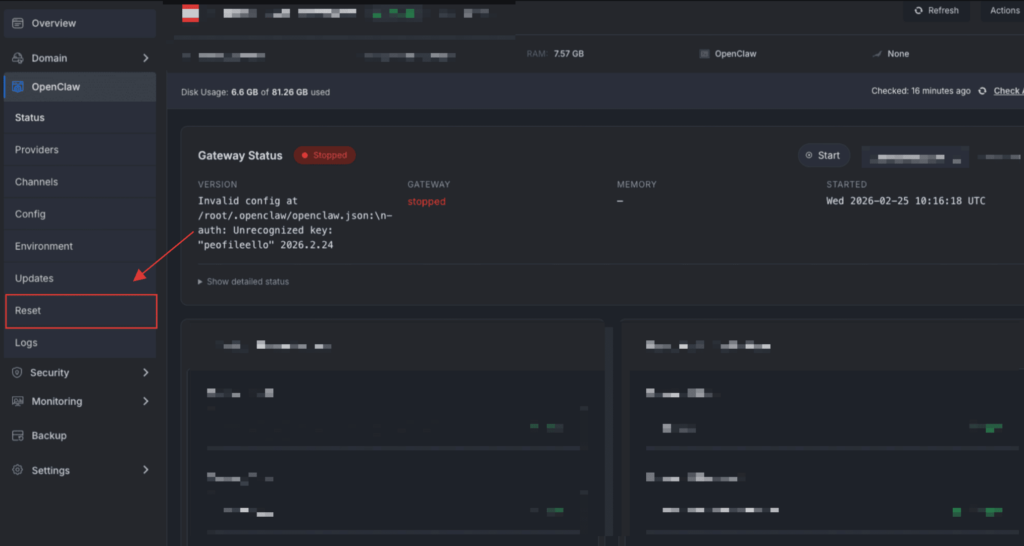
🌟 Update: OpenClaw Reset (No new server needed): You can now reinstall OpenClaw from scratch on the same server using OpenClaw Reset. With one click, it creates a backup, reinstalls a clean setup, and generates fresh credentials.
✨ Improvements
WireGuard updates now run async — no more timeouts during bulk updates
n8n now requires Node.js 22 (upstream requirement)
SSH password auth blocked for root on OpenClaw servers — prevents accidental lockout
PHP Config modal now fully responsive on mobile
Shorter SSH key display on the “Connect Existing Server” page
Billing Type Selector & Free Plan — Server creation now supports subscription, lifetime, or free plans. Free plan users get a streamlined flow.
Site Name Sorting — All Sites page now has clickable A-Z sort on the Site Name column.
🔧 Issues and Bug Fixes
Fixed the pCloud backup deletion crash issue
Fixed the issue with Server deletion, and now it no longer gets stuck in the deletion_failed state
Site sorting across multiple servers now works correctly
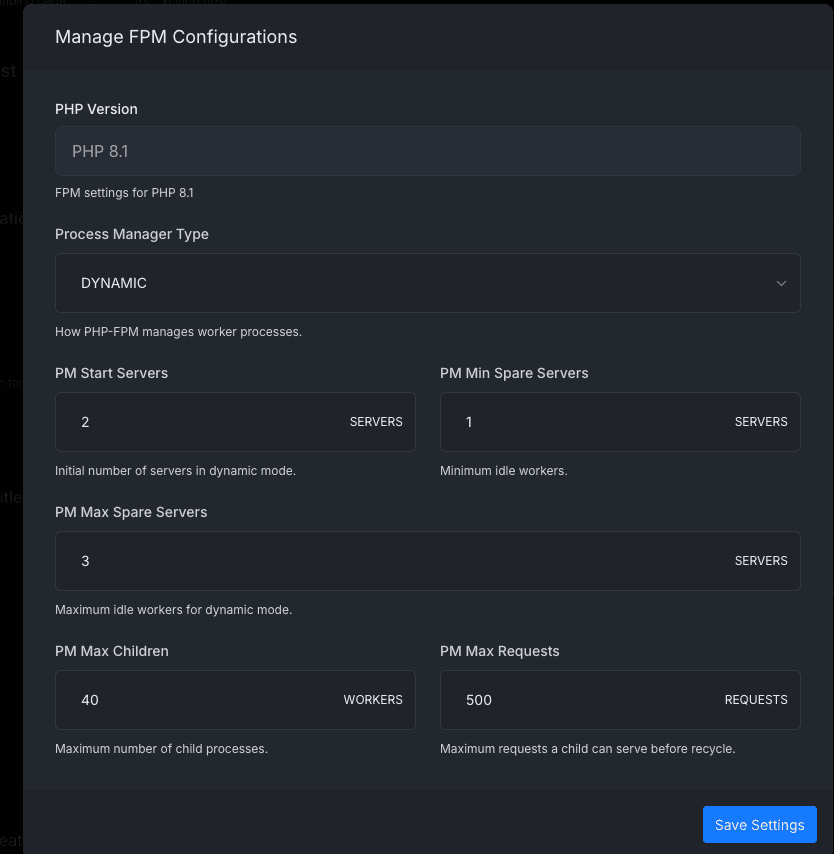
🌟 FPM Configuration: Site-Level PHP-FPM Configuration Is Now Available on xCloud. You can now control PHP-FPM settings for each site directly from the dashboard without SSH access or manual configuration files. This update lets you tune PHP worker behavior, manage resource usage per site, and handle traffic spikes more reliably while avoiding risky server-wide changes.🚀
Process Manager Type: Process manager mode used by PHP-FPM to handle requests.
PM Start Servers: Number of PHP worker processes started when PHP-FPM launches.
PM Min Spare Servers: Minimum number of idle PHP worker processes kept ready.
PM Max Spare Servers: Maximum number of idle PHP worker processes allowed.
PM Max Requests: Number of requests a PHP worker handles before restarting.
PM Max Children: Maximum number of PHP worker processes that can run at the same time.
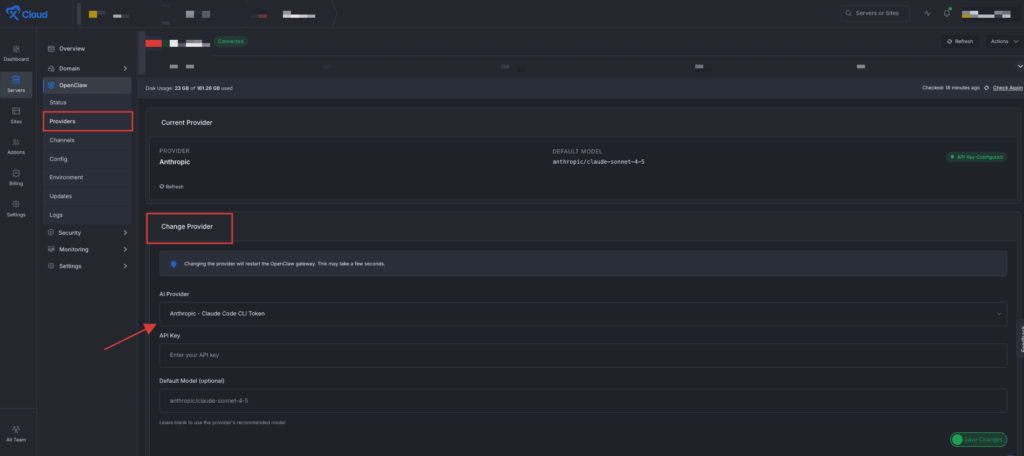
🦀 OpenClaw Hosting — Update. Big improvements to the OpenClaw one-click hosting on xCloud:
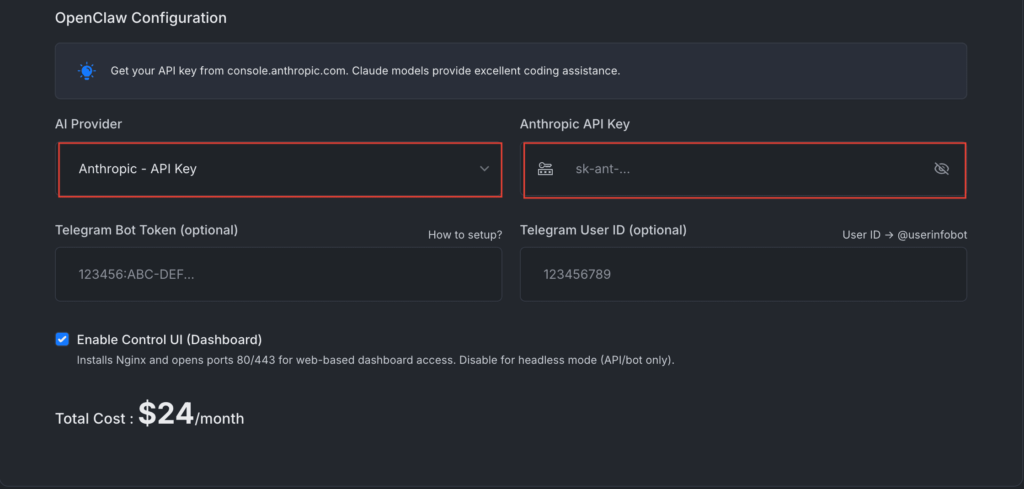
Anthropic API Key support added
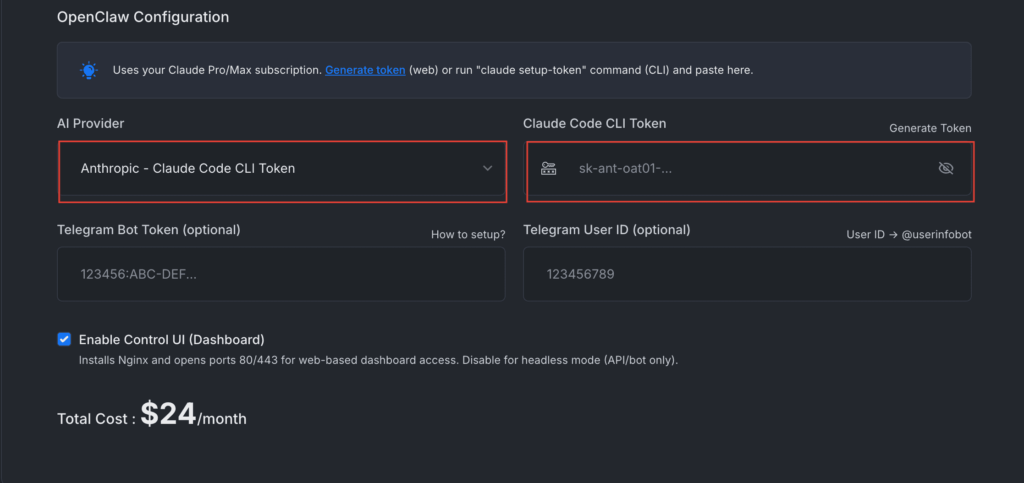
Claude Code Token support — use your Claude Pro/Max subscription with OpenClaw
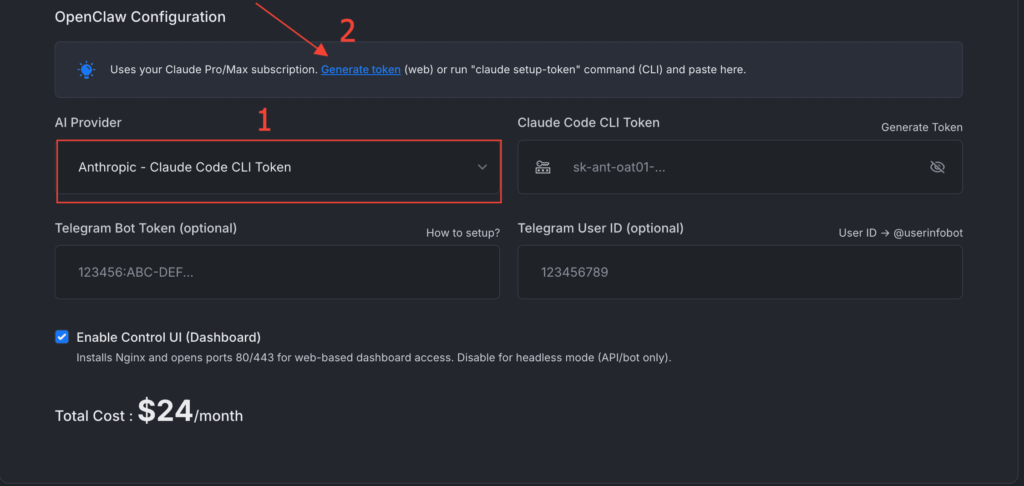
Browser-based token generation — Now, there is no need to install the Claude Code CLI manually. Generate your token directly from your browser. This one is a game changer, and no one has done this yet 👏 First, select the Claude Code CLI option and then click on Generate Token.
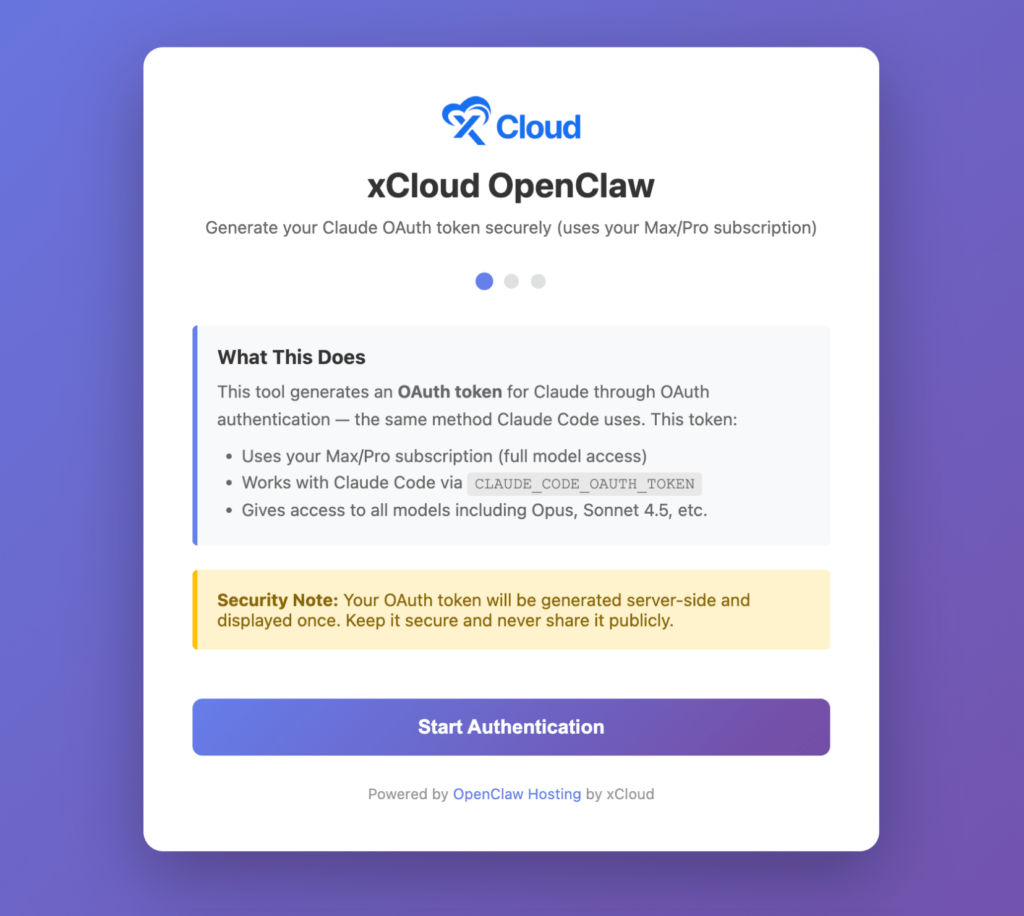
Then a screen will appear, and it will help to generate a Claude OAuth token using the same OAuth flow as Claude Code, and the process is absolutely fluent.
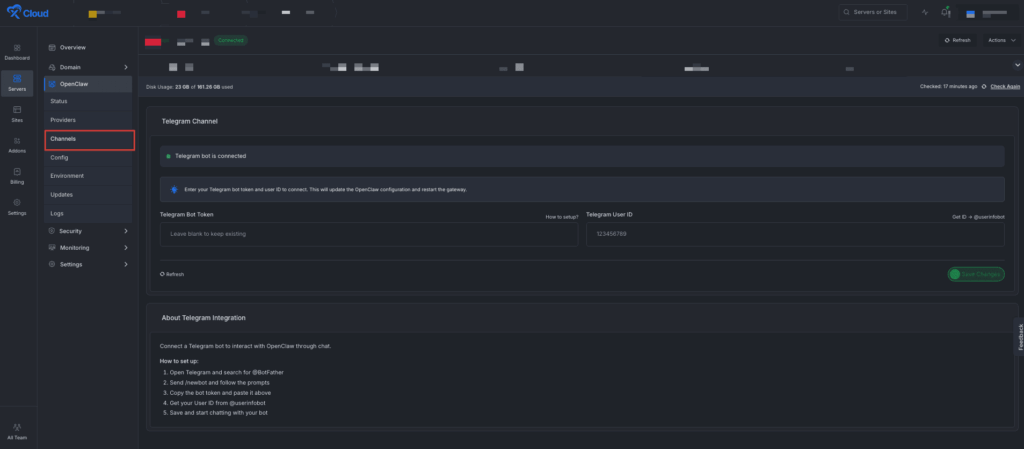
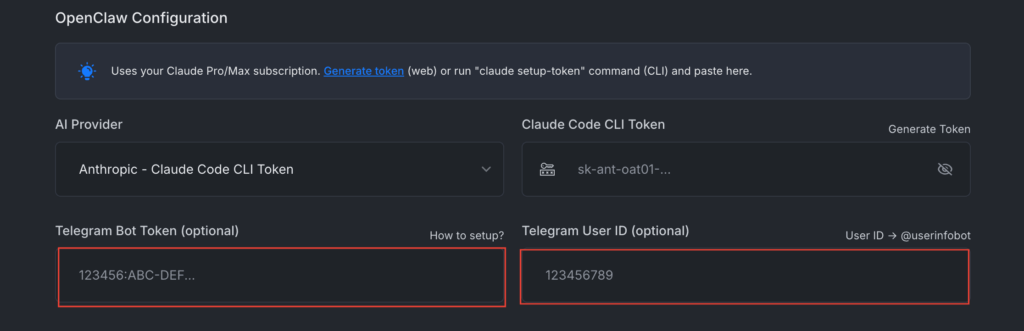
Telegram Improvements – Smarter auto-pairing: When you provide your Telegram User ID during setup, your account is automatically allowlisted. No more running commands to pair your account!

















 WordPress
 OpenClaw