


Run a Self-Improving AI Agent On Managed  Hermes Agent Hosting

Changelog

xCloud Changelog

We’re constantly making xCloud better with new features and improvements. Look at what we’ve got now and tell us what else you want!

  • No categories

xCloud v2.7.0 brings a more powerful AI Bot Blocker, stronger backup reliability, smoother n8n provisioning, and several improvements across site management, billing, search, and documentation.

🔥 New Features

🆕 AI Bot Blocker Management Got Smarter

We’ve upgraded the AI Bot Blocker from a simple on/off option into a full management experience for your sites. You can now view the default AI bot blocklist, allow selected bots, and add custom bots to block directly from the Web Server Security page.

Major updates are:

  • View the full built-in AI bot blocklist.  
  • Add bots to an allowlist when you want to let specific AI crawlers access your site.  
  • Add custom bots to your own blocklist.  
  • Search and select multiple bots at once for faster management.  
  • Works with both Nginx and OpenLiteSpeed sites.

This gives you more control over how AI crawlers interact with your websites while keeping the default protection easy to manage.

⚡ Improvements

  • Added a new Custom Nginx `main_location` option, allowing advanced users to add custom rules inside the main PHP app location block.
  • Improved global search so sites can be found even when you paste a full URL like `https://example.com/`, not just the plain domain.
  • Improved several UI areas, including profile avatar visibility, server creation cards, mobile layouts, analytics controls, and white-label product editing.
  • API documentation has been standardized with OpenAPI YAML and Scalar for a cleaner, more consistent developer documentation experience.

🐛 Bug Fixes

  • Fixed an issue where the dashboard could show incorrect or stale “Next Backup” times. Backup schedules are now calculated from the active site-level backup settings.
  • Fixed inherited backup exclude paths for newly created and migrated sites, so backup exclusions are carried over correctly.
  • Fixed an issue where sites using remote backups could incorrectly appear as active under the Local Backup tab.
  • Improved backup delete handling so xCloud now reconciles backup records correctly even when the remote storage is already clean.
  • Improved n8n provisioning by moving long installation tasks into the long-running provisioning flow, reducing queue timeout issues.
  • Hardened n8n PM2 startup and update handling to reduce recurring 502/503 errors after updates.
  • Added proxy trust configuration for n8n behind the xCloud Nginx reverse proxy.
  • Cleaned up fallback n8n PM2 configuration handling.
  • Fixed WordPress staging clone failures caused by file ownership issues after `rsync`.
  • Improved domain update handling so partially completed server rename states can be detected, rolled back, or resumed more safely.
  • Fixed duplicate white-label renewal invoices when users retried failed “Renew Now” attempts.
  • Improved the Managed Server “Continue Setup” flow so users who already purchased eligible plans can continue deployment correctly.
  • Added stronger validation for cloud provider credential labels to prevent invalid provider saves.
  • Enterprise and Public API documentation now use a more consistent OpenAPI YAML structure.
  • No categories

🔥 New Features

🌟 xCloud AI Agent Skills: Manage Your Servers and Sites With Plain Language

Take full control of your servers and sites by describing what you want in plain language, and let the skills handle the xCloud Public API calls in the background with enterprise-grade security. The skills are agent-agnostic: they work with any MCP-compatible AI coding agent, including Claude, Codex, Grok, and others. Create a token in your dashboard settings, install the skills in your agent, and start in about a minute.

  • Create a fully configured site with a single prompt, no dashboard required.
  • Check the status of any server or site with a single prompt.
  • Manage servers, PHP versions, databases, and firewall rules in plain language, on demand.
  • Run WordPress updates, vulnerability scans, SSL setup, and site backups just by asking.
  • Pull live server and site data into workflows you already use.
  • Included with your xCloud account at no additional cost.
  • Enterprise-grade security: token-based, permission-scoped access on every request.

✨ Improvements

  • Improved flash message appearance and timing for cleaner, less distracting alerts.
  • Streamlined setup for agentic-only teams by hiding manual site creation.

🐛 Bug Fixes

  • Fixed an issue related to the support tickets page.
  • Fixed the client reports logo issue, which was not displaying properly.
  • Fixed server monitoring so CPU usage now shows accurately.
  • Fixed an error that could cause the team management page to fail to load.
  • No categories

✨ Improvements

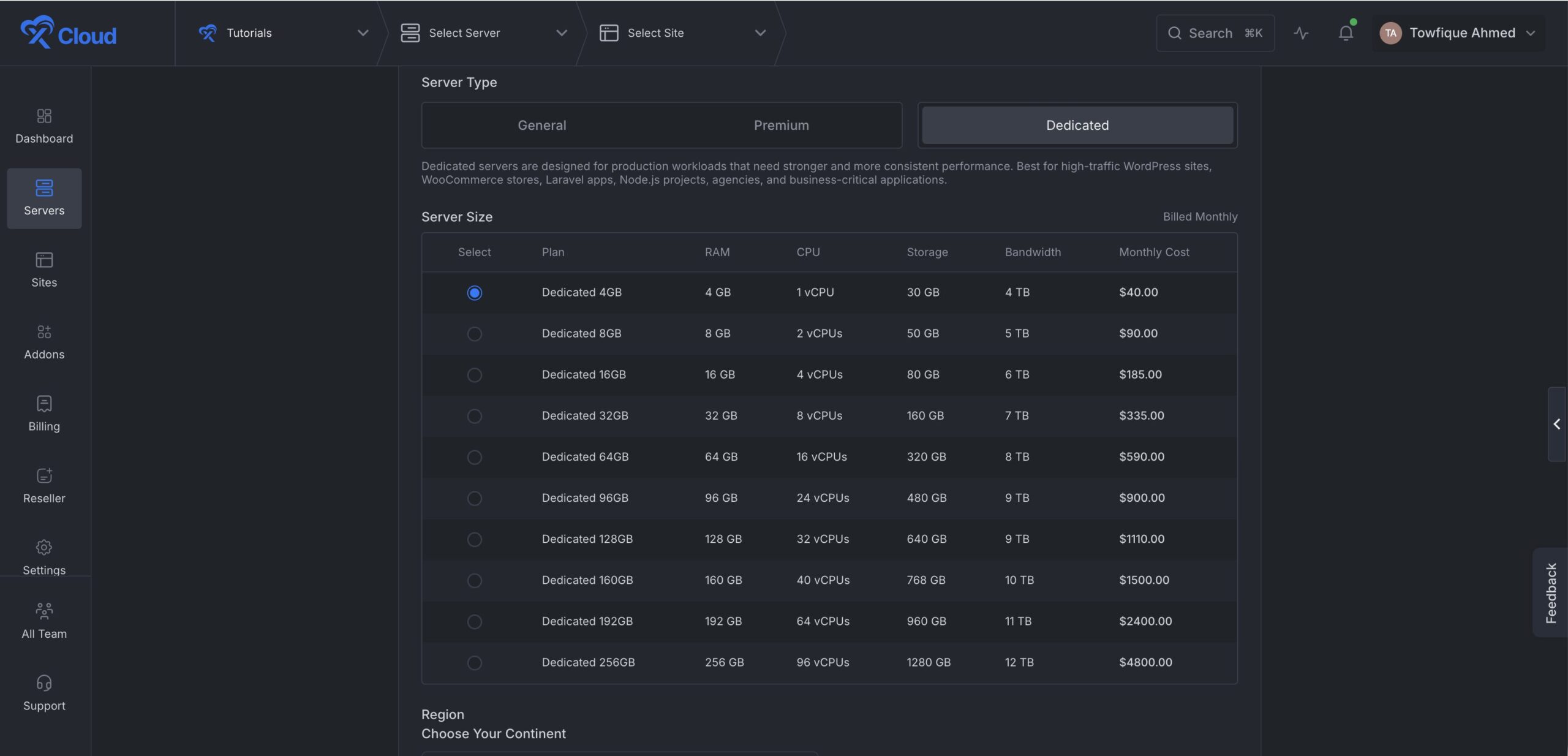
  • Added Dedicated Server Plans on xCloud Managed Server – Added new General Purpose optimized plans when provisioning dedicated servers, giving you more sizing options.
  • Improved Codex integration to set up the agent harness automatically on connection.
  • Improved deployment reliability by ignoring stale tasks that interfered with the deploy guard.
  • Patched a security vulnerability (CVE-2026-46331) for stronger server protection.

  • No categories

🔥 New Features

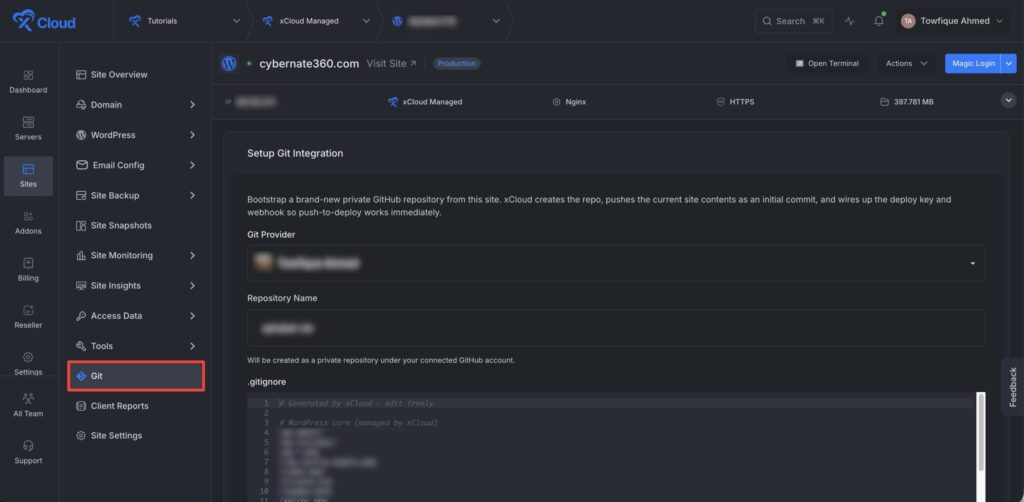
🌟Git Integration for Existing WordPress & Custom PHP Sites

You can now add Git integration to an existing WordPress or Custom PHP site directly from the site’s Git tab, in a single flow. Previously, putting an existing site under Git meant redeploying the project from scratch: create a repository, push your files, set up a deploy key, and get it live.

Now you pick a connected GitHub provider, confirm the prefilled repository name, and review the generated .gitignore. xCloud then creates a private repository, pushes your current site files as the first commit, and configures the deploy key and webhook automatically. Push-to-deploy is available the moment setup completes, with no manual SSH or Git wiring.

What is included:

✅ Add Git to an existing WordPress or Custom PHP site without redeploying it
✅ Skip the manual setup of repositories, deploy keys, and webhooks
✅ Start from a clean codebase, with sensitive and unnecessary files ignored for you
✅ Get a private repository with your site files captured from the first commit
✅ Use push-to-deploy as soon as setup finishes

Bring existing WordPress and Custom PHP sites under Git control with a single click on xCloud now in just a few clicks. 🚀

🌟 Laravel Site Cloning

Cloning is no longer just for WordPress. Spin up a copy of any Laravel site for staging, testing, or a new environment, without rebuilding it from scratch.

If you have deployed a Laravel site using Git from xCloud, the clone brings your Git settings along with it, so push-to-deploy is ready to go on the new copy. Each clone also gets its own deploy key instead of sharing the original one, keeping your setup clean and secure. Clone, test, and ship with confidence. 🚀

🌟 Hermes Workspace Setup Support

We’ve added Hermes Workspace setup support, including workspace connection/self-hosting flow, token generation, Docker UI support, and optional domain/SSL setup where available.

✨Improvements

  • Added a dedicated AI Website Builder card for Site.pro sites in Site Overview.
  • Added Hermes Workspace setup support.
  • Added Laravel site cloning and full server migration support.
  • Improved global search with recent servers and sites.
  • Improved Server Logs selection workflow.

🐛Bug Fixes

  • Fixed site deletion + web terminal output related issue.
  • Improved Security Analytics to reduce false attack detections and clarify insights.
  • Fixed WordPress scan crashes caused by overly long plugin or theme titles.
  • Fixed same-server cloning issues that could affect original site database safety.
  • Fixed Hermes Codex OAuth token saving and refresh issues.
  • Fixed robots.txt handling for proxied Node.js SSR apps.
  • Improved client report generation to reduce pending report delays.
  • Fixed OpenLiteSpeed PHP worker updates.

  • No categories

🔥 New Features

🌟 xCloud Pulse — Native macOS Menu Bar Companion App

Introducing xCloud Pulse, a native macOS menu bar companion app for xCloud, built on the upcoming xCloud Public API.

xCloud Pulse works like a quick-access xCloud dashboard that lives directly in your Mac menu bar, helping you check important site and server information without opening the browser every time.

With xCloud Pulse, you can:

  • See every site and server at a glance, with live status the moment the app opens.
  • Check site status, PHP version, SSL, and backup state for any site in one place.
  • Catch critical issues, recent activity, warnings, and system logs as they happen.
  • Run quick actions such as purge cache, trigger backup, copy a server IP, or open the dashboard, each in a single click.
  • Search across every site, server, and action with a fast command palette, the way Spotlight works on your Mac.
  • Native macOS app, light on your machine and built on the xCloud Public API.

The goal is simple: make everyday xCloud tasks faster, whether you need to check a site, purge cache, review an issue, or trigger a backup without leaving your workflow.

xCloud Pulse is currently being fine-tuned, with UI improvements and polishing still in progress.

✨ Improvements & Bug Fixes

  • Added a cleaner and more helpful UI for pending server setup, making it easier for new users to complete pending server creation.
  • Improved Git branch search in the Deploy via Git site creation flow, allowing users to search and find more branches more reliably.

Bug Fixes

  • Fixed several billing issues related to self-managed servers.
  • Fixed an issue where the “Reading databases with users” event could fail on servers that had no databases.

🔖 Resources

  • No categories

🔥 New Features

🌟 xCloud API — Develop, Integrate, and Automate Programmatically

Take full control of your servers and sites through a modern RESTful API. Automate repetitive tasks, scale your infrastructure, and build directly on top of xCloud, all with enterprise-grade security. Create a token in your dashboard settings, set the permissions you need, and start building in about a minute.

  • Auto-provision servers through the API with no dashboard required.
  • Deploy fully configured sites in a single API call.
  • Manage SSH and sudo users programmatically, adding or removing access on demand.
  • Build CI/CD pipelines, client portals, SaaS tools, and internal dashboards on top of xCloud.
  • Pull live server and site data into any system you already use.
  • Enterprise-grade security with token-based, permission-scoped access on every request.

We will continue to expand API capabilities by introducing additional endpoints on a regular basis.

✨ Improvements & Bug Fixes

  • Improved the payment flow so customers can now securely save cards and pay invoices directly inside xCloud using embedded Stripe payments, with 3D Secure support for future renewals.
  • The limit of the additional domain has now been increased per team with Cloudflare.
  • Improved MySQL auto-healing so it no longer runs when the server is not in the correct state.
  • Fixed an issue related to the Hermes events feed and Status page.
  • Fixed MySQL repeatedly trying to repair itself during problems.
  • Fixed an activity issue where the site deletion was not showing in the activity log.
  • Resolved issues with the Hermes dashboard events feed disconnecting and reduced unnecessary task/poll requests on the Status page.
  • Fixed: Improved Vultr managed server creation errors by showing a clear message instead of the unclear “Invalid plan chosen” error.
  • Fixed: Local backup auto-delete now self-heals correctly when needed.
  • Added support for Hermes live chat with Hermes Agents.

🔖 Resources

  • No categories

🔥 New Features

🌟 PHP Extensions Management – Add PHP Extensions With Clicks, Not Code

Installing and managing PHP extensions no longer requires SSH access or command-line work. xCloud now lets you view, install, and remove PHP extensions for every PHP version directly from the dashboard.

  • One-click installation for supported extensions including APCu, Xdebug, LDAP, YAML, and more
  • One-click removal of extensions you no longer need
  • Dedicated Installed Extensions and Available Extensions sections with extension counts
  • Real-time status indicators for every extension
  • Built-in protection for core PHP extensions to prevent accidental removal
  • Confirmation prompts before extension removal for safer management
  • Unified PHP Configuration and Extensions interface for a cleaner management experience

✨ Improvements

  • Reseller Panel: Resellers can now create products specifically with stacks (NGINX/OLS) or with AI Agents (OpenClaw, Hermes)
  • Improved global search result prioritization and navigation experience.
  • Added monitoring data source filtering across monitoring views.

Bug Fixes

  • Fixed Cloudflare redirect SSL issues on multi-domain redirect sites.
  • Enhanced white-label stack selection and product management.
  • No categories

🚀 New Feature

Global Search (Cmd+K / Ctrl+K)

Find anything in xCloud instantly. Press Cmd+K to search across all your servers, sites, and feature pages from anywhere in the dashboard. When you’re on a server page, the search automatically scopes to that server’s sites.

You’ll also see smart hints showing which features are available based on your server stack and site type, your recent searches, and provider and site-type logos to help you spot results faster. The old sidebar search has been retired, the new search palette replaces it. Keyboard and accessibility behavior has been polished too (focus handling, Esc to close, scroll-lock).

Improvements:

  • Guided SSH Key Setup Setting up SSH keys is now much easier. A new step-by-step guided UI walks you through the process during the sudo/SSH flow, so first-time setup is smoother and less error-prone.

🐛 Bug Fixes

  • Fixed an issue with the Hostinger integration
  • Fixed an issue with the domain update feature
  • Fixed issues with NGINX packages
  • No categories

xCloud v2.6.2 introduces a new interactive browser SSH terminal, a redesigned server creation experience, new Hermes management panels, smarter Docker Compose environment setup, and safer confirmation modals for risky server actions. This release also includes server setup improvements, Mailbox validation updates, and multiple reliability fixes across sites, servers, backups, Supabase, WordPress, and dashboard workflows.

🚀 New Feature

🌟 Interactive Browser SSH Terminal — Open Server & Site Terminal From xCloud Dashboard

Open server, sudo user, or site user terminal sessions directly from the xCloud dashboard, no local SSH client required. Terminal access is permission-controlled and uses secure, single-use session tickets, so server credentials are not exposed to the browser.

🌟 Redesigned Server Creation Flow

We redesigned the server creation experience across all supported providers with a cleaner layout, improved plan selection, better stack options, and recommended plan support. This makes launching a new server easier, clearer, and more consistent.

🌟 New Hermes Management Panels

Hermes sites now include new dashboard panels for Status, Reset, Environment, and Updates. You can view service status, manage selected settings, reset configuration, and check updates more easily from xCloud.

⚡ Improvements

  • Safer Confirmation for Risky Server Actions – xCloud now shows a confirmation modal before high-impact actions like restarting the server, NGINX, LiteSpeed, or MySQL/MariaDB. This helps prevent accidental downtime.
  • Smarter Docker Compose Environment Setup – Custom Docker Compose setup now detects missing environment variables and helps prepare the .env file automatically. This makes Docker Compose deployments easier and reduces setup errors.
  • New server creation now uses Ubuntu 24.04 by default.
  • Improved server setup reliability for new servers.
  • Improved server plan categorization and recommendation support.
  • Improved dashboard design consistency across server creation pages.
  • Improved Hermes provider and channel setup instructions.
  • Improved Mailbox validation for reserved prefixes.
  • Improved service and permission handling across server pages.

🐛 Bug Fixes

  • Fixed Laravel NGINX 404 handling for PHP-served assets.
  • Fixed Supabase install/reinstall port conflict issues.
  • Fixed Supabase dashboard password configuration issues.
  • Fixed WordPress Git-clone site creation failure.
  • Fixed site deletion handling when no database engine exists.
  • Fixed CPU monitoring process detection.
  • Fixed empty MySQL backup size checks.
  • Fixed Wordfence manual scan timestamp saving.
  • Fixed sudo username validation.
  • Fixed Mailbox admin prefix and API error handling.
  • Fixed Site Events per-page dropdown and pagination issues.
  • No categories

🚀 New Feature

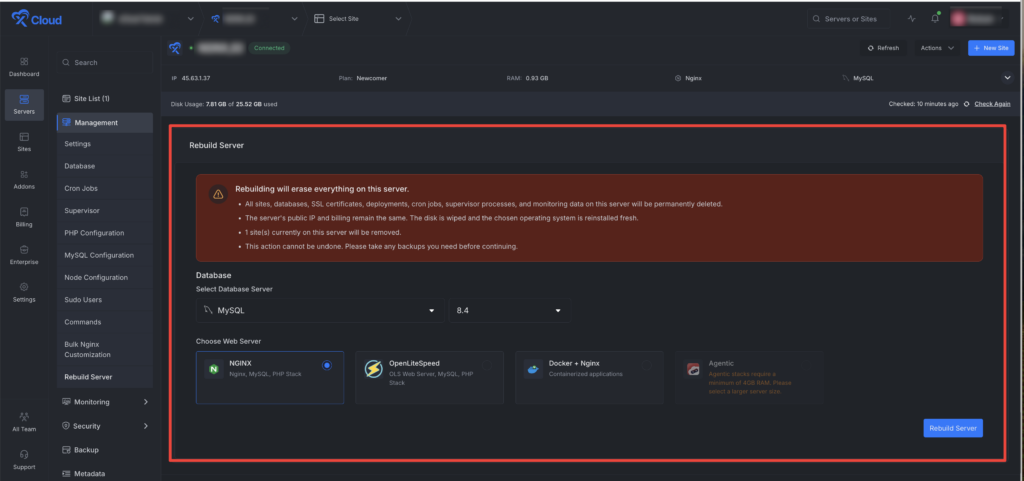
🌟 Introducing Server Rebuild on xCloud – One Click to a Fresh Server, Same IP & Billing

Reset your server to a day-one clean state without decommissioning, re-provisioning, or starting a new billing cycle. One click resets the stack while your IP, DNS records, firewall rules, and invoice stay exactly where they are.

  • Switch your web stack: Choose between NGINX, OpenLiteSpeed, Docker + Nginx, or any of our Agentic stacks (OpenClaw, Paperclip, Hermes) — swap your entire web environment in a single action.
  • Change your database: Move to MySQL 8.4, MariaDB 11, depending on what your new stack needs.
  • Keep the same public IP: DNS records, firewall rules, and monitoring URLs stay intact, so there’s nothing to reconfigure on the network side.
  • Keep the same billing cycle: No new server, no new invoice, no prorated charges, your existing subscription continues uninterrupted.
  • Same security hardening, fresh disk: SSL, SSH, and 7G-firewall come back automatically on the rebuilt server, so you start clean without losing your baseline protection.

⚡ Improvements

  • Bills Payment page now displays detailed invoices above the billing history for faster reference.
  • Mailbox now correctly shows whether SMTP is available for the user’s plan.

🐛 Bug Fixes

  • Fixed stale database information appearing after deleting databases or users.
  • Fixed renewal billing issues affecting white-label subscriptions.