

How to Enable AI Bot Blocker for Your Website in xCloud?
Updated November 6, 2026 · 4 min read
AI crawlers and automated scrapers now account for a growing share of web traffic, and most of it does nothing for your site, it copies your content without permission, inflates your server load, and skews your analytics with visits that were never real people. The AI Bot Blocker in xCloud gives you a simple way to shut that traffic out. For an overview of what it does and which plans include it, see the AI Bot Blocker feature page.
Built into your site’s security page as a single on/off switch, the feature lets you control automated traffic without touching a line of code. By blocking unwanted AI bots, you protect your content from unauthorized scraping, lighten the load on your server, and keep your analytics clean so your data reflects genuine visitor engagement. The result is a site that stays faster, with more secure management, all from one place.
Follow the step-by-step guide below to enable the AI Bot Blocker for your website in xCloud.
Step 1: Access Site Settings in xCloud
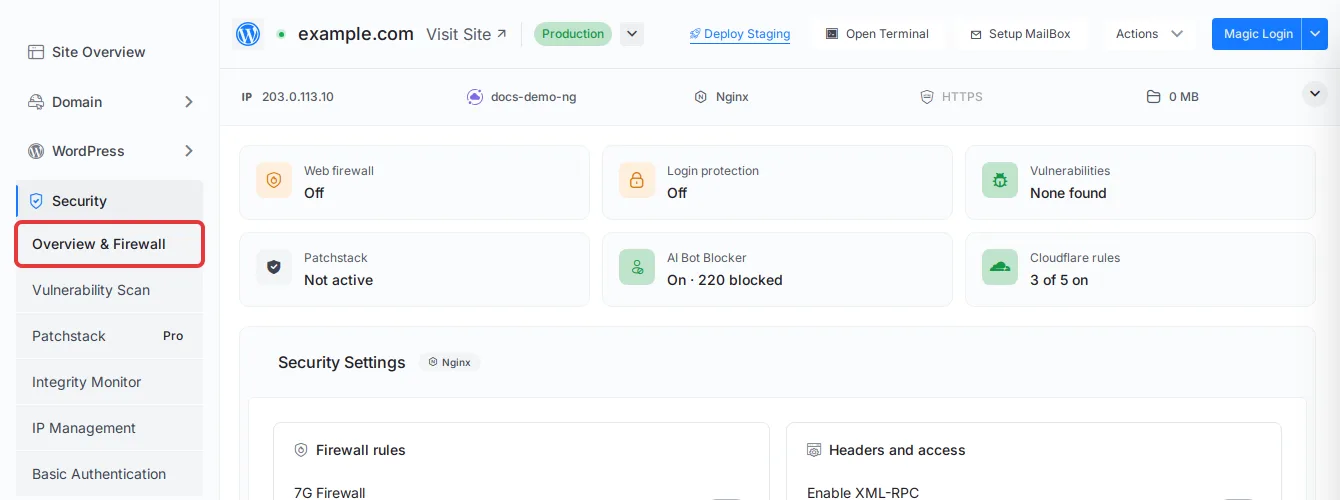
Log in to your xCloud dashboard and go to ‘Sites’. Click on the site where you want to enable the bot blocker. The site menu on the left shows the Security group with Overview & Firewall.
Step 2: Enable the AI Bot Blocker
The AI Bot Blocker is available on both Nginx and OpenLiteSpeed servers. In the site menu, go to Security → Overview & Firewall (the browser tab reads Nginx and Security on Nginx and Security on OpenLiteSpeed) and scroll to the AI Bot Blocker card.
Turn on the switch in the card header, before the AI Bot Blocker title. There is no separate save: xCloud confirms the change with AI Bot Blocker enabled successfully (or AI Bot Blocker disabled successfully) and applies it to the server in the background within a few moments. The AI Bot Blocker tile at the top of the page then shows On with the number of blocked bots.
Note: On Nginx, the change reaches the server only while xCloud manages the site’s config. If Disable Nginx Config Regeneration is on, the switch still reports success but nothing changes on the server.
If the server refuses a change, the card shows The last change could not be applied on the server, so the live state may differ from this switch. Fix the cause and toggle again: followed by the reason. On OpenLiteSpeed, one cause is an .htaccess file whose AI Bot Blocker start and end markers do not pair up, for example after a hand edit. Fix the file, then turn the switch off and on again.

To turn it off later, turn off the same switch. The switch is greyed out while the server is disconnected or when you do not have permission to change security settings; hover over it to see why.
Step 3: Allow/ Block AI Bots
Once enabled, the AI Bot Blocker automatically blocks 200+ known AI training and search crawlers and scrapers, including but not limited to:
- Hugging Face
- Hypotenuse AI
- iaskspider
- ICC-Crawler
- ImagesiftBot
- img2dataset
- INK Editor
- INKforall
- IntelliSeek.ai
- Inferkit
- ISSCyberRiskCrawler
- JasperAI
- Kafkai
- Kangaroo
- Keyword Density AI
- LeftWingGPT
- LLaMA
- magpie-crawler
- MarketMuse
- Meltwater
- Meta AI
- Meta Llama
- Meta.AI
- Meta-AI
- Meta-ExternalAgent
- MetaAI
- MetaTagBot
- Mistral
- Narrative Device
- Neural Text
- NeuralSEO
- OAI-SearchBot
- OAI SearchBot
- omgili
- OmniGPT
- Open AI
- OpenAI
- OpenText AI
- Outwrite
- Page Analyzer AI
- PanguBot
- Paraphraser.io
- peer39_crawler
- PerplexityBot
- PetalBot
- ProWritingAid
- QuillBot
- RightWingGPT
- RobotSpider
- Rytr
- SaplingAI
- Scalenut
- Scrapy
- ScriptBook
- SearchGPT
- SemrushBot
- SEO Content Machine
- SEO Robot
- Sidetrade
- Simplified AI
- SlickWrite
- Spin Rewriter
- Spinbot
- Stability
- Sudowrite
- Surfer AI
- Text Blaze
- TextCortex
- The Knowledge AI
- Timpibot
- VelenPublicWebCrawler
- Vidnami AI
- WebChatGPT
- Webzio
- Whisper
- WordAI
- Wordtune
- Writecream
- WriterZen
- Writescope
- Writesonic
- x.AI
- xAI
- YouBot
- Zero GTP
- ZimmWriter
- Claude-SearchBot
- PhindBot
- Andibot
- SBIntuitionsBot
- Poseidon Research Crawler
- Cotoyogi
- Factset_spyderbot
- TikTokSpider
- YandexAdditional
- Devin
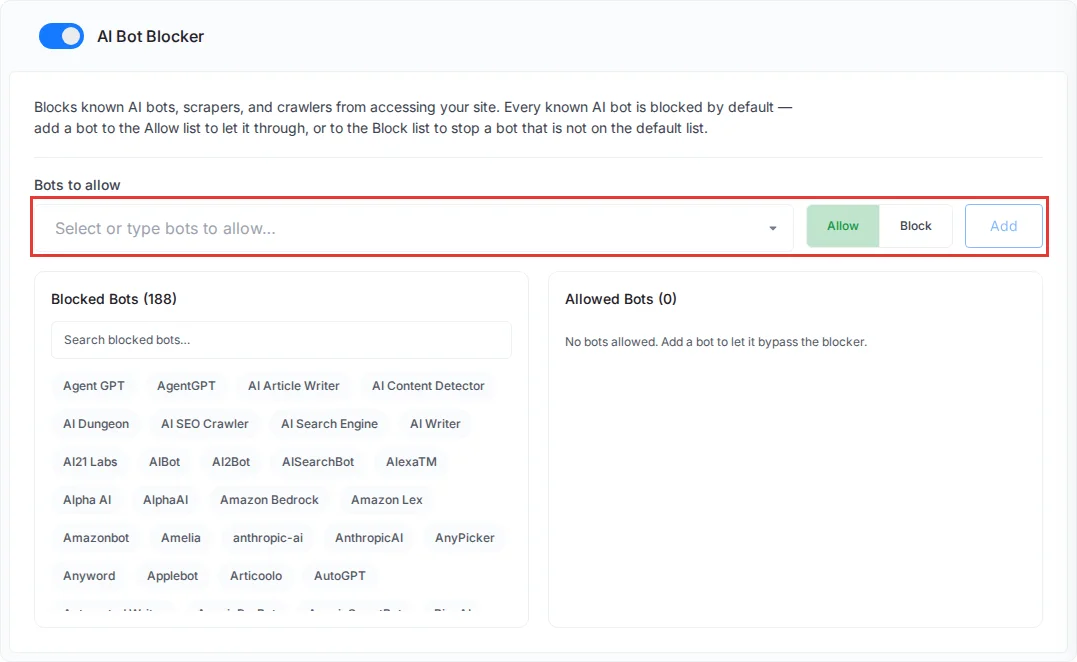
Every known AI crawler is blocked by default. AI assistants that fetch a page only because a person asked them to are allowed: Claude-User, ChatGPT-User, Perplexity-User, MistralAI-User, Meta-ExternalFetcher, Google-NotebookLM, Manus and Nova Act. A Claude or ChatGPT connector calling your site is one example. To block these assistants too, turn on Also block AI assistants acting for a user, which shows on the card while the blocker is on. xCloud confirms with AI assistants acting for a user are now blocked (or now allowed).
To change the default for a single bot:
- Choose Allow or Block next to the bot picker.
- With Allow, pick one or more bots from Select or type bots to allow… to let them through. With Block, type the user-agent of a bot that is not on the default list in Type bot user-agents to block….
- Click Add.
The bots appear under Allowed Bots or Blocked Bots. Use Search blocked bots… to find a bot in the blocked list.
Step 4: Exclude Any Specific Bot From Allowed/ Blocked List
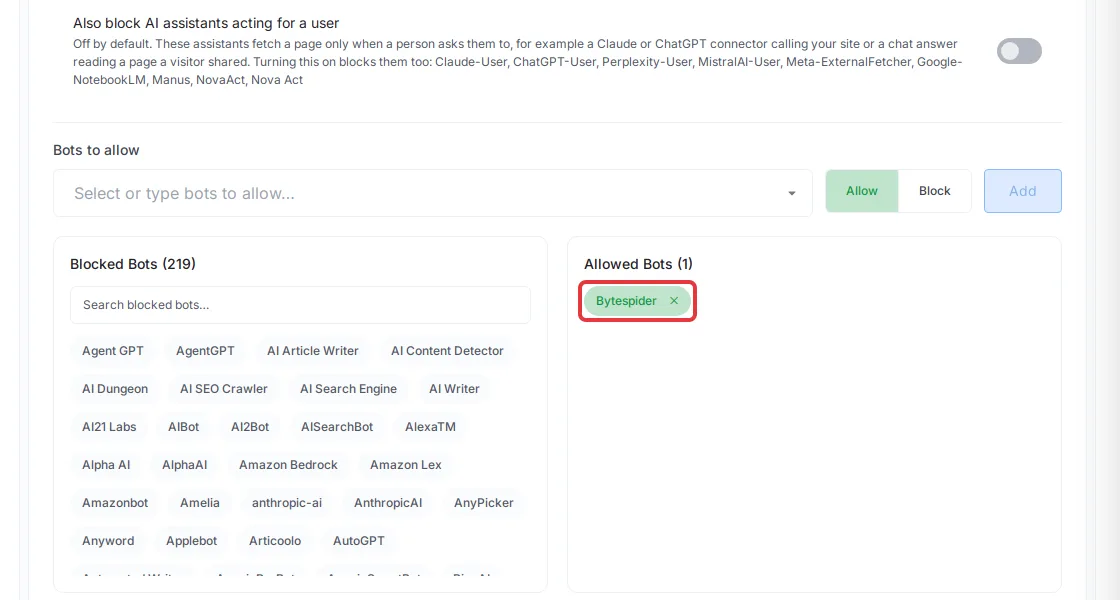
If you want to remove a bot you added to the allowed or blocked list, click the cross (×) icon beside that bot and confirm with Yes, Remove it!. xCloud removes the rule straight away. The bots on the default block list have no ×: to let one of them through, choose Allow, enter the bot’s name and click Add, so it appears under Allowed Bots.
This is how you can easily enable the AI Bot Blocker for your site in xCloud.
The AI Bot Blocker is one of the quickest ways to take back control of your website’s traffic in xCloud. With a single toggle, you can shut out unwanted AI crawlers, protect your original content from scraping, ease the strain on your server, and keep your analytics honest, all without any technical setup. Whether you’re running Nginx or OpenLiteSpeed, the feature fits right into your existing workflow and gives you the flexibility to allow or block specific bots whenever you need to. Turn it on once, fine-tune it to your preferences, and let xCloud handle the rest while you focus on delivering a fast, secure experience to your real visitors.
This is how easily you can enable AI Bot Blocker for your site in xCloud. Thanks to Perishable Press for their research and article about this.
Still feeling stuck? Contact the support team for further assistance.