


In business, every detail says something about who you are. The email address you send from is one of the first things a stranger notices, and it carries more weight than most founders realize. A 2024 GoDaddy survey of small-business consumers found that 75% of people consider a domain-based email a key factor in trusting a small business (LinkNow citing GoDaddy, 2025). That’s three out of four prospects forming an opinion before they read your first line.
This piece walks through twelve concrete reasons a domain email belongs in your 2026 stack, the security stats that should worry you if you’re still on a free inbox, and how to spin up a professional mailbox on your own domain without paying anything if you host with xCloud.
Key Takeaways
- 75% of consumers trust small businesses more when they use a domain email (GoDaddy survey).
- Over 90% of the top 1.8 million email domains are still vulnerable to spoofing (EasyDMARC, 2025), so authentication on your own domain is now table stakes.
- Gmail accounted for 20% of sender domains in malicious emails in 2025 (Hoxhunt), making “@gmail” a credibility hit, not just an aesthetic one.
- xCloud Mailbox now ships a free tier for every unique domain on a Managed or Provider server, starting May 2026.
What Counts as a Professional Business Email?
A professional business email runs on your own domain. So [email protected] instead of [email protected]. The change looks cosmetic, but it shifts three things at once: who owns the inbox (you, not Google), what the recipient infers about you (legitimate vs. side hustle), and what authentication you can layer on top (SPF, DKIM, DMARC).
Free Gmail or Outlook accounts work fine for personal mail. They weren’t designed to represent a brand. There’s no way to make [email protected] look like part of yourbusiness.com, because it isn’t.
Business Email vs Free Email Services: What Actually Differs
The honest gap between the two isn’t features. It’s ownership and signal. Free services give you a usable inbox; a domain email gives you a piece of your brand that you control. Domain reputation has now overtaken IP reputation as the main trust signal mailbox providers use (Ediware, 2025), which means the address you send from increasingly decides whether you land in the inbox or the spam folder.
| Feature | Professional Business Email | Free Email Service |
|---|---|---|
| Domain | @yourcompany.com | @gmail.com, @yahoo.com |
| Branding | Reinforces your brand on every send | Advertises the free provider |
| Trust signal | Looks legitimate to recipients and spam filters | Increasingly flagged as suspicious |
| Authentication | Full SPF/DKIM/DMARC control | Cannot publish a DMARC policy for your brand |
| Ownership | The business owns the account | The provider owns the platform |
| Departures | Account stays when an employee leaves | Conversation history walks out the door |
Why 12 Reasons, and Why Now?
The case for a domain email used to be aesthetic. Now it’s structural. Google and Yahoo both require SPF, DKIM, and DMARC authentication for bulk senders (Mailmodo, 2025), and the average phishing-related breach cost organizations $4.88 million last year (IBM via Zensec, 2025). If you can’t prove who you are, you can’t protect your customers or your inbox placement.
1. First Impressions Decide the Deal
Imagine two cold pitches in your inbox: one from [email protected] and one from [email protected]. The second gets opened. That isn’t a guess. A custom domain email functions as a digital handshake that builds immediate rapport and lowers the chance your message gets ignored (Phantom Technology Solutions, 2026). For a B2B sale where you’re already a stranger, that first three seconds matters more than the body of the pitch.
2. Brand Consistency Across Every Channel
A strong brand needs one identity everywhere it shows up. If your site is greenleafinteriors.com, your handles are @greenleafinteriors, and your email is [email protected], the mismatch confuses prospects. With 50 emails sent a day, a custom address creates roughly 18,000 branded touchpoints a year (MailAfiniti, 2026). Free providers get the impressions instead.
3. Customer Trust and Credibility
Trust is the entire game right now. APWG recorded 3.8 million phishing attacks in 2025 (Bright Defense via APWG, 2026), and most started with a spoofed identity. The closer your email matches your domain, the easier it is for a careful customer to verify you’re not a fraud. Would you click an invoice from [email protected] or [email protected]? You wouldn’t. Neither will yours.
4. Real Security Controls You Can Actually Configure
Free inboxes give you a single account. A domain email gives you a platform. You can enforce two-factor authentication across the team, revoke a leaver’s access in one click, and publish DMARC to stop other people from impersonating your brand. That last one matters: over 90% of the top 1.8 million email domains are still vulnerable to spoofing because only 7.7% enforce a strict DMARC reject policy (EasyDMARC via Infosecurity Magazine, 2025). You can’t fix that on a Gmail address.
5. Better Deliverability and Less Spam Anxiety
Your email is only useful if it lands. Bulk senders relying on free inboxes now see noticeably worse deliverability since the Gmail/Yahoo authentication mandate kicked in (Zensec, 2026). With a domain email you can publish:
- SPF — lists which servers may send on your behalf.
- DKIM — cryptographically signs each message so it can’t be tampered with mid-flight.
- DMARC — tells receiving servers what to do when SPF or DKIM fails, and reports back when someone tries to forge your domain.
Together these protocols drove a 65% reduction in unauthenticated email reaching Gmail inboxes after the 2024 rollout (Zensec, 2026).
6. Scalability Without Renaming Anyone
When your team grows, you need support@, sales@, careers@, billing@. A domain mailbox makes that a one-minute setup. Trying to do the same with five free Gmail accounts is messy and unprofessional. Even better, aliases and forwarding addresses on most domain email providers are free and unlimited, so a solo founder can run five role-based inboxes from one account.
7. Marketing You Get for Free
Every email you send is a tiny ad. The question is what it’s advertising. A generic address advertises Google. [email protected] advertises you. Email signatures, in particular, have become one of the few branded touchpoints that consistently reach inboxes in the age of digital clutter (Signite, 2025), so making yours land on your own domain compounds over thousands of sends.
8. Compliance and Data Protection Aren’t Optional
Depending on your industry, you may legally need controlled email. GDPR, HIPAA, and PCI DSS all require auditable, secure communication. Free consumer email accounts can’t deliver that. The 2025 average healthcare data breach cost $7.42 million (TechMagic, 2026), and small businesses make up 28% of business email compromise victims (Verizon via Keevee, 2025). A managed domain email puts you on compliant infrastructure from day one.
9. Employee Accountability and Continuity
If a sales rep handles a six-figure account from [email protected], that conversation history belongs to them, not you. When they leave, so does the relationship. A domain email keeps the inbox tied to the company, lets you reassign accounts cleanly, and creates the professional separation between work and personal that protects both sides.
10. Integration With the Tools You Already Use
Domain-based email plugs into the rest of your stack. CRM, project management, e-signature, support desk: they all assume a business address. Free email accounts work too, but they often get rate-limited, flagged for automated activity, or quietly downgraded by partners’ spam filters. A domain inbox just works.
11. A Channel You Actually Own
Free email is free until it isn’t. Policies change. Accounts get suspended. Lock-outs happen during disputes. With a domain email, the address belongs to you as long as you renew the domain. That portability matters: if you ever want to switch providers, you keep your address, your customers, and your history.
12. Competitive Edge Where the Margins Are Tight
In a head-to-head pitch, small signals decide who wins. When two providers offer roughly the same service and one writes from @theircompany.com while the other writes from @gmail.com, the professional address wins by default. It’s the cheapest credibility upgrade money can buy, often less than $1.25 per user per month (MailAfiniti, 2026), and on xCloud it can now be free.
How to Set Up a Professional Email With xCloud Mailbox (Now Free)
xCloud’s MailBox Addon is a business-friendly email hosting solution that improves your email communication. It allows you to create and manage email addresses using your own domain, which helps your emails look professional and represent your brand.
The MailBox Addon is a fully managed email service. It lets businesses set up professional email addresses (e.g., [email protected]). It provides strong security, easy integration with your domain, and a simple interface, making it a great choice for businesses that want to improve their email communication.
Starting May 2026, every unique domain hosted on an xCloud Managed or Provider server gets one free professional mailbox. That’s enough for a freelancer or small agency to run [email protected] without paying anything, with paid plans starting at $1/month when you need more storage or AI features (xCloud Mailbox, 2026).
Step 1: Enable xCloud Mailbox Addon
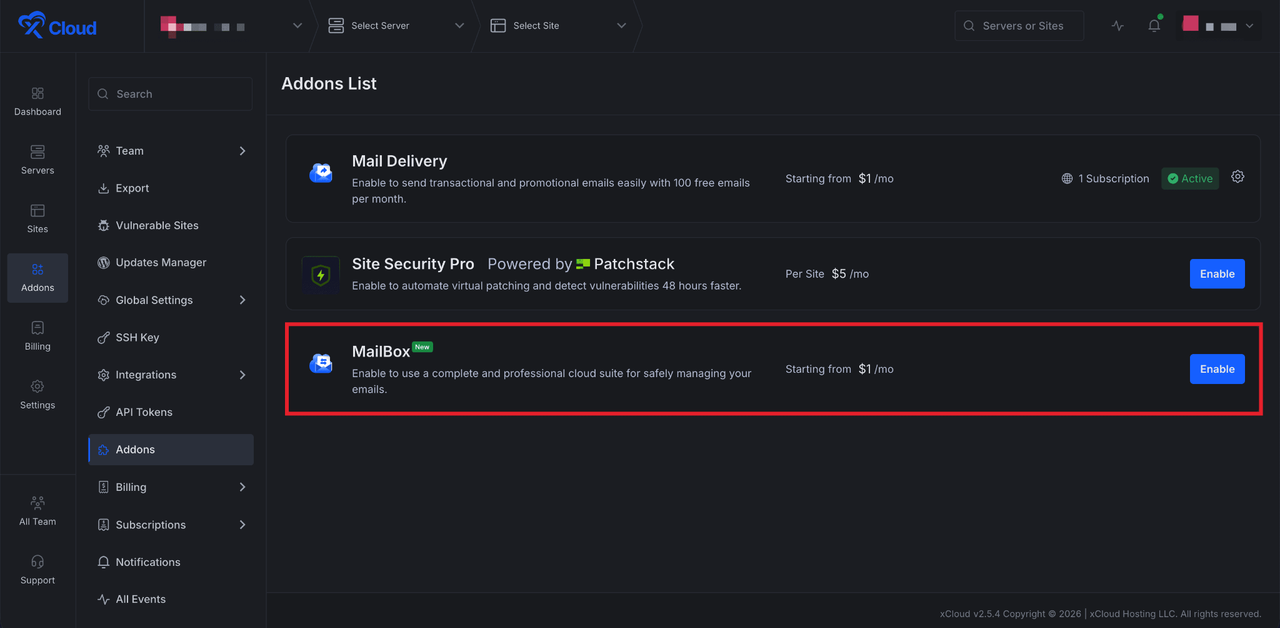
Log in to your xCloud dashboard, then head over to the left navigation menu and click on the**‘Addons’ option** from the dashboard. Here you will find all the addons available in xCloud. Go to the ‘MailBox’ addon from the list of available addons. If you have not purchased it yet, click the ‘Enable’ button to purchase it.
Step 2: Subscribe to a Mailbox Subscription Plan
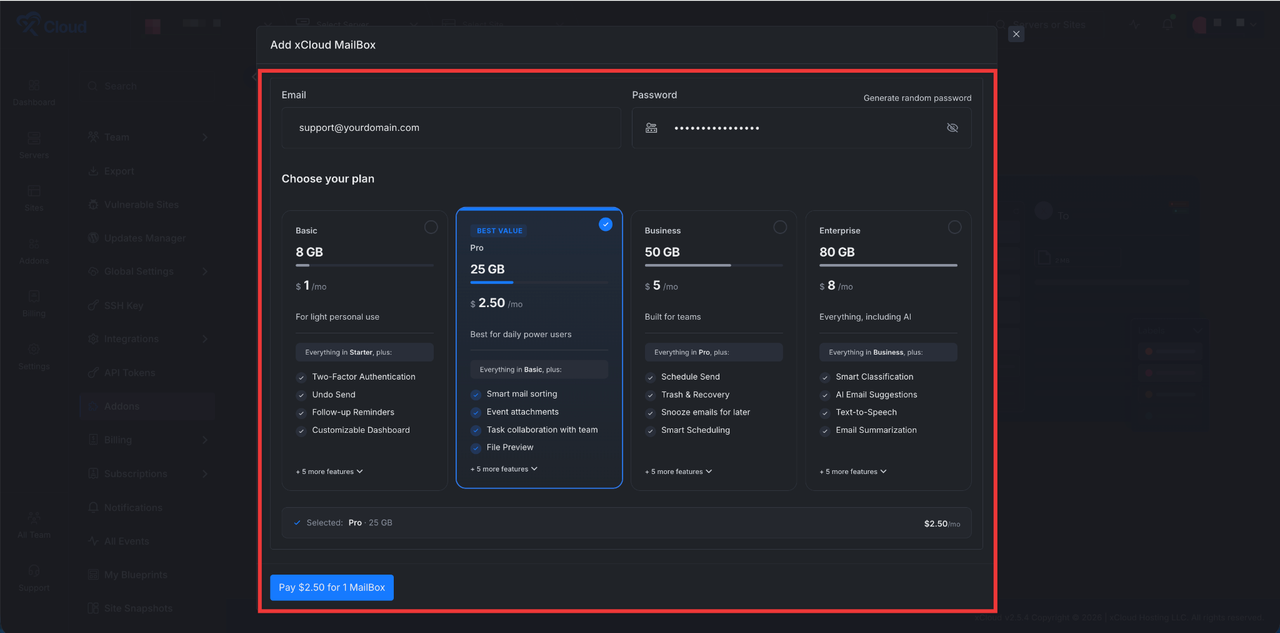
Next, a pop-up will appear. Enter the credentials ‘Email’ and ‘Password’ in the dedicated fields. Then choose a plan according to your needs. And finally, click on the ‘Pay’ button.
However, existing mailboxes can be migrated to our new mailbox provider. This allows you to benefit from all the upgraded features while continuing to pay your current rate.
Step 3: Verify Mailbox
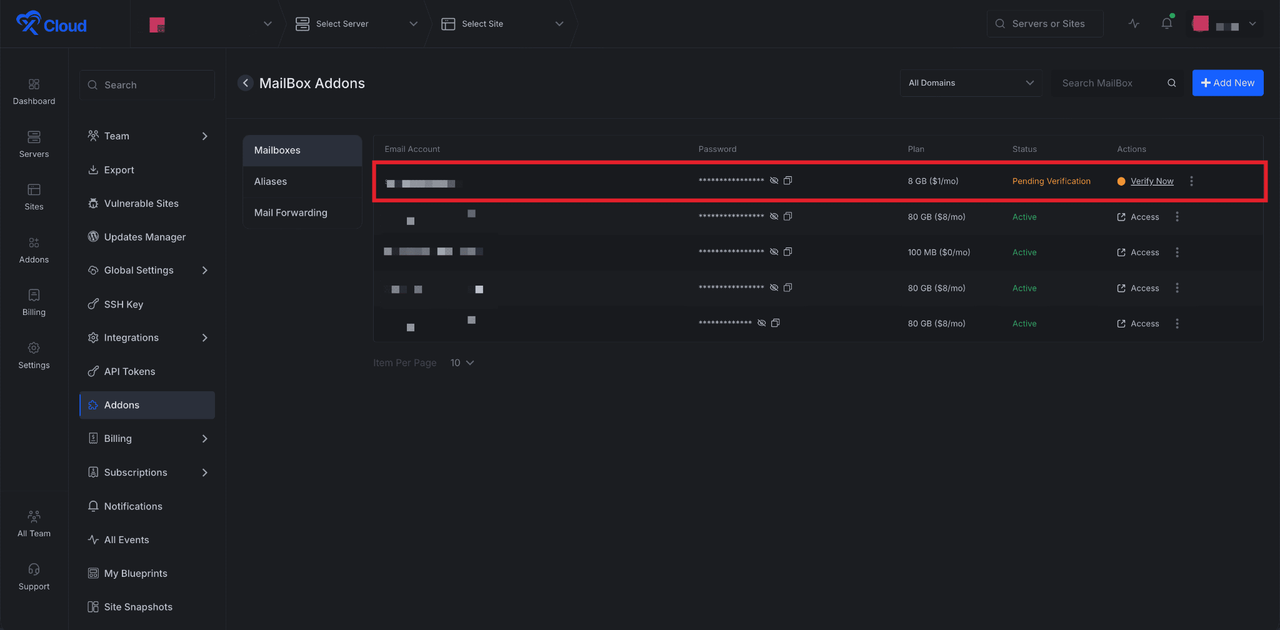
Once the purchase is done, your subscription plan for the xCloud Mailbox will be shown in the dashboard. Here you can see the ‘Pending Verification’ status. Click on the ‘Verify Now’ button to start the DNS setup process.
You can do this in two ways. If you have already connected your domain with Cloudflare, the easiest method is to toggle the “Auto Manage DNS Records” switch. This will automatically add all the required DNS records like MX and SPF to your Cloudflare account and verify them.
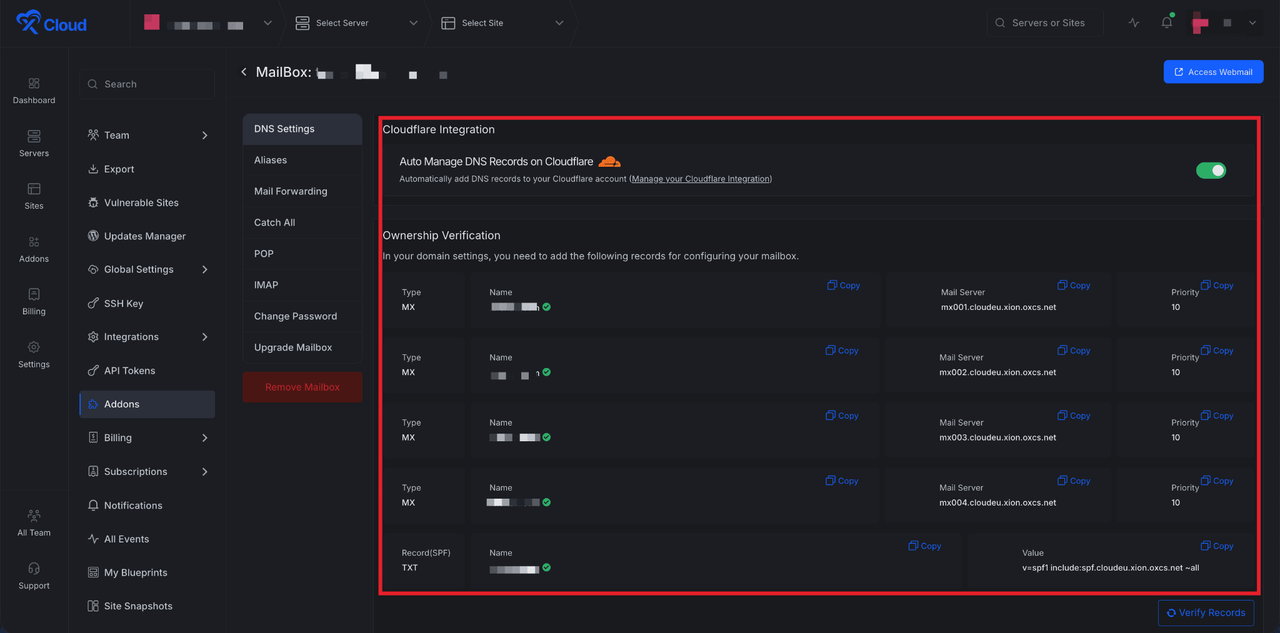
If you manage your domain’s DNS settings with a different domain provider, you will need to copy the required records provided and paste them into your domain provider’s DNS panel. These include various types of DNS records like MX and SPF. After adding records on your DNS provider, click on the ‘Verify Records’ button
Step 4: Launch Your Mailbox
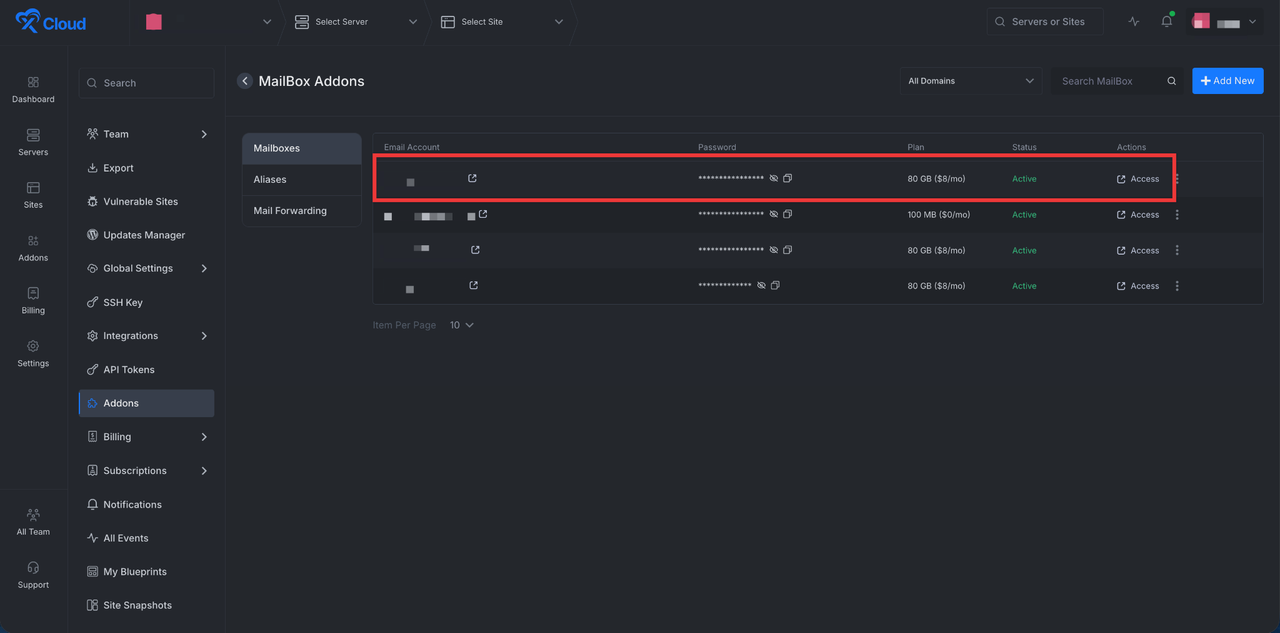
After configuring everything, let’s go back to the Mailbox dashboard and click on the Access option to log in to your Mailbox dashboard.
Once logged in, you can check out the ‘Inbox’, ‘Draft’, and more from the dashboard. Even send the new message to your preferred email address as well. Moreover, access, Calendar, Drive, AI-powered replies, summarize, and more features to increase your productivity.
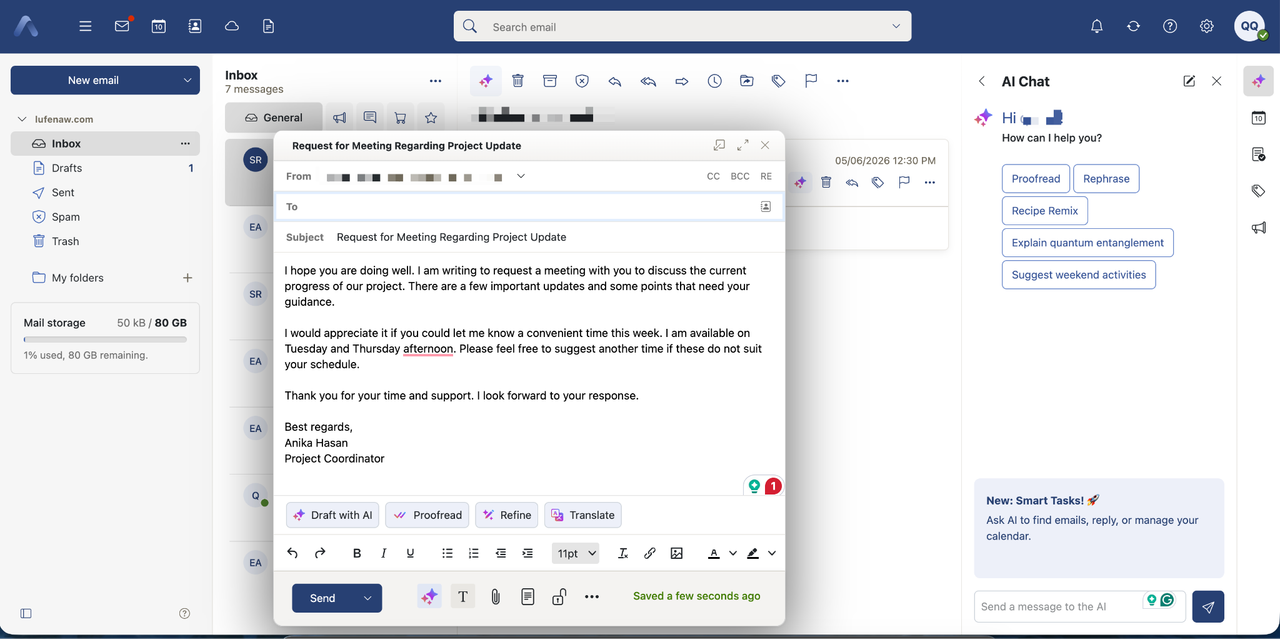
And that is how you can set up your xCloud Mailbox quickly and easily. If you would like to explore more details or advanced options, you can always refer to the full documentation for step-by-step guidance.
What’s Different About the Free Plan?
The free tier is genuinely free, but it has limits worth knowing:
- One free mailbox per unique domain. Need
support@,sales@, andinfo@? You’d need two paid plans on top of the free one, or use aliases (which are unlimited) and route everything through one inbox. - Available only on xCloud Managed and Provider servers. Self-managed server users can buy any paid plan but don’t get the free tier.
- 100 MB storage. Fine for a few months of normal email. Upgrade when you fill it up.
If you’re already on xCloud’s legacy mailbox, the built-in migration tool moves your messages over without changing your pricing.
Frequently Asked Questions
Is a domain email really worth it for a one-person business?
Yes, especially when the entry cost is now $0. A solo founder gets the same trust lift from a domain email as a 50-person company, and it removes the awkwardness of pitching a $5,000 service from a Gmail address. Setup takes under 10 minutes if your DNS is already on Cloudflare.
Will my emails still land in the inbox after switching from Gmail?
After the 2024 Gmail and Yahoo authentication rules, properly authenticated domain emails deliver as well as or better than free inboxes for cold outreach and marketing. The key is publishing SPF, DKIM, and DMARC records on day one. xCloud Mailbox auto-configures these when you use Cloudflare DNS.
What if my domain is registered somewhere other than xCloud?
It doesn’t matter where your domain is registered. You only need to add the MX and SPF records xCloud provides to your domain’s DNS panel. The domain itself can stay with GoDaddy, Namecheap, Cloudflare, or anywhere else.
Can I use Gmail’s interface with a domain email?
Yes. xCloud Mailbox supports IMAP, POP3, and SMTP, so you can configure it inside Gmail, Outlook, Apple Mail, or Thunderbird and keep the interface you’re used to (xCloud Mailbox docs, 2025).
How many email addresses can I have on one domain?
You can create one free mailbox per unique domain. Beyond that, aliases (like hello@, support@, team@) are unlimited and free on every plan, and forward into your main inbox. For separate inboxes with their own storage, each one needs its own plan.
Does a domain email actually protect against phishing?
It protects others from being phished using your name. Once you publish a strict DMARC policy, mailbox providers will reject emails forged to look like they’re from your domain. It doesn’t stop you from receiving phishing attempts, but it stops attackers from successfully impersonating your brand to your customers.
Build Trust, Boost Credibility, and Grow with Every Email You Send
A professional business email is much more than just a way to send messages. It is a powerful tool for building your brand, establishing trust, and enhancing your professional reputation.
In a competitive market, a custom domain email gives you an essential edge, showing clients and partners that you are a serious and credible business. Whether you are a freelance professional, a small startup, or a large enterprise, investing a small amount of time and money in a business email is a decision that will pay dividends in the long run.
So, try the MailBox and create a professional email for your business today.
If you have found this blog helpful, feel free to subscribe to our blog for valuable tutorials, guides, knowledge, and tips on web hosting and server management. You can also join our Facebook community to share insights and engage in discussions.
Last updated May 18, 2026
← All articles