

xCloud MCP Server
Connect your AI assistant to xCloud and manage servers, sites, WordPress, SSL, backups and deployments from your editor or chat.
Run this in your terminal. Then type /mcp inside Claude Code and choose Authenticate; the browser opens for the xCloud approval screen.
claude mcp add xcloud --transport http https://app.xcloud.host/mcpOpen Settings, then Connectors, then Add custom connector. Name it xcloud and paste this URL. Claude Desktop opens the browser sign-in for you.
https://app.xcloud.host/mcpAdd this to ~/.cursor/mcp.json, or use Settings, then MCP, then Add new MCP server. Click Needs login on the server to approve. Cursor caps a server at 40 tools: if it refuses the list, use the compact URL from the reference below.
{
  "mcpServers": {
    "xcloud": { "url": "https://app.xcloud.host/mcp" }
  }
}
Run both lines in your terminal. The second one opens the browser sign-in.
codex mcp add xcloud --url https://app.xcloud.host/mcp
codex mcp login xcloud
Run opencode mcp add xcloud --url https://app.xcloud.host/mcp; it writes this under mcp.servers in opencode.jsonc (OpenCode v2 no longer puts servers directly under mcp). Then run opencode mcp auth xcloud to sign in.
"mcp": { "servers": { "xcloud": { "type": "remote", "url": "https://app.xcloud.host/mcp" } } }Add this to ~/.hermes/config.yaml. On first connect Hermes prints the authorize link and opens your browser for the xCloud sign-in; run hermes mcp login xcloud if you ever need to re-authorize.
mcp_servers:
  xcloud:
    url: "https://app.xcloud.host/mcp"
    auth: oauth
GitHub Copilot, VS Code and any client that speaks MCP Streamable HTTP: add the server URL under mcpServers in its config. OAuth starts on first use. A client that only runs local servers can bridge with mcp-remote.
"xcloud": { "url": "https://app.xcloud.host/mcp" }npx mcp-remote https://app.xcloud.host/mcpThen ask your assistant: Who am I on xCloud? It should answer with your name, email and team.No browser? Connect with an API key
Not in the tabs? Setup guides for every agent, one per hosting job
- Free with every xCloud account
- OAuth in the browser, no token to paste
- Read-only option; risky changes ask first
What you can ask
Run Your Hosting from a Conversation
Describe the outcome and the assistant picks the xCloud tool. Reads run straight away. Anything that creates, changes or deletes stops and asks you first. Copy a prompt, swap in your own site and server names.
YouList all my xCloud servers with CPU, RAM and disk usage, and flag any above 80% disk.
→list_servers read-only
3 servers — Frankfurt 42% · London 61% · Singapore 86% ⚠
xCloudSingapore is over 80% disk. Want the largest sites and caches on it?
See everything at once
Server load, pending updates, vulnerabilities and open alerts, without opening thirty tabs.
List all my xCloud servers with CPU, RAM and disk usage, and flag any server above 80% disk.Which of my sites have pending WordPress core, plugin or theme updates? Group them by site.Keep WordPress up to date
Plugins, themes, debug mode and a passwordless login link for the admin.
Update every plugin on the Northwind site, then confirm the homepage still loads.Give me a magic login link for the Northwind WordPress admin.Create and deploy
New sites with a dry run first, Git and Docker Compose deploys, staging for Git-backed apps.
Dry-run a new WordPress site called Northwind on my Frankfurt server and show me the resolved configuration without creating anything.Deploy the main branch of github.com/acme/api to my Docker server as a Compose app on a staging hostname.Recover a failed deploy
A failed deploy gets a diagnosis that names the step, shows the output and lists what would fix it.
The last deploy of the API site failed. Diagnose it, show me the settings I can correct, fix the build command, and retry on the same site.Scan the docker-compose.yml in github.com/acme/api and tell me which services and ports xCloud would use.Security, SSL and backups
Vulnerability rollups, certificate checks and renewals, backup status for every site.
Show the vulnerability count for every site on this team, sorted worst first.Check the SSL certificate on shop.example.com and tell me when it expires.When was the last backup of the shop site, did it succeed, and where is it stored?Server housekeeping
Services, PHP and Node.js versions, cron jobs, cache purges and reboots.
Install Redis on the Frankfurt server and enable the service.Purge all caches on the shop site.Reboot the staging server and tell me when it is back.
Chain the steps and let it work
The assistant remembers the conversation, so you can describe an outcome and set the condition for stopping. This one is four tools, run in order, each result checked before the next.
Update every plugin on the Northwind site, then run a vulnerability scan, and if the scan comes back clean give me a magic login link so I can check the pages. If it is not clean, stop and tell me what it found.Read the full guide: 40+ prompts, what it will not do, and how to stay safe
How it works
One URL, Approved in Your Browser
The MCP server is built into xCloud and hosted at a single endpoint. Point your client at it and approve access once; every xCloud Public API operation is then a tool your assistant can call.
- 01
Choose what it may do
Read lets it view servers, sites, account and billing. Read and write lets it make changes. Start read-only and reconnect with more later.
- 02
Risky changes ask first
Creating, deploying, updating, rebooting, deleting and buying are refused unless the assistant passes an explicit confirmation. Routine actions such as cache purges, backups, restarts and scans run straight away, and reads never ask. Site creation also has a dry run.
- 03
One connection, every team you choose
Authorize the connection for several teams, then just name the team in the prompt. A team you did not grant is refused, never silently swapped.
Multi-team access - 04
Revoke in one click
Every connection is listed with your API keys in the dashboard. Your client can add its own per-tool rules on top: run, ask, or block.
Setup overview
- MCP endpoint
https://app.xcloud.host/mcp- Transport
- Streamable HTTP
- Authentication
- OAuth in the browser (recommended), or an API key with the mcp:invoke scope sent as
Authorization: Bearer YOUR_TOKEN - Compact profile
- Five tools instead of one per operation. Use this for any client that caps the tool list; toolsets alone rarely fit under a cap.
https://app.xcloud.host/mcp?profile=compact
Setup guides
Pick Your Client
Each card opens the step-by-step section of the connect guide for that client, with screenshots where the client has a settings screen.
 Claude CodeOne command in the terminal, then /mcp to authenticate.
- Claude DesktopAdd a custom connector in Settings and sign in.
 CursorOne entry in mcp.json, then Needs login. Compact profile for the 40-tool cap.
 CodexTwo commands: add the server, then log in.
- OpenCodeOne opencode mcp add command, then opencode mcp auth.
 HermesAn mcp_servers entry in config.yaml with OAuth.
- OtherCopilot, VS Code, Windsurf and any Streamable HTTP client, or the mcp-remote bridge.
Reference
Everything Else, When You Need It
API keys for headless clients, profiles for clients that cap tools, the full toolset list, and what to do when something does not connect.
Connect with an API keyFor CI, servers and clients with no browser sign-in
Create an access token with the explicit mcp:invoke scope. Add the read abilities for the areas it will use (read:servers, read:sites, read:billing, read:addons) to let the assistant view things, or the matching write: scopes to let it make changes. Full access alone does not enable MCP. You can also limit a key to specific MCP toolsets when you create it. Create an API key.
Claude Code
Pass the key as a header when adding the server. Keep the single quotes: xCloud tokens contain a | character that a shell would otherwise read as a pipe.
claude mcp add xcloud --transport http https://app.xcloud.host/mcp \
  --header 'Authorization: Bearer YOUR_TOKEN'
Claude Desktop
Add this to your Claude Desktop config file, then restart the app:
{
  "mcpServers": {
    "xcloud": {
      "type": "http",
      "url": "https://app.xcloud.host/mcp",
      "headers": { "Authorization": "Bearer YOUR_TOKEN" }
    }
  }
}
Cursor
In ~/.cursor/mcp.json, add the key as a header:
{
  "mcpServers": {
    "xcloud": {
      "url": "https://app.xcloud.host/mcp",
      "headers": { "Authorization": "Bearer YOUR_TOKEN" }
    }
  }
}
Other clients
Configure the URL plus an Authorization header:
URL:    https://app.xcloud.host/mcp
Header: Authorization: Bearer YOUR_TOKEN
Through the stdio bridge:
npx mcp-remote https://app.xcloud.host/mcp --header "Authorization: Bearer YOUR_TOKEN"Too Many Tools for Your Client?Flat, compact and toolset-limited views of the same server
Everything below is served from the same server URL with the same access; only the tool list the client sees differs.
Flat (default)
https://app.xcloud.host/mcpEvery xCloud API operation is its own tool (servers_index, sites_ssl and so on), plus the two search tools. The full picture, at the cost of ~190 tool descriptions loaded every session.
Compact
https://app.xcloud.host/mcp?profile=compactFive tools: the two searches plus three executors split by what a call does (read, write, irreversible). Use it when your client caps how many tools a server may advertise, Cursor stops at 40, or when you would rather not load every description. An API key can carry mcp:profile:compact instead, for clients whose configuration has no room for a query string; /mcp/v2 is the same surface.
Toolsets
https://app.xcloud.host/mcp?toolsets=sites,serversNarrow the list to one or more areas of xCloud, for focus rather than for a tool cap: servers alone is 61 tools and sites 60, so use the compact profile for a cap. Both search tools stay, so the assistant can still tell you what it cannot reach. An API key can be limited to toolsets when you create it (a key with none selected sees every tool). Toolsets narrow what the assistant is shown, not what the key may do: the permissions on the connection decide every call.
What the Assistant Can Reach188 tools in 18 toolsets, plus two search tools
The server exposes 188 of the Public API's 199 operations as tools, plus two search tools, grouped into toolsets. Each toolset can be granted or narrowed on its own.
| Toolset | Tools | What it covers |
|---|---|---|
servers | 61 | Create and list servers, monitoring stats, PHP and Node.js versions, services such as Redis and Docker, cron jobs, firewall rules, Fail2Ban, sudo users, reboots, staging hostname suggestions. |
sites | 60 | Create, list and inspect sites, deploy from Git (native or Docker Compose), staging environments for Git sites, deploy diagnosis and correction, domains, DNS checks, SSL, cache purges, backups, cron jobs, events and logs. |
billing | 10 | Current plan, billing overview, bills and invoices. |
addons-mailbox | 9 | Mailbox plans, purchase, list, inspect, delete, verify DNS. |
oneclick-apps | 7 | Browse the one-click catalogue, check server compatibility, install, poll status, fetch credentials, stop or redeploy. |
vulnerabilities | 6 | Per-site findings and counts, the team-wide rollup, rescans, ignore and unignore a finding. |
wordpress-actions | 5 | Update or activate plugins and themes, refresh the inventory, toggle WP_DEBUG, generate a magic login link. |
sites-wordpress | 4 | List plugins and themes, the updates summary and the site health status. |
broken-links | 4 | Trigger a broken-link scan and read its findings. |
addons-mail-delivery | 4 | Mail Delivery plans, purchase and subscriptions. |
alerts | 3 | List incident alerts, read one, mark it read. |
pagespeed | 3 | Trigger a PageSpeed scan, latest snapshot, history. |
ssl-certificates | 3 | Inspect, check and delete a certificate. |
integrations | 3 | Connected Cloudflare and Git providers and their repositories. |
catalog | 2 | The app catalogue and hosting pricing. |
user | 2 | The current user and the teams the connection may act on. |
blueprints | 1 | List blueprints. |
payments | 1 | Pay an invoice. |
xcloud_agent_search | 1 | Finds the right operation and the order to call things in. The assistant uses it when it is not sure which tool fits. |
xcloud_docs_search | 1 | Answers a question from the xCloud documentation, so "how does the edge cache work?" is answered without a tool call against your account. |
Full toolset list with countsPublic API referenceOpenAPI specification
When Something Does Not Connect401, 403, missing tools and the 40-tool cap
| Symptom | Cause and fix |
|---|---|
| Client asks for a token | It does not support browser sign-in. Use the API-key path in the Setup tabs above. |
| 403 on connect | The approval was declined, or was granted read-only for a write action. Reconnect and approve read and write. On the API-key path, the key lacks the explicit mcp:invoke scope. |
| "Lacks the ... ability" | The connection is not permitted that action. Reconnect with write access, or add the missing scope (for example write:sites) to your API key. |
| "Site not found" | The site belongs to a team this connection was not granted. Ask the assistant to list its granted teams and name the right one, or reconnect and grant that team during authorization. |
| 401 Unauthorized | The sign-in expired: reconnect. On the API-key path the key is invalid, or the Authorization header was mangled by shell quoting; keep the single quotes around a token that contains |. |
| Client refuses to load all the tools | Some clients cap the tools per server (Cursor at 40). Connect with ?profile=compact, which is five tools. Toolsets alone rarely get under the cap: servers is 61 tools and sites is 60. |
| A tool you expected is not listed | The key is limited to some toolsets, or the URL carries ?toolsets=. Ask xcloud_agent_search for the operation, which says what exists, then widen the key or drop the parameter. |
What the Server Does Not DoExcluded operations, dashboard-only workflows, no schedules
- Eleven Public API operations are deliberately excluded: the health check, managing your own API tokens, and the native apps' sign-in and push-notification plumbing. Most customer-facing operations are available.
- Creating, deploying, updating, rebooting, deleting and buying are gated, and so is starting a broken-link scan: without an explicit confirmation from the assistant the call is refused. Routine actions such as a backup, a cache purge, a service restart or a PageSpeed or vulnerability scan run without an xCloud prompt, so the client's own approval rules are the gate for those. This is by design, not a bug to work around.
- Some workflows remain dashboard-only today: WordPress staging (Git-backed sites can create staging environments through MCP), restoring a backup, and changing a native site's backup schedule. Taking a backup on demand works for native sites and Docker apps alike.
- MCP runs while you are talking to your assistant. A long job started from chat finishes on xCloud either way, but nothing reports back after your session ends, and the MCP server has no scheduler of its own. A client with a scheduler, such as OpenClaw automations or Hermes cron, can run a saved xCloud connection on a timer; for your own cron jobs, use the Public API.
- Tools that return credentials (one-click app logins, magic login links) return real secrets into the conversation. The server asks assistants not to echo them into summaries, but treat the transcript accordingly.
Step-by-step connection guideGuides for every AI agentSet up an agent with the setup scriptxCloud AI agent skills
Go deeper
Guides, Docs and the Story
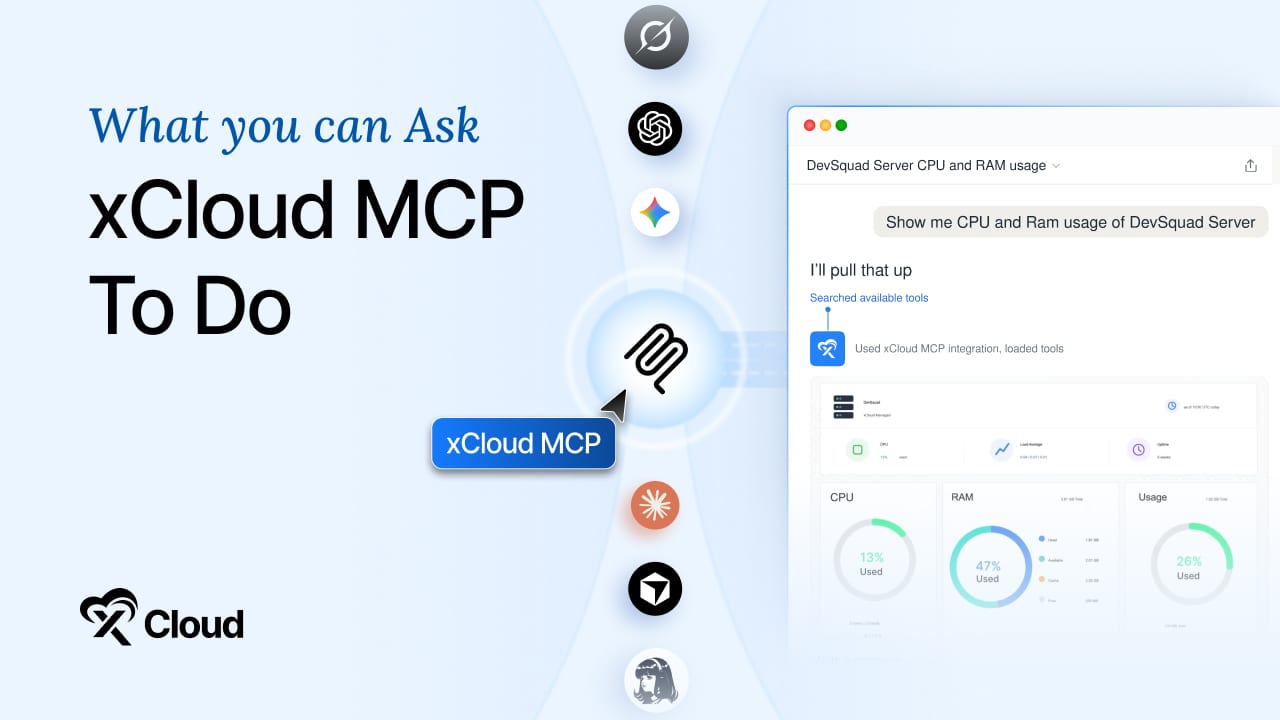 BlogStop Clicking Through Your Hosting Dashboard: What You Can Ask xCloud MCP to DoA plain-English tour of xCloud MCP for people who are not developers: what to ask, what it will not do, and how to keep it safe.Read the post
- DocConnect xCloud MCP to your AI agentStep by step for Claude Code, Claude Desktop, Cursor and others, with screenshots.
- DocMulti-team access with one connectionGrant the teams you choose and switch per request. New in v2.8.8.
- DocAccess the xCloud Public APIThe same operations as REST calls, for scripts, CI and schedules.
- ProductxCloud AI Agent SkillsA Claude Code plugin with nine skills the agent picks on its own, on top of MCP.
- ChangelogWhat shipped in v2.8.8Multi-team API tokens and MCP access, and the rest of the release.
- For agentsMachine-readable setup/agent-setup/prompt.md walks an agent through connecting itself; /mcp.md is this page as Markdown.
Frequently Asked Questions
Feel free to contact us with any questions or concerns you may have.
Is xCloud MCP free?
Yes. xCloud MCP comes free with your xCloud account. There is no separate plan, no extra purchase, and nothing to upgrade. This feature is included for every xCloud user, on both managed and self-managed servers.
What is MCP?
MCP, the Model Context Protocol, is an open standard that lets AI agents connect to external tools and act on your behalf. With xCloud MCP connected, you can ask your agent to check a server's health, run a backup, update plugins, purge a cache, or pull the latest vulnerability scan, and it does it through your xCloud account.
Which AI clients can I connect?
Any client that speaks the MCP Streamable HTTP transport: Claude Code, Claude Desktop, Cursor, Codex, OpenCode and others. Clients with browser sign-in connect over OAuth; anything else can use an API key with the mcp:invoke scope. Clients that only support local (stdio) servers connect through the mcp-remote bridge.
Can I limit what the agent is allowed to do?
Yes, at two levels. On the xCloud side you choose Read or Read and write when you authorize (or the scopes on an API key), and anything that creates, deploys, updates, reboots, deletes or buys is refused unless the assistant passes an explicit confirmation, while routine actions such as cache purges, backups, service restarts and scans run straight away. On the assistant's side, most clients let you set per-tool rules: run automatically, ask each time, or block. Read-only is a safe place to start; you can reconnect with wider access later.
How is this different from xCloud AI Agent Skills?
The skills are a plugin you install into Claude Code. MCP is an open protocol, so it is the way to connect every other client, including Claude Desktop and Cursor. Both are free, and both run on the same xCloud Public API.

Ready to Transform Your Hosting Workflow?
Connect your assistant in minutes with xCloud MCP and manage your server, sites and more in natural language.