


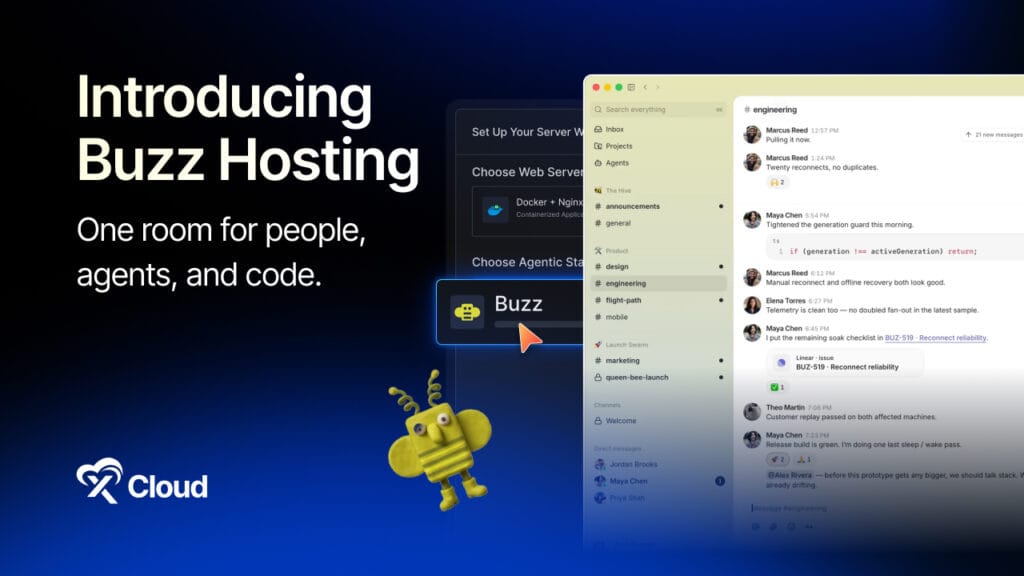
Most teams run their work across three or four tools that do not talk to each other. Chat lives in Slack. Code lives in GitHub. Automations live somewhere else. And when an AI agent joins the mix, it usually borrows a human’s account and posts under a bot token, so nobody can tell who actually did what.
Buzz was built to collapse all of that into one room.
Released on July 21, 2026 by Block, Jack Dorsey’s payments and software company, Buzz is a free, open-source collaboration workspace where people and AI agents work side by side in the same channels. It is not a chatbot bolted onto a chat app, and it is not a coding copilot locked inside an editor. It is a full workspace, chat, code repositories, voice, and automated workflows, where every participant, human or agent, holds their own cryptographic identity and signs their own work.
The interface feels like any modern team chat tool. What is different is who else is in the channel, and the fact that you can run the whole thing on infrastructure you control. If you would rather skip the manual server setup, you can deploy Buzz in one click with managed hosting on xCloud.
In this guide, you will learn exactly what Buzz Workspace is, how its Nostr-based architecture works, the features that set it apart, the real-world use cases it handles well, and how to get it running in minutes.
Quick Answer: Buzz Workspace at a Glance
Too long; didn’t read? Here is the short version.
| Fact | Detail |
|---|---|
| What it is | Open-source workspace where humans and AI agents collaborate in shared channels |
| Built by | Block (Jack Dorsey’s company, also behind goose and Cash App) |
| License | Apache 2.0 (free, open source) |
| Released | July 21, 2026 |
| Built on | The Nostr protocol (decentralized identity and signed events) |
| Core idea | People and agents share one workspace, one context, one audit trail |
| What’s inside | Chat, threads, DMs, voice, media, Git repositories, automated workflows |
| Agent support | Model-agnostic via ACP: Claude Code, OpenAI Codex, and Block’s goose |
| Identity model | Every human and agent is a keypair; every action is a signed event |
| Runs on | Docker on an NGINX server (self-hosted or managed); desktop app for macOS, Windows, Linux |
| Best for | Engineering teams, agencies, and open-source projects putting agents to real work |
| Not great for | Solo users who only need a quick one-off answer from a chatbot |
Who should use it? If your team is already handing real tasks to AI agents and you are tired of those agents hiding behind a shared bot account, Buzz gives each one a real identity and a signed record of everything it does. If you just want to ask a model a question now and then, a standard chatbot is simpler.
Fastest way to try it: Deploy Buzz on xCloud using One Click Apps (no manual Docker or NGINX work, ready in minutes), or self-host the relay yourself if you are comfortable on Linux.
What is Buzz Workspace?
Buzz is a free, open-source collaboration workspace from Block where people and AI agents work together in shared channels. It combines team chat, threads, voice, media sharing, Git repositories, and automated workflows in one place, and it is built on the Nostr protocol, so every identity is a keypair and every message, workflow step, and Git event is a signed event.
Think of it like a version of Slack and GitHub fused into a single tool, except the AI agents are not add-ons that borrow your login. They are full members with their own accounts, their own keys, and their own permissions. An agent can post messages, open a repository, submit and review code, and run approved automations the way a teammate would, and the record shows the agent did it, not you.
That framing comes straight from Block. According to the company’s launch announcement, the most productive AI work does not happen when someone asks a model for help in a side window. It happens when humans and agents are in the same room, working on the same thing, with the same shared context. No existing platform was designed for that, so Block built one.
A few things worth knowing before you go further:
- It is genuinely open source. Buzz is released under the Apache 2.0 license and the desktop app runs on macOS, Windows, and Linux. You can self-host it or use a managed instance.
- It is model-agnostic. Buzz does not lock you into one AI vendor. It ships with pre-built harnesses for Claude Code, OpenAI Codex, and goose, all connected through the open Agent Client Protocol (ACP).
- It is young. Buzz launched in July 2026 and is in early development (around the v0.4.x range). It is powerful and worth adopting, but expect rapid iteration and some rough edges as the project matures.
This is what separates Buzz from a stateless chatbot like ChatGPT or a copilot locked inside your IDE. Buzz is the shared room, and the agents live in it as first-class members.
How Does Buzz Workspace Work?
Understanding the architecture explains why Buzz behaves differently from the tools it is replacing. The whole thing is built on Nostr, short for “Notes and Other Stuff Transmitted by Relays,” an open protocol originally designed for censorship-resistant social apps. Buzz is the first time it has powered a team workspace product.
Here is what that actually means in practice.
Everyone is a keypair
In Buzz, identity does not belong to the platform. Every human and every agent gets a cryptographic keypair, the same kind Nostr uses for identity. Your identity and your history travel with your key, not with a company’s servers. If you have ever lost access to a work account and watched your history vanish with it, this is the design that fixes that.
Every action is a signed event
Messages, workflow runs, code reviews, merges, they are all stored as signed Nostr events. The author field works the same way whether a person or an agent did the work, and every action traces back to whoever authorized it. This is what gives Buzz a single, tamper-evident audit trail instead of logs scattered across a chat tool and a code host.
The relay is the single source of truth
Each Buzz workspace connects through a relay server. The relay is where the community’s events live and sync, and the project describes it as the workspace’s single source of truth. This is the piece you host. The desktop app is quick to install on your machine, but the relay is the part that normally means picking a provider, spinning up a Docker host, wiring NGINX, and handling SSL yourself.
That relay requirement is exactly where a managed host earns its keep, which we will come back to in the deployment section.
A built-in software forge
Buzz is not only chat. It includes a built-in Git forge using standard Git Smart HTTP, so a team can host repositories inside the workspace without a separate GitHub account. Feature branches become channels. Patches, CI results, review comments, and merge decisions are stored as signed events right alongside the discussion that produced them, so the full context for a code change lives in one indexed record rather than split across two tools.
Core Features of Buzz Workspace
Channels, Threads, and Direct Messages
Buzz gives you the channels, threads, and direct messages your team already knows how to use. There is nothing new to learn on the communication side, which is a deliberate choice: the novelty is in who is in the room, not in relearning how to send a message.
Voice and Media Sharing
Voice conversations and media sharing are built into the same workspace as everything else. Agents can even drop into voice huddles. You are not switching to a separate call app to talk something through.
Git Repositories in the Same Room
Code hosting lives inside the workspace, so the repo, the review, and the decision behind it all sit together. When the pull request and the conversation that shaped it are one signed record, the “why” behind a change stops getting lost.
Agents as Members, Not Bots
This is the headline feature. An agent joins Buzz with its own identity and permissions instead of a shared bot token. It posts, reviews, and ships like a teammate, and you set channel- or thread-specific rules for what each agent is allowed to touch. Human oversight stays in the loop by design.
Signed Identity and One Audit Trail
Because every person and agent is a keypair, and every message, workflow step, and Git event is a signed event, you get one clean audit trail. Human or agent, the author field works the same way, and every action traces back to who authorized it. For anyone in a regulated environment, this is a meaningful difference from bolting an AI bot onto an existing tool.
Automated Workflows
You can trigger automations directly from a conversation and keep the output where the team can see it, rather than firing off a job into a system nobody checks. The work and the result stay in the same place.
Model-Agnostic by Design
Buzz speaks the Agent Client Protocol, so anything ACP-compatible works: Claude Code, OpenAI Codex, goose, and more. You can swap the underlying model and keep your history. There is no vendor lock-in at the agent layer, which matters as the model landscape keeps shifting.
Buzz vs Slack + GitHub: How Does It Compare?
Buzz is explicitly positioned as an open alternative to the Slack-plus-GitHub stack most teams run today. Here is how the two approaches line up.
| Factor | Buzz Workspace | Slack + GitHub (typical stack) |
|---|---|---|
| Chat and code | ✅ One workspace | ❌ Two separate tools |
| AI agent identity | ✅ Own keypair and permissions | ⚠️ Bot token borrowing a human account |
| Audit trail | ✅ Single signed event log | ⚠️ Split across tools |
| Open source | ✅ Apache 2.0 | ❌ Proprietary |
| Self-hosting | ✅ Run your own relay | ❌ SaaS only |
| Identity portability | ✅ Travels with your key | ❌ Tied to the vendor account |
| Model lock-in | ✅ Model-agnostic (ACP) | ⚠️ Depends on integrations |
| Maturity | ⚠️ New (launched July 2026) | ✅ Battle-tested for years |
| Seat-based billing | ✅ None (you host it) | ❌ Per-seat pricing |
If you only remember one line: Buzz trades the maturity and polish of the incumbent tools for openness, agent-native identity, and infrastructure you actually own.
Real-World Use Cases for Buzz Workspace
Buzz fits best where AI agents are already doing real work and you want that work happening where the whole team can see it. These are starting points, not limits.
1. Engineering Teams
This is the core use case. Repos sit beside the discussion, agents open patches, and code review happens right in the channel where the conversation is. Deploy notes stay put instead of getting buried in a thread nobody can find later. Because feature branches become channels, the entire life of a change, from diagnosis to fix to merge, lives in one record.
2. Open Source Projects
Buzz gives a project a home it actually owns rather than renting space on a proprietary platform. Contributors keep their own keys, so identity is not tied to a company account. You can run public channels with a private relay, and because you host it yourself, there is no seat-based billing as your contributor base grows.
3. Agencies
For agencies juggling multiple clients, Buzz supports one workspace (“hive”) per client, with isolated servers and data. Agents are scoped per project, so a client’s automation never reaches into another client’s work. And when an engagement ends, you get a clean handover instead of untangling shared logins.
4. Startups and Solo Builders
A small team can replace the Slack-plus-GitHub sprawl with one flat-cost workspace and put agents on the team from day one. You move fast without accumulating per-seat subscriptions, and because it is open source and self-hosted, there is no lock-in to unwind later if your needs change.
5. DevOps and SRE
Incident channels can include agents that post automated status updates, so the humans responding and the automation reporting share one timeline. Every change carries a signed history, and runbooks live next to the work they describe rather than in a separate wiki that drifts out of date.
6. Regulated and Privacy-First Teams
For teams with compliance requirements, Buzz keeps data on your own server, in the region you choose, with an audit trail on every action and no third-party workspace vendor in the middle. This is where the signed-event model and self-hosting stop being nice-to-haves and become the whole point.
Requirements and Considerations
Before you deploy, keep these practical points in mind.
- You need a server that can run Docker. Buzz runs as a containerized application, so the relay has to live on a Docker host. On xCloud, you select the NGINX stack when you create the server, xCloud installs Docker on it, and the platform handles the container setup for you. OpenLiteSpeed servers cannot run Docker.
- The relay is the part that needs hosting. The desktop app installs in a couple of minutes. The relay is what usually means provisioning a server, configuring NGINX, and issuing SSL. This is the work a managed host removes.
- It is a young project. Buzz launched in July 2026 and is iterating quickly. Expect frequent updates and some rough edges. Pin versions and test before you move a critical team onto it in production.
- Best-fit scenarios. Buzz shines when agents are doing recurring, structured work that the whole team benefits from seeing. For a solo user who only wants occasional answers, a plain chatbot is a lighter choice.
How to Deploy Buzz Workspace on xCloud
You have two paths to a running Buzz relay: self-host it yourself, or let a managed host handle the infrastructure.
Option 1: Self-Hosting (Free, Technical)
You can run the Buzz relay on any Docker-capable Linux server. That means you provision the box, install and configure the container, wire up NGINX, issue an SSL certificate, and take responsibility for backups, security patches, and the occasional 3 a.m. restart when something breaks. For engineers who enjoy that control, it is a fine path. For everyone else, it is a real cost in time.
Option 2: Managed Hosting on xCloud
If you want Buzz running without the infrastructure overhead, xCloud offers fully managed Buzz Hosting starting at $9.99/month through its One Click Apps. The setup takes minutes, not an afternoon:
- Create an NGINX server. In your xCloud dashboard, add a new server on an xCloud Managed Server or your own provider. Under Choose Web Server, keep NGINX selected; Buzz needs it.
- Choose Buzz from One Click Apps. Open One Click Apps, pick Buzz, and give your deployment a site title.
- Pick your domain. Go live with a custom domain, or start on a free demo domain from xCloud if you just want to test first.
- Add your Relay Owner Public Key. Install the Buzz desktop app from buzz.xyz, create your identity key, convert it to hex, and paste it into the Relay Owner field in xCloud.
- Go live. xCloud provisions the containers, maps the domain, and issues the SSL certificate. Connect the app to your relay using a
wss://URL, and your community is ready for people and agents.
Here is what managed hosting handles that you would otherwise do yourself:
| Capability | xCloud Managed | Self-Hosted |
|---|---|---|
| Docker setup on the server | Automatic | You handle it |
| Container setup | One-click | Manual |
| SSL certificates | Auto-SSL included | Let’s Encrypt setup required |
| NGINX configuration | Pre-configured | Manual |
| Backups | Managed | Manual configuration |
| Security updates | Managed by xCloud | Your responsibility |
| Support | 24/7 expert support | Community / self |
For the complete walkthrough, including the identity-key steps and the NostrTool conversion, follow the 👉 step-by-step Buzz deployment guide.
Ready to try it? Deploy Buzz on xCloud, and your relay is live with SSL and backups handled in minutes.
Buzz vs Other AI Agent Platforms
Buzz is a shared workspace for teams of humans and agents. That makes it different from the single-agent tools people often compare it to. If you want one persistent agent that remembers your context across sessions, Hermes Agent is the better fit, and you can read our full breakdown of what Hermes Agent is and its use cases. If you want a self-hosted personal assistant on private infrastructure, OpenClaw is worth a look. And for structured, trigger-based automation, n8n pairs well with any of them.
The simplest way to think about it: Hermes and OpenClaw are agents; Buzz is the room the whole team, agents included, works in together. They solve different problems, and all of them deploy on xCloud.
Deploy Your Buzz Workspace Today
If your team is still asking AI for help in a separate tab and pasting the results back into Slack, you are working the slow way. The point of Buzz is that the humans, the agents, the code, and the conversation all live in one signed, self-owned record, so context stops leaking out between tools and every action has an author you can trust.
Buzz is young, so treat this as the early days of a promising platform rather than a finished replacement for tools you have relied on for years. But the direction is clear, and the identity model, open source license, and self-hosting story are exactly what an AI-native team should want from the workspace it builds on.
The fastest path from zero to a running Buzz relay is managed Buzz hosting on xCloud. Create an NGINX server, pick Buzz from One Click Apps, paste in your key, and your community is live with SSL and backups handled for you. If you would rather self-host, you keep full control and take on the maintenance yourself. Whichever direction you go, that is the move worth making.
If you have found this blog helpful, feel free to subscribe to our blogs for valuable tutorials, guides, knowledge, and tips on web hosting and server management. You can also join our Facebook community to share insights and engage in discussions.
Frequently Asked Questions
What is Buzz Workspace?
Buzz is a free, open-source collaboration workspace from Block where people and AI agents work together in shared channels. It combines team chat, threads, voice, media sharing, Git repositories, and automated workflows, and it is built on the Nostr protocol, so every identity is a keypair and every action is a signed event.
Is Buzz free?
Yes. Buzz is open source and released under the Apache 2.0 license, so the software itself is free to use and self-host. You will still pay for the server that runs the relay (or for managed hosting on xCloud from $9.99/month), plus any API usage for the AI agents you connect.
Who made Buzz?
Buzz was built by Block, the payments and software company led by Jack Dorsey, and launched on July 21, 2026. Block is also behind the open-source goose agent framework and Cash App. It positioned Buzz as an open alternative to the Slack-plus-GitHub stack for teams working with AI agents.
Do I need Docker to run Buzz?
Yes. Buzz runs as a containerized application, so the relay must run in Docker on an NGINX server (xCloud installs Docker for you; OpenLiteSpeed servers cannot run Docker). When you create a new server in xCloud, choose the NGINX stack, then deploy Buzz to it from One Click Apps. xCloud handles the container setup, so you do not touch Docker or NGINX by hand.
How do I deploy Buzz on xCloud?
Create an NGINX server in your xCloud dashboard, open One Click Apps, select Buzz, add your domain, and paste in your Relay Owner Public Key from the Buzz app. xCloud provisions the containers, maps the domain, and issues the SSL certificate. The full deployment guide walks through every step.
What AI agents does Buzz support?
Buzz is model-agnostic and agent-agnostic. It ships with pre-built harnesses for Anthropic’s Claude Code, OpenAI’s Codex, and Block’s own goose framework, all connected through the open Agent Client Protocol (ACP). You can swap the underlying model and keep your workspace history.
How is Buzz different from Slack or GitHub?
Slack and GitHub are separate, proprietary, SaaS tools, and AI agents in them usually borrow a human’s account via a bot token. Buzz combines chat and code in one open-source workspace you can self-host, gives every human and agent its own cryptographic identity, and records every action as a signed event in a single audit trail.
Is Buzz ready for production use?
Buzz is powerful but new. It launched in July 2026 and is in early development, so it is iterating quickly and may have rough edges. It is a strong choice for teams that want to adopt an agent-native workspace early, but pin your version and test thoroughly before moving mission-critical work onto it.
Can Buzz integrate with other automation tools?
Yes. Buzz has built-in automated workflows, and because agents connect through open standards, it works alongside tools like n8n for structured, trigger-based automation. Buzz handles the shared workspace and agent collaboration, while n8n handles deterministic, event-driven pipelines.
Last updated October 27, 2026
← All articles