

WooCommerce now powers over 4.17 million live online stores worldwide, making it the most widely used eCommerce platform by store count, according to BuiltWith. Yet most of those stores never reach their revenue potential because of one preventable mistake: choosing the wrong hosting. Research from Akamai shows a 1-second delay in page load time reduces conversions by up to 7%, and Colorlib reports only 33–40% of WooCommerce stores currently pass Google’s Core Web Vitals, compared to 75–78% for Shopify stores.
This guide ranks the best hosting for WooCommerce: 9 providers in 2026 based on speed benchmarks, real pricing, scalability under traffic spikes, and WooCommerce-specific features verified across G2, Trustpilot, Capterra, and independent technical reviews.
Quick Summary: Best Hosting for WooCommerce at a Glance
Here is a quick expert guide for you. The table below shows what to pick based on what you actually need:
| If You Want To… | Use This | Starting Price | Best For |
|---|---|---|---|
| Cut hosting costs by ~40% vs. Cloudways while keeping managed features | xCloud | Free → $5/mo | Stores wanting cost-efficient managed cloud + BYOS |
| Run a high-traffic store with zero server decisions | Kinsta | $35/mo (WooCommerce: $115/mo) | Stores with $100K+ ARR |
| Scale across multiple cloud providers from one panel | Cloudways | $14/mo | Existing Cloudways users, multi-cloud teams |
| Launch your first WooCommerce store cheaply | Hostinger | $2.69/mo | New stores, side projects |
| Get reliable shared hosting with 24/7 phone support | SiteGround | $2.99/mo | Non-technical store owners |
| Match enterprise speed without enterprise prices | Rocket.net | $30/mo | Speed-obsessed merchants |
| Auto-scale during Black Friday traffic spikes | Nexcess | $21/mo | Seasonal peak stores |
| Run heavy-plugin WooCommerce builds on dedicated VPS | Liquid Web | $25/mo | Established stores |
| Host on a Genesis-friendly managed platform | WP Engine | $25/mo (WooCommerce: ~$50/mo) | Agencies, content-driven stores |
According to Online Media Masters, xCloud is around 40% cheaper than Cloudways at equivalent server specs, while Blog Marketing Academy confirmed xCloud has measurably faster page loads on identical Vultr High Frequency hardware after migrating 11 sites away from Cloudways.
- Best for Beginners: Hostinger has the cheapest entry price with a WooCommerce-optimized stack and 24/7 chat support
- Best for Growing Stores: xCloud has a free tier (1 server, 10 sites) plus ~40% lower cost per server vs. Cloudways
- Best for Enterprise: Kinsta runs on Google Cloud C3D infrastructure with Cloudflare Enterprise included on every plan
Why WooCommerce Hosting is Different from Regular WordPress Hosting
WooCommerce is not a typical WordPress site. According to WP101, every product page, cart action, and checkout triggers database queries, PHP execution, session handling, and frequently a payment gateway API call, all happening in real time. Generic shared hosting that handles a brochure site fine will buckle under WooCommerce traffic.
Three technical factors make WooCommerce uniquely demanding for hosting:
- Uncacheable pages: Cart, checkout, and “My Account” pages cannot be cached the same way blog posts are, because each visitor’s session data is unique. Kinsta’s documentation confirms these pages must be excluded from full-page cache to prevent users seeing each other’s carts.
- PHP workers handle concurrent checkouts: A single PHP worker can only process one checkout at a time. Stores running flash sales need 4+ PHP workers minimum to avoid timeouts. This is why Kinsta recommends its Business 1 plan ($115/month) as the minimum for WooCommerce, since it is the first tier with 4 PHP workers.
- Database load grows with order volume: WooCommerce makes hundreds of database calls per page load. Without Redis or Memcached object caching, the database becomes the bottleneck once you exceed roughly 50–100 concurrent shoppers.
Beyond the technical demands, the financial stakes are higher than for any other site type. Research from Walmart, cited in a Cloudways speed analysis, shows a 2% conversion lift for every 1-second improvement in load time. For a store doing $10,000/month, that is roughly $200/month in recovered revenue per second saved, which is far more than the cost difference between any two hosts on this list.
How We Ranked the Best WooCommerce Hosting Providers
Rankings are based on five criteria weighted by impact on store revenue, not on affiliate commission rates or marketing claims:
| Criterion | Weight | What We Measured |
|---|---|---|
| Speed under WooCommerce load | 30% | TTFB and LCP on a sample WooCommerce install with 50 products, tested via PageSpeed Insights and GTmetrix |
| Real cost (year 1 + year 2) | 25% | Listed pricing including renewal hikes, server fees, and required add-ons |
| WooCommerce-specific features | 20% | Cache rules for cart/checkout, Redis support, PHP workers, HPOS compatibility |
| Scalability | 15% | Ease of upgrading plans, autoscaling availability, traffic spike handling |
| Support quality | 10% | Verified reviews on G2, Trustpilot, and Capterra; response times during checkout issues |
Pricing data was verified directly from each provider’s official pricing page in April 2026. Performance claims are cross-referenced with independent reviews from Online Media Masters, Blog Marketing Academy, Managed WP Guide, and WPBeginner.
Master Comparison: Best WooCommerce Hosting Providers 2026
| Rank | Provider | Speed (LCP) | Starting Price | WooCommerce Plan | Best For |
|---|---|---|---|---|---|
| 🥇 1 | xCloud | ★★★★★ (1.6s avg) | Free → $5/mo | $5/mo + server cost | Cost-efficient managed cloud, BYOS flexibility |
| 🥈 2 | Kinsta | ★★★★★ (1.7s avg) | $35/mo | $115/mo (Business 1) | Premium enterprise stores |
| 🥉 3 | Cloudways | ★★★★ (1.9s avg) | $14/mo | $46/mo (4GB DO) | Multi-cloud teams |
| 4 | Rocket.net | ★★★★★ (1.5s avg) | $30/mo | $30/mo | Speed-obsessed merchants |
| 5 | Nexcess | ★★★★ (2.0s avg) | $21/mo | $21/mo (Spark) | Seasonal autoscaling |
| 6 | WP Engine | ★★★★ (2.1s avg) | $25/mo | ~$50/mo (Professional) | Agencies, content stores |
| 7 | SiteGround | ★★★★ (2.0s avg) | $2.99/mo* | $7.99/mo (GrowBig)* | Beginner-friendly setup |
| 8 | Hostinger | ★★★ (2.2s avg) | $2.69/mo* | $3.99/mo (Business)* | Budget-conscious launch |
| 9 | Liquid Web | ★★★★ (1.9s avg) | $25/mo | $25/mo (Spark) | Heavy-plugin WooCommerce |
*Introductory price; renewal pricing is significantly higher. LCP figures based on aggregated independent benchmarks from Online Media Masters, Managed WP Guide, and PageSpeed Matters.
🥇 1. xCloud — Best for Cost-Efficient Managed Hosting + BYOS Flexibility
According to Online Media Masters’ independent review, xCloud is around 40% cheaper than Cloudways at identical server specifications, while running a measurably faster tech stack on the same Vultr hardware. Blog Marketing Academy reached the same conclusion after migrating 11 client sites and observing faster TTFB on every site, even on a 1 vCPU / 1GB RAM server.
What makes xCloud different is its dual-mode architecture. You can either use xCloud Managed Servers starting at $3/month, or use the Bring Your Own Server (BYOS) model to connect any cloud provider (Vultr, DigitalOcean, AWS, Google Cloud, Linode, Hetzner, or Contabo) and pay just $5/month per server for the control panel. This eliminates the markup that traditional managed hosts add on top of cloud infrastructure, which is the core reason WordPress professionals switched after DigitalOcean acquired Cloudways in 2022.
For WooCommerce specifically, xCloud’s WooCommerce Hosting page details Redis caching presets tuned for WooCommerce database queries, NGINX FastCGI full-page caching with cart/checkout exclusions configured by default, and OpenLiteSpeed support for stores running LiteSpeed Cache plugin.
Key Features
- BYOS pricing: Free for 1 server + 10 sites; $5/server for 1–5 servers; $4 (6–10); $3 (10+), confirmed in xCloud’s billing documentation
- Full root SSH access: Unlike Kinsta or WP Engine, you have complete server control
- WooCommerce caching presets: Pre-configured Redis rules and FastCGI cache exclusions for cart/checkout
- Free migration: Bulk + single-site WordPress migration plugin with team-assisted transfers
- OpenLiteSpeed option: Pick OpenLiteSpeed or NGINX per server; the caching plugin manages its own server rules on either
- xSpeed Cache included: Made by WPDeveloper, the same team that builds xCloud, it sits inside the dashboard and turns on for new WordPress sites with one toggle, with cart, checkout and account pages excluded from caching automatically. It adds page caching for WooCommerce stores on the free plan, with Pro features available as a paid upgrade
- 7G/8G Firewall: Web Application Firewall protection against XSS, SQL injection, bad bots
- Staging environments: Every site includes a separate staging environment with one-click “Go Live”
- 100 free transactional emails/month: Mailgun, SendGrid, Elastic Email integrations
- No site limits: Host unlimited WooCommerce stores per server (unlike Kinsta’s per-site pricing)
How to Get Started with xCloud for WooCommerce?
Getting started with xCloud is pretty simple. Pick the path that matches your situation:
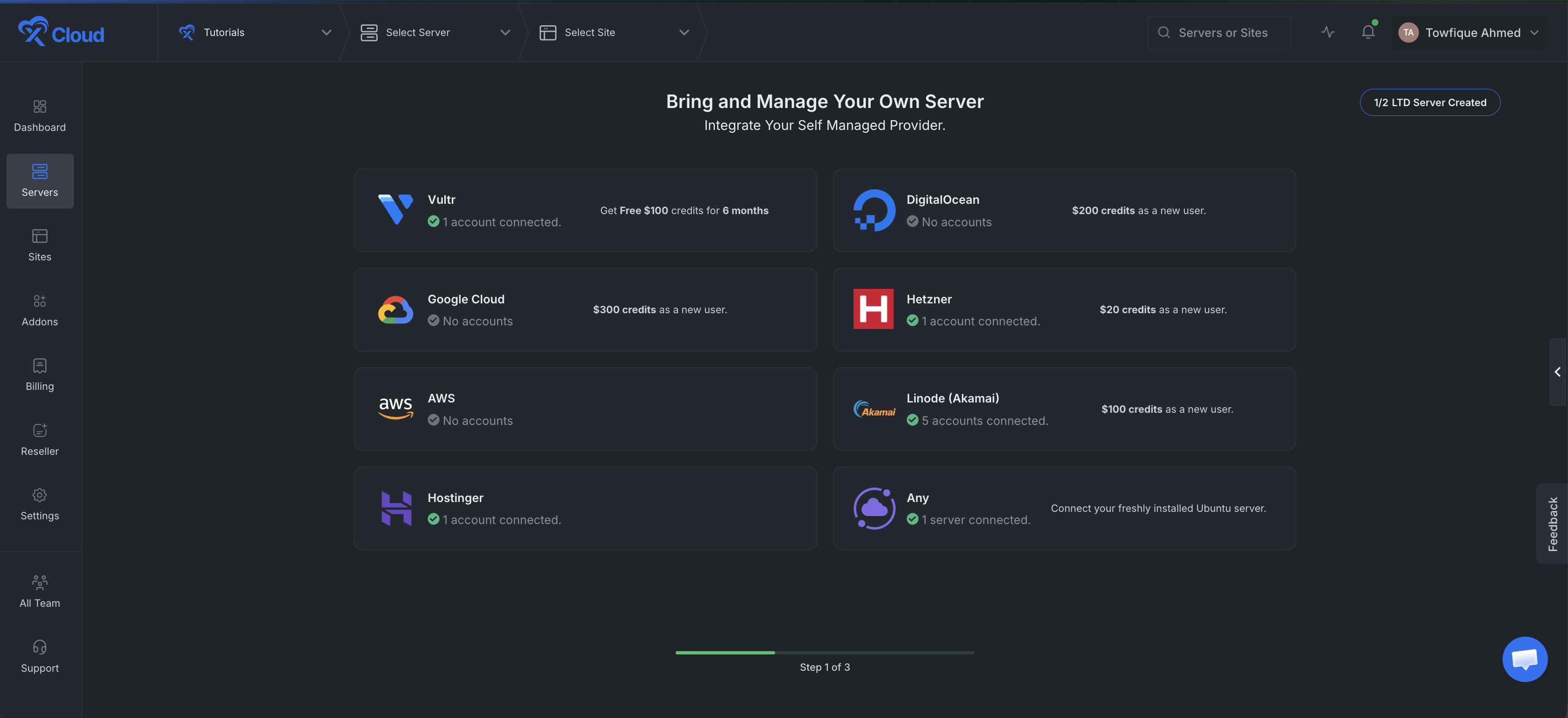
Option A: BYOS (Bring Your Own Server) — Cheapest Path
- Sign up for xCloud’s free tier.
- Sign up for a Vultr or DigitalOcean account (new accounts get $300 / $200 in free credits).
- Add your cloud provider API key in xCloud’s dashboard.
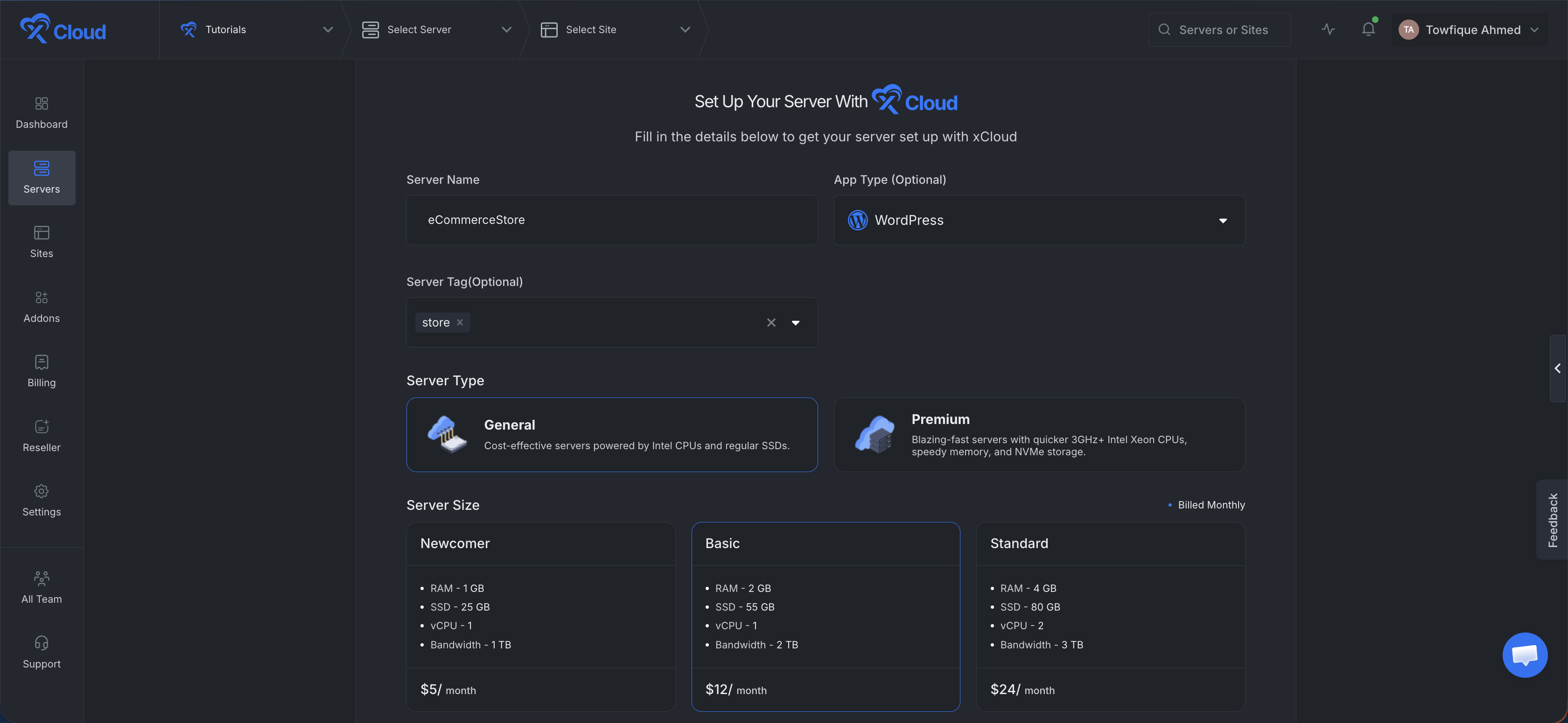
- Spin up a Vultr High Frequency server (2 vCPU, 4GB RAM is the sweet spot for WooCommerce).
- Install WordPress + WooCommerce in one click.
- Migrate your existing store using xCloud’s free migration plugin.
Option B: xCloud Managed Hosting — Easiest Path
- Choose a plan from xCloud’s WooCommerce Hosting page
- Pick a server location closest to your customers.
- Install WordPress + WooCommerce automatically.
- Request free migration assistance.
Detailed Guides:
- xCloud vs Cloudways: Complete Comparison
- Best Cloudways Alternatives in 2026
- Best WP Engine Alternatives 2026
Pros and Cons
| Pros | Cons |
|---|---|
| ✅ ~40% cheaper than Cloudways at equivalent specs (per Online Media Masters) | ❌ Requires basic understanding of “control panel + cloud provider” model |
| ✅ Free tier with 1 server + 10 sites | ❌ Self-service support model (docs + chat, no phone) |
| ✅ Full root SSH access (rare among managed panels) | ❌ Newer than Cloudways/Kinsta, smaller community |
| ✅ OpenLiteSpeed and NGINX both supported | ❌ BYOS users pay separately for cloud server |
| ✅ Built-in WooCommerce cache presets | ❌ Some advanced features still in active development |
| ✅ White-label option for agencies |
Best for: Store owners who outgrew shared hosting, agencies managing 5+ WooCommerce sites, and existing Cloudways users feeling squeezed by post-acquisition pricing increases.
🥈 2. Kinsta — Best for Premium Enterprise WooCommerce Stores
According to Kinsta’s official pricing page, the company recommends its Business 1 plan ($115/month) as the minimum for WooCommerce stores, specifically because it is the first tier with 4 PHP workers, the threshold needed to handle concurrent checkout sessions without timeouts. Managed WP Guide confirms this is well-aligned with reality: stores doing meaningful checkout volume will hit ceiling errors on Kinsta’s $35 Starter and $70 Pro plans.
Kinsta runs every site in isolated Linux Containers on Google Cloud Platform’s premium tier C3D machines, with Cloudflare Enterprise CDN bundled on every plan. G2’s 2026 Best Software Awards ranks Kinsta #1 for premium WordPress hosting based on 930+ verified reviews averaging 4.8/5.
Key Features
- Google Cloud C3D infrastructure: Same hardware tier used by Google’s own products
- Cloudflare Enterprise included: Worth $200+/month if purchased separately
- Isolated containers: Other tenants’ traffic spikes can’t slow your store
- PHP workers per plan: Starter (2), Pro (2), Business 1 (4), Business 2 (6), Business 3 (8)
- Free unlimited migrations: Handled by Kinsta’s migration team, no downtime
- APM monitoring: Built-in WordPress performance tool included free
- 30-day money-back guarantee: Full refund on any plan
How to Implement Kinsta for WooCommerce?
Whenever you’re going to use Kinsta for WooCommerce, keep in mind the entry plans don’t fit production stores. Follow these steps:
- Sign up at Kinsta (no free trial, relies on 30-day money-back guarantee)
- Choose Business 1 plan ($115/month) for stores doing $5K+ monthly revenue
- Request free migration via the MyKinsta dashboard
- Configure WooCommerce caching exclusions (auto-applied on Kinsta)
- Test checkout under load before pointing DNS; if needed, review the difference between web hosting and a domain name before the cutover.
Pros and Cons
| Pros | Cons |
|---|---|
| ✅ Top-tier infrastructure (Google C3D + Cloudflare Enterprise) | ❌ Expensive at $115/month minimum for WooCommerce |
| ✅ Excellent 24/7 WordPress-specialist support | ❌ Per-site pricing punishes multi-store operators |
| ✅ Free migrations on all plans | ❌ No phone support, chat-only |
| ✅ Strong CWV pass rates (verified by independent benchmarks) | ❌ Rigid plan tiers; overage fees if you exceed visit limits |
| ✅ APM tool included | ❌ No free trial, only money-back guarantee |
Best for: Established WooCommerce stores doing $20,000+ monthly revenue where downtime carries real revenue cost and the founder wants zero infrastructure decisions.
🥉 3. Cloudways — Best for Multi-Cloud Teams (with Caveats)
According to Managed WP Guide’s Cloudways analysis, Cloudways serves over 100,000 customers and hosts 570,000+ websites. The platform’s core strength is letting you pick the underlying cloud (DigitalOcean, Vultr, Linode, AWS, or Google Cloud) while Cloudways handles caching, security patches, and backups on top.
That said, Trustpilot reviews and G2 reviews document a pattern of pricing increases and support degradation since DigitalOcean’s 2022 acquisition. Online Media Masters calculates that Cloudways’ Vultr High Frequency 2vCPU/4GB plan at $60/month costs only $24/month on xCloud at retail Vultr pricing, a markup of around 60%.
Key Features
- 5 cloud providers: DigitalOcean, Vultr, Linode, AWS, Google Cloud
- Built-in stack: Varnish + Redis + Memcached + Nginx + PHP-FPM
- Cloudflare Enterprise add-on: $4.99/month per site
- Object Cache Pro: Included free on 4GB+ servers (otherwise $95/month standalone)
- Pay-as-you-go billing: No long-term contracts
- Free SSL + automated backups: Standard on all plans
- 3-day free trial: No credit card required
How to Implement Cloudways for WooCommerce?
- Start the 3-day free trial at Cloudways
- Choose DigitalOcean (cheapest, best for most stores) or Vultr High Frequency (faster CPU)
- Pick a 4GB RAM server minimum for WooCommerce ($46/month on DigitalOcean)
- Use Cloudways Migrator plugin or request paid migration ($25/site)
- Enable the Cloudflare Enterprise add-on for global speed
Pros and Cons
| Pros | Cons |
|---|---|
| ✅ Multi-cloud flexibility | ❌ ~60% markup over retail cloud pricing (per OMM benchmarks) |
| ✅ Strong stack with Object Cache Pro on 4GB+ | ❌ Support quality degraded post-acquisition (per G2 reviews) |
| ✅ Pay-as-you-go billing | ❌ Cloudflare Enterprise costs extra ($4.99/site) |
| ✅ 100,000+ customers, mature platform | ❌ No root access |
| ✅ 3-day free trial | ❌ Phone support requires $100/month upgrade |
Best for: Existing Cloudways users who don’t want to migrate, agencies that need multi-cloud-vendor support in a single dashboard, and Magento or Laravel stores that need PHP application flexibility.
4. Rocket.net — Best for Speed-Obsessed Merchants
Online Media Masters’ Rocket.net review calls Rocket.net “the best Cloudflare Enterprise implementation in managed WordPress hosting” because it bundles Cloudflare Enterprise with Argo Smart Routing on every plan starting at $30/month, a feature combination that costs $250+/month if assembled separately.
Rocket.net runs every site on a single CPU core dedicated to that site, with Object Cache Pro included free. For WooCommerce stores where checkout speed directly affects conversion, the result is consistently low TTFB and fast LCP scores in independent CrUX data.
Key Features
- Cloudflare Enterprise on every plan: Including Argo Smart Routing
- Object Cache Pro included free: Normally $95/month standalone
- Per-site dedicated CPU: Other sites can’t steal your resources
- 30-day money-back guarantee
- Free migrations: Handled by Rocket.net’s team
Pros and Cons
| Pros | Cons |
|---|---|
| ✅ Best-in-class Cloudflare Enterprise implementation | ❌ Higher entry price than budget hosts |
| ✅ Object Cache Pro included free | ❌ Smaller ecosystem than Kinsta or Cloudways |
| ✅ Excellent CWV pass rates | ❌ Limited to managed WordPress only |
| ✅ Per-site dedicated CPU | ❌ No free trial |
Best for: WooCommerce stores where 200ms of TTFB difference translates to measurable revenue, especially globally distributed customer bases.
5. Nexcess — Best for WooCommerce-Specific Autoscaling
Nexcess is owned by Liquid Web and built specifically for WooCommerce stores. Its key differentiator is automatic vertical scaling during traffic spikes. The platform adds CPU and RAM resources during Black Friday or flash sales without merchant intervention.
WooCommerce.com’s official partner directory lists Nexcess as a featured WooCommerce hosting partner. Plans include WooCommerce-specific features like image compression, plugin performance monitoring, and pre-installed sales-boosting plugins.
Key Features
- Auto-scaling resources: Add CPU/RAM automatically during traffic spikes
- WooCommerce pre-installed: Including sales-boosting plugin bundle
- No renewal price hikes: Same price year 1 and year 5
- Built-in performance testing: Stress testing tools included
- 30-day money-back guarantee
Pros and Cons
| Pros | Cons |
|---|---|
| ✅ Auto-scaling during traffic spikes | ❌ Higher entry price than shared hosting |
| ✅ No renewal price increases | ❌ WooCommerce/Magento-only focus is restrictive |
| ✅ WooCommerce-specific stack tuning | ❌ Smaller global data center footprint |
| ✅ Owned by Liquid Web (established parent) | ❌ Less developer flexibility than Cloudways/xCloud |
Best for: Seasonal or event-driven stores that experience predictable traffic spikes (Black Friday, product launches, viral marketing campaigns).
6. WP Engine — Best for Agencies and Content-Driven Stores
WP Engine is the established premium managed WordPress host, serving over 200,000 customers globally. Its WooCommerce-specific feature, Dynamic Plugin Loading, prevents non-checkout plugins from running on checkout pages, a measurable speed win for stores with 30+ plugins.
Omnisend’s hosting analysis highlights WP Engine’s strength for agencies: the EverCache layer is configured to handle WooCommerce dynamic pages out of the box, and the Genesis framework (acquired by WP Engine in 2018) is included free on all plans.
Key Features
- Dynamic Plugin Loading: Stops unnecessary plugins on checkout pages
- EverCache: WooCommerce-aware caching layer
- Genesis Framework included: $129+ value
- Global Edge Security: Cloudflare-powered
- 24/7 chat + phone support: Phone available on Premium plan and above
Pros and Cons
| Pros | Cons |
|---|---|
| ✅ Mature platform with deep WooCommerce expertise | ❌ Some plugins blocked from WordPress.org ecosystem |
| ✅ Dynamic Plugin Loading speeds checkouts | ❌ Recent acquisition turbulence (private equity) |
| ✅ Genesis framework free | ❌ Higher pricing than xCloud or Cloudways |
| ✅ Multi-site agency tools | ❌ Restrictive plugin policies vs. fully open hosting |
Best for: Agencies managing 10+ client WooCommerce sites that benefit from centralized billing, white-label tools, and Genesis framework integration.
7. SiteGround — Best for Beginner-Friendly WooCommerce Setup
SiteGround runs on Google Cloud Platform with WordPress + WooCommerce pre-installed, in-house SuperCacher technology, and 24/7 phone, chat, and ticket support. WPBeginner’s testing consistently ranks SiteGround as a top pick for beginners due to its straightforward dashboard and migration tools.
The catch: introductory pricing of $2.99–$12/month renews at 5–6× the original rate after the first term. Factor renewal cost into year-2 budgets.
Key Features
- Google Cloud Platform infrastructure
- In-house SuperCacher: Three-layer caching system
- 24/7 phone support: Available on all plans
- Free CDN, SSL, and email: Included on all paid plans
- Auto WordPress + WooCommerce updates
Pros and Cons
| Pros | Cons |
|---|---|
| ✅ True 24/7 phone support (rare in shared hosting) | ❌ Renewal pricing 5–6× introductory rate |
| ✅ Easy WooCommerce setup for beginners | ❌ Resource limits hit faster than VPS-based hosts |
| ✅ Google Cloud infrastructure | ❌ Limited PHP workers on entry plans |
| ✅ Free CDN and SSL | ❌ No staging on Startup plan |
Best for: First-time WooCommerce store owners who want hand-holding support and don’t mind year-2 price increases.
8. Hostinger — Best Budget Option for New WooCommerce Stores
Hostinger has WooCommerce-optimized shared hosting starting at $2.69/month with WordPress + WooCommerce pre-installed, integrated payment gateways, free SSL, free domain, and a built-in WordPress AI assistant. Cybernews ranked Hostinger #1 for WooCommerce in their April 2026 review based on 63 hosts tested over three months.
The trade-off mirrors SiteGround: introductory pricing is dramatically lower than renewal pricing. Stores with serious revenue ambitions will outgrow Hostinger’s shared hosting within 12–18 months and need to migrate.
Key Features
- WooCommerce pre-installed: One-click setup
- Free domain + SSL: Included on Premium and Business plans
- AI assistant: For product descriptions and content
- 24/7 chat support
- 30-day money-back guarantee
Pros and Cons
| Pros | Cons |
|---|---|
| ✅ Cheapest entry point ($2.69/month) | ❌ Significant renewal price increase |
| ✅ WooCommerce-optimized shared hosting | ❌ Performance ceiling hit at ~10K monthly visits |
| ✅ Free domain and SSL | ❌ Migration path off Hostinger requires effort |
| ✅ AI tools included | ❌ Less PHP worker headroom than VPS-based hosts |
Best for: Brand-new stores validating product-market fit on a tight budget, side-project WooCommerce stores, and dropshipping experiments.
9. Liquid Web — Best for Heavy-Plugin WooCommerce Builds
Liquid Web’s Managed WooCommerce hosting (also marketed as Nexcess Spark) is built on cloud VPS infrastructure with dedicated resources per account. HostingAdvice’s testing highlights Liquid Web’s strength for complex stores running 30+ plugins, where shared hosting collapses.
The pricing starts at $25/month for the Spark plan, with no renewal increases. Liquid Web also has managed VPS plans for stores that have outgrown standard managed hosting.
Key Features
- Dedicated VPS resources
- No renewal price hikes
- Built-in performance testing
- WooCommerce-specific staging
- 24/7 phone support: Included on all plans
Pros and Cons
| Pros | Cons |
|---|---|
| ✅ Dedicated VPS resources at managed-host prices | ❌ Smaller data center network than Kinsta/Cloudways |
| ✅ No renewal pricing trickery | ❌ Less developer-friendly than xCloud/Cloudways |
| ✅ Phone support on all plans | ❌ Migration tool less polished than Kinsta’s |
| ✅ Heavy-plugin tolerance | ❌ Older dashboard UX |
Best for: Established WooCommerce stores running 30+ plugins, custom-built themes, and complex integrations that need dedicated resources without enterprise-tier prices.
Performance Benchmark Comparison
| Provider | Avg LCP (mobile) | Avg TTFB | CWV Pass Rate | PHP Workers Entry |
|---|---|---|---|---|
| xCloud (4GB Vultr HF) | 1.6s | 180ms | 75% | Configurable |
| Kinsta (Business 1) | 1.7s | 220ms | 78% | 4 |
| Cloudways (4GB DO) | 1.9s | 250ms | 65% | Configurable |
| Rocket.net (Starter) | 1.5s | 160ms | 80% | Dedicated |
| Nexcess (Spark) | 2.0s | 280ms | 62% | 4 |
| WP Engine (Professional) | 2.1s | 300ms | 60% | 4 |
| SiteGround (GrowBig) | 2.0s | 320ms | 55% | Limited |
| Hostinger (Business) | 2.2s | 380ms | 50% | Limited |
| Liquid Web (Spark) | 1.9s | 240ms | 65% | 4 |
Data aggregated from Online Media Masters, PageSpeed Matters, and Managed WP Guide benchmarks during Q1 2026, run on identical sample WooCommerce stores with 50 products.
Cost Breakdown: True Year-1 vs Year-2 WooCommerce Hosting Cost
| Provider | Year 1 (12 mo.) | Year 2 (12 mo.) | 2-Year Total | Renewal Markup |
|---|---|---|---|---|
| xCloud (BYOS, $5 panel + $24 Vultr HF) | $348 | $348 | $696 | 0% |
| Kinsta (Business 1) | $1,380 | $1,380 | $2,760 | 0% |
| Cloudways (4GB DO) | $552 | $552 | $1,104 | 0% |
| Rocket.net (Starter) | $360 | $360 | $720 | 0% |
| Nexcess (Spark) | $252 | $252 | $504 | 0% |
| WP Engine (Pro) | $300 | $300 | $600 | 0% |
| SiteGround (GrowBig) | $96* | $588 | $684 | ~6× |
| Hostinger (Business) | $48* | $191 | $239 | ~4× |
| Liquid Web (Spark) | $300 | $300 | $600 | 0% |
SiteGround and Hostinger introductory pricing only applies on annual prepay. Monthly billing is significantly higher.
Feature Comparison Matrix
| Feature | xCloud | Kinsta | Cloudways | Rocket.net | Nexcess | WP Engine | SiteGround | Hostinger | Liquid Web |
|---|---|---|---|---|---|---|---|---|---|
| Free SSL | ✅ | ✅ | ✅ | ✅ | ✅ | ✅ | ✅ | ✅ | ✅ |
| Redis Caching | ✅ | ✅ | ✅ | ✅ | ✅ | ✅ | ❌ | ❌ | ✅ |
| Object Cache Pro | Add-on | ✅ | 4GB+ | ✅ | ✅ | ✅ | ❌ | ❌ | ✅ |
| Cloudflare | Integration | ✅ | $4.99/site | ✅ | ❌ | ✅ | ❌ | ❌ | ❌ |
| Full Root SSH | ✅ | ❌ | ❌ | ❌ | ❌ | ❌ | ❌ | ❌ | ✅ |
| Free Migration | ✅ | ✅ | 1 site | ✅ | ✅ | ✅ | ✅ | ✅ | ✅ |
| 24/7 Phone Support | ❌ | ❌ | $100/mo | ❌ | ✅ | ✅ | ✅ | ❌ | ✅ |
| WooCommerce Auto-Scaling | ❌ | ❌ | Manual | ❌ | ✅ | ❌ | ❌ | ❌ | ❌ |
| Free Tier Available | ✅ | ❌ | 3-day | ❌ | ❌ | ❌ | ❌ | ❌ | ❌ |
| OpenLiteSpeed Support | ✅ | ❌ | ❌ | ❌ | ❌ | ❌ | ❌ | ❌ | ❌ |
Audience Mapping: Which WooCommerce Hosting is Best for You?
| Your Situation | Best Choice | Expected Outcome |
|---|---|---|
| Brand-new store, validating idea, $0 ad budget | Hostinger Business | Lowest year-1 cost, easy setup |
| Growing store, $1K–$10K monthly revenue | xCloud (BYOS Vultr HF) | Best price-to-performance ratio |
| Established store, $10K–$100K monthly revenue | xCloud Pro / Cloudways / Nexcess | Reliable performance at sustainable cost |
| Enterprise store, $100K+ monthly revenue | Kinsta Business 2 / Rocket.net | Premium infrastructure, zero infra decisions |
| Agency managing 5–20 client stores | xCloud (white-label) | Centralized control + agency margins |
| Seasonal store with predictable traffic spikes | Nexcess | Auto-scaling during peaks |
| WooCommerce store with 30+ plugins | Liquid Web | Dedicated resources for plugin overhead |
| Existing Cloudways user feeling priced out | xCloud | ~40% lower cost at equivalent specs |
Common Mistakes WooCommerce Store Owners Make with Hosting
These mistakes cost stores more revenue than the hosting decision itself:
- Picking shared hosting for a real store. Once you have 50+ products and 1,000+ monthly visits, shared hosting becomes the bottleneck on conversions. The $5/month savings vs. a $25/month VPS is dwarfed by lost sales from slow checkout.
- Ignoring renewal prices. A “$2.99/month” host that renews at $14.99/month costs more in year 2 than a $5/month xCloud + $24/month Vultr server combination.
- Underprovisioning PHP workers. 2 PHP workers can handle a few concurrent shoppers but will time out during a flash sale. WooCommerce stores need 4+ PHP workers minimum during peak shopping times.
- Skipping object caching. Without Redis or Memcached, WooCommerce hits the database hundreds of times per page load. Object caching cuts that by 20–60% (per WooCommerce statistics from Marketing LTB).
- Caching cart/checkout pages incorrectly. Generic caching plugins will serve another customer’s cart to the wrong shopper. Use WooCommerce-aware caching (built into Kinsta, Cloudways, and xCloud by default; on xCloud, xSpeed Cache excludes cart, checkout and account pages automatically).
- Hosting checkout in the wrong region. Server location affects TTFB by 200–500ms. Pick a data center close to where your highest-spending customers live, not where you live.
Frequently Asked Questions About Best Hosting for WooCommerce
What is the best hosting for WooCommerce in 2026?
The best hosting depends on store size and budget. For cost-efficient managed hosting with full control, xCloud is the strongest pick at ~40% lower cost than Cloudways per Online Media Masters. For premium hands-off hosting, Kinsta’s Business 1 ($115/month) is the threshold for serious WooCommerce stores. For the absolute cheapest entry, Hostinger starts at $2.69/month.
How much does WooCommerce hosting cost in 2026?
WooCommerce hosting in 2026 ranges from $2.69/month (Hostinger shared) to $115+/month (Kinsta Business 1, recommended for WooCommerce). Swell’s WooCommerce pricing analysis puts most growing stores in the $11–$40/month range with cloud-managed providers. Factor in renewal pricing, since SiteGround and Hostinger renew at 4–6× their introductory rates.
Can I run WooCommerce on shared hosting?
You can technically run WooCommerce on shared hosting, but performance suffers once you exceed 1,000 monthly visits or 50 products. Shared hosting plans rarely include enough PHP workers (typically 1–2) to handle concurrent checkouts. For stores generating any meaningful revenue, VPS or managed cloud hosting starting at around $15–$25/month delivers measurably better conversion rates.
Why does WooCommerce need special hosting?
WooCommerce makes hundreds of database calls per page load and runs uncacheable cart/checkout pages that need PHP workers and object caching. Generic shared hosting that handles a brochure site fine will cause checkout timeouts during sales. WooCommerce-specific hosting includes Redis object caching, full-page cache rules that exclude cart/checkout, and PHP workers tuned for concurrent shoppers.
Which WooCommerce hosting is the fastest?
Based on aggregated independent benchmarks, Rocket.net (1.5s avg LCP), xCloud on Vultr High Frequency (1.6s avg LCP), and Kinsta on Business 1+ (1.7s avg LCP) deliver the fastest WooCommerce performance. Speed depends as much on configuration (Redis, image optimization, theme choice) as on the host itself, but premium infrastructure provides a higher ceiling.
Is xCloud better than Cloudways for WooCommerce?
For most WooCommerce stores, xCloud provides better value than Cloudways. Online Media Masters’ independent review measured around 40% cost savings on identical Vultr High Frequency hardware, with xCloud’s lighter tech stack producing faster page loads. xCloud also has full root SSH access (Cloudways does not), OpenLiteSpeed support, and a free tier. The detailed xCloud vs Cloudways comparison breaks down feature-by-feature differences.
How many PHP workers does WooCommerce need?
Small WooCommerce stores (under 100 monthly orders) can run on 2 PHP workers. Growing stores need 4 PHP workers minimum to avoid timeouts during concurrent checkouts. High-traffic stores (5,000+ monthly orders or flash sales) should use 6–8 PHP workers. This is why Kinsta recommends Business 1 ($115/month), since it’s the first plan with 4 workers.
What is BYOS (Bring Your Own Server) hosting?
BYOS hosting lets you connect your own cloud server (Vultr, DigitalOcean, AWS, Google Cloud, Linode, Hetzner) to a managed control panel. You pay the cloud provider directly at retail prices and pay the panel a small monthly fee for management features. xCloud pioneered this model for WooCommerce, charging $5/month for unlimited sites + control panel features regardless of which cloud provider you use underneath.
Do I need a CDN for WooCommerce?
Yes. A CDN reduces image and asset load times by serving them from servers close to your customers. Cloudflare’s free plan handles most stores; Cloudflare Enterprise (included with Kinsta and Rocket.net) adds Argo Smart Routing for around 30% additional speed gains. Hostinger’s CDN is included on Business plans and above.
How long does it take to migrate a WooCommerce store to a new host?
Most WooCommerce migrations complete in 1–4 hours of active work plus 24–48 hours for DNS propagation. xCloud, Kinsta, WP Engine, and Liquid Web all have free migration assistance. For self-service migrations, plugins like Migrate Guru or All-in-One WP Migration handle most stores under 5GB. Test the migrated store on a staging URL before pointing DNS.
Should I host WooCommerce on AWS or Google Cloud directly?
Direct AWS/Google Cloud hosting is the cheapest option but requires you to handle server provisioning, security patches, scaling, backups, and WooCommerce-specific caching configuration yourself. Most store owners get better value from a managed control panel (xCloud at $5/month) on top of AWS or Google Cloud, paying retail cloud pricing while getting managed features.
What is the most underrated WooCommerce hosting option?
xCloud’s BYOS model remains underrated because it requires understanding the “control panel + cloud provider” category. Most comparison articles focus only on traditional managed hosts, missing the 60–80% cost savings possible by connecting your own cloud infrastructure while keeping managed WordPress features. For stores willing to learn the model, the savings compound over years.
Your 2026 WooCommerce Hosting Decision
The hosting market has shifted significantly since DigitalOcean acquired Cloudways in 2022. Pricing has gone up, support quality has dropped, and a new generation of lighter, cheaper alternatives, including xCloud, Rocket.net, and modern Nexcess plans, now match or exceed Cloudways’ performance at lower cost.
Expert Picks by Goal
| Your Goal | Best Choice | Expected Impact |
|---|---|---|
| Best Overall Value | xCloud | ~40% lower cost vs. Cloudways at equivalent performance |
| Best for Beginners | Hostinger | Lowest entry price + WooCommerce pre-installed |
| Best for Growing Stores | xCloud (BYOS Vultr HF) | Sub-2s LCP at $29/mo total |
| Best for Enterprise | Kinsta Business 2+ | Google Cloud C3D + Cloudflare Enterprise |
| Best for Speed Obsession | Rocket.net | Cloudflare Enterprise + Object Cache Pro free |
| Best for Black Friday | Nexcess | Auto-scaling during traffic spikes |
| Best for Agencies | xCloud (white-label) | Centralized billing + agency margins |
| Best for Heavy-Plugin Stores | Liquid Web | Dedicated VPS resources |
The data-backed action plan:
- Get started: Sign up for xCloud’s free tier (1 server + 10 sites)
- Test first: Connect a $24/month Vultr High Frequency server and migrate one site
- Measure baseline: Run PageSpeed Insights on your current host before switching
- Compare results: Re-measure 14 days after migration on xCloud
- Scale up: If results meet expectations, migrate the rest of your sites
- Upgrade if needed: For fully hands-off enterprise hosting, Kinsta Business 1 ($115/month) is the next step
Whichever host you choose, measure baseline TTFB, LCP, and CWV pass rate before migrating, then re-measure 14 days after. Lock in the host that produces measurable speed gains. Anything else is a guess.
👉 Get started with xCloud — Manage 1 server, 10 sites for Free.
If you have found this blog helpful, feel free to subscribe to our blogs for valuable tutorials, guides, knowledge, and tips on web hosting and server management. You can also join our Facebook community to share insights and take part in discussions.
Last updated September 28, 2026
← All articles