


n8n Docker is the officially recommended way to self-host n8n: you run the official image with Docker Compose, put a reverse proxy with SSL in front of it, and keep its data on a persistent volume. This guide gives you the full Compose setup step by step, then the one-click way on xCloud, and what each costs you in upkeep.
If you are still deciding whether n8n is the right tool, start with our beginner’s guide to n8n. If you already know you want it on your own server, read on.
The install is the easy part. The real work is what comes after: updates, backups, the encryption key and HTTPS. This guide covers both halves.
TL;DR
Short on time? Here is the whole guide in a few lines:
- n8n Docker Compose is the official recommended install. n8n’s own example uses the
n8nio/n8nimage, a Traefik proxy for free SSL, and one volume at/home/node/.n8n. - That volume holds your SQLite database and the encryption key. Lose it and your saved credentials become unreadable.
- Use PostgreSQL once several people build workflows or history grows. Queue mode with workers needs PostgreSQL and Redis.
- Update with
docker compose pull,down,up -d. Never rundocker compose down -v: it deletes your data. - The xCloud one-click app is not Docker. It installs n8n with npm, runs it with PM2, uses SQLite and checks for 4 GB RAM and 2 CPU cores first.
- Pick Docker if you want PostgreSQL, queue mode or full control. Pick one-click if you want the domain, SSL, restarts and updates handled from a dashboard.
What the xCloud n8n One-Click App Actually Runs (It Is Not Docker)
Most “n8n hosting” guides treat every managed option as a Docker container with a nicer screen. xCloud’s n8n one-click app is not a container at all. We read its install script so you know exactly what you get.
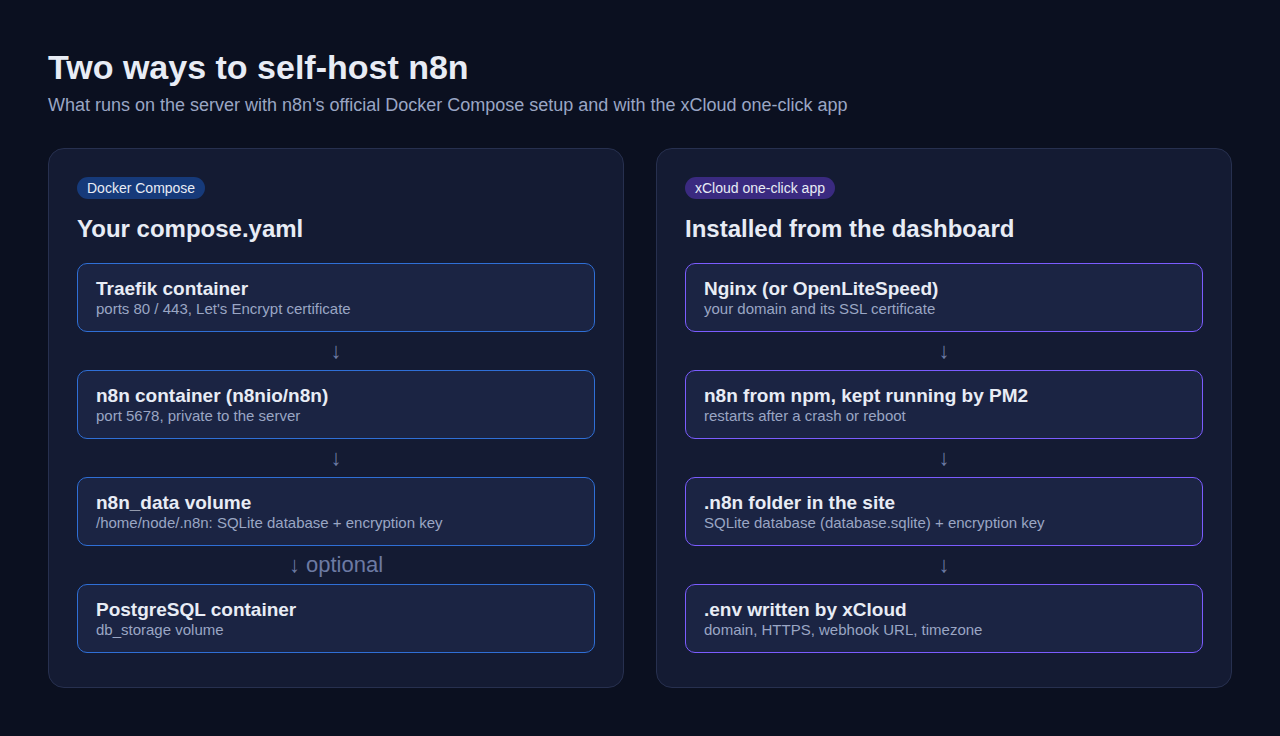
Here is what the one-click install does on your server, taken from xCloud’s own install and update scripts:
| Part | Docker Compose (n8n’s example) | xCloud one-click app |
|---|---|---|
| How n8n is installed | Official n8nio/n8n image |
npm install -g n8n on the server |
| What keeps it running | Docker restart: always |
PM2, saved so it starts again after a reboot |
| Database | SQLite by default, PostgreSQL optional | SQLite, stored at .n8n/database.sqlite in the site folder |
| Web traffic and SSL | Traefik with a Let’s Encrypt certificate | Your server’s Nginx (or OpenLiteSpeed) and the site’s SSL certificate |
| Settings | .env and compose.yaml you write |
A .env file xCloud writes, editable in Environment on paid plans |
| Server check before install | None | At least 4 GB RAM and 2 CPU cores, plus Node.js 24 for current n8n versions |
| Updates | You pull a new image | Updates page; the new version is staged and checked before it replaces the old one |
The .env that xCloud writes already sets the values people most often get wrong by hand: N8N_PROTOCOL=https, N8N_HOST and WEBHOOK_URL set to your domain, N8N_PROXY_HOPS=1 for the reverse proxy, and task runners turned on.
This also answers questions our support team often hears about the one-click app: whether it uses Docker (no), which database it uses (SQLite), and how to move it to another server (export and import, covered below).
What You Need to Self-Host n8n
Any Ubuntu server with a public IP, a domain you control and Docker installed is enough. Size it for how many workflows run at once, not for how many you have saved.
| Requirement | What to use | Why it matters |
|---|---|---|
| Server | 2 CPU cores, 4 GB RAM to start | xCloud refuses to install n8n below this; AI and file-heavy workflows need more |
| Storage | SSD with room for the image, the database and execution history | Execution data piles up until pruning removes it |
| Domain | A subdomain such as n8n.example.com, with an A record to SERVER_IP |
Webhooks and OAuth logins need a stable HTTPS address |
| Ports | 80 and 443 open to the internet; 5678 kept private | n8n listens on 5678; the proxy serves it on 443 |
| Software | Docker Engine and the Docker Compose plugin | The official install method |
| Email for SSL | Any address you read | Let’s Encrypt uses it for certificate notices |
If Docker Compose itself is new to you, our Docker Compose explainer covers services, volumes and networks in plain terms.
Self-Host n8n with Docker Compose (Step by Step)
This is n8n’s official Docker Compose setup, with Traefik handling SSL. The .env and compose.yaml below come from the n8n Docker Compose docs as of October 2026. n8n updates that page from time to time, so compare it with the files below before you start. We have not run these steps on a test server for this guide.
Step 1: Install Docker and Docker Compose
Install Docker Engine and the Compose plugin on your server, then check both are present:
docker --version
docker compose version
To run Docker without sudo, add your user to the docker group and reload it:
sudo usermod -aG docker ${USER}
exec sg docker newgrp
Step 2: Point your domain at the server
At your DNS provider, add an A record for n8n (or the subdomain you prefer) that points to SERVER_IP. Wait until the name resolves before you start the stack, or the SSL certificate request will fail.
Step 3: Create the project folder and the .env file
mkdir n8n-compose
cd n8n-compose
mkdir local-files
Create a file named .env in that folder:
# n8n will be served at https://n8n.example.com
DOMAIN_NAME=example.com
SUBDOMAIN=n8n

# Used by schedule (Cron) nodes. Defaults to America/New_York if not set
GENERIC_TIMEZONE=Europe/Berlin

# Email for the Let's Encrypt certificate
SSL_EMAIL=[email protected]
Step 4: Create compose.yaml
Create compose.yaml in the same folder. As of October 2026, this file matches n8n’s official Docker Compose example line for line:
services:
  traefik:
    image: "traefik"
    restart: always
    command:
      - "--api.insecure=true"
      - "--providers.docker=true"
      - "--providers.docker.exposedbydefault=false"
      - "--entrypoints.web.address=:80"
      - "--entrypoints.web.http.redirections.entryPoint.to=websecure"
      - "--entrypoints.web.http.redirections.entrypoint.scheme=https"
      - "--entrypoints.websecure.address=:443"
      - "--certificatesresolvers.mytlschallenge.acme.tlschallenge=true"
      - "--certificatesresolvers.mytlschallenge.acme.email=${SSL_EMAIL}"
      - "--certificatesresolvers.mytlschallenge.acme.storage=/letsencrypt/acme.json"
    ports:
      - "80:80"
      - "443:443"
    volumes:
      - traefik_data:/letsencrypt
      - /var/run/docker.sock:/var/run/docker.sock:ro

  n8n:
    image: n8nio/n8n
    restart: always
    ports:
      - "127.0.0.1:5678:5678"
    labels:
      - traefik.enable=true
      - traefik.http.routers.n8n.rule=Host(`${SUBDOMAIN}.${DOMAIN_NAME}`)
      - traefik.http.routers.n8n.tls=true
      - traefik.http.routers.n8n.entrypoints=web,websecure
      - traefik.http.routers.n8n.tls.certresolver=mytlschallenge
      - traefik.http.middlewares.n8n.headers.SSLRedirect=true
      - traefik.http.middlewares.n8n.headers.STSSeconds=315360000
      - traefik.http.middlewares.n8n.headers.browserXSSFilter=true
      - traefik.http.middlewares.n8n.headers.contentTypeNosniff=true
      - traefik.http.middlewares.n8n.headers.forceSTSHeader=true
      - traefik.http.middlewares.n8n.headers.SSLHost=${DOMAIN_NAME}
      - traefik.http.middlewares.n8n.headers.STSIncludeSubdomains=true
      - traefik.http.middlewares.n8n.headers.STSPreload=true
      - traefik.http.routers.n8n.middlewares=n8n@docker
    environment:
      - N8N_ENFORCE_SETTINGS_FILE_PERMISSIONS=true
      - N8N_HOST=${SUBDOMAIN}.${DOMAIN_NAME}
      - N8N_PORT=5678
      - N8N_PROTOCOL=https
      - NODE_ENV=production
      - N8N_WEBHOOK_URL=https://${SUBDOMAIN}.${DOMAIN_NAME}/
      - GENERIC_TIMEZONE=${GENERIC_TIMEZONE}
      - TZ=${GENERIC_TIMEZONE}
      - N8N_RESTRICT_FILE_ACCESS_TO=/files
    volumes:
      - n8n_data:/home/node/.n8n
      - ./local-files:/files

volumes:
  n8n_data:
  traefik_data:
Three lines in this file matter more than the rest:
127.0.0.1:5678:5678keeps n8n’s own port private. Visitors reach n8n only through your domain, not by server IP and port.n8n_data:/home/node/.n8nis where n8n keeps its SQLite database and encryption key. This volume is your whole instance.N8N_WEBHOOK_URLgives n8n your public address for webhooks when it runs behind a reverse proxy like Traefik. As of November 2026, n8n’s Docker Compose docs say this name is available from n8n 2.30.0, and earlier versions useWEBHOOK_URL. Its endpoint variables page saysWEBHOOK_URLis deprecated from 2.35.0: it still works, but n8n logs a warning at startup.
The catch worth knowing: --api.insecure=true turns on Traefik’s dashboard API. It is not published to the internet in this file, but remove the line if you never use the dashboard.
Step 5: Start n8n
docker compose up -dCheck both containers are up with docker compose ps, and read the logs with docker compose logs -f n8n if anything looks wrong.
Step 6: Open n8n and create the owner account
Visit https://n8n.example.com. Traefik requests the SSL certificate on first start, so give it a minute if the page does not load straight away. Create the owner account on the first screen, then build a test workflow with a Webhook node to confirm callbacks reach the server.
Optional: Switch the Docker setup to PostgreSQL
SQLite is fine for one person; PostgreSQL is the safer choice for a team. n8n keeps an official PostgreSQL example in its n8n-hosting repo. It adds a PostgreSQL service, an init-data.sh script that creates a non-root database user, and the DB_TYPE=postgresdb settings n8n needs.
Start from that example rather than editing the file above by hand. Copy its postgres service, its DB_POSTGRESDB_* lines and its init-data.sh into your folder, keep the Traefik service and labels from Step 4, and run docker compose config to catch mistakes before docker compose up -d.
Also set your own N8N_ENCRYPTION_KEY in .env. Generate it once with openssl rand -hex 32 and store a copy outside the server. Setting it yourself means a rebuilt volume never locks you out of your credentials.
Queue mode: when one container is not enough
Queue mode splits n8n into a main process and workers, with Redis passing jobs between them. You turn it on with EXECUTIONS_MODE=queue on every process and point them at Redis with QUEUE_BULL_REDIS_HOST.
Two rules from the n8n queue mode docs catch people out. Queue mode over SQLite is not supported, so move to PostgreSQL first. Every worker also needs the main instance’s N8N_ENCRYPTION_KEY, or it cannot read stored credentials.
One-Click n8n on xCloud (Step by Step)
The one-click app turns the six Docker steps into a short form in the dashboard. You still need a server connected to xCloud with 4 GB RAM, 2 CPU cores and Node.js 24 or newer.
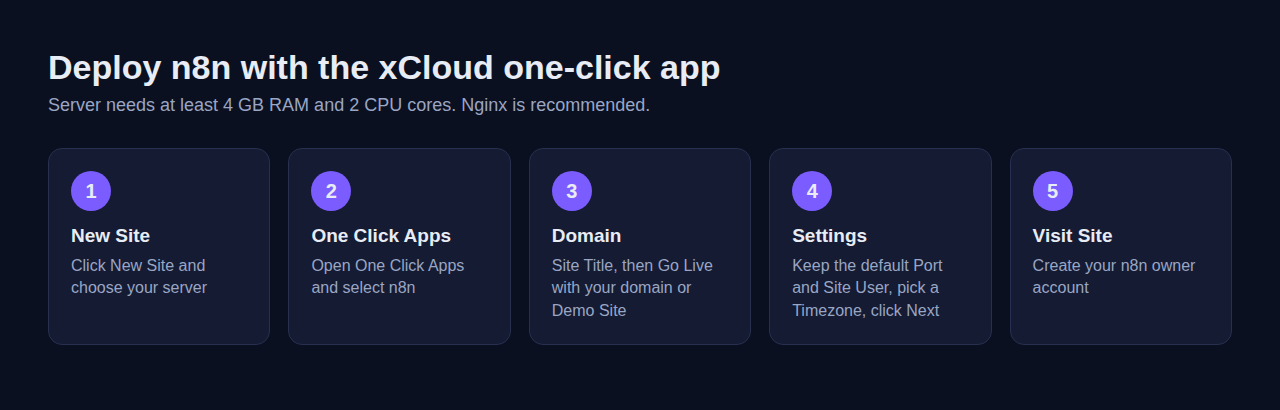
- In the xCloud dashboard, click New Site and choose your server.
- Open One Click Apps and select n8n.
- Enter a Site Title and choose Go Live with your own domain, or Demo Site for a free test domain.
- Keep the default Port and Site User, pick a Timezone, and click Next.
- When the install finishes, click Visit Site and create your n8n owner account.
👉 Follow the full walkthrough with screenshots in How to Deploy n8n with xCloud One Click Apps.
What xCloud handles for you
- Install: xCloud installs PM2 and n8n for you. Your server needs Node.js 24 or newer first; if it has an older version, xCloud asks you to update it on the Node configuration page.
- Settings: the
.envwith your domain, HTTPS, webhook URL, timezone and task runner port is written for you. - Web server: Nginx (or OpenLiteSpeed) serves n8n on your domain; n8n’s port is never exposed.
- Restarts: PM2 restarts n8n if it crashes and starts it again after a reboot.
- Settings changes: on paid plans, edit variables under Environment and click Save. Environment editing for n8n is not available on the free plan. Our guide to SMTP for n8n shows a real example.
- Updates: open Updates, click Check for Updates, then Update n8n.
Prefer Docker, but on xCloud?
You can have both. On an NGINX server, deploy your own compose.yaml as a Custom Docker site, and xCloud serves it on your domain. Leave out the Traefik service, because xCloud’s Nginx already handles the domain and SSL. Do not map n8n to ports 80 or 443 either: publish only n8n’s own port (5678 by default) and pick it as the public port when xCloud asks during deployment, as the Custom Docker guide shows.
👉 See How to Deploy Custom Docker with xCloud and our Docker hosting page. This route gets you PostgreSQL and queue mode, but you own the compose file and its updates.
Updates, Backups and Security After Install
This is where the two routes really differ.
Updating n8n in Docker
From the folder with your compose file:
docker compose pull
docker compose down
docker compose up -d
If you pinned a version tag in the image line of compose.yaml, change it before you pull. Read n8n’s release notes before a major version jump, and take a backup first.
Never run docker compose down -v. The -v deletes named volumes, including n8n_data, which holds your encryption key.
Updating n8n on xCloud
There are no automatic n8n upgrades on xCloud today; you start each update from the Updates page. Updating n8n updates every n8n site on that server, so check your workflows on each one before you click Update n8n. xCloud installs the new version in a staging location first and runs n8n’s command line on it before swapping it in. The dashboard warns that the update causes temporary downtime, so plan for your n8n sites on that server to be offline for a short time.
If the new version needs a newer Node.js than the server has, the update stops before anything changes. If an update fails after n8n has stopped, xCloud puts the previous working version back and restarts your n8n sites.
Backing up n8n in Docker
Back up three things: the n8n_data volume, the database (if you use PostgreSQL) and your .env. Find the exact volume name with docker volume ls; Compose prefixes it with the folder name. Put that name in place of YOUR_N8N_VOLUME below.
# Database dump (PostgreSQL setups only)
docker compose exec -T postgres pg_dump -U YOUR_POSTGRES_USER n8n > n8n-$(date +%F).sql

# Copy of the n8n data volume (database file for SQLite setups, plus the encryption key)
docker run --rm -v YOUR_N8N_VOLUME:/data -v "$PWD":/backup alpine \
  tar czf /backup/n8n_data-$(date +%F).tar.gz -C /data .
Copy those files off the server. A backup that lives on the same disk dies with it.
Backing up n8n on xCloud
xCloud site backups cover the n8n site’s files and its SQLite database, on a schedule you set. Read Backups in xCloud to set the schedule and storage.
To move an n8n site to another server, the safest way is to export your workflows and credentials and import them on the new server, covered next.
Exporting workflows and credentials (both routes)
n8n’s command line (export:workflow and export:credentials) exports everything to files. In Docker, run it through the container:
docker compose exec -u node n8n n8n export:workflow --backup --output=/home/node/.n8n/backups/workflows/
docker compose exec -u node n8n n8n export:credentials --backup --output=/home/node/.n8n/backups/credentials/
On an xCloud server the one-click app keeps its settings in /var/www/<your-site>/.env and its data, including the SQLite database and the encryption key file, in /var/www/<your-site>/.n8n/. Commands you type over SSH don’t read your site’s settings on their own. Load them first, or n8n opens an empty database instead of yours. SSH in as the site user, load the .env into your session, then export:
cd /var/www/<your-site>
set -a && . ./.env && set +a
n8n export:workflow --backup --output=./.n8n/backups/workflows/
n8n export:credentials --backup --output=./.n8n/backups/credentials/
You should see a line like Successfully exported 12 workflows. for each command, with your own numbers, and one .json file per item in each folder. If n8n finds no workflows you know you have, the .env was probably not loaded.
Imported credentials only work if the new site uses the same encryption key as the old one. xCloud does not set N8N_ENCRYPTION_KEY, so each n8n site makes its own key and stores it in /var/www/<your-site>/.n8n/config. That includes the new site you just created. n8n will not start if that file and N8N_ENCRYPTION_KEY hold different keys (the “Mismatching encryption keys” error), so change both, in this order, before you save any credentials on the new site:
- Copy the
encryptionKeyvalue from the old site’s.n8n/config. - On the new site, open
.n8n/configand replace itsencryptionKeyvalue with the old key. Change nothing else in the file. - In the new site’s Environment, add
N8N_ENCRYPTION_KEYwith the same key and click Save. Saving restarts n8n. Editing Environment needs a paid plan.
Then copy the two backup folders to the new site’s .n8n/backups/ folder and import them there, again as the site user:
cd /var/www/<your-new-site>
set -a && . ./.env && set +a
n8n import:credentials --separate --input=./.n8n/backups/credentials/
n8n import:workflow --separate --input=./.n8n/backups/workflows/
You should see a line like Successfully imported 5 credentials. and one like Successfully imported 12 workflows., with your own numbers. Then open the n8n editor and check that the workflows you need are on.
We have not run this move on a test server. These steps come from n8n’s docs and source code and from xCloud’s install scripts, so keep the old site running until the new one works.
Security basics for either route
- Keep port 5678 private; only 80 and 443 should be open.
- Protect the owner account with a long, unique password, and only invite the users who need access.
- Keep execution pruning on. n8n deletes execution data older than 336 hours (14 days) by default, set by
EXECUTIONS_DATA_MAX_AGE. - Restrict SSH to keys, and patch the server. Our VPS security guide covers the server side.
Docker vs One-Click: Which to Choose
If you only remember one line: choose Docker for control, choose one-click for less upkeep. Both run the same n8n.
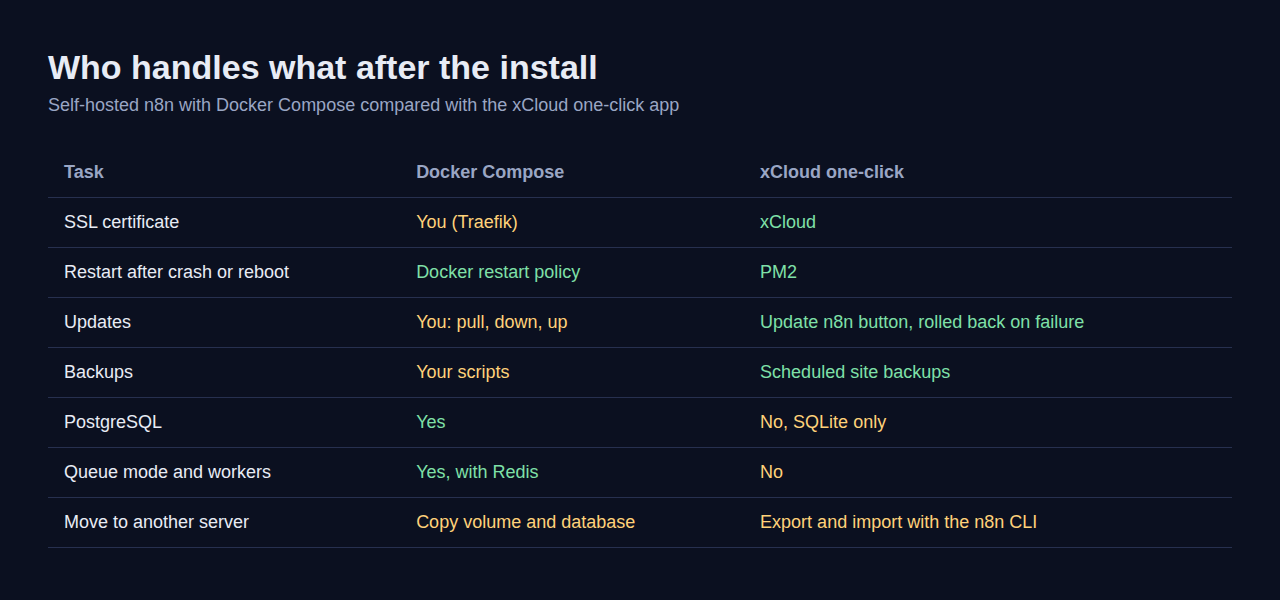
| Task | Docker Compose on any server | xCloud one-click app |
|---|---|---|
| First install | 6 steps in a terminal | A form in the dashboard |
| SSL certificate | Traefik, configured by you | Handled with the site’s domain |
| Database | SQLite or PostgreSQL | SQLite only |
| Queue mode and workers | Yes, with PostgreSQL and Redis | Not part of the one-click app |
| Updates | docker compose pull when you remember |
Update n8n button, staged and rolled back on failure; updates every n8n site on that server |
| Restarts after a crash or reboot | restart: always |
PM2 |
| Backups | Scripts you write and schedule | Scheduled site backups |
| Move to another server | Copy the volume and database | Export and import with the n8n command line |
Choose Docker Compose if…
- ✅ Your team builds many workflows at once and needs PostgreSQL.
- ✅ You expect to need queue mode and workers.
- ✅ You already run other services with Docker and have backups for them.
- ✅ You want the same setup on any provider.
Choose the xCloud one-click app if…
- ✅ You want n8n on your own server without writing a compose file.
- ✅ You would rather click Update n8n than plan image upgrades, and your n8n sites on one server can move to a new version together.
- ✅ SQLite fits your workload: one owner or a small team.
- ✅ You manage other sites or apps from the same dashboard. See all of them in One Click Apps.
Still comparing hosts rather than install methods? Our best n8n hosting providers round-up ranks the managed options.
What the One-Click App Does Not Do
Honest limits first, so you are not surprised later. The xCloud n8n one-click app:
- Uses SQLite only. There is no PostgreSQL option inside the one-click app.
- Runs one n8n process. Queue mode with separate workers is not set up for you.
- Does not update itself. You start each update from the Updates page.
- Updates every n8n site on the server at once. One click on Update n8n moves all n8n sites on that server to the new version.
To undo the install, delete the site from the xCloud dashboard. Export your workflows and credentials first if you want to keep them.
If the site shows a 502 or 503 error after an update or reboot, start with Fix 503 Bad Gateway Errors for n8n. In Docker, the same symptom usually means the n8n container is restarting; docker compose logs n8n will tell you why.
Run Your n8n Server This Week
Pick the route by what you want to own. If PostgreSQL, queue mode or a fully portable setup matter, use the Docker Compose files above and schedule your backup on day one.
If you want n8n on your own server with SSL, restarts and updates handled, deploy the one-click app from xCloud n8n hosting. Then build your first real workflow, such as an AI agent with n8n.
Whichever you choose, export your workflows and keep a copy of the encryption key somewhere other than the server.
If you have found this blog helpful, feel free to subscribe to our blogs for valuable tutorials, guides, knowledge, and tips on web hosting and server management. You can also join our Facebook community to share insights and engage in discussions.
Frequently Asked Questions
Is n8n free to self-host with Docker?
Yes. The n8n Community edition runs from the official Docker image without a license key. You still pay for the server, and any paid APIs your workflows call bill you separately.
Does the xCloud n8n one-click app use Docker?
No. The xCloud one-click app installs n8n with npm, keeps it running with PM2 and stores data in SQLite. If you want n8n in Docker on xCloud, deploy your own compose file as a Custom Docker site on an NGINX server instead.
Should I use SQLite or PostgreSQL for n8n in Docker?
SQLite is the default and is fine for one user and light workloads. Use PostgreSQL when several people build workflows, when execution history grows large, or when you plan to use queue mode, which n8n does not support on SQLite.
How do I update n8n running in Docker Compose?
Go to the folder with your compose file and run docker compose pull, docker compose down and docker compose up -d. Back up the n8n_data volume and your database first, and never add -v to the down command, because that deletes the volume that holds your encryption key.
How much RAM does n8n need?
It depends on how many workflows run at once and how much data they move. xCloud checks for at least 4 GB of RAM and 2 CPU cores before it installs n8n, which is a sensible floor for any production server.
Can I move my xCloud n8n site to another server?
Yes. Export your workflows and credentials with n8n’s command line, copy the old site’s encryption key to the new site, then import them. The exact commands are in the export and import section above.
Last updated November 2, 2026
← All articles