


If you are weighing Nod vs ChatGPT dots, or Claude Duet, you are really choosing who runs a computer that reads your inbox. Three of the biggest AI labs shipped a personal agent in the space of seven weeks: OpenAI’s dots, Anthropic’s Claude Duet and Meta’s Muse each get their own computer and browser in the vendor’s cloud, read your apps, and run errands while you do something else.
Then n8n shipped Nod, an open-source personal agent that does the same kind of work but runs on a computer you control, with the model you choose. If you are deciding which one gets access to your inbox, the question is not only “which is smartest”. It is where the agent lives, who pays for what, and what happens when it gets something wrong.
This guide puts Nod vs ChatGPT dots vs Claude Duet side by side, with Meta Muse as the fourth option, on the things that decide it: where each runs, which models it uses, who can get it, what it costs, how approvals work and what it connects to. If you already lean towards Nod, our step-by-step Nod deployment guide shows how to run it on your own server.
TL;DR
Short on time? Here is the whole comparison in a few lines:
- ChatGPT dots suit people already paying for ChatGPT Pro (from $100 a month) who want an always-on agent with nothing to set up.
- Claude Duet suits US Claude subscribers who want a careful, ask-first assistant. It is a waitlisted research preview included in Pro, Max and Ultra.
- Meta Muse is the low-cost entry point. Meta says it is free for most of what people need, but it is only rolling out in the US so far.
- Nod is the only one of the four that is open source, works with your choice of model provider and runs on a computer or server you control.
- The catch with Nod: it only works while the machine running it is on. For an always-on Nod, run it on a server.
- If you only remember one line: pick a cloud agent for zero setup, pick Nod for control over where it runs and which model it uses.
Contents
- At a glance: Nod vs ChatGPT dots vs Claude Duet vs Meta Muse
- What each personal AI agent is
- Where it runs: your server or the vendor’s cloud
- Models: one lab’s models or your choice
- Who can get it today
- What it costs
- Approvals and safety
- Apps, channels and connectors
- Pros and cons
- Which personal AI agent should you choose?
- How to run Nod always on
- Frequently asked questions
At a glance: Nod vs ChatGPT dots vs Claude Duet vs Meta Muse
All four run errands for you with a browser of their own. They differ on where that browser lives and who controls it.
| Nod | ChatGPT dots | Claude Duet | Meta Muse | |
|---|---|---|---|---|
| Made by | n8n | OpenAI | Anthropic | Meta |
| Where it runs | Your computer or your server | OpenAI’s cloud, on its own computer | Anthropic’s cloud, on its own virtual machine | Meta’s cloud, on Muse Secure VM |
| Model | Your choice of 20+ providers | OpenAI’s models | Claude Opus 5.5 | Muse Spark |
| Open source | Yes, Apache 2.0 | No | No | No |
| Who can get it | Anyone, as a preview | ChatGPT Pro and Business Premium, rolling out | US Pro, Max and Ultra, by waitlist | US, rolling out |
| Entry price | Free software, plus hosting and model use | ChatGPT Pro, from $100 a month | Included in Claude Pro, $20 a month | Free for most use, paid plans for more |
| Works with your devices off | Only on a server | Yes | Yes | Yes |
If you only remember one line: the three cloud agents trade control for convenience, and Nod trades convenience for control.
Facts in this table come from each vendor’s own pages, read on 18 November 2026: OpenAI’s dots documentation, ChatGPT pricing, Anthropic’s Claude Duet announcement, Claude pricing, Meta’s Muse announcement and Nod’s README. These products change quickly, so check a vendor’s page before you buy.
What each personal AI agent is
A personal AI agent is an assistant that acts for you instead of only answering. It reads your mail and calendar, opens websites, fills in forms and comes back when something needs a decision.
Nod: the open-source agent from n8n
Nod is a free, open-source personal agent from the team behind n8n, released under the Apache 2.0 licence. Its README sums it up: it chases invoices, preps your calls and cancels trials on real websites, and it asks before it acts for you.
Nod has its own Linux workspace and Chromium browser, a database for its memory, and a Vault that enters passwords and card details privately. It is not the n8n workflow tool and not the n8n AI Assistant, and you don’t need n8n to use it. n8n calls it a research preview.
ChatGPT dots: OpenAI’s always-on agent
Dots are OpenAI’s personal agents inside ChatGPT. OpenAI’s documentation says “your dot lives in the cloud and has its own computer and browser”, and it can also use your own computer when you connect it and keep the ChatGPT app open.
Dots draw on several OpenAI models for different parts of the work, including GPT-6.1 Terra. They reach your apps through ChatGPT’s supported plugins, such as Gmail, Google Drive and GitHub.
Claude Duet: Anthropic’s ask-first assistant
Claude Duet is Anthropic’s personal agent, announced on 21 October 2026. It has “a virtual machine with its own browser, so it doesn’t require your laptop or phone to be on”, and it is built around Claude Opus 5.5.
Duet runs as a standalone app on iOS and Android and on claude.ai, and it can use over 6,000 connectors and plugins in the Claude Marketplace.
Meta Muse: the free-for-most option
Muse is Meta’s personal agent, announced on 8 September 2026. It “runs on Muse Secure VM, a dedicated secure computer with its own browser”, powered by Meta’s Muse Spark model.
Muse is rolling out in the US on iOS, Android and muse.ai. Meta says it is free for most of what people need, with subscription plans for people who want to do more.
Where it runs: your server or the vendor’s cloud
This is the sharpest dividing line between the four, and it decides most of the others.
ChatGPT dots, Claude Duet and Meta Muse each run on a computer in their vendor’s cloud. That is why they keep working when your phone and laptop are off, and why there is nothing to install. It also means the vendor runs the computer that reads your accounts.
Nod runs where you put it. The desktop app runs it on your Mac or Windows PC, and the self-host option runs it on a Linux server. Nod’s own comparison page puts it this way: a self-hosted assistant keeps its server, database, workspace and browser on your server, and model requests go to the provider you picked.
Here’s the part that trips people up: Nod on a laptop stops when the laptop sleeps. Its README is direct about it: schedules run while the computer that runs Nod is on, so for an always-on Nod, use a Mac mini or your own server. Telegram and WhatsApp replies stop too when the desktop app quits.
The truth is less dramatic than “cloud bad, self-hosted good”. Running Nod yourself moves the trust from a vendor to whoever operates the server, and app connections still pass through a connection service n8n hosts by default. What you gain is a choice about where the computer lives and code you can read.
Models: one lab’s models or your choice
Each cloud agent runs on its own lab’s models, which makes sense: each lab is selling its best model through its agent.
- ChatGPT dots use OpenAI’s model family, including GPT-6.1 Terra.
- Claude Duet is built around Claude Opus 5.5.
- Meta Muse runs on Meta’s Muse Spark.
Nod uses the model you connect. Its model guide lists Google Gemini, OpenAI, Anthropic, OpenRouter, Google Vertex AI, Amazon Bedrock, Azure OpenAI, Cloudflare, more than 20 other named providers, and your own OpenAI-compatible model server. You can also sign in with an existing ChatGPT Plus or Pro plan.
The trade-off is that you pick and pay for the model yourself. n8n’s own advice is to pick a capable model, because Nod’s safety check is a model’s judgement too. One limit worth knowing: Anthropic’s terms require an API connection for Claude in Nod, so a Claude Pro or Max subscription cannot be used to sign in.
Who can get it today
Availability is uneven, and for many readers it settles the choice before features do.
| Agent | Availability on 18 November 2026 |
|---|---|
| Nod | Anyone. Desktop app for macOS 14+, with Windows 11 and Linux x64 previews, or a self-hosted server |
| ChatGPT dots | Rolling out to eligible ChatGPT Pro and Business Premium accounts. Pro access is for users 18+ outside the EEA, UK and Switzerland. Enterprise, Edu and Healthcare workspaces where eligible |
| Claude Duet | Research preview by waitlist, starting with US Pro, Max and Ultra subscribers |
| Meta Muse | Rolling out in the US on iOS, Android and muse.ai |
If you are in the UK or the EU, ChatGPT dots on a personal Pro plan are not an option yet, and Claude Duet and Muse are US-first. Nod has no regional gate, because you run it yourself.
What it costs
Real cost has three parts: the subscription or server, the model usage, and your setup time. The third is the line item people forget.
| Subscription or software | Model usage | Setup | |
|---|---|---|---|
| ChatGPT dots | ChatGPT Pro, from $100 a month (tiers named Pro 100, Pro 200 and Pro 500) | Included, within plan limits | None |
| Claude Duet | Included in Claude Pro ($20 a month billed monthly), Max ($100) and Ultra ($200) | Included, within plan limits | Join the waitlist |
| Meta Muse | Free for most use, with paid plans (prices not published in the announcement) | Included | None |
| Nod | Free, open source | Your provider’s API rates, or a ChatGPT Plus ($20) or Pro sign-in | Install it, or deploy it on a server |
Prices are from ChatGPT pricing and Claude pricing, read on 18 November 2026. ChatGPT lists dots on Pro only, not on Free, Go ($8) or Plus ($20).
Nod’s cost depends on where it runs. On your own laptop the software costs nothing, but it stops when the laptop sleeps. On a server you pay for the server: Nod’s own guide suggests starting with two CPU cores, 8 GB of memory and 50 GB of disk, and calls that a starting size, not a measured minimum.
On xCloud, the plan marked Recommended for Nod is a Cloud VPS with 16 GB of RAM at $59.99 a month. A 6 GB plan at $24.99 also runs Nod but is below its 8 GB minimum. You can also connect a server you already rent: xCloud’s self-managed plans start free for one server, then $5 per server a month (see Nod hosting for the current plans).
With an API model, Nod shows what each task cost on its Usage page and stops at the monthly limit you set. Treat this as a starting point rather than a strict rule: a few daily checks cost little, while long browser sessions on a frontier model add up.
Approvals and safety
All four agents ask before consequential actions. They differ on what triggers the question and on what you can check afterwards.
- ChatGPT dots: an automatic review checks actions that could affect your accounts or share information. It decides whether the action can go ahead, needs your approval, or includes a step you must do yourself. You can add custom rules such as “ask before sending messages to customers”, and using a saved login for a new sign-in needs your confirmation (dots controls).
- Claude Duet: before it sends a message, makes a payment, signs a document or deletes anything, it shows you exactly what it is about to do and waits for your approval. Anthropic also puts trading securities and moving money between accounts off-limits, even with approval.
- Meta Muse: it checks with you before sensitive actions like sending an email or making a purchase, and pays through Link by Stripe.
- Nod: the server checks each app action, and each website step that can change something, against your request and your rules. Anything they don’t cover waits for your yes. Every action and sign-in is on the Usage page, with its cost.
Nod’s distinguishing point is that the rules run in its server, not in the prompt, and that the code is open, so a security team can read the exact rule behind every decision. n8n’s own comparison is also honest about where others are ahead: Muse pays with single-use card numbers, and Meta offers a bug bounty of up to $300,000, which Nod does not (How Nod compares).
The catch worth knowing for all four: each approval check is partly a model’s judgement, and each vendor tells you to review consequential work. None of them is a reason to hand over accounts you cannot afford to have misused.
Apps, channels and connectors
This is where the cloud agents lead on breadth.
| Agent | Apps and connectors | Where you talk to it |
|---|---|---|
| ChatGPT dots | Supported ChatGPT plugins, such as Gmail, Google Drive and GitHub | ChatGPT apps, Slack; texting in beta for US Pro users |
| Claude Duet | Over 6,000 connectors and plugins in the Claude Marketplace, including Gmail, Slack, QuickBooks, Stripe, HubSpot and Shopify | iOS and Android app, claude.ai |
| Meta Muse | Shopping through Link by Stripe, saved Instagram posts; 1Password and Shop Pay announced as coming | iOS, Android, muse.ai, WhatsApp |
| Nod | Gmail, Outlook, Calendar, Slack, Notion and more through Composio, plus your own MCP servers | Web app, desktop app, Telegram, WhatsApp |
Nod’s channels are the practical draw for many people. You can talk to it from Telegram or WhatsApp, and it is the same conversation, memory and tasks as in the app. On a self-hosted server those channels stay connected while you close the app.
If your work runs on a long tail of business tools, Duet’s marketplace is the widest today. If you mostly live in mail, calendar and chat, all four cover it.
Pros and cons
The steelman for each, and the honest catch.
ChatGPT dots
| ✅ Pros | ❌ Cons |
|---|---|
| Always on, with its own cloud computer and browser | Needs ChatGPT Pro, from $100 a month |
| Can also work on your own computer when you connect it | Pro access excludes the EEA, UK and Switzerland |
| Custom rules and an Activity view of what it did | OpenAI’s models only |
Claude Duet
| ✅ Pros | ❌ Cons |
|---|---|
| Included in Claude Pro at $20 a month | Waitlisted research preview, US only for now |
| Asks before sending, paying, signing or deleting | Built around Claude only |
| Over 6,000 connectors in the Claude Marketplace | Runs on Anthropic’s virtual machine, not yours |
Meta Muse
| ✅ Pros | ❌ Cons |
|---|---|
| Free for most of what people need | Rolling out in the US first |
| Single-use card numbers for payments | Meta’s own model only |
| Built into WhatsApp | Runs on Meta’s cloud computer |
Nod
| ✅ Pros | ❌ Cons |
|---|---|
| Open source under Apache 2.0, code you can read | You set it up, or pay a host to |
| Your choice of 20+ model providers, or your own model server | Stops when the computer running it sleeps |
| Runs on your computer or your server, no regional gate | Research preview, one person per server |
Which personal AI agent should you choose?
Neither one is universally better. Use this decision path:
✅ Choose ChatGPT dots if you already pay for ChatGPT Pro, live outside the EEA, UK and Switzerland, and want an always-on agent with nothing to run.
✅ Choose Claude Duet if you are a US Claude subscriber, prefer Claude, and want the strictest ask-first behaviour across a wide connector catalogue.
✅ Choose Meta Muse if you are in the US, want to spend nothing, and already use WhatsApp and Instagram daily.
✅ Choose Nod if you want to pick the model, keep the agent’s computer under your control, read the code, or you are outside the regions the cloud agents serve.
If you are choosing Nod and want it to keep working at night, the next section is the practical part.
How to run Nod always on
Nod on a laptop is fine for trying it. For schedules, Telegram and WhatsApp that keep working, it needs a machine that stays on. Nod’s own guide suggests a Mac mini or a Linux server, with two CPU cores, 8 GB of memory and 50 GB of disk to start.
On xCloud, Nod is one of the agent stacks you choose when you create a server: select Agentic, then Nod.
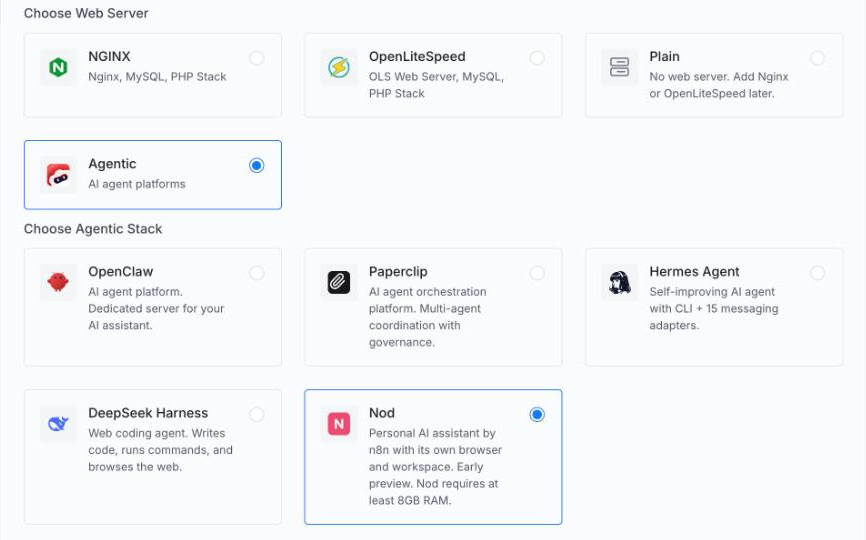
xCloud installs Docker, builds Nod from its pinned release and gives it an HTTPS address, which adds about 10 to 15 minutes to setup. When it finishes, the server’s Status page shows the address and a hidden Sign-in token. You select Open Nod, paste the token and connect your AI model.
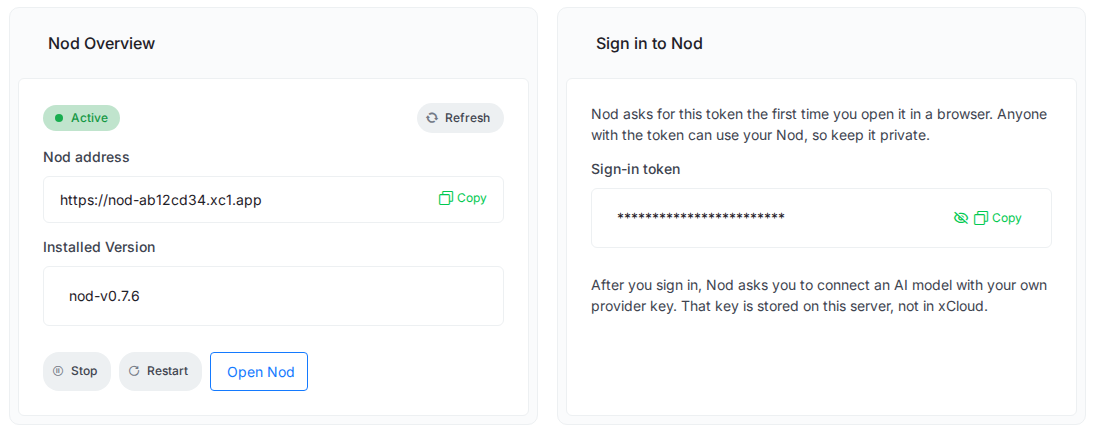
From then on, you start updates yourself from the Updates page, because Nod cannot go back to an older release, and you can back it up to S3 or SFTP storage you connect. If you already rent a server elsewhere, xCloud can install Nod on a fresh Ubuntu 24.04 server with at least 6 GB of RAM.
👉 For every step with screenshots, follow how to deploy Nod with xCloud.
If you are still weighing the other self-hosted agents, OpenClaw vs Paperclip vs Hermes and Hermes Agent vs OpenClaw compare them, and the best AI agent hosting covers where to run them. For workflow automation rather than an assistant, n8n hosting on your own server is the closer fit.
Frequently asked questions
Is Nod a free alternative to ChatGPT dots?
Nod itself is free and open source under the Apache 2.0 licence, but running it is not free. You pay for the computer or server it runs on and for the AI model it uses, either per use through an API key or by signing in with a ChatGPT Plus or Pro plan. ChatGPT dots come with ChatGPT Pro, which starts at $100 a month.
Can Nod use Claude, like Claude Duet does?
Yes. Nod connects to Anthropic with your own API key, as well as OpenAI, Google Gemini, OpenRouter, Amazon Bedrock and more than 20 other providers. Anthropic’s terms require an API connection for Claude in Nod, so a Claude Pro or Max subscription cannot be used to sign in.
Do ChatGPT dots and Claude Duet work when my laptop is closed?
Yes. Both run in the vendor’s cloud on a computer of their own, so they keep working while your devices are off. Nod only works while the machine running it is on, which is why people who want it always on run it on a server rather than on a laptop.
Is Claude Duet available outside the US?
Not yet. Anthropic’s announcement says the research preview starts by waitlist with Pro, Max and Ultra subscribers in the US. ChatGPT dots for Pro users are not offered in the European Economic Area, the United Kingdom or Switzerland, per OpenAI’s documentation.
Which personal AI agent is best for privacy?
Nod gives you the most control, because it runs on a computer or server you choose and the code is open for review. Your model provider still sees each task, and app connections pass through a service n8n hosts by default. ChatGPT dots, Claude Duet and Meta Muse run on their vendors’ cloud computers.
Verdict: the right agent depends on who you want holding the keys
For most people who already pay for ChatGPT Pro, ChatGPT dots are the easiest always-on agent today. For US Claude subscribers, Claude Duet is the most careful one and costs nothing extra on Pro, once the waitlist lets you in. Meta Muse is the cheapest way to try the idea, if you are in the US.
Nod is the pick for anyone who wants control over the model, the machine and the code, or who lives where the cloud agents are not offered yet. The price of that control is running it yourself, or paying a host to keep it on.
Start with the agent you can trust with your inbox this week
Pick one errand you would happily hand off, such as a weekly price check or a morning call brief, and try it on the agent that fits your situation. Watch what it asks you before it acts, and read its activity log afterwards.
If that agent is Nod, give it a server so it keeps working while you sleep. Deploy Nod on xCloud, sign in with your token and hand it its first errand.
If you have found this blog helpful, feel free to subscribe to our blogs for valuable tutorials, guides, knowledge, and tips on web hosting and server management. You can also join our Facebook community to share insights and engage in discussions.