



Every host says it is the fastest place for a WooCommerce store. Most of those claims come from a home page test with one visitor, which tells you little about the moment that matters: a few hundred shoppers in the cart and checkout at once. So we ran a WooCommerce hosting benchmark of our own, and this post publishes all of it, including the results where xCloud lost.
We put four control panels on the same Vultr server plan in the same Dallas data centre: xCloud, Cloudways, SpinupWP and RunCloud. Each got the same 120,018-order store and the same 250 shoppers, and kept its own default settings. If you are choosing a home for a store, read our WooCommerce hosting page alongside this.
Below you will find the setup, the time to first byte (TTFB) for one visitor, the orders each panel placed under load, a realistic shopper mix, and what we are fixing on our side.
Read this first: we ran this test ourselves. xCloud planned, ran and paid for this benchmark, and xCloud sells one of the four products tested. No host was contacted or asked to tune anything. Every panel ran as it ships, on its own defaults, on the same server plan, store and load machine, and each test ran once. Gaps under about 10% may be noise. We publish our losses next to our wins so you can judge.
TL;DR
- Same hardware, four panels. Vultr Dallas, 4 vCPU, about 8 GB RAM, the same 120,018-order WooCommerce store, 250 shoppers for 15 minutes.
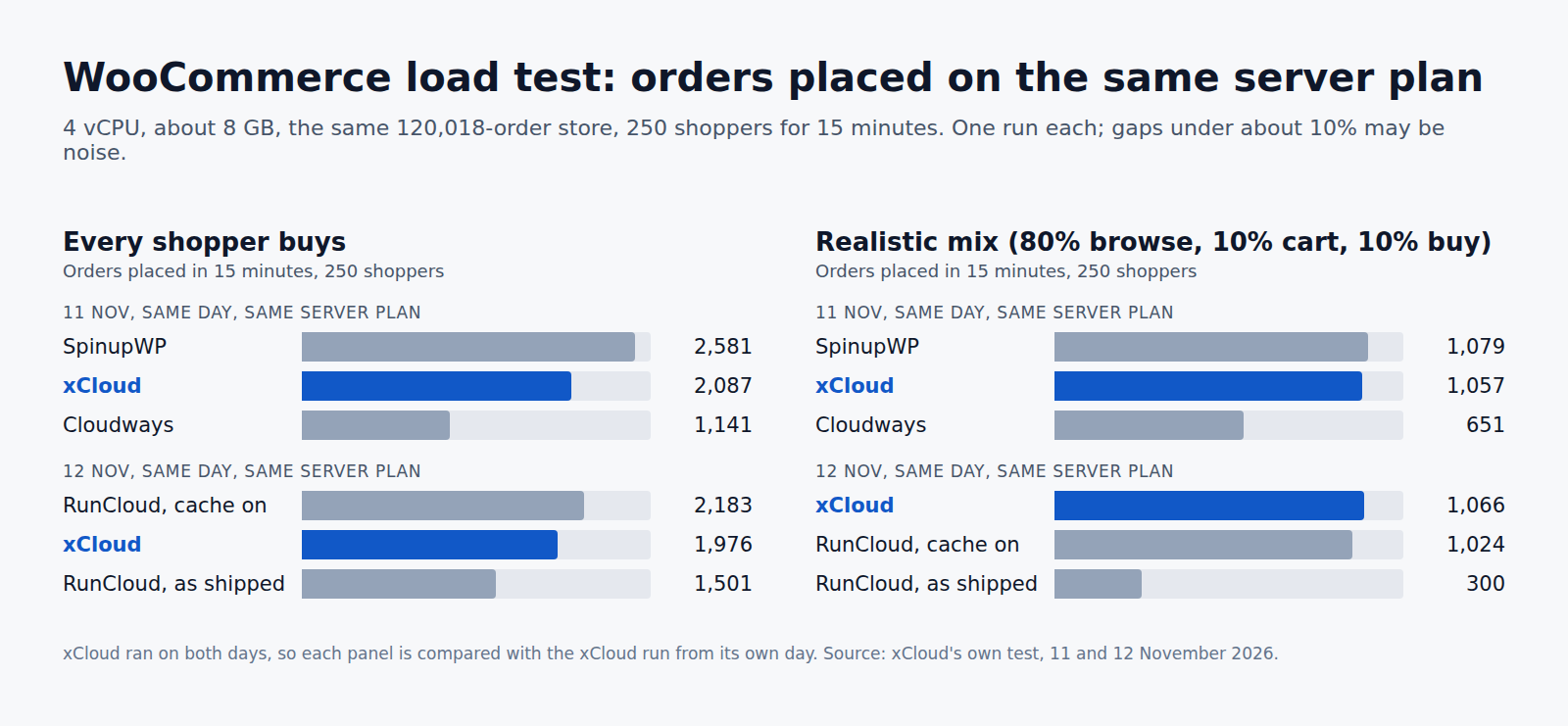
- SpinupWP placed the most orders when every shopper was buying: 2,581, against 2,087 on xCloud and 1,141 on Cloudways the same day.
- In a realistic mix (80% browse, 10% leave at the cart, 10% buy), xCloud, SpinupWP and RunCloud with its cache on passed every limit with about the same orders. Cloudways failed every step.
- TTFB for one visitor: cached pages answered in 9 to 22 ms on every panel with a page cache. On the uncached login page xCloud took 251 ms, Cloudways 396 ms.
- RunCloud as shipped has no page cache, and that cost it most. With its cache on it tied xCloud, and beat it on cart and checkout under full load.
- No panel kept cart and checkout within our limits with 250 shoppers all buying at once. Four CPUs ran out on every one.
Why We Ran Our Own WooCommerce Benchmark
A published third-party WooCommerce benchmark this autumn included four xCloud setups. They ran on different clouds and server sizes, and the plan sizes were not published, so the results could not say whether the panel, the cloud or the server size made the difference.
We wanted to answer a narrower question that a store owner can act on: on identical hardware, what does the control panel change? That is the choice you make when you already have a cloud server, or are about to rent one, and need something to run WordPress and WooCommerce on it.
We also wanted to find what xCloud should improve, and we did. You will find that list near the end.
How We Ran the Test
| What | Setting |
|---|---|
| Cloud and place | Vultr, Dallas, for every panel |
| Server | 4 vCPU (Intel Broadwell), about 8 GB RAM, 150 GB disk |
| Store | One WooCommerce store copied to every server: 120,018 orders, WordPress 6.8.1, WooCommerce 9.9.7, the same plugins, theme and uploads |
| Load tool | k6, 250 shoppers at once for 15 minutes (5 minutes ramping up, 5 holding, 5 ramping down) |
| Load machine | A separate server in the same Dallas data centre, 0.5 ms away, so the network did not decide anything |
| Shopper flow | Open the shop page and a product, add to cart, view the cart, open checkout and place an order |
| One visitor tests | Lighthouse 13.5, desktop, no throttling, from Dallas: 8 runs per page, best 3 averaged. One GTmetrix run from San Antonio as a cross-check |
| Settings | Each panel’s own defaults: web server, page cache, object cache, PHP workers, database settings |
| Dates | 11 and 12 November 2026, one run each |
Before each load test we flushed the object cache, purged the page cache and requested every test page once, so every panel started warm.
We wrote down the limits before the runs. A step passes when its slowest 5% of requests finish in under 2 seconds for the shop, product and cart steps, and under 4 seconds for checkout, with under 1% failed requests.
What each panel ran, as shipped
| xCloud | Cloudways | SpinupWP | RunCloud | |
|---|---|---|---|---|
| Web stack | Nginx with xCloud’s page cache, PHP-FPM | Nginx, Varnish, Apache and PHP-FPM | Nginx with its FastCGI page cache, PHP-FPM | Nginx, Apache and PHP-FPM |
| Page cache as shipped | On | On (Breeze plugin) | On | Off (tested both ways) |
| Object cache | Redis | Redis (Object Cache Pro) | Redis | None as shipped |
| PHP | 8.3 | 8.2 (left as shipped) | 8.3 | 8.3 |
| Database | MySQL 8.0 | MySQL 8.4 | MySQL 8.4 | MySQL 8.4 |
Two differences are worth knowing before you read the numbers. Cloudways ran PHP 8.2 while the others ran 8.3; we left it as shipped. RunCloud’s panel would not issue an SSL certificate on its test domain, so its first run used plain HTTP; the second run used HTTPS with a self-signed certificate and its page cache on.
TTFB: One Visitor at a Time
Time to first byte is how long the server takes to start answering. For one visitor, a cached page should answer in a few milliseconds and an uncached page in a few hundred. You can check your own store with our free TTFB test.
Lighthouse from Dallas, best 3 of 8 runs, in seconds:
| Page | xCloud | Cloudways | SpinupWP | RunCloud, as shipped | RunCloud, cache on |
|---|---|---|---|---|---|
| Home (cached) | 0.009 | 0.014 | 0.014 | 0.291 | 0.022 |
| Product (cached) | 0.009 | 0.015 | 0.014 | 0.360 | 0.021 |
| My Account login (not cached) | 0.251 | 0.396 | 0.220 | 0.237 | 0.249 |
What this says:
- Cached pages are close on every panel with a page cache. 9 ms against 14 or 22 ms is a difference no shopper will notice.
- RunCloud as shipped was 30 to 40 times slower to first byte on the home and product pages, because without a page cache every view runs PHP. With its cache on it joined the others.
- The login page is where the panels separate. Nobody caches it, so it shows how fast PHP and the database answer. SpinupWP was fastest (220 ms), RunCloud and xCloud were close (237 to 251 ms), and Cloudways took 396 ms.
- Fully loaded times on xCloud were 0.82 to 1.07 s, and 0.2 to 0.4 s longer on Cloudways on all three pages.
The xCloud column comes from 8 November; the other panels were measured on 11 and 12 November. One-visitor tests are a small part of the story, so the load tests below matter more.
Load Test: 250 Shoppers, Every Shopper Buys
This is the hardest case: 250 shoppers, all of them buying, for 15 minutes. xCloud ran on both days, so each panel is compared with the xCloud run from its own day.
11 November: xCloud, SpinupWP and Cloudways
Times are typical / slowest 5%.
| Step | xCloud | SpinupWP | Cloudways | Limit (slowest 5%) |
|---|---|---|---|---|
| Shop page | 2.2 ms / 4.2 ms | 2.0 ms / 3.0 ms | 9.3 s / 22.7 s | 2 s |
| Product page | 2.0 ms / 3.6 ms | 1.9 ms / 2.7 ms | 7.4 s / 22.4 s | 2 s |
| Cart | 8.8 s / 13.0 s | 5.7 s / 8.7 s | 15.6 s / 24.6 s | 2 s |
| Checkout and place order | 9.4 s / 13.2 s | 6.1 s / 8.9 s | 18.8 s / 28.9 s | 4 s |
| Orders placed | 2,087 | 2,581 | 1,141 | — |
| Failed requests | 0 | 0 | 0 | under 1% |
12 November: xCloud and RunCloud
| Step | xCloud | RunCloud, cache on | RunCloud, as shipped | Limit (slowest 5%) |
|---|---|---|---|---|
| Shop page | 2.3 ms / 4.3 ms | 4.3 ms / 8.0 ms | 10.9 s / 14.8 s | 2 s |
| Product page | 2.1 ms / 3.9 ms | 4.0 ms / 7.1 ms | 10.9 s / 14.7 s | 2 s |
| Cart | 9.5 s / 14.5 s | 8.2 s / 11.4 s | 10.8 s / 14.5 s | 2 s |
| Checkout and place order | 9.8 s / 14.7 s | 9.3 s / 11.7 s | 11.3 s / 14.9 s | 4 s |
| Orders placed | 1,976 | 2,183 | 1,501 | — |
| Failed requests | 0 | 2 (0.01%) | 0 | under 1% |
What this says:
- Shop and product pages were not the problem on any panel with a page cache: 2 to 8 ms, even at 250 shoppers.
- Cart and checkout were. They cannot be cached, so every one runs PHP and the database. All four CPUs were busy on every server, and no panel passed the cart and checkout limits.
- SpinupWP placed 24% more orders than xCloud on the same day, with cart and checkout about 35% faster. That is a clear loss for xCloud.
- RunCloud with its cache on placed 10% more orders than xCloud, with the slowest 5% of cart and checkout about 21% faster. That is just over our noise line, so treat it as a small lead.
- xCloud placed 83% more orders than Cloudways (2,087 against 1,141), and 32% more than RunCloud as shipped (1,976 against 1,501).
- Nothing broke. Every panel slowed down under overload instead of throwing errors; failed requests stayed at or near zero.
A fair note on Cloudways
Cloudways’ Breeze plugin clears the shop page on every new order, which keeps stock counts on that page fresh but makes the server rebuild it often. xCloud’s and SpinupWP’s page caches are not cleared by new orders. We ran Cloudways a second time with the order purge switched off: it placed 1,230 orders, so the purge explains only a small part of the gap.
Realistic Shopper Mix: 80% Browse, 10% Cart, 10% Buy
Real stores do not have every visitor buying. In this run, 80% of shoppers only opened the shop and a product, 10% added to cart and left, and 10% bought. Same 250 shoppers, same 15 minutes.
| Panel (day) | Orders placed | Requests served | Cart, slowest 5% | Checkout, slowest 5% | Verdict |
|---|---|---|---|---|---|
| xCloud (11 Nov) | 1,057 | 29,681 | 1.2 s | 1.6 s | Pass on every limit |
| SpinupWP (11 Nov) | 1,079 | 30,084 | 0.51 s | 0.74 s | Pass on every limit |
| Cloudways (11 Nov) | 651 | 18,790 | 7.2 s | 9.2 s | Fail on all four steps |
| xCloud (12 Nov) | 1,066 | 29,503 | 1.7 s | 2.0 s | Pass on every limit |
| RunCloud, cache on (12 Nov) | 1,024 | 29,651 | 0.89 s | 1.2 s | Pass on every limit |
| RunCloud, as shipped (12 Nov) | 300 | 9,732 | 17.0 s | 17.3 s | Fail on all four steps |
What this says:
- This is where the panels separate. xCloud, SpinupWP and RunCloud with its cache on served about the same orders and passed every limit. The gaps between them are inside the noise.
- Cloudways served 38% fewer orders than xCloud on the same day and failed every step. Its CPUs were full, with about 37 processes waiting, while xCloud’s still had 16% idle.
- RunCloud as shipped served 72% fewer orders than xCloud. Without a page cache, even shoppers who only browse need a PHP worker, so the browsers crowd out the buyers.
- SpinupWP’s slowest cart and checkout times were about half of xCloud’s, even though both passed. That matches the full-load result.
Where xCloud Lost, and What We Are Fixing
We said we would publish the losses, so here they are in one place.
- SpinupWP beat xCloud under full load: 24% more orders and about 35% faster cart and checkout, on the same server plan and day.
- RunCloud with its cache on beat xCloud under full load: 10% more orders and about 21% faster cart and checkout at the slowest 5%.
- The login page, which nobody caches, answered a little faster on SpinupWP (220 ms) than on xCloud (251 ms).
The settings that differ are known. xCloud ran MySQL 8.0 with its performance schema on and at most 4 PHP workers for the site; SpinupWP and RunCloud ran MySQL 8.4 with the performance schema off and about 5 workers. We have not yet tested which of these makes the difference. The next step is to change one setting at a time, rerun the test, and update this post with what we find.
What This Means for Your Store
- Turn on a page cache. It was the biggest single difference in this test. A panel with its page cache on served shop and product pages in milliseconds; the same panel without it failed every limit. On xCloud, the page cache lives on each site’s Caching page, and you can purge it there or in bulk with the public API and MCP.
- Cart and checkout decide how many orders you take. They cannot be cached, so size the server for your busiest hour of buyers, not for page views. A Redis object cache helps here; see how to set Redis memory on an xCloud server.
- Judge a panel on a realistic mix, not only on a one-visitor speed test. A 9 ms home page and a failing checkout can come from the same server.
- Test your own store. Your plugins, theme and traffic are not ours. Run our TTFB test on your store before and after a move.
If you are weighing Nginx against OpenLiteSpeed for WooCommerce, read Nginx vs OpenLiteSpeed: which web server is faster.
Run Your WooCommerce Store on xCloud
xCloud is a hosting control panel and managed server platform. You keep the server, with root access, and xCloud sets up the web server, page cache, Redis, SSL and backups for WordPress and WooCommerce.
- Connect a server from Vultr, DigitalOcean, Hetzner or another provider, or start an xCloud Managed server.
- Create a WooCommerce site with the page cache and Redis object cache ready.
- Move your store with the free migration, then check it with the TTFB test.
See the side-by-side pages for each panel in this test: xCloud vs Cloudways, xCloud vs SpinupWP and xCloud vs RunCloud.
Start with xCloud’s WooCommerce hosting
Pick the Panel by the Test That Matches Your Store
On identical hardware, the control panel changed the result a lot, but not always in our favour. SpinupWP handled the heaviest buying best. xCloud, SpinupWP and RunCloud with its cache on were even for a realistic store, and xCloud placed far more orders than Cloudways in both tests on the same server plan.
This week, check two things on your own store: that a page cache is on, and how your checkout holds up in your busiest hour. We will rerun this benchmark after our cart and checkout work and publish the new numbers here, wins or losses.
If you have found this blog helpful, feel free to subscribe to our blogs for valuable tutorials, guides, knowledge, and tips on web hosting and server management. You can also join our Facebook community to share insights and engage in discussions.
Frequently Asked Questions
Which control panel handled the most WooCommerce orders in this benchmark?
SpinupWP, when every shopper was buying: 2,581 orders in 15 minutes against 2,087 on xCloud and 1,141 on Cloudways, on the same server plan and day. In the realistic mix, where most visitors only browse, SpinupWP, xCloud and RunCloud with its cache on were even, and Cloudways placed about 40% fewer orders.
What TTFB did xCloud get for a WooCommerce store?
From a machine in the same Dallas data centre, xCloud answered cached pages in about 9 ms (home and product page) and the uncached My Account login page in 251 ms. Cloudways answered the same login page in 396 ms. Cached pages were within 9 to 22 ms on every panel that had a page cache on.
Why did RunCloud do badly at first and then well?
RunCloud ships with no page cache, so every page view runs PHP. As shipped it placed 1,501 orders against xCloud’s 1,976 the same day. With its own page cache switched on it placed 2,183, about 10% more than xCloud, and tied xCloud in the realistic mix.
Is this benchmark independent?
No. xCloud ran and paid for it, and xCloud sells one of the products tested. Every panel ran on the same server plan, store and load machine with its own defaults, and this post shows the results where xCloud lost as well as where it won. Gaps under about 10% may be noise, because each test ran once.
Can a 4 vCPU server handle 250 WooCommerce shoppers buying at once?
Not within our time limits. On every panel, cart and checkout were too slow when all 250 shoppers bought at the same time, because cart and checkout cannot be cached and the four CPUs were full. With a realistic mix of 80% browsers, three of the four panels passed every limit.