

August marked a major shift in how users experience xCloud. With the new app-first site creation flow, you no longer need to start by thinking about server stacks, infrastructure requirements, or which server will support the application you want to run. Instead, you start with a much simpler question:
What do you want to deploy?
Choose WordPress, a Git project, a One-Click App, or an AI Agent, and xCloud helps guide you toward the right infrastructure. It shows compatible existing servers, lets you know when a different stack or more resources are required, and even helps you create a suitable xCloud Managed Server without leaving the deployment flow.
This smarter experience is the direction xCloud is moving toward: choose what you want to build or host first, and let xCloud simplify the infrastructure decisions behind it.
Throughout August, we expanded that experience with 200+ One-Click Apps, a redesigned Server Overview, Live Monitoring, improved AI Agent setup, Managed DeepSeek Harness Hosting, Broken Link Monitoring, a new mobile dashboard, better backup visibility, and dozens of improvements across Git, migrations, security, monitoring, and server management.
Here is everything we shipped in August 2026.
Grab a cup of coffee, settle in, and let us explore everything we shipped in the August 2026 release.
📸 Highlights of xCloud August 2026 Release
Here is a quick look at the biggest updates before we dig into the details:
📊 New Server Overview Dashboard brings resource usage, site and service health, security, billing, quick actions, and more together on one page.
🧩 App-First Site Creation lets you start from what you want to deploy, then helps you choose the right infrastructure for it.
🔗 Broken Link Monitoring scans up to 5,000 pages of your WordPress site for broken links, missing images, and 404s, with no plugin and no extra cost.
🚀 90+ New One-Click Apps landed across two releases, expanding the library to 200+ deployable applications.
🧠 Managed DeepSeek Harness Hosting puts an open-source, plugin-based AI coding agent on fully managed infrastructure.
📡 Live Monitoring follows server and site activity from the dashboard in real time, so you can watch resource trends instead of a single snapshot.
📱 New Mobile Dashboard UI makes managing servers and sites from your phone noticeably smoother.
🔀 Repository-Scoped GitHub App Connections let you decide exactly which repositories xCloud can reach.
Scroll down to explore each feature in detail.
📊 New Server Overview Dashboard: See Everything at a Glance
The old server page told you the server was online. Beyond that, finding out how it was actually doing meant clicking through several separate pages: one for resources, another for services, another for billing.
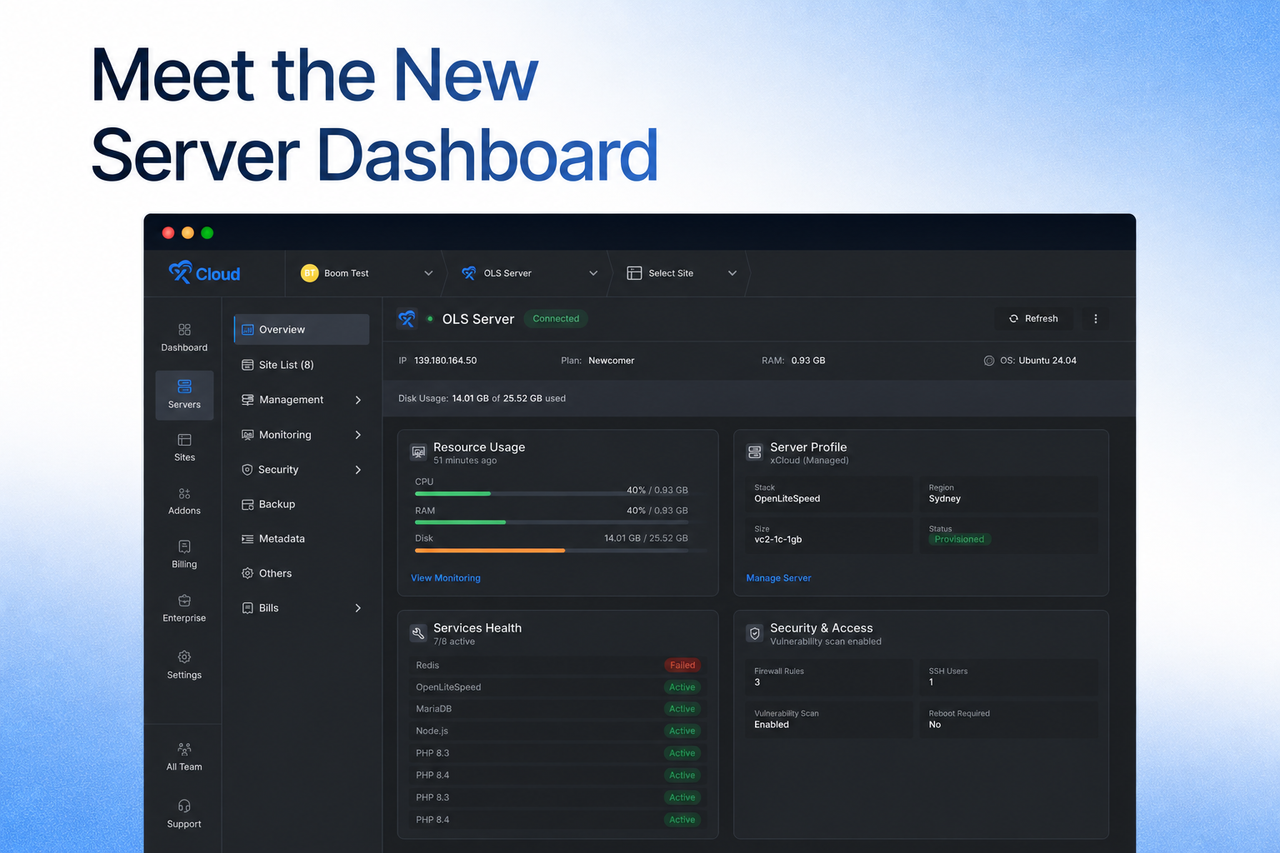
We redesigned the Server Overview page to make important server information and health indicators easier to review at a glance. You open a server and immediately see resource usage, site and service health, security, billing, quick actions, and more.
Here is what the new dashboard puts in front of you:
- Resource usage at a glance. See how CPU, memory, and disk are being used without opening a separate monitoring page.
- Site and service health together. Spot a stopped service or an unhealthy site in the same place you check everything else.
- Security and billing context. Know about an outstanding invoice or a security item before it turns into a surprise.
- Quick actions and automation. Run the tasks you repeat most without hunting for the right page first.
For agencies and developers who check on several servers a day, this turns a four-click routine into one page.
🧩 A Smarter Site Creation Flow: Start With the App, Not the Stack
Creating a site used to begin with a decision you were not ready to make. You had to choose a server stack before committing to what you were installing, which meant guessing whether your app wanted OpenLiteSpeed or NGINX and how much memory it would need.
We redesigned site creation so you start with what you want to deploy, whether that is WordPress, a Git project, a One-Click App, or an AI Agent, and xCloud helps you choose the right infrastructure for it.
Here is what the new flow gives you:
- See compatible existing servers. xCloud shows which of your servers can run the app you picked, before you begin.
- Know when you need more. Get clear guidance when an app needs a different stack or additional resources, instead of just being blocked.
- Create a server without leaving the flow. Spin up a compatible xCloud Managed server directly inside the app setup journey.
- Compare in one place. Review plans, terms, backups, and pricing side by side without opening another page.
The new app-first site creation experience is now available in your xCloud dashboard and is the default for all eligible users. For anyone deploying something outside the usual WordPress path, this removes the guesswork from the very first step.
🔗 Broken Link Monitoring: Find and Fix Broken Links, No Plugin, No Extra Cost
Broken links quietly erode client trust, hurt SEO, and turn into the kind of issue you only discover when a client points it out. People leave, trust drops, and valuable traffic ends up at a dead end.
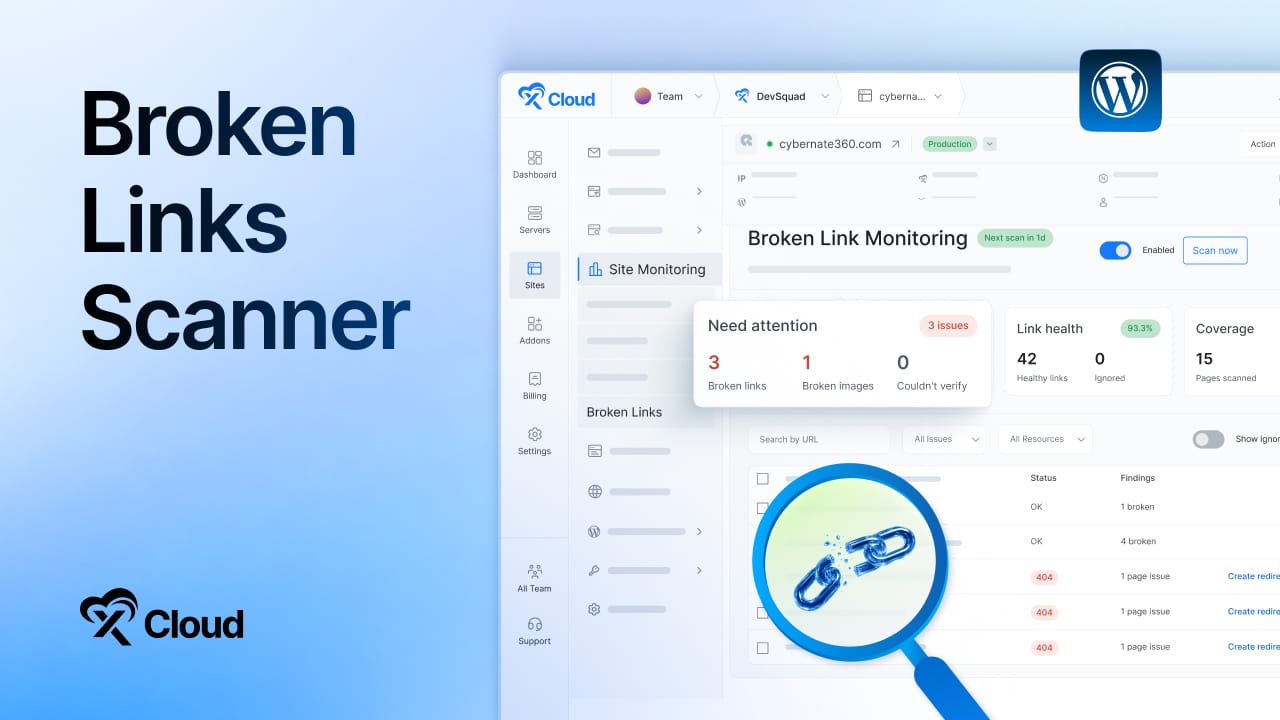
Broken Link Monitoring lets you scan your WordPress site for broken pages, links, and images directly from your xCloud dashboard. There is no WordPress plugin to install or maintain, no separate account, no external scanning tool, and no extra subscription. It is included free.
Here is what you get with Broken Link Monitoring:
- Scan up to 5,000 pages in one run. Cover a real site, not just the top few pages.
- Schedule it or run it anytime. Set daily or weekly scans, or start one on demand whenever you need it.
- Watch findings update live. Pages, links, and results update as the scan runs, with no page refresh.
- Catch more than broken links. Detect missing images, 404s, timeouts, DNS errors, server errors, redirects, and soft 404s.
- Work through findings your way. Search, filter, ignore what does not matter, and export everything as a CSV.
- Create redirects instantly. Turn a broken-page finding into a working redirect without leaving the results.
To start your first scan, open your WordPress site and go to Site Monitoring → Broken Links. Public API endpoints to start and manage broken-link scans landed alongside the feature, so agencies can run this across a whole portfolio programmatically.
👉 Read the step-by-step guide: Monitor and fix broken links in xCloud
🚀 90+ New One-Click Apps: The Library Keeps Growing
Two releases in August expanded the One-Click App library substantially.
In August 2026, we have added 90+ new applications, including Penpot, OpenProject, SearXNG, Audiobookshelf, Firefly III, Linkwarden, Vikunja, ClickHouse, Wiki.js, Activepieces, Apache Solr, Kanboard, Gogs, Monica, OpenBudgeteer, and ZITADEL.
The One-Click App library now offers 200+ applications, giving you far more options to deploy the tools you need. No complicated setup: choose an app, deploy it, and get started.
Here is where the library now runs deepest:
| Category | Examples |
| Utilities | CyberChef, IT Tools, ConvertX, OmniTools |
| Developer tools | Gitea, Forgejo, Code Server, Hoppscotch, Jenkins |
| Database | PostgreSQL, ClickHouse, Qdrant, pgvector, MongoDB |
| Productivity | Nextcloud, Grist, Vikunja, Etherpad |
| Communication | Chatwoot, Discourse, HumHub, GoToSocial |
| Monitoring | Uptime Kuma, Grafana, Prometheus, Gatus, Beszel Hub |
| Security | Vaultwarden, Keycloak, ZITADEL, OpenBao, Pocket ID |
Besides that, we have redesigned the catalog itself. You can browse apps by category, search and filter more quickly, switch between grid and list views, and see clearer service names and compatibility information before installation. If what you need is still missing, the Request an App button at the top of the catalog is the fastest way to tell us. We have many more applications in the pipeline.
🧠 Managed DeepSeek Harness Hosting: Keep Control of Your AI Coding Setup
Claude Code and OpenAI Codex made development much easier. But what if you want more control over the model, the tools, and the workflow you use?
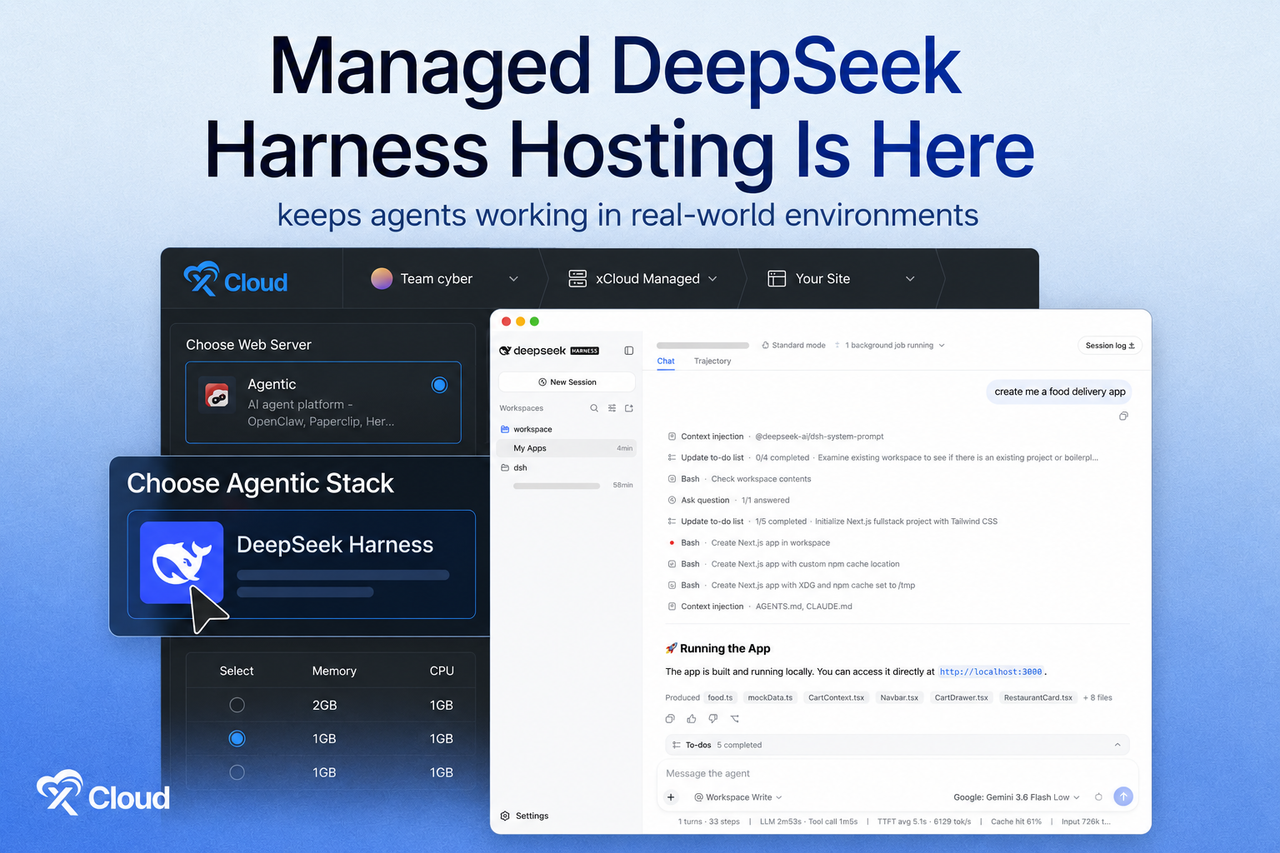
DeepSeek Harness is an open-source, plugin-based AI coding agent built around one idea: everything is a plugin. You can deploy it on fully managed xCloud infrastructure.
Here is what makes it worth a look:
- A flexible alternative to Claude Code and Codex. Use it for AI-powered coding and day-to-day development work.
- Choose your own models and tools. You are not locked into a single setup or ecosystem.
- Let your AI do real work. Work with files, run shell commands, search the web, plan tasks, and automate workflows.
- See what your AI is doing. Review agent actions, tool usage, and results with real visibility into every session.
- Choose how it works. Switch between runtime modes depending on the task in front of you.
- Customize your own assistant. Add the tools, capabilities, storage, and sandboxes you need without changing the core system.
Running it on xCloud means easy deployment with zero DevOps, fully managed infrastructure, and automatic SSL, security, and monitoring. It joins Hermes Agent, OpenClaw, and Paperclip in the managed AI agent lineup.
👉 Read the step-by-step guide: How to deploy DeepSeek Harness with xCloud
📡 Live Monitoring: Follow Server Activity in Real Time
Checking server resources meant opening a terminal and running htop. That works, but it only shows you the two minutes you happen to be connected, which is rarely the two minutes when the problem happens.
Live Monitoring lets you follow server and site activity directly from the xCloud dashboard in real time. It collects regularly refreshed CPU, RAM, and disk-usage metrics, so instead of a single snapshot you get the shape of your usage over time.
Here is what Live Monitoring helps you catch:
- Recurring spikes. Identify the pattern behind a site that slows down at the same time every week.
- Sustained high usage. See when a server has quietly been running hot rather than briefly peaking.
- Capacity issues before they bite. Notice disk or memory pressure while you still have time to plan a resize.
- All without the terminal. No SSH session required to answer basic questions about server health.
Live Monitoring is optional. Enable or disable it any time from Servers → Monitoring.
🔐 Easier AI Provider Authorization & Hermes Agent Environment Management
Connecting an AI provider was the roughest edge in the AI agent experience. It could take up to three browser windows, around 12 steps, and manual typing of a device code while moving back and forth between pages. Getting one detail wrong meant starting over.
Now you can connect supported AI providers directly from your AI Agent setup pages. Authorize OpenAI Codex or connect Claude Code through a guided xCloud modal that copies the code in one click, validates tokens, shows the code-expiry countdown, and detects successful authorization automatically when you return to xCloud.
The same release also brought environment management to the Hermes Agent dashboard. Editing Hermes configuration used to mean SSH access. It no longer does.
- Edit configuration in the dashboard. Change Hermes settings without manually accessing the server.
- Manage keys and tokens. Handle provider API keys, OAuth tokens, and other environment variables in one place.
- Save and restart. Apply your changes and restart Hermes without leaving xCloud.
- Stay protected. xCloud automatically backs up your configuration before updates, so a bad change is recoverable.
Together, these make configuring providers for OpenClaw, Hermes, and Paperclip significantly faster. 👉 See the guide to deploying Hermes Agent with xCloud for the full setup.
📱 New Mobile Dashboard UI & Backup Overview
We have introduced a new clean UI for mobile devices so that you can manage your hosting from anywhere using any device easily with xCloud.
📱 New Mobile Dashboard UI – Managing xCloud from your phone is now smoother with a redesigned mobile dashboard experience.
💾 New Backup Overview – Quickly see which sites are backup-eligible, check the last backup date, filter sites more easily, and get a clearer overview of your backups in one place.
🤖 One-Click Codex Connection – Connecting Codex is now faster with a code modal, copy confirmation, auto-save, and an improved provider card.
🖥️ Smarter Server Rebuild Options – Server rebuild options now match your current plan and the server stacks you are allowed to use, so you do not pick something that cannot be provisioned.
🔀 Repository-Scoped GitHub App Connections: Grant Only What You Need
Connecting GitHub was previously an all-or-nothing decision at the account level. If you only wanted xCloud reaching two client repositories, there was no clean way to say so.
When you connect GitHub through an App, you choose whether xCloud can access all repositories or only the ones you select. Existing GitHub connections continue to work, and migration can happen without downtime.
Here is what else changed for Git this month:
- Set up Git on existing sites. Add Git tracking to an existing WordPress or Custom PHP site using a GitHub App connection, with clearer steps and confirmation details.
- Get checked before you start. xCloud verifies the selected repository is reachable and empty before setup begins.
- Connect one organization to multiple teams. The same GitHub organization can now serve more than one xCloud team, and disconnecting it from one team leaves the others untouched.
- Deploy with the right account. Git deployments now use the server team’s Git account, and cloning will not start if a deploy key cannot be configured successfully.
For agencies running client work across separate teams, this removes a permissions headache that used to need a workaround.
❇️ Additional New Features
Beyond the headline features, August also delivered several notable additions:
⏺️ More Affordable xCloud Managed Servers – The 6 GB xCloud Managed plan now starts at $9.99 for the first month and renews at $19.99 per month, giving you a more accessible managed hosting option with the tools and support you need to run your sites. Current rates are always on the pricing page.
⏺️ Cloudflare Enterprise for Any Domain – You can now purchase Cloudflare Enterprise for domains hosted outside xCloud, bringing its performance and security benefits to any domain you manage.
⏺️ Deploy via Git Through the xCloud API – The xCloud Public API can now detect a repository’s application type and deploy Git-based projects. Deploy GitHub, GitLab, and Bitbucket repositories through API-powered workflows, get clearer guidance when repository access, deploy keys, DNS, or configuration need attention, and use the same guided deployment flow through xCloud MCP and compatible AI tools.
⏺️ Automatic Recovery for Cloudflare Enterprise Cache Purging – xCloud now detects when the Cloudflare Enterprise cache-purge plugin goes missing after a restore, clone, or manual deletion. Monitoring surfaces the issue and offers a one-click reinstall.
⏺️ Webmail Password Self-Service – Mail users can now change their own webmail passwords, and xCloud provides clearer guidance when a changed password also needs updating in the xCloud panel.
⭐ 85+ Improvements & Fixes Across the Platform
With every release, we ship improvements and bug fixes alongside the new features. Some of these changes stay behind the scenes, but they play an important role in making xCloud more reliable, stable, and easier to use. August included more than 85 of them.
⚡ Infrastructure & Server Management
- Server and site pages now load faster, especially on servers with many sites.
- The New Server menu clearly separates xCloud Managed servers from Bring Your Own VPS provider options and shows the applicable pricing before you continue.
- The New Server menu also works more clearly with keyboard navigation and screen readers.
- Improved the Managed Server setup flow and plan recommendations.
- Site-creation server cards now show site counts for clearer capacity context.
- PHP-FPM settings are now validated before saving, preventing inconsistent values from taking multiple sites offline.
- Fixed PHP and NGINX upload-limit synchronization, including unlimited values.
- Improved NGINX page performance, site and server validation, module detection, and automatic configuration recovery.
- Fixed NGINX dynamic modules after runtime upgrades.
- OpenLiteSpeed now restarts more gracefully, reducing intermittent connection errors during restarts.
- SSL renewal and health checks are more reliable for OpenLiteSpeed Node.js sites.
- Improved Node.js update checks, recovery for stuck tasks, and responsive layouts.
- Preserved rotated log archives during cleanup.
- Fixed SSH-key deletion timeouts and added failure notifications.
- Terminal links now open in a new browser tab.
- Fixed Docker deployments failing because of host-port conflicts left by older containers.
- Fixed service controls using incorrect identifiers for Redis and other managed services.
- Fixed old custom NGINX files remaining after site deletion, and added stronger checks to prevent incorrect automatic NGINX changes.
- Fixed MariaDB server-list errors and Hetzner server deletion.
- Fixed server monitoring charts so the seven-day view refreshes correctly and uses a backup data source when needed.
- Improved monitoring context and removed stale site rows.
- Improved slow-query timestamps and background-task reconciliation.
🧩 Sites, Apps & Deployment
- HTTPS is now enabled by default when you select a live domain during site creation.
- Basic Authentication is available again in the One-Click site Tools menu.
- Saving changes in the One-Click environment editor now redeploys the app automatically, keeping the running app aligned with its configuration.
- One-Click App cards have improved labels, badges, categories, and filtering.
- Unblocked Immich One-Click App platform requirements.
- Git Settings now includes a Save and Deploy action, letting you save changes and begin deployment in one step.
- Git deployment setup now displays the deploy key and explains when xCloud cannot add it automatically.
- Git setup errors now explain the next step in plain language, such as reconnecting GitHub or selecting an empty repository.
- The Git deployment script editor now has a resizable workspace.
- Site size is displayed correctly in the dashboard site grid.
- Fixed WordPress Blueprint installation runtime issues.
- Fixed Update Manager row overlap and dark-mode badge contrast.
- Restored phpMyAdmin access from a fresh authentication state.
- Fixed Basic Authentication for Node.js sites.
- Fixed private repository access, branch detection, deploy script, and configuration handoff issues.
- Fixed shared-domain DNS records not being fully removed after site deletion.
- Fixed One-Click App deployments not remaining on the selected xCloud Managed pool.
- Fixed OpenLiteSpeed Node.js sites with Cloudflare multi-domain SSL incorrectly serving 404 pages or static content instead of redirecting.
- Improved WordPress cron scheduling, locking, and recovery after PHP updates.
- Fixed a WordPress bulk-cleanup scheduler failure that prevented stale operations and server queues from being recovered.
- Magic Login now works more reliably with older WordPress versions.
🤖 AI, Agents & Integrations
- Hermes and OpenClaw pages now use more consistent buttons, banners, and confirmation messages.
- Improved OpenClaw repair reliability and Hermes task handling.
- DeepSeek Harness servers now report provisioning failures correctly and can retry site setup without getting stuck.
- Fixed issues affecting Hermes version selection, the environment editor, and adding environment variables.
- Added retry handling for temporary AI Website Builder outages.
- Public API and MCP responses now provide actionable recovery guidance instead of only generic errors.
🔒 Security & Reliability
- Fixed an issue where platform admin API tokens could access resources from other teams. API tokens are now kept within the correct team.
- Server details are no longer exposed to team members without server access.
- Support tickets are attributed to the correct authorized team.
- Staging-site deletion warnings now appear for every team member who can delete a site.
- Vulnerability syncing now handles concurrent updates safely and retries temporary failures.
- Cloudflare Enterprise DNS instructions now separate safe verification records from the live-traffic cutover step, with clearer warnings about DNS changes.
- Cloudflare Enterprise domains now recover more reliably when registration, secure-connection setup, or DNS timing issues occur.
- Fixed Cloudflare Enterprise settings saves when a shared zone rule fails.
- Fixed SMTP passwords containing shell characters.
- Strengthened backups, Magic Login, DNS provisioning, staging-site isolation, and container cleanup.
- Fixed database conflicts that could happen when automated tests ran at the same time.
💾 Backups & Migrations
- Backup defaults are selected more accurately for sites with or without a database.
- Improved backup restoration checks, SQLite backup records, and backup request handling.
- Cleaned up orphaned full backups after switching to incremental backups.
- Fixed backups incorrectly reporting harmless liveness output as an error.
- Fixed backup scheduling errors caused by incomplete frequency settings.
- Improved automatic migrations with secure private-archive downloads, stronger database imports, and safer cleanup.
- Prevented migration progress from jumping backward or reacting to stale events.
- Fixed migration-site selection checkmarks.
- Improved migration handling when a migrated WordPress configuration contains paths from the previous server. See the full server migration guide for details.
💳 Billing & Reporting
- Server suspension notes now provide clearer billing context for outstanding invoices.
- Improved recovery of missing and stale monthly server bills.
- Checkout stays selectable when a selected server tier does not have a pool tile.
- Fixed inactive-bill invoicing, duplicate installment charges, and Free-to-LTD conversion.
- Fixed declined White Label purchases being marked as paid.
- Fixed server billing update related issues.
⚙️ Platform & Workflow
- Added public API endpoints to start and manage broken-link scans.
- Fixed regenerated Elastic Email API keys not syncing correctly.
- Fixed an issue where mailbox status was not restored after a failed mailbox deletion.
- Fixed long visitor-source values being truncated.
- Plus multiple mobile UI, documentation, Vultr, notification, migration, and platform fixes.
👉 Check out the full release details for each version in the xCloud changelog.
⛳ Wrapping Up August and Looking Ahead
August 2026 was about removing steps. Fewer trips to the terminal to understand what a server is doing, fewer decisions forced on you before you know what you are building, fewer browser windows to authorize an AI provider, and one less plugin to install just to find your broken links.
Everything here is already live on your account. Open a server to see the new Server Overview, run your first scan from Site Monitoring → Broken Links, and start your next site from the One-Click App library.
A big thanks to everyone who shared feedback and requested improvements this month. Many of the fixes above started as a comment or a support ticket, and your suggestions help us make xCloud better every day.
Go ahead and explore these new features today. As always, your feedback plays a key role in shaping what comes next. Stay with us for more insights, and feel free to subscribe to our blog for valuable tutorials, guides, and tips on web hosting and server management.
Join the Facebook Community, share your ideas, and help us build the next wave of updates. September is right around the corner, and we have even more exciting things in the pipeline.
Last updated September 4, 2026
← All articles