


Free Docker hosting in 2026 comes in two kinds: platforms that run your container for free but stop it when nobody visits (Render, Koyeb, Google Cloud Run), and free virtual machines that stay on but that you run yourself (Oracle Cloud, Google’s e2-micro). Railway gives a small credit, and Fly.io no longer has a free tier.
Most “free Docker hosting” lists were written before half of those rules changed. Fly.io dropped its free allowance for new organizations. Railway now gives $1 a month in credits on its Free plan. If you have read our guide to the best Docker hosting providers, this post is its free-tier companion.
We opened every provider’s own pricing and limits page on 31 October 2026 and wrote down what each one actually gives you: RAM, hours, sleep rules, bandwidth, card requirements and what happens to your data. Then we did the math on how long each free allowance keeps one container running, because that number is on nobody’s pricing page.
TL;DR: Which Free Docker Hosting Fits You
Short on time? Here is the whole guide in one table:
| If you want to… | Use this | Catch |
|---|---|---|
| Show a demo or portfolio app that can wake up slowly | Render free web service | Sleeps after 15 minutes without traffic, wakes in about a minute |
| Run a small API that sleeps less often | Koyeb free instance | 512 MB RAM, 0.1 vCPU, one per organization, sleeps after 1 hour idle |
| Serve occasional requests and pay nothing at low traffic | Google Cloud Run | Free allowance is monthly totals; a billing account is required |
| Keep a container on 24/7 for $0 | Oracle Cloud Always Free VM | You run the server yourself; idle VMs can be reclaimed |
| Try a platform for a month | Railway trial | $5 one-time credit for 30 days, then $1 a month |
| Run real apps with real data | A small VPS plus the xCloud free plan | You pay the provider for the server; xCloud’s panel is $0 for one server |
- Best for demos: Render, because a Docker image or Dockerfile deploys straight from a repository.
- Best always-on $0: Oracle Cloud Always Free, if you are comfortable managing Linux.
- Best for anything you can’t lose: a server with a disk you control and a backup.
The Finding: Only Free VMs Keep a Container Running All Month
We turned each provider’s free allowance into one number: how long it keeps one small container running nonstop in a 30-day month. A month of 30 days is 2,592,000 seconds, or 720 hours. Here is what the published limits work out to.
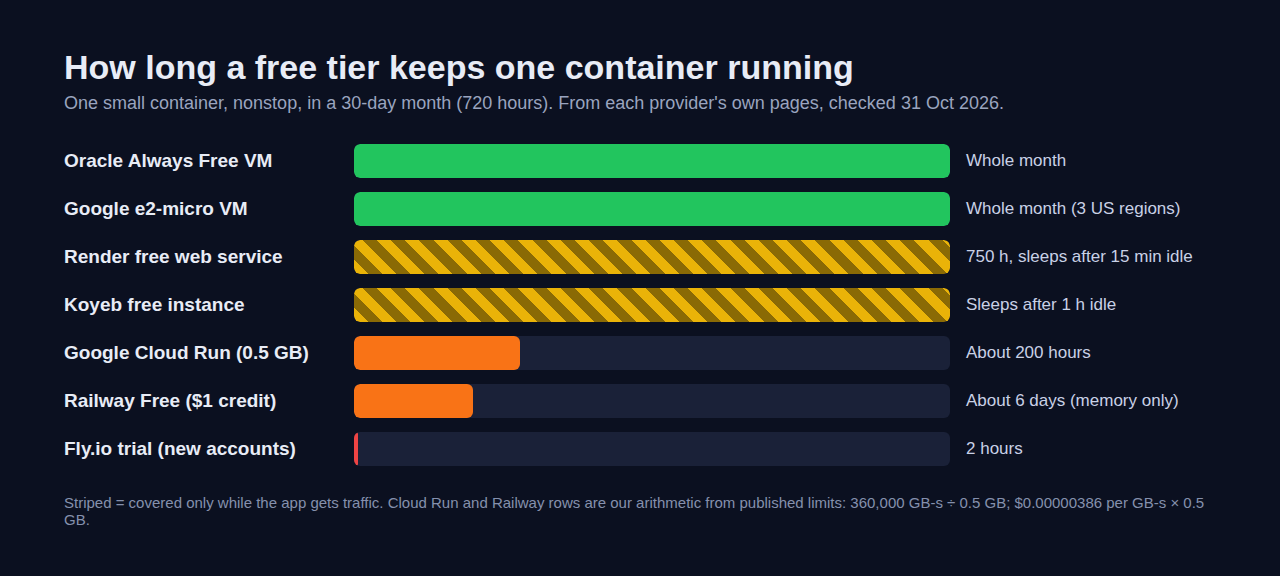
| Provider | Free allowance (from its own page) | One container, nonstop, 30 days |
|---|---|---|
| Oracle Cloud Always Free | 1,500 OCPU hours and 9,000 GB hours of Arm compute a month, plus two AMD micro VMs | The whole month |
| Google Compute Engine e2-micro | One e2-micro VM, hours equal to the hours in the month | The whole month (in three US regions) |
| Render | 750 free instance hours per workspace per month | Covers 720 hours, but it sleeps after 15 minutes idle |
| Koyeb | One free instance, 512 MB RAM, 0.1 vCPU | Runs while it has traffic, sleeps after 1 hour idle |
| Google Cloud Run | 360,000 GB-seconds of memory and 180,000 vCPU-seconds | About 200 hours at 0.5 GB, about 50 hours of 1 vCPU |
| Railway Free plan | $1 of usage credit a month | About 6 days of 0.5 GB memory alone, before CPU and egress |
| Fly.io (new accounts) | Trial only: 2 VM hours or 7 days | 2 hours |
The Cloud Run and Railway rows are our own arithmetic from their published numbers. Cloud Run’s 360,000 GB-seconds divided by 0.5 GB is 720,000 seconds, which is 200 hours. Railway lists memory at $0.00000386 per GB per second, so 0.5 GB for 30 days costs about $5.00, five times the $1 credit.
If you only remember one line: free platforms are free because they stop your container when it is idle. Free VMs stay on, but the server becomes your job.
How We Checked These Free Tiers
Every limit in this post comes from the provider’s own pricing, docs or free-tier page, opened on 31 October 2026. We did not deploy a test app on each platform, and we did not run a test deploy on xCloud for this post, so there are no speed, uptime or memory numbers here. The one xCloud detail below (the swap file on small servers) comes from xCloud’s own server setup code, not from a test. Where we could not confirm something on a provider’s page, the table says so instead of guessing.
We judged each option on five things:
- RAM and CPU of the free instance.
- Sleep rules: when the container stops and how long it takes to wake.
- Hours and bandwidth included each month.
- Data: whether files, disks and databases survive.
- Sign-up friction: card or billing account, and region limits.
Master Comparison: Free Docker Hosting in 2026
| Provider | Type | Free RAM / CPU | Sleeps when idle? | Persistent data | Card or billing |
|---|---|---|---|---|---|
| Render | Platform | Not stated on the free page | Yes, after 15 minutes | No disk; free Postgres expires after 30 days | Not covered here |
| Koyeb | Platform | 512 MB, 0.1 vCPU, 2 GB SSD | Yes, after 1 hour | No volumes | Not covered here |
| Google Cloud Run | Serverless containers | Monthly GB-second and vCPU-second totals | Yes, scales to zero by default | Not part of the free tier | Billing account required |
| Oracle Cloud Always Free | Virtual machine | Arm: equivalent to 2 OCPUs and 12 GB; AMD micro: 1 GB | No, but idle VMs can be reclaimed | 200 GB block storage | Not covered here |
| Google e2-micro | Virtual machine | Small shared-core VM | No | 30 GB standard disk | Billing account required |
| Railway | Platform | Free plan: up to 0.5 GB and 1 vCPU per service | Not stated | 500 MB max volume on Free | No card for the trial |
| Fly.io | Platform | Trial only: 2 machine hours or 7 days | Trial machines stop after 5 minutes | Not covered here | No card for the trial |
🥇 1. Render: Best Free Docker Hosting for Demos
Render runs Docker natively: its docs say a service can pull a prebuilt image from a registry such as Docker Hub, or build from the Dockerfile in your repository. Free web services are allowed, and Render grants 750 free instance hours per workspace each month, according to its free instance documentation.
The catch is sleep. Render spins down a free web service after 15 minutes without inbound traffic, and waking it takes about a minute. If your free hours run out, Render suspends every free web service in the workspace until the next month.
Key limits (from the free instance documentation, as of October 2026):
- Filesystem: lost on every redeploy, restart or spin-down, and free services cannot attach a persistent disk.
- Database: one free Postgres per workspace, 1 GB, and it expires 30 days after creation. After a 14-day grace period, Render deletes it with its data.
- Email: outbound ports 25, 465 and 587 are blocked.
- No scaling beyond one instance, no shell access and no one-off jobs on a free web service.
- Restarts: Render says it might restart a free web service at any time.
| Pros | Cons |
|---|---|
| ✅ Deploys from a Dockerfile or a registry image | ❌ 15-minute idle sleep and about a minute to wake |
| ✅ 750 hours covers a full month for one service | ❌ No persistent disk; free Postgres is deleted after 30 days plus grace |
| ✅ One free Key Value instance per workspace | ❌ Render may restart a free service at any time |
Best for: portfolio projects, demos and webhooks that can tolerate a slow first request.
🥈 2. Koyeb: Best for a Small API With Daytime Traffic
Koyeb gives each organization one free instance with 512 MB of RAM, 0.1 vCPU and 2 GB of SSD, according to its instances documentation (as of October 2026; the pricing page no longer lists the free instance). It runs Docker images from public or private registries. Free instances scale to zero after 1 hour without traffic, which is four times longer than Render’s window.
Key limits:
- One region only: Frankfurt or Washington, D.C.
- Web services only: no worker services, no custom scaling and no volumes.
- Bandwidth: the free tier’s allowance is not stated on the pricing page.
| Pros | Cons |
|---|---|
| ✅ Clear published specs: 512 MB, 0.1 vCPU | ❌ 0.1 vCPU is slow for builds or heavy requests |
| ✅ Sleeps after 1 hour, not 15 minutes | ❌ No volumes, so no database on the free instance |
| ✅ Runs registry images directly | ❌ Only two regions |
Best for: a small API or bot that gets steady traffic during the day.
🥉 3. Google Cloud Run: Best for Spiky, Low Traffic
Google Cloud Run runs any container image and, by default, scales to zero when a service gets no traffic. Its free tier, listed on Google’s free features page, covers 2 million requests a month, 360,000 GB-seconds of memory, 180,000 vCPU-seconds and 1 GB of outbound data from North America.
With request-based billing you are charged only while a request is being handled, so a low-traffic app can stay inside those totals for a long time. Run the same container nonstop and the memory allowance lasts about 200 hours at 0.5 GB.
Key limits:
- A Google Cloud billing account is required to use the free tier.
- Free limits are monthly totals, not credit. They do not roll over.
- Cold starts: a service scaled to zero has to start again on the next request.
| Pros | Cons |
|---|---|
| ✅ 2 million free requests a month | ❌ Billing account needed, so a runaway bill is possible |
| ✅ Any container image, any language | ❌ Only 1 GB of free egress from North America |
| ✅ Scales to zero, so idle time costs nothing | ❌ Nonstop use runs out the free memory in about 8 days |
Best for: APIs, webhooks and scheduled jobs with bursts of traffic and long quiet periods.
4. Oracle Cloud Always Free: Best Always-On $0 Server
Oracle Cloud gives every account Always Free compute for the life of the account, according to its Always Free resources page. That is not a container platform. It is a set of virtual machines where you install Docker yourself.
- Arm (Ampere A1): the first 1,500 OCPU hours and 9,000 GB hours a month, which Oracle’s Always Free docs say equals 2 OCPUs and 12 GB of memory for Always Free accounts.
- AMD micro: up to two VMs with 1/8 of an OCPU and 1 GB of memory each, up to 50 Mbps of internet bandwidth.
- Storage and data: 200 GB of combined boot and block volume, and 10 TB of outbound data a month.
The catch worth knowing: Oracle may reclaim idle Always Free instances. A VM counts as idle when, over 7 days, its CPU (95th percentile), network and (on Arm) memory use all stay under 20%. Always Free VMs must live in your home region, and Oracle warns that “out of host capacity” errors can happen.
| Pros | Cons |
|---|---|
| ✅ A real server that stays on all month | ❌ You patch, secure and back up the server yourself |
| ✅ Up to 12 GB of memory on Arm | ❌ Idle VMs can be reclaimed |
| ✅ 10 TB of outbound data | ❌ Arm needs images built for Arm (arm64) |
Best for: developers who want a $0 always-on box and are happy to run Linux.
5. Google Compute Engine e2-micro: Always-On, Small
Google’s free tier also includes one non-preemptible e2-micro VM a month in Oregon (us-west1), Iowa (us-central1) or South Carolina (us-east1). It comes with 30 GB of standard persistent disk and 1 GB of outbound data from North America a month.
It is a small shared-core machine, so it suits one light container, not a stack with a database. Like Cloud Run, it needs a billing account.
Best for: one small always-on container in the US, with your own setup.
6. Railway: A Free Trial, Then a $1 Credit
Railway has two free options. The trial gives a one-time $5 credit for 30 days, with up to 2 vCPU and 1 GB per service. After 30 days or $5, you move to the Free plan: $0 a month with $1 of usage credit, up to 0.5 GB and 1 vCPU per service.
Railway says no credit card is needed for the trial. The trade-off is that usage is metered per second, and $1 does not cover a container that runs all month. Railway also deletes trial volumes 30 days after the credits expire.
Best for: trying Railway’s workflow before you pay for it.
7. Fly.io: No Free Tier for New Accounts
Fly.io says plainly that new organizations have no free tier or monthly free usage allowance. New accounts get a trial of 2 hours of machine runtime or 7 days, whichever comes first, and trial machines stop after 5 minutes of running.
The trial starts without a card. To keep machines running after the trial, you add a card, and adding it ends the trial. The cheapest paid machine, a shared-cpu-1x with 256 MB of RAM, is listed at $2.19 per 30 days. Organizations on plans discontinued in October 2024 keep their old free allowances.
Best for: a quick test drive. It is no longer a free home for a container.
What Breaks When You Outgrow Free Docker Hosting
The free tier rarely fails on day one. It fails the first time your app needs to remember something, or the first time a real visitor waits a minute for a sleeping container.
- Data disappears. Render’s free filesystem is wiped on restart, and its free Postgres is deleted after 30 days plus a 14-day grace period. Koyeb’s free instance has no volumes.
- First requests are slow. A container that sleeps after 15 minutes or 1 hour has to start again for the next visitor.
- Email doesn’t send. Render blocks outbound mail ports on free services, so password resets and contact forms need an email API.
- One service is not enough. Most real apps are a web container, a database and a cache. Free tiers give you one instance, or one service per organization.
- Bills appear. Cloud Run and e2-micro need a billing account, so usage above the free totals is charged.
If your app keeps a database, files or user uploads, read what Docker Compose is first. A Compose file with named volumes on a server you control is the usual next step.
The Cheapest Always-On Option: A Small VPS With xCloud
The honest next step after free hosting is not a bigger free tier. It is a small server you rent and a panel that does the Docker work for you. This is where the xCloud free plan fits, and it is worth being exact about what it is.
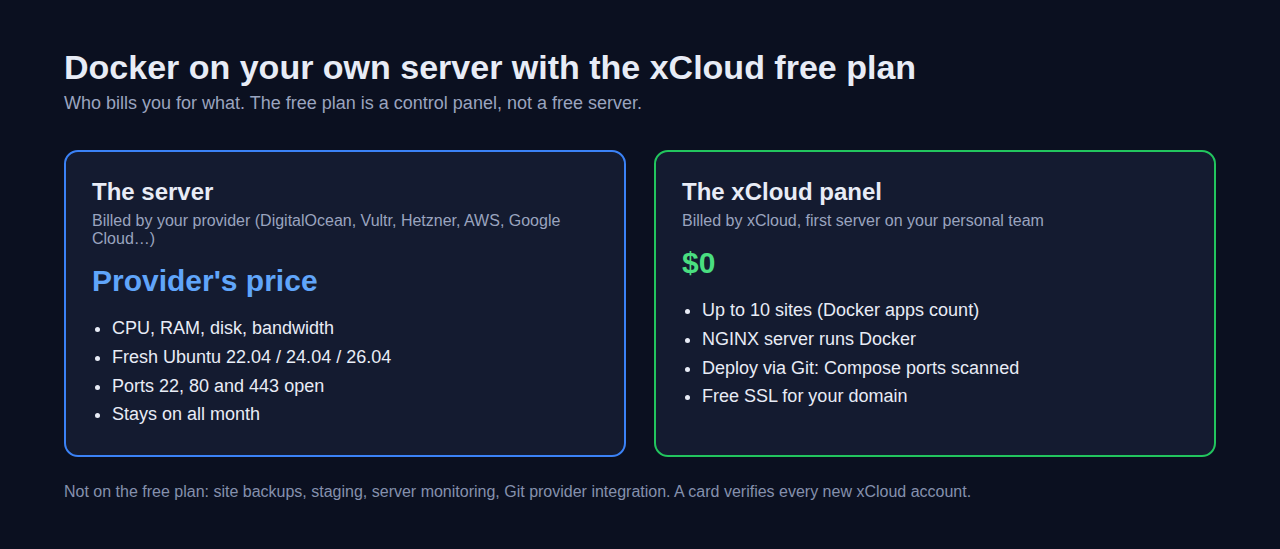
The xCloud free plan is not free hosting. It is a $0 control panel for one server you already rent from a provider such as DigitalOcean, Vultr, Hetzner, AWS or Google Cloud, with up to 10 sites. Docker apps count as sites. Your provider bills you for the server; xCloud’s panel fee for that first server is $0. The details are in the xCloud free plan guide.
Here is the flow from xCloud’s own docs:
- Rent a fresh Ubuntu 22.04, 24.04 or 26.04 LTS server with ports 22, 80 and 443 open. Arm servers can be connected too.
- In xCloud, choose New Server → Bring your own VPS provider, keep the Free billing option, and select NGINX as the web server. OpenLiteSpeed servers cannot run Docker. 👉 Connect a server from any provider
- Open the server, click New Site, then Deploy via Git. For a public repository, paste its URL in the Public Repository tab. Choosing a repository from a connected GitHub or GitLab account is Git provider integration, which needs a paid plan. Click Docker container above the repository (xCloud may suggest Native app for some repositories). xCloud reads your Compose file, finds the ports your app publishes and puts your domain in front of the right one. 👉 Deploy a Docker app from a Git repository
- On a small server, xCloud adds swap for you. When xCloud sets up a server that has no swap file, it creates a 1 GB swap file, so a 1 GB VM such as Oracle’s AMD micro or Google’s e2-micro has some room when NGINX, Docker and your container run together. Swap is slower than RAM, so it helps a busy moment, not a heavy app.
- You don’t need to install Docker first. xCloud installs it during your first container deploy, or ahead of time from the server’s Management → Settings page: click Install a Service at the top of Server Utilities, then Install next to Docker. 👉 Enable Docker on an NGINX server
Prefer one-click? Self-hosted apps such as Vaultwarden and Uptime Kuma are in the one-click apps catalogue, and each one runs as a Docker app on your server.
What xCloud costs, plainly
| Option | What you get | xCloud price |
|---|---|---|
| Free plan | Panel for 1 server you own, up to 10 sites | $0 (your provider bills the server) |
| Second server you own and more | Unlimited sites per server | $5 a server a month for 2–5 servers, $4 for 6–10, $3 for 11+ |
| xCloud Managed server | xCloud provides the server, one invoice | From $5 a month (1 GB RAM) |
| Managed Docker hosting | Dedicated Cloud VPS, backups and patching included | From $24.99 a month (6 GB RAM) |
Current prices are on the pricing page, and the managed option is on the Docker hosting page.
What xCloud does not do
- It does not give you a free server. You need a server from a provider, and you pay for it.
- A card is required. xCloud asks every new signup to add a card to verify the account. The free server’s bill stays at $0.
- The free plan leaves out site backups, staging, server monitoring and Git provider integration. Back up from your provider’s side, or see backing up Docker apps on a paid plan.
- No scale to zero. Your server runs all the time, which is the point, but it also means you pay the provider all the time.
- A free VM must meet the same rules as any other server. The connect guide asks for a fresh Ubuntu 22.04, 24.04 or 26.04 LTS server, root access by password or SSH key, ports 22, 80 and 443 open, and at least 1 GB of memory. Oracle’s AMD micro VM and Google’s e2-micro have exactly 1 GB, the minimum, so Oracle’s Arm VM leaves far more room for containers. On Arm, MySQL 8.4 is not available. Open the three ports in the provider’s firewall rules as well as on the server.
Common Mistakes With Free Docker Hosting
- Putting a database on a free instance. If the platform has no persistent disk, the database lives only until the next restart.
- Using a sleeping container for webhooks. A payment or chat webhook that times out during a cold start may not be retried.
- Forgetting the billing account. Free tiers that need billing will charge you once you pass the monthly totals. Set a budget alert.
- Building an x86 image for an Arm server. Oracle’s Arm VMs need arm64 images, or a multi-arch build.
- Leaving an idle VM. Oracle can reclaim an Always Free VM that sits under 20% use for 7 days.
Who Should Use Which Option
| If you are… | Best choice | Why |
|---|---|---|
| A student or job seeker showing a project | Render | Deploys a Dockerfile in minutes; sleep doesn’t matter for a portfolio |
| A developer with a small daytime API | Koyeb | Sleeps after 1 hour, not 15 minutes |
| Building an API with bursty traffic | Google Cloud Run | 2 million free requests a month |
| Comfortable running Linux and wanting $0 | Oracle Cloud Always Free | A real server that stays on |
| Running apps with users and data | A small VPS with xCloud | Always on, your own disk, Docker deploys from the dashboard |
Not sure whether a raw server or a managed one suits you? Our guide to self-managed vs managed hosting covers that trade-off, and VPS providers compared helps you pick the server.
Pick Your Free Docker Hosting and Deploy This Week
Free Docker hosting is real, and it is useful. Use Render, Koyeb or Cloud Run for demos and side projects that can sleep. Use Oracle’s Always Free VMs if you want a $0 server and don’t mind running it yourself.
The moment your app holds data people care about, move it to a server with its own disk and backups. This week, list the containers you run, mark the ones that keep data, and move those first. A small VPS with the xCloud free plan is one way to do that without managing Docker over SSH.
If you have found this blog helpful, feel free to subscribe to our blogs for valuable tutorials, guides, knowledge, and tips on web hosting and server management. You can also join our Facebook community to share insights and engage in discussions.
Frequently Asked Questions
Is there truly free Docker hosting that never sleeps?
Only on free virtual machines. Oracle Cloud’s Always Free compute and Google Cloud’s free e2-micro VM keep running all month, but you install Docker and look after the server yourself. Render, Koyeb and Cloud Run all stop idle containers.
Does Fly.io still have a free tier?
No. Fly.io’s pricing page says new organizations have no free tier or monthly free usage allowance. New accounts get a trial of 2 hours of machine runtime or 7 days, whichever comes first. Organizations on plans discontinued in October 2024 keep their old allowances.
Can I keep a database on free Docker hosting?
Not safely. Render’s free Postgres expires 30 days after creation, Render and Koyeb free instances cannot attach a persistent disk or volume, and Railway deletes trial volumes 30 days after the credits run out. Keep real data on a server with a disk you control and a backup.
Is xCloud free Docker hosting?
No. The xCloud free plan is a $0 control panel for one server you already rent elsewhere, with up to 10 sites, and Docker apps count as sites. Your provider still bills you for that server. xCloud Managed servers are paid, from $5 a month.
Do I need a credit card for free Docker hosting?
It depends on the provider. Railway’s trial and Fly.io’s trial start without a card (on Fly.io, a card is needed to keep running after the trial), while Google Cloud requires a billing account for its free tier. xCloud also asks for a card to verify every new account, even on the free plan.
What is the cheapest always-on way to run Docker?
A small VPS. Fly.io’s smallest paid machine is listed at $2.19 per 30 days, and small VPS plans from providers such as Vultr or Hetzner are another low-cost option (check their current prices). Connect it to the xCloud free plan to deploy Docker Compose apps from the dashboard instead of over SSH.