

WordPress brute force protection in xCloud now runs on BetterShield, not WP Fail2Ban. Since v2.9.6 (26 October 2026), turning on Login Protection installs BetterShield, which pauses repeated failed logins inside WordPress and bans the attacker’s network at your server firewall for 15 minutes. It is free, opt-in per site, and existing sites switch in one click.
If your sites still show a blue Switch from WP Fail2Ban to BetterShield banner, this post is for you. Our WP Fail2Ban integration did one job well: it turned WordPress login abuse into server firewall bans. BetterShield keeps that job and fixes the parts WP Fail2Ban could not.
Below you will find why we made the change, what BetterShield blocks, the hardening it applies on install, how to switch, and the trade-offs you should know before you click.

TL;DR
Short on time? Here is the whole change in a few lines:
- WP Fail2Ban is retired in xCloud. Sites that run it keep working, but the dashboard no longer turns it on or changes it.
- BetterShield is the new Login Protection. It is a free plugin from WPDeveloper, the team behind xCloud, and xCloud installs and manages it for you.
- Two layers, one switch. BetterShield pauses failed logins in WordPress, and xCloud bans the attacker’s /24 (IPv4) or /64 (IPv6) network at the firewall for 15 minutes.
- Cloudflare-aware. It trusts Cloudflare’s visitor IP only when the request really comes from Cloudflare, so Cloudflare edges are never banned.
- Strict by default. Every protection starts on, and install also closes common hardening gaps such as the dashboard file editor and a published WordPress version.
- One click to switch, or one API call per site through the Public API and MCP.
- Requirements: WordPress 6.7+, PHP 8.0+, and a WordPress site on a connected server.
What Changed in v2.9.6
The v2.9.6 release replaced the WP Fail2Ban option on a WordPress site’s Security page with BetterShield login protection. Every security setting now lives under one Security menu, with an on/off switch in each card header.
Here is what that means for each kind of site:
| Your site today | What you see | What to do |
|---|---|---|
| No login protection | Protect your WordPress logins card, Off and Free badges | Turn on the switch in the card header |
| Runs WP Fail2Ban | Blue Switch from WP Fail2Ban to BetterShield banner, tile reads WP Fail2Ban, retired | Click Switch Now, then turn on the switch |
| WP Fail2Ban, but WordPress below 6.7 or PHP below 8.0 | Login protection needs an update | Update WordPress or PHP first, then switch |
| Not a WordPress site | No card | Nothing; BetterShield is WordPress-only |
Nothing is installed until you turn it on. We did not force-migrate anyone, because changing login security behind a site owner’s back is exactly the kind of surprise we try to avoid.
Why WP Fail2Ban Was Not Enough
Let us be fair first. WP fail2ban is a respected plugin with more than 60,000 active installations, and it has been around since 2012. Its design is simple and clever: WordPress writes security events to syslog, and the server’s fail2ban reads them and bans the IP.
That design has three limits we kept running into on managed servers.
1. The ban only happened at the server
WP Fail2Ban reports an event and lets fail2ban decide. The blocking lives outside WordPress, so the protection is only as good as the server-side filter that reads the log.
BetterShield works in two layers. It pauses the connection inside WordPress first (by default, 5 failed attempts within 15 minutes pauses sign-in for 15 minutes), and then reports the pause so xCloud’s firewall rule bans the network. If the firewall link ever breaks, the card says Server firewall not connected, and the login is still protected inside WordPress.
2. Cloudflare made IP bans tricky
On a site behind Cloudflare’s proxy, every request reaches your server from a Cloudflare address. Ban that address and you block real visitors. Ignore the header Cloudflare sends and you lock out the wrong person.
BetterShield reads the visitor’s real IP from Cloudflare’s header only when its Cloudflare setting is on and the request really comes from Cloudflare’s networks. xCloud turns that setting on for sites with Cloudflare SSL, Cloudflare Enterprise or an xCloud staging domain, and the card shows a Cloudflare aware chip. Cloudflare edges are never banned.
3. Login protection is more than counting failures
Counting failed logins was enough a few years ago. Today, site owners also ask for two-factor sign-in, passkeys, bot checks and an audit of their WordPress setup. Those sit outside what WP Fail2Ban was built to do.
BetterShield adds them in the same free plugin, and it is actively developed by WPDeveloper. xCloud tests each new release before it reaches your sites.
| WP Fail2Ban in xCloud | BetterShield in xCloud | |
|---|---|---|
| Where it blocks | Server firewall only | WordPress login and server firewall |
| What gets banned | The reported IP | The whole network (/24 or /64), HTTP and HTTPS ports only, 15 minutes |
| Behind Cloudflare | Could lock out Cloudflare’s address instead of the visitor | Real visitor IP, only from verified Cloudflare requests |
| Two-factor and passkeys | ❌ | ✅ (set up in WP Admin) |
| Bot and proof-of-work checks | ❌ | ✅ |
| Hardening on install | ❌ | ✅ |
| Managed from the dashboard | No longer | ✅ |
| Price | Free | Free |
What BetterShield Blocks
BetterShield starts strict: every protection below is on. You can turn each one on or off from the Protection settings section of the card, then click Save Settings.
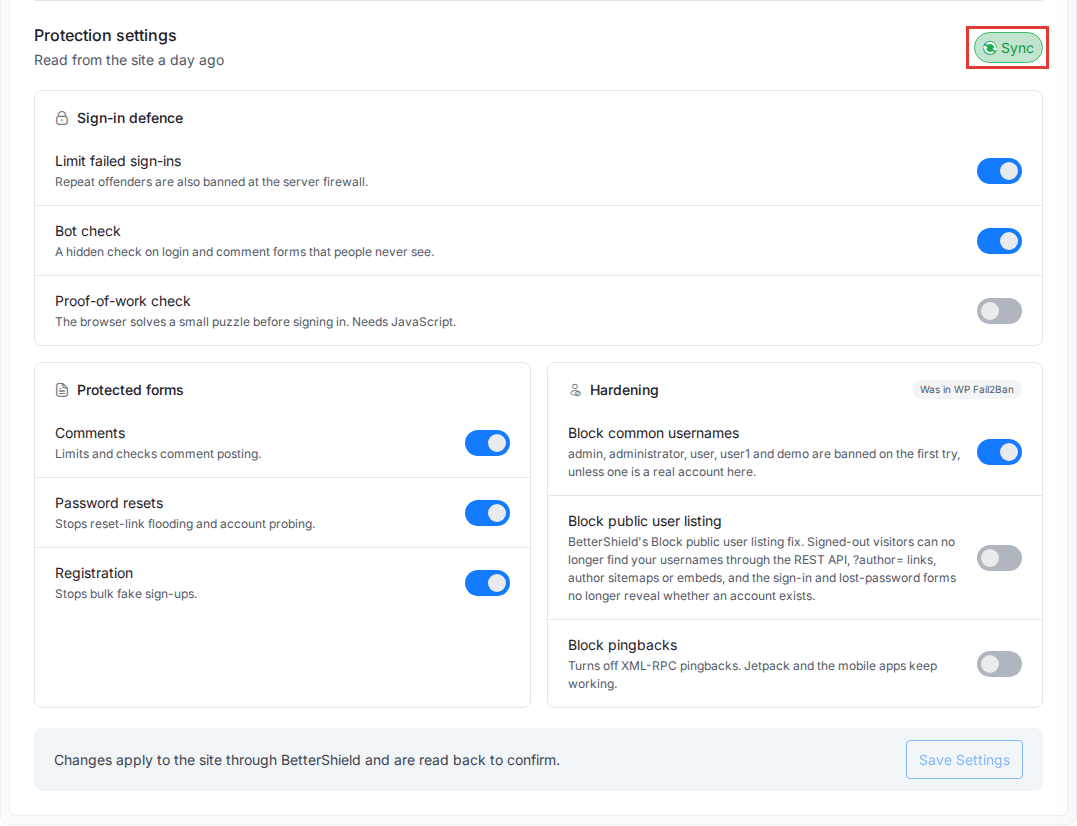
| Group | Setting | What it stops |
|---|---|---|
| Sign-in defence | Limit failed sign-ins | Password guessing. Each pause also triggers a 15-minute network ban at the firewall. |
| Sign-in defence | Bot check | Simple bots, with a hidden field on the login and comment forms that people never see. |
| Sign-in defence | Proof-of-work check | Scripted attempts. After 2 failed logins, the browser solves a small puzzle that takes a fraction of a second. |
| Protected forms | Comments | Comment flooding. |
| Protected forms | Password resets | Reset-link flooding and account probing. |
| Protected forms | Registration | Bulk fake sign-ups. |
| Hardening | Block common usernames | Attempts as admin, administrator, user, user1 or demo are paused on the first try. A real account with that name is never blocked. |
| Hardening | Block public user listing | Username discovery through the REST API, ?author= links and author sitemaps. |
| Hardening | Block pingbacks | XML-RPC pingback abuse, while Jetpack and the WordPress mobile apps keep working. |
The Hardening group is marked Was in WP Fail2Ban, so former WP Fail2Ban users will recognise it. Every WP Fail2Ban option has a matching BetterShield setting.
The catch worth knowing: Block public user listing hides author profiles from signed-out visitors. If your theme shows author pages, turn it off after the switch.
Hardening xCloud Applies at Install
When you turn BetterShield on, xCloud also closes a few findings that BetterShield’s security audit would otherwise report. Each fix is safe on any site:
- The dashboard file editor is turned off, so a stolen admin login cannot edit theme or plugin code from WP Admin.
- Security response headers are added. Our guide to WordPress security headers explains what each one does.
- The WordPress version is hidden from your pages.
- Uploads folders stop listing their files, with an empty index file in each.
wp-config.phpis set to640when other accounts on the server could read or change it.- The site address moves from
http://tohttps://when the site has a working SSL certificate in xCloud. If the login page then fails over HTTPS, xCloud puts the address back.
The first four go through BetterShield’s own hardening, so you can undo each one in WP Admin. None of them needs .htaccess, so they work on Nginx and OpenLiteSpeed alike.
How to Switch From WP Fail2Ban in One Click
Here is the dashboard flow for a site that still runs WP Fail2Ban:
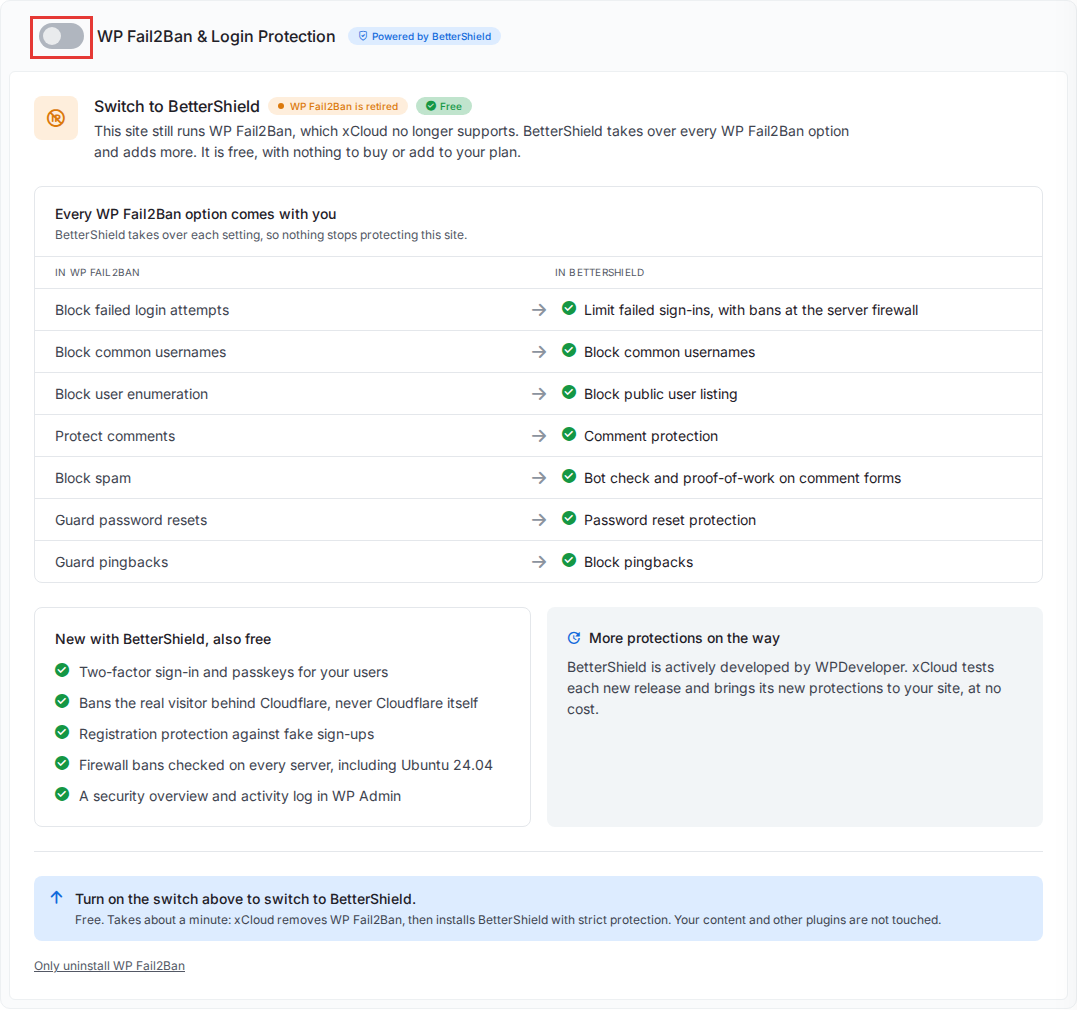
- Open the switch. Click Switch Now on the blue banner, or open the site and go to Security → Overview & Firewall.
- Turn on the switch in the header of the WP Fail2Ban & Login Protection card.
- Confirm with Switch. xCloud removes WP Fail2Ban, then installs BetterShield with strict protection.
- Wait a minute or two. The card walks through Remove WP Fail2Ban, Install BetterShield and Apply strict protection and connect the firewall. You can leave the page.
- Check the result. The card shows Your logins are protected with an Active badge and Server firewall connected.
- Keep the recovery email. BetterShield emails the site’s WordPress admin address a single-use recovery link for lockouts.
👉 The full walkthrough, including what to do if the switch stops, is in Migrate from WP Fail2Ban to BetterShield.
For a new site with no login protection, the same switch installs BetterShield directly. 👉 See Set up BetterShield login protection.
Managing BetterShield Through the Public API and MCP
Agencies with dozens of WordPress sites will not want to click through each one. The xCloud Public API has the same controls under /api/v1/sites/{uuid}/bettershield, and they are available as MCP tools too.
| Request | What it does |
|---|---|
GET /sites/{uuid}/bettershield |
Reads the state, including upgrade_eligible for sites that can switch |
PUT /sites/{uuid}/bettershield |
Turns BetterShield on with every protection on |
POST /sites/{uuid}/bettershield/upgrade |
Removes WP Fail2Ban, then installs BetterShield |
PUT /sites/{uuid}/bettershield/settings |
Changes protection settings, including the failed-login numbers |
DELETE /sites/{uuid}/bettershield |
Turns BetterShield off |
A switch from a script looks like this:
curl -X POST https://app.xcloud.host/api/v1/sites/SITE_UUID/bettershield/upgrade \
  -H "Authorization: Bearer YOUR_API_TOKEN" \
  -H "Accept: application/json"
Write requests answer 202 Accepted and run in the background, so poll the GET request until status is active or failed. If you use an AI assistant, see what you can ask xCloud MCP to do.
What BetterShield Does Not Do (Yet)
Honesty matters more than a tidy launch post, so here are the trade-offs:
- Network bans are broad. The firewall bans a whole /24 or /64 for 15 minutes. One person typing
admincan lock the whole office out. You can lift it early under Security → Firewall Management on the server, and IPs you whitelist for a site are never banned. - The firewall layer does not help proxied traffic. Behind Cloudflare, the server sees Cloudflare’s addresses, which are never banned. BetterShield still locks the visitor out at the login, but the firewall ban only applies to direct traffic.
- There is a short gap during the switch. Between removing WP Fail2Ban and finishing the BetterShield install, failed logins are not blocked for a minute or two.
- Older sites cannot run it. WordPress below 6.7 or PHP below 8.0 must be updated first. 👉 See how to change PHP versions.
- Some settings live only in WP Admin. Two-factor sign-in, passkeys, the audit, the activity log and the failed-login numbers are set up in WordPress (or the numbers through the API), not on the xCloud card.
- It is not a firewall or malware scanner. BetterShield’s own plugin page says so. For vulnerability scanning and malware cleanup, pair it with Site Security PRO.
Protect Your WordPress Logins Today
Brute force attacks are boring, constant and cheap for attackers, which is exactly why the protection should run without you thinking about it. BetterShield gives you two layers, Cloudflare-safe bans and a hardened baseline, for free.
This week, open each WordPress site that shows the blue banner and switch it, or script it through the API if you manage many. Then check that the card says Server firewall connected and keep the recovery email somewhere safe.
If you are not on xCloud yet, our managed WordPress hosting includes BetterShield, server-level Fail2Ban protection and the rest of how xCloud keeps your WordPress sites safe.
If you have found this blog helpful, feel free to subscribe to our blogs for valuable tutorials, guides, knowledge, and tips on web hosting and server management. You can also join our Facebook community to share insights and engage in discussions.
Frequently Asked Questions
Is BetterShield free on xCloud?
Yes. BetterShield is a free plugin on WordPress.org, and xCloud installs and manages it at no extra cost. There is nothing to buy or add to your plan.
Do I have to switch from WP Fail2Ban?
xCloud no longer supports WP Fail2Ban. A site that still runs it keeps working, but you cannot turn it on or change its options from the dashboard anymore. Switch to keep your login protection managed and up to date.
Does the switch leave my site unprotected?
Briefly. xCloud removes WP Fail2Ban first and then installs BetterShield, so failed logins are not blocked for the minute or two in between. Pick a quiet moment if your login page is under constant attack.
Will BetterShield ban Cloudflare and take my site offline?
No. xCloud never bans Cloudflare’s edge networks, localhost, your server’s own address or IPs you whitelisted. On a proxied site, BetterShield reads the visitor’s real IP only when the request really comes from Cloudflare and locks that visitor out at the WordPress login.
Why did a firewall ban lock out my whole office?
The server ban covers the visitor’s whole network, an IPv4 /24 or an IPv6 /64, for 15 minutes. Everyone on that network is blocked too. You can lift the ban early from the server’s Security → Firewall Management page.
What does BetterShield need to run?
A WordPress site on WordPress 6.7 or newer and PHP 8.0 or newer, on a server connected to xCloud. If the site is older, the card tells you which requirement is missing.