
Managed LMS hosting
Managed LMS Hosting Built for Course Sites That Actually Scale
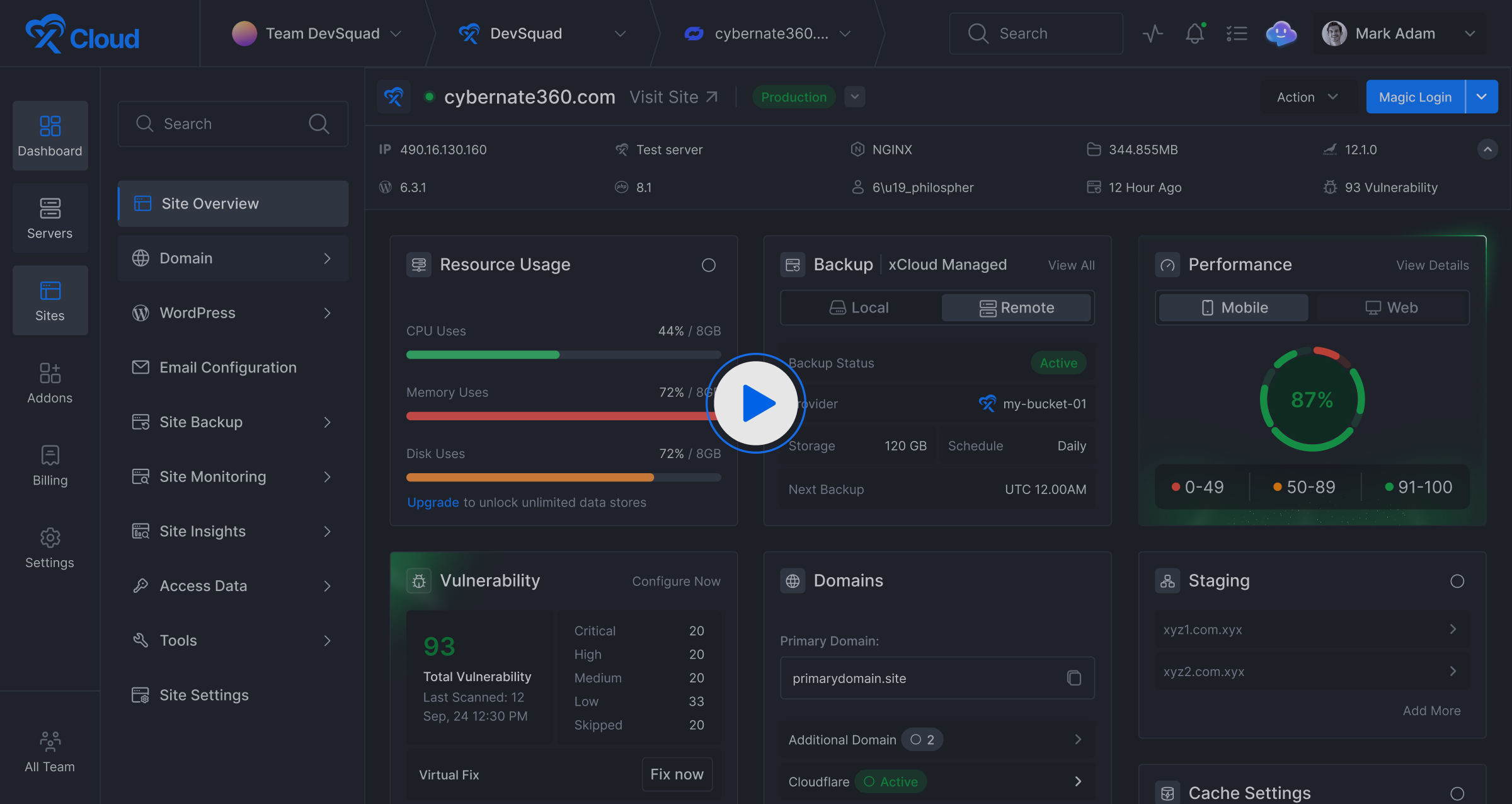
Course sites do not fail because of traffic. They fail because every student is logged in, which means not one lesson view can be served from a page cache. xCloud is LMS hosting tuned for that: Redis object caching, NVMe storage and PHP workers sized for concurrent students, with no server administration left on your desk.
Get started for free- Tuned for LearnDash, Tutor LMS, LifterLMS and Moodle
- Object caching and per-site isolation as standard
- Free migration, staging and automatic backups

Who it is for
LMS Hosting for Every Kind of Learning Business
Whether you sell courses, teach a cohort or train a workforce, the hosting problem is the same: every learner is logged in, so the server does real work on every page.
Course creators and trainers
Sell courses and memberships on LearnDash, Tutor LMS or LifterLMS without a launch day taking the site down. Redis object caching keeps lessons quick while everyone is signed in.
Schools and institutes
Run Moodle or a WordPress LMS for a term of students at once. Each site is isolated with its own database and PHP pool, and staging keeps upgrades off live classes.
Corporate learning teams
Host internal training on a server you control, on the cloud provider you already use. Backups, monitoring and SSL are handled, so nobody on your team is on call for it.
Features
LMS Hosting Features Built Around Logged-In Traffic
Everything a course site leans on, in five groups. Pick a tab.
Redis object caching
Caches the database queries a page cache never reaches, keeping lesson pages fast while every student stays signed in.
FastCGI page caching
One-click full-page caching for the public side of your site: sales pages, course catalogues and the blog.
Ready for your cache plugin
One-click NGINX configuration for WP Rocket, WP Super Cache and W3 Total Cache, so the plugin you already use works properly.
NGINX or OpenLiteSpeed
A tuned LEMP stack with PHP-FPM is installed for you, or choose an OpenLiteSpeed stack. Neither needs manual configuration.
MariaDB and MySQL
Optimised engines for the constant small writes that quizzes and progress tracking produce.
PHP your way
Run multiple PHP versions and set the version and limits for each site on its own.
Isolation between sites
Every site runs as its own system user, so a problem on one course site cannot reach another.
Free SSL certificates
One-click SSL, with renewals handled for you. Bring your own certificate if you prefer.
Fail2Ban by default
Enabled on xCloud servers to block brute-force attempts against the SSH port.
SFTP and SSH only
Server connections are limited to secure SFTP and SSH. Plain FTP is not an option.
A server of your own
Not a shared plan. Your sites run on a server that is yours, so nobody else's site sits beside your students' data.
Backups you can restore
Full and incremental backups, with a restore you run yourself in a few clicks.
More than one LMS on a server
Deploy LearnDash, Tutor LMS and Moodle side by side. There is no site limit from xCloud.
Resize when enrolment grows
Move to a bigger server without a rebuild or a migration.
Your choice of cloud
An xCloud managed server, or DigitalOcean, Vultr, Hetzner, AWS, Google Cloud, Linode, Hostinger or any Ubuntu server.
No per-student pricing
Managed servers and self-managed per-server fees are both flat. Nothing is metered per student, visit or site.
Free migration in
Bring the course site you already run across, with its files and database.
Demo sites in one click
Spin up a test site with a temporary domain to try a new LMS before it meets a student.
Staging with pull and push
Update the LMS on a staging copy, check enrolment and checkout, then push it live.
Backup and restore
Incremental and full backups to the storage you choose, and a rollback in a few clicks.
Real system cron
Drip content and scheduled rebills run on time, not only when somebody visits.
Full root, SSH and SFTP access
It is your server, with the access to run it your way.
Deploy straight from Git
Push to your repository and ship, for teams that keep a custom LMS theme or plugin in version control.
Databases and users on tap
Create and manage multiple databases and users on a single server.
Server and site monitoring
Watch RAM, CPU and disk usage from the dashboard.
Instant alerts
Find out about a problem before your students do.
Documentation
Step-by-step guides for migration, caching, staging and backups.
Video tutorials
Walkthroughs for the parts of the panel that are easier to watch than to read.
A community to ask
Other people running sites on xCloud, in the xCloud community.
A support team
People who know the stack, because they configured it.
WordPress LMS plugins
LMS Hosting Services Tuned Per Platform
You pick the LMS plugin. xCloud tunes the stack under it for long authenticated sessions rather than anonymous page views.
LearnDash Hosting
The heaviest WordPress LMS, and the one that gains most from Redis. That is what the best hosting for LearnDash comes down to: object caching plus enough PHP workers for quiz submissions.
Tutor LMS Hosting
Instructors and students both generate uncacheable requests all day. A dedicated database and system cron keep the course builder and the student dashboard quick together.
LifterLMS Hosting
Memberships, drip content and rebills hang off scheduled jobs. Real system cron means they run on time, not when a visitor happens by.
One-Click App
Running Moodle Instead? Deploy It in One Click
Moodle is standalone PHP rather than a WordPress plugin, so it deploys from xCloud's One-Click Apps library. Pick Moodle and xCloud brings up the server and its database, then sets up your domain, SSL and backups. Sign in as administrator and start building your first course.

Pricing
LMS Hosting Costs, Sized to Your Cohort
Two ways to pay. A managed xCloud server bundles the server and the panel in one price; self-managed is a per-server panel fee, with the server billed by your own cloud provider. Either way LMS hosting costs stay predictable as enrolment grows: nothing is charged per student, per visit or per site. A course under a hundred students is comfortable on 2 GB; a few hundred active students wants 4 GB or more.
Newcomer
$5.00per month
- 1 GB Ram
- 25 GB SSD
- 1 vCPU
- 1 TB Bandwidth
- Unlimited Sites
Lite
Premium$7.50per month
- 1 GB Ram
- 32 GB NVMe SSD
- 1 vCPU
- 1 TB Bandwidth
- Unlimited Sites
Basic
$12.00per month
- 2 GB Ram
- 55 GB SSD
- 1 vCPU
- 2 TB Bandwidth
- Unlimited Sites
Personal
Premium$20.00per month
- 2 GB Ram
- 80 GB NVMe SSD
- 2 vCPU
- 3 TB Bandwidth
- Unlimited Sites
Standard
$24.00per month
- 4 GB Ram
- 80 GB SSD
- 2 vCPU
- 3 TB Bandwidth
- Unlimited Sites
Growing
Premium$30.00per month
- 4 GB Ram
- 128 GB NVMe SSD
- 2 vCPU
- 3 TB Bandwidth
- Unlimited Sites
Professional
$45.00per month
- 8 GB Ram
- 160 GB SSD
- 4 vCPU
- 4 TB Bandwidth
- Unlimited Sites
Elite
Premium$50.00per month
- 8 GB Ram
- 256 GB NVMe SSD
- 3 vCPU
- 4 TB Bandwidth
- Unlimited Sites
Business
$88.00per month
- 16 GB Ram
- 320 GB SSD
- 6 vCPU
- 5 TB Bandwidth
- Unlimited Sites
Titanium
Premium$100.00per month
- 16 GB Ram
- 384 GB NVMe SSD
- 4 vCPU
- 5 TB Bandwidth
- Unlimited Sites
Business Plus
$196.00per month
- 32 GB Ram
- 640 GB SSD
- 8 vCPU
- 6 TB Bandwidth
- Unlimited Sites
Ultimate
Premium$200.00per month
- 32 GB Ram
- 512 GB NVMe SSD
- 8 vCPU
- 7 TB Bandwidth
- Unlimited Sites
Ultimate PLUS
Premium$310.00per month
- 48 GB Ram
- 768 GB NVMe SSD
- 12 vCPU
- 8 TB Bandwidth
- Unlimited Sites
Quantum
Premium$395.00per month
- 58 GB Ram
- 1024 GB NVMe SSD
- 16 vCPU
- 9 TB Bandwidth
- Unlimited Sites
Business Max
$399.00per month
- 64 GB Ram
- 1280 GB SSD
- 16 vCPU
- 10 TB Bandwidth
- Unlimited Sites
Every plan above includes the server. Provisioning, OS and stack patching, daily backups, free SSL, the xCloud panel and 24/7 support all come with it, on one bill from xCloud — there is no separate hosting invoice to add. See how this compares with the rest of xCloud pricing.
Premium servers are powered by High-Frequency 3GHz+ Intel Xeon CPUs, lightning-fast memory, and NVMe storage, delivering unmatched speed and performance. General servers, on the other hand, offer a budget-friendly solution for standard workloads.
Free Trial
$0forever
- Start your journey without cost.
- 1 server
- 10 sites
Starter
$5per server / month
- Your rate with 2–5 servers connected.
- 2–5 servers
- Unlimited sites
- All features included
- Bring any VPS provider
Professional
$4per server / month
- The same platform, discounted at 6–10 servers.
- 6–10 servers
- Unlimited sites
- All features included
- Bring any VPS provider
Agency
$3per server / month
- The same platform, discounted at 11+ servers.
- 11+ servers
- Unlimited sites
- All features included
- Bring any VPS provider
With self-managed you pay your own cloud provider for the server. xCloud charges a management fee per connected server per month, which drops as you connect more servers.
Servers
Host Your LMS on xCloud or Any Cloud
Deploy a managed xCloud server, or connect a server you already run. Either way it is the same panel.

xCloud Managed Servers
No cloud account to set up. Deploy a managed server from $5/month across 31 locations, sized to your cohort and resized when enrolment grows.
Or connect your own
 DigitalOceanConnect DigitalOcean
 VultrConnect Vultr
 HetznerConnect Hetzner
 AWSConnect AWS
 Google CloudConnect Google Cloud
 LinodeConnect Linode
 HostingerConnect Hostinger
 Any Ubuntu serverConnect Any Ubuntu server
Deliver Fast Experiences Anywhere In The World
Launch applications closer to your users across multiple global regions for reliable performance and low latency worldwide.

Global Reach....
- 162,368 Sites
- 100% Uptime
- 31 Locations


Frequently Asked Questions
Feel free to contact us with any questions or concerns you may have
How much does LMS hosting cost?
It depends on which of two models you pick. A managed xCloud server is one price for the server and the panel together. Self-managed is two line items: a per-server xCloud fee, and your own cloud server billed by whoever you host it with. A small course site runs comfortably on an entry-level 2 GB server; a few hundred concurrent students wants 4 GB or more. Nothing is metered per student, per visit or per site, so the cost of a successful launch is a server resize rather than a new invoice tier.
How many concurrent students can it handle?
Concurrency is what matters, not total enrolment, because only the students actually logged in cost you anything. The limits are PHP workers and database throughput, both of which follow the size of the server. A 2 GB server is fine for a small cohort, 4 GB and up comfortably carries a few hundred students working at once, and past that you resize rather than migrate. Object caching is what moves that ceiling furthest, which is why it is on by default.
Can I host LearnDash and Tutor LMS on the same server?
Yes. Each site on the server is isolated with its own database, its own PHP pool and its own SSL, so a LearnDash site and a Tutor LMS site can sit side by side, along with the rest of your WordPress LMS hosting, without sharing anything but the hardware. Sizing is the only real consideration: two busy course sites want the same headroom two busy course sites would want anywhere.
Do you migrate my existing course site for free?
Yes. The built-in migration brings files and database across together, and Migrate Guru works if you prefer to run it from inside WordPress. Student records, course progress and enrolments all live in the database, so they arrive intact. You verify the copy on a temporary domain first and point DNS only when you are satisfied, which is how a cutover happens without interrupting a cohort mid-lesson.
Can I host course videos on the server?
You can, and you should not. Video is a long-running, bandwidth-heavy request, and every stream competes for the same workers and disk your lesson pages need, so one popular module can slow the whole site for everyone. Put video on Bunny Stream, Vimeo or object storage and embed it, then let the CDN carry the rest of the course assets. The server then spends its capacity on the part only it can do, which is the LMS itself.
Is shared hosting enough for a small course?
Sometimes, for a while. A handful of students working through pre-recorded lessons will not trouble a decent shared plan. It stops being enough at the first launch, because the load arrives all at once and every one of those requests is authenticated and uncacheable. If your course sells in cohorts rather than trickling, the shared plan will fail on exactly the day it matters most.
Do you support Moodle?
Yes. Moodle deploys from the one-click library and is managed the same way as any WordPress site here, including staging, backups and real system cron. It is standalone PHP rather than a WordPress plugin, so it gets its own data directory and cache paths configured for it. Cheap Moodle hosting usually means shared PHP with no cron and no staging, which is precisely what breaks a Moodle upgrade.
Which LMS platform should I host on xCloud?
Any of them. LearnDash, Tutor LMS, LifterLMS, MasterStudy and Sensei all run on the managed WordPress stack, Moodle runs standalone, and anything else built on PHP, Node.js or Docker deploys here too, so a headless or self-built LMS platform is not a special case. Pick the LMS on its features. The hosting requirements underneath are the same either way.