


Update, 23 October 2026: PHP2Shell is patched on xCloud. More than 95% of xCloud servers already run PHP’s official fixed builds. Separately, PHP has announced a new, lower-risk issue, CVE-2026-115560. PHP itself has not released a fix for it yet, so no host can install one today. The mitigation we applied on 21 October is the step PHP recommends for it, and it stays in place on xCloud servers. You don’t need to do anything, and we’ll install PHP’s fix as soon as PHP releases it. Details are in our CVE-2026-115560 guide.
Update, 22 October 2026: we started applying a temporary mitigation to all xCloud servers, Managed and Self-Managed, from 06:00 UTC on 21 October, eight hours before PHP released its fix. Once the fix was out, the Patch button in Manage PHP could install it from about 14:00 UTC, and our automatic rollout of the official patched PHP builds started at 18:24 UTC, on both NGINX and OpenLiteSpeed. Nobody had to take a site offline. More than 95% of xCloud servers are now fully patched, and old PHP versions down to 5.6 on NGINX servers got a backported fix too. Most teams already have an email confirming their servers are done. Didn’t get one? Contact our support team and we will help. Every change is listed in the v2.9.4 security release notes and the v2.9.5 release notes.
| You don’t need to do anything if… | You need to act if… |
|---|---|
| ✅ Your sites run PHP 8.2, 8.3, 8.4 or 8.5 | ❌ A site runs PHP 8.1 or older on OpenLiteSpeed: move it to PHP 8.3 or newer |
| ✅ Your sites run PHP 5.6 to 8.1 on NGINX (backported fix, but plan an upgrade) | ❌ Your team did not get a “servers patched” email: contact support |
| ✅ Your server runs Ubuntu 22.04, 24.04 or 26.04, or OpenLiteSpeed on Ubuntu 20.04 | ❌ Your server runs NGINX on Ubuntu 20.04: move to a new server |
| ✅ Your server was connected to xCloud during the rollout | ❌ You run PHP inside your own Docker containers: rebuild your images |
If you are an xCloud customer, we first applied a temporary mitigation for PHP2Shell on your servers before the official PHP patch was even released, then followed it with the real fix. You did not have to lift a finger for either.
At xCloud, we care about security, and our goal is to keep your sites and servers secure at all times. When a critical bug lands, we do not wait for someone else to fix it first. That is what being safe with us means: we act early, and we tell you plainly what is left for you to do.
PHP2Shell is the nickname for CVE-2026-109618 and CVE-2026-109619, two critical remote code execution vulnerabilities in PHP itself. The PHP security team rated both CVSS v4.0 9.2 and released the official fix on 21 October 2026 at 14:00 UTC, in PHP 8.5.12, 8.4.27, 8.3.36 and 8.2.35. Our mitigation was temporary, not a complete fix, which is why we followed it with the patched PHP builds. It also stays in place after patching.
This is a core PHP issue, so it sits below WordPress, WooCommerce, Laravel and every other PHP app, and our guide to web hosting security best practices will only get you so far. Below, we cover how we worked on it, where the official patch rollout stands, and what is still left for you to do.
TL;DR: What You Need to Know
Short on time? Here is the whole story in a few lines:
- The fix is out: PHP released 8.5.12, 8.4.27, 8.3.36 and 8.2.35 on 21 October 2026 at 14:00 UTC.
- xCloud customers: we applied a temporary mitigation before PHP core was patched, then rolled out the official patched PHP builds to xCloud servers, on both NGINX and OpenLiteSpeed.
- Want to double-check? Open Manage PHP and check the installed version: 8.2.35, 8.3.36, 8.4.27 or 8.5.12 or newer is patched. If Scan Patch still shows a patch, apply it.
- What it is: two critical PHP core vulnerabilities (CVSS v4.0 9.2). Proof-of-concept code is already public.
- Not WordPress: updating WordPress, themes or plugins does not fix it.
- Don’t run sites on PHP lower than 8.2. PHP 8.1 and older are end of life, and the PHP project does not fix them. On NGINX servers they got a backported fix from Ondřej Surý’s packages, but that is a stopgap. Move those sites to PHP 8.3 or newer.
- New PHP package source on NGINX: the Launchpad PPA that most Ubuntu servers use for PHP has been overloaded since the release, so we moved NGINX servers to Ondřej Surý’s own repository (packages.sury.org), which had the fixed builds. OpenLiteSpeed servers get theirs from LiteSpeed’s repository.
- Put your sites behind Cloudflare with its managed rules on. Cloudflare’s emergency rules are on by default for Free plans; on paid plans, check that the Managed Ruleset is enabled. Traffic that reaches your server directly, without going through Cloudflare, skips those rules, so they add a layer but never replace the PHP patch.
- New, lower-risk issue (23 October): PHP announced CVE-2026-115560, a different issue from PHP2Shell that PHP has not released a fix for yet. Our 21 October mitigation is the same step PHP recommends for it and stays in place, so you don’t need to do anything. See our CVE-2026-115560 guide.
- Still on Ubuntu 20.04 with NGINX? No patched PHP exists for it, not even for PHP 8.3 installed earlier, because Ondřej Surý’s repository stopped building for Ubuntu 20.04. OpenLiteSpeed servers on Ubuntu 20.04 did get patched builds from LiteSpeed, but Ubuntu 20.04 itself is end of life. Create a new Ubuntu 24.04 or 26.04 server and move everything onto it with xCloud’s full server clone: sites, databases and configuration in one go.
- Still on old PHP? Until a site runs a patched PHP version, the most cautious option is to temporarily disable it. No stopgap is a guarantee.
How We Worked Proactively
PHP gave only a day’s notice, and reports of a public exploit followed within hours. So we treated it as an emergency from the first announcement.
- We assessed the risk the same day. As soon as PHP announced the release on 20 October, our team reviewed the notice and the early reports, and confirmed that every PHP server on the platform was potentially in scope.
- We built a mitigation instead of waiting. Our team, led by our CTO Nasir Nobin, prepared a rule that switches off the part of PHP the leaked reports point to, which reduces the risk until the official patch is out.
- We rolled it out across the platform. From 06:00 UTC on 21 October, eight hours before PHP’s official release, the mitigation started applying automatically to PHP on all xCloud servers, Managed and Self-Managed, reaching them over the following hours. No site had to go offline, and nobody had to change a setting.
- We told teams what we did. Teams received an email at their team address listing their protected servers and how many sites are on each, plus any servers we could not reach.
- We keep retrying the rest. Unreachable servers are retried once a day, at 19:00 UTC, so they get the mitigation within a day of reconnecting.
- We prepared for the real fix. Support had answers ready for customer questions, and Manage PHP → Scan Patch was ready to install the official update the moment patched builds appeared. From about 14:00 UTC, as soon as PHP published the fix, the Patch button could install it.
- We switched package sources when the usual one failed. After the release, the Launchpad PPA that serves PHP for Ubuntu started refusing most requests (HTTP 503), because servers everywhere were pulling the same update at once. We moved NGINX servers to packages.sury.org, Ondřej Surý’s own repository, which had the fixed builds.
- We rolled out the official patch automatically. From 18:24 UTC, the patched PHP builds were installed on every xCloud server where a patched build exists, on both NGINX and OpenLiteSpeed, with PHP restarted and checked so the fixed version is the one actually serving your sites.
- We kept patching on autopilot. From 04:30 UTC on 22 October, our PHP security autopilot keeps finishing the job on its own: it retries busy servers, patches PHP versions that no site uses yet, and picks up servers as they reconnect. 👉 See the v2.9.5 release notes.
- We stayed close to you the whole way. We posted updates in our Facebook community and on our social channels, and our support team worked through customer questions one by one, helping each team check its servers and plan upgrades off old PHP versions.
While some organisations took their sites offline to stay safe, xCloud customers did not have to. We would rather act before a vulnerability becomes your problem. When a bug sits below your application, the fastest protection is the one your hosting platform applies for you, across every server at once, while you are still reading the news. When we can protect your servers early, we always will.
What Our Community Said
Nobody was asked to write these. They are posts and comments from the xCloud Facebook community during the incident, quoted as written.
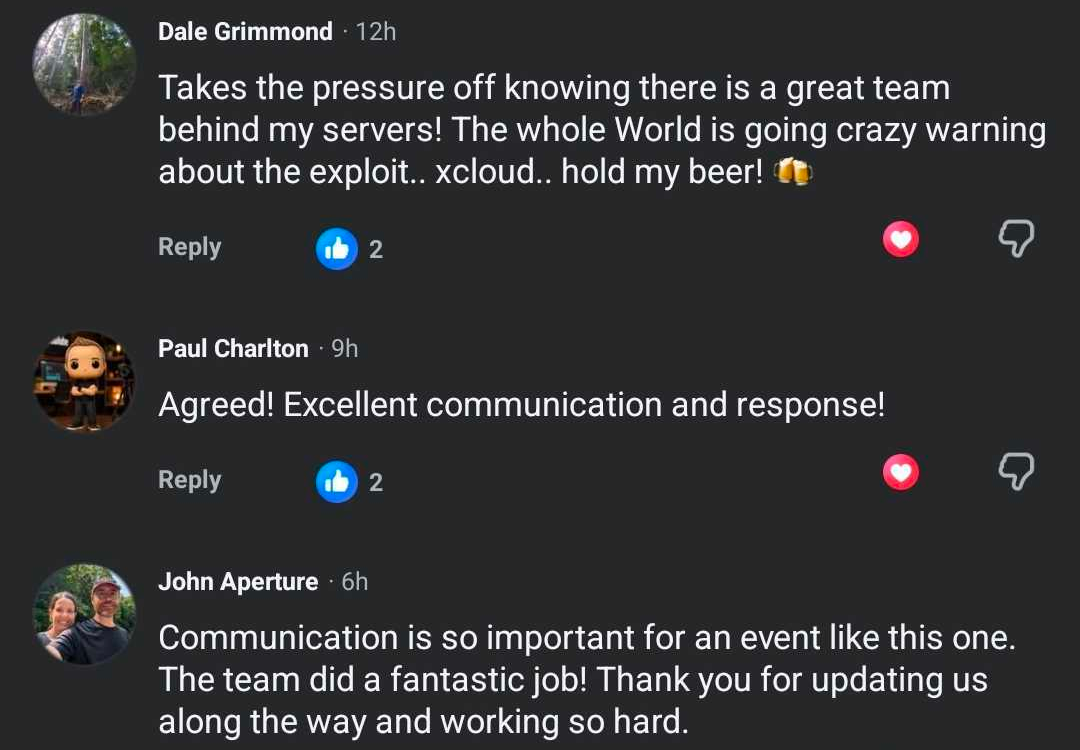
“Takes the pressure off knowing there is a great team behind my servers! The whole World is going crazy warning about the exploit.. xcloud.. hold my beer! 🍻”
Dale Grimmond
“Agreed! Excellent communication and response!”
Paul Charlton
“Communication is so important for an event like this one. The team did a fantastic job! Thank you for updating us along the way and working so hard.”
John Aperture
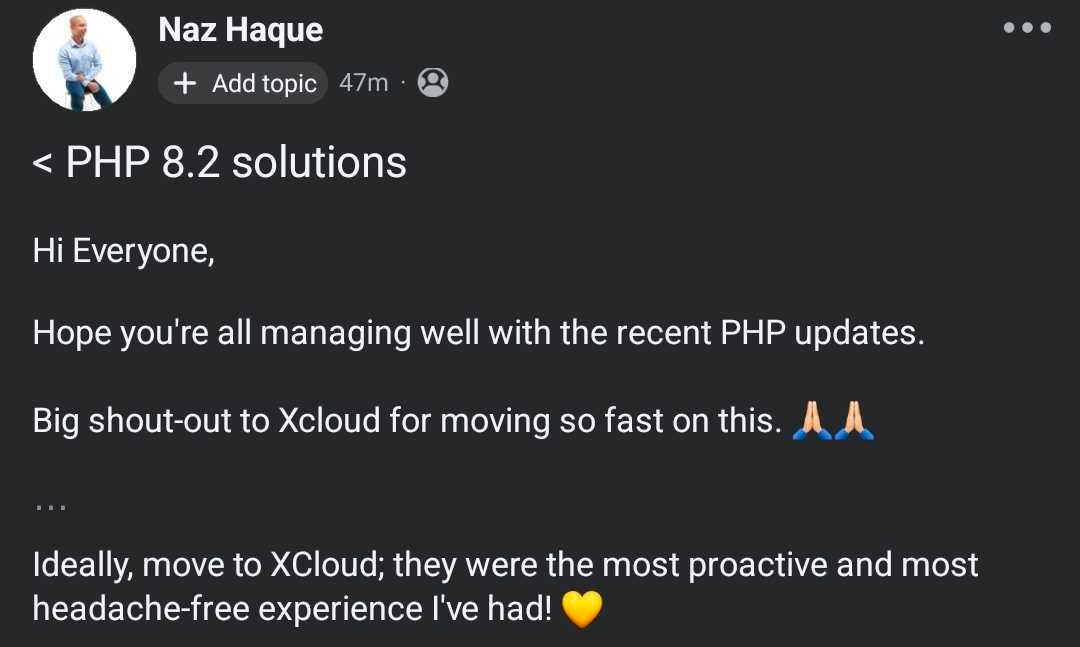
“Big shout-out to Xcloud for moving so fast on this. … they were the most proactive and most headache-free experience I’ve had!”
Naz Haque
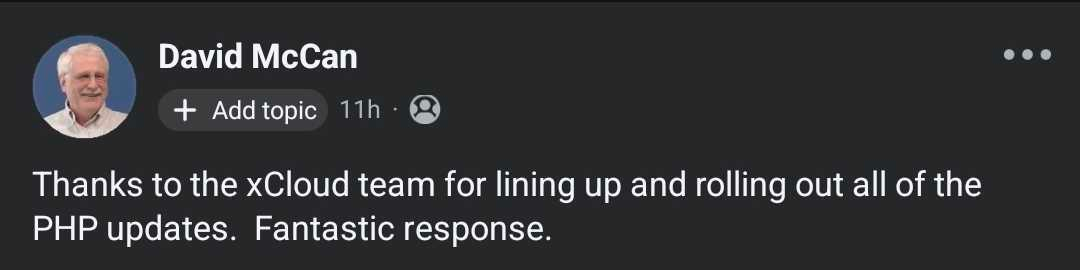
“Thanks to the xCloud team for lining up and rolling out all of the PHP updates. Fantastic response.”
David McCan
“You guys are absolute champions!”
Tobi Salami, sharing the mitigation email we sent his team
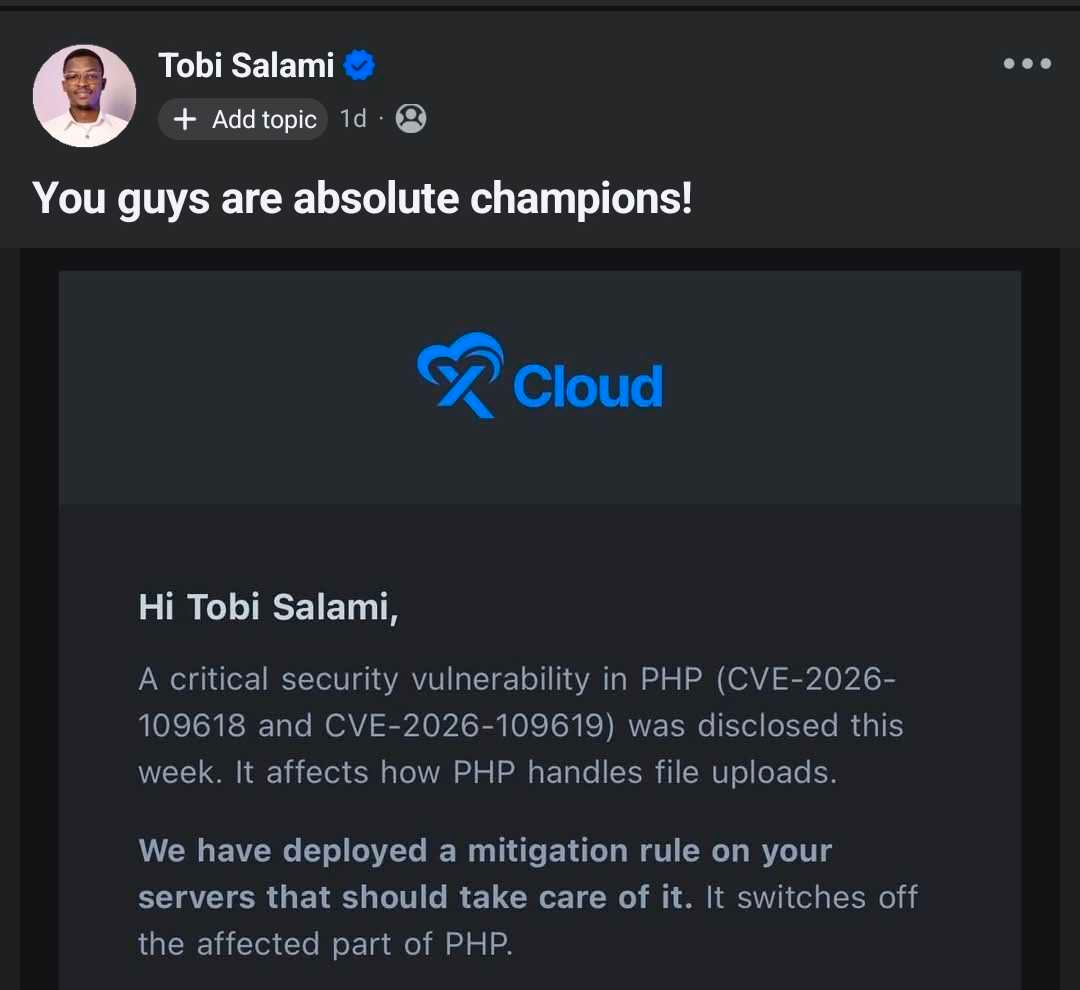
Thank you to everyone who posted, asked questions and kept each other informed. That is what a community is for.
Where the Official Patch Stands, and What’s Left for You
We want you to know exactly where you stand, so here is the status as plainly as we can put it.
| Situation | Official PHP patch | Your action |
|---|---|---|
| PHP 8.2, 8.3, 8.4 or 8.5 on a connected NGINX server | ✅ Rolled out from packages.sury.org | None. Scan Patch to double-check |
| PHP 8.2, 8.3, 8.4 or 8.5 on a connected OpenLiteSpeed server | ✅ Rolled out from LiteSpeed’s repository | None. Scan Patch to double-check |
| A server that was disconnected or switched off during the rollout | ⏳ Not yet | Reconnect it, then run Scan Patch and apply any patch shown |
| A site on PHP 5.6 to 8.1 on a connected NGINX server | ✅ Backported fix from packages.sury.org | None now, but move it to PHP 8.3 or newer |
| A site on PHP 8.1 or older on OpenLiteSpeed | ❌ Not part of the automatic rollout | Move it to PHP 8.3 or newer |
| An NGINX server on Ubuntu 20.04, any PHP version | ❌ No patched build is published for it | Move to a new Ubuntu 24.04 or 26.04 server |
| An OpenLiteSpeed server on Ubuntu 20.04, PHP 8.2 or newer | ✅ Rolled out from LiteSpeed’s repository | None now, but plan a move off Ubuntu 20.04 |
| PHP running inside your own Docker containers | ❌ We only change PHP installed on the server | Rebuild your images with the fixed PHP |
If any of these apply to you, contact xCloud support and we will help you work out the safest next step.
Why the Mitigation Was Never the Whole Answer
Here is the honest part. The mitigation was a stopgap, not a complete solution for the issue.
Before the release, PHP had not published the technical details, so our mitigation was based on the leaked reports. It switched off the part of PHP those reports pointed to, which reduced the risk until the official patch was out. Only the patched PHP build closes every way in.
If you only remember one line: the mitigation bought time, only the PHP update fixes PHP2Shell. That is why we rolled out the patched builds as soon as they were available, and why any version that still shows a patch in Scan Patch should be updated now.
The mitigation was not removed after patching. It stays in place on xCloud servers as an extra layer, and new PHP installs get it too.
A New PHP Issue: CVE-2026-115560 (23 October)
PHP2Shell itself is fully patched on xCloud. This is a different issue. On 23 October, PHP published an informational advisory about CVE-2026-115560, a lower-risk issue in session upload progress that PHP will fix in its next regular release. No exploitation has been reported.
PHP recommends session.upload_progress.enabled=0 until then, which is the same mitigation we applied on all xCloud servers on 21 October. It stays in place after patching, so you don’t need to do anything. It’s a temporary mitigation, not a complete fix, and we’ll apply PHP’s official fix once it’s released.
👉 Everything about this issue, including how to apply the step if you are not on xCloud, is in our CVE-2026-115560 guide.
PHP2Shell at a Glance
| Detail | What we know |
|---|---|
| CVE IDs | CVE-2026-109618, CVE-2026-109619 |
| Nickname | PHP2Shell |
| Type | Remote code execution (RCE) in PHP core |
| Severity | CVSS v4.0 9.2 (Critical), as rated by the PHP security team |
| Announced | 20 October 2026 |
| Official fix | 21 October 2026, 14:00 UTC |
| Affected versions | Every PHP version older than the fixed releases, including end-of-life versions |
| Fixed versions | PHP 8.5.12, 8.4.27, 8.3.36 and 8.2.35 |
| Exploitation | Proof-of-concept code is public, and Cloudflare reported early attacks on PHP sites on 21 October |
| xCloud status | Temporary mitigation applied before the fix, then the official patched PHP builds rolled out on NGINX and OpenLiteSpeed |
What Is PHP2Shell?
PHP2Shell is the name for a pair of remote code execution bugs in the PHP engine. Remote code execution means an attacker can make your server run commands they choose, over the network, without logging in. That is the worst class of web vulnerability, because whoever wins it effectively owns the server.
In plain terms: when a request fails partway through, for example when a form upload runs out of memory, PHP does not clean up that request’s memory properly. A later request handled by the same PHP worker can then reach that leftover memory, and an attacker can shape it to run commands on the server. No login is needed, and researchers showed that even a minimal “Hello World” PHP page on an affected version can be attacked.
Think of it like a flaw in the lock on your building’s front door rather than in any one apartment. It does not matter how well each tenant secures their own door if the main entrance can be opened from the street.
PHP’s own announcement is short by design. It said the release “addresses two critical vulnerabilities, both rated CVSS v4.0 9.2”, and that “full details, affected versions, and the fixed versions will be published with the release.” You can read it on php.net.
A Few Things Worth Knowing
- It is not a WordPress bug. WordPress, WooCommerce, Magento, Laravel and custom PHP apps all run on top of PHP, so all of them are exposed in the same way.
- You cannot fix it in your app code. Security plugins and application firewalls run after PHP has already handled the request, which is too late for a bug in PHP itself.
- It goes back a long way. Reports say affected releases reach back to PHP 5.4, so very old sites are exposed too.
- The timing matters. Proof-of-concept code is public and attacks have started, so every hour a server runs an unpatched PHP version is exposure.
Timeline: How It Unfolded
We will update this timeline as new details arrive.
- 20 October 2026: PHP publishes an advance notice of a critical security release fixing two vulnerabilities rated CVSS 9.2. Reports of the PHP2Shell exploit and its CVE IDs start circulating the same day.
- 21 October, from 06:00 UTC: xCloud starts applying its temporary mitigation to all xCloud servers, Managed and Self-Managed, reaching them over the following hours.
- 21 October, 14:00 UTC: PHP releases the official fix in PHP 8.5.12, 8.4.27, 8.3.36 and 8.2.35.
- 21 October, from about 14:00 UTC: the Patch button in Manage PHP can install the fixed builds.
- 21 October, afternoon: the Launchpad PPA most Ubuntu servers use for PHP is overloaded and refuses most requests (HTTP 503).
- 21 October, 18:06 UTC: xCloud switches NGINX servers to packages.sury.org for the patched builds, for the patched builds.
- 21 October, 18:24 UTC: xCloud’s automatic patch rollout starts, on NGINX and OpenLiteSpeed servers.
- 22 October, 04:30 UTC: the PHP security autopilot takes over, retrying busy servers and patching the remaining PHP versions automatically, including backported fixes for PHP 5.6 to 8.1 on NGINX servers.
- 22 October: more than 95% of xCloud servers are fully patched, and teams receive an email confirming their servers are done.
- 23 October: PHP announces CVE-2026-115560, a separate, lower-risk issue it has not fixed yet. xCloud’s 21 October mitigation is the same step PHP recommends for it, and it stays in place. See our CVE-2026-115560 guide.
- Daily at 19:00 UTC: xCloud retries servers that were unreachable, so they get the mitigation within a day of reconnecting.
Are You Affected?
If your site runs on PHP, assume yes until it runs a fixed build. Every version older than the fixed releases is vulnerable, including end-of-life versions.
The bigger question is whether a fix exists for your version. PHP only patches supported branches:
| PHP version | Security support ends | Gets the PHP2Shell fix? |
|---|---|---|
| PHP 8.5 | 31 Dec 2029 | ✅ Fixed in 8.5.12 |
| PHP 8.4 | 31 Dec 2028 | ✅ Fixed in 8.4.27 |
| PHP 8.3 | 31 Dec 2027 | ✅ Fixed in 8.3.36 |
| PHP 8.2 | 31 Dec 2026 | ✅ Fixed in 8.2.35 |
| PHP 8.1 | Ended 31 Dec 2025 | ⚠️ Not from PHP. Backported by Ondřej Surý |
| PHP 8.0 | Ended 26 Nov 2023 | ⚠️ Not from PHP. Backported by Ondřej Surý |
| PHP 7.4 and older | Ended 28 Nov 2022 or earlier | ⚠️ Not from PHP. Backported by Ondřej Surý (down to 5.6) |
You can check the dates on PHP’s supported versions page. To see what you run on xCloud, open your server and go to Management → Manage PHP. Each site’s version is also shown under Site → Settings → PHP. On any other server, run php -v over SSH.
How to Check or Install the Official PHP Patch on xCloud
We have rolled the patch out for you, so this is a way to double-check, or to patch a server that was offline during the rollout. The fix is a patch release for the PHP version you already run, not a new PHP version. Your sites stay on the same version, and one update per PHP version covers every site on that server.
Step 1: Open Manage PHP
Open your server in xCloud and go to Management → Manage PHP. You will see every PHP version installed on the server and how many sites use each one.
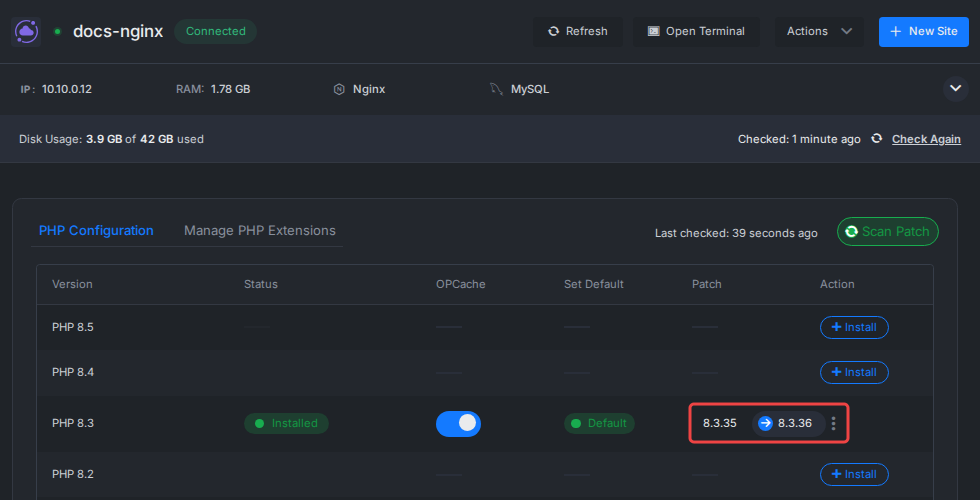
Step 2: Click Scan Patch
Click Scan Patch. xCloud checks the package source for every installed version, and any version with an update shows it in the Patch column (for example 8.3.35 → 8.3.36). If no patch shows, check the installed version: 8.2.35, 8.3.36, 8.4.27 or 8.5.12 or newer is patched. On NGINX servers on Ubuntu 20.04 no patch ever shows, because none is published for it.
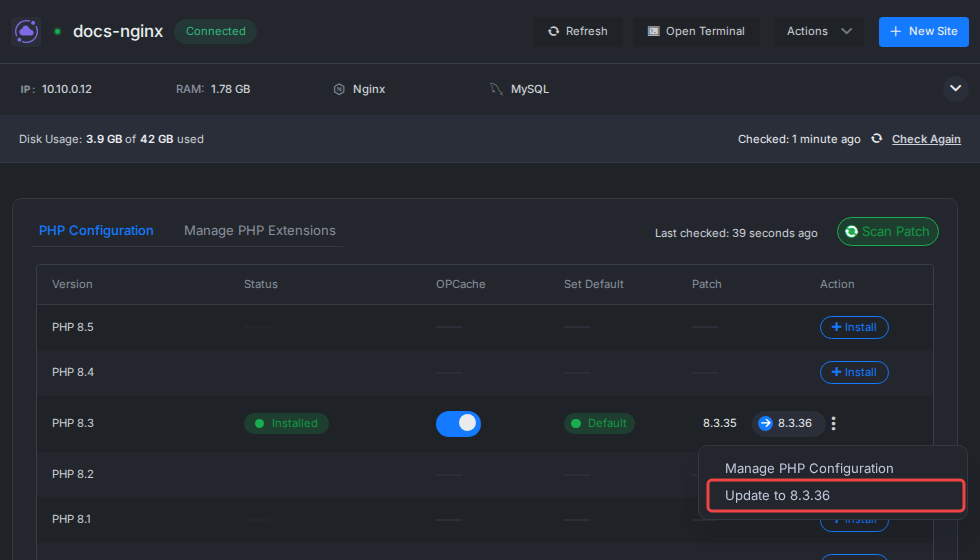
Step 3: Update to the Patched Version
Open the three-dot menu on that version, choose Update to …, and confirm with Yes, Update! PHP and the web server reload in a moment, with no server reboot needed.
Step 4: Repeat for Each Version and Server
Repeat for every PHP version that shows a patch, on every server. To confirm over SSH, php8.3 -v (or the version you use) should print the fixed version. If you run PHP in your own Docker containers, rebuild those images with the fixed PHP version too. 👉 The full walkthrough is in our guide to installing PHP security patches.
Optional: Let Your Servers Patch Themselves
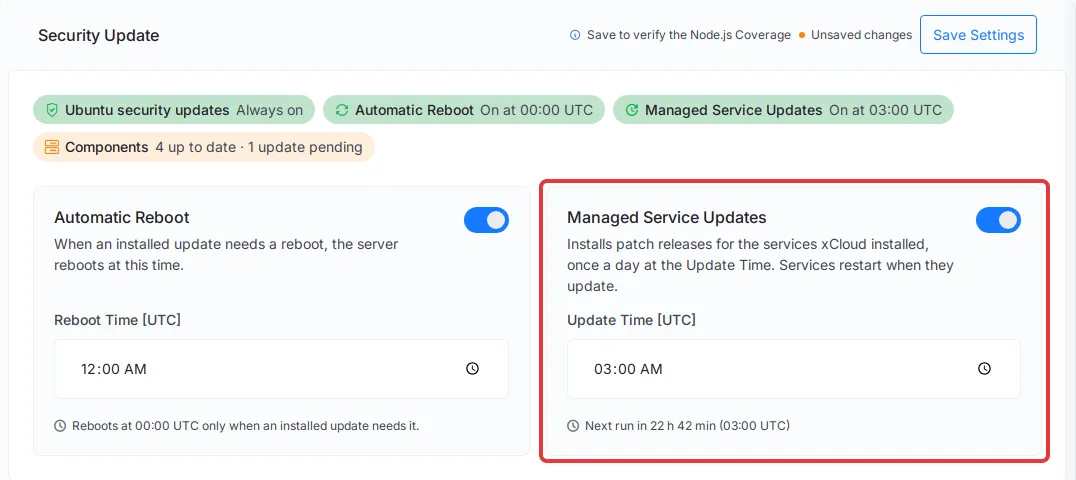
PHP patches are not installed automatically by default. To change that, go to Security → Security Update, turn on Managed Service Updates, and pick a quiet update time. Your server then installs patches like this one on its next daily run. 👉 See how automated security updates work.
On PHP 8.1 or Older? Upgrade Now
This is the group most at risk. PHP 8.1, 8.0, 7.4 and older are end of life, so the PHP project itself does not fix them. On NGINX servers they did get a backported fix (see below), but backports for end-of-life versions are best effort and can arrive later next time, so these sites still need to move to a supported version.
Did End-of-Life PHP Packages Get a Fix?
The PHP project itself does not patch them. Whether a fixed package appears depends on who builds it:
- PHP-FPM (Nginx servers) comes from Ondřej Surý’s package repository, which xCloud now uses at packages.sury.org. It keeps building older PHP versions for Ubuntu releases that are still supported, and it backported the PHP2Shell fix to PHP 5.6 through 8.1 for Ubuntu 22.04 and 24.04 (for example PHP 8.1.34-9). xCloud installed these automatically on NGINX servers. It was a generous effort by the maintainer, not a promise for next time.
- LSPHP (OpenLiteSpeed servers) comes from LiteSpeed’s repository, which also ships some older versions. Old LSPHP versions are not part of our automatic rollout, so on OpenLiteSpeed, move sites on PHP 8.1 or older to PHP 8.3 or newer.
- Ubuntu 20.04 is itself end of life. Ondřej Surý’s repository has published no PHP packages for it since June 2025, so on NGINX servers, no PHP version on Ubuntu 20.04 gets the PHP2Shell fix, not even PHP 8.2 or 8.3 installed earlier, and PHP 8.2 or newer cannot be installed there either. LiteSpeed’s repository still builds for Ubuntu 20.04, so OpenLiteSpeed servers on it got the patched PHP 8.2 to 8.5 builds. Either way, the operating system itself no longer gets security updates. Our PHP versions compatibility table shows which PHP versions each Ubuntu version and stack can run. The way out is a new server: create one on Ubuntu 24.04 or 26.04, then use full server clone to copy every site with its settings onto it. 👉 See how to clone a full server with xCloud and how to migrate from Ubuntu 20.04 to Ubuntu 24.04.
Backported packages show up in Scan Patch like any other patch. Don’t plan around them: upgrading PHP is the only path you control.
Aim for PHP 8.3 or 8.4. PHP 8.2 is supported, but its security fixes end on 31 December 2026, so you would be migrating again within weeks.
- Take a backup of the site. 👉 See site backups in xCloud.
- Clone it to staging and switch the staging copy to PHP 8.3 under Site → Settings → PHP. 👉 See how to create a staging environment.
- Test what matters: login, forms, checkout, payments, API endpoints and anything that runs on a schedule. Check the error log for warnings.
- Switch the live site and check it again right away.
Moving from PHP 8.1 is usually smooth, and the most common side effect is deprecation warnings, not errors. Moving from 7.4 is a bigger jump, so expect to update old plugins or themes first. 👉 Our PHP version upgrade guide and PHP compatibility notes cover the details.
Not on xCloud? What to Do Today
The same principles apply wherever you host:
- Find every PHP install you are responsible for, including staging, containers and forgotten side projects.
- Ask your host whether the fixed build (8.5.12, 8.4.27, 8.3.36 or 8.2.35) is already installed, and when.
- If you manage your own VPS, upgrade PHP now, then restart PHP-FPM or your web server so the old processes stop. On Ubuntu with Ondřej Surý’s packages, the Launchpad PPA (ppa:ondrej/php) has been overloaded since the release; his own repository at packages.sury.org has the fixed builds. On OpenLiteSpeed, upgrade lsphp from LiteSpeed’s repository instead, and don’t mix in Sury’s packages.
- Plan upgrades for anything on PHP 8.1 or older. The PHP project does not fix them, and backports from package maintainers are best effort.
Running WordPress somewhere else? Our PHP2Shell checklist for WordPress on any host covers stopgaps, patching and compromise checks step by step. Our guide on how to maximize your VPS security covers the rest of the hardening basics.
Quick Checklist
- ✅ Run Scan Patch in Manage PHP on each server, and apply any patch that still shows
- ✅ Make sure every server is connected to xCloud; servers that were offline during the rollout need patching once they are back
- ✅ Rebuild PHP inside your own Docker containers yourself; our rollout does not reach them
- ✅ Turn on Managed Service Updates so future patches install themselves
- ✅ Move every site on PHP 8.1 or older to PHP 8.3 or newer, testing on staging first
- ✅ Uninstall PHP versions no site uses, so there are fewer versions to patch
- ✅ Put your sites behind Cloudflare and make sure its managed rules are on
- ✅ Move servers still on Ubuntu 20.04, NGINX ones first, to a new Ubuntu 24.04 or 26.04 server with full server clone
- ✅ For high-risk sites still on old PHP, consider disabling the site until it runs a patched version
Let xCloud Handle the Next One
Critical bugs below your application will happen again, and the hard part is never the fix itself. It is noticing in time, acting across dozens or hundreds of servers at once, and doing it before attackers do. Your time is the hidden cost.
On xCloud, that work is built in:
- Platform-wide temporary mitigations applied for you when a critical bug lands, like the one we rolled out for PHP2Shell.
- Patch rollouts handled for you, including switching package sources when the usual one goes down.
- One-click PHP patching in Manage PHP, with Scan Patch across every installed version.
- Automated security updates, including optional PHP, database and Redis patches on a schedule you choose.
- Staging sites and backups that make version upgrades safe to test.
If you want your servers looked after by people who were watching this one at 3 a.m., look at xCloud Managed Hosting, or explore PHP hosting on xCloud. We care about security, and our goal is to keep your sites and servers secure at all times.
Thank You to the People Who Found and Fixed It
Our thanks go to the PHP security team, who shipped fixes for four PHP branches under heavy pressure, to the security researchers who found and reported the issues, and to Ondřej Surý and LiteSpeed, whose package repositories got the patched builds to servers everywhere. And to our own engineering and support teams, who kept working until every server was covered, so you didn’t have to.
Check Your Servers Today, and Retire Old PHP for Good
PHP2Shell is serious, but the path through it is clear. If you are on xCloud, we applied the temporary mitigation early and then rolled out the official patched PHP builds. What is left for you is to stop running PHP versions that no longer get fixes.
Run Scan Patch today to double-check. Then schedule this week’s upgrades for anything still on PHP 8.1 or older, starting with the sites that handle logins, payments or customer data.
If you have found this blog helpful, feel free to subscribe to our blogs for valuable tutorials, guides, knowledge, and tips on web hosting and server management. You can also join our Facebook community to share insights and engage in discussions.
Frequently Asked Questions
What are CVE-2026-109618 and CVE-2026-109619?
They are two critical remote code execution vulnerabilities in PHP itself, nicknamed PHP2Shell. The PHP security team rated both CVSS v4.0 9.2 and released the fix on 21 October 2026 at 14:00 UTC in PHP 8.5.12, 8.4.27, 8.3.36 and 8.2.35.
I’m an xCloud customer. Are my servers already covered?
Yes, for supported PHP versions on your connected xCloud servers. We applied a temporary mitigation before the fix, then rolled out the official patched PHP builds (8.2.35, 8.3.36, 8.4.27 and 8.5.12) on both NGINX and OpenLiteSpeed servers. Old PHP 5.6 to 8.1 on NGINX servers also got a backported fix. Sites on PHP 8.1 or older on OpenLiteSpeed, NGINX servers on Ubuntu 20.04 and PHP inside your own Docker containers still need action from you.
Is PHP2Shell a WordPress vulnerability?
No. It is a core PHP issue, so it sits below WordPress, WooCommerce, Laravel or any other app. Updating WordPress or plugins does not fix it; only a PHP update does.
Which PHP versions are affected by CVE-2026-109618?
Treat every PHP version older than the fixed releases as vulnerable: PHP 8.5 before 8.5.12, 8.4 before 8.4.27, 8.3 before 8.3.36 and 8.2 before 8.2.35. End-of-life versions such as PHP 8.1, 8.0 and 7.4 are also exposed. The PHP project does not fix them, but Ondřej Surý has backported the fix to their packages for Ubuntu 22.04 and 24.04.
“I’m on PHP 8.1. Will I get a patch?”
On an NGINX server, yes. The PHP project does not patch PHP 8.1, but Ondřej Surý backported the PHP2Shell fix to PHP 5.6 through 8.1 in his packages, and xCloud installed it automatically. On OpenLiteSpeed, old PHP versions are not part of the automatic rollout, so move those sites. Either way, a backport is a stopgap: move to PHP 8.3 or newer after testing on a staging copy.
Does the xCloud mitigation replace the official PHP update?
No. It reduced the risk until the official patch was out, and only the patched PHP build fully fixes the vulnerabilities. That is why we followed it with the official PHP update on xCloud servers. The mitigation also stays in place after patching, as an extra layer.
What is CVE-2026-115560, and do I need to do anything?
It is a separate, lower-risk PHP issue that PHP announced on 23 October 2026 and has not fixed yet. The temporary mitigation we applied on 21 October is the same step PHP recommends for it, and it stays in place on xCloud servers after patching. It is a temporary mitigation, not a complete fix, and we will apply PHP’s official fix once it is released. You don’t need to do anything. Full details are in our CVE-2026-115560 guide.
Do I need to do anything now?
On a supported PHP version on Ubuntu 22.04 or newer, no. To double-check, open Manage PHP: the installed version should be 8.2.35, 8.3.36, 8.4.27, 8.5.12 or newer. If Scan Patch shows a patch, apply it. You still need to act if a site runs PHP 8.1 or older on OpenLiteSpeed, if the server runs NGINX on Ubuntu 20.04 (no PHP patches are published for it, so Scan Patch shows nothing even though the version is not patched), or if you run PHP in your own Docker containers.
Does the mitigation cover PHP inside my Docker containers?
No. The mitigation and our patch rollout change PHP installed on the server itself. If you run PHP inside your own Docker containers, rebuild those images with the fixed PHP version now.
Did I need to take my site offline?
No. Some organisations took their sites offline while they waited for a fix. On xCloud, the mitigation and the patch were applied in the background, so nobody had to take a site offline. The only sites we suggest pausing are ones that cannot be moved off PHP 8.1 or older, or off Ubuntu 20.04, soon.
Does PHP2Shell mean my site was hacked?
Not necessarily. A vulnerability means a site could be attacked, not that it was. Public exploit code appeared quickly, so check your logs for unusual multipart (upload) requests followed by memory-limit errors or bursts of HTTP 500 responses, and look for unknown admin users, changed files or odd outbound traffic. If you find any of these, contact xCloud support. Our WordPress PHP2Shell checklist covers what to look for.
My server was listed as unreachable in the xCloud email. What now?
xCloud retries unreachable servers once a day, at 19:00 UTC, so the mitigation is applied within a day of the server reconnecting. If it stays unreachable, contact xCloud support so the team can help you restore the connection.
Last updated October 23, 2026
← All articles