Every release, one click away
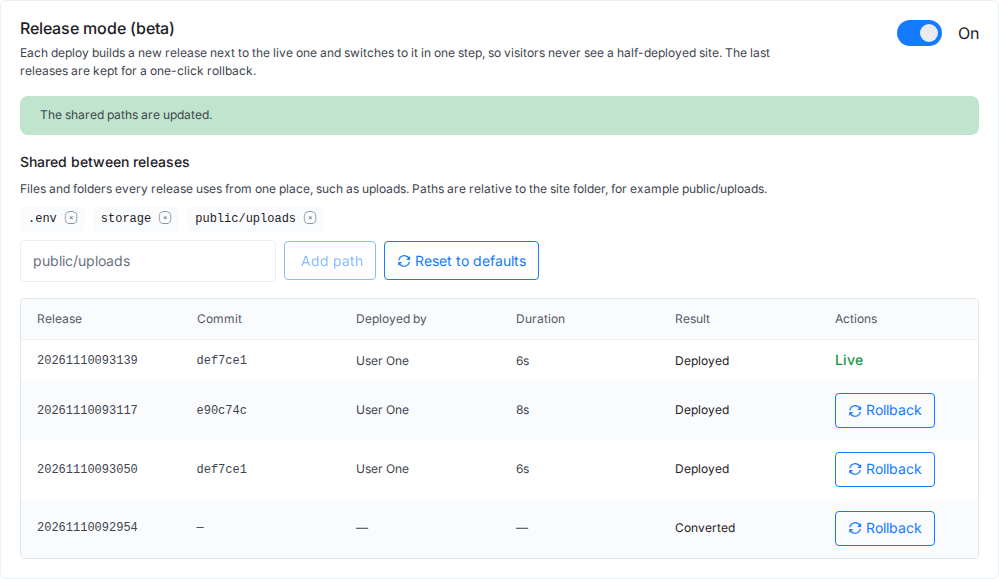
Each deploy is listed with its commit, who deployed it and how long it took. The newest is marked Live. Every kept release has a Rollback button.

Release mode for Git sites
xCloud builds every Git deploy beside your live site, checks that the new release answers, then switches traffic in one step. If a release misbehaves, roll it back in one click. Turn on Release mode from the dashboard for Laravel, PHP, WordPress, Node.js and Docker sites, with no YAML to write.
Get started
HOW IT WORKS
A normal deploy changes files in the folder your visitors are using, or restarts the app they are talking to. Release mode never touches the live release until the new one is ready.
xCloud pulls your commit into a new release folder, or builds a new container image, next to the one that is live. Your deploy script runs there while visitors keep using the live release.
Before it gets any traffic, the new release must answer a request. Node.js apps and containers start on a second port and pass a health check. A release that answers with a server error, or not at all, is never switched in.
For PHP and WordPress, the site folder now points to the new release. For Node.js and containers, nginx sends new requests to the new port. There is no moment where half the files are new.
The old Node.js process or container finishes its open requests, then stops. Queue workers, Horizon and Supervisor programs restart on the new code. The old release is kept for rollback.
SUPPORTED STACKS
Any site you deploy from Git on these stacks can turn on Release mode. Each stack switches the way that suits it.
On nginx or OpenLiteSpeed. .env and storage are shared between releases, and queue workers and Horizon restart on the new code after each deploy.
Any custom PHP app deployed from Git, on nginx or OpenLiteSpeed. Add folders such as public/uploads to the shared list so they survive every release.
Classic and Bedrock layouts on nginx. wp-config.php (or .env for Bedrock) and uploads are shared. Plugins and themes come from your repository while Release mode is on.
Node.js apps on nginx. The new release starts on a second port, passes a health check, then nginx switches over and the old process finishes its requests.
Sites built from your repository's Dockerfile or an app recipe such as Flask. The new container starts beside the old one and takes over after its health check.
A repository's own docker-compose file, containers that publish more than one port, and WordPress sites not deployed from Git. Node.js and WordPress need an nginx server.
ROLLBACK AND SHARED FILES
Everything lives on the Release mode card under Site → Git. These are real screens from an xCloud test site.
Each deploy is listed with its commit, who deployed it and how long it took. The newest is marked Live. Every kept release has a Rollback button.
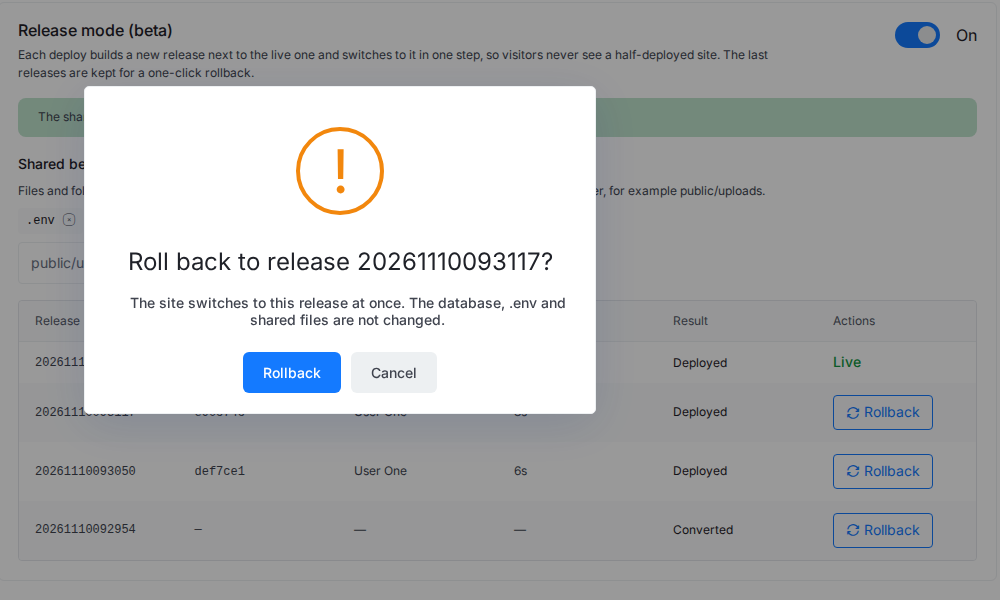
Confirm the rollback and the site switches to that release at once. The database, .env and shared files are not changed, so a rollback never loses an order or an upload.
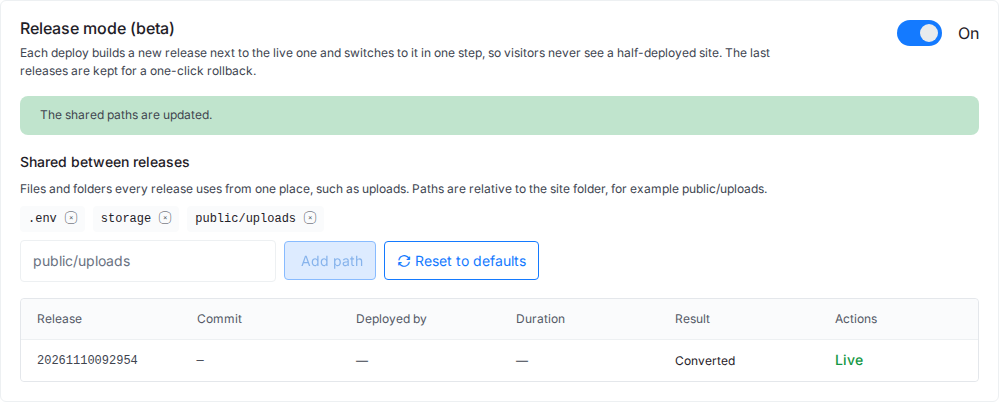
Files every release needs, such as .env, storage and uploads, live in one shared folder. Add your own paths, for example public/uploads, and every new release links to them.
ON EVERY DEPLOY
The parts of a deploy that usually need a runbook.
If the build or the check fails, the deploy is marked Failed and the live release keeps serving. The deployment log shows why.
Queue workers, Horizon and Supervisor programs restart after every deploy and rollback, so background jobs never run old code against a new release.
xCloud keeps the last five releases of PHP, WordPress and Node.js sites, and the last three images of container sites, and removes older ones.
Turning Release mode on or off and rolling back need the Manage Deploy Scripts permission, so not every teammate who can deploy can roll back.
Switch on Release mode (zero-downtime deploys) when you create a Git site, and the site converts after its first successful deploy.
Turn it on or off, list releases and roll back from the xCloud Public API or from an AI tool connected through xCloud MCP.
LAB PROOF
We deployed six demo apps on xCloud test servers while each one served steady traffic, then ran the same Node.js app with Release mode off for comparison.
| App | Stack | Release mode | Deploys | Rollbacks | Requests | Failed |
|---|---|---|---|---|---|---|
| Laravel store | Laravel on nginx | On | 4 | 2 | 2,256 | 0 |
| PHP landing page | Custom PHP on OpenLiteSpeed | On | 3 | 1 | 1,429 | 0 |
| Express app | Node.js on nginx | On | 3 | 1 | 2,400 | 0 |
| Welcome app | Docker container from a Dockerfile | On | 3 | 1 | 2,640 | 0 |
| Flask app | Docker container from the Flask recipe | On | 3 | 1 | 3,760 | 0 |
| WordPress blog | WordPress (Bedrock) from Git on nginx | On | 3 | 1 | 1,520 | 0 |
| Same Express app | Node.js on nginx | Off | 3 | 0 | 880 | 27 (502 errors) |
Measured on 10 November 2026 on three xCloud test servers (nginx, OpenLiteSpeed, Docker), with demo apps from public sample repositories. Each site got a steady 8 requests a second over HTTPS during its own turn-on, deploys and rollbacks. A failed request is any answer that is not 2xx or 3xx, or no answer. Some deploys rebuilt the same commit; each still built and switched to a new release. With Release mode off, every deploy restarted the app and visitors got about a second of 502 errors.
NO YAML, FROM THE PANEL
You can build all of this yourself on any Linux server. This is the list of jobs, and what Release mode does instead.
Scroll the table sideways to compare.
| Scripting it yourself | With Release mode in xCloud |
|---|---|
| Write a deploy script that builds into a new folder, links it live and cleans up old releases. | Turn on Release mode. Each deploy builds beside the live release, and old releases are removed for you. |
| Add a health check, and stop the switch when the new code fails it. | Every release is checked before it gets traffic. One that fails never goes live. |
| Run two copies of a Node.js app or container on two ports and flip the nginx upstream. | Node.js and container releases start on a second port. nginx switches after the check passes. |
| Restart queue workers and Supervisor programs so they pick up the new code. | Workers, Horizon and Supervisor programs restart after every deploy and rollback. |
| Keep .env and uploads outside the release folders, and link them into each one. | Shared files and folders: .env and storage by default, plus any path you add. |
| SSH in and relink the previous release when a deploy goes wrong. | Click Rollback on any kept release in the dashboard. |
GET STARTED
Release mode works on sites you deploy from Git, on a server you bring or one xCloud manages.
Create a site from your GitHub, GitLab or Bitbucket repository, or use a Git site you already have.
Open Site → Git, find the Release mode card and click Turn on. The site stays online while it converts.
Click Deploy Now or push to your branch. Each deploy becomes a new release, and Rollback is one click away.
Step-by-step guides: zero-downtime deploys with Release mode, roll back a deployment and deploy a Git project. Related: One-click Git deployment, Laravel hosting, Node.js hosting, Docker hosting, Pricing.
How Release mode works, what it covers and what it leaves alone.
A zero-downtime deployment puts new code live without a moment where visitors get errors or a half-updated site. The new version is built and checked beside the running one, and traffic moves to it only when it is ready. xCloud does this with Release mode.
Sites deployed from Git: Laravel and custom PHP apps on nginx or OpenLiteSpeed, WordPress (classic or Bedrock) and Node.js apps on nginx, and Docker container sites built from a Dockerfile or an app recipe. A repository's own docker-compose file and containers that publish more than one port are not supported.
No. A rollback switches your code to an older release. The database, .env and shared files are not changed. If a deploy ran a migration, make sure the older code still works with the new schema before you roll back.
The new release never gets traffic. The deploy is marked Failed, the live release keeps serving, and the deployment log shows the reason, so you can fix it and deploy again.
The last five releases for PHP, WordPress and Node.js sites, and the last three images for Docker container sites. Older ones are removed after a deploy.
Open your site, go to Git and click Turn on in the Release mode card. You can also switch on Release mode (zero-downtime deploys) when you create a Git site, or use the xCloud Public API.
No. Release mode runs on your xCloud server for PHP, WordPress and Node.js sites without containers. There is no YAML file or pipeline to write: you turn it on from the dashboard.
Deploy from Git, turn on Release mode, and keep a one-click rollback for every release.