


The best GridPane alternatives in 2026 are xCloud for WordPress on any server you own (free for one server and 10 sites), SpinupWP for a WordPress-only panel, RunCloud for mixed PHP stacks, Ploi for Laravel teams, Cloudways for no server account at all, and GridPane Core if you would rather stay.
You built your agency stack on GridPane because it gave you fast servers, a hardened security layer, and a panel that respected developers. Then the plans changed. As of November 2026, GridPane’s pricing page says its Panel and Developer Plus plans are no longer open to new sign-ups. The lineup is now a free Core plan, a managed PeakFreq tier from $19/month, and Bespoke Hosting from $2,000/year (GridPane pricing).
If you are rethinking where your client sites live, you are not alone. People usually start looking when Core’s limits bite, when Core doesn’t support their server provider, or when they need apps beyond WordPress. We covered a similar crossroads in our guide to the best RunCloud alternatives, and the same lesson applies here: the panel fee is the small cost; the move is the big one.
This guide ranks the 6 best GridPane alternatives in 2026 on pricing, server control, WordPress tools, and support. It also shows exactly what moves off a GridPane server and what you rebuild by hand, which most roundups skip.
TL;DR: Quick Summary
| If you want to… | Use this | Price checked Nov 2026 | Best for |
|---|---|---|---|
| Keep your own server on any provider, with managed servers as an option | xCloud | $0 for 1 server and 10 sites, then $5 per server/month | Agencies, freelancers, resellers |
| A tidy WordPress-only panel with site snapshots | SpinupWP | From $12/month (1 server) | WordPress developers |
| A general server panel for WordPress and PHP | RunCloud | See runcloud.io/pricing | Mixed PHP stacks |
| Laravel and WordPress side by side | Ploi | Free (1 server, 1 site); paid from €8/month | Laravel-first teams |
| No server account to manage | Cloudways | Server included in the plan price | Agencies that want one bill |
| Stay inside GridPane and pay nothing | GridPane Core | Free for up to 25 sites | Existing GridPane users |
Best overall GridPane alternative: xCloud, because the free plan runs on any Ubuntu server, managed servers sit in the same dashboard, and the GridPane move has its own guide.
Best for solo developers: SpinupWP, if you only host WordPress and want a clean, opinionated panel.
Best for hands-off owners: Cloudways, if you would rather never hold a server account.
Why Agencies Are Looking for GridPane Alternatives in 2026
GridPane earned its reputation. It tuned the web server and shipped the 7G Firewall, Redis object caching, and A+ SSL by default. For many agencies, it was the first panel that felt built by people who actually ran WordPress at scale.
The catch nobody talks about: a panel is a long-term dependency. When a vendor closes the plans you signed up on, your pricing, feature set, and support tier all become questions you did not plan to answer this year.
Four reasons come up again and again:
- Core’s limits. GridPane’s pricing page lists Core as free for up to 25 websites, on your own Vultr server or a managed PeakFreq server. Those are the only two options it names, so check with GridPane if your servers are elsewhere.
- Tools sit on the paid tier. The same page lists support tickets, server monitoring, staging, and local and remote backups under PeakFreq, from $19/month.
- Older plans are closed. A new agency can’t pick the Panel or Developer Plus plan an older one runs on. GridPane’s FAQ says that in the near future all plans will be able to buy features as add-ons, without giving a date.
- WordPress only. Agencies that also host a Laravel app, a Node.js app, or an open-source tool need a second panel.
Here is what a GridPane replacement actually needs to cover:
| Requirement | Why it matters |
|---|---|
| NGINX or OpenLiteSpeed stack | Matches the speed your clients already expect from GridPane |
| Full-page and Redis caching | Keeps response times low under traffic spikes |
| Server-level firewall and security tools | Replaces GridPane’s 7G and security plugin layer |
| Staging and one-click cloning | Agencies test every update before it hits production |
| Automated off-site backups | Your restore point when a plugin update breaks checkout |
| Team roles and client access | You need to hand access to developers without sharing root |
| Predictable per-server pricing | Margins die when panel fees scale per site |
Speed is not a vanity metric either. Google reports that the probability of a bounce rises 32% as page load time goes from 1 to 3 seconds, and 90% from 1 to 5 seconds (Think with Google). Your panel’s caching stack sits directly in that equation.
What Actually Moves Off a GridPane Server (and What You Rebuild)
The question that decides a switch is: how much of my GridPane setup comes with me?
xCloud’s GridPane full-server migration guide answers it plainly. xCloud’s Full Server Migration copies the WordPress sites you pick, files and databases, from the GridPane server to a fresh server, as demo sites first. Full Server Migration is a paid feature; on the free plan you move sites one at a time, up to 10. Everything GridPane added around those sites is yours to recreate.
| Part of your GridPane setup | Moves in Full Server Migration? | What to do instead |
|---|---|---|
| WordPress files and databases you select | ✅ Yes, as demo sites first | Test, then switch DNS |
| Server-level cron jobs and background processes | ❌ No | Recreate them on the new server |
| Custom NGINX or OpenLiteSpeed rules | ❌ No | Rebuild the rules you still need |
| Packages installed directly on the server | ❌ No | Install them again |
| GridPane’s own security, cache, SendGrid and must-use plugins | ❌ No | Use xCloud’s built-in tools or your own plugins |
| DNS zones, CDN origin, firewall allowlists, email and SPF settings | ❌ No | Update them at your DNS, CDN and email provider |
| Non-WordPress apps on the same server | ❌ No | Move each app with its own method |
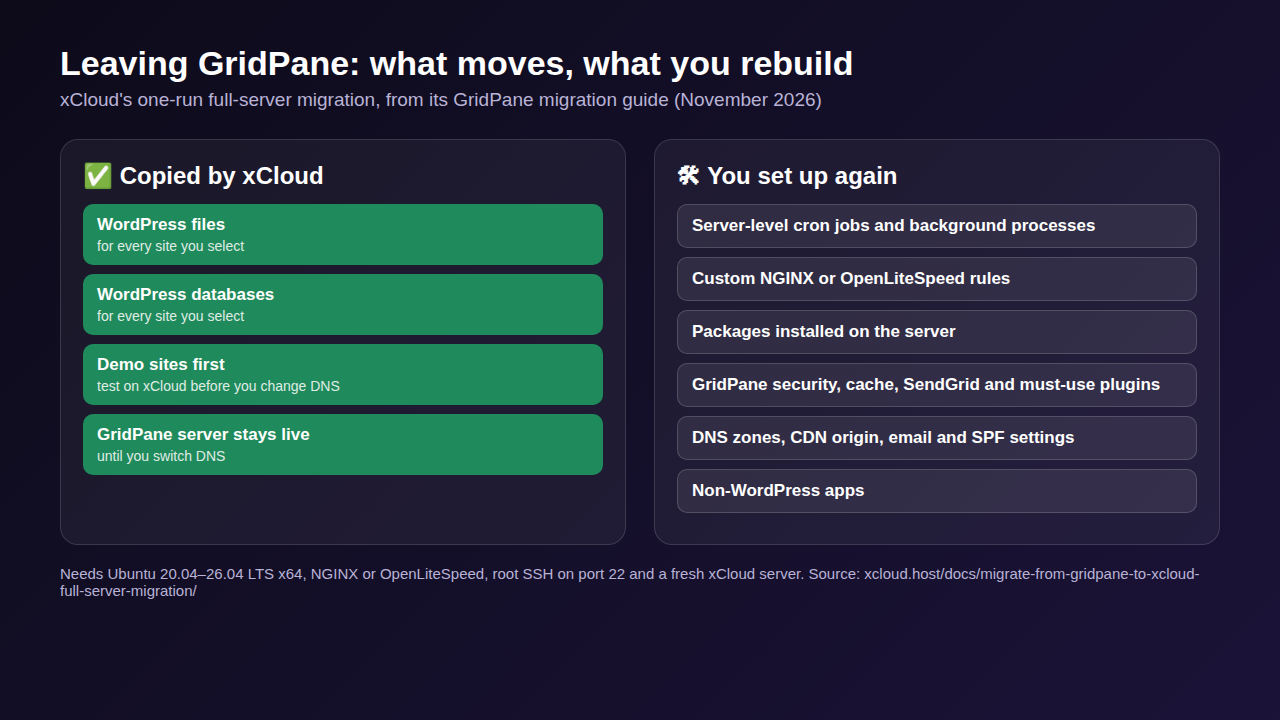
GridPane’s own migration checklist says the same about its side: server-wide settings, added software and server-level cron jobs need to be recreated by hand. Write this list down before you pick a new panel, because it is the real size of the job, whichever panel you choose.
The 3 Categories You Are Actually Choosing Between
Most “alternatives” lists mix products that solve different problems. Sort them first and the decision gets easier.
| Category | What you get | Who runs the server | Examples |
|---|---|---|---|
| Self-managed control panel | A dashboard on top of your own server | You (the panel automates it) | xCloud Self-Managed, SpinupWP, RunCloud, Ploi, GridPane Core |
| Managed cloud hosting | Server plus panel plus support, one bill | The provider | xCloud Managed, Cloudways, GridPane PeakFreq |
| Hybrid platform | Both models in one account | Your choice per server | xCloud |
If you only remember one line: self-managed panels save money, managed hosting saves time, and a hybrid platform lets you pick per client.
How We Ranked These GridPane Alternatives
- Pricing transparency: published prices on the vendor’s own page, and how fees grow as you add servers.
- WordPress depth: caching, staging, backups, and updates.
- The move off GridPane: the cost most buyers forget.
- Stack flexibility: choice of server provider, NGINX or OpenLiteSpeed, and non-WordPress apps.
- Agency workflow: team access, white-label, and reseller options.
- Honest limits: what each tool does not do.
We read every price on the vendor’s own pricing page in November 2026. Where a vendor’s page didn’t show a price we could read (RunCloud, Cloudways), we don’t quote one. We did not run speed tests for this guide. Prices change often, so confirm on the vendor’s page before you buy.
Master Comparison Table
| Rank | Provider | Category | Starting price (Nov 2026) | Free tier | Best for |
|---|---|---|---|---|---|
| 🥇 1 | xCloud | Hybrid (managed + self-managed) | $5 per server/month self-managed; Managed from $5/month | Yes (1 server, 10 sites) | Agencies and resellers |
| 🥈 2 | SpinupWP | WordPress panel | $12/month (1 server) | No (7-day trial) | WordPress developers |
| 🥉 3 | RunCloud | Server panel | See runcloud.io/pricing | See its pricing page | Mixed PHP workloads |
| 4 | Ploi | Server panel | €8/month (5 servers) | Yes (1 server, 1 site) | Laravel and Git-driven teams |
| 5 | Cloudways | Managed cloud host | Server included in the plan | See its pricing page | Non-technical owners |
| 6 | GridPane Core | Self-managed panel | Free | Yes (up to 25 sites) | Existing GridPane users on a budget |
🥇 1. xCloud: Best Overall GridPane Alternative
xCloud is a WordPress-first hosting platform that lets you run fully managed servers or connect your own server from DigitalOcean, Vultr, Hetzner, AWS, Google Cloud, Linode, or any Ubuntu host, all from one dashboard. That hybrid model is the main reason agencies switch from GridPane: you can put a high-revenue WooCommerce client on a managed server and a small brochure site on your own low-cost server without juggling two platforms.
Pricing stays simple. The free plan covers 1 server and up to 10 sites. Self-managed hosting then costs $5 per server a month for 2 to 5 servers, $4 for 6 to 10, and $3 for 11 or more, with paid servers holding unlimited sites. If you would rather not hold a provider account, Managed hosting supplies the server too, from $5/month (xCloud pricing).
Key Features
- NGINX and OpenLiteSpeed stacks: pick the web server per server, with Redis object caching available.
- Full Server Migration from GridPane (paid servers): copies the WordPress sites on an NGINX or OpenLiteSpeed GridPane server as demo sites first. Free plan users move sites one by one, up to 10.
- WordPress tools (paid plans): one-click staging and a plugin, theme and core update manager.
- Security: Fail2Ban protection, the Security Center on paid plans, which shows vulnerable plugins, old PHP versions and waiting server patches on one page, and the optional Patchstack-powered Site Security PRO add-on.
- Agency and reseller tools: a white-label reseller hosting program (a separate subscription).
- Beyond WordPress: deploy Laravel, Node.js, and one-click open-source apps such as n8n from the same panel.
- Support: 24/7 live chat, plus free website migration if you’d rather the xCloud team move your sites.
Does your GridPane server qualify for Full Server Migration?
| Check | Full Server Migration | Use site-by-site migration instead |
|---|---|---|
| Operating system | Ubuntu 20.04, 22.04, 24.04 or 26.04 LTS x64 | Anything else |
| Web server | NGINX or OpenLiteSpeed | Anything else |
| Access | Root SSH on port 22 | No root access, or SSH on another port |
| Destination | A fresh paid server in xCloud, with 1 GB free beyond the sites’ size | An existing server that already hosts sites |
If it doesn’t qualify, site-by-site WordPress migration moves one site at a time.
How to Move from GridPane to xCloud
- Create an xCloud account. Add a card to verify your account.
- Back up every site and take a provider snapshot of the GridPane server.
- Add a fresh destination server: one you connect yourself or an xCloud Managed server. Full Server Migration is a paid feature, so this server is billed at the per-server price.
- On the fresh server, select New Site → Migrate Full Server and connect the GridPane server over root SSH (port 22).
- Copy the sites as demo sites, test them, then switch DNS. 👉 Follow the full GridPane to xCloud migration guide.
Pros and Cons
| ✅ Pros | ❌ Cons |
|---|---|
| ✅ Managed and self-managed in one account | ❌ Free plan covers 10 sites; GridPane Core covers 25 |
| ✅ $0 panel for 1 server on any Ubuntu provider | ❌ A card is needed at sign-up, even on the free plan |
| ✅ Full Server Migration from a GridPane server (paid servers) | ❌ Staging, Updates Manager and Security Center are not on the free plan |
| ✅ Hosts Laravel, Node.js, and one-click apps, not just WordPress | ❌ Full Server Migration copies WordPress sites only, not server settings |
| ✅ 24/7 live chat support | ❌ White label is a separate subscription |
Best for: agencies, freelancers, and hosting resellers who want to keep their own servers on any provider, with the option to go fully managed. See the side-by-side breakdown in xCloud vs GridPane.
🥈 2. SpinupWP: Best for Solo WordPress Developers
SpinupWP is the closest match to GridPane’s WordPress-only focus. It feels closest to GridPane in philosophy: opinionated, and aimed at people who know what a cron job is.
As of November 2026, the Essentials plan costs $12/month with 1 server, unlimited sites, and one daily snapshot per site. The Advanced plan costs $19/month and adds up to 4 daily, 4 weekly, and 4 monthly snapshots per site, plus extra users at $2/month each. Extra servers are priced on a sliding scale: $8 each on Essentials or $10 on Advanced for 2 to 3 servers, $5 for 4 to 6, down to $1 per server at 61 or more. There’s a 7-day free trial with no card needed (SpinupWP pricing).
Key Features
- Unlimited sites on every plan.
- Site snapshots built in, with more retention on Advanced.
- Extra servers get cheaper as you add more.
- Clean, minimal dashboard with very little to learn.
Pros and Cons
| ✅ Pros | ❌ Cons |
|---|---|
| ✅ Unlimited sites on every plan | ❌ No free plan, trial only |
| ✅ Site snapshots built in | ❌ Essentials is a single user |
| ✅ Extra servers get cheaper at scale | ❌ WordPress-focused, not a general app panel |
| ✅ 7-day trial, no card | ❌ No managed server option |
Best for: solo developers running a handful of WordPress servers who never need another app type. Compare it in detail in xCloud vs SpinupWP.
🥉 3. RunCloud: Best for Mixed PHP Workloads
RunCloud manages NGINX and OpenLiteSpeed servers for WordPress and other PHP apps, including Laravel, on a server you rent from any provider. It gives you more knobs than SpinupWP and fewer WordPress-specific guardrails.
RunCloud’s prices load on runcloud.io/pricing and change often, so check there for today’s figure. Your server provider bills you separately.
Key Features
- NGINX and OpenLiteSpeed support.
- WordPress and other PHP apps on the same server.
- Any cloud provider, not one.
Pros and Cons
| ✅ Pros | ❌ Cons |
|---|---|
| ✅ Works for any PHP app | ❌ General-purpose panel, not built only for WordPress |
| ✅ OpenLiteSpeed option | ❌ Panel fee on top of your server bill |
| ✅ Any provider | ❌ No managed server option |
Best for: developers running WordPress next to custom PHP apps. Read xCloud vs RunCloud for a feature-by-feature view.
4. Ploi: Best for Laravel and Git-Driven Teams
Ploi started in the Laravel world and handles WordPress too. Its pricing is generous on server counts.
As of November 2026, Ploi’s Free plan covers 1 server, 1 site, and 5 deployments a month. Basic is €8/month for up to 5 servers, Pro €13/month for 10, and Unlimited €30/month. A 5-day Pro trial needs no card (Ploi pricing).
Key Features
- Real free plan to test on one server.
- Low entry price for 5 servers.
- Laravel deployments at the center of the product.
Pros and Cons
| ✅ Pros | ❌ Cons |
|---|---|
| ✅ 5 servers for €8/month | ❌ Free plan is 1 site only |
| ✅ Strong Laravel tooling | ❌ General-purpose panel, not built only for WordPress |
| ✅ Free tier to test | ❌ Server billed separately |
Best for: Laravel shops that also host a few WordPress sites.
5. Cloudways: Best for Hands-Off Managed Hosting
Cloudways is a managed cloud host: it rents the server for you and puts it on one bill, on a choice of cloud providers. You trade some control for not owning the server problems.
Its plans include the server; check Cloudways’ pricing page for current prices and trial terms.
Pros and Cons
| ✅ Pros | ❌ Cons |
|---|---|
| ✅ No provider account to manage | ❌ Server price is bundled into the plan |
| ✅ Several cloud providers to pick from | ❌ Less control over the server itself |
| ✅ One bill | ❌ No bring-your-own-server option |
Best for: business owners who want someone else to hold the server. Weigh the trade-offs in xCloud vs Cloudways, or see our Cloudways alternatives guide.
6. GridPane Core: Best If You Want to Stay with GridPane
Sometimes the best GridPane alternative is a different GridPane plan. As of November 2026, GridPane Core is free for up to 25 websites on your own Vultr server or a managed PeakFreq server (GridPane pricing). Support tickets, server monitoring, staging, and backups are listed under PeakFreq, from $19/month.
Pros and Cons
| ✅ Pros | ❌ Cons |
|---|---|
| ✅ Free for up to 25 sites | ❌ Only Vultr or PeakFreq servers are named; check with GridPane for others |
| ✅ Same GridPane stack you know | ❌ Support tickets, staging and backups need PeakFreq |
| ✅ No migration needed | ❌ Panel and Developer Plus plans closed to new sign-ups |
Best for: small portfolios already on GridPane that can live without paid support.
GridPane Competitors and Sites Like GridPane, by Type
“Sites like GridPane” can mean three different things. Pick the type first, then the tool.
| Type | What you manage | Examples from this list |
|---|---|---|
| WordPress panel on your own server | The server account | xCloud, SpinupWP, GridPane Core |
| General server panel | The server account | RunCloud, Ploi |
| Managed cloud host | Nothing below WordPress | Cloudways, xCloud Managed, GridPane PeakFreq |
GridPane’s most direct competitors are the panels in the first two rows, because they all manage a server you rent. Managed hosts compete for agencies that would rather not hold a server account at all.
Feature Comparison: xCloud vs GridPane vs the Field
| Feature | xCloud | GridPane | SpinupWP | RunCloud | Ploi | Cloudways |
|---|---|---|---|---|---|---|
| Free plan | ✅ (1 server, 10 sites) | ✅ (Core, 25 sites) | ❌ (trial) | See its page | ✅ (1 server, 1 site) | See its page |
| Managed server option | ✅ | ✅ (PeakFreq) | ❌ | ❌ | ❌ | ✅ |
| Bring your own server | ✅ Any Ubuntu provider | Vultr named for Core | ✅ | ✅ | ✅ | ❌ |
| OpenLiteSpeed | ✅ | ✅ | Check vendor | ✅ | Check vendor | Check vendor |
| Non-WordPress apps | ✅ | ❌ | ❌ | ✅ (PHP) | ✅ | Check vendor |
| Reseller / white label | ✅ (separate subscription) | Check vendor | ❌ | Check vendor | Check vendor | Check vendor |
Cost Breakdown: What You Will Actually Pay
Real cost has three parts: the panel fee, the server bill, and your time. Every option here except Cloudways and xCloud Managed sits on top of your server bill, so compare the panel fee plus your server, not the panel fee alone.
| Platform | Free option | Panel fee for 1 server | Panel fee for 5 servers | Your time |
|---|---|---|---|---|
| GridPane (for reference) | Core, 25 sites, Vultr or PeakFreq | $0 (Core) | Core free; PeakFreq from $19/month | Low for WordPress |
| xCloud | 1 server, 10 sites | $0 | $5 per server/month for 2 to 5 servers | Low: WordPress tools on paid plans |
| SpinupWP | Trial only | $12/month | $12 plus extra servers on its sliding scale | Low for WordPress |
| RunCloud | See its page | See runcloud.io/pricing | See runcloud.io/pricing | Medium |
| Ploi | 1 server, 1 site | €8/month (Basic) | €8/month | Medium |
| Cloudways | See its page | Server included in the plan | Priced per server | Low |
Be honest with the math: at five servers, a flat-fee panel such as Ploi costs less than xCloud on the panel fee alone. xCloud wins when you have one server, want any provider, want managed and self-managed servers in one account, or when Full Server Migration saves more hours than the fee difference.
The line item people forget is your time. Rebuilding cron jobs and server rules for twenty client sites is a weekend.
Honest Limits of Switching (and How to Undo It)
No move is zero-downtime by default. Your sites stay live on GridPane while xCloud copies them, but sites that take orders, sign-ups or comments need a short pause before the final copy and DNS switch. Ask xCloud support to plan the final copy with you.
xCloud’s Full Server Migration moves WordPress sites only, from x64 Ubuntu servers. It does not copy GridPane’s own plugins, server rules or cron jobs, and you don’t need GridPane’s beta gpmigrate-away command for it.
To undo, keep the GridPane server and its backups untouched until the rollback window ends. Going back means pointing DNS at the old server again, after copying over any orders or posts the new server took. The GridPane migration guide has the rollback checklist.
Common Mistakes When Leaving GridPane
- Migrating everything at once: move 1 or 2 low-traffic sites first, then batch the rest.
- Cancelling GridPane first: your sites keep running on the server, but anything GridPane managed for you may stop being managed.
- Forgetting GridPane’s plugins: its security, cache and SendGrid plugins don’t work on another panel; plan their replacements.
- Forgetting DNS TTL: drop TTL to 300 seconds a day before cutover so changes spread fast.
- Skipping a staging test: test each copied site on a staging environment or its demo URL, and check forms, checkout, and cron jobs before going live.
- Running cron on both servers: duplicate jobs send emails twice. Turn jobs on only on the server that is live.
- Comparing only panel fees: add the server bill and the hours you will spend.
Which GridPane Alternative Fits You?
| If you are… | Best choice | Why |
|---|---|---|
| An agency leaving several GridPane servers | xCloud | Full Server Migration, then $3 to $5 per server |
| A freelancer with one server of WordPress sites | xCloud | $0 panel for 1 server, any provider |
| A solo WordPress developer | SpinupWP | Clean, WordPress-only, site snapshots |
| A team mixing WordPress and PHP apps | RunCloud | Supports any PHP app |
| A Laravel-first shop | Ploi | Built around Laravel deployments |
| A store owner who never wants SSH | Cloudways or xCloud Managed | The server is included |
| A GridPane user with under 25 sites | GridPane Core | Free and no migration |
Agencies weighing the wider field can also read our guide to the best WordPress hosting for agencies, or self-managed vs managed hosting for the trade-off itself.
Switch to xCloud and Keep GridPane-Level Speed
If GridPane’s plan changes pushed you to look around, xCloud gives you the closest match with fewer limits on where your servers live. You keep an NGINX or OpenLiteSpeed stack, Redis caching, and server firewalls, with staging on paid plans. You also gain a managed option, non-WordPress app hosting, and a reseller program.
Getting started:
- Sign up, then connect your own server or launch a managed server.
- Move a few sites one by one on the free plan (up to 10), or copy a whole GridPane server with Full Server Migration on a paid server.
- Test on the demo URLs, then switch DNS.
- Turn on caching and backups from the site dashboard.
Want to see every tool in the panel first? Browse the full xCloud feature list.
👉 Start with xCloud’s free plan and move your first site from GridPane today.
Frequently Asked Questions
What is the best GridPane alternative in 2026?
For most agencies, xCloud. The panel is free for one server and 10 sites, paid servers cost $3 to $5 a month each, managed servers sit in the same dashboard, and on a paid server its Full Server Migration can copy every WordPress site off an eligible GridPane server in one run. Solo developers who only host WordPress may prefer SpinupWP.
Is there a free GridPane alternative?
Yes. xCloud is free for one server and 10 sites, and Ploi has a free plan for 1 server and 1 site. GridPane’s own Core plan is also free for up to 25 sites. Your server provider still bills you for the server on each of them.
Who are GridPane’s main competitors?
The panels people compare GridPane with most are xCloud, SpinupWP, RunCloud and Ploi, because they all manage a server you rent. Cloudways and other managed hosts compete for agencies that would rather not hold a server account at all.
Is GridPane still free?
Yes. As of November 2026, GridPane Core is free for up to 25 websites on your own Vultr server or a managed PeakFreq server. Support tickets, server monitoring, staging, and backups are listed under the paid PeakFreq plan, from $19/month.
Why did GridPane close its Panel and Developer Plus plans?
GridPane has not given a detailed public reason. Its pricing page says those plans are no longer open to new sign-ups, and its FAQ says that in the near future all plans will be able to buy features as add-ons, without giving a date.
Is xCloud cheaper than GridPane?
It depends on your setup. GridPane Core is free for up to 25 sites on Vultr or PeakFreq servers. xCloud is free for one server and 10 sites on any Ubuntu provider, then $3 to $5 per server a month. If you need more than 10 sites on one Vultr server and no paid support, Core costs less; if your servers are elsewhere or you need managed servers in the same account, compare xCloud’s per-server price with GridPane’s PeakFreq plan.
Can I migrate from GridPane without downtime?
Yes, for most sites. Your sites stay live on the GridPane server while the copy runs, until you change DNS. Lower your DNS TTL, copy the sites, test them on the demo URLs, and switch DNS only after everything checks out. Sites that take orders, sign-ups, or comments need a short pause on new activity before the final copy and DNS switch.
What does a GridPane to xCloud migration not copy?
It copies WordPress files and databases. Server-level cron jobs, custom NGINX or OpenLiteSpeed rules, extra packages, GridPane’s own security, cache and SendGrid plugins, DNS zones, email settings, and non-WordPress apps need to be set up again.
Which GridPane alternative is best for WooCommerce?
A managed plan works well for stores, because checkout can’t afford a server you forget to patch. xCloud Managed and Cloudways both include the server in one bill; xCloud also lets you keep smaller sites on your own servers in the same account.
Do I need Linux skills to use a GridPane alternative?
Not for managed options like xCloud Managed or Cloudways. Self-managed panels like SpinupWP, RunCloud, and Ploi automate most tasks, but basic server knowledge helps when something breaks at 3 a.m.
Your 2026 Roadmap: Pick the Right GridPane Alternative
| Goal | Expert pick |
|---|---|
| Best overall value for agencies | xCloud |
| Simplest WordPress-only panel | SpinupWP |
| Mixed PHP applications | RunCloud |
| Laravel deployments | Ploi |
| Zero server management | Cloudways |
| Free and familiar | GridPane Core |
GridPane is still a capable product, and its free Core plan is a real option for small portfolios. But if you need servers on any provider, managed servers in the same account, broader app support, or pricing that drops as you grow, the field has caught up. Leaving a different platform? Our WP Engine alternatives and cPanel alternatives guides cover those.
What to do this week: write down every cron job, server rule, and GridPane plugin on one non-critical server, then move a few of its sites to your top pick. One test migration tells you more than any comparison table.
If you have found this blog helpful, feel free to subscribe to our blogs for valuable tutorials, guides, knowledge, and tips on web hosting and server management. You can also join our Facebook community to share insights and engage in discussions.
Last updated November 16, 2026
← All articles