



The best Ploi alternatives in 2026 are xCloud for WordPress and mixed Laravel work on your own server, Laravel Forge for Laravel-only teams, and Coolify or CloudPanel if you want no panel fee. Common reasons to look elsewhere are team seats, automatic backups and zero-downtime deploys, which Ploi keeps on its higher plans.
Ploi is a good panel. It is quick, Laravel-friendly, and its free plan is real. The question is usually which plan you would need, not whether the panel works.
The catch nobody covers in the review-site lists: the panel fee is the small cost; moving the server is the big one. So this guide checks every price on the vendor’s own page (November 2026) and shows exactly what moves off a Ploi server in one run.
Quick Summary / TL;DR
Short on time? Here is the whole guide in a few lines:
| If you want to… | Use this | Price checked Nov 2026 | Best for |
|---|---|---|---|
| Keep your own server, run WordPress and Laravel side by side, and move a Ploi server in one run | xCloud | $0 for 1 server and 10 sites, then $5 per server/month | WordPress agencies with some Laravel |
| The official Laravel server tool | Laravel Forge | From $12/month | Laravel-only teams |
| A general PHP panel with a long track record | RunCloud | Prices load on its pricing page | General PHP apps |
| Many servers on one flat fee | ServerAvatar | From $12/month (5 servers) | Multi-server developers |
| A clean WordPress-first panel | SpinupWP | From $12/month (1 server) | WordPress developers |
| The deepest WordPress-only tooling | GridPane | Core free (25 sites) | WordPress-only agencies |
| Deploy everything as containers | Coolify | Self-hosted free; Cloud from $5/month | Docker-first teams |
| No panel fee | CloudPanel | Free software | Hands-on admins |
- Best for WordPress plus Laravel: xCloud, because both run on one panel and the Ploi move has its own guide.
- Best Laravel Forge or Ploi swap for Laravel-only work: Laravel Forge, with zero-downtime deployments on every plan as of November 2026.
- Best free option: Coolify or CloudPanel if you can run the panel yourself; xCloud if you want the panel run for you.
Move a Whole Ploi Server to xCloud in One Run
Most “Ploi alternatives” pages are review-site lists that stop at star ratings. The question that decides a switch is: how many hours will the move take, and what will not come with you?
xCloud’s full server migration connects to your Ploi server over root SSH, finds the WordPress sites on it, and copies the ones you pick to a fresh xCloud server in one run. The copies start as demo sites, so your live sites keep running on Ploi while you test.
Here is what the Ploi migration guide says qualifies:
| Check | Moves in one run | Do this instead |
|---|---|---|
| Workload | WordPress sites on a Ploi webserver | Move Laravel apps, Docker containers and other apps with their own Git or database steps |
| Web server | NGINX or OpenLiteSpeed | Site-by-site migration |
| Operating system | Ubuntu 20.04, 22.04, 24.04 or 26.04 LTS | Site-by-site migration |
| Processor | x86-64 (standard Intel or AMD) | Site-by-site migration for ARM servers |
| SSH user | Direct root login with the key xCloud shows you | The ploi user is not enough for this flow |
| SSH port | Port 22 | Put SSH back on port 22 for the move |
| Destination | A fresh xCloud server with no sites | Don’t pick a server that already hosts sites |
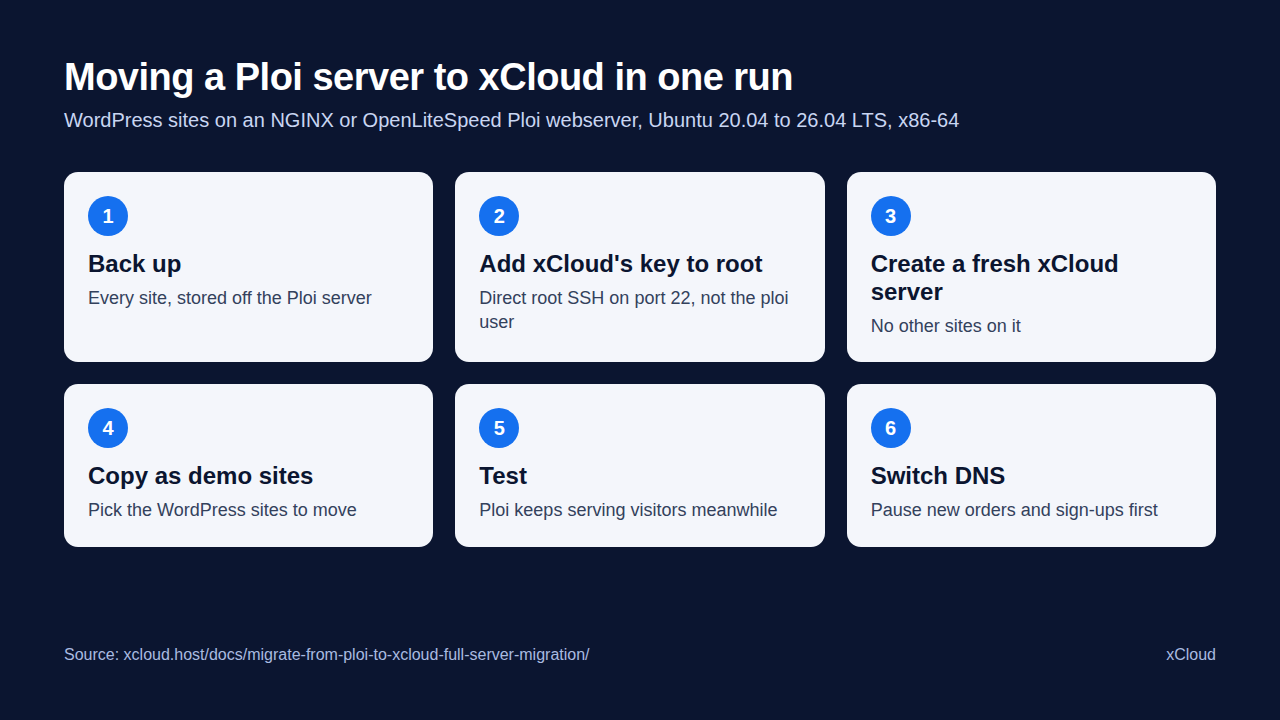
Here’s the part that trips people up: Ploi signs you in as the ploi user, and root login is key-only. xCloud’s migration needs its own direct root connection, so you add the public key from xCloud’s migration screen to the root account and check that it works on port 22. Don’t turn on root passwords to get around a key problem.
If your server doesn’t qualify, the site-by-site WordPress migration moves one site at a time without root access. You can also ask the xCloud team for a free migration from the dashboard under Support → Create Ticket → Free Migration. The same one-run move exists for RunCloud, GridPane, ServerAvatar and SpinupWP servers.
Why People Look for a Ploi Alternative
Ploi’s pricing page (November 2026) is clear about what each plan includes, and that is where the reasons to compare start.
| Ploi plan (Nov 2026) | Price per month | Servers | What it adds |
|---|---|---|---|
| Free | €0 | 1 server, 1 site, 5 deployments a month | The basics |
| Basic | €8 ($10) | 5 servers, unlimited sites | Unlimited deployments |
| Pro | €13 ($16) | 10 servers | Zero-downtime deployments, automatic database and file backups |
| Unlimited | €30 ($36) | Unlimited | Team management |
Team seats sit on the top plan. A two-person agency that wants a shared panel pays for Unlimited, even with three servers.
Automatic backups and zero-downtime deploys sit on Pro. On Basic, you set up backups yourself, and a deploy updates the live site in place.
WordPress is a side dish. Ploi names Laravel, WordPress and Statamic, but it is built around deployments, not WordPress updates or staging. Ploi’s own server fees are separate too: “our pricing does not include server fees,” as its FAQ puts it (November 2026).
How We Ranked These Alternatives
We weighed each tool on six things, in this order:
- Cost of the panel for a small portfolio, read from the vendor’s own pricing page in November 2026.
- Free plan, and what it really covers.
- Laravel tools: deployments from Git, scheduled and background tasks, zero-downtime releases.
- WordPress tools: staging, backups, updates.
- Migration path off Ploi, the cost most buyers forget.
- Honest limits: what each tool does not do.
We did not run benchmarks for this guide, so there are no speed scores here. Prices change often; treat every figure as “as of November 2026” and confirm on the vendor’s page.
Master Comparison Between the Best Ploi Alternatives
| Rank | Platform | Type | Free plan | First paid price (Nov 2026) | Best for |
|---|---|---|---|---|---|
| 🥇 | xCloud | Panel + optional managed servers | 1 server, 10 sites | $5 per server/month | WordPress + Laravel on your own server |
| 🥈 | Laravel Forge | Laravel server panel | None listed | $12/month (Hobby) | Laravel-only teams |
| 🥉 | RunCloud | Server panel | Trial | See runcloud.io/pricing | General PHP apps |
| 4 | ServerAvatar | Server panel | 4-day trial | $12/month, 5 servers | Many servers, one fee |
| 5 | SpinupWP | WordPress panel | 7-day trial | $12/month, 1 server | WordPress developers |
| 6 | GridPane | WordPress panel + managed servers | Core: 25 sites | PeakFreq from $19/month | WordPress-only agencies |
| 7 | Coolify | Container platform | Self-hosted, free | Cloud $5/month (2 servers) | Docker-first teams |
| 8 | CloudPanel | Self-hosted panel | Free | Managed CloudPanel from €29/month | Full control, no fee |
🥇 1. xCloud: Best Ploi Alternative for WordPress and Laravel on Your Own Server
xCloud works the way Ploi does at its core: you connect a server from DigitalOcean, Vultr, Hetzner, AWS, Google Cloud, Linode or any Ubuntu host, and manage what runs on it. The difference is WordPress depth and a free first server that holds 10 sites, not one.
The free plan covers one server and up to 10 sites. Add more servers and you pay $5 per server a month for 2–5 servers, $4 for 6–10 and $3 for 11 or more. Prefer not to hold a provider account? xCloud Managed hosting provides the server too, from $5 a month.
Key Features
- Laravel deployments from Git: xCloud deploys Laravel apps from Git and keeps their scheduled and background tasks running, next to your WordPress tools.
- Zero-downtime releases: Release mode builds each update separately, checks it loads, then switches visitors over in one step, so the site never shows a half-finished update.
- WordPress tools: staging, plugin, theme and core updates, and a vulnerability checker. Updating plugins, themes and core across all your sites at once (the Updates Manager) is on paid plans; one-site updates are free on every plan.
- Whole-server move from Ploi: WordPress sites copied as demo sites first.
How to Switch From Ploi to xCloud
- Create an xCloud account and add a card for verification (your free server stays at $0).
- Back up every site on the Ploi server, and keep the backups off that server.
- Add the public key from xCloud’s migration screen to the root account, and check root SSH on port 22.
- Create a fresh server through xCloud, open it, then select New Site → Migrate Full Server and enter the Ploi server’s details.
- Copy the WordPress sites as demo sites, test them, then switch DNS. Redeploy Laravel apps from Git.
👉 Full steps: How to migrate a full server from Ploi to xCloud.
Pros and Cons
| Pros | Cons |
|---|---|
| ✅ $0 panel for 1 server and 10 sites | ❌ Once you run several servers, Ploi Basic’s flat $10 can cost less than xCloud’s $5 per server |
| ✅ WordPress and Laravel on the same panel | ❌ Backups are on paid plans, not the free plan |
| ✅ Whole-server move for WordPress sites on Ploi | ❌ The one-run move skips Laravel apps, containers and ARM servers |
| ✅ Optional managed servers, so you can stop running the machine later | ❌ A card is required at sign-up, even on the free plan |
| ✅ Per-server price with no feature tiers on paid servers | ❌ Fewer Laravel-specific extras than Forge |
Best for: agencies and freelancers who run mostly WordPress with some Laravel, and want both on one panel. See the Laravel hosting page for the Laravel side.
🥈 2. Laravel Forge: Best for Laravel-Only Teams
Laravel Forge is the server tool from the Laravel team, and Ploi is often described as its rival. As of November 2026, Hobby is $12 a month with unlimited Laravel VPS servers and 1 external server, Growth $19 for unlimited servers, and Business $39.
As of November 2026, Forge lists zero-downtime deployments on every plan, which is the feature many Ploi Basic users are missing. Its FAQ notes that zero-downtime deploys work on one server. WordPress runs on it, but there are no WordPress-specific tools such as an update manager or WordPress staging.
Pros and Cons
| Pros | Cons |
|---|---|
| ✅ Made by the Laravel team | ❌ No free plan listed |
| ✅ Zero-downtime deployments on every plan | ❌ Little WordPress-specific tooling |
| ✅ Unlimited servers from $19/month | ❌ Hobby allows only 1 external server |
Best for: teams whose Ploi servers run only Laravel.
🥉 3. RunCloud: Best General PHP Panel
RunCloud is a long-running server panel for PHP apps and WordPress, and it appears near the top of most Ploi alternative lists. Its prices load in the browser on its pricing page, so check there for today’s figures.
Our xCloud vs RunCloud page compares the two feature by feature, and our RunCloud alternatives guide covers the same market from the other side.
Pros and Cons
| Pros | Cons |
|---|---|
| ✅ Handles a wide mix of PHP apps | ❌ Server billed separately, like Ploi |
| ✅ NGINX and OpenLiteSpeed servers | ❌ Prices show only in the browser, so check its page |
Best for: developers who manage many kinds of PHP apps, not mostly Laravel.
4. ServerAvatar: Best for Many Servers on One Fee
ServerAvatar prices by server count. As of November 2026, Newbie is $12 a month for 5 servers (after a $10 first month), Pro $29 for 25, Master $49 for 50 and Business $69 for unlimited, with unlimited apps and databases on every plan.
As of November 2026, there’s a 4-day free trial, and a WP Toolkit add-on costs $9 a month.
Pros and Cons
| Pros | Cons |
|---|---|
| ✅ 5 servers for $12/month | ❌ No permanent free plan |
| ✅ Unlimited apps and databases | ❌ WordPress tools are a paid add-on |
Best for: developers running several small servers.
5. SpinupWP: Best Clean WordPress-First Panel
SpinupWP focuses on WordPress. As of November 2026, Essentials is $12 a month with one server and unlimited sites, and Advanced is $19 with extra users at $2 each. Additional servers cost less as you add more, down to $1 a month each from 61 servers (as of November 2026).
There’s a 7-day free trial (as of November 2026).
Pros and Cons
| Pros | Cons |
|---|---|
| ✅ Unlimited sites on every plan | ❌ No free plan |
| ✅ Extra servers get cheaper as you add more | ❌ Not built for Laravel apps |
Best for: WordPress developers who want a tidy panel.
6. GridPane: Best for WordPress-Only Agencies
GridPane is built only for WordPress. Its free Core plan hosts up to 25 websites, and managed PeakFreq servers start at $19 a month (as of November 2026).
Pros and Cons
| Pros | Cons |
|---|---|
| ✅ Free plan with a 25-site cap | ❌ WordPress only: no Laravel apps |
| ✅ Managed servers available | ❌ Managed servers cost extra |
Best for: agencies that run nothing but WordPress.
7. Coolify: Best for Docker-First Teams
Coolify deploys apps as containers on your own servers. The self-hosted version is free; Coolify Cloud is $5 a month for 2 servers plus $3 for each extra server (as of November 2026).
It is a different shape from Ploi: you think in containers and images, not PHP sites. Our Coolify alternatives guide covers that side of the market.
Pros and Cons
| Pros | Cons |
|---|---|
| ✅ Free when self-hosted | ❌ You run and update the panel yourself on the free version |
| ✅ Any app that runs in Docker | ❌ No WordPress-specific tools |
Best for: teams that already ship Docker images.
8. CloudPanel: Best When You Want No Panel Fee
CloudPanel is free software you install on your own server. It runs WordPress, PHP, Node.js, Python and static sites.
No fee. As of November 2026, CloudPanel lists its Discord channel for support. Updates, monitoring and fixes are yours.
Pros and Cons
| Pros | Cons |
|---|---|
| ✅ The software is free to install | ❌ You maintain it yourself |
| ✅ PHP, Node.js and Python | ❌ Its site lists Discord for support |
Best for: comfortable Linux admins who want zero recurring panel cost.
Laravel Forge Alternatives: The Same List, Read Differently
Searching for Laravel Forge alternatives instead? Ploi itself is the most direct one: a free plan, then €8 ($10) a month for 5 servers. After that, the picks are the same tools, ranked by Laravel depth rather than WordPress depth:
| Need | Pick | Why |
|---|---|---|
| Cheapest Forge-style panel | Ploi | Free plan, then €8 ($10) for 5 servers |
| Laravel and WordPress on one panel | xCloud | Deploys Laravel apps from Git and keeps their scheduled and background tasks running, next to your WordPress tools |
| Containers instead of PHP sites | Coolify | Any Docker image |
| No fee at all | CloudPanel | Free software on your own server |
Cost Breakdown: What You’ll Actually Pay
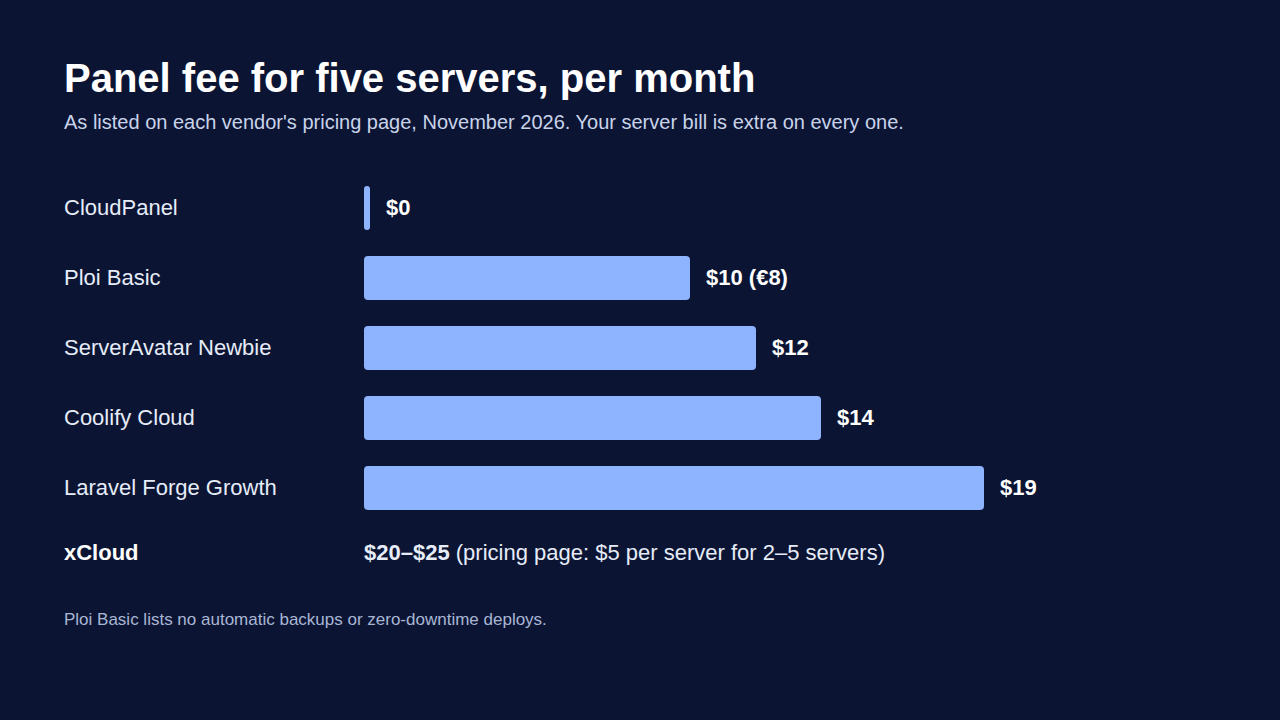
Every panel here sits on top of your server bill, except managed servers such as xCloud Managed and GridPane PeakFreq. So compare the panel fee plus your server, not the panel fee alone.
| Platform | Panel fee, 1 server | Panel fee, 5 servers | Your time |
|---|---|---|---|
| xCloud | $0 (up to 10 sites) | $20–$25 (pricing page: $5 per server for 2–5 servers; see pricing) | Low for WordPress |
| Ploi | €0 (1 site) | €8 ($10) Basic; €13 ($16) for backups and zero-downtime deploys | Medium |
| Laravel Forge | $12 (Hobby) | $19 (Growth) | Medium |
| ServerAvatar | $12 | $12 | Medium |
| Coolify Cloud | $5 (covers 2 servers) | $14 | Medium |
| CloudPanel | $0 | $0 | High: you run everything |
Be honest with the math: once you run several servers, Ploi Basic’s flat $10 for up to 5 servers can cost less than xCloud’s $5 per server on the panel fee alone. xCloud wins when you have one server with several sites, when you need WordPress tools, or when Ploi’s team and backup features would push you to Pro or Unlimited.
The line item people forget is your time. A free panel you patch at 3 a.m. is not free, and a move you do site by site costs a weekend per server.
Honest Limits of Switching (and How to Undo It)
No switch is zero downtime by default. Your sites stay live on Ploi while xCloud copies them, but a site that takes orders, sign-ups or comments needs a short pause on new writes before you switch DNS.
xCloud’s one-run migration moves WordPress sites only. Laravel apps, their scheduled and background tasks, Docker containers, mail and custom services on the same Ploi server need their own plan: redeploy Laravel from Git and copy its database and .env values yourself.
To undo, keep the Ploi server and its backups untouched until you are sure. To go back, point DNS at Ploi again, but first copy over any orders or posts the new server took. The Ploi migration guide has the full rollback checklist.
Common Mistakes When Leaving Ploi
- Entering
ploias the migration user. The one-run move needs direct root SSH on port 22. - Cancelling Ploi first. Your sites keep running, but deploys, SSL renewals and backups set up in Ploi may stop being managed.
- Forgetting the Laravel apps. The WordPress move does not include them. List every app on the server before you start.
- Running scheduled and background tasks on both servers. Duplicate tasks send emails twice. Run them only where the site is live.
- Comparing panel fees without the server bill. Add your server cost before you decide.
Who Should Pick What
| If you are… | Best choice | Why |
|---|---|---|
| A freelancer with one server of WordPress sites | xCloud | $0 panel for 1 server, 10 sites |
| An agency with WordPress and a few Laravel apps | xCloud | Both on one panel, plus the one-run WordPress move; $0 applies on your first server only |
| A Laravel-only team | Laravel Forge | Zero-downtime deploys on every plan |
| Running many small servers | ServerAvatar | 5 servers for $12/month |
| A WordPress-only shop | GridPane | 25 free sites, WordPress-only tools |
| Shipping Docker images | Coolify | Free when self-hosted |
| Happy to run everything yourself | CloudPanel | No panel fee |
Still weighing managed against self-run? Our guide to self-managed vs managed hosting explains the trade-off, and the best Laravel hosting guide covers hosts that include the server.
Frequently Asked Questions
What is the best Ploi alternative?
For WordPress on a server you own, xCloud: the panel is free for one server and 10 sites, and it can move the WordPress sites on an eligible Ploi server in one run. For Laravel-only teams, Laravel Forge is the closest match, and Coolify suits teams that deploy everything as Docker containers.
What is the best Laravel Forge alternative?
Ploi is the most direct Laravel Forge alternative, with a free plan and paid plans from €8 ($10) a month as of November 2026. If you also run WordPress, xCloud deploys Laravel apps from Git and keeps their scheduled and background tasks running, next to your WordPress tools.
Is there a free alternative to Ploi?
Yes. xCloud is free for one server and 10 sites, GridPane Core is free for up to 25 WordPress sites, and Coolify and CloudPanel are free to install on your own server. Your server provider still bills you for the server itself.
Which Ploi features need a paid plan?
As of November 2026, Ploi’s pricing page lists zero-downtime deployments and automatic database and file backups on the Pro (€13 / $16) and Unlimited plans only, and team management on Unlimited (€30 / $36) only. The free plan covers 1 server, 1 site and 5 deployments a month.
Can I move my Ploi server to xCloud without rebuilding sites?
Yes, for WordPress sites on a Ploi webserver that runs NGINX or OpenLiteSpeed on Ubuntu 20.04, 22.04, 24.04 or 26.04 LTS (x86-64), with direct root SSH on port 22. xCloud copies the sites to a fresh xCloud server as demo sites first. Laravel apps, Docker containers and ARM servers need their own move.
What are sites like Ploi?
Sites like Ploi are server control panels that manage a server you rent: Laravel Forge, RunCloud, ServerAvatar, SpinupWP, GridPane, xCloud, Coolify and CloudPanel. Managed hosts such as Cloudways also include the server in the price, which is a different kind of product.
Conclusion: Pick Your Panel by the Plan You Would Need, Then Plan the Move
Ploi alternatives are not short on choice in 2026. Forge wins on Laravel, ServerAvatar on many servers for one fee, GridPane on WordPress-only depth, and Coolify and CloudPanel on cost.
Before you switch, price the Ploi plan you would actually need: Pro for backups and zero-downtime deploys, Unlimited for a team. If that is more than a panel that already includes those, the move pays for itself. Looking at a managed host instead? Our Cloudways alternatives guide covers those.
What to do this week: pick one non-critical Ploi server, back it up, and copy its WordPress sites as demo sites on a free xCloud plan. Test for a few days before you switch DNS.
If you have found this blog helpful, feel free to subscribe to our blogs for valuable tutorials, guides, knowledge, and tips on web hosting and server management. You can also join our Facebook community to share insights and engage in discussions.