


Looking for Coolify alternatives? The strongest options in 2026 are Dokploy (closest like-for-like dashboard), Dokku (lightest, CLI-only), CapRover (one-click apps on Docker Swarm), Kamal (deploy tool from 37signals), Portainer (container manager), Sliplane (managed Docker hosting) and xCloud (managed panel on your own server). Each trades control for upkeep differently.
Coolify is a very good product. It is open source under Apache-2.0, free forever when you host it yourself, and it ships a catalog of one-click services. So why are people searching for a way out?
Usually it is one of three things. You are tired of keeping the panel itself patched, you need something lighter for a single small server, or you want a team-friendly dashboard without running it. This guide maps every option to those three reasons, and covers the part most lists skip: how to actually move your apps off Coolify.
TL;DR: Quick Picks
Short on time? Here is the whole guide in a few lines:
Prices below were checked on each vendor’s official pricing page as of October 2026.
| If you want to… | Use this | Best for | Cost of the tool |
|---|---|---|---|
| Keep a Coolify-style dashboard, with Swarm clusters | Dokploy | Developers who like Coolify’s model | Free self-hosted; cloud from $4.50/server/mo (pricing) |
Run apps from git push with almost no overhead |
Dokku | One small server, CLI people | Free (MIT) |
| Get one-click apps and a simple Swarm cluster | CapRover | Hobby projects, small teams | Free (Apache 2.0, plus added terms on its paid features) |
| Ship a containerized app with zero-downtime deploys | Kamal | Rails and app teams with CI | Free |
| Manage containers you already run | Portainer | Ops teams, many hosts | Free start with 3 nodes, then paid (pricing) |
| Hand off the servers entirely | Sliplane | Small teams that want no server work | Paid plans; see Sliplane’s pricing |
| Keep your own server but stop running the panel | xCloud | Agencies and teams mixing WordPress and Docker | Free plan for one server and up to 10 sites; paid plans on pricing |
- Closest swap: Dokploy. Same idea, different strengths.
- Lightest swap: Dokku. No web dashboard, very few moving parts.
- Least upkeep while keeping your server: xCloud. The panel is run for you, which is also its biggest trade-off.
What This Guide Shows That Others Do Not
Most Coolify alternative lists compare dashboards. The more useful question is who maintains what: the app, the panel, and the server underneath. That one split decides how many 3 a.m. updates land on you.
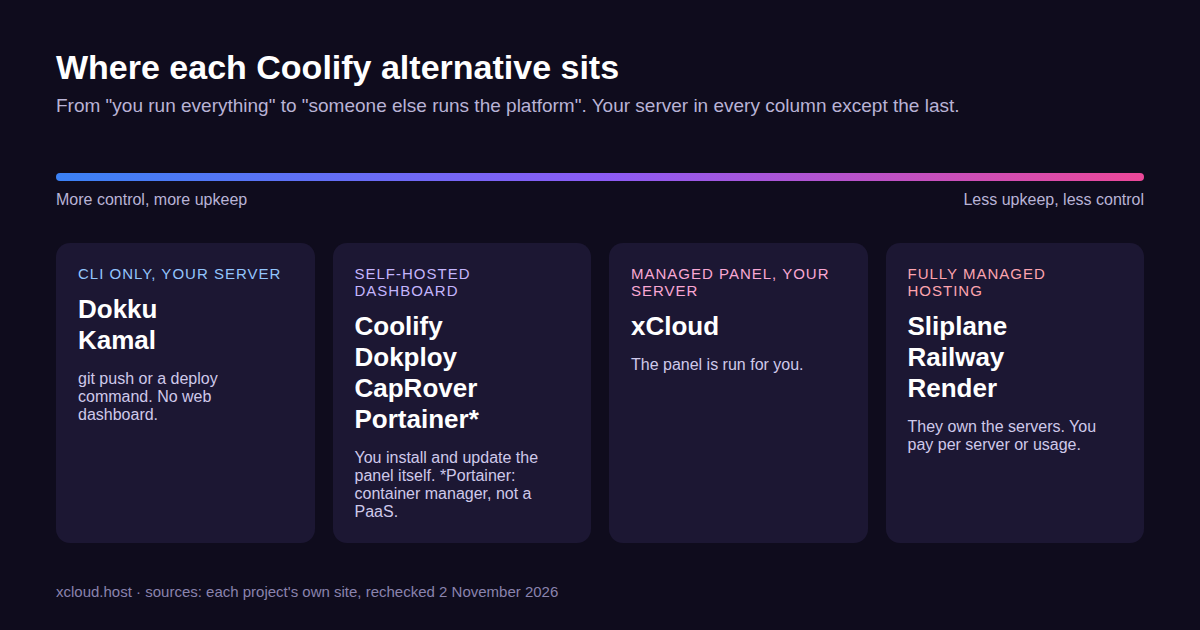
For each option below, we list how it handles Docker Compose, backups and its own updates, not just how it deploys.
How We Compared These Coolify Alternatives
We did not install, test or benchmark these tools for this post. Every fact comes from each project’s own website, docs or GitHub page, opened on 30 October 2026, and the competitor facts were rechecked on 2 November 2026. We judged each option on six things:
- Who maintains the panel. You, or the vendor.
- Docker Compose support. Full, partial or none, in the project’s own words.
- Deploy methods. Git push, Dockerfile, buildpacks, images.
- Multi-server support. One box, or a cluster.
- Backups and restores. What is covered out of the box.
- Cost. The tool’s own price, not the server.
Server prices are left out on purpose. A $5 VPS costs the same whichever tool you put on it.
Master Comparison Table
| Tool | Type | Panel maintained by | Docker Compose | Multi-server |
|---|---|---|---|---|
| Coolify (baseline) | Self-hosted dashboard | You (or Coolify Cloud) | Yes | Yes |
| 🥇 Dokploy | Self-hosted dashboard | You (or Dokploy Cloud) | Native | Yes, plus Docker Swarm |
| 🥈 Dokku | CLI PaaS | You | Not built in; deploys one Dockerfile, buildpack or image per app | Single server by default |
| 🥉 CapRover | Self-hosted dashboard | You | Partial, marked experimental | Yes, Docker Swarm |
| Kamal | Deploy tool (CLI) | You (no panel; only Docker and kamal-proxy run on the server) | Not its model | Yes, many hosts |
| Portainer | Container manager | You | Yes (stacks) | Yes |
| Sliplane | Managed Docker hosting | Sliplane | No; one container per service, with a parser that reads a Compose file (docs) | Their servers |
| xCloud | Managed panel, your server | xCloud | Yes, on NGINX servers | Many servers, one dashboard |
🥇 1. Dokploy: The Closest Like-for-Like Swap
Dokploy describes itself as a platform to “manage containerized deployments and AI-built apps across multiple servers.” It is the closest match to Coolify, because the mental model barely changes: you install a dashboard on your server and deploy from Git or Compose.
Where it pulls ahead of Coolify is clustering. Dokploy builds Docker Swarm clusters in, and lists native Docker Compose support for both stacks and plain Compose. One detail worth reading before you commit: the license is Apache 2.0 for most of the code, with a separate proprietary license for anything under its /proprietary folders (LICENSE).
Key features:
- Native Docker Compose, including Swarm stacks.
- Multi-server deployment from one dashboard.
- Templates for tools such as Supabase, Cal.com and PocketBase.
- Dokploy Cloud if you do not want to host the dashboard: Hobby at $4.50 per server per month, Startup from $15 per month (Dokploy pricing, as of October 2026).
| ✅ Pros | ❌ Cons |
|---|---|
| ✅ Feels familiar to Coolify users | ❌ You still patch and back up the panel yourself |
| ✅ Swarm clusters without extra tools, free when self-hosted | ❌ Mixed license; check which parts you use |
Best for: developers who like Coolify’s approach but want stronger multi-node support. How it compares with a managed panel is on xCloud vs Dokploy.
🥈 2. Dokku: The Lightest Option
Dokku describes itself on GitHub as “a docker-powered PaaS that helps you build and manage the lifecycle of applications.” It is the smallest tool here, MIT-licensed, and runs on a single server by default.
You deploy with git push. Dokku builds the app from a Dockerfile or Heroku-style buildpacks, then starts the container (deploy methods). There is no web dashboard; everything is a command such as dokku apps:create my-app.
Key features:
- Heroku-style git push deploys.
- Dockerfile, buildpack, Docker image and archive deploys.
- Plugins for databases, Let’s Encrypt and more.
- Optional schedulers (K3s, Nomad) when one server is not enough.
| ✅ Pros | ❌ Cons |
|---|---|
| ✅ Very few moving parts | ❌ No web dashboard for teammates |
| ✅ Mature, MIT license | ❌ Docker Compose is not built in; it deploys one Dockerfile, buildpack or image per app |
| ✅ Familiar for anyone who used Heroku | ❌ Backups depend on plugins and your own scripts |
Best for: one developer, one small server, apps that fit the Heroku model.
🥉 3. CapRover: One-Click Apps on Docker Swarm
CapRover bills itself as a “scalable, free, and self-hosted PaaS.” It has a web dashboard, a catalog of one-click apps (“databases, WordPress, monitoring tools, and dozens of popular services”), and lets you add nodes to a Docker Swarm cluster.
The catch worth knowing: CapRover’s own docs say its Docker Compose support “is still experimental and does not implement the complete Compose specification.” Fields such as build, networks, secrets and restart are ignored. If your stack is one complex compose file, test it before you move.
| ✅ Pros | ❌ Cons |
|---|---|
| ✅ Simple dashboard, quick setup | ❌ Partial Compose support |
| ✅ Swarm clustering built in, free to self-host | ❌ You maintain and secure the panel |
Best for: hobby projects and small teams who deploy single containers more than full compose stacks.
4. Kamal: Deploys Without a Dashboard
Kamal comes from 37signals, the makers of Basecamp and HEY. It calls itself “Capistrano for Containers”: you run one command from your laptop or CI, and it builds your image and rolls it out to your servers with zero-downtime deploys and rolling restarts.
There is no panel to install and no web dashboard. Servers only need Docker, which Kamal can set up for you. It started as a Rails tool but works with any web app that can be containerized.
| ✅ Pros | ❌ Cons |
|---|---|
| ✅ Only Docker and the small kamal-proxy container run on the server | ❌ No dashboard, no one-click apps |
| ✅ Zero-downtime deploys across many hosts | ❌ Databases and backups are your job |
| ✅ Free (MIT), built and used by 37signals | ❌ Best for teams already comfortable with CI |
Best for: app teams with a CI pipeline who want deploys, not a platform.
5. Portainer: A Container Manager, Not a PaaS
Portainer is often listed next to Coolify, but it solves a different problem. It is a control panel for containers and Kubernetes clusters you already run, not a Git-to-production platform.
Portainer offers a free start with 3 nodes; paid plans start at $1,045 a year for Starter (Portainer pricing, as of October 2026). Pick it if you need to see and manage many Docker hosts, not if you want git push deploys.
Best for: operations teams managing existing container fleets.
6. Sliplane: Managed Docker Hosting
Sliplane is a Berlin-based managed Docker host. You do not install anything; you pick a server size and deploy containers onto it. It sells paid plans by server size, with prices shown before VAT; see Sliplane’s pricing for current rates.
That is the real trade: no panel and no server to patch, but you rent their machines. The same applies to Railway and Render; see our xCloud vs Railway comparison for that route.
Best for: small teams who want zero server work and are happy on someone else’s hardware.
7. xCloud: Your Server, a Panel You Do Not Run
xCloud is a managed control panel for servers you own (or a server xCloud provides). Since v2.9.0, any xCloud NGINX server can run Docker apps next to WordPress, PHP, Laravel and Node.js sites. You can deploy your own Docker Compose file, a Docker app straight from a Git repository, or one of the One Click Apps.
The difference from Coolify is who runs the panel. You never install, update or back up xCloud itself. For your apps, xCloud takes scheduled Docker backups of volumes, the compose file and the .env file, to the server and up to two remote destinations, with an in-place Restore. For disk cleanup, our guide to reclaiming space from local backups, cache and dumps shows where the space goes and how to free it.
Key features:
- Docker and native apps on one server: xCloud installs Docker with your first container site (how it works).
- One Click Apps with App Actions for Start, Stop, Restart and Update.
- Compose editing from the dashboard, behind its own team permission.
- Team roles that can be limited to particular servers and actions (team permissions).
- WordPress-specific tools: staging sites, WordPress updates and the built-in firewall.
Honest limits. xCloud is not open source and you cannot self-host the panel. The free plan covers one server and up to 10 sites, and some One Click Apps need a paid plan, while Coolify’s self-hosted dashboard is free at any scale. Docker apps need an NGINX server (OpenLiteSpeed servers cannot run Docker), and there are no pull-request preview environments. Copy a compose file before you edit it.
| ✅ Pros | ❌ Cons |
|---|---|
| ✅ No panel to patch or back up | ❌ Not self-hostable, not open source |
| ✅ Docker backups with restore, up to two remote copies | ❌ Free plan is one server and up to 10 sites |
| ✅ WordPress and Docker on the same server | ❌ No pull-request previews |
| ✅ Team roles scoped per server | ❌ Docker only on NGINX servers |
Best for: agencies and teams that run WordPress and Docker apps side by side and would rather not maintain a panel. Full side-by-side detail is on xCloud vs Coolify.
Cost Breakdown: What You Will Actually Pay
Prices and plan limits below were checked on each vendor’s official pricing page as of October 2026.
| Option | Tool cost | Who patches the panel | The line item people forget |
|---|---|---|---|
| Coolify self-hosted | $0 | You | Panel updates and its own backups |
| Coolify Cloud | $5/mo base (2 servers), +$3 per extra server (pricing) | Coolify | Your servers, billed separately |
| Dokploy self-hosted | $0 | You | Same as Coolify |
| Dokku, CapRover, Kamal | $0 | You (Kamal: Docker and kamal-proxy) | Backups you script yourself |
| Portainer | Free start with 3 nodes; Starter from $1,045/yr (pricing) | You | Per-node pricing as you grow |
| Sliplane | Paid plans; see Sliplane’s pricing | Sliplane | VAT, which its prices leave out |
| xCloud | Free plan for one server and up to 10 sites; see pricing | xCloud | Paid plan for more servers or sites, and for some One Click Apps |
Real cost has three parts: the server, the tool, and your time. The third is the one people forget.
Migrating Off Coolify, Step by Step
Coolify’s docs explain how to move an app to another Coolify instance, but we found no tool in them that exports to a different platform. Every move is a manual rebuild, so plan it like one.
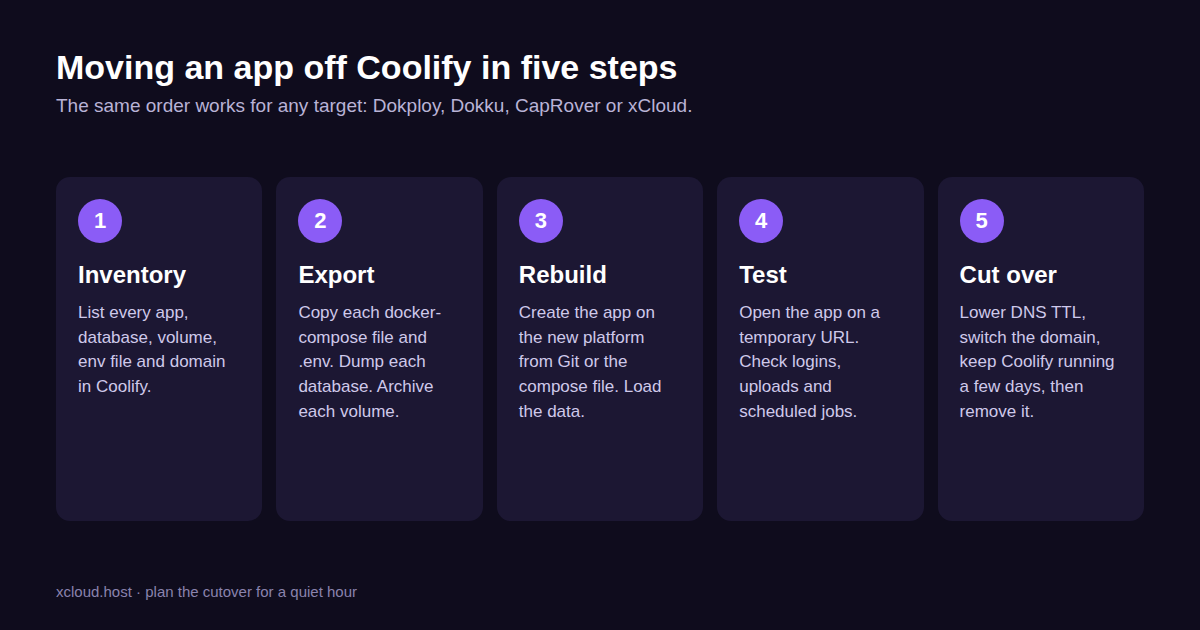
- Inventory. List every app, database, volume, domain and environment variable in Coolify. Note which apps use a compose file and which build from Git.
- Export. Copy each
docker-compose.ymland.env. Dump each database with its own tool (mysqldump,pg_dump). Archive each named volume. - Rebuild. Create the app on the new platform from the same Git branch or compose file, then load the data.
- Test. Open the app on a temporary URL. Check logins, uploads, emails and scheduled jobs.
- Cut over. Lower your DNS TTL a day ahead, switch the domain, and keep Coolify running for a few days before you remove it.
👉 Moving to xCloud? The Railway to xCloud guide walks through the same inventory, export and cutover steps, and our Docker Compose explainer helps if your compose files need a tidy-up first.
Common Mistakes When Leaving Coolify
- Forgetting volume data. The compose file rebuilds the app, not its uploads.
- Assuming full Compose support. CapRover ignores several fields, such as
build,networks,secretsandrestart(CapRover docs); test first. - Cutting DNS too early. Run both copies until the new one has handled real traffic.
- Skipping backups on the new side. Set them up before the cutover, not after.
- Picking on features alone. Pick on who you want maintaining the panel.
Which Coolify Alternative Fits You
| If you are… | Best choice | Why |
|---|---|---|
| A developer who likes Coolify but needs clusters | Dokploy | Same model, Swarm built in |
| One person with one small VPS | Dokku | Lightest footprint |
| A hobbyist who wants one-click apps | CapRover | Simple dashboard and catalog |
| A team shipping from CI | Kamal | Deploys without a platform |
| An ops team with many Docker hosts | Portainer | Manages what you already run |
| A small team that wants no servers | Sliplane | Fully managed |
| An agency running WordPress and Docker | xCloud | Panel run for you, on your own server |
For a wider view of hosts that run containers, see our best Docker hosting providers roundup, and if you are weighing the managed trade-off in general, self-managed vs managed hosting.
Frequently Asked Questions
What is the best Coolify alternative?
For most people it is Dokploy, because it keeps the same model: a free, self-hosted dashboard with native Docker Compose and multi-server support. If you want fewer moving parts, pick Dokku. If you want someone else to run the panel while you keep your own server, look at xCloud.
Is there a free Coolify alternative?
Yes. Dokploy, Dokku, CapRover and Kamal are all free to self-host, and you only pay for the server. Portainer offers a free start with 3 nodes (paid plans start at $1,045 a year, as of October 2026), and xCloud has a free plan for one server and up to 10 sites (some One Click Apps need a paid plan).
Is Dokploy better than Coolify?
Neither is better across the board. Coolify leans on its catalog of one-click service templates, while Dokploy puts Docker Swarm clusters and multi-server deployment at the center. Our xCloud vs Dokploy and xCloud vs Coolify pages list both side by side.
Can I move my Coolify apps to another platform?
Yes, but by hand. Coolify’s docs cover moving an app to another Coolify instance, but we found no tool in them that exports to a different platform, so you copy each app’s compose file and environment variables, dump each database, archive each volume and rebuild on the new platform. Keep Coolify running until the new copy has served real traffic for a few days.
Does xCloud support Docker Compose like Coolify?
Yes. Any xCloud NGINX server can run your own Docker Compose file, a Docker app from a Git repository or a containerized One Click App, next to WordPress and PHP sites. OpenLiteSpeed servers cannot run Docker, and xCloud does not offer pull-request preview environments.
Pick Your Coolify Alternative This Week
Coolify is not a bad choice, and nobody here needs to pretend it is. The question is which part of the job you want to keep. If you like running the panel, Dokploy, Dokku and CapRover give you the same freedom with different trade-offs.
If the panel is the part you want to stop running, try xCloud’s Docker hosting with one app first. Move one low-risk app with the five steps above, live with it for a week, then decide on the rest.
If you have found this blog helpful, feel free to subscribe to our blogs for valuable tutorials, guides, knowledge, and tips on web hosting and server management. You can also join our Facebook community to share insights and engage in discussions.