


CVE-2026-98432 is a 9.8-rated flaw in how the Linux kernel sets up IPv4 TCP connections. An attacker needs no login, only a TCP port your server leaves open. Linux 4.4 and newer are affected. The fix is a patched kernel plus a reboot, and on 30 October 2026 Ubuntu and Red Hat had not released one.
That last part is the catch. Debian, Amazon Linux 2023 and Oracle already ship fixed kernels, so for some of you this is a ten-minute job. For the many servers on Ubuntu, there is nothing to install yet, and the honest advice is narrower than most posts make it sound.
This guide is for anyone running a Linux server: a VPS, a cloud instance, a home lab or a self-hosted app. If you also run WordPress, our PHP2Shell checklist for any host covers the other big October advisory. Here you will learn what the flaw is, why the scores disagree, how to check your kernel, how to patch it, and what to do while you wait.

TL;DR
Short on time? Here is the whole guide in a few lines:
- CVE-2026-98432 is a use-after-free in the kernel’s IPv4 TCP connection setup. It needs no credentials, only a reachable TCP port. IPv6 connections are not affected.
- Scores differ: the kernel CVE team and Ubuntu say 9.8, Red Hat, Oracle and SUSE say 8.1, Amazon says 7.0. The gap is one question: how hard is the race to win?
- Fixed upstream in 5.10.272, 5.15.223, 6.1.190, 6.6.159, 6.12.113, 6.18.56 and 7.2.10, plus mainline 7.3.
- Fixed in distributions (30 Oct): Debian 12 and 13, Amazon Linux 2023, Oracle UEK, SUSE Linux Micro 6.2 and openSUSE Leap 16.0. Not yet: every Ubuntu release, RHEL 8, 9 and 10.
- Your
uname -rnumber will not match the upstream table on Ubuntu, Debian or RHEL. Check your distribution’s tracker instead. - Patch = install the fixed kernel, reboot, run
uname -ragain. Installing without a reboot leaves the old kernel running. - No vendor workaround exists. Until your fix lands, close ports you don’t need and watch the tracker.
The Version Number on Your Server Won’t Tell You If You’re Safe
Most write-ups list the upstream fixed versions, and most readers then compare them with uname -r. On a distribution kernel, that comparison is meaningless. Ubuntu 24.04 reports a kernel like 6.8.0-…, Debian 12 reports 6.1.0-…, and RHEL reports 5.14.0-…, whatever fixes have been backported into them.
So the only reliable answer comes from your distribution’s own status for this CVE, matched with the package version you have installed. The table below collects every distribution status we could confirm on 30 October 2026, with the exact fixed package where one exists.
| Distribution | Status on 30 Oct 2026 | Fixed package (advisory) |
|---|---|---|
| Ubuntu 22.04, 24.04, 26.04, 26.10 | Vulnerable, fix in progress, no date | None released |
| Ubuntu 16.04, 18.04, 20.04 | Vulnerable | None released |
| Debian 13 (trixie) | Fixed | linux 6.12.113-1 (DSA-6568-1) |
| Debian 12 (bookworm) | Fixed | linux 6.1.190-1 (DLA-4841-1), linux-6.12 6.12.113-1~deb12u1 (DLA-4850-1) |
| Amazon Linux 2023 | Fixed | kernel6.18-6.18.56-125.164.amzn2023 (ALAS2023-2026-3251), kernel6.12-6.12.113-138.209.amzn2023 (ALAS2023-2026-3335) |
| Amazon Linux 2 | Fix pending | None released |
| Oracle Linux 7 to 10 (UEK) | Fixed on 16 October | See Oracle’s ELSA advisories |
| SUSE Linux Micro 6.2, openSUSE Leap 16.0 | Fixed | kernel-default 6.12.0-160000.40.1 or later |
| RHEL 8, 9, 10 | Fix deferred to a future update | None released |
| RHEL 7 | Not affected | Not needed |
Sources: Ubuntu’s CVE-2026-98432 page, the Debian security tracker, and The Hacker News report of 29 October for Amazon, Oracle, SUSE and Red Hat. Statuses change daily, so open your own distribution’s page before you act.
What Is CVE-2026-98432?
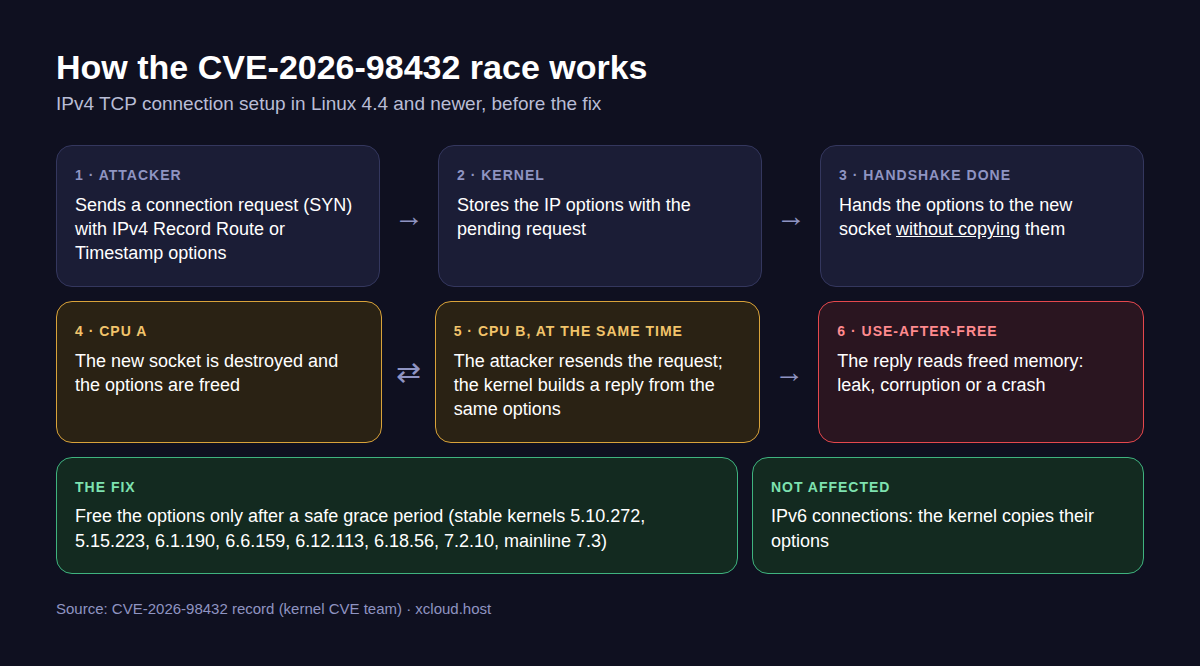
It is a race condition that turns into a use-after-free in the kernel’s IPv4 TCP handshake. When a new connection completes, the kernel hands the IP options saved with the pending request to the new socket without copying them. If that socket is destroyed while another CPU core is still using those options to answer a resent connection request, the kernel reads memory it has already freed.
Think of it like two waiters sharing one order slip. One finishes the table and throws the slip away while the other is still reading it to the kitchen. Most of the time nothing happens; occasionally the kitchen cooks from garbage.
A Few Things Worth Knowing
- Who can trigger it: anyone who can reach an open TCP port on the server, with no account. The trigger is a connection request with the IPv4 Record Route or Timestamp options, sent again and again to win the race.
- Where it started: the bug was introduced in Linux 4.4. Kernels older than 4.4 are not affected.
- IPv6 is not affected by this race, because the kernel copies the options for IPv6 connections.
- A second path exists. The CVE record says a similar race exists when request-socket migration is turned on (
net.ipv4.tcp_migrate_req=1, or a BPF reuseport program that migrates requests). - Exploit status: Anthropic said on 27 October that its AI model wrote a working root exploit against a server with a multipath TCP listener. In its test, leaking a kernel address took 48 minutes and running commands took 5 more. The exploit is not public.
- Attacks: as of 29 October, no vendor advisory, the CVE record or Anthropic’s post reported attacks using the flaw.
- The fix: kernel developers fixed it on 5 October, ten days before the CVE was published on 15 October.
Why the Scores Differ: 9.8, 8.1 or 7.0?
Everyone agrees an attacker needs no login and can reach it over the network. They disagree on how hard the race is to win. That single choice, “attack complexity”, moves the score from 9.8 to 8.1.
| Who | Score | Attack complexity | Their reasoning |
|---|---|---|---|
| Kernel CVE team (added 24 Oct) | 9.8 Critical | Low | Both sides of the race are attacker-induced |
| Ubuntu | 9.8, priority High | Not shown | Uses the 9.8 score |
| Red Hat | 8.1 (its advisory file lists Important) | High | The race is hard to win; the most likely result is a crash |
| Oracle, SUSE | 8.1 | High | Same vector as Red Hat’s advisory file |
| Amazon | 7.0 | Not stated | Not stated |
Red Hat’s CVE page describes the main risk as “a system crash leading to a Denial of Service (DoS) or potential memory corruption”. Anthropic’s exploit shows the memory-corruption side is real on at least one setup.
The honest take: don’t let the lower score talk you out of patching. A remote, no-login kernel bug with a demonstrated root exploit belongs at the top of your list, whichever number your vendor prints.
Are You Affected?
You are in scope if all three are true:
- The server runs Linux 4.4 or newer. That covers every supported distribution today.
- It accepts IPv4 TCP connections from untrusted networks. A web server on ports 80 and 443, or SSH on port 22, counts.
- Your distribution’s tracker does not list your installed kernel as fixed. Use the table above, then confirm on the tracker.
Upstream, these stable releases contain the fix. They matter if you build your own kernel or run a distribution that tracks upstream closely:
| Stable branch | First fixed release |
|---|---|
| 5.10 | 5.10.272 |
| 5.15 | 5.15.223 |
| 6.1 | 6.1.190 |
| 6.6 | 6.6.159 |
| 6.12 | 6.12.113 |
| 6.18 | 6.18.56 |
| 7.2 | 7.2.10 |
| Mainline | 7.3 |
Source: the CVE-2026-98432 record published by the kernel CVE team. The kernel team recommends moving to the latest stable kernel, not cherry-picking this one fix.
How to Check Your Kernel
Connect over SSH. If your host has a browser terminal, that works too. None of these commands change anything.
Step 1: See Which Kernel Is Running
uname -rThis is the kernel in memory right now. Write it down: after patching and rebooting, this line must change.
Step 2: Look for a Kernel Update (Ubuntu and Debian)
sudo apt update
apt list --upgradable 2>/dev/null | grep -E 'linux-(image|generic|headers)'
No output means your enabled repositories offer no newer kernel. On Ubuntu on 30 October, that is the expected answer for this CVE.
Step 3: Look for a Kernel Update (RHEL, Rocky, Alma, Oracle, Amazon Linux)
sudo dnf check-update 'kernel*'On Amazon Linux 2023, the kernel packages are named kernel6.12 or kernel6.18, and the fixed builds are in the table above.
Step 4: Compare With Your Distribution’s Tracker
Open your distribution’s CVE page and match its fixed version against what you have installed:
dpkg -l 'linux-image*' | grep ^ii     # Ubuntu and Debian
rpm -q kernel                          # RHEL family
Step 5: Check the Second Path
sysctl net.ipv4.tcp_migrate_reqThe CVE record names net.ipv4.tcp_migrate_req=1 as a second way into the same bug. 0 is the kernel default. If yours is 1 and nobody set it on purpose, find out why before changing it.
How to Patch CVE-2026-98432
When your distribution ships the fix, the patch is three moves: install, reboot, verify.
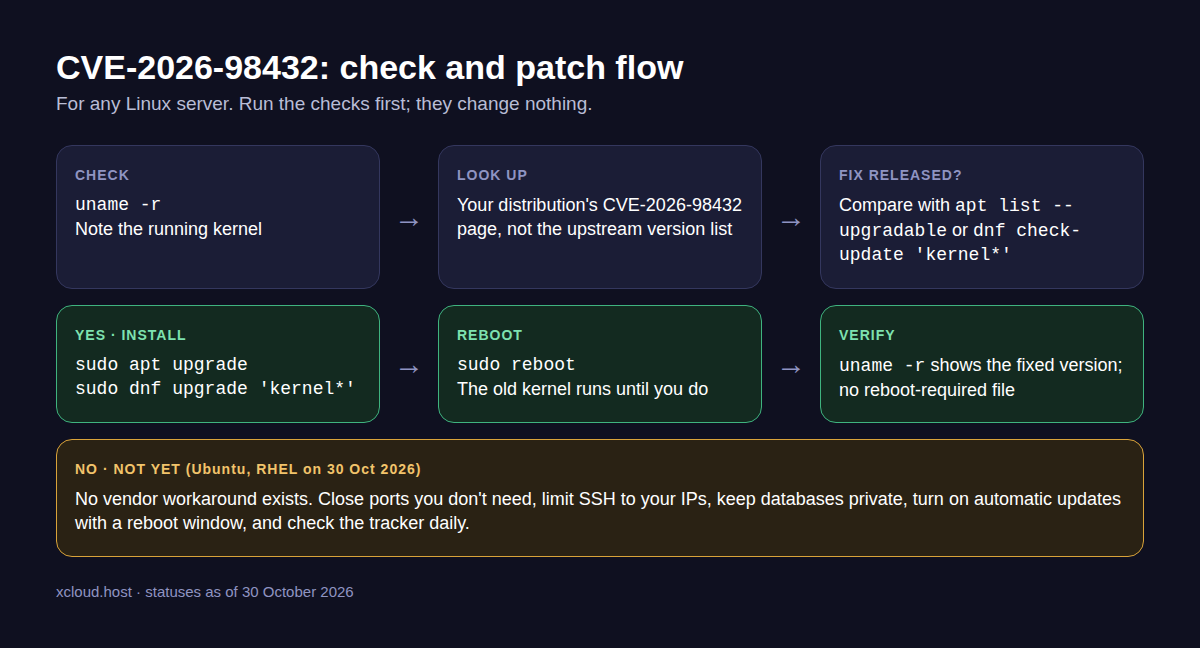
Step 1: Take a Snapshot or Backup
A kernel update is routine, but a server that fails to boot is not. Take a provider snapshot first if you can.
Step 2: Install the Fixed Kernel
Ubuntu and Debian:
sudo apt update
sudo apt upgrade
RHEL family and Amazon Linux:
sudo dnf upgrade 'kernel*'Step 3: Reboot
sudo rebootThis step is the one people skip. Until the server restarts, the old, vulnerable kernel keeps running, even though the new one is installed. A live patch, if your vendor offers one for this CVE, is the only way around the reboot.
Step 4: Confirm the New Kernel Is Running
uname -r
cat /var/run/reboot-required 2>/dev/null || echo "No reboot required"
The version must match the fixed package from your tracker. On Ubuntu and Debian, the second line should print “No reboot required”.
Until Your Distribution Ships a Fix
Here is the part that trips people up: there is no vendor-published workaround. Red Hat says no available mitigation meets its standards for being easy to deploy, suitable for most installations and stable. The kernel CVE team’s only advice is to update.
What you can do is shrink who can reach the bug:
- Close every TCP port you don’t need. List what listens with
sudo ss -tlnp, then remove anything that should not face the internet. - Limit SSH to your own IP addresses in your firewall, instead of leaving port 22 open to everyone.
- Keep databases, caches and admin panels private. MySQL, Redis and dashboards should listen on localhost or a private network only.
- Watch your distribution’s tracker daily, and install the fix the day it appears.
- Turn on automatic security updates and an automatic reboot window, so the fix applies itself overnight when it lands.
You may see people suggest dropping incoming packets that carry IPv4 options or turning off multipath TCP. No vendor has published either as a mitigation, and none of the advisories says whether they lower the risk. If you try one, test it on a staging server first and treat it as unproven.
Quick Checklist
- Ran
uname -rand noted the running kernel - Checked my distribution’s CVE-2026-98432 page
- Fix released? Installed it with
apt upgradeordnf upgrade - Rebooted, then confirmed the new kernel with
uname -r - Fix not released? Closed unused ports and limited SSH to my IPs
- Checked
net.ipv4.tcp_migrate_reqis0unless set on purpose - Turned on automatic security updates and an automatic reboot time
- Moved servers off Ubuntu 20.04 or older, which have no fix
What This Looks Like on an xCloud Server
If your servers run on xCloud, here is exactly what happens today, and what does not.
What xCloud does now:
- Every xCloud server runs Ubuntu 22.04, 24.04 or 26.04, and installs Ubuntu security updates on its own, every day, including kernel updates. See how automated security updates and Auto Reboot work.
- When an installed update needs a restart, you see a Reboot Required notice in the dashboard with a Reboot Now button, and you get an email.
- Automatic Reboot restarts the server at the time you pick, only when a reboot is required. Turn it on under Server → Security → Security Update, step by step in Keep Your Server up to Date with Automated Security Updates.
- Firewall Management lets you review and remove open ports from the dashboard. See how to configure firewall management.
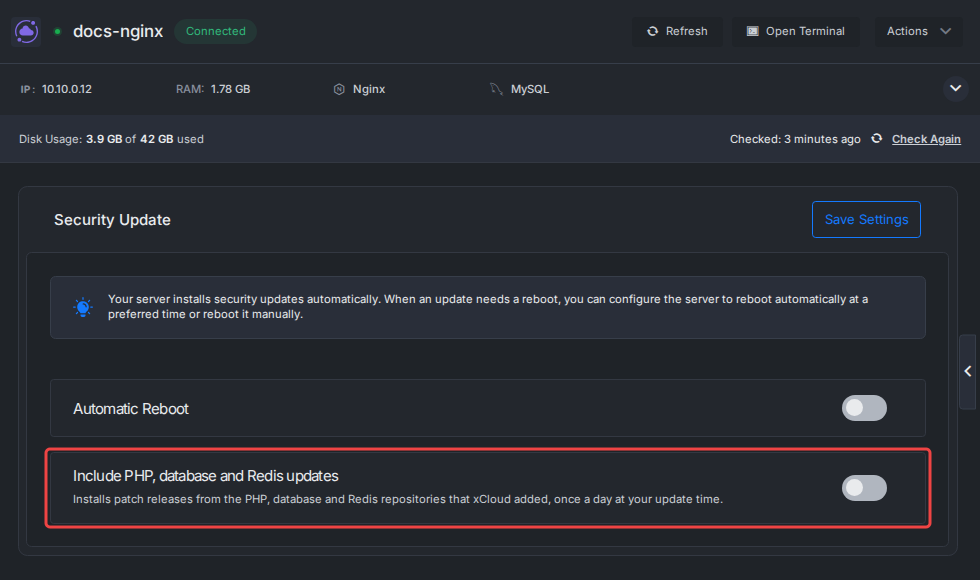
What it does not do:
- It cannot install a fix Ubuntu has not released. On 30 October 2026, Ubuntu had no fixed kernel for this CVE, so an xCloud server has nothing to install yet.
- Automatic Reboot installs nothing. It only applies a kernel that is already installed.
- It does not attach servers to Ubuntu Pro. A server still on Ubuntu 20.04 gets no fix this way. Move it with our Ubuntu 20.04 to 24.04 migration guide.
The one setting worth changing this week: turn on Automatic Reboot, so Ubuntu’s fixed kernel runs the same night it is installed. Compare plans on our pricing page, or bring your own server with self-managed hosting. For the wider picture, read how to automate security updates with xCloud and our VPS security guide.
Patch CVE-2026-98432 the Day Your Fix Lands
CVE-2026-98432 is serious because it needs nothing but an open port. The fix is boring: a new kernel and a reboot. The hard part right now is the wait, especially on Ubuntu and RHEL.
This week, check your kernel against your distribution’s tracker, not against the upstream list. Close the ports you don’t need, set up automatic updates with a reboot window, and patch the day the fix appears. If an earlier kernel scare taught you anything, as Copy Fail and Dirty Frag did for many teams, it is that the reboot is the step that actually closes the door.
If you have found this blog helpful, feel free to subscribe to our blogs for valuable tutorials, guides, knowledge, and tips on web hosting and server management. You can also join our Facebook community to share insights and engage in discussions.
Frequently Asked Questions
What is CVE-2026-98432?
It is a race condition in how the Linux kernel sets up new IPv4 TCP connections. The kernel can read memory it has already freed, which can crash the server or corrupt kernel memory. The kernel CVE team rates it 9.8 because an attacker needs no login, only a reachable TCP port.
Is my server affected by CVE-2026-98432?
Probably, if it runs Linux 4.4 or newer and has not installed a fixed kernel. Version numbers from distributions do not match the upstream ones, so check your distribution’s tracker. On 30 October 2026, Debian, Amazon Linux 2023, Oracle UEK and some SUSE releases had fixes, and Ubuntu and RHEL did not.
Does IPv6 protect me from CVE-2026-98432?
Not on its own. The race affects IPv4 connections only, because the kernel copies the options for IPv6 connections. Almost every server also listens on IPv4, so an IPv6 address alone does not take you out of scope.
Is there a workaround if my distribution has no fix yet?
No vendor has published one. Red Hat says no mitigation meets its standards, and the kernel CVE team advises updating to the latest stable kernel. Until a fix lands, close every port you do not need, limit SSH to your own addresses, and keep checking your distribution’s tracker.
Do I need to reboot after installing the fixed kernel?
Yes. A new kernel only runs after the server restarts, unless your vendor ships a live patch for it. Run uname -r after the reboot to confirm the running kernel is the fixed one.
Does xCloud install the fix for CVE-2026-98432 automatically?
xCloud servers install Ubuntu security updates, including kernel updates, automatically. On 30 October 2026, Ubuntu had not released a fixed kernel, so there is nothing to install yet. When it lands, turn on Automatic Reboot so the new kernel runs at the time you choose.