


The best GoDaddy alternatives in 2026 depend on why you are leaving: xCloud for WordPress sites that need their own server from $5 a month, SiteGround and Hostinger for cheap shared hosting, Cloudways for pay-as-you-go cloud servers, Kinsta for premium managed WordPress, and Bluehost for a beginner shared plan.
GoDaddy is a common first host for small sites, often because the domain was bought there first. The common reasons to look elsewhere are renewal prices, add-ons sold at checkout, and sites that slow down as they grow. If you came from another host first, our list of WP Engine alternatives covers the premium end of the market.
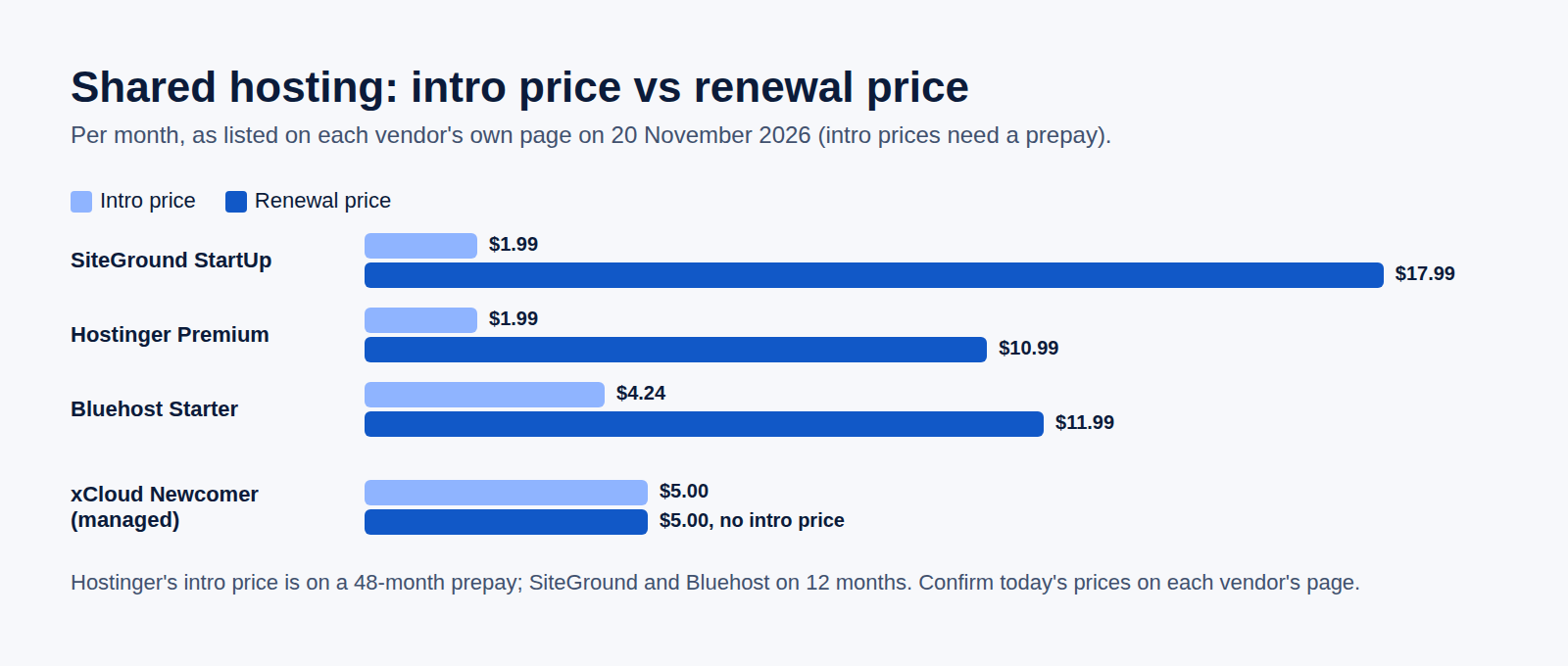
The catch most roundups skip: the low price you see on a host’s page is a first-term price. So this guide puts the intro price and the renewal price side by side, read from each vendor’s own page on 20 November 2026, and shows the three jobs to plan when you leave GoDaddy hosting.
Quick Summary / TL;DR
Short on time? Here is the whole guide in a few lines:
| If you want to… | Use this | Price checked 20 Nov 2026 | Best for |
|---|---|---|---|
| Give a WordPress site its own server, with one flat price and no renewal jump | xCloud | Managed from $5/month; panel free for 1 server you rent | Growing WordPress sites and agencies |
| Stay on shared hosting with daily backups and free email | SiteGround | From $1.99/month intro, renews at $17.99/month | Small business sites |
| Pay the least up front | Hostinger | From $1.99/month for 48 months, renews at $10.99/month | Budget sites and beginners |
| Pick your own cloud provider, billed by the hour | Cloudways | From $14/month (1 GB server) | Developers who want cloud servers |
| A premium managed WordPress host | Kinsta | From $35/month for 1 site | High-traffic WordPress sites |
| A familiar shared host with many sites per plan | Bluehost | Intro promo price, renews at $11.99/month | Beginners with several small sites |
- Best when you have outgrown shared hosting: xCloud, because a server of your own costs the same every month.
- Best like-for-like shared host: SiteGround, for daily backups and email on every plan.
- Cheapest to start: Hostinger, if you can prepay four years.
Leaving GoDaddy Hosting Does Not Mean Leaving GoDaddy
Here is the pattern our support team sees. 14 support tickets in the 90 days to 20 November 2026 mentioned GoDaddy, and most of the ones we reviewed were not about the move itself. They were about DNS that still pointed at GoDaddy after the move: an SSL certificate that would not issue, a new site that showed a GoDaddy page instead of WordPress, a Cloudflare connection that failed, and email landing in spam.
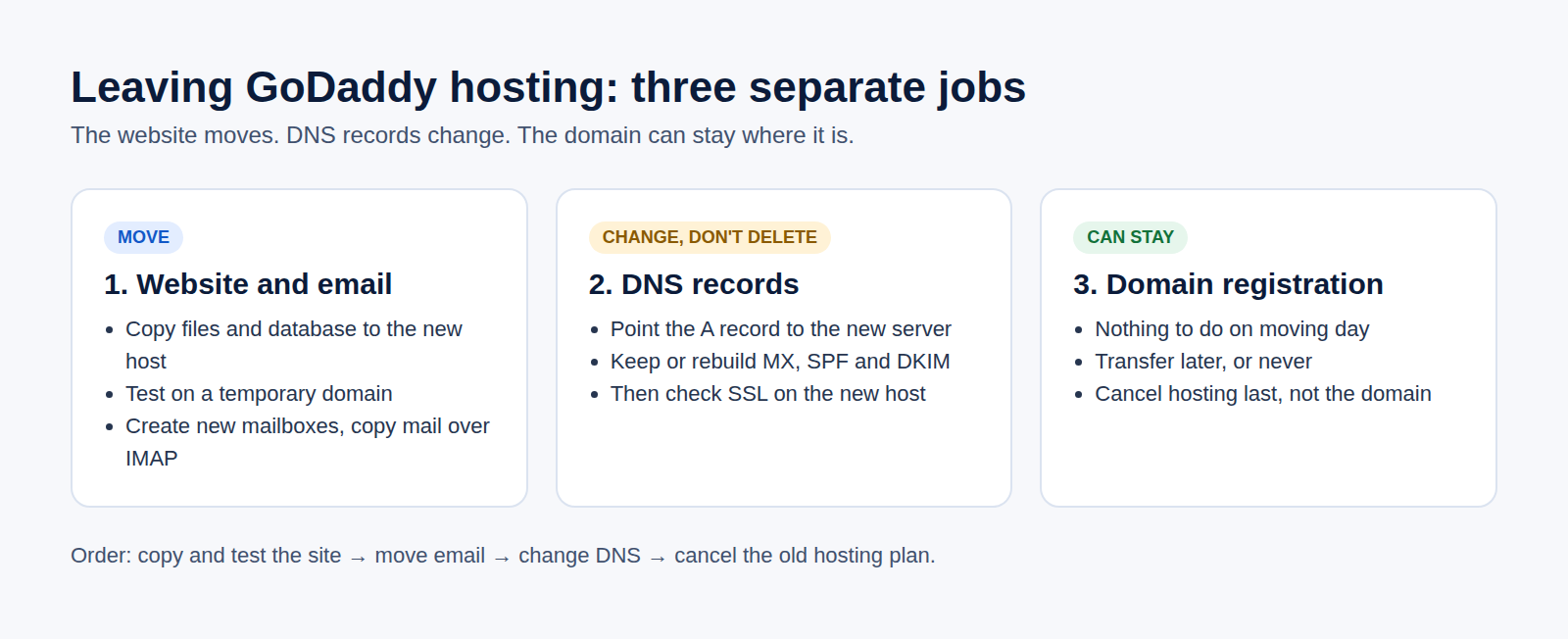
The reason is simple. When you leave GoDaddy hosting, your domain, your DNS records and often your email stay at GoDaddy unless you change them. Your new host can copy every file and database perfectly, and visitors will still reach the old server until the records change.
So split the move into three separate jobs:
| What | Where it lives at GoDaddy | What to do | Move it? |
|---|---|---|---|
| Website (files and database) | Your hosting plan | Copy it to the new host and test it on a test domain | Yes |
| DNS and email records (A, CNAME, MX, TXT) | GoDaddy’s DNS, unless you changed nameservers | Point the A record to the new server. If your email is on the GoDaddy plan, create new mailboxes and copy your old emails into them with MailBox’s email import before you switch the MX records | Change, don’t delete; email before you cancel |
| Domain registration | GoDaddy as registrar | Nothing; it can stay where it is | Optional, later |
👉 Pointing a domain at a new server: How to set up DNS records for an xCloud site.
Why People Look for GoDaddy Alternatives
Three reasons come up again and again in the top-ranking guides and in our own tickets.
Renewal prices. Shared hosting is sold on a first-term price. Every shared host in this list renews higher, so the real comparison is the renewal line, not the banner.
Add-ons. Backups, email, security and SSL are separate line items on many entry plans. Check what is included before you compare two prices.
Growth. Shared hosting puts many sites on one machine. When a WooCommerce store or a busy blog outgrows it, a server of your own is the next step, and our guide to shared hosting, VPS or cloud hosting explains the difference.
How We Ranked These GoDaddy Alternatives
We weighed each host on six things, in this order:
- Renewal price, not only the intro price, read from the vendor’s own page on 20 November 2026.
- What is included: backups, email, SSL and staging.
- The move off GoDaddy: cPanel import, migration plugin or a free migration team.
- Room to grow from one site to a store or an agency portfolio.
- Domains and email, since most GoDaddy customers have both.
- Honest limits: what each host does not do.
We did not run speed tests for this guide, so there are no benchmark scores. Many hosts were running Black Friday prices on 20 November 2026; treat every intro price as a promotion and confirm it on the vendor’s page. GoDaddy’s own pricing pages could not be read for this guide, so GoDaddy prices are left out on purpose.
Master Comparison Between the Best GoDaddy Alternatives
| Rank | Host | Type | Entry price (20 Nov 2026) | Renews at | Free domain | Best for |
|---|---|---|---|---|---|---|
| 🥇 | xCloud | Managed servers + control panel | $5/month (1 GB RAM, 25 GB SSD) | Same $5/month | No (keep yours) | Growing WordPress sites |
| 🥈 | SiteGround | Shared WordPress hosting | $1.99/month, 12-month prepay | $17.99/month | Yes, limited-time offer | Small business sites |
| 🥉 | Hostinger | Shared hosting | $1.99/month, 48-month prepay | $10.99/month | Yes, 1st year | Lowest upfront cost |
| 4 | Cloudways | Managed cloud servers | $14/month (1 GB server) | Same, billed hourly | Not listed | Developers on cloud |
| 5 | Kinsta | Managed WordPress | $35/month, 1 site | Same list price | Not listed | High-traffic WordPress |
| 6 | Bluehost | Shared hosting | Promo price, 12-month term | $11.99/month | Yes, 1st year | Beginners with several sites |
🥇 1. xCloud: Best GoDaddy Alternative When You Outgrow Shared Hosting
xCloud gives each customer a server of their own instead of a slot on a shared machine. With xCloud Managed hosting, the team sets up, patches and watches the server, and the entry plan is $5 a month for 1 vCPU, 1 GB RAM, 25 GB SSD and 1 TB bandwidth.
There is no intro price, so there is no renewal jump. If you already rent a server from a provider such as Vultr, DigitalOcean or Hetzner, the free plan manages one server and up to 10 sites for $0; more servers cost $5, $4 or $3 per server a month.
Key Features
- cPanel import: copy WordPress sites from a cPanel account with an API token or a full backup file.
- Test before you switch: you can test the copied site on a test domain before you change DNS, then go live when it works.
- WordPress tools: one-click staging, plugin, theme and core updates, and a vulnerability checker.
- Business email: on xCloud Managed you can claim one free 100 MB mailbox per domain, and bigger mailboxes on the MailBox addon start at $1 a month. The free 100 MB mailbox is only for xCloud Managed servers; paid mailboxes are also available on self-managed servers.
- Beyond WordPress: Laravel, Node.js and Docker apps on the same server.
- Free migration help: the team can move eligible WordPress sites for you.
How to Move From GoDaddy to xCloud
- Create an xCloud account and a server (managed, or one you rent).
- If your GoDaddy plan has cPanel, create an API token there and follow the cPanel migration guide. If not, use the WordPress migration plugin.
- Test the copied site on a test domain before you change DNS. When it works, go live from the test domain.
- Set up mailboxes and copy your old emails into your new mailbox with MailBox’s email import.
- At GoDaddy, change the A record to the new server’s IP and update the MX records. Leave the domain registered where it is.
- Cancel the GoDaddy hosting plan only after the site and email work.
👉 Prefer not to do it yourself? Open a Free Migration support ticket and the team checks whether your site qualifies, or read how the free website migration service works.
Pros and Cons
| Pros | Cons |
|---|---|
| ✅ A server of your own from $5/month, same price every month | ❌ No domain registration: your domain stays at GoDaddy or another registrar |
| ✅ cPanel import and a migration plugin, with a test domain for checking the site first | ❌ Bigger mailboxes are a paid addon: xCloud Managed includes one free 100 MB mailbox per domain, and paid mailboxes start at $1 a month |
| ✅ Free panel if you already rent a server | ❌ A card is required at sign-up, even on the free plan |
| ✅ WordPress updates, staging and vulnerability checks built in | ❌ The cPanel import copies your WordPress sites (files and databases); PHP settings and other server settings need setting up again |
| ✅ Runs Laravel, Node.js and Docker apps too | ❌ More choices to make than a one-page shared hosting signup |
Best for: WordPress site owners and agencies whose sites have outgrown shared hosting and who want one flat monthly price.
🥈 2. SiteGround: Best Like-for-Like Shared Host
SiteGround is the shared host people usually move to when they want the GoDaddy experience with more included. Every WordPress plan on its page lists free email, free SSL, free CDN, daily backups and free site migrations.
As of 20 November 2026, StartUp is $1.99 a month for one site (renews at $17.99), GrowBig is $3.99 (renews at $29.99) and GoGeek is $5.99 (renews at $44.99), each prepaid for 12 months. For a full head-to-head, read xCloud vs SiteGround.
Pros and Cons
| Pros | Cons |
|---|---|
| ✅ Daily backups, email and CDN on every plan | ❌ Renewal is about nine times the StartUp intro price |
| ✅ Free site migrations | ❌ Shared hosting: no root access and no choice of server provider |
| ✅ Unlimited traffic on every plan | ❌ StartUp hosts only one website |
Best for: small business sites that want shared hosting with backups and email included.
🥉 3. Hostinger: Best for the Lowest Upfront Cost
Hostinger has the lowest first bill in this list. As of 20 November 2026, Premium is $1.99 a month on a 48-month prepay ($95.52 up front) for 3 websites and 20 GB of storage, renewing at $10.99 a month. The page labels these intro prices a limited-time Black Friday offer.
Bigger plans step up from there (same date): Unlimited is $2.79 a month (renews at $16.99) and Cloud Startup $7.99 (renews at $25.99), both on 48 months. All three include a free domain for the first year, plus free mailboxes for the first year: 2 per website on Premium, unlimited on the bigger plans.
Pros and Cons
| Pros | Cons |
|---|---|
| ✅ Lowest first payment of any host here | ❌ The lowest price needs a 48-month prepay |
| ✅ Free domain and email for the first year | ❌ Premium has weekly backups, not daily |
| ✅ 30-day money-back guarantee | ❌ The free domain and email are for one year only |
Best for: budget sites and beginners who are happy to pay several years up front.
4. Cloudways: Best for Cloud Servers Billed by the Hour
Cloudways puts your sites on a cloud server from a provider you choose and manages it for you. As of 20 November 2026, its pricing page lists the smallest Flexible server at $14 a month for 1 vCPU, 1 GB RAM, 25 GB NVMe storage and 1 TB bandwidth, billed by the hour.
It is a real step up from shared hosting, and as of 20 November 2026 its Flexible plan has a 5-day free trial with no credit card. Our Cloudways alternatives guide compares it with other cloud panels.
Pros and Cons
| Pros | Cons |
|---|---|
| ✅ Choose your cloud provider | ❌ $14/month entry, nearly three times xCloud’s $5 plan for the same RAM |
| ✅ Hourly billing, no long prepay | ❌ No free domain listed on the pricing page |
| ✅ Free trial without a card | ❌ Prices for other providers sit in a separate calculator |
Best for: developers who want managed cloud servers and pay-as-you-go billing.
5. Kinsta: Best Premium Managed WordPress Host
Kinsta is the premium end of this list. As of 20 November 2026, its Single plan lists at $35 a month for one WordPress site, with a CDN and unlimited free migrations included; each additional site is a $30 a month add-on. A Black Friday discount on the first months ends on 1 December 2026.
You pay for a fully managed WordPress platform rather than a server.
Pros and Cons
| Pros | Cons |
|---|---|
| ✅ Fully managed WordPress platform | ❌ $35/month for one site |
| ✅ Unlimited free migrations | ❌ WordPress only |
| ✅ CDN included | ❌ Premium price for small sites |
Best for: busy WordPress sites with a budget for premium managed hosting.
6. Bluehost: Best Familiar Shared Host for Beginners
Bluehost is the closest match to GoDaddy’s own shared plans. As of 20 November 2026, its shared hosting page lists Starter for 10 websites and 10 GB NVMe storage at a limited-time intro price for the first 12-month term, renewing at $11.99 a month; Business, for 50 sites, renews at $15.99. Check the intro price on Bluehost’s page, as it changes with each promotion.
Plans include a free domain for the first year, free SSL and weekly backups. Pro Email is a one-month free trial, then $2.50 a month (as of 20 November 2026).
Pros and Cons
| Pros | Cons |
|---|---|
| ✅ 10 websites on the entry plan | ❌ Weekly backups, not daily |
| ✅ Free domain for the first year | ❌ Email is a trial, then paid |
| ✅ 30-day money-back guarantee on hosting |
Best for: beginners with several small sites who want a familiar shared host.
GoDaddy Competitors and Sites Like GoDaddy
People also search for GoDaddy competitors or sites like GoDaddy, and those usually mean two different things.
| You want… | Look at | Note |
|---|---|---|
| Hosting and a domain in one account, like GoDaddy | Hostinger, Bluehost | Both include a free domain for the first year |
| A faster home for a WordPress site | xCloud, Kinsta, Cloudways | Keep your domain at your registrar and point DNS |
| Only a cheaper domain registrar | A dedicated registrar | Outside the scope of this hosting guide |
If your site also uses cPanel tools you rely on, our list of cPanel alternatives explains what replaces each one.
Cost Breakdown: What You’ll Actually Pay
Prices below come from each vendor’s page on 20 November 2026. “Year two” is the renewal price times 12.
| Host and plan | First year | Year two (renewal) | What is easy to forget |
|---|---|---|---|
| xCloud Newcomer (managed, 1 GB) | $60 | $60 | One free 100 MB mailbox; bigger mailboxes from $1/month |
| SiteGround StartUp | $23.88 | $215.88 | One website only |
| Hostinger Premium | $23.88 (paid as $95.52 for 48 months) | None until month 49, then $10.99/month | The 48-month prepay covers years one to four |
| Cloudways 1 GB server | $168 | $168 | Price grows with server size |
| Kinsta Single | $420 at list | $420 | One site; extra sites $30/month |
| Bluehost Starter | Intro promo price | $143.88 | Email is a trial, then $2.50/month |
The line item people forget is your time. A cheap first year that ends in a second migration costs more than a host you keep for five years.
Honest Limits of Switching (and How to Undo It)
- No host here is “free”. Even the xCloud free plan needs a server you rent elsewhere.
- xCloud does not register domains. Keep your domain at GoDaddy or move it to another registrar; xCloud only needs DNS records.
- Migration copies websites, not every setting. The cPanel import copies your WordPress sites (files and databases). PHP settings and other server settings need setting up again.
- Undo is easy if you keep the old plan running. Until you cancel GoDaddy, switching the A record back sends traffic to the old site again.
Common Mistakes When Leaving GoDaddy
- Cancelling hosting before email is moved. Mail on the old plan goes with it.
- Deleting all DNS records. Change the A record; keep MX, SPF and DKIM records or rebuild them for your new email.
- Transferring the domain at the same time. A domain transfer and a hosting move at once doubles what can go wrong. Do the hosting first.
- Comparing intro prices only. Compare renewal prices, as in the table above.
- Skipping the test. Check the copied site on a test domain before you change DNS.
Who Should Pick What
| If you are… | Best choice | Why |
|---|---|---|
| A WordPress site or store that has outgrown shared hosting | xCloud | Own server from $5/month, same price every month |
| An agency with many client sites | xCloud | Many sites per server and per-server pricing |
| A small business that wants everything included | SiteGround | Daily backups, email and CDN on every plan |
| On a tight budget and fine with a long prepay | Hostinger | Lowest first payment |
| A developer who wants a cloud provider of your choice | Cloudways | Hourly billing on DigitalOcean and others |
| A busy site with a premium budget | Kinsta | Fully managed WordPress |
| A beginner with several small sites | Bluehost | 10 sites on the entry plan |
Frequently Asked Questions
What is the best GoDaddy alternative for hosting?
For a WordPress site that has outgrown shared hosting, xCloud: managed servers start at $5 a month with no promo price to renew out of, and it can copy sites from a cPanel account. SiteGround and Hostinger are the closest like-for-like shared hosts, and Kinsta suits people who want a premium managed WordPress host.
Do I have to move my domain away from GoDaddy?
No. You can keep the domain registered at GoDaddy and only change its DNS records so the A record points to your new host. Moving hosting and moving a domain are separate jobs, and you can do the second one later or never.
What are GoDaddy’s main competitors?
For shared hosting, GoDaddy’s closest competitors are Hostinger, Bluehost and SiteGround. For managed WordPress and cloud hosting, the usual competitors are Kinsta, Cloudways and xCloud. Sites like GoDaddy that bundle a first-year domain with hosting include Hostinger and Bluehost; xCloud does not register domains.
Will my email stop working when I leave GoDaddy hosting?
It can, if your email lives on the GoDaddy plan you cancel or if you delete its MX records while changing DNS. Set up the new mailboxes first, copy your old emails into them with MailBox’s email import, then update the MX records, and only then cancel the old plan.
Is there a free GoDaddy alternative?
Not for hosting a live site with nothing to pay. The xCloud free plan is a $0 control panel for one server and up to 10 sites, but you rent that server from a provider such as Vultr or DigitalOcean. Shared hosts like Hostinger and Bluehost are paid, with low first-term prices.
Can xCloud move my sites from a GoDaddy cPanel account?
If your GoDaddy plan gives you a cPanel login, yes: xCloud’s cPanel migration copies your WordPress sites with a cPanel API token or a full backup file. If your plan has no cPanel, use the site-by-site WordPress migration plugin, or ask the xCloud team for a free migration of eligible sites.
Conclusion: Pick Your Host, Then Move in Three Steps
Most people leaving GoDaddy are really leaving a renewal bill or a shared server that got too small. If price is the only issue, SiteGround, Hostinger and Bluehost are the like-for-like options; read their renewal line first. If the site has outgrown shared hosting, a server of your own on xCloud costs the same every month.
What to do this week: list where your domain, DNS and email live, copy the site to the new host and test it on a test domain, then change the A and MX records. Cancel GoDaddy hosting last, and keep the domain where it is until you have a reason to move it.
If you have found this blog helpful, feel free to subscribe to our blogs for valuable tutorials, guides, knowledge, and tips on web hosting and server management. You can also join our Facebook community to share insights and engage in discussions.