


xCloud 3.0 is live. Since last Black Friday we shipped 97 releases with more than 200 new features, and this release brings them together under the idea xCloud has always stood for: host anything, deploy anywhere.
Most site owners still choose between two options. Regular hosting is easy, but you live inside someone else’s box. A control panel on your own server is flexible and cheap, but you become the system administrator. xCloud has always been both in one: a managed hosting provider and a control panel, on your cloud or ours. If you are still weighing the classic options, our guide to the types of web hosting covers the basics.
This post explains, in plain words, what xCloud 3.0 adds, how it compares with regular hosting and with a basic control panel, and where each one still makes sense.
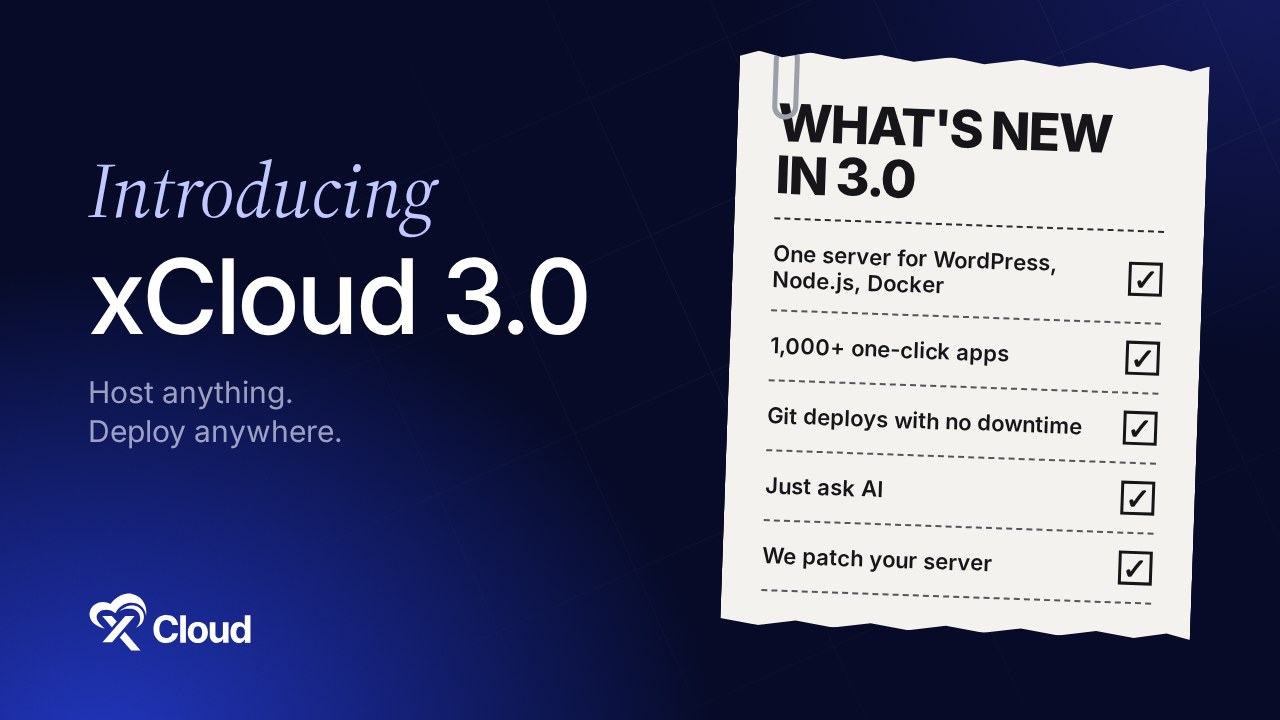
Key Takeaways
- One server for everything: WordPress, Node.js and Docker apps run side by side on the same server, including apps that ship as a Docker Compose file.
- 1,000+ apps in one click: open-source tools like n8n, Ghost and Nextcloud install on your own server with SSL and backups.
- Apps live from GitHub with no downtime: each update is checked before visitors see it, and you can undo it in one click.
- Just ask: tell AI what you want in plain words. It asks before it changes anything.
- We patch your server: when a dangerous security hole appears, closing it is our job, even on a server you rent yourself.
- One list of what needs you: problems from every server and site, each with a one-click fix.
- Your server or ours: use the panel on any provider, or let xCloud provide and look after the server.
xCloud 3.0 at a Glance
| Regular hosting | A basic control panel | xCloud 3.0 (both, in one panel) | |
|---|---|---|---|
| Who provides the server | The host | You, from any provider | You, or xCloud |
| What you can run | Mostly WordPress and PHP | Whatever the panel supports | WordPress, PHP, Node.js, Docker and 1,000+ one-click apps, on one server |
| Put apps online from Git | Rarely | Often, with setup | One click, with no downtime and one-click undo |
| New security holes on your server | The host handles it | Mostly your job | We close them for you on every connected server |
| Manage things by asking AI | Rarely | Rarely | AI Assistant in the dashboard, plus MCP for Claude, ChatGPT and others |
| See everything that needs you | Per site | Per server | One list across all servers and sites |
| Change what a server is for | Buy a new plan | Reinstall by hand | Rebuild the same server, same bill |
These are categories, not one product each. Some hosts and panels do more than the table shows, so treat it as a typical picture.
What xCloud 3.0 Adds
1. One Server for Everything, Docker Included
With regular hosting you usually get a WordPress or PHP box. With many panels, Docker apps want a server of their own. xCloud 3.0 runs WordPress, PHP and Laravel, Node.js, static sites and Docker apps on the same server.
Docker apps can come from a single image or a Docker Compose file, deployed from the file or straight from Git. Each gets a domain with free SSL and backups of its data. That means fewer servers to pay for and fewer places to look.
👉 Enable Docker on an NGINX server · Deploy a custom Docker app
2. 1,000+ Apps You Install in One Click
Want your own n8n, Ghost, Nextcloud or Uptime Kuma instead of paying for someone else’s cloud? More than 1,000 open-source apps install in one click on your server, with SSL and backups set up.
You can update an app, change its settings and give it several domains from the dashboard, without opening a terminal.
👉 Browse all one-click apps · Use one-click app templates
3. Apps Live from GitHub, with No Downtime
Paste a repository and xCloud works out what kind of app it is and writes the deploy steps. Every push after that goes live by itself.
Each new version is built next to the live one and checked before it switches in, so visitors never see a half-finished update. If something is wrong, roll back to the previous version in one click.
👉 Deploy Git projects in one click · Zero-downtime deploys
4. Just Ask: AI That Does the Work
Most hosting dashboards make you find the right page first. In xCloud 3.0 you can ask the AI Assistant (“why is this site slow?”, “update every plugin”) and it does the work after you click Confirm.
If you already live in Claude, ChatGPT or Cursor, connect xCloud MCP and manage your servers and sites from there. You can also run your own AI agents, such as OpenClaw or Hermes Agent, in one click.
👉 Use the AI Assistant · Connect xCloud MCP
5. We Patch Your Server for You
This is where xCloud differs most from a basic control panel. When a dangerous security hole appears, xCloud closes it on every connected server, including servers you rent from your own provider.
It matters because attackers move fast. Patchstack’s 2026 report found that heavily exploited WordPress flaws reach mass exploitation in a weighted median of 5 hours (source). Verizon’s 2026 breach report puts the median time to fully patch at 43 days (source).
That gap is where sites get hacked. This year xCloud closed it for customers more than once:
- PHP2Shell (October 2026): connected servers were protected hours before PHP’s own fix, then moved to the fixed PHP versions.
- Copy Fail and Dirty Frag (May 2026): two Linux kernel holes closed with no reboot and nothing for customers to do.
- Security Center: every known vulnerability and missing patch across your team on one page, with a fix button on each line.
👉 Find and fix security issues · Set up Site Security Pro
6. One List of Everything That Needs You
Instead of opening every server and site, the To-Do Center collects what needs attention: updates, expiring SSL, missing backups. It shows what each fix will change, then does it in one click. Fleet Monitoring puts the health of every server on one page, worst first.
7. Change Your Mind Without Buying a New Server
Finished with a project, or want to try something else? Rebuild the same server into WordPress, Node.js, Docker apps or an AI agent. You keep the same server, IP address and bill.
And Everything That Makes WordPress Easier
xCloud 3.0 also brings one-click rollback of plugins and themes, safer updates for premium plugins, database cleanup without a plugin, login protection, client reports and our own xSpeed Cache, now running on more than 10,000 WordPress sites. For the fastest pages, add Cloudflare Enterprise to any domain.
👉 See every change in the xCloud 3.0 changelog
The Honest Trade-Offs
| ✅ Where xCloud 3.0 shines | ❌ Where something else may fit better |
|---|---|
| ✅ You run more than one kind of site or app | ❌ You have one small blog and never touch settings: basic shared hosting is cheaper |
| ✅ You want your own server without being a sysadmin | ❌ You want to hand-tune every config file yourself: a bare server with no panel gives total control |
| ✅ You deploy from Git and want zero downtime | ❌ You only need a static site: a static host may be simpler |
| ✅ You want security holes closed for you | ❌ Your company requires its own security team to patch everything by hand |
Try xCloud 3.0
Getting started takes a few minutes:
- Create a free xCloud account.
- Connect a server you already rent, or let xCloud provide one.
- Add a WordPress site, deploy an app from Git, or install a one-click app.
- Open the To-Do Center and let xCloud tell you what needs attention.
Already an xCloud user? Everything in 3.0 is already in your dashboard.
Get More From Your Server This Week
Regular hosting keeps you safe but small. A basic control panel gives you freedom but hands you the risk. xCloud 3.0 gives you both: host anything, deploy anywhere, on your cloud or ours, with someone watching its back.
This week, pick one thing you do by hand today, such as checking updates, deploying from Git or patching PHP, and let xCloud do it. Then look at how many servers you could merge onto one.
If you have found this blog helpful, feel free to subscribe to our blogs for valuable tutorials, guides, knowledge, and tips on web hosting and server management. You can also join our Facebook community to share insights and engage in discussions.
Frequently Asked Questions
What is xCloud 3.0?
xCloud 3.0 is the release that brings together everything xCloud shipped since last Black Friday: 97 releases with more than 200 new features. It lets you run WordPress, Node.js and Docker apps on one server, put apps online from Git with no downtime, manage servers by asking AI, and have security holes closed on your server for you.
Is xCloud a hosting company or a control panel?
Both. You can use the xCloud panel on a server you already rent from any provider, or let xCloud provide the server too. Either way you get the same dashboard, and xCloud keeps watching and patching the server.
Can I run WordPress and Docker on the same server?
Yes. One xCloud server can run WordPress, PHP and Laravel, Node.js, static sites and Docker apps side by side. For busy WordPress stores we still suggest a separate server, because Docker apps share the server’s CPU and memory.
Do I have to update anything to get xCloud 3.0?
No. Everything in xCloud 3.0 is already in your dashboard. Your existing servers and sites keep working as they are.
Who patches my server when a new security hole appears?
xCloud does, on every connected server, including servers you rent from your own provider. During PHP2Shell in October 2026 we protected connected servers hours before PHP released its own fix.