


A Portainer alternative is any tool that lets you see and control your Docker containers without typing every command. The main options in 2026 are Dockge and Komodo for web dashboards, Lazydocker for the terminal, Dozzle for logs, and Coolify, Dokploy or xCloud if you would rather deploy apps than manage containers.
Most people start looking when Portainer feels like more than they need. It covers far more than compose stacks, and its Business Edition is a paid product. If all you run is a few Docker Compose stacks on one server, a smaller tool often fits better.
This guide compares eight options on what they actually manage (containers, stacks, servers or whole apps), how you use them, their licence and their cost. Every fact about another project comes from its own GitHub repository or site, checked on 3 November 2026. We read those pages; we did not install or run these tools. Plans change often, so check the linked pages before you buy. One disclosure: xCloud is our product. It is listed last, with its weak points, because it is not a container dashboard.
TL;DR: Which Portainer Alternative Fits You
Short on time? Here is the whole guide in one table:
| If you want to… | Use this | Best for |
|---|---|---|
| Manage compose stacks in a simple web UI | Dockge | Homelabs and single servers |
| Manage many servers, builds and stacks in one place | Komodo | Small teams with several hosts |
| Control Docker from your SSH session | Lazydocker | Developers who live in the terminal |
| Read live container logs in a browser | Dozzle | Pairing with any tool above |
| Deploy apps from Git with a self-hosted PaaS | Coolify or Dokploy | Developers replacing Heroku-style hosting |
| Run Docker apps without maintaining a dashboard | xCloud | Site owners and agencies who want a managed path |
| Try a template-based container UI | Yacht | Not recommended for new installs |
- Best close replacement: Dockge, if your setup is compose files.
- Best for many servers: Komodo, with no limit on connected servers.
- Best if you don’t want another app to babysit: xCloud, which deploys the stack for you and gives One Click Apps a one-click Update, but only shows the apps it deployed.
What People Leaving Portainer Actually Need
Seeing your containers is the easy part. The harder question comes later: “how do I get the new version of this app without losing my data?”
Here is how we answer it in xCloud. When you deploy a Docker Compose app from a Git repository, the deploy script xCloud fills in for you is three lines:
docker compose pull
docker compose down
docker compose up -d --build
pull fetches the newer images your compose file names, down removes the old containers and networks, and up -d --build starts fresh containers. down without -v leaves named volumes alone, so your data stays where it was. If you use a .env file, the last line also gets --env-file .env. You can edit the script before you deploy, and push-to-deploy is off until you tick it. Whichever tool you pick, check that its update step works the same way and never adds -v.
That matters when you pick a Portainer alternative. A tool that lists containers beautifully but leaves updates, volumes and backups to you solves the easy half of the job. So for each option below, look at three things first: does it update stacks, does it touch your data, and who fixes it when it breaks.
The Three Kinds of Portainer Alternative
Portainer is a container management UI. The tools people suggest in its place fall into three groups, and mixing them up is how you end up with the wrong one.
| Kind | What it manages | Examples | You still handle |
|---|---|---|---|
| Container and stack dashboards | Containers and compose stacks on hosts you run | Dockge, Komodo, Yacht | The server, plus any proxy, SSL and backups the tool does not list |
| Terminal and log tools | A view of what is already running | Lazydocker, Dozzle | Everything else |
| App platforms | Whole apps: build, domain, SSL, deploy | Coolify, Dokploy, xCloud | Less, but you work the platform’s way |
Rule of thumb: if you like your compose files and just want buttons for them, pick a dashboard. If you want “push code, get a URL”, pick a platform.
How We Compared These Tools
We did not install, run or benchmark these tools for this post, so you will not see speed or ease-of-use results. We read each project’s own pages and compared the tools on:
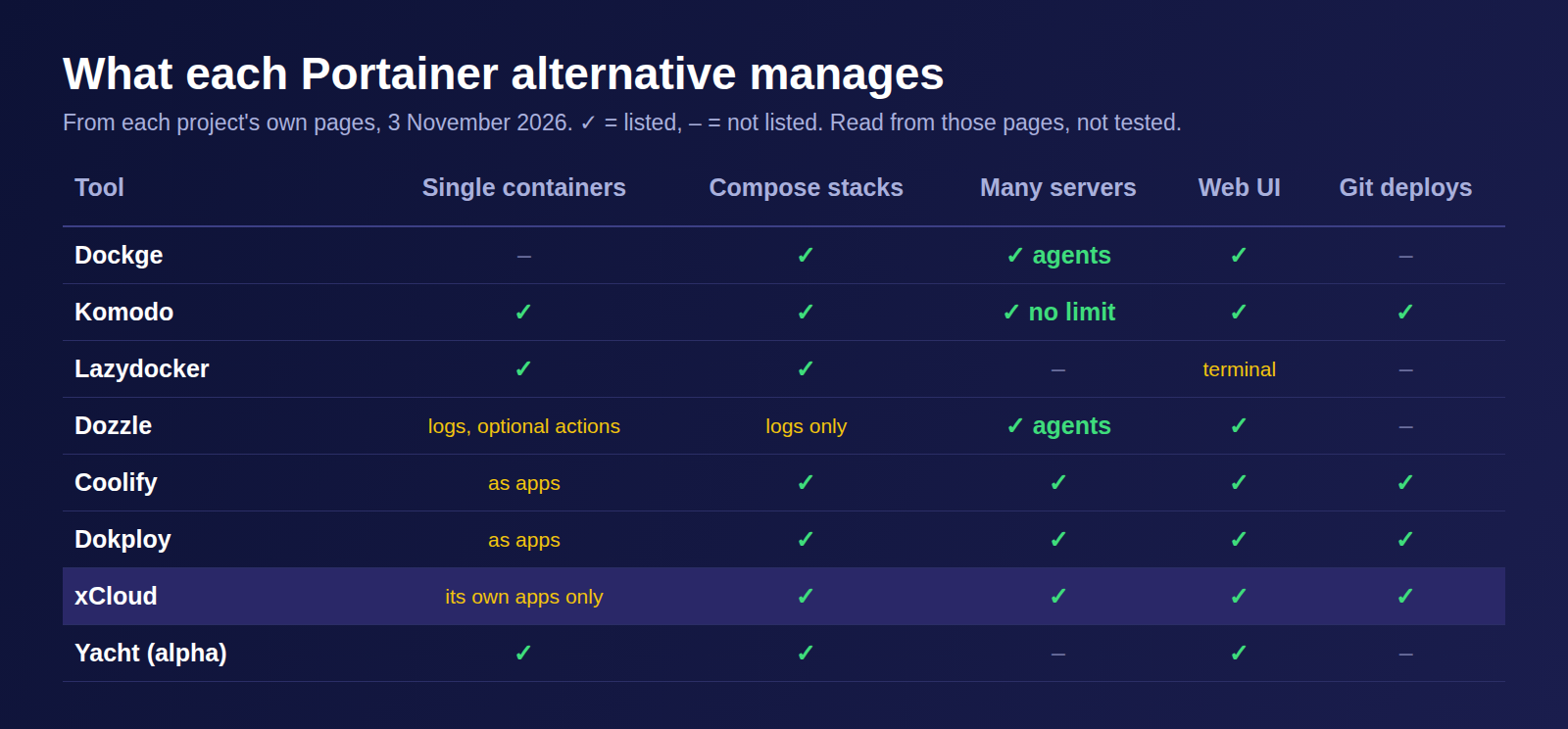
- Scope: single containers, compose stacks, many servers, or whole apps.
- Interface: web UI or terminal.
- Licence: open source, source-available parts, or proprietary.
- Cost: what the project’s own page says on 3 November 2026.
- Maintenance status: what the repository itself says.
Master Comparison Table
| # | Tool | Kind | Interface | Licence | Cost | Multi-server |
|---|---|---|---|---|---|---|
| 1 | Dockge | Stack dashboard | Web | MIT | Free | Yes, with agents |
| 2 | Komodo | Multi-server dashboard | Web | GPL-3.0 | Free | Yes, unlimited |
| 3 | Coolify | Self-hosted PaaS | Web | Apache-2.0 | Free self-hosted; hosted Cloud option (see its pricing page) | Yes |
| 4 | Dokploy | Self-hosted PaaS | Web | Apache-2.0, except a /proprietary folder |
Free self-hosted; hosted Cloud option (see its site) | Yes |
| 5 | Lazydocker | Terminal UI | Terminal | MIT | Free | Not stated |
| 6 | Dozzle | Log viewer | Web | MIT | Free | Yes, with agents |
| 7 | Yacht | Container dashboard | Web | MIT | Free | Not stated |
| 8 | xCloud | Managed app platform | Web dashboard | Proprietary | Free plan: 1 server, 10 sites; paid: $5 per server a month, down to $3 at 11+ servers (as of November 2026) | Yes |
Open-source licences are as shown on each project’s GitHub repository in November 2026.
For reference, Portainer itself: as of November 2026, Community Edition is free under the zlib licence and covers Docker, Swarm, Podman, Kubernetes and ACI (Portainer repository). Paid plans with Business Edition features are on the Portainer pricing page.
1. Dockge: Best Close Replacement for Compose Users
Dockge describes itself as a “stack-oriented manager” for compose.yaml files (Dockge README, accessed 3 November 2026). It is MIT-licensed.
Its best idea is that your files stay yours. Stacks live as normal folders on disk, so you can still run normal docker compose commands by hand. See the Dockge repository for the install command.
Key features:
- Compose editing: create, edit, start, stop, restart and delete stacks, and update their images.
- Web terminal: an interactive terminal in the browser.
- Converter: turns a
docker run …command into acompose.yaml(listed in the README, November 2026). - Multiple agents: manage stacks on several Docker hosts from one page (added in version 1.4.0, per the README).
- Plain files: your compose files stay on your drive as usual.
| Pros | Cons |
|---|---|
| ✅ One job: compose stacks | ❌ Compose stacks only; its FAQ points to Portainer or the Docker CLI for single containers |
| ✅ Your compose files stay on disk | ❌ May not fit if you manage Docker networks, per its FAQ |
| ✅ Free and MIT-licensed | ❌ Its README lists no proxy, SSL or backup features |
Best for: homelabs and single servers where everything is already a compose file.
2. Komodo: Best for Many Servers
Komodo calls itself “a tool to build and deploy software across many servers”. It is GPL-3.0, and its README says: “There is no limit to the number of servers you can connect, and there will never be.” (Komodo README, accessed 3 November 2026.)
Where Dockge is a stack editor, Komodo is closer to a small operations platform. It monitors CPU, memory and disk on connected servers, manages containers and compose files, builds images and runs multi-step workflows (Komodo docs, accessed 3 November 2026).
Key features:
- Servers: connect any number and watch CPU, memory and disk.
- Stacks and containers: create, start, stop and redeploy containers, and define compose files in the UI, on the host or in a Git repo.
- Docker Swarm: manage Swarm clusters through a Swarm resource (Komodo Swarm docs, accessed 3 November 2026).
- Builds: build images from your code.
- Procedures and actions: automate repeated steps.
- No paid tier listed: its site has a Donate link instead.
| Pros | Cons |
|---|---|
| ✅ Built for many servers | ❌ More concepts to learn than Dockge |
| ✅ Builds, deploys and automation in one tool | ❌ You host, update and back up Komodo yourself |
| ✅ Free, with no server limit | ❌ GPL-3.0 may matter if you plan to modify and ship it |
Best for: small teams running several Docker hosts who want one place for builds and deploys.
3. Coolify: Best Open-Source PaaS
Coolify is an Apache-2.0 self-hosted platform for deploying apps, databases and services on your own servers. As of November 2026, its README lists “more than 360 one-click services” and calls the project “Open source & free forever” (Coolify README, accessed 3 November 2026).
There is also a hosted Coolify Cloud option; see the Coolify pricing page for current plans.
| Pros | Cons |
|---|---|
| ✅ Large catalog of one-click services | ❌ You run and update Coolify itself when self-hosted |
| ✅ Git deploys, databases and Compose in one tool | ❌ Heavier than a dashboard if you only want stack buttons |
| ✅ Free self-hosted, with a hosted Cloud option | ❌ You still rent the servers your apps run on |
Best for: developers who want Heroku-style deploys on their own servers. We compare it in more depth in xCloud vs Coolify.
4. Dokploy: PaaS With Swarm Support
Dokploy is a self-hostable PaaS. It deploys apps with Nixpacks, Heroku Buildpacks or a Dockerfile, has native Docker Compose support, runs MySQL, PostgreSQL, MongoDB, MariaDB, libsql and Redis, can scale to several nodes with Docker Swarm, and can redeploy when you push to Git (Dokploy site, README and auto-deploy docs, accessed 3 November 2026).
Check the licence before you build on it. As of November 2026, its LICENSE.MD says code outside any /proprietary folder is Apache-2.0, while code inside that folder uses a separate licence (LICENSE_PROPRIETARY). Read both before production use. Dokploy also offers a hosted Cloud option; see the Dokploy site for current plans.
| Pros | Cons |
|---|---|
| ✅ Swarm clusters built in | ❌ Mixed licence needs reading |
| ✅ Databases and Compose in one place | ❌ You maintain it when self-hosted |
| ✅ Hosted Cloud option if you don’t want to host it | ❌ More platform than a Portainer user may want |
Best for: developers who want a PaaS and plan to grow into Swarm. See xCloud vs Dokploy for the managed comparison.
5. Lazydocker: Best Terminal Alternative
Lazydocker is “a simple terminal UI for both docker and docker-compose” (Lazydocker README, accessed 3 November 2026), MIT-licensed. It runs in your SSH session, so nothing new listens on the network.
It shows your containers, logs and graphs of their metrics, attaches to containers, and can restart, remove or rebuild them and prune what takes up disk space.
| Pros | Cons |
|---|---|
| ✅ No web service to secure | ❌ Terminal only |
| ✅ Logs, metrics and restarts in one tool | ❌ Nothing to share with non-technical teammates |
| ✅ Free and MIT-licensed | ❌ Its README lists no compose file editing |
Best for: developers who already work over SSH and want Portainer’s “what is running?” view without a browser.
6. Dozzle: Best for Live Logs
Dozzle is an MIT-licensed live log viewer for Docker containers, with Swarm mode support. It streams logs with search, split-screen views and live CPU and memory stats (Dozzle README, accessed 3 November 2026).
It is not a full Portainer replacement. Container actions (start, stop, restart, remove and update) exist but are off by default; you turn them on with the DOZZLE_ENABLE_ACTIONS setting (Dozzle actions guide, accessed 3 November 2026). Its README lists no compose editing. It pairs well with Dockge or Lazydocker if reading logs is what you used Portainer for most. Agent mode lets one Dozzle watch several hosts.
| Pros | Cons |
|---|---|
| ✅ Lightweight, per its README | ❌ Container actions are off by default |
| ✅ Multi-host with agents | ❌ No offline log search, per its README |
| ✅ Free and MIT-licensed | ❌ Needs a second tool for management |
Best for: anyone who mainly opened Portainer to read logs.
7. Yacht: Not Recommended for New Installs
Yacht is a container dashboard that can use Portainer templates. As of 3 November 2026, its README says “this is an alpha so the risk of data loss is real”, that the app “has not been updated in a while”, and that the backend is being rewritten in TypeScript.
With those warnings in its own README, Dockge or Komodo is the safer pick today.
Best for: following the rewrite, not production.
8. xCloud: Best If You Don’t Want to Run a Dashboard
xCloud is our product, so read this entry with that in mind. It is not a container UI like Portainer. It is a server control panel that deploys and runs Docker apps for you, next to WordPress, PHP, Laravel and Node.js sites on the same server.
You connect your own server (or use an xCloud managed one), pick NGINX as the web server, and xCloud installs Docker the first time an app needs it. From there you add an app three ways: paste or link a docker-compose.yml, deploy from a Git repository (connecting a Git provider such as GitHub is a PRO feature), or install from the One Click Apps catalog.
Key features:
- Docker Compose sites: paste the file or give its public URL in New Site → Custom Docker → Docker Compose. 👉 Deploy a custom Docker app
- Domains and free SSL: each app gets a domain, or a free demo domain while you test.
- App Actions (One Click Apps): Start, Stop, Restart and Update, which pulls the latest images and keeps your data volumes. 👉 Update a One Click App
- Compose editor (One Click Apps): edit the app’s
docker-compose.ymlin the dashboard and click Save & Redeploy. - Backups (paid plans): scheduled snapshots of volumes, the compose file and
.env, with up to two remote destinations. 👉 Back up and restore Docker apps - Logs: Docker Compose and container logs in the site’s log viewer. 👉 View logs and events
What it does not do. xCloud only shows the apps it deployed: containers you started by hand over SSH do not appear. There is no per-container dashboard, no Swarm or Kubernetes, and OpenLiteSpeed servers cannot run Docker. Deploying a single Docker image (without a compose file) is listed as Coming Soon on our Free vs PRO page. The compose editor has no undo, so keep a copy before you edit.
| Pros | Cons |
|---|---|
| ✅ Domain and SSL handled for you; One Click Apps get Update, paid plans add backups | ❌ Not a general container browser like Portainer |
| ✅ Docker apps and WordPress or PHP sites on one server | ❌ No Swarm or Kubernetes; single-image deploys are Coming Soon |
| ✅ Free plan covers 1 server and 10 sites, Docker included | ❌ Proprietary, and you work the platform’s way |
Best for: site owners and agencies who want Docker apps running with SSL (and backups on paid plans), and no dashboard of their own to patch. See Docker hosting on xCloud for plans.
What You Will Actually Pay
The software is often free. The real cost has three parts: the server, the tool’s price, and your time keeping the tool, proxy, SSL and backups working. The third is the line item people forget.
| Option | Software cost | Who maintains the dashboard | Who handles SSL and backups |
|---|---|---|---|
| Portainer CE | Free | You | You, unless the tool’s own docs say otherwise |
| Dockge, Komodo, Lazydocker, Dozzle | Free | You | You, unless the tool’s own docs say otherwise |
| Coolify or Dokploy, self-hosted | Free | You | The platform helps, you run it |
| Coolify Cloud or Dokploy Cloud | See each vendor’s pricing page | The vendor | The platform helps |
| xCloud | Free plan for 1 server; paid: $5 per server a month, down to $3 at 11+ servers (as of November 2026) | xCloud | xCloud handles SSL; backups on paid plans |
Server prices are separate in every row, because each option runs on a server you rent. See xCloud pricing for current plans.
Common Mistakes When Replacing Portainer
- Removing a volume in a compose edit. A renamed or removed volume can mean lost data on the next redeploy. Copy the file before you change it.
- Exposing the dashboard to the internet. A container UI controls your whole Docker host. Put it behind a login, a VPN or your domain with SSL.
- Picking a platform when you wanted buttons. Coolify and Dokploy change how you deploy. If you like your compose files, Dockge is less disruptive.
- Forgetting backups. Do not assume a free dashboard backs up your volumes. Check its docs and plan backups before you migrate.
- Updating without pinning versions. “Update” pulls whatever tag your compose file names. Pin versions for apps that hold data.
Who Should Pick What
| If you are… | Best choice | Why |
|---|---|---|
| A homelab user with a few stacks | Dockge | Simple, free, keeps your files |
| A team with five or more Docker hosts | Komodo | Unlimited servers, builds and automation |
| A developer who works over SSH | Lazydocker | No extra service to run |
| Someone who mostly read logs in Portainer | Dozzle | Live logs in a browser |
| A developer replacing Heroku-style hosting | Coolify or Dokploy | Git deploys and databases |
| A site owner or agency running apps and WordPress | xCloud | Domains and SSL handled; Update for One Click Apps; backups on paid plans |
Run Docker Apps Without Maintaining a Dashboard
If the reason you are leaving Portainer is that you are tired of looking after the tool that looks after your containers, there is a managed path. On xCloud, the steps are:
- Connect your server or create a managed one, with NGINX as the web server. 👉 Enable Docker on an NGINX server
- Go to New Site → Custom Docker → Docker Compose and paste your file, or deploy it from a Git repository (connecting a Git provider such as GitHub needs a PRO plan; see Free vs PRO). 👉 Deploy a Docker app from a Git repository
- Pick a demo domain to test, then go live with free SSL.
- On a paid plan, turn on scheduled backups before you rely on the app.
It is not a Portainer clone, and it will not show containers you start by hand. One Click Apps get a one-click Update; for your own Compose apps you edit the file and redeploy. Either way, there is no dashboard of your own to keep running. Create a free account and move one stack over first.
Frequently Asked Questions
What is the best Portainer alternative?
For most people who run Docker Compose stacks on one or a few servers, Dockge is the closest replacement. It is free, MIT-licensed and edits your compose files in place. If you need many servers, builds and automation, look at Komodo instead.
Is Portainer still free?
Yes. As of November 2026, Portainer Community Edition is free under the zlib licence, according to its GitHub repository. Portainer also sells paid plans with Business Edition features; check its pricing page for current plans.
Is Dockge better than Portainer?
For compose stacks, it is the simpler fit, because that is all it manages. It is not a full replacement: as of November 2026, its own FAQ suggests Portainer or the Docker CLI for single containers, and Portainer also covers Swarm and Kubernetes.
Is there a terminal alternative to Portainer?
Yes. Lazydocker is a free terminal UI for Docker and Docker Compose. It shows logs and metric graphs and can restart, remove or rebuild containers, but it runs in your SSH session, so there is no web page to share with a team.
Is Yacht still maintained?
Its own README advises caution. As of November 2026, it calls the project an alpha, warns that data loss is possible and says the app has not been updated in a while. Pick Dockge or Komodo for a new install.
Can xCloud replace Portainer?
Partly. xCloud deploys and runs Docker Compose apps and One Click Apps on your server, with domains, free SSL and logs from the dashboard, plus backups on paid plans. One Click Apps also get Update and a compose editor with Save & Redeploy. It does not show or control containers it did not deploy, and it does not manage Swarm or Kubernetes.
Pick Your Portainer Alternative This Week
There is no single best Portainer alternative, because the tools solve different jobs. Dockge and Komodo replace the dashboard, Lazydocker and Dozzle replace the parts you used daily, and Coolify, Dokploy and xCloud replace the work around the containers.
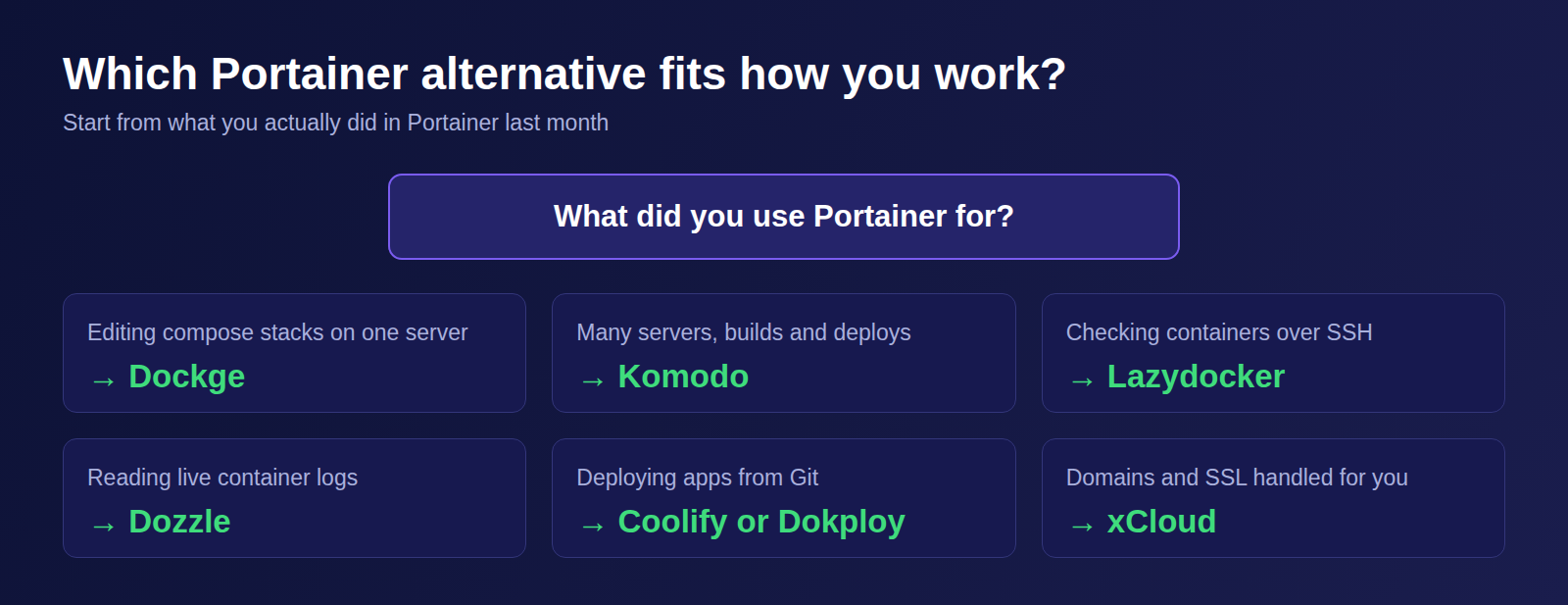
What to do this week: write down the three things you actually did in Portainer last month. If it was editing stacks, try Dockge. If it was many servers, try Komodo. If it was updates, SSL and backups, try a platform, and move one non-critical stack first. For more on hosting choices, read our guide to the best Docker hosting providers and self-managed vs managed hosting.
If you have found this blog helpful, feel free to subscribe to our blogs for valuable tutorials, guides, knowledge, and tips on web hosting and server management. You can also join our Facebook community to share insights and engage in discussions.
Last updated November 3, 2026
← All articles