


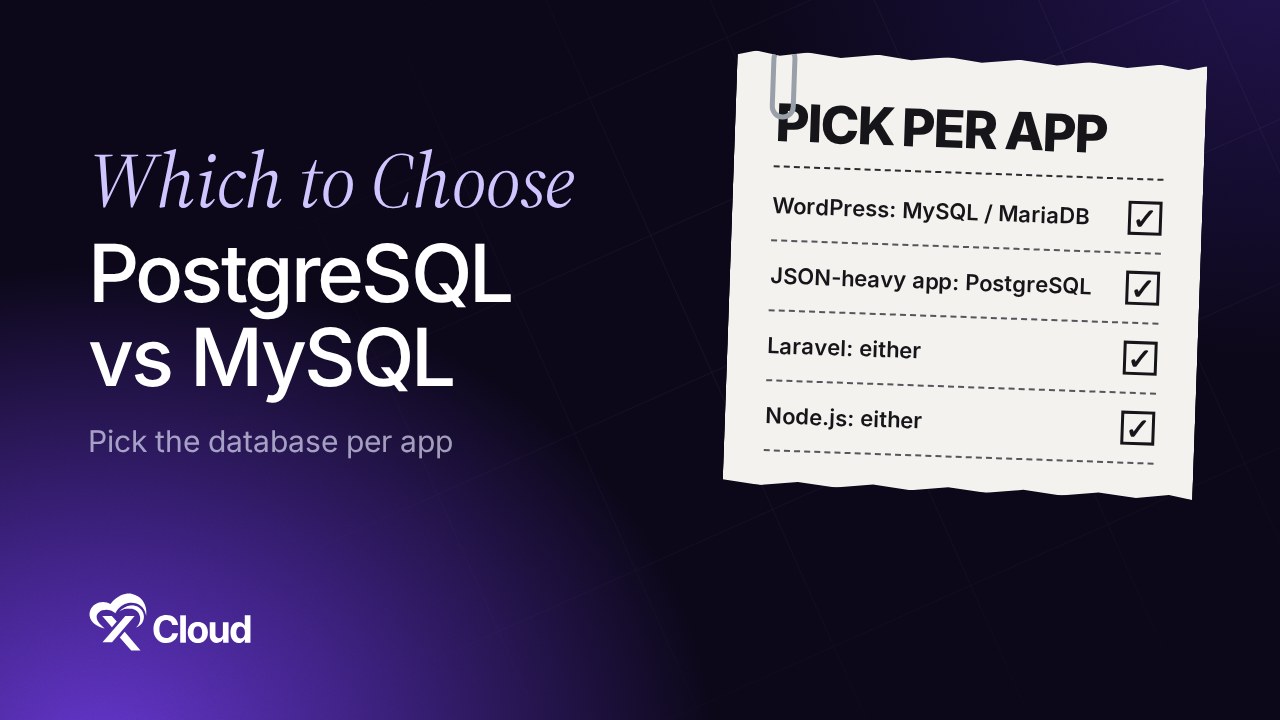
PostgreSQL vs MySQL comes down to your app, not to which database is “better”. Pick PostgreSQL when you need rich data types, JSON queries, extensions or strict SQL. Pick MySQL (or MariaDB) when you run WordPress, need the widest hosting support, or your team already knows it. Both are free, mature and fast.
You are starting a new app and the framework asks one question before anything else: which database? Every forum thread turns into a benchmark war. If you have read our Node.js vs Laravel comparison, you already know the frameworks treat both as first-class choices.
The truth is less dramatic. Most apps run fine on either, and the real cost of a wrong pick is a migration later, not a slow site today. This guide covers the differences that matter, what each framework expects, and how to run either one on your own server.
TL;DR
Short on time? Here is the whole guide in a few lines:
- PostgreSQL optimizes for features and correctness; MySQL optimizes for simplicity and reach. Both are open source and production-proven.
- WordPress needs MySQL or MariaDB. PostgreSQL is not on its requirements list, so the WordPress decision is already made.
- Laravel and Django support both first-party. Pick by your data model and your team, not by the framework.
- JSON-heavy apps lean PostgreSQL. Its
jsonbtype can be indexed directly with GIN indexes; MySQL indexes JSON through generated columns. - It’s a tie on cost and concurrency. Both are free to run, and both use multi-version concurrency so readers and writers rarely block each other.
- On xCloud the choice is per site, not per server. A Git site (PHP App, Laravel or Node.js) picks MySQL or PostgreSQL when you create it.
What Most Comparisons Miss: You Don’t Have to Pick One Per Server
Most PostgreSQL vs MySQL posts assume one database per project or per server. In practice, you can run an app that needs PostgreSQL next to WordPress sites that use MySQL.
You may wonder whether you have to remove MySQL to use PostgreSQL. You don’t: PostgreSQL runs next to MySQL on the same server.
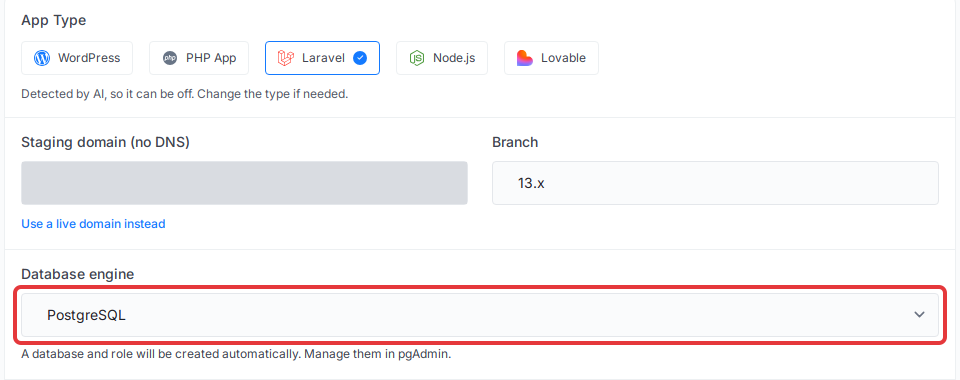
That is how xCloud works since v2.9.7. An Nginx server keeps any MySQL or MariaDB it runs for its existing sites, and can add one managed PostgreSQL service that new Git sites share. The engine is a choice on each site’s creation form.
If you only remember one line: choose the database per app, and keep your server flexible enough to run both.
PostgreSQL vs MySQL at a Glance
| Factor | PostgreSQL | MySQL |
|---|---|---|
| Type | Object-relational database | Relational database |
| License | PostgreSQL License (BSD/MIT-style) | GPLv2, with a commercial license from Oracle |
| JSON | json and jsonb; jsonb indexable with GIN |
JSON type in a binary format; index via generated columns or multi-valued indexes |
| Concurrency | MVCC: reading never blocks writing | InnoDB MVCC: keeps old row versions for reads and rollback |
| Extensions | Large extension system (CREATE EXTENSION) |
Plugins and storage engines, smaller extension culture |
| Replication | Physical (streaming) and logical replication built in | Binary-log replication, async by default, semi-sync option |
| SQL strictness | Strict by default | More forgiving, depends on SQL mode |
| WordPress | Not supported | Recommended (MySQL 8.0+ or MariaDB 10.11+) |
| Laravel / Django | Supported first-party | Supported first-party |
| Close relative | — | MariaDB, a community fork that WordPress also recommends |
| Best for | JSON-heavy apps, analytics, GIS, complex queries | WordPress, PHP apps, read-heavy sites, broad hosting |
What Is PostgreSQL?
PostgreSQL is an open-source object-relational database with a long track record in production. It is known for following the SQL standard closely, for its data types (arrays, ranges, jsonb, UUID) and for extensions such as PostGIS that add whole new capabilities.
The common misconception is that PostgreSQL is “only for big data”. It runs small apps just as well. What it asks in return is a little more care: tuning, vacuuming and backups work differently from MySQL, and fewer shared hosts offer it.
PostgreSQL ships a new major version every year. PostgreSQL 17, the version xCloud’s managed service installs, is supported until November 8, 2029, according to the PostgreSQL versioning policy.
What Is MySQL?
MySQL is the open-source relational database behind a large share of the web, owned by Oracle. It powers WordPress, most PHP apps and countless shared hosting plans, which is why nearly every tool, tutorial and backup plugin supports it.
MySQL now ships LTS releases. MySQL 8.4 is the current LTS branch, and MySQL 8.0 reached its end of life in April 2026. If you are setting up a new server, start on 8.4.
MariaDB is a community fork of MySQL that works as a drop-in replacement for most apps. Our MariaDB setup guide covers it in detail; everything below about MySQL mostly applies to MariaDB too.
PostgreSQL vs MySQL: The 6 Differences That Actually Matter
1. JSON and Data Types
This is the sharpest dividing line. PostgreSQL has two JSON types: json keeps the exact text, while jsonb stores a decomposed binary format that is faster to query and can be indexed directly. The PostgreSQL JSON docs say most apps should prefer jsonb.
MySQL also stores JSON in a binary format for quick reads. JSON columns are not indexed directly, though: you index a generated column that pulls out one value, or use a multi-valued index on a JSON array.
Rule of thumb: if you plan to query inside JSON documents often, PostgreSQL makes it easier. If JSON is just a blob you read and write whole, either works.
2. Concurrency (MVCC)
Effectively a tie. Both use multi-version concurrency control. PostgreSQL’s docs put it plainly: reading never blocks writing, and writing never blocks reading. MySQL’s InnoDB engine keeps old row versions for the same reason.
The difference is in the upkeep. PostgreSQL leaves old row versions in the table until VACUUM cleans them up (autovacuum does this for you). InnoDB keeps them in a separate undo log. Neither is better; just know which chore your database has.
3. Extensions
Here the two diverge. PostgreSQL treats extensions as a core feature: PostGIS for maps and geography, pgvector for AI embeddings, full-text search improvements and many more, added with one CREATE EXTENSION command.
MySQL has plugins and storage engines, but the culture of “add a new data type to your database” is much smaller. If your roadmap includes location search or vector search inside the database, that tips the scale to PostgreSQL.
4. Replication and Scaling
Both replicate well. PostgreSQL has physical (streaming) replication for exact copies and logical replication for copying chosen tables. MySQL uses binary-log replication, asynchronous by default, with a semi-synchronous mode that waits for a replica to confirm.
For most apps on one server, replication is a later problem. Pick the database you can operate, then scale it when you need to.
5. SQL Strictness
PostgreSQL rejects bad data loudly: insert a string into a number column and you get an error. MySQL used to quietly convert or cut values, and its strict mode (on by default in modern versions) depends on server settings.
This matters most when moving between them. Queries written for MySQL’s forgiving style can fail on PostgreSQL, which is why a switch later is a real migration.
6. Licensing
PostgreSQL uses the PostgreSQL License, a liberal license similar to BSD or MIT. MySQL Community Server is GPLv2, and Oracle sells a commercial license for software that embeds or bundles MySQL.
For a web app you host yourself, neither license costs you anything. It only matters if you ship the database inside a product you sell.
Which Database Your Framework Expects
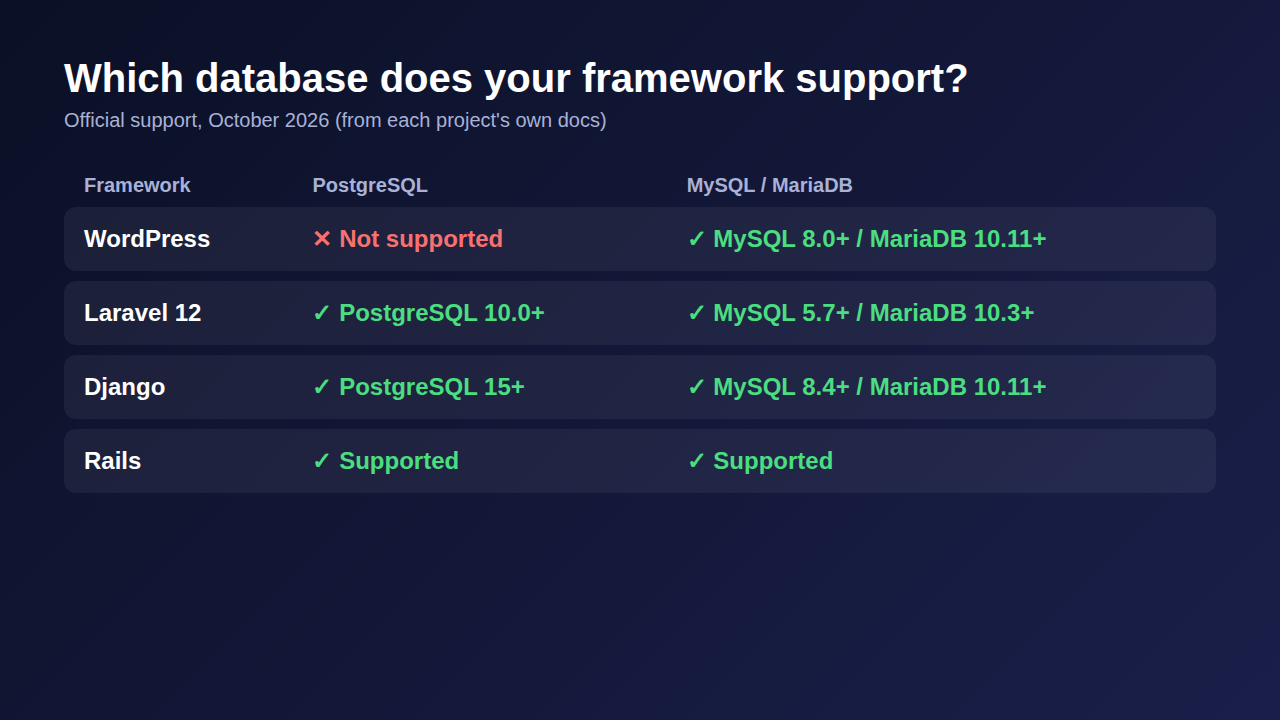
The framework often makes the decision for you. Here is what each one officially supports today:
| Framework | PostgreSQL | MySQL / MariaDB | Notes |
|---|---|---|---|
| WordPress | ❌ Not supported | ✅ Recommended | MySQL 8.0+ or MariaDB 10.11+ (WordPress requirements) |
| Laravel 13 | ✅ PostgreSQL 10.0+ | ✅ MySQL 5.7+, MariaDB 10.3+ | Also SQLite and SQL Server |
| Django 6.1 | ✅ PostgreSQL 15+ | ✅ MySQL 8.4+, MariaDB 10.11+ | Also Oracle and SQLite |
| Rails | ✅ Supported | ✅ Supported | Also SQLite |
| Node.js ORMs (Prisma, Sequelize, Knex) | ✅ Supported | ✅ Supported | Choose by your data model |
For WordPress, the answer is fixed: MySQL or MariaDB. For Laravel, Django and Node.js, both are fine, and our Django vs Node.js guide and best Laravel hosting guide cover the hosting side of those stacks.
Which One Should You Choose?
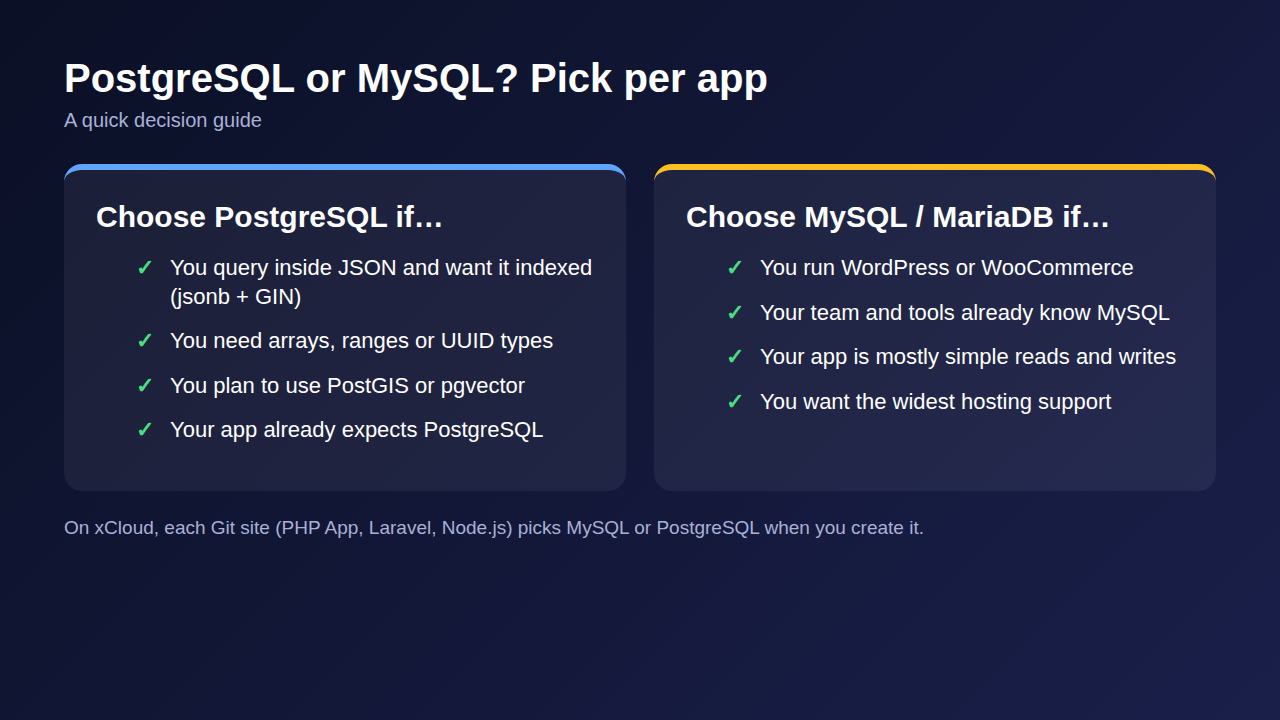
Choose PostgreSQL if…
- ✅ You query inside JSON documents and want those queries indexed.
- ✅ You need arrays, ranges, UUIDs or other rich types.
- ✅ Your roadmap includes PostGIS, pgvector or other extensions.
- ✅ You want the database to reject bad data rather than fix it quietly.
- ✅ The app you want to run (Umami, for example) already expects PostgreSQL.
PostgreSQL is the pick when your data model is the hard part of the app.
Choose MySQL or MariaDB if…
- ✅ You run WordPress, WooCommerce or another PHP app built for MySQL.
- ✅ Your team, backup tools and hosting already know MySQL.
- ✅ Your app is mostly simple reads and writes.
- ✅ You want the widest support from plugins, tutorials and hosts.
MySQL is the pick when you want the well-trodden path.
| Project type | Better fit | Why |
|---|---|---|
| WordPress or WooCommerce | MySQL / MariaDB | The only supported option |
| Laravel SaaS with JSON settings | PostgreSQL | jsonb queries with GIN indexes |
| Laravel app on shared tools | MySQL | Familiar tools and backups |
| Node.js API with Prisma | Either | Prisma supports both |
| Location or map features | PostgreSQL | PostGIS extension |
| AI app storing embeddings | PostgreSQL | pgvector extension |
Running Either Database on Your Own Server
Whichever database you pick, it has to run somewhere and be patched, backed up and kept off the open internet. Doing that yourself on a VPS is fine until the occasional 3 a.m. restart. Your time is the hidden cost.
On xCloud, you don’t have to choose one database per server:
- MySQL or MariaDB: you choose MySQL or MariaDB when you create a server, for your WordPress and PHP sites. See Create a database for your site and Configure MySQL and MariaDB.
- Managed PostgreSQL (PostgreSQL 17) can be installed on an Nginx server from Management → Settings → Install a Service, or ticked when you create the server.
- pgAdmin is enabled from the pgAdmin card in Management → Database and opens over HTTPS with its own login.
- Each Git site picks its engine. In Deploy via Git, choose PHP App, Laravel or Node.js, then set Database engine to MySQL or PostgreSQL. xCloud creates the database and role and writes
DB_CONNECTION,DB_HOST,DB_DATABASE,DB_USERNAME,DB_PASSWORDandDATABASE_URLinto the site’s environment.
The managed PostgreSQL service is only reachable from apps on the same server, not by server IP and port from the internet.
👉 Step-by-step: How to install managed PostgreSQL and pgAdmin in xCloud, and the release write-up, Managed PostgreSQL and pgAdmin on xCloud.
Need a standalone database instead? The PostgreSQL hosting and MySQL hosting one-click apps run a database on its own. Plans are on the pricing page.
Pick the engine per site, and let xCloud handle the server around it.
What xCloud Does Not Do Yet
Be clear on the limits before you put production data on managed PostgreSQL:
| Area | Today |
|---|---|
| Server stack | Nginx only, with Docker Engine 28 or newer. Not OpenLiteSpeed |
| Services per server | One managed PostgreSQL, shared by every PostgreSQL site on it |
| Site types | Git sites only: PHP App, Laravel and Node.js. WordPress stays on MySQL or MariaDB |
| Backups | PostgreSQL databases are not in xCloud site backups yet. Export them with pgAdmin or pg_dump |
| Clone, migrate, staging, snapshots | Not supported for PostgreSQL sites yet |
| Changing engine | An existing site cannot switch from MySQL to PostgreSQL. Create a new site and move the data |
| PostgreSQL one-click app | A server that runs it cannot add managed PostgreSQL |
To undo, delete the site. xCloud keeps its PostgreSQL database and role, so remove them in pgAdmin when you no longer need them. Disabling pgAdmin deletes nothing.
Pick Your Database Today and Leave Room for the Other
PostgreSQL vs MySQL is not a fight you have to settle forever. WordPress decides for you: MySQL or MariaDB. For Laravel, Django and Node.js apps, choose PostgreSQL when your data model needs its types and extensions, and MySQL when you want the familiar path.
This week, list the apps you run or plan to build, and note which database each one actually needs. Then set up a server that can run both, so the next app gets the right database instead of the one that happened to be installed.
If you have found this blog helpful, feel free to subscribe to our blogs for valuable tutorials, guides, knowledge, and tips on web hosting and server management. You can also join our Facebook community to share insights and engage in discussions.
Frequently Asked Questions
Is PostgreSQL faster than MySQL?
Neither is faster across the board. Results depend on the workload, the schema, the indexes and the server settings. Test your own queries on your own data before you switch for speed.
Can WordPress use PostgreSQL?
Not officially. WordPress lists MySQL 8.0 or newer, or MariaDB 10.11 or newer, as its recommended database, and PostgreSQL is not on that list. Run WordPress on MySQL or MariaDB.
Should I use PostgreSQL or MySQL for Laravel?
Both are supported first-party, so pick by your data. Choose PostgreSQL if you lean on JSON queries, arrays or extensions, and MySQL or MariaDB if your team and tools already know them. On xCloud you choose the database engine when you create a Laravel Git site.
Can I run PostgreSQL and MySQL on the same server?
Yes. On an xCloud Nginx server, the MySQL or MariaDB you chose when creating the server keeps serving your existing sites, and one managed PostgreSQL service can run next to it. Each new Git site picks its own database engine.
Can I switch from MySQL to PostgreSQL later?
Yes, but it is a migration, not a setting. You recreate the schema, move the data and test every query, because the SQL dialects differ. On xCloud, an existing site cannot change engine, so you create a new PostgreSQL site and move the data into it.
Are PostgreSQL databases included in xCloud backups?
Not yet. xCloud site backups cover MySQL and MariaDB databases, but not PostgreSQL. Export PostgreSQL databases with pgAdmin or pg_dump on a schedule you trust.