


Zero-downtime deployment is a way of releasing new code so that visitors never see an error page, a timeout or a half-updated site while the release happens. The new version is built and checked beside the running one, and traffic moves to it only when it is ready. If something breaks, traffic moves back.
Most teams learn they need it the hard way. A deploy that “only takes a few seconds” restarts the app at the exact moment a customer clicks Pay, or an npm install runs in the folder the site is serving from. If you have ever seen a 502 right after a push, this guide is for you. For the hosting side of the question, our Node.js hosting guide is a good companion.
Here you will learn what zero downtime really requires, how the five common deployment strategies compare (recreate, rolling, blue-green, canary and release folders), how to handle database migrations, and how it all looks on a single server.
TL;DR
Short on time? Here is the whole guide in a few lines:
- Zero-downtime deployment = new code goes live without failed requests. It needs three things: a copy of the new version running before the switch, a health check, and a way to let in-flight requests finish.
- Recreate (stop, then start) always has a gap. Every other strategy can avoid one.
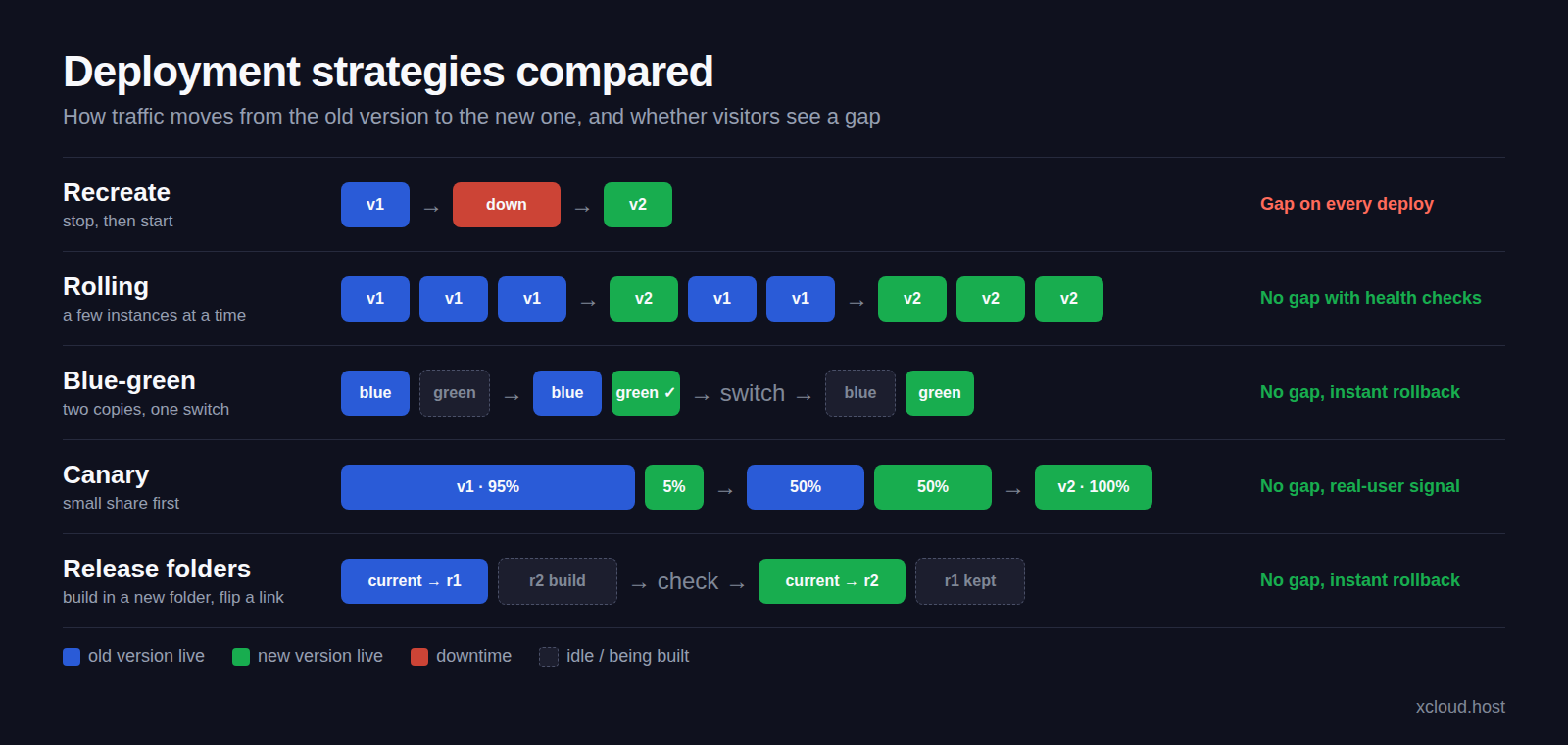
- Rolling replaces instances a few at a time; blue-green switches everything at once between two copies; canary sends a small share of traffic to the new version first; release folders build each version in its own directory and flip a link.
- Rollback is fastest with blue-green and release folders: switch back to the copy you kept.
- Database migrations are the hard part. Use expand and contract so old and new code both work with the schema.
- On one server you don’t need Kubernetes: release folders plus a second port and a health check get you there.
What We Measured: The Same App, With and Without a Switch
We wanted a number, not an opinion. On 10 November 2026 we deployed the same small Node.js (Express) app three times on an xCloud test server while it got a steady 8 requests a second over HTTPS.
| Setup | Deploys | Requests | Failed requests |
|---|---|---|---|
| Restart in place (the app stops, then starts) | 3 | 880 | 27 (502 errors) |
| New release on a second port, health check, then switch | 3 + 1 rollback | 2,400 | 0 |
The restart version failed for about a second on every deploy: nine requests each time. That is what “a quick restart” costs at a modest 8 requests a second, and it grows with your traffic. The switch version never failed, including the rollback. Across six apps on PHP, WordPress, Node.js and Docker, the switch approach handled 19 deploys and 7 rollbacks with 0 failed requests.
The lesson: the strategy matters more than the speed of the restart.
What Is Zero-Downtime Deployment?
Zero-downtime deployment means no request fails because you released new code. It does not mean the release is instant. A deploy can take five minutes to build, as long as visitors keep using the old version during those five minutes.
Think of it like changing a shop’s display window. You don’t empty the window and leave it bare while you arrange the new one. You build the new display in the back room, then swap it in one move.
A Few Things Worth Knowing
- Downtime is per request, not per minute. A one-second gap at 100 requests a second is 100 failed checkouts, API calls or page views.
- Planned maintenance still counts. A “deploying, back in 2 minutes” page is downtime with better manners.
- Zero downtime is not zero risk. A broken release that goes live without errors is still broken. That is why rollback, and testing on a staging site first, belong in the same conversation. Our guide on what uptime means covers how to measure it.
Why Do Deploys Cause Downtime?
Most deploy downtime comes from four places:
- Files change under live traffic.
git pullandcomposer installin the folder the web server reads from mean some requests see old files, some see new ones, and some see missing ones. - The app process restarts. A Node.js app managed by a process manager stops, then starts. Requests that arrive in between get a 502 from nginx.
- The new code doesn’t start. A missing environment variable or a failed build takes the site down, and you only find out after the switch. Our list of why Git deploys fail covers the usual causes.
- The database changes shape. A migration renames a column the running code still reads.
Every strategy below solves the first three in a different way. The fourth needs its own plan, covered further down.
The 5 Deployment Strategies, Compared
| Strategy | How it works | Downtime | Extra capacity needed | Rollback | Best for |
|---|---|---|---|---|---|
| Recreate | Stop the old version, start the new one | Yes, every deploy | None | Redeploy the old version | Dev and internal tools |
| Rolling | Replace instances a few at a time | None, if health checks gate each step | A little (surge instances) | Roll forward or back instance by instance | Many identical instances behind a load balancer |
| Blue-green | Run two full copies, switch all traffic at once | None | A second full copy during the switch | Instant: switch back | Apps that need a clean cut-over and a fast way back |
| Canary | Send a small share of traffic to the new version, then grow it | None | A few new instances | Stop the canary | Large traffic, where you want real-user signals first |
| Release folders | Build each release in its own folder, flip a link | None for PHP and static files | Disk for kept releases | Instant: point the link back | PHP, Laravel and WordPress on one server |
1. Recreate
The simplest strategy: stop everything, then start the new version. Kubernetes describes its Recreate strategy exactly this way: all existing Pods are killed before new ones are created. It is honest about the gap, which makes it fine for a staging site, and a poor fit for anything with customers.
2. Rolling deployment
A rolling deployment (or rolling update) replaces your instances in small batches. Kubernetes uses it by default for Deployments, with maxUnavailable and maxSurge both at 25%, according to the Kubernetes Deployment docs. Each new instance must pass its readiness check before the next batch starts.
The trade-off is that old and new versions serve traffic side by side for a while. Your app, your API and your database must cope with that. Rolling needs several instances; on a single server with one app process, there is nothing to roll.
3. Blue-green deployment
Blue-green deployment keeps two production environments. One (blue) is live; you deploy and test the new release on the other (green), then switch the router so all traffic goes to green. Martin Fowler’s BlueGreenDeployment article also points out the big bonus: rollback is just switching the router back.
The cost is a second copy during the switch, and the classic question of what happens to data written while green was live. Our full guide to blue-green deployment walks through it with a real example.
4. Canary release
A canary release sends a small share of users, say 5%, to the new version, watches errors and metrics, then increases the share. Fowler’s CanaryRelease article describes it as rolling out to a subset of users before the whole infrastructure.
Canaries shine when you have enough traffic for 5% to tell you something, and the monitoring to read it. For a small store or a client site, the signal is often too thin to be worth the setup.
5. Release folders (symlink switching)
The PHP world has done this for years. Each deploy goes into a new folder such as releases/20261110093139. Shared things like .env and uploads live in a shared folder and are linked in. When the new release is ready, one link (current) is pointed at it. The web server always reads through the link, so the change is a single step.
Rollback is pointing the link back at the previous folder. It is blue-green on one server, with folders instead of machines, and it costs only disk space.
The Building Blocks Every Strategy Needs
Whatever strategy you pick, three pieces make it truly zero-downtime:
| Building block | What it does | What goes wrong without it |
|---|---|---|
| Health check | Sends a request to the new version before it gets traffic | A broken release goes live and every visitor sees the error |
| Connection draining | Lets the old version finish requests already in progress | Long requests (uploads, reports, checkouts) are cut off mid-way |
| Shared state | Keeps .env, uploads and sessions outside the release |
Uploads vanish after a deploy, users get logged out |
Background workers are the piece people forget. A queue worker started before the deploy keeps running the old code until it restarts. In Laravel that means running queue:restart (or horizon:terminate for Horizon) after every switch, so jobs pick up the new release.
Database Migrations Without Downtime: Expand and Contract
Here’s the part that trips people up. Code can switch in one step; a database can’t. While the switch happens, old and new code may both talk to the same schema. And after a rollback, the old code meets the new schema.
The answer is expand and contract, which Fowler calls parallel change: break a breaking change into three phases.
- Expand: add the new column or table without removing anything. Old code ignores it.
- Migrate: deploy code that writes to both, or reads the new one with a fallback. Backfill existing rows.
- Contract: in a later release, once nothing reads the old column, remove it.
Renaming name to full_name becomes three small deploys instead of one risky one. Every release in between works with the schema as it is, so you can roll back at any point.
Rollback: Plan the Way Back Before You Need It
A rollback is only fast if the old version still exists. Blue-green and release folders keep it on hand, so going back takes a switch. Recreate and rolling deployments usually redeploy the old commit, which takes as long as any other deploy.
Two rules keep rollbacks safe:
- Roll back code, not data. Most rollbacks, xCloud’s included, leave the database alone. That is a feature: you never lose orders placed after the deploy.
- Keep migrations backward compatible. With expand and contract, the previous release always works with the current schema.
How xCloud Does Zero-Downtime Deployment
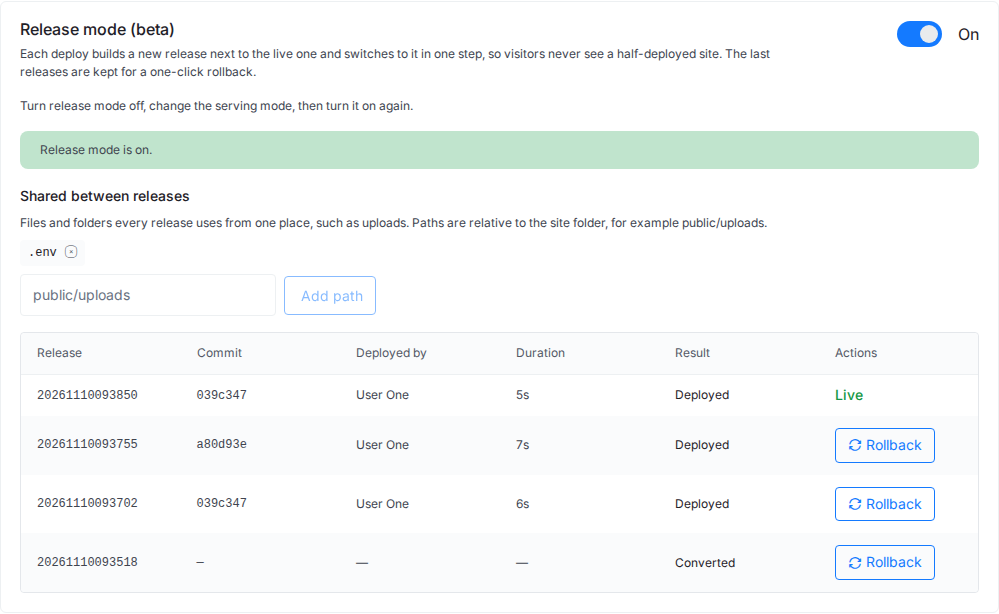
xCloud’s Release mode combines release folders with a blue-green style switch, chosen per stack. It does not do canary releases or rolling updates across several servers: it is built for the common case of a site or app on one server.
| Stack | Strategy in xCloud | Health check | Shared by default |
|---|---|---|---|
| Laravel and custom PHP (nginx or OpenLiteSpeed) | Release folders, link switch | The new release must answer a request | .env, storage (Laravel) |
| WordPress from Git, classic or Bedrock (nginx) | Release folders, link switch | The new release must answer a request | wp-config.php and uploads |
| Node.js (nginx) | Blue-green on two ports, nginx switch, old process drains | Health check on the second port | .env |
| Docker container from a Dockerfile or app recipe | Blue-green on two ports, nginx switch, old container stops | Health check on the second port | none (each release reads the site’s .env) |
After each switch, queue workers, Horizon and Supervisor programs restart on the new code. The last five releases (three images for containers) are kept, and any of them can be rolled back to in one click. You turn it on from Site → Git → Release mode: there is no YAML file or pipeline to write.
What it doesn’t cover yet: a repository’s own docker-compose file, containers that publish more than one port, and WordPress sites not deployed from Git. See the zero-downtime deployments page for everything it does, or the launch post Zero-Downtime Deployments and One-Click Rollback Are Here for the full test results.
👉 Step-by-step: Zero-downtime deploys with Release mode.
Which Zero-Downtime Deployment Strategy Should You Choose?
| If you… | Use | Why |
|---|---|---|
| Run a PHP, Laravel or WordPress site on one server | Release folders | Instant switch and rollback, no extra servers |
| Run a Node.js app or a container on one server | Blue-green on two ports | The new process is ready before it gets traffic |
| Run many identical instances behind a load balancer | Rolling | Uses capacity you already have |
| Have heavy traffic and good monitoring | Canary | Real-user signals before everyone gets the change |
| Need a clean cut-over with an instant way back | Blue-green | One switch forward, one switch back |
| Run an internal tool where a short gap is fine | Recreate | Simplest to set up |
Treat this as a starting point rather than a strict rule. Many teams combine them: blue-green for the app, expand and contract for the database.
Make Your Next Deploy a Non-Event
Zero-downtime deployment comes down to one habit: never change what visitors are using until the replacement is ready and checked. Pick the strategy that fits your setup, add a health check and draining, keep shared files outside the release, and split database changes into expand and contract steps.
If you run on a single server, you don’t need a cluster to get there. Turn on Release mode on your Laravel or Node.js site in xCloud, or read how Git deploys work in xCloud first. Plans are on the pricing page.
If you have found this blog helpful, feel free to subscribe to our blogs for valuable tutorials, guides, knowledge, and tips on web hosting and server management. You can also join our Facebook community to share insights and engage in discussions.
Frequently Asked Questions
What is zero-downtime deployment?
Zero-downtime deployment is a way of releasing new code so visitors never get errors or a half-updated site during the release. The new version is built and checked beside the running one, and traffic moves to it only when it is ready.
Which deployment strategy has zero downtime?
Rolling, blue-green, canary and release-folder (symlink) deployments can all run with zero downtime when they are paired with health checks and connection draining. Recreate deployments, which stop the old version before starting the new one, always have a gap.
What is the difference between blue-green and rolling deployment?
Blue-green runs two full copies of your app and switches all traffic from one to the other at once. A rolling deployment replaces instances a few at a time, so old and new versions serve traffic side by side for a while.
How do you handle database migrations with zero downtime?
Use the expand and contract pattern. First add new columns or tables in a way the old code ignores, then deploy code that uses them, and only remove the old structure in a later release, once nothing reads it.
Can I get zero-downtime deploys without Kubernetes?
Yes. On a single server, release folders plus a health check and an instant switch give you zero-downtime deploys for PHP and WordPress, and a second port with an nginx switch does the same for Node.js. xCloud’s Release mode does this from the dashboard.
Does rollback undo a database migration?
Usually not. Most rollbacks, including xCloud’s, switch code only. Plan migrations so the previous release still works with the new schema, and you can roll back safely.