


Zero-downtime deploys are now part of xCloud. Turn on Release mode on a Git site and every deploy builds a new release beside the live one, checks that it answers, then switches traffic in one step. If a release misbehaves, you roll it back in one click. It works for Laravel, PHP, WordPress, Node.js and Docker sites.
Until now, a deploy on xCloud worked the way it does on most servers: new files land in the folder your visitors are using, and Node.js apps restart. For a few seconds, some requests can fail. That was fine for a blog. It is not fine for a store at checkout time, or for an API that other apps call. If you are new to Git deploys on xCloud, start with our one-click Git deploy guide.
This post covers what Release mode does, which stacks it supports, how a deploy and a rollback work, what we measured on our own test servers, and how to turn it on.
TL;DR
- What’s new: Release mode gives Git sites zero-downtime deploys and a one-click rollback, from Site → Git → Release mode.
- How it works: each deploy builds beside the live release, must pass a check, then takes over in one step. A release that fails never goes live.
- Stacks: Laravel and PHP on nginx or OpenLiteSpeed, WordPress from Git and Node.js on nginx, and Docker containers from a Dockerfile or an app recipe.
- Rollback: switches code only. Your database,
.envand shared files are not changed. - Proof: on our test servers, 6 apps took 19 deploys and 7 rollbacks under steady traffic with 0 failed requests. The same Node.js app without Release mode returned 27 errors over 3 deploys.
- No YAML: you turn it on from the dashboard. Workers restart on the new code by themselves.
What We Found: 0 Failed Requests Across 19 Deploys
Before writing a word about this feature, we tested it. On 10 November 2026 we set up three xCloud test servers (nginx, OpenLiteSpeed and Docker) with demo apps from public sample repositories. Each site got a steady 8 requests a second over HTTPS while we turned Release mode on, deployed three or more times and rolled back.
| App | Stack | Release mode | Deploys | Rollbacks | Requests | Failed |
|---|---|---|---|---|---|---|
| Laravel store | Laravel on nginx | On | 4 | 2 | 2,256 | 0 |
| PHP landing page | Custom PHP on OpenLiteSpeed | On | 3 | 1 | 1,429 | 0 |
| Express app | Node.js on nginx | On | 3 | 1 | 2,400 | 0 |
| Welcome app | Docker container from a Dockerfile | On | 3 | 1 | 2,640 | 0 |
| Flask app | Docker container from the Flask recipe | On | 3 | 1 | 3,760 | 0 |
| WordPress blog | WordPress (Bedrock) from Git on nginx | On | 3 | 1 | 1,520 | 0 |
| Same Express app | Node.js on nginx | Off | 3 | 0 | 880 | 27 (502 errors) |
The last row is the one to look at. With Release mode off, each deploy restarted the Express app, and visitors got about a second of 502 errors every time. With it on, the same app deployed three times and rolled back once without a single failed request.
A failed request here means any answer that is not 2xx or 3xx, or no answer at all. Some deploys rebuilt the same commit; each one still built and switched to a new release. We are not publishing response times from this run: one window overlapped a monitoring install on a small test server, so those numbers would not be fair.
How a Zero-Downtime Deploy Works in xCloud
Release mode never touches the live release until the new one is ready. Every deploy goes through four steps:
- Build beside the live release. xCloud pulls your commit into a new release folder, or builds a new container image, next to the live one. Your deploy script runs there.
- Check that it answers. Node.js apps and containers start on a second port and must pass a health check. PHP and WordPress releases must answer a request. A server error or no answer stops the deploy.
- Switch in one step. For PHP and WordPress, the site folder now points to the new release. For Node.js and containers, nginx sends new requests to the new port.
- Finish and restart workers. The old Node.js process or container finishes its open requests, then stops. Queue workers, Horizon and Supervisor programs restart on the new code.
The pattern behind steps 2 and 3 is known as blue-green deployment: two copies, one live, and a switch that moves traffic between them.
Which Stacks Support Release Mode
| Stack | Server | How it switches | Shared by default |
|---|---|---|---|
| Laravel | nginx or OpenLiteSpeed | Site folder points to the new release | .env, storage |
| Custom PHP | nginx or OpenLiteSpeed | Site folder points to the new release | .env |
| WordPress from Git (classic or Bedrock) | nginx | Site folder points to the new release | wp-config.php and uploads (Bedrock: .env and web/app/uploads) |
| Node.js | nginx | New release on a second port, then nginx switches | .env |
| Docker container (Dockerfile or app recipe) | Docker server with nginx | New container on a second port, then nginx switches | none: each release reads the site’s .env |
For WordPress, plugins and themes come from your repository while Release mode is on, so installs from the WordPress admin are turned off. The card says so before you turn it on.
One-Click Rollback That Leaves Your Data Alone
Every deploy shows up on the Release mode card with its commit, who deployed it, how long it took and its result. The newest is marked Live. Every other kept release has a Rollback button.
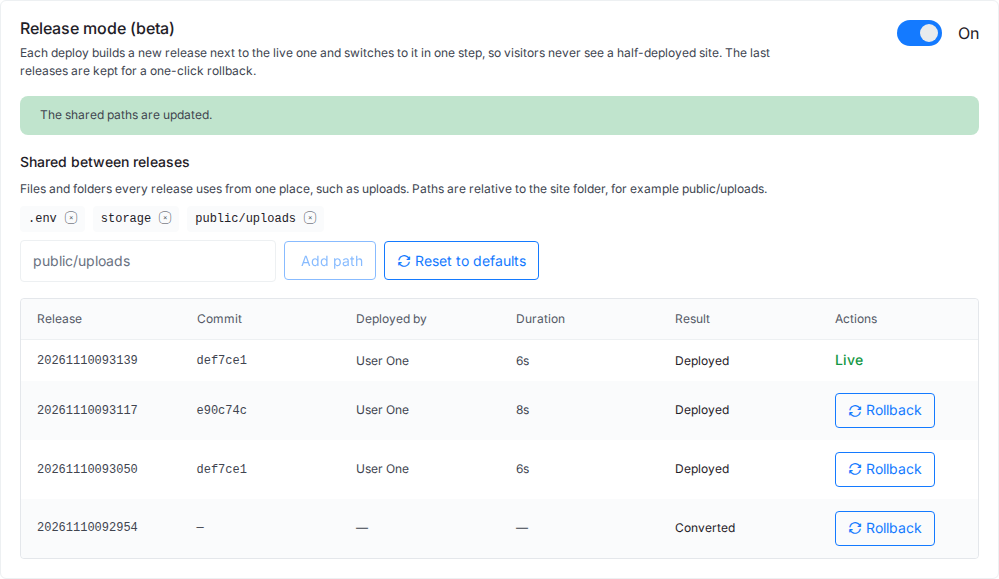
Click Rollback and xCloud asks you to confirm: “The site switches to this release at once. The database, .env and shared files are not changed.” That is the important part. A rollback puts your old code back; it never rolls back orders, sign-ups or uploads.
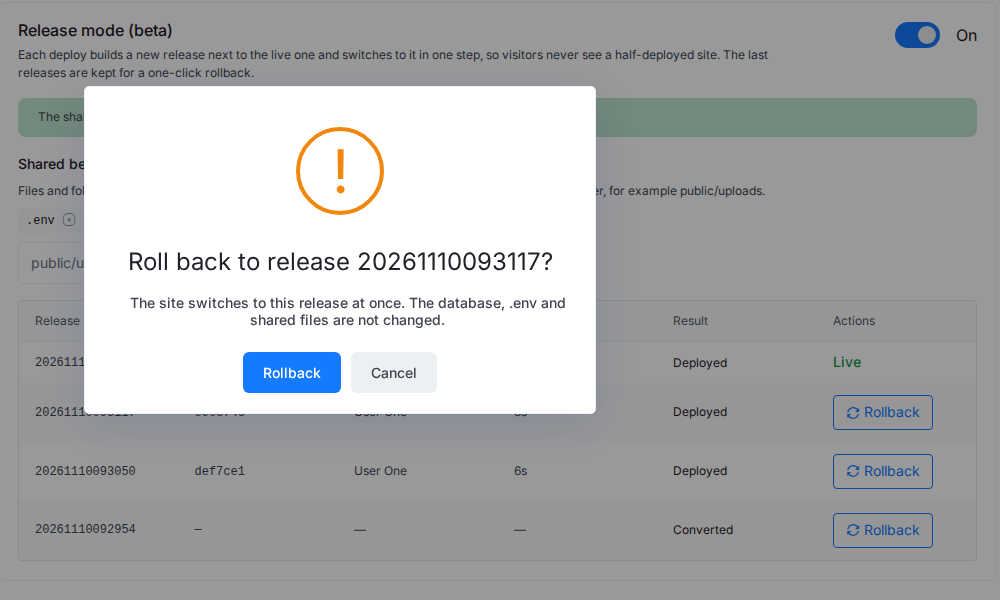
xCloud keeps the last five releases for PHP, WordPress and Node.js sites, and the last three images for container sites. Rolling back and turning Release mode on or off need the Manage Deploy Scripts permission, so a teammate who can only deploy can’t roll back.
Shared Files and Worker Restarts
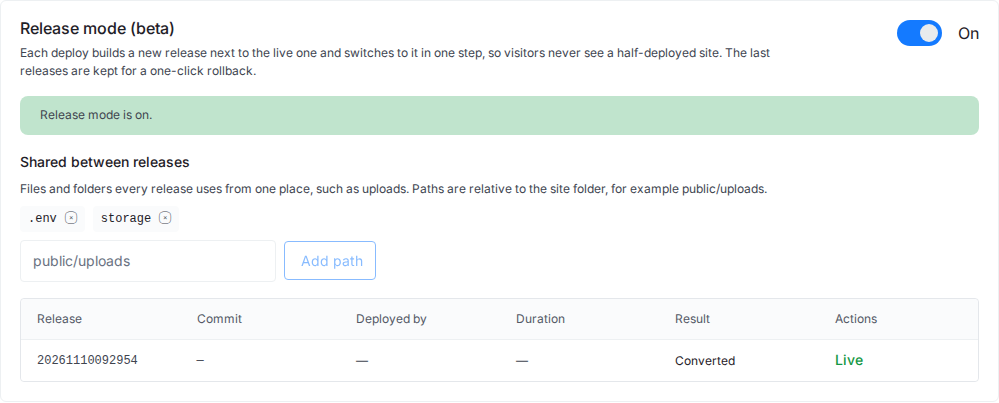
Files that every release needs live in one shared folder. Laravel shares .env and storage by default. Under Shared between releases you can add your own paths, such as public/uploads, and every new release links to them.
On Laravel sites, queue workers and Horizon reload after their current job, and other Supervisor programs restart. That happens after every deploy and every rollback, so a background job never runs old code against a new release.
How to Turn On Zero-Downtime Deploys
- Open your Git site in xCloud and go to Git.
- Scroll to the Release mode card and switch it on.
- Confirm Turn on release mode?. The site stays online while it converts.
- Deploy as usual with Deploy Now or a push to your branch.
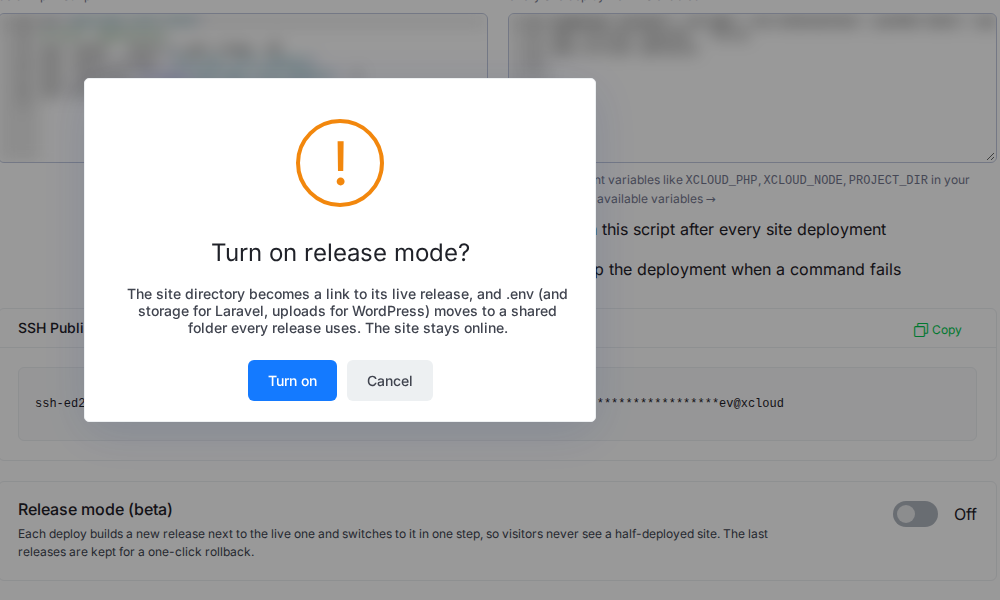
Creating a new site? In Deploy via Git, switch on Release mode (zero-downtime deploys) and the site converts after its first successful deploy. You can also turn it on, list releases and roll back from the xCloud Public API or MCP.
👉 Full steps: Zero-downtime deploys with Release mode and How to roll back a deployment.
What Release Mode Doesn’t Do (Yet)
Honest limits, so you can plan:
- Rollback doesn’t undo migrations. If a deploy changed the database schema, the older code must still work with it. Our guide to zero-downtime deployment strategies explains the expand and contract pattern.
- Some setups are not supported yet: a repository’s own docker-compose file, containers that publish more than one port, WordPress sites not deployed from Git, and Node.js or WordPress on OpenLiteSpeed.
- A custom pull script must go. Release mode builds each release from Git itself, so a deploy is refused until the site uses the default pull script. The live release stays untouched.
- Keep
.envout of your repository. Release mode keeps it in the shared folder. On our Node.js test site, a commit that tracked.envwas refused, with the reason in the deployment log. - To turn it off, switch the card off. The site goes back to its normal folder.
Ship Your Next Deploy Without Downtime
Release mode removes the riskiest minute of a release: the moment new code meets live traffic. Build beside the live site, check it, switch, and keep a way back. If you run a store, an API or a client site you can’t afford to break, turn it on before your next deploy.
See everything it covers on the zero-downtime deployments page, host your app on Laravel hosting or Node.js hosting, and compare plans on pricing. If a deploy ever does fail, why your Git deploy failed on xCloud walks through the usual causes.
Start with xCloud and turn on Release mode on your first Git site.
If you have found this blog helpful, feel free to subscribe to our blogs for valuable tutorials, guides, knowledge, and tips on web hosting and server management. You can also join our Facebook community to share insights and engage in discussions.
Frequently Asked Questions
What is Release mode in xCloud?
Release mode is the dashboard name for xCloud’s zero-downtime deployments. When it is on, every Git deploy builds a new release beside the live one, checks that it answers, then switches traffic in one step. Older releases are kept, so you can roll back in one click.
Which sites can use zero-downtime deploys?
Sites deployed from Git: Laravel and custom PHP apps on nginx or OpenLiteSpeed, WordPress (classic or Bedrock) and Node.js apps on nginx, and Docker container sites built from a Dockerfile or an app recipe. A repository’s own docker-compose file and containers that publish more than one port are not supported yet.
Does a rollback restore my database?
No. A rollback switches your code to an older release. The database, .env and shared files are not changed. If the newer release ran a migration, check that the older code still works with the new schema before you roll back.
What happens if a deploy fails with Release mode on?
The new release never gets traffic. The deploy is marked Failed, the live release keeps serving visitors, and the deployment log on the Deployments page shows why.
How many releases does xCloud keep?
The last five releases for PHP, WordPress and Node.js sites, and the last three images for Docker container sites. Any kept release can be rolled back to from the Release mode card.