


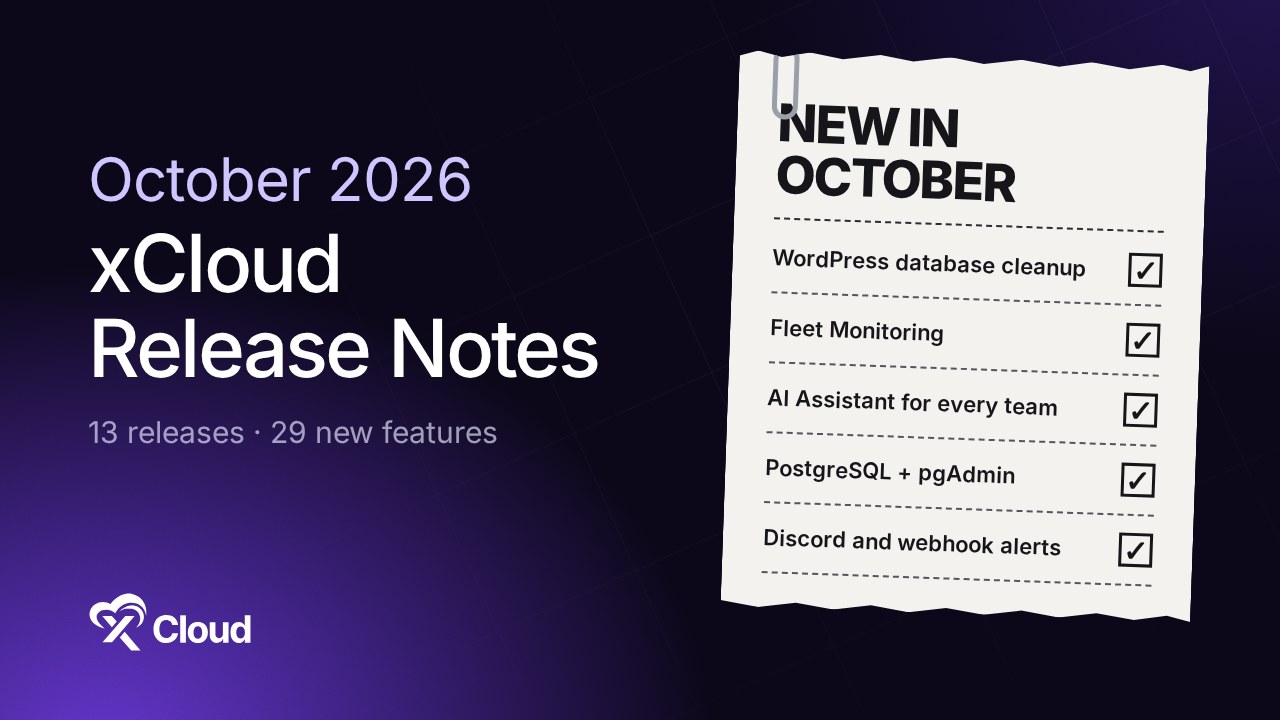
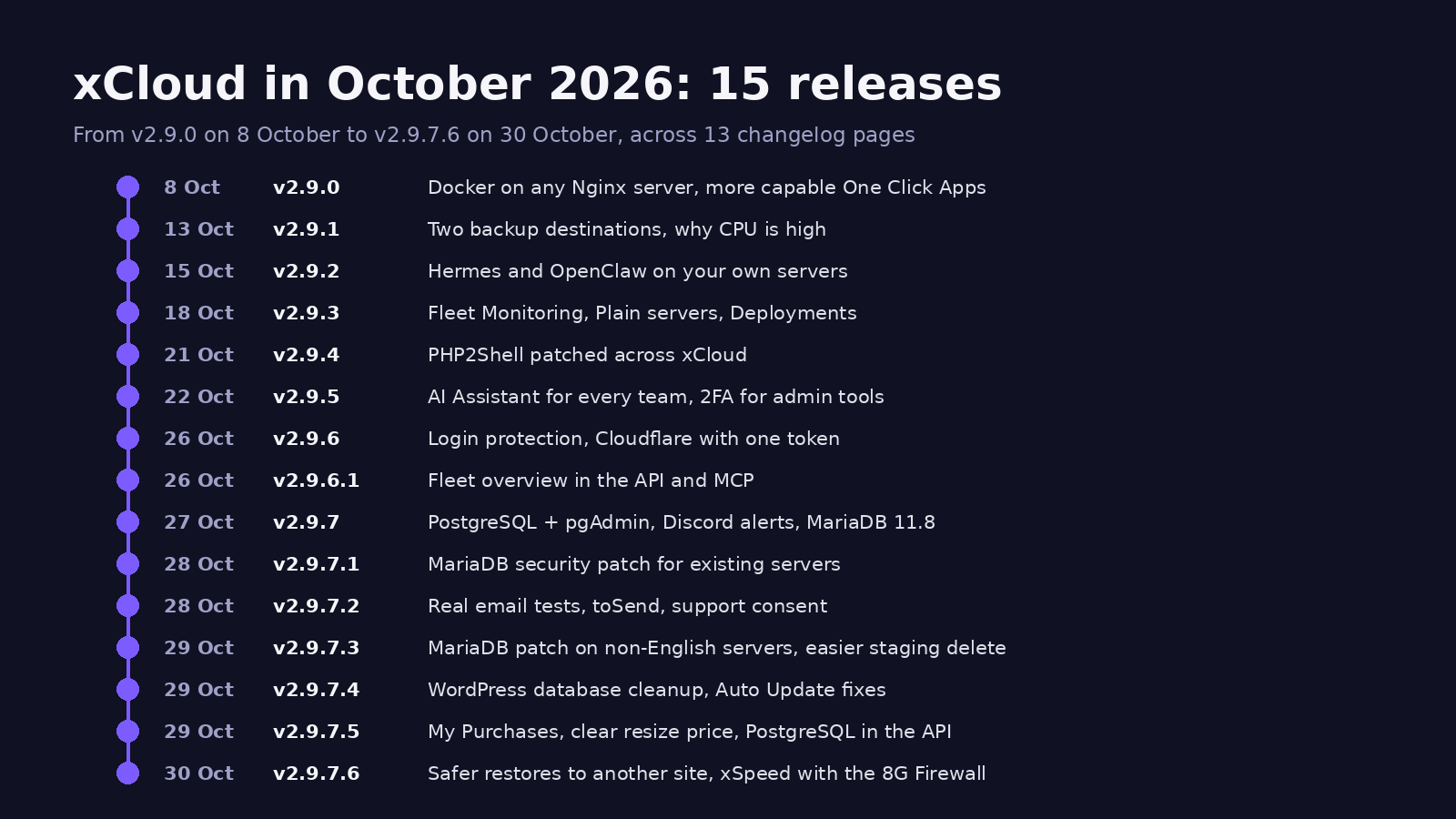
The xCloud October 2026 release notes cover 15 releases. One Nginx server can now run WordPress, Laravel, Node.js and Docker apps side by side, and xCloud now tells you what needs attention. Highlights: WordPress database cleanup with no plugin, Fleet Monitoring, the AI Assistant for every team, PostgreSQL with pgAdmin, and alerts in Discord.
If you missed last month, the September 2026 release notes covered Ubuntu 26.04, Docker backups and multi-team API access. This post picks up where that one stopped.
| Releases | Changelog pages | New features |
|---|---|---|
| 15 | 13 | 30 |
Counted from the 13 changelog pages v2.9.0 to v2.9.7.6, published 8 to 30 October 2026. v2.9.7.1 and v2.9.7.3 have no page of their own; their changes are listed on the v2.9.7.2 and v2.9.7.4 pages.
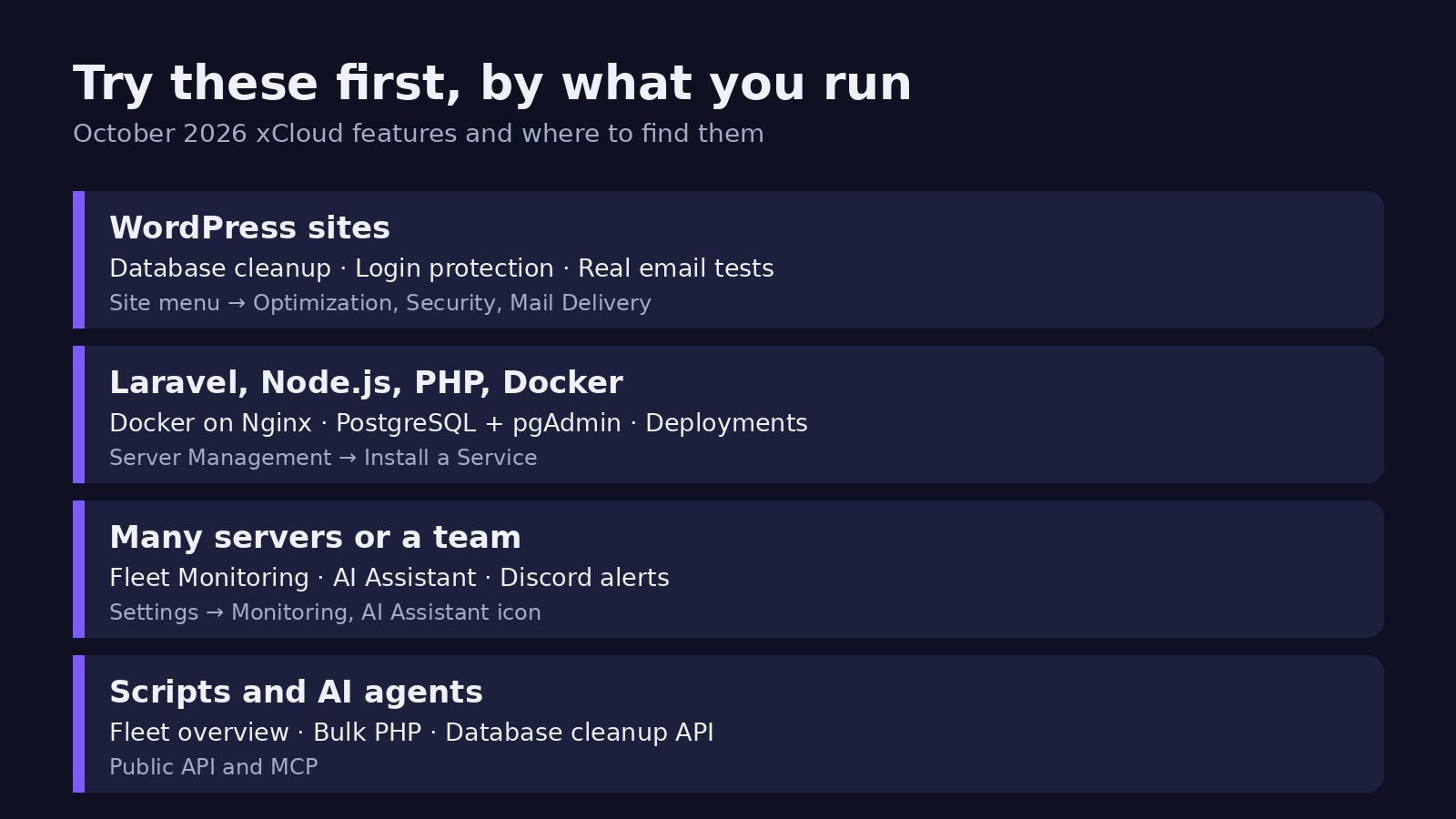
TL;DR: What Is New in October, by What You Run
Short on time? Find your row, then jump to that section.
| If you run… | New this month | Where |
|---|---|---|
| WordPress sites | Database cleanup, stronger login protection, real email tests, two backup destinations | Site menu: Optimization, Security, Mail Delivery, Backups |
| Laravel, Node.js, PHP or Docker apps | Docker on any Nginx server, PostgreSQL with pgAdmin, a Deployments page for Git sites | the server’s Management → Settings → Install a Service, site menu: Deployments |
| Many servers or a team | Fleet Monitoring, AI Assistant, Discord and webhook alerts, Team Access card | Settings → Monitoring, the AI Assistant icon, Settings → Integrations → Notification |
| Scripts, AI agents or MCP | Fleet overview, bulk PHP switching, database cleanup, PostgreSQL install and site commands in the API | For developers |
The Month in One Picture: Every App on One Server, and a Dashboard That Points at Problems
Read the 15 releases together and two lines run through almost all of them.
First, one Nginx server now hosts WordPress, Laravel, Node.js, static sites and Docker apps side by side, with PostgreSQL available as a managed service. Second, xCloud now tells you what needs attention: which servers are unhealthy, which have no backup, why CPU is high, and whether a site really sends email.
For WordPress Sites: A Faster Database, Safer Logins and Email You Can Trust
Clean Up Your WordPress Database Without a Plugin (v2.9.7.4)
Over time, a WordPress database fills with old revisions, spam and leftover data that slow it down. Until now, you needed a plugin to clear it. Now every WordPress site has an Optimization page in its menu, right after Caching.
Who it’s for: WordPress site owners and agencies.
- Preview shows how many items each action will delete before anything is removed.
- It removes post revisions, auto-drafts, trashed posts, spam and trashed comments, empty tags and categories, and temporary and leftover data.
- Tick Optimize Database Tables to tidy the tables after the cleanup.
- Tick Back up database first, and xCloud waits for that backup before deleting anything. If the backup fails, nothing is deleted.
- Run it on a Daily, Weekly or Monthly schedule, and check every run in Cleanup History.
The honest note: our support staff cannot run a cleanup on your site, so this one is yours to start. 👉 Clean up and optimize your WordPress database
Stronger Login Protection, Free (v2.9.6)
Before, login protection used WP Fail2Ban. Now turn on the switch on the WP Fail2Ban & Login Protection card under Security → Overview & Firewall, and xCloud installs BetterShield, a free plugin on WordPress.org. It blocks repeated failed logins and bans the attacker’s network at your server firewall for 15 minutes.
Who it’s for: WordPress site owners and agencies. Free, and opt-in per site.
- Cloudflare’s own network is never banned, because the visitor IP is trusted only when the request really comes from Cloudflare.
- Sites still on WP Fail2Ban keep working and show a one-click switch on the WP Fail2Ban & Login Protection card.
- It needs WordPress 6.7 and PHP 8.0 or newer.
All of a site’s security settings now live under one Security menu. 👉 Set up login protection
Know Your Site Emails Really Go Out (v2.9.7.2)
Before, a test email could show success even when the site was not sending. Now Send Test Email on a site’s Mail Delivery page goes through FluentSMTP itself and shows your provider’s real answer.
Who it’s for: WordPress site owners and agencies who send site email through FluentSMTP.
- You can now connect toSend under Mail Delivery. Paste your sending key and xCloud fills in the rest.
- One click shows each FluentSMTP connection’s state, sent and failed counts, and the plugin version.
Two Backup Destinations, and a Reminder When There Is None (v2.9.1, v2.9.6)
One provider outage or one deleted bucket used to mean losing your off-server copy. Now each site can back up to two remote storage providers, each with its own schedule and retention. The newest backup of a destination is always kept, so if backups stop, your last good one survives.
Who it’s for: everyone. Docker apps can use two destinations too.
A missing backup could also go unnoticed until you needed a restore. Now a weekly check emails your team the servers whose production sites have no remote or provider backup. You get it at most once every 30 days, and you can turn it off under Settings → Notifications → Backup Reminders.
Beyond WordPress: Any App, Any Database, on One Server
Docker on Any Nginx Server (v2.9.0)
An xCloud Nginx server now runs WordPress, PHP and Laravel, Node.js, static sites and Docker apps on the same machine. Install Docker from the server’s Management → Settings → Install a Service, or let xCloud install it the first time a container site needs it.
Who it’s for: developers and agencies that run more than WordPress.
The trade-off is real: containers share CPU, memory and disk with your sites. For busy WordPress or WooCommerce stores, keep Docker on a separate server. OpenLiteSpeed servers are not included, and existing Docker + Nginx servers keep working as they are. 👉 Enable Docker on an Nginx server
PostgreSQL and pgAdmin (v2.9.7, v2.9.7.5)
Until now, xCloud sites could only use MySQL or MariaDB databases. Now a server can run one managed PostgreSQL service, with pgAdmin to manage databases and roles over HTTPS.
Who it’s for: developers running Node.js, PHP or Laravel sites from Git.
- Choose PostgreSQL when you create a server, or add it from the server’s Management → Settings → Install a Service. Since v2.9.7.5 you can also check and install it through the Public API and MCP; pgAdmin is still managed from the dashboard.
- Pick MySQL or PostgreSQL per site. xCloud creates the database and role and adds them to the site’s environment settings.
- It needs an Nginx server with Docker Engine 28 or newer.
What it does not do yet: PostgreSQL sites cannot be cloned, migrated, staged or snapshotted, and their databases are not in site backups. Export them from pgAdmin until that changes. 👉 Install managed PostgreSQL and pgAdmin
Plain Servers and a Deployments Page for Git Sites (v2.9.3, v2.9.5)
A Plain server is Ubuntu with no web server, PHP or database, for your own apps and tools. It keeps the same firewall, key-only SSH and automatic security updates as every xCloud server.
Git sites now have a Deployments page that shows what is live and every deploy’s commit, branch, author and duration. A failed deploy names the step that broke, with a button to jump to the error line.
More Capable One Click Apps (v2.9.0, v2.9.2, v2.9.3, v2.9.7)
One Click Apps can now use more than one domain and accept direct connections, such as a VPN or game server, and they show their login details on the Site Overview. Hermes and OpenClaw can now run on your own VPS or connected cloud account, on a dedicated server with at least 4 GB of RAM.
LibreChat and WireGuard both update from the dashboard now. LibreChat keeps your conversations, users and images, and WireGuard saves your client data first and puts it back if the new version does not start healthy.
For Every Team: See What Needs You, and Get Help Fixing It
Fleet Monitoring and Why CPU Is High (v2.9.3, v2.9.1)
Before, you opened servers one by one to find the unhealthy one. Now Settings → Monitoring shows every server’s health on one page. Servers that are down or at risk come first, with the reason in plain words, such as Disk 97% full, and a 24-hour trend.
Who it’s for: agencies and teams with several servers. Monitoring covers servers on a paid plan; free-plan servers show as Not monitored.
When CPU or RAM crosses the alert threshold, the server header in Live Monitoring now names the processes using it. You no longer need SSH to find the cause. 👉 Monitor all your servers
The AI Assistant, Now for Every Team (v2.9.5)
Click the AI Assistant icon in the dashboard header. Ask in plain words, and it checks servers and sites, reads logs, checks SSL and answers billing questions. It can now install and patch PHP and set the default Node.js version too.
Who it’s for: everyone. It is still labelled Beta.
- Every change shows an Action required card, and nothing runs until you click Confirm.
- It starts at Read access. Switch to Read & Write under My Profile → API Tokens → Assistant Access.
- It can never do more than your team role allows.
Alerts in Discord or Your Own Tools (v2.9.7)
Before, alerts could only go to Slack, Telegram or WhatsApp. Now you can send them to a Discord channel, or to any HTTPS address you run, signed so you can check they came from xCloud. Find both under Settings → Integrations → Notification.
Who it’s for: teams that work in Discord, and developers. Paid plans only, and not yet in white-label dashboards. 👉 Send notifications to Discord or a webhook
Team Access and Cloudflare in One Step (v2.9.3, v2.9.6)
A Team Access card on every server and site overview shows who can open it. Give or remove access right there, without opening Team Management.
Cloudflare retired Origin CA keys on 30 September 2026. xCloud now connects to Cloudflare with one scoped API token, and an error names the exact permission to add. Existing integrations keep working.
See What You Own, and What a Resize Costs (v2.9.7.5)
Before, the purchase pages only listed what you had not used yet, so it was hard to tell which plan a server was on. Now Settings → My Purchases shows every lifetime plan, server plan and add-on you own, and what uses each one.
Who it’s for: everyone with a lifetime plan, a paid server plan or an add-on.
- Each lifetime plan has a card with a bar of used and free server slots, and links to the servers on it.
- Servers and Add-ons tabs split what is waiting for setup from what is In use. Site Security Pro now lives in the Add-ons tab.
- The Resize server screen now shows You pay now at the top, split into the new plan, its backups and your credit for unused time, with the credit explained in sentences.
Security Handled for You
October had a lot of security news. Most of it needed nothing from you.
- PHP2Shell (v2.9.4). A pair of critical flaws in PHP itself. xCloud applied a temporary fix to connected servers before PHP’s release (large OpenLiteSpeed servers and servers with leftover files from a removed PHP version got it in a later fix), then rolled out the patched builds 8.5.12, 8.4.27, 8.3.36 and 8.2.35. 👉 Read the PHP2Shell update
- Newer MariaDB on new servers (v2.9.7). New servers install MariaDB 11.8. Existing MariaDB 10 servers keep working.
- MariaDB security patch (v2.9.7.1, v2.9.7.3). The patch now reaches existing MariaDB servers a few at a time, including servers with a non-English system language.
- Auto Update fixes more (v2.9.7.4). With Enable Auto Update on under Server → Security → Vulnerability Settings, a known vulnerability in a plugin or theme found by Patchstack is now fixed automatically. Premium plugins that update from inside the plugin are included.
- AI Bot Blocker hardened on OpenLiteSpeed (v2.9.7.5). A harmful file placed inside a site can no longer use AI Bot Blocker to change files outside that site.
- Supabase admin tools closed to the internet (v2.9.7.4). Supabase Studio, Logflare and Kong are no longer reachable from the internet by server IP. Connect to them through an SSH tunnel.
- 2FA for admin-level tools (v2.9.5). The web terminal, command runner, sudo users and server scripts that run as admin now need two-factor authentication, so a stolen password alone can no longer get full control of your server.
- Support needs your consent (v2.9.0, v2.9.7.2). Support staff can’t see site credentials or open your database until you give SSH consent.
One action is worth doing: open Server → Management → Manage PHP and click Scan Patch. If a site runs PHP 8.1 or older, move it to PHP 8.3 or newer after testing on staging, because those versions get no official fix.
One more step for OpenLiteSpeed WordPress sites that already had the 8G Firewall on: open the site’s Security page and, under Firewall rules, turn 8G Firewall off and on again. That brings in the v2.9.7.6 fix, so xSpeed’s database scan, clean and optimize work with the firewall on.
For Developers: Public API and MCP
Every October endpoint and tool, in short.
- Fleet overview:
GET /api/v1/overviewreturns every server and site with status and usage warnings. Also an MCP tool. - Database cleanup:
POST /api/v1/sites/{uuid}/database/cleanup/preview,POST .../database/cleanupandGET .../database/cleanup/history. - Site commands:
POST /api/v1/sites/{uuid}/commandsruns one command as the site user. It needs thecommands:runability and 2FA. Safe to retry: a repeated request never runs twice. - Bulk cache purge:
POST /api/v1/sites/bulk/cache-purgepurges the page cache on 1 to 100 WordPress sites. - Bulk PHP switching: switch PHP for up to 100 sites in one call, with a preview first.
- Redirects:
POST,PUTandDELETE /api/v1/sites/{uuid}/redirections. - Site Rules (v2.9.7.5):
POST /api/v1/sites/{uuid}/web-rules,PUTandDELETE /api/v1/sites/{uuid}/web-rules/{webRule}manage a site’s headers and redirects. A failed server configuration test rolls the change back. Paid plans only. - Managed PostgreSQL (v2.9.7.5):
GET /api/v1/servers/{uuid}/postgresqlsays whether a server can have it and why not,POST /api/v1/servers/{uuid}/postgresqlinstalls it, andPOST /api/v1/servers/{uuid}/postgresql/retryretries a failed install. Also MCP tools. pgAdmin stays in the dashboard. - Vulnerability settings:
GETandPUT /api/v1/servers/{uuid}/vulnerability-settings. - Login protection:
/api/v1/sites/{uuid}/bettershieldendpoints turn it on or off and change its settings. - Sites and databases: 16 site endpoints for cloning, staging, domains and Go Live (v2.9.0), and nine database operations (v2.9.2).
- PHP: list, install and remove PHP extensions, and read or change php.ini settings.
Also New in October
| Feature | Release |
|---|---|
| Personal email preferences under Profile → Notifications | v2.9.0 |
| Cloudflare Enterprise can keep separate cached pages for mobile, tablet and desktop visitors (off by default, turn on per domain) | v2.9.2 |
| Download server logs (up to 10 MB, link valid 24 hours) | v2.9.2 |
| Cron jobs no longer pile up when a run is still going (save existing cron jobs once to turn it on) | v2.9.3 |
| Node.js updates restart your running apps | v2.9.5 |
| Settings overview page with search | v2.9.5 |
| Finish setting up add-ons you already bought | v2.9.6 |
| Broken-link alerts back, with their own switch | v2.9.7.4 |
| Free mailboxes say they are webmail-only, with Upgrade Mailbox and Access Webmail buttons | v2.9.7.5 |
Fixes by Area
October fixed a lot. These are the fixes you are most likely to notice.
| Area | Most noticeable fixes |
|---|---|
| Backups | Restoring a backup onto another site keeps that site’s files and database until the backup is in place, and puts them back if the restore fails (v2.9.7.6). Restoring an incremental backup now restores the exact point you picked. A remote Docker backup no longer deletes the site’s local backups. A full backup now fails if its archive is incomplete, instead of showing Completed. Google Drive backups no longer fail on duplicate folders. Backup Now shows a Backup in progress row right away. A failed restore no longer shows as a failed backup. |
| Billing | Deleting a server or site now ends its Site Security Pro bill. Cancelling a pending payment no longer removes a paid, running server. Coupon renewals charge what you actually paid. |
| Cloudflare | Deleting a site cleans up its old certificate and cache rules. Turning on Cloudflare SSL no longer renames www records. Turning off Under Attack Mode restores your earlier Security Level. |
| New domains in Mail Delivery now verify, because the DKIM record shown is the right one. Adding Mail Delivery records keeps your existing SPF. Deleting a mailbox keeps other aliases. | |
| Servers | Several PHP restarts in a row no longer leave PHP stopped. Deleting a server now removes it at the provider, so forgotten servers don’t keep billing you. PHP versions a site uses can’t be uninstalled. |
Every fix is on its release page in the xCloud changelog, from v2.9.0 to v2.9.7.6.
What October Does Not Do Yet
- PostgreSQL sites cannot be cloned, staged or backed up with the site yet, and pgAdmin is managed from the dashboard only, not the Public API.
- Running Docker apps next to your sites works on Nginx servers only, not OpenLiteSpeed.
- Discord and webhook alerts are not in the Public API, MCP or white-label dashboards yet.
- The AI Assistant is still Beta, and Fleet Monitoring skips free-plan servers.
Try Three Things This Week
If you only remember one line: October made xCloud the place that tells you what to fix, then helps you fix it.
Pick one site and run Preview on its Optimization page. Open Settings → Monitoring and look at the first server on the list. Then ask the AI Assistant which of your sites need a WordPress update. Our pricing page shows which plan unlocks monitoring and alerts.
If you have found this blog helpful, feel free to subscribe to our blogs for valuable tutorials, guides, knowledge, and tips on web hosting and server management. You can also join our Facebook community to share insights and engage in discussions.
Frequently Asked Questions
Do I need a plugin to clean up my WordPress database on xCloud?
No. Every WordPress site now has an Optimization page in its menu, right after Caching. You can preview what will be removed, take a database backup first and run the cleanup on a daily, weekly or monthly schedule.
Is Fleet Monitoring available on the free plan?
Fleet Monitoring covers servers on a paid plan. Servers on the free plan still appear on the page, marked Not monitored. Move a server to a paid plan to turn monitoring on.
Can the AI Assistant change my servers without asking?
No. Every change shows an Action required card first, and nothing runs until you click Confirm. The assistant starts with read-only access, and it can never do more than your team role allows.
Do I have to do anything after the October security updates?
On a supported PHP version, no. For peace of mind, open Manage PHP on each server and click Scan Patch. If a site still runs PHP 8.1 or older, move it to PHP 8.3 or newer after testing on staging, because those versions get no official fix.
Where can I read every October fix?
Each release has its own page on the xCloud changelog, from v2.9.0 to v2.9.7.6. This post covers the most noticeable fixes per area and links to every changelog page.