


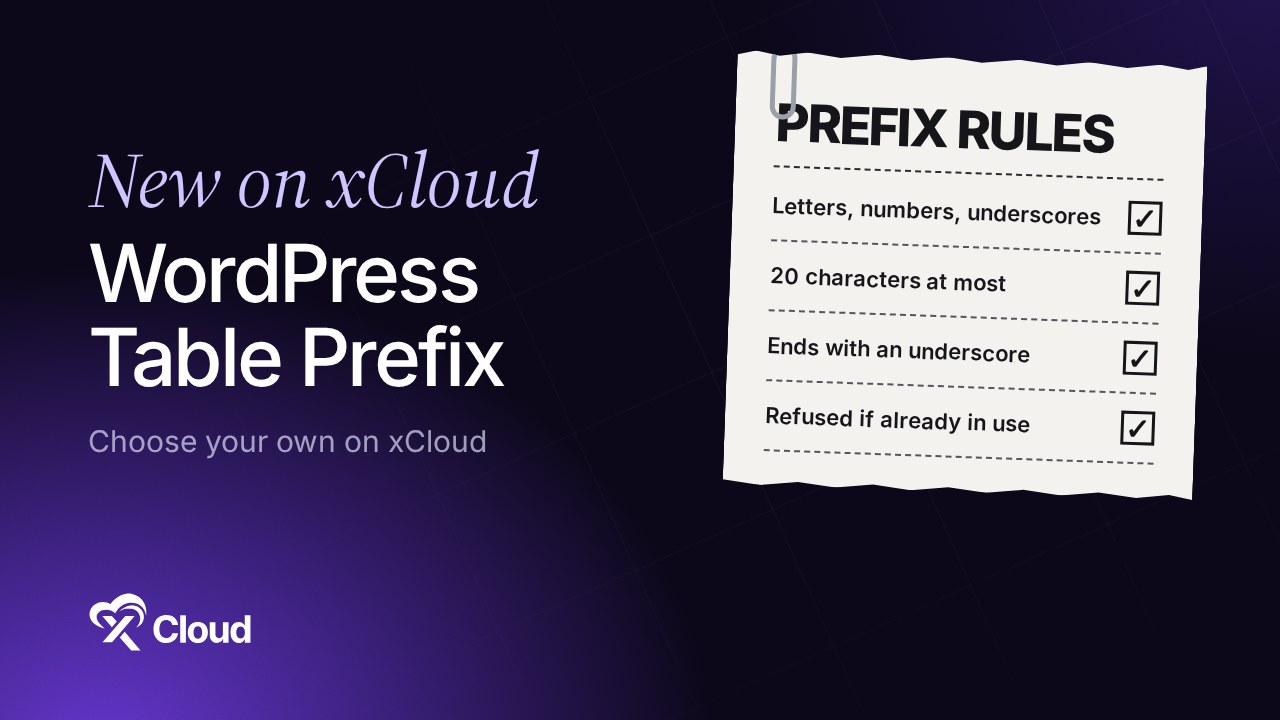
You can now set your WordPress database table prefix when you create a site on xCloud. Since v2.9.7.8, the new site form has a Database Table Prefix field under Advanced Settings, and xCloud refuses to install over a WordPress site that already uses that prefix in the chosen database.
Before this release, xCloud always picked the prefix for you. If you wanted wp_ or your own naming, you had to work around it after the site was created.
This post covers what a prefix does, how to set one, what happens when it is already in use, and what the field does not change. For the click-by-click version, see how to set a custom table prefix.
TL;DR
- New field: Advanced Settings → Database Table Prefix on the new WordPress site form.
- The default stays: xCloud still fills in a random four-character prefix. You can keep it.
- The rules: letters, numbers and underscores, 20 characters at most, ending in an underscore. xCloud adds the underscore if you leave it off.
- Protection: if the chosen database already has a WordPress site on that prefix, xCloud refuses the install and tells you why.
- What it does not do: it does not rename existing tables, and migrated sites keep their source prefix.
- It is not a security fix: a generated prefix is harder to guess, and that is all it claims.
Two Sites on One Prefix Share One Set of Data
The prefix decides which tables a WordPress site reads. If you point a new site at a database and a prefix that another site already uses, the new site does not get a fresh install. It goes live on the other site’s data.
That is the reason this release is more than a new text box. xCloud now checks for that clash before it installs.
What a WordPress table prefix is
WordPress adds the prefix to the start of every table name. A prefix of shop_ gives you tables such as shop_options and shop_posts.
Think of it as a label on a set of drawers in one shared cabinet. The WordPress handbook describes $table_prefix in wp-config.php as the value placed in front of your tables, and asks for numbers, letters and underscores only.
When you would choose one
Most people can keep the generated value. These are the cases where choosing your own makes sense:
- You want
wp_because your own scripts or notes expect the WordPress default. - You have a naming scheme. Agencies running many sites may want a prefix that says which site is which.
- You keep more than one WordPress site in one database. WordPress allows this when each site has a unique prefix, though separate databases are usually the tidier choice.
Set the Prefix When You Create a Site
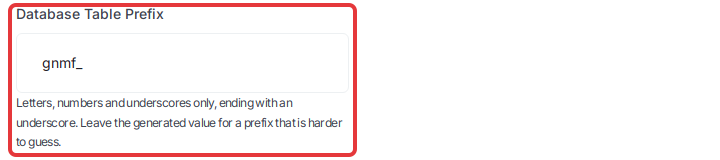
Open the new site form from Sites → Add New Site, choose WordPress, then Install New WordPress Website. Under Configuration, open Advanced Settings and edit Database Table Prefix. Our guide to creating a site walks through the rest of the form.
| Rule | What the field accepts |
|---|---|
| Characters | Letters, numbers and underscores only. A hyphen or a space is refused |
| Length | 20 characters at most (lowered from 32 in v2.9.8.3, so WooCommerce tables always fit), including the ending underscore |
| Ending | Must end with an underscore. xCloud adds it if you leave it off, so shop becomes shop_ |
| Default | A random four-character prefix, such as gnmf_ |
Why 20 characters? As of November 2026, MySQL stops table names at 64 characters, and WooCommerce’s longest table name is 44 characters (woocommerce_downloadable_product_permissions). With a longer prefix, WooCommerce can’t create tables like that one, and you see no error. So xCloud caps the prefix to keep a single site’s WooCommerce tables within the limit. On a multisite, use a shorter prefix, because sub-site tables have longer names.
When the site is ready, you can check the result in WordPress → WP Config, on the $table_prefix line.
What Happens If the Prefix Is Already in Use
xCloud looks for a table named with your prefix followed by options, such as wp_options. If it finds one, the form stays open and shows this under the field:
This database already has a WordPress site with the table prefix wp_. Choose another prefix or an empty database.
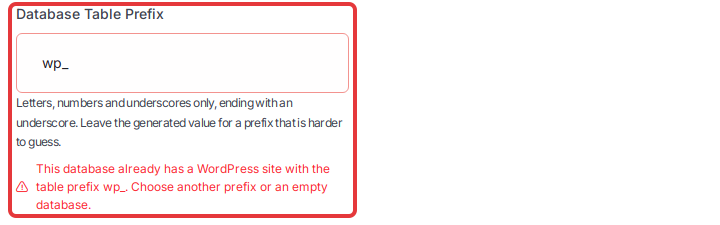
The fix is what the message says: enter a different prefix, or choose an empty database. Your existing database is not changed.
You can see this with either Database Management option: Add Your Existing Database, or Create Database In Server when you enter the name of a database that already exists. If you are connecting your own database, read how to add an external database first.
xCloud checks again during installation, so the same message can stop an install that has already started. Retry keeps the same prefix and database, so it will not clear this message. Create the site again with a different prefix or an empty database. Use another site name, because the failed site still holds the first one. If you delete the failed site, turn off Delete Database first, or you can lose the database you wanted to keep.
Migrations and Existing Sites: What Does Not Change
Setting a prefix applies to new installs. Be clear on the limits before you plan around it:
| Situation | What happens |
|---|---|
| New WordPress site | The site installs with the prefix you set |
| Migrated site | It keeps the source site’s prefix. Existing tables are not renamed |
| Site that already exists | Nothing changes. xCloud has no setting that renames its tables |
| Prefix clash detected | The install is refused. Your database is not changed |
The migration form also shows a Database Table Prefix field, and the note under it explains that the source prefix is kept. Our migration guide covers the rest of that form.
Here is the catch with existing sites: the $table_prefix line tells WordPress which tables to read, and it must match the tables in the database. Editing the line does not rename anything. If the two stop matching, the site stops working until they match again.
To change the prefix of a live site, you rename the tables yourself and update the saved settings that include the old prefix. Take a backup first, and try it on a staging site before you touch the live one.
The honest limits
- It is not a security fix. The field says a generated value is harder to guess, and nothing more. WordPress’s own hardening guide calls security through obscurity “generally an unsound primary strategy”. Updates and backups matter far more. Our post on how xCloud keeps WordPress sites safe covers the rest.
- The check looks for one table. It looks for your prefix followed by
options. Leftover tables without that one will not trigger the message, so an empty database is still the cleanest choice. - To undo a prefix on a new site, create the site again. There is no button that changes it later.
For Developers: Set It From the Public API or Your AI Agent
The Public API and MCP accept an optional prefix when you create a WordPress site with POST /api/v1/servers/{uuid}/sites/wordpress.
- Leave it out and xCloud generates a random four-character prefix.
- The same rules apply, and xCloud adds a missing ending underscore.
- A site created from a snapshot keeps the snapshot’s prefix, so sending both
prefixandsnapshot_uuidreturns an error. - Sites created through the API, except from a snapshot, get the check during installation. It does not run before the request is accepted, so a clash shows up as a failed install.
Start with how to access the xCloud API. If you work through an AI agent, here is what you can ask the xCloud MCP to do.
Also in v2.9.7.8: Fixes You May Notice
Temporary sudo users. Expired temporary sudo users are now removed within about an hour of expiring. If a removal fails, xCloud tries again instead of skipping that user.
BetterShield and plugin URLs. Installing or removing BetterShield no longer leaves other plugins’ pages showing “404 Not Found”. You no longer need to re-save your permalinks afterwards. Our post on why BetterShield replaced WP Fail2Ban has the background.
Mail Delivery keys. New Mail Delivery API keys no longer expire after 48 hours, and Rotate API key works again. Rotating changes your SMTP password too, so update the key anywhere you copied it by hand.
Clearer errors. A failed WhatsApp connection now shows an error instead of saying it is connected. This makes the failure visible. It does not change whether the connection itself succeeds.
Pick Your Prefix on Your Next WordPress Site
If you have no reason to change the prefix, keep the generated value and move on. If you do have a reason, set it before you create the site, because changing it later is a manual database job.
Ready to try it? Host your next WordPress site on xCloud, or check the plans and pricing first.
If you have found this blog helpful, feel free to subscribe to our blogs for valuable tutorials, guides, knowledge, and tips on web hosting and server management. You can also join our Facebook community to share insights and engage in discussions.
Frequently Asked Questions
What is the default WordPress database table prefix?
WordPress uses wp_ by default. On xCloud, the new site form fills in a random four-character prefix instead, such as gnmf_, and you can replace it with wp_ or your own value.
How long can a table prefix be on xCloud?
Up to 20 characters for a new site, including the ending underscore. As of November 2026, MySQL limits table names to 64 characters, and a longer prefix would leave the longest WooCommerce table names over that limit.
Does changing the table prefix make WordPress secure?
No. A generated prefix is harder to guess than wp_, but it does not protect a site by itself. Keep WordPress, plugins and themes updated, and keep backups.
Can I change the table prefix of an existing site on xCloud?
Not with a setting. xCloud has no option that renames the tables of an existing site, so it is a manual database job. Editing the $table_prefix line alone does not rename anything, and the site stops working if the line no longer matches your tables.
Why does xCloud say my database already has a WordPress site?
The database you chose already has an options table with that prefix, such as wp_options. Enter a different prefix or choose an empty database. Your existing database is not changed when this happens.