


The best Heroku alternatives in 2026 are Render, Railway and Fly.io if you want another platform that runs your code, Coolify or Dokploy to self-host on a VPS, and xCloud if you want Git deploys and workers on a flat-price managed server. The right pick depends on workers, Postgres and how much upkeep you accept.
Most teams start looking when the Heroku bill passes the cost of a whole server, or when an Eco dyno that sleeps after 30 minutes stops being acceptable. Heroku still works well. The question is what you pay for each piece of it.
This guide compares eight alternatives on the parts a Heroku app is actually made of: the web process, worker processes, Postgres, scheduled jobs, and what you maintain yourself. If you are still deciding between a platform and a server, our guide to self-managed vs managed hosting covers that choice first.
TL;DR: Which Heroku Alternative Fits You
| If you want to… | Use this | Best for |
|---|---|---|
| Keep the git-push PaaS feel, pay for usage | Railway | Small teams, side projects that grow |
| Get web services, workers and cron on one platform | Render | Teams rebuilding a Heroku setup piece by piece |
| Run apps close to users in many regions | Fly.io | Global apps, latency-sensitive APIs |
| Scale idle services to zero | Koyeb | Low-traffic APIs and bots |
| Stay inside an existing DigitalOcean account | DigitalOcean App Platform | Teams already on DigitalOcean |
| Self-host a PaaS panel on your own VPS | Coolify or Dokploy | Developers happy to own the server |
| Flat-price managed server with Git deploys and workers | xCloud | Agencies and teams with several apps |
- Best like-for-like swap: Render, because web services, background workers and cron jobs map closely to Heroku’s process types.
- Lowest entry price: Fly.io’s shared-cpu-1x (256 MB) at $2.19/month in Ashburn as of October 2026, before storage and traffic.
- Best for many apps on one bill: a server you control, managed by xCloud, Coolify or Dokploy.
- Watch out for: free Postgres that expires (Render), apps that sleep (Heroku Eco, Render free) and metered RAM that grows with every service.
Every Heroku Piece Has an Equivalent, Except Autoscaling and Point-in-Time Recovery
Most Heroku alternative lists compare price tables. What decides a migration is whether each piece of your Heroku app has a home on the new platform. We mapped every Heroku building block to where it lives on an xCloud NGINX server, using xCloud’s own docs.
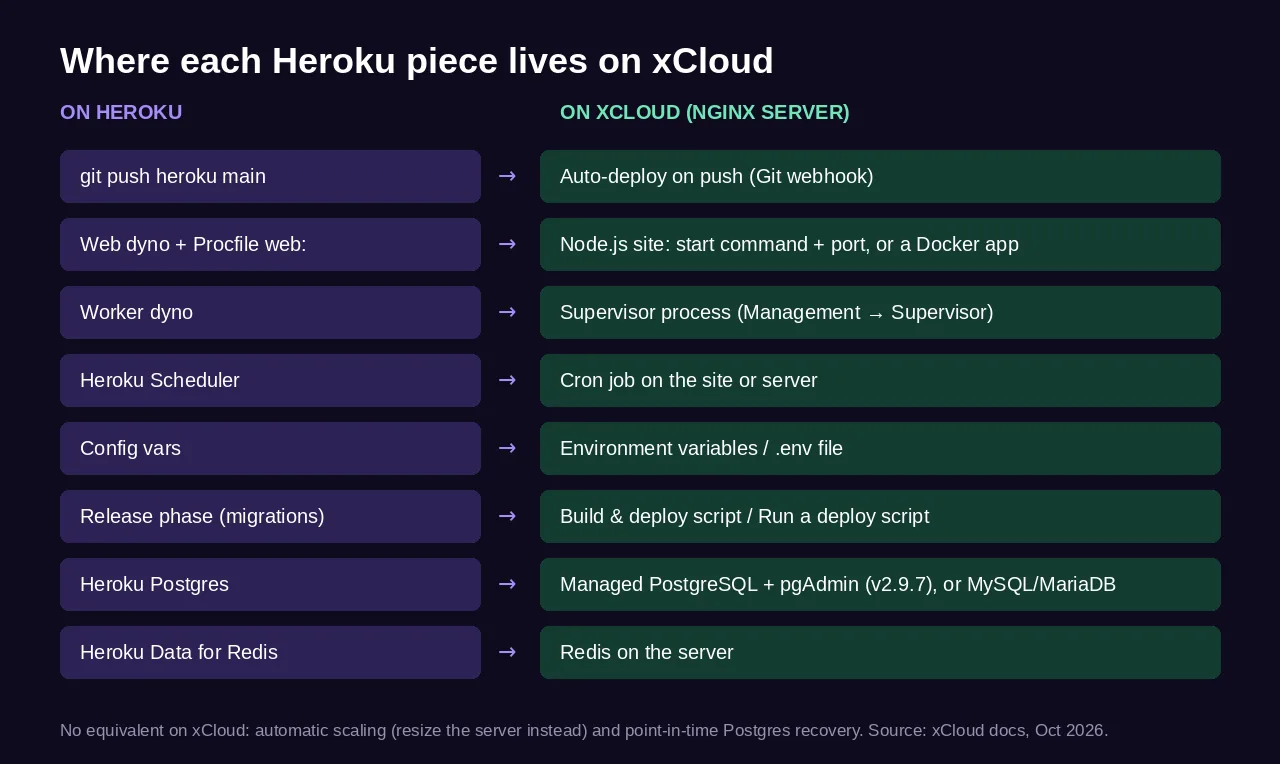
Two things have no direct equivalent on xCloud: automatic scaling (you resize the server instead) and point-in-time Postgres recovery. Managed PostgreSQL itself is there since v2.9.7, but its databases are not in site backups yet, so you export them with pgAdmin or pg_dump (👉 back up and restore PostgreSQL). Scaling and recovery are the two questions to ask any alternative before you move.
Teams leaving a PaaS usually bring PostgreSQL and often Python. PostgreSQL now has a managed option with pgAdmin on NGINX servers, while Python apps still run in Docker. The xCloud section below covers both.
The Three Kinds of Heroku Alternative
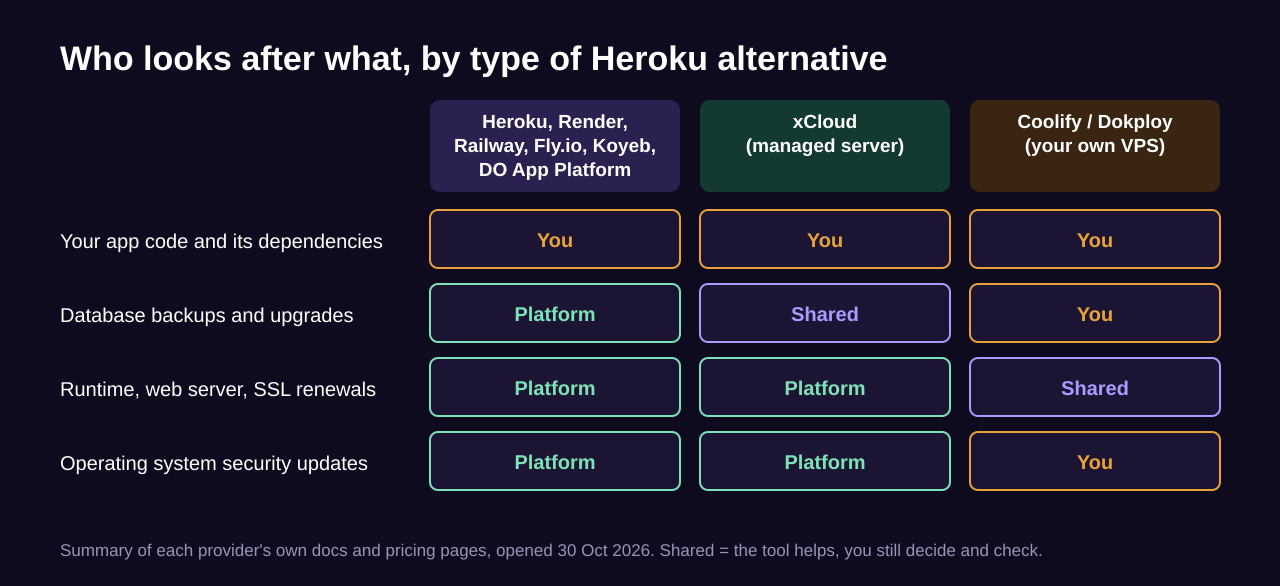
The market splits into three groups, and the split matters more than any single feature.
| Type | Examples | You manage | Billing |
|---|---|---|---|
| PaaS | Railway, Render, Fly.io, Koyeb, DigitalOcean App Platform | Your code | Per instance or per second of usage |
| Managed server | xCloud | Your code, some database work | Flat monthly price per server |
| Self-hosted panel | Coolify, Dokploy | Code, database, server, OS updates | VPS price, plus an optional cloud fee |
How We Compared Them
- Deploy model: Git push, Docker image or Compose file.
- Workers and cron: can a background process and a scheduled job run next to the web app?
- Postgres: managed by the provider, or yours to run?
- Entry price: taken from each provider’s own pricing page or docs, opened on 30 October 2026.
- Sleep and limits: does the cheapest tier stay on?
- Upkeep: what is left for you to maintain.
Prices change often. Every figure here is as of October 2026. Treat it as a snapshot and check the provider’s page before you buy. We did not run or benchmark these platforms; this is a comparison of published plans and documented features.
Master Comparison Table
| Rank | Provider | Type | Cheapest paid entry | Postgres | Free option |
|---|---|---|---|---|---|
| 🥇 1 | Render | PaaS | See Render’s pricing page | Managed, paid plans | Free web service sleeps after 15 min; free DB expires in 30 days |
| 🥈 2 | Railway | PaaS | Hobby $5/mo (includes $5 usage) | Runs as a service | $5 one-time trial credit for 30 days |
| 🥉 3 | xCloud | Managed server | $5/mo server (1 vCPU, 1 GB) | Managed PostgreSQL + pgAdmin (NGINX servers) | Free plan for your own server |
| 4 | Fly.io | PaaS | $2.19/mo shared-cpu-1x, 256 MB | Managed from $38/mo | None for compute |
| 5 | Koyeb | PaaS | Pro plan $29/mo plus compute | Serverless, Small $29.76/mo | One Free Instance per organization |
| 6 | DigitalOcean App Platform | PaaS | $5/mo, 1 vCPU, 512 MiB | Dev database $7/mo | 3 static sites |
| 7 | Coolify | Self-hosted panel | Free self-hosted; Cloud $5/mo | You run it | Self-hosted is free |
| 8 | Dokploy | Self-hosted panel | Hobby $4.50/mo per server | You run it | Open source; 7-day trial of paid plans |
For reference, Heroku’s own pricing page lists Eco dynos at $5/month (sleep after 30 minutes idle), Basic at $7/month, Standard-1X at $25/month, and Heroku Postgres Essential-0 at $5/month with 1 GB of storage.
🥇 1. Render: Best Like-for-Like Swap
Render has the closest shape to Heroku. Its docs list background workers and cron jobs as services you create next to web services and managed Postgres, so most Procfile lines have a clear home.
The catch is the free tier. Per Render’s free tier docs, a free web service spins down after 15 minutes without traffic and takes about a minute to wake. A free Postgres database expires after 30 days and is deleted after a 14-day grace period.
Key features
- Process types: web services, background workers and cron jobs.
- Managed Postgres: Render continually backs up paid databases for point-in-time recovery, per its backup docs. Free databases get no backups.
- Free hours: 750 free instance hours per workspace each month.
- Git deploys: connect a Git provider and deploy on push.
| ✅ Pros | ❌ Cons |
|---|---|
| ✅ Closest mapping from Heroku process types | ❌ Free Postgres is deleted after expiry |
| ✅ Managed database on paid plans | ❌ Free services sleep and wake slowly |
| ✅ Web, worker and cron on one platform | ❌ Free Postgres has no backups |
Best for: teams who want service types close to Heroku’s.
👉 Already on Render and want a flat price? Follow migrate from Render to xCloud.
🥈 2. Railway: Best Usage-Based PaaS
Railway bills for what each service uses. As of October 2026, its pricing page lists a Hobby plan at $5/month that includes $5 of usage, and Pro at $20/month per workspace with $20 included.
Usage is metered at about $10 per GB of RAM and $20 per vCPU per month, plus $0.05 per GB of egress. That is cheap for one small app and adds up when every worker and database holds memory all month.
Key features
- Services: always-running services, such as web apps and databases, and scheduled jobs in one project.
- Trial: a $5 one-time credit that lasts 30 days.
- Replicas: the trial allows 2 replicas, per Railway’s plan docs.
| ✅ Pros | ❌ Cons |
|---|---|
| ✅ Fast setup, low starting price | ❌ Bills grow with RAM held by every service |
| ✅ Databases next to the app | ❌ Harder to forecast than a flat price |
Best for: side projects and small teams who value speed over a fixed bill.
👉 Already on Railway? Follow migrate from Railway to xCloud.
🥉 3. xCloud: Best Flat-Price Server With Git Deploys and Workers
xCloud is not a PaaS. It is a hosting panel that runs your apps on a server, either an xCloud managed server or a server you already own on the free plan (one server, up to 10 sites). You pay one flat price per server, and every app on it shares that bill.
For a Heroku app, the flow is: create an NGINX server, then New Site and deploy from Git. xCloud reads the repository, suggests the stack and writes a deploy script, as shown in 👉 deploy Git projects in one click.
Key features
- Git deploys: Auto-deploy on push (webhook) for connected Git provider repositories.
- Node.js apps: set the start command, port and environment variables, as in 👉 deploy a Node.js application.
- Docker apps: any language with a Dockerfile or Compose file, via 👉 a custom Docker app from Git.
- Workers: a Supervisor process per worker, under Management → Supervisor on the server’s page (👉 Supervisor guide).
- Scheduled jobs: cron jobs instead of Heroku Scheduler (👉 add a custom cron job).
- Backups for Docker apps: scheduled snapshots of volumes, the Compose file and
.env, with up to two remote copies (👉 backup and restore Docker apps).
What xCloud does not do (yet):
- No automatic scaling. You resize an eligible managed server from the dashboard.
- No point-in-time Postgres recovery. Managed PostgreSQL with pgAdmin runs on NGINX servers (one shared service per server), but its databases are not in site backups yet. Export them with pgAdmin or
pg_dumpover SSH (👉 back up and restore PostgreSQL). - No clone, staging or snapshots for PostgreSQL sites yet. PostgreSQL sites can’t be cloned, migrated, staged or snapshotted, so move the data with a dump.
- No native Python stack. Git deploys detect Python repositories but do not build them natively; Python apps run in Docker with a Dockerfile or Compose file.
- Docker needs NGINX. OpenLiteSpeed servers cannot run Docker apps.
| ✅ Pros | ❌ Cons |
|---|---|
| ✅ Flat price, many apps per server | ❌ No autoscaling or per-second billing |
| ✅ Git deploys, workers and cron in one dashboard | ❌ No point-in-time Postgres recovery; Postgres is not in site backups yet |
| ✅ OS security updates handled for you on xCloud servers | ❌ You think in servers, not dynos |
| ✅ Free plan if you already own a server | ❌ A card is needed to sign up, even for the free plan |
Best for: agencies and teams running several apps who want one predictable bill. Managed servers start at $5/month on the pricing page.
4. Fly.io: Best for Apps Close to Users
Fly.io runs your app on Machines, fast-launching VMs in many regions, billed by the second. As of October 2026, per Fly.io’s pricing page, the smallest shared-cpu-1x machine with 256 MB is $2.19/month in Ashburn.
Managed Postgres is a separate product that starts at $38/month for the Basic plan. There is no free compute allowance.
| ✅ Pros | ❌ Cons |
|---|---|
| ✅ Many regions, per-second billing | ❌ Managed Postgres is a big step up in cost |
| ✅ Very small machines available | ❌ No free compute tier |
Best for: latency-sensitive APIs and global apps.
5. Koyeb: Best for Scale-to-Zero Services
Koyeb runs services that can scale to zero when idle, a feature its docs mark as public preview. Each organization also gets one Free Instance. As of October 2026, its pricing page lists the Pro plan at $29/month plus compute, and a Small serverless Postgres database at $29.76/month plus storage. Check the page for current instance prices.
| ✅ Pros | ❌ Cons |
|---|---|
| ✅ Scale-to-zero for idle services | ❌ Small Postgres costs more than a small app |
| ✅ Serverless Postgres in the same dashboard | ❌ Pro plan fee on top of compute |
Best for: bots, webhooks and low-traffic APIs.
6. DigitalOcean App Platform: Best Inside a DigitalOcean Account
As of October 2026, DigitalOcean App Platform lists a shared container with 1 vCPU and 512 MiB for $5/month, with no autoscaling at that size. A development database with 512 MiB is $7/month, and up to 3 static sites are free.
It is a sensible pick if your team already uses DigitalOcean for Droplets or storage. DigitalOcean’s database docs say development databases are intended for development use and recommend Managed Databases for production, which are priced separately.
| ✅ Pros | ❌ Cons |
|---|---|
| ✅ Simple pricing, familiar account | ❌ Small instances do not autoscale |
| ✅ Free static sites | ❌ Dev database is for development use |
Best for: teams already on DigitalOcean.
7. Coolify: Best Free Self-Hosted PaaS
Coolify is a PaaS you install on your own server. As of October 2026, its pricing page lists self-hosting as free forever, and Coolify Cloud at $5/month to manage 2 of your servers, plus $3 per extra server.
Per its docs, you deploy from a Git repository, Dockerfile or Compose file on servers you control. You also take on the server: OS updates, database backups and fixing it when a disk fills up at 3 a.m.
| ✅ Pros | ❌ Cons |
|---|---|
| ✅ Free when self-hosted | ❌ You maintain the server and databases |
| ✅ Runs on servers you choose | ❌ Updates to Coolify itself are yours |
Best for: developers who are comfortable running Linux. Our list of the best Docker hosting providers covers where to rent that VPS.
8. Dokploy: Best Paid Self-Hosted Option per Server
Dokploy is another self-hosted deploy panel. Its docs describe it as built on Docker and Traefik, and its site calls the software free and open source. As of October 2026, its pricing page lists Hobby at $4.50/month per server and Startup from $15/month, with a 7-day trial.
It suits teams who like Coolify’s model but want a per-server paid plan. As with Coolify, the server and its databases are yours to run.
| ✅ Pros | ❌ Cons |
|---|---|
| ✅ Native Docker Compose support | ❌ You maintain the server |
| ✅ Simple per-server price | ❌ Paid per server, on top of the VPS |
Best for: small teams self-hosting a handful of servers.
Cost Breakdown: What You Will Actually Pay
Sticker prices compare one small instance. A real Heroku app is a web process, a worker and a database.
| Setup: web + worker + Postgres | Compute | Database | Your time |
|---|---|---|---|
| Heroku (Basic dynos) | 2 × $7 | Essential-0 $5 | Low |
| Fly.io | 2 × $2.19 (256 MB) | Managed from $38 | Low to medium |
| xCloud (managed server) | One server runs both (size it for your app plus PostgreSQL) | Managed PostgreSQL included on the server | Medium: you export Postgres backups (how) |
| Coolify (self-hosted) | Your VPS price | Included on the VPS | High: you own the server |
Time is the line item people forget. A managed database costs more because someone else handles backups, upgrades and restores. On a server, that work is yours, so budget time for it.
Common Mistakes When Leaving Heroku
- Forgetting the worker. The web app moves, the queue does not, and emails stop sending. List every Procfile line first.
- Trusting a free database. Render’s free Postgres is deleted after its expiry. Never put customer data on it.
- Copying config vars by hand. Export them, then paste them into the new platform’s environment settings in one pass.
- Skipping a restore test. Restore a backup once on the new platform before you cut DNS over.
- Ignoring RAM on usage billing. Every always-on service holds memory all month, and memory is the metered unit.
Who Should Pick What
| If you are… | Best choice | Why |
|---|---|---|
| A solo developer with one small app | Railway | Low entry price, little setup |
| A team rebuilding a Heroku setup | Render | Worker and cron services, managed Postgres |
| A global API team | Fly.io | Many regions |
| An agency with many client apps | xCloud | One flat bill per server, Git deploys per app |
| A Laravel team | xCloud | Queue workers and deploys built in, see set up a Laravel queue worker and best Laravel hosting |
| A developer who enjoys running Linux | Coolify or Dokploy | Full control, lowest cost |
Move Your Heroku App to xCloud
If xCloud fits, the move is a short list. Each step links to the doc that shows the screen.
- Create an NGINX server, managed or your own. For Docker apps, also 👉 enable Docker on an NGINX server.
- Click New Site and deploy your repository from Git. Turn on Auto-deploy on push (webhook).
- Paste your Heroku config vars into the site’s environment variables.
- Put your release-phase commands, such as migrations, into the Build & deploy script (Node.js) or Run a deploy script (other stacks).
- Add one Supervisor process for each worker dyno.
- Add cron jobs for your Heroku Scheduler tasks.
- Using MySQL or MariaDB? Create the database when you create the site and import your dump.
- Using PostgreSQL? Go to Management → Settings, click Install on the PostgreSQL row under Install a Service (needs Docker Engine 28 or newer). Then choose PostgreSQL under Database engine when you create the site, and import your Heroku dump in pgAdmin or over SSH (👉 install managed PostgreSQL and pgAdmin, 👉 back up and restore PostgreSQL).
- Test a restore, then switch DNS. PostgreSQL sites can’t be cloned, staged or snapshotted yet, so keep your Heroku dump and restore it with 👉 back up and restore PostgreSQL if you need to start over.
Undo path: keep the Heroku app running until the new site has served real traffic for a few days. If something breaks, point DNS back to Heroku.
👉 Running Node.js? Start with Node.js hosting on xCloud. Running Docker containers? Start with the Docker guide linked in step 1.
Frequently Asked Questions
What is the cheapest Heroku alternative in 2026?
On list price as of October 2026, Fly.io’s shared-cpu-1x machine with 256 MB at $2.19 a month in Ashburn is the lowest entry price we confirmed. It is a small, metered instance, so the bill grows with RAM, storage and traffic. If you already pay for a VPS, connecting it to xCloud’s free plan or self-hosting Coolify costs nothing extra.
Is there still a free Heroku alternative?
Yes, with limits. Render’s free web services sleep after 15 minutes without traffic, and its free Postgres database is deleted after the 30-day expiry and a 14-day grace period. Treat free tiers as demo hosting, not production.
Can I run Heroku worker dynos somewhere else?
Yes. Render has a background worker service type, and Railway’s docs describe always-running services next to your web app, which is where a worker can go. On xCloud, a worker is a Supervisor process you add under the server’s Management menu, so it restarts on its own if it crashes.
Does xCloud support PostgreSQL like Heroku Postgres?
Yes, on NGINX servers. Since v2.9.7, xCloud runs one managed PostgreSQL service per NGINX server, shared by its PostgreSQL sites, with pgAdmin for databases and roles. You choose PostgreSQL when you create a native Git site (PHP App, Laravel or Node.js). There is no point-in-time recovery, and PostgreSQL databases are not in site backups yet, so export them with pgAdmin or pg_dump. See 👉 back up and restore PostgreSQL and 👉 install managed PostgreSQL and pgAdmin.
Does xCloud scale my app automatically like Heroku?
No. xCloud does not scale servers automatically. You resize an eligible managed server from the dashboard when you need more CPU or RAM, which suits steady traffic better than sudden spikes.
Should I move off Heroku to a PaaS or to my own server?
Move to another PaaS if you want the same git-push model and your bill is small. Move to a server you control when the bill has grown, you run several apps, or you want a flat monthly price, and pick a panel such as xCloud or Coolify to keep the server work small.
Pick Your Heroku Alternative This Week
There is no single best Heroku alternative. Render is the closest swap, Railway is a low-cost way to start, Fly.io wins on regions, and Coolify or Dokploy give you full control.
If you run several apps and want one flat bill with Git deploys, workers and cron in one dashboard, xCloud is worth a test. This week, list every Procfile line, config var and database, then try one non-critical app on your shortlist before you move the rest.
If you have found this blog helpful, feel free to subscribe to our blogs for valuable tutorials, guides, knowledge, and tips on web hosting and server management. You can also join our Facebook community to share insights and engage in discussions.