


Linkwarden vs Karakeep comes down to what you save. Pick Linkwarden if you mostly save links and want a preserved screenshot, PDF and HTML copy of each page, shared in team collections. Pick Karakeep if you save everything (links, notes, images, PDFs) and want AI tagging, rules and lighter collaboration.
Both are free, open-source, self-hosted bookmark managers. Both archive pages so a dead link does not take your research with it. Both have browser extensions and mobile apps, and both are AGPL-3.0 open source.
So the choice is less about features on a checklist and more about how you work. We already covered the first one in depth in What Is Linkwarden?. This post puts the two side by side, including what each one actually needs on a server.
TL;DR: Linkwarden vs Karakeep in Seven Lines
- Linkwarden optimizes for preserving and sharing links; Karakeep optimizes for capturing anything and organizing it automatically.
- Linkwarden saves a screenshot, a PDF and a single HTML file of each page, with reader view, highlights and notes.
- Karakeep saves links, notes, images and PDFs, archives full pages, runs OCR and can archive videos.
- AI tagging: both have it as an option, with Ollama or an OpenAI-compatible provider. Karakeep adds AI summaries, a rule engine and OCR.
- Teams: Linkwarden has collections with per-member permissions. Karakeep has shared lists.
- Server needs: on xCloud, Linkwarden asks for 2 GB RAM and 1 core, Karakeep for 3 GB RAM and 2 cores.
- It’s a tie on cost: both are AGPL-3.0, both are free to self-host, and as of November 2026 both projects also sell a hosted cloud plan (Linkwarden pricing, Karakeep pricing).
The Setup Difference Most Comparisons Miss
Most Linkwarden vs Karakeep posts compare feature lists. We read both of xCloud’s one-click templates instead, because that is where the day-one differences live. Three things stand out.
First, the stacks are built differently. Linkwarden runs with PostgreSQL for your data and Meilisearch for search. Karakeep keeps its data in SQLite and runs a headless Chrome beside Meilisearch to crawl pages and take screenshots.
Second, the minimums differ. Karakeep runs a separate headless Chrome container, and its template asks for 3072 MB of RAM and 2 cores against Linkwarden’s 2048 MB and 1 core.
Third, first login works differently. Linkwarden creates an admin account for you and closes public sign-up during install. Karakeep leaves registration open so you can create the first account, and you close it yourself afterwards.
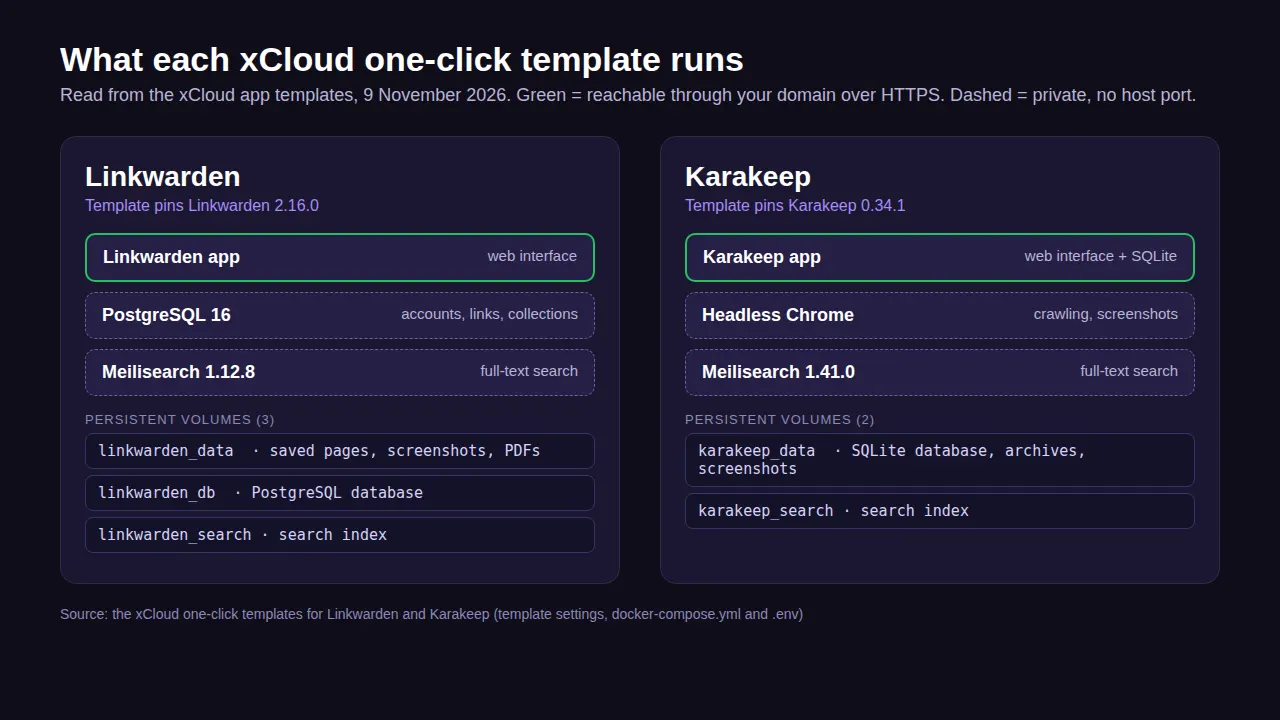
If you only remember one line: Karakeep needs more server and one extra setup step; Linkwarden needs one more volume in your backups.
Linkwarden vs Karakeep at a Glance
| Factor | Linkwarden | Karakeep |
|---|---|---|
| Best at | Preserving and sharing links | Capturing anything you want to keep |
| What you can save | Links, image and PDF uploads | Links, notes, images, PDFs |
| Page archive | Screenshot, PDF and single HTML file per page | Full-page archive, screenshots, video archiving |
| Reading | Reader view with highlights and notes | Highlights, offline reading in the mobile app |
| Organizing | Collections, sub-collections, tags | Lists, tags, rule-based engine |
| AI | Optional AI tagging (Ollama or an OpenAI-compatible provider) | Optional AI tagging and summaries (OpenAI or Ollama) |
| Search | Full-text search, filter, sort | Full-text and semantic search, OCR on images |
| Collaboration | Shared collections, per-member permissions, public sharing | Shared lists |
| Apps | Browser extension, iOS and Android apps | Chrome, Firefox and Safari extensions, iOS and Android apps |
| Extras | RSS, API keys, SSO, Wayback Machine snapshots | RSS, REST API, CLI, SSO, importers |
| Data store | PostgreSQL | SQLite |
| Licence | AGPL-3.0 | AGPL-3.0 |
| xCloud minimum | 2048 MB RAM, 1 core, 10 GB disk | 3072 MB RAM, 2 cores, 10 GB disk |
Feature rows come from each project’s README on GitHub (Linkwarden, Karakeep), read on 9 November 2026. The last row comes from xCloud’s one-click templates.
What Is Linkwarden?
Linkwarden is a self-hosted, open-source, collaborative bookmark manager. Its own tagline is “Bookmarks, Evolved”, and its README says it exists to fight link rot: useful pages disappear, so it keeps a copy.
For every page you save, Linkwarden captures a screenshot, a PDF and a single HTML file. It can also send the page to the Wayback Machine. You read saved pages in a reader view where you can highlight text and add notes.
The other half of Linkwarden is teamwork. You organize links into collections and sub-collections, invite people to a collection, set each member’s permissions, and share links and their preserved copies publicly. Our full Linkwarden guide covers each feature in more detail.
What Is Karakeep?
Karakeep, previously called Hoarder, describes itself as “a self-hostable bookmark-everything app with a touch of AI.” The key word is everything: links, quick notes, images and PDFs all go into the same place.
Karakeep fetches titles, descriptions and images for links automatically. It archives full pages, runs OCR to pull text out of images, and can archive videos. Search covers everything you have stored, with both full-text and semantic search.
Its other strength is automation. AI tagging and summaries work with OpenAI or local models through Ollama, and a rule-based engine sorts what you save. Karakeep’s configuration docs say tagging is skipped unless you set an OpenAI key or an Ollama address, so nothing goes to an AI provider by default.
Linkwarden vs Karakeep: The 6 Differences That Actually Matter
1. What You Save
This is the sharpest dividing line. Linkwarden is link-first. You can upload images and PDFs, but the product is built around a web page and its preserved copies.
Karakeep is capture-first. A note, a screenshot from your phone, a PDF and a link all sit in one timeline. If your saving habit looks like “dump it now, find it later”, Karakeep fits that habit better.
Rule of thumb: if most of what you save starts as a URL, Linkwarden. If it starts as anything, Karakeep.
2. How Pages Are Preserved
Both fight link rot, in slightly different ways. Linkwarden gives you three formats per page: screenshot, PDF and single HTML file, plus an optional Wayback Machine snapshot.
Karakeep makes a full-page archive, takes screenshots with its bundled Chrome, and can archive videos. If you cite sources for work, Linkwarden’s PDF copy is easy to hand to someone else. If you save video tutorials or talks, Karakeep covers what Linkwarden does not.
3. AI and Automation
Here the two diverge. Linkwarden offers optional AI tagging (Ollama or an OpenAI-compatible provider), according to its AI tagging docs. Your data stays on your server only when you use a local model through Ollama.
Karakeep goes further: AI tagging and summaries, a rule engine for custom sorting, OCR, RSS feeds that save new items automatically, and a CLI for scripts. The catch worth knowing for both: the AI parts only work once you connect a provider or run Ollama, data leaves your server if you use a hosted provider, and a local model needs its own memory.
4. Collaboration
Linkwarden was designed for collaboration. You can invite members to a collection, give each one different permissions, and share links publicly. That is what a small research team or agency needs.
Karakeep lets you collaborate on lists, which works well for a household or a couple of friends. It does not describe per-member permissions the way Linkwarden does. For a team with roles, Linkwarden is the safer pick.
5. Server Weight
On paper the two look similar: each runs three services. Linkwarden runs the app, PostgreSQL and Meilisearch. Karakeep runs the app, a headless Chrome and Meilisearch, with no separate database because it keeps data in SQLite. Chrome is the heavy one, and Karakeep’s template asks for 3072 MB of RAM and 2 cores against Linkwarden’s 2048 MB and 1 core.
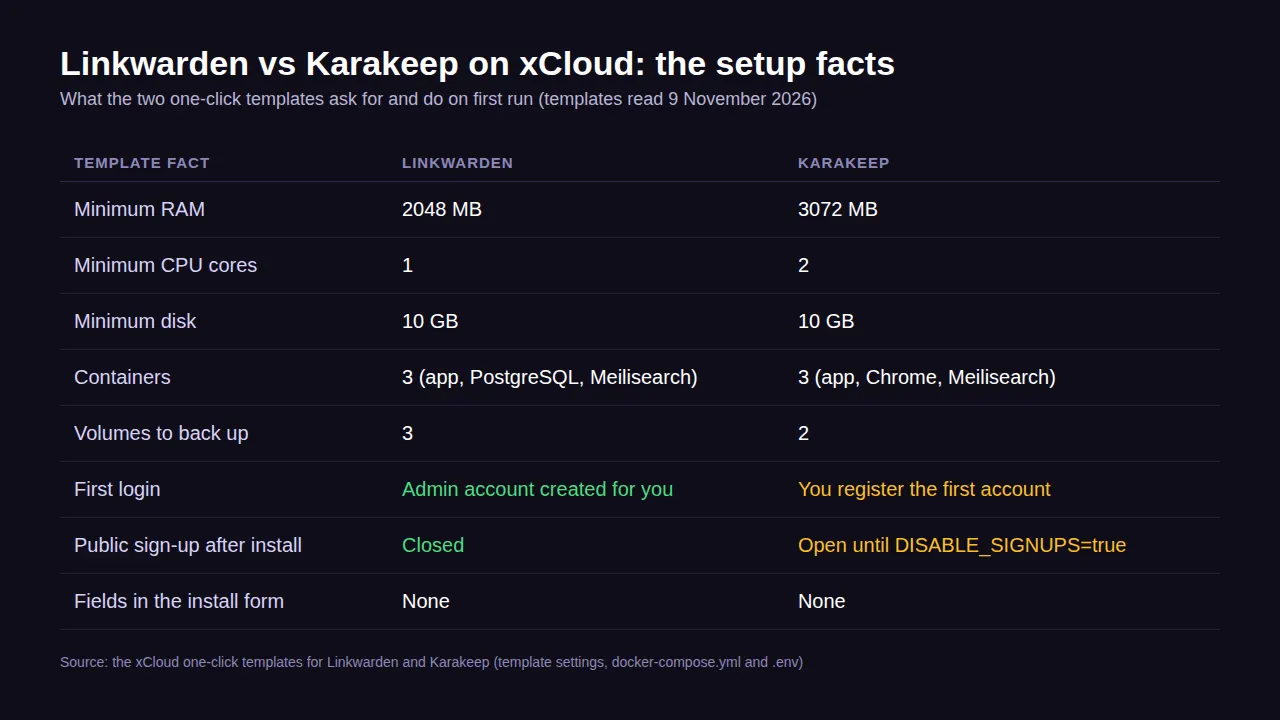
Both templates ask for 10 GB of disk as a floor. Archives grow with every saved page, so plan storage around how much you save, not around the install.
6. First Run and Sign-Up
On xCloud, Linkwarden is ready to use when the install finishes: open the Linkwarden Credentials card, sign in as xcloud-admin with the password shown there, and public sign-up is already closed.
Karakeep needs one more step. Register your own account first, then set DISABLE_SIGNUPS=true in Environment and click Save & Redeploy. Until you do, anyone who finds the address can create an account, so keep that window short.
Can You Use Linkwarden and Karakeep Together?
Yes. One way to split them is Linkwarden for shared team research and Karakeep for a personal “save everything” inbox.
Each runs in its own containers with its own domain and volumes, so they never share data. If you later want one tool, Karakeep’s README lists a Linkwarden importer, so moving from Linkwarden to Karakeep is supported.
Which One Fits Your Use Case?
| Your situation | Better fit | Why |
|---|---|---|
| Team research with roles | Linkwarden | Collections with per-member permissions |
| Citing sources for clients or papers | Linkwarden | PDF and HTML copy of every page |
| Annotating articles you read | Linkwarden | Reader view with highlights and notes |
| Saving notes, images, PDFs and links together | Karakeep | One timeline for every type |
| Hands-off tagging and sorting | Karakeep | AI tagging, summaries and rules |
| Archiving videos | Karakeep | Video archiving built in |
| Smallest server | Linkwarden | 2 GB RAM and 1 core minimum on xCloud |
| Leaving Pocket | Karakeep | Its README lists a Pocket importer |
Which One Should You Choose?
Choose Linkwarden if…
- ✅ Most of what you save is a web page
- ✅ You want a screenshot, PDF and HTML copy you can hand to someone else
- ✅ A team shares the library and needs different permissions
- ✅ You read and annotate in the app
- ✅ You want the smaller server
Linkwarden is the better shared research library.
Choose Karakeep if…
- ✅ You save notes, images and PDFs as often as links
- ✅ You want AI tagging, summaries or rules to do the sorting
- ✅ You want OCR and semantic search across everything
- ✅ You save videos
- ✅ You can give it 3 GB of RAM and 2 cores
Karakeep is the better personal “save everything” inbox.
Host Linkwarden or Karakeep on xCloud
Both apps run all the time: the browser extension and mobile apps need your server online to save anything. So the real choice is where it runs. You can build the stack yourself on a VPS with Docker Compose, use the project’s own paid cloud, or deploy it from xCloud’s One Click Apps on a server you own.
On xCloud the steps are the same for both:
- Go to Sites, click New Site, open One Click Apps and choose Linkwarden or Karakeep.
- Pick an Nginx server (xCloud installs Docker for you), enter a site title, and choose Go Live with your domain or Demo Site to test first.
- Click Create. xCloud starts the app with its database or Chrome and its search service, generates the secrets, and adds free SSL. The database and search stay private, so the app is only reachable through your domain.
The install form has no app-specific fields for either app. 👉 For the full walkthrough with screenshots, follow Linkwarden Docker hosting on xCloud; Karakeep follows the same one-click app template flow.
After that, the two hosting pages explain what each template sets up: Linkwarden hosting and Karakeep hosting. Both list a 6 GB Cloud VPS at $24.99 a month, or you can connect a server you already have. Browse the rest of the bookmark and reading apps on One Click Apps.
Deploy the one that fits, on a server you own, in a few minutes.
What xCloud Does Not Do (Honest Limits)
Updates are not automatic. Each app stays on the version it was installed with: Linkwarden 2.16.0 on the LINKWARDEN_IMAGE line and Karakeep 0.34.1 on the KARAKEEP_IMAGE line in Environment. That image line shows the version followed by a long fixed ID after @sha256. You choose when to upgrade: take a backup, read the app’s release notes, then follow Update a one-click app. When you upgrade, change the version and remove or update that ID, or the old version keeps running. For Karakeep, a new Meilisearch version can also need its search index rebuilt.
AI is not set up for you. Neither template connects OpenAI or Ollama. If you want AI tagging, you add the settings yourself, and a local model needs more memory than the minimums above.
Backups are yours to schedule. On paid plans, go to Backup → Previous Backups and click Backup Now, or turn on Automatic Backup under Backup → Backup Settings. Back up all of an app’s volumes together: three for Linkwarden, two for Karakeep. See Backup and restore Docker apps.
We have not benchmarked the two. The numbers in this post are each template’s stated minimums, not measured usage. Heavy importing, many screenshots at once, or a large archive can need more.
Undoing it is simple. To stop using one, take a backup or export your bookmarks from inside the app, then delete the site from your dashboard.
Pick Your Bookmark Manager and Stop Losing Links
If you want a shared, well-preserved research library, start with Linkwarden. If you want one place for everything you save, with automation doing the sorting, start with Karakeep.
Either way, the decision is easy to reverse: Karakeep can import from Linkwarden, and both are open source. This week, deploy one on a demo site, save twenty links you actually care about, and see which one you open again.
If you want the bigger picture on running apps yourself versus paying someone to, read self-managed vs managed hosting. If Docker itself is new to you, start with what Docker Compose is.
If you have found this blog helpful, feel free to subscribe to our blogs for valuable tutorials, guides, knowledge, and tips on web hosting and server management. You can also join our Facebook community to share insights and engage in discussions.
Frequently Asked Questions
Is Karakeep better than Linkwarden?
Neither is better for everyone. Karakeep is better if you save more than links (notes, images, PDFs, videos) and want AI tagging and rules. Linkwarden is better if you want team collections with per-member permissions and a preserved screenshot, PDF and HTML copy of every page.
Is Karakeep the same as Hoarder?
Yes. Karakeep was previously named Hoarder, and its README says so. Older guides, apps and Docker examples may still use the old name, but it is the same project under the AGPL-3.0 licence.
Can I move my bookmarks from Linkwarden to Karakeep?
Yes. Karakeep’s README lists a Linkwarden importer, along with importers for Chrome, Pocket, Omnivore and Tab Session Manager. Run a small test import first and check a few archived pages before you move everything.
Which one needs less RAM?
Linkwarden. On xCloud its one-click template asks for at least 2048 MB of RAM and 1 CPU core, against 3072 MB and 2 cores for Karakeep, which also runs a separate headless Chrome container. Both ask for 10 GB of disk, and archives grow from there.
Are Linkwarden and Karakeep free?
Yes, both are open source under AGPL-3.0, so self-hosting has no licence fee and you pay only for the server. As of November 2026, both projects also sell a hosted cloud plan (Linkwarden Cloud and Karakeep Cloud) if you would rather not run a server. See Linkwarden pricing and Karakeep pricing.
Can I run Linkwarden and Karakeep on the same server?
Yes, if the server has room for both. Each one-click app runs in its own containers with its own domain and volumes, so they do not share data. Add the two minimums together, about 5 GB of RAM and 3 cores, and leave headroom for archiving.