

Linkwarden Docker Hosting: Deploy & Host Linkwarden in One Click
Updated September 8, 2026 · 6 min read
Linkwarden Docker hosting on xCloud lets you deploy the open-source bookmark manager from the xCloud app-create flow: Sites → New Site → One Click Apps → Linkwarden → Docker + NGINX server → Demo Site or Go Live → Create. You do not need to start with a custom docker-compose.yml; xCloud creates the app as a managed Docker site and keeps domain, SSL, logs, backups, and updates in the site dashboard.
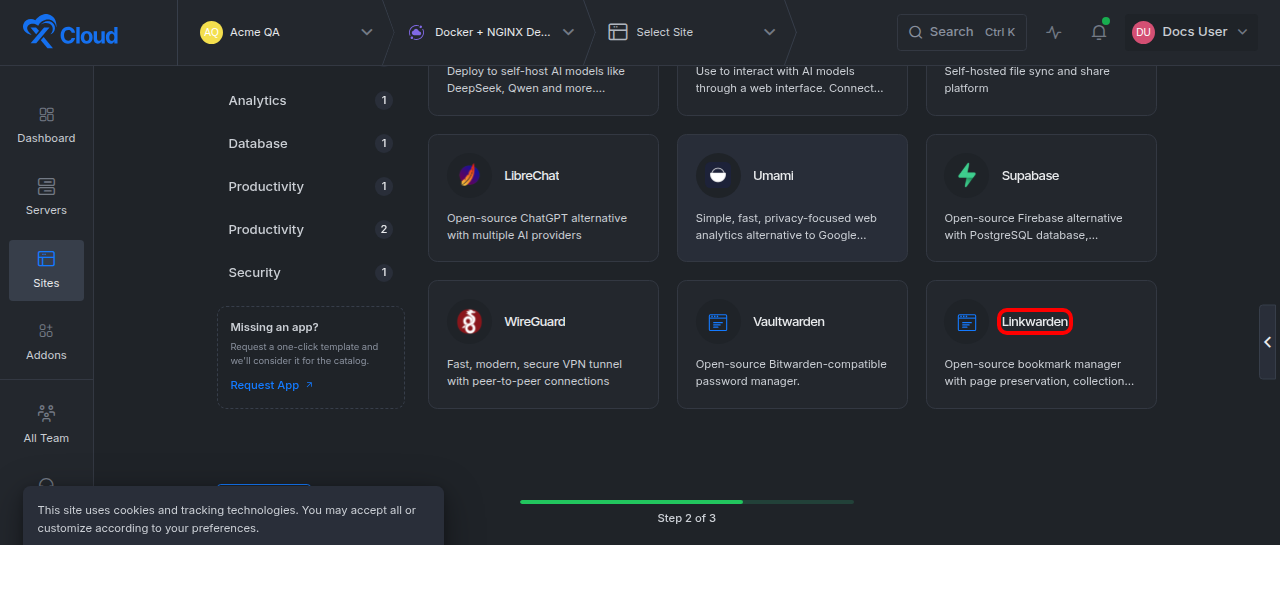
Linkwarden Docker hosting one-click app selected in the xCloud One Click Apps catalog
Table of contents
- Why use xCloud for Linkwarden hosting?
- Requirements
- One-click deployment steps
- Post-deployment setup
- xCloud vs Railway vs Coolify
- Troubleshooting
Why use xCloud for Linkwarden hosting?
Linkwarden can become a long-running knowledge base, not just a small bookmark app. Saved pages, archived content, screenshots, search indexes, and team activity all affect storage and maintenance. xCloud keeps deployment short while still giving operators a dashboard for the site, server, domain, SSL, backups, logs, and updates.
| Need | How xCloud handles it |
|---|---|
| Fast app start | Choose Linkwarden in One Click Apps and create the site from the dashboard. |
| Server choice | Deploy to an existing or xCloud-managed Docker + NGINX server. |
| No custom Compose authoring | The template drives the Docker setup through the xCloud create-site flow. |
| Safe review path | Use Demo Site before attaching a production domain. |
| Operations after launch | Manage domain, SSL, logs, backups, site settings, and updates from xCloud. |
Linkwarden hosting requirements
| Requirement | Recommendation | Why it matters |
|---|---|---|
| Server stack | Docker + NGINX | This xCloud flow deploys Linkwarden as a Docker-based app. |
| Database | PostgreSQL-backed app data | Linkwarden stores users, collections, links, metadata, and app state in the database. |
| Storage | Plan for archive growth | Preserved pages, screenshots, uploaded files, and indexes can grow over time. |
| Domain and SSL | Use Go Live for production | Secure login sessions and team access require HTTPS. |
| Email/SMTP | Configure for team workspaces | Invites and password reset flows need working email. |
| Resources | Increase memory/storage for heavy archiving | Search and archive workloads need more headroom than a small personal link list. |
Linkwarden template components
| Component | Purpose | Operational note |
|---|---|---|
| Linkwarden application service | Runs the web app and API. | Verify login, collections, save flow, and archive flow after deployment. |
| PostgreSQL database | Stores users, collections, links, metadata, and settings. | Back it up before updates or migration. |
| Search/indexing service | Supports fast lookup across saved links and preserved content. | Give it enough memory for larger teams. |
| Archive/persistent storage | Stores preserved pages, screenshots, and uploaded content. | Monitor disk growth and include it in backups. |
| NGINX routing and SSL | Routes and secures the Demo Site or custom domain. | Use Go Live for production team access. |
Deploy Linkwarden in one click on xCloud
1. Open New Site
In xCloud, go to Sites and click New Site. Select the Docker + NGINX server that should host Linkwarden.
Expected result: xCloud opens the create-site screen for the selected server.
2. Choose One Click Apps
Select One Click Apps to open the app catalog instead of a Git deployment or manual upload flow.
Expected result: You can search and select one-click app templates.
3. Select Linkwarden
Search for Linkwarden or browse the Productivity category, then select the Linkwarden app card.
Expected result: xCloud opens the Linkwarden app-create screen for the selected Docker + NGINX server.
4. Add site details
Enter a clear Site Title, such as Linkwarden, Research Bookmarks, or Team Bookmarks. Add tags if your team uses them.
Expected result: xCloud prepares the site identity and applies the Linkwarden template.
5. Choose Demo Site or Go Live
Choose Demo Site for a temporary review URL, or choose Go Live when the production domain is ready.
Expected result: xCloud knows whether to create a temporary demo URL or attach your own domain.
6. Review generated settings and click Create
Review generated app URL, credentials, database settings, secret values, and template options. Store generated credentials in a secure password manager, then click Create.
Expected result: xCloud provisions the Linkwarden Docker site and opens deployment progress or the site dashboard when ready.
Post-deployment Linkwarden setup
| Setup area | What to do | Success check |
|---|---|---|
| Domain and SSL | Open the Linkwarden URL and confirm HTTPS. | The app loads without certificate warnings. |
| First user | Create the first admin/user account and save credentials securely. | You can log in and access the dashboard. |
| Registration | Disable open registration unless the workspace should be public. | Unknown users cannot self-register. |
| SMTP | Configure email for invites and password reset. | A test invite or reset email is delivered. |
| Save flow | Save a public test bookmark into a collection. | The bookmark appears with title and metadata. |
| Archive flow | Preserve a public page and wait for processing. | The archived page or screenshot is available. |
| Search flow | Search for the saved bookmark after indexing. | The bookmark appears in search results. |
| Backups | Back up database and persistent archive storage. | A recent backup exists before real team use. |
Resource and storage planning
| Workload | What grows | Planning note |
|---|---|---|
| Personal bookmarks | Small database and low archive storage. | A small Docker + NGINX server is usually enough to start. |
| Team knowledge base | More users, collections, links, and metadata. | Monitor database size and query performance. |
| Heavy page archiving | Screenshots, HTML snapshots, uploads, and preserved content. | Plan extra disk and backup retention. |
| Search-heavy workspace | Indexes and search service memory. | Increase memory before search becomes slow. |
xCloud vs Railway vs Coolify for Linkwarden
| Platform | Best for | Deployment model | Operational tradeoff |
|---|---|---|---|
| xCloud | Teams that want one-click app creation plus server/site operations in one dashboard. | New Site → One Click Apps → Linkwarden → Docker + NGINX server → Demo Site/Go Live → Create. | You manage the app as an xCloud site with domain, SSL, logs, backups, and updates. |
| Railway | Users already deploying services on Railway and comfortable with Railway projects. | Template-style deployment on Railway infrastructure. | Review runtime/storage settings for archive-heavy bookmark workloads. |
| Coolify | Users who want to self-host their own PaaS layer. | Service/app deployment inside a Coolify instance. | You also maintain the Coolify host, platform updates, and backups. |
Troubleshooting
| Symptom | Likely cause | Fix |
|---|---|---|
| Linkwarden page does not load | Deployment unfinished, container stopped, or domain not routed. | Check deployment progress, container health, and domain routing in xCloud. |
| Login or invite email fails | SMTP is missing or credentials are rejected. | Verify SMTP settings and sender authentication. |
| Saved page is not archived | Archive worker/service is still processing or unhealthy. | Check app services and retry with a public URL. |
| Search does not show a new link | Indexing is delayed or search service needs attention. | Wait for indexing, then check search/index health. |
| Disk usage grows quickly | Archive storage, screenshots, uploads, and indexes are expanding. | Review retention, increase storage, and confirm backups. |
FAQ
Can I deploy Linkwarden without writing Docker Compose?
Yes. In xCloud, choose Linkwarden from One Click Apps and create the site on a Docker + NGINX server.
What should I test before inviting a team?
Verify HTTPS, login, invite email, saving a bookmark, archiving a page, search, and backup coverage.
Why does Linkwarden need storage planning?
Bookmarks are small, but archived pages, screenshots, uploads, and search indexes can grow as the workspace saves more content.