
WP Engine to xCloud
Migrate from WP Engine to xCloud, Site by Site
xCloud copies each WordPress site from WP Engine to an xCloud server with a small migration plugin, onto a demo domain you test before DNS changes. It is for agencies and site owners leaving WP Engine. There is no migration fee: the free plan covers one server with 10 sites, and xCloud Managed servers start at $5/mo.
- Test every site on a demo domain while WP Engine stays live
- Files and database copied by the xCloud migration plugin
- Or ask the xCloud team to move eligible sites for free
What moves
What Comes Across, and What Stays on WP Engine
Comes with the migration
- Each WordPress site you migrate, one at a time
- Site files: WordPress core, themes, plugins and uploads stored on the site
- The site's database, all tables
- Your WordPress logins, users and content
- Site URLs, updated for the demo domain while you test
Stays behind or needs a step from you
- Files offloaded with WP Engine LargeFS are not in the copy. Download them separately and add them to the site. Guide
- WP Engine's own cache files and must-use plugins come across in the copy. Remove them from the xCloud site before you test. Guide
- WP Engine account settings, redirects and caching stay behind; xCloud has its own cache. Guide
- Mailboxes stay with your mail provider, or move to the xCloud MailBox add-on. Guide
- Your domain stays at its registrar; you only point DNS at xCloud. Guide
Can I move my WP Engine site with the plugin?
The plugin migration needs every line in the middle column. If one fails, use the other route. See Migrate Guru or a team migration.
| Check | xCloud migration plugin | Use instead |
|---|---|---|
| Access | Administrator login to the site's WordPress dashboard | No admin login: ask the xCloud team, or upload a zip with Manually Upload Website |
| Connection | The plugin connects with the token xCloud shows | Two-factor login, a security plugin or a host block stops it: try Migrate Guru |
| Files | Uploads stored on the site | LargeFS is on: download those files separately and add them after the copy |
| Site type | A WordPress site | Another app: set it up again on xCloud, for example from Git |
Ready? Create a free account and move your first WP Engine site.
Start for freeHow it runs
How Do I Move a Site from WP Engine to xCloud?
Six steps for each site, from backup to DNS. The full walkthrough is in the WP Engine migration guide.
Back up on WP Engine
In the WP Engine User Portal, create a backup and wait until it completes. Prepare and download the ZIP: WP Engine keeps a prepared download for up to 7 days.
List what is WP Engine-only
Note LargeFS files, redirects, email, scheduled tasks and the WP Engine cache and must-use plugins. These need a plan on xCloud.
Start the migration in xCloud
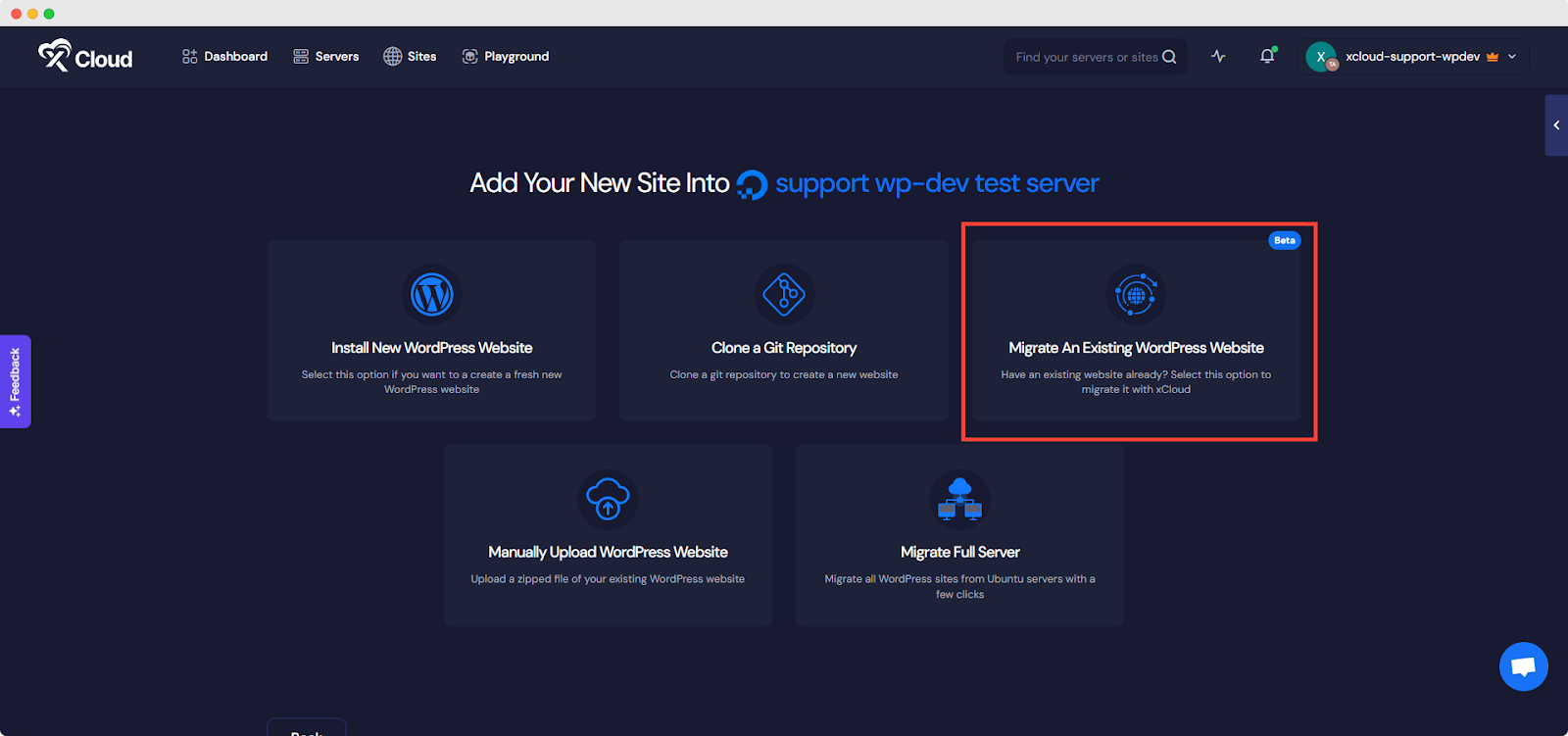
Click Add New Site, choose your server, then Migrate An Existing WordPress Website. Enter the site URL and choose Demo Site.
Connect the plugin
Install the xCloud migration plugin on the WP Engine site and paste the Authentication Token. Pick All Database Tables & Corresponding File System and start the copy.
Clean up and test
Remove WP Engine-only cache files and must-use plugins from the copy. Check pages, admin, forms, orders and email on the demo domain while WP Engine stays live.
Go live
Open Go Live, enter your real domain, point DNS at the xCloud server, click Verify My DNS and turn on SSL.
Downtime, DNS and rollback
Does Migrating from WP Engine Cause Downtime?
Your site stays up during the copy. The risk is in the switch to xCloud, so plan that part.
The site stays online during the copy
xCloud copies from WP Engine while it keeps serving visitors. Nothing on WP Engine is switched off.
Pause new orders and edits before the switch
Orders or posts made after the copy are not merged for you. For shops and membership sites, pause new orders and edits, then copy again before you switch DNS.
DNS is the switch
Change only the web records for the site. Keep mail and verification records as they are, then check SSL.
Rollback means pointing back
Keep the WP Engine site and its backup until you are sure. Going back is a DNS change. Copy any orders or edits made on xCloud since the switch back to WP Engine by hand.
What to know before you start
- This is a site-by-site move. xCloud's full server migration does not connect to WP Engine, so each site is migrated on its own.
- WP Engine account settings, redirects and platform caching do not come across. Set up what you need on xCloud.
- Do not reuse WP Engine's wp-config.php. The xCloud site uses its own database settings.
- It is not zero downtime. There is no built-in final sync, so for busy sites, pause new orders and edits for a short time before you switch DNS.
- Going live from a demo site is one way: the site cannot go back to its demo domain afterwards.
Still comparing? Read xCloud vs WP Engine or thebest WP Engine alternatives. Running a store? SeeWooCommerce hosting and WordPress hosting on xCloud. Moving from somewhere else? See free website migration.
Which migration do I need?
| You are moving | Use |
|---|---|
| A WordPress site on WP Engine, with dashboard access | WP Engine migration guide |
| The xCloud plugin cannot connect or finish | Migrate with Migrate Guru |
| Sites on a Cloudways server | Migrate from Cloudways |
| A RunCloud server | Migrate from RunCloud |
| You would rather the xCloud team does it | Request a team migration |
Before you switch DNS, make sure you know how to restore: site backups in xCloud andissuing SSL after DNS moves.
Moving during Black Friday?
Until 4 Dec 2026: a lifetime control panel from $199 (save up to 77%) and Cloud VPS up to 65% off.
See the Black Friday dealPeople who moved to xCloud
In their own words, unedited.
I had 150 sites on cloudways and am in the process of moving them to xcloud. Much faster and better priced.
 Dan Spinoza
I too have moved over to xCloud. It's pretty sweet. One click n8n and uptime Kuma apps
 John Aperture
I went from Cloudways to xCloud. No intention on switching in the foreseeable future.
 Blaine Moore
Trust me when I say, once people explore the potential of xCloud they gonna switch from other panels, just keep delivering the best tech, lots of love for the team 😍😍
 Rahul Singh
WP Engine Migration Questions
What people ask before they move a site off WP Engine.
Can I move every site from WP Engine at once?
No. WP Engine is not a source for xCloud's full server migration, so you move each WordPress site with the migration plugin, one at a time. The xCloud team can also move eligible sites for you.
What do I need from WP Engine to migrate?
An administrator login to each site's WordPress dashboard, access to the WP Engine User Portal for a backup, and access to your domain's DNS. You do not need SSH or root access.
What happens to WP Engine's must-use plugins and cache files?
Remove the WP Engine-only cache files and must-use plugins from the xCloud copy, as the WP Engine migration guide lists. Keep must-use plugins that belong to your own site only after you know what they do.
What if my site uses WP Engine LargeFS?
Files offloaded with LargeFS are not part of the normal copy. Download them separately and add them to the xCloud site before you test it.
Will my site go down during the migration?
Not during the copy: WP Engine keeps serving visitors. It is not zero downtime, though. Changes made after the copy are not merged, so for busy sites, pause new orders and edits for a short time before you switch DNS.
How long does a WP Engine migration take?
It depends on the size of the site's files and database. xCloud does not promise a time.
Can I roll back to WP Engine?
Yes, if you keep the WP Engine site and its backup until you are sure. Rolling back means pointing DNS at WP Engine again. You also need to copy back any orders or edits made on xCloud since the switch.
Can the xCloud team migrate my WP Engine sites for me?
Yes. You can request a free standard WordPress migration for eligible sites from the xCloud team, or run the migration yourself from the dashboard.
What does moving from WP Engine to xCloud cost?
The migration itself has no fee. On a Self-managed server (your own server connected to xCloud), the free plan covers one server with up to 10 sites, and you pay your server provider. xCloud Managed servers start at $5/mo.

Ready to Leave WP Engine?
Create a free account, move your first WP Engine site to a demo domain, and test it before anything goes live.