


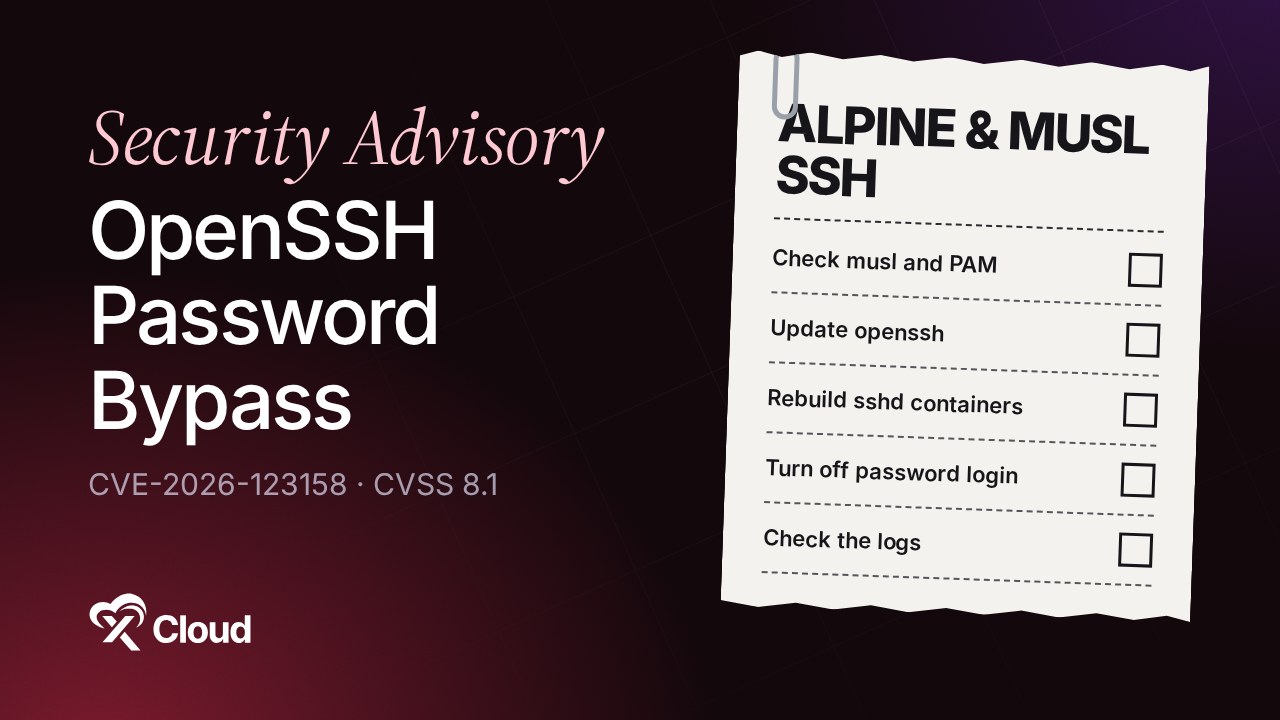
CVE-2026-123158 is an OpenSSH password bypass on Alpine Linux and other musl-based systems where sshd checks passwords without PAM. On accounts that were never meant to take a password, such as key-only users, any very long password can log in. The fix is OpenSSH 10.6p2, released on 5 November 2026.
The bug has a short reach. Most web servers run Ubuntu or Debian and are not affected at all. The risk sits in the places people forget: an Alpine jump host, an SFTP container, a Git server in Docker, or a router.
This guide is for anyone who runs SSH: on a VPS, in containers or on appliances. You will learn what the bug is in plain words, how to tell if you are exposed, how to fix it, and where else to look. It shows no exploit steps.
TL;DR
Short on time? Here is the whole guide in a few lines:
- CVE-2026-123158 lets a password longer than 256 characters log in to accounts that should never take a password. The finder gives the range as 257 to 1,024 characters.
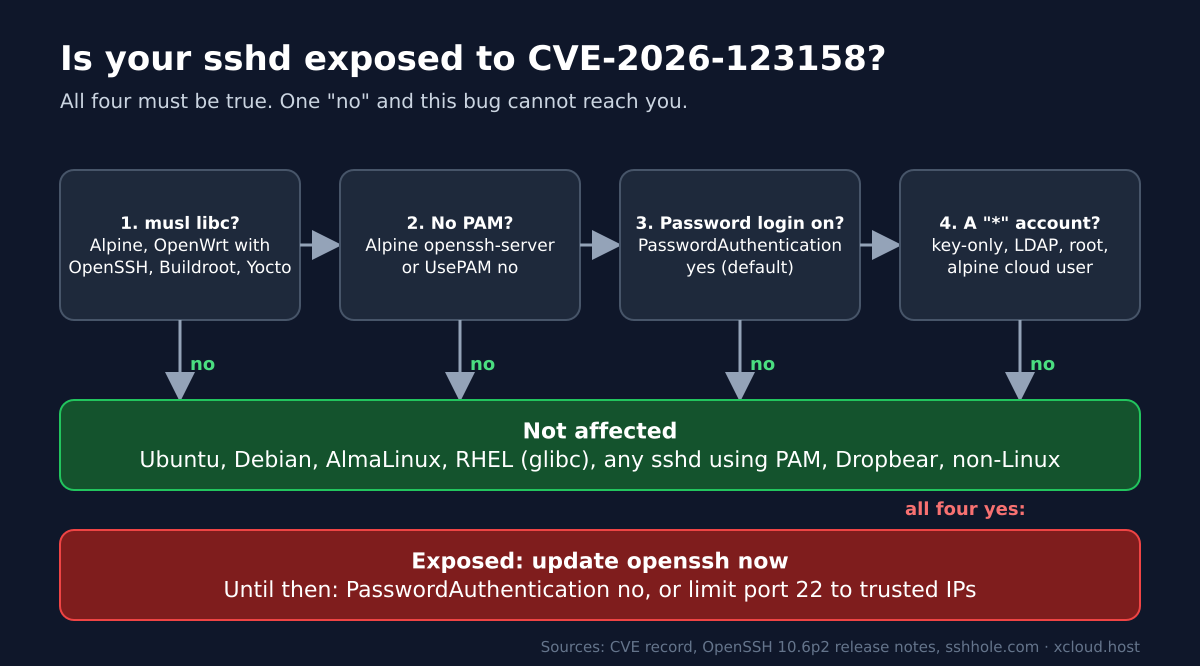
- Exposed only if all four are true: musl libc (mainly Alpine Linux), sshd without PAM, password login on (the OpenSSH default) and an account whose shadow password field is
*. - Not affected: Ubuntu, Debian, AlmaLinux, the RHEL family and any sshd using PAM. The finder also lists Dropbear as safe.
- Fix: OpenSSH 10.6p2, or on Alpine
apk upgrade openssh, then restart sshd. - Containers that run sshd must be rebuilt or re-pulled. A restart keeps the old package.
- Can’t update today? Set
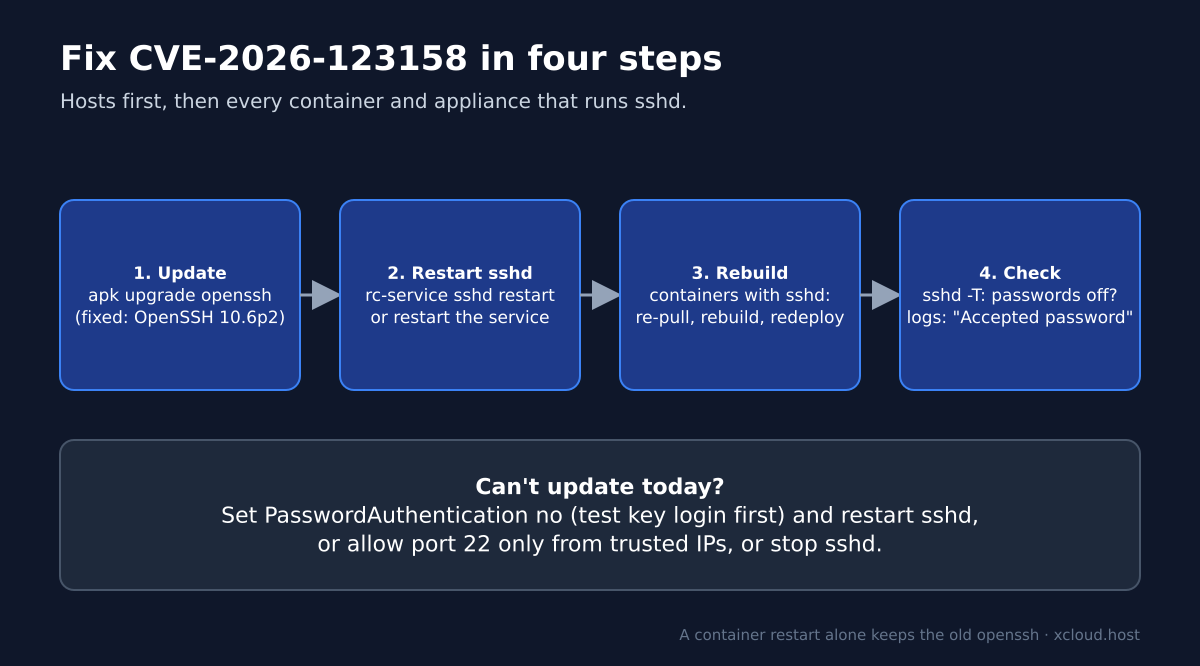
PasswordAuthentication no(test key login first), or allow port 22 only from trusted IPs. - Check your logs. The finder says no one is known to have noticed the bug before, but someone may have.
- On xCloud? Servers run Ubuntu, which this bug can’t reach, and have password SSH off by default, so the server itself needs nothing. Run the four checks inside any Docker app that runs sshd on Alpine.
Your Main Server Is Probably Fine. Look at What Runs Beside It
The exposed machines are rarely the ones on your server list. A standard Ubuntu or Debian server is out of scope. The Alpine boxes and containers you set up once and forgot are not.
The table below sorts the usual suspects, using the facts from the finder’s sshhole.com write-up and the OpenSSH 10.6p2 release notes, checked on 6 November 2026.
| Where sshd runs | Exposed? | Why |
|---|---|---|
| Ubuntu, Debian, AlmaLinux, RHEL servers | No | glibc, and sshd checks passwords through PAM |
Alpine server or VM with openssh-server |
Yes, until updated | musl, no PAM, password login on by default |
| Alpine bastion or jump host | Check it | Small Alpine hosts often run the standard, non-PAM openssh-server |
| SFTP or backup container on Alpine with sshd | Check it | Same package; rebuild needed |
| Git server in Docker with its own sshd | Check it | Run the four checks below inside the container |
wordpress:fpm-alpine, nginx:alpine |
No | These images don’t run sshd |
| OpenWrt router | Check it if it runs OpenSSH | The finder lists OpenWrt as a musl system and Dropbear as safe |
| Buildroot or Yocto appliances | Check it | musl builds of OpenSSH without PAM are possible |
What Is CVE-2026-123158?
It is a mix-up between “no password allowed” and “this password failed”. On Linux, an account that should never accept a password often has a single * in its /etc/shadow entry. sshd hashes the password you type and compares the result with that field.
The finder explains that on musl libc, a very long password makes the hashing step return * too. That * then matches the locked account’s *, and sshd lets the login through. The finder’s write-up says such an account takes any password between 257 and 1,024 characters. The CVE record is the place to watch for the official score.
Think of a door with a sign that reads “no key fits this lock”. A broken key reader, given an oversized key, prints the same words on its screen. The guard sees the two messages match and opens the door.
A Few Things Worth Knowing
- How old it is: the finder traces it back to OpenSSH’s 2016 fix for CVE-2016-6210.
- Whose bug it is: the OpenSSH 10.6p2 release notes say the team considers “the root cause of this bug to be outside sshd, but it is exploitable via sshd and can be avoided there”. So the fix ships in sshd.
- Accounts with a real password hash are not bypassed. Only
*accounts are at risk. - Past attacks: the finder says that, as far as anyone knows, nobody noticed the bug, but someone may have. Check your logs (see below).
Are You Exposed? Four Checks
Connect to the Alpine host, or open a shell in the container. None of these commands change anything. Run them as root. Alpine often uses doas instead of sudo, so on a normal user account put doas (or sudo, if you set it up) in front of each command. Output can look a little different between Alpine releases and container images.
Step 1: Is It musl?
ldd --version 2>&1 | head -1A line mentioning musl means yes. A line mentioning GLIBC or GNU libc means you are not affected and can stop here.
Step 2: Does sshd Use PAM?
apk info -e openssh-server-pam
sshd -T 2>/dev/null | grep -i usepam
On Alpine, PAM support comes in the separate openssh-server-pam package. If it is installed and usepam yes shows, passwords go through PAM and this bug does not apply.
Step 3: Is Password Login On?
sshd -T | grep -i passwordauthenticationpasswordauthentication yes is the OpenSSH default. no means the bug can’t be reached over SSH.
Step 4: Which Accounts Have a * Password Field?
awk -F: '$2 == "*" {print $1}' /etc/shadowAny name printed here is an account an attacker could log in to while the other three checks are yes. The finder says root on Alpine 3.16 and later has *, so root may be on the list.
How to Fix CVE-2026-123158
Update openssh, restart sshd, then go container by container. The fix ships in the openssh package, even though the root cause sits in the C library.
Step 1: Update openssh
On Alpine, as root (or with doas):
apk update
apk upgrade openssh
On a system that builds OpenSSH from source, move to OpenSSH 10.6p2. Older Alpine branches may keep an older version number with the fix added, so check Alpine’s security tracker for your branch instead of comparing numbers.
Step 2: Restart sshd
rc-service sshd restartThe running sshd keeps the old code until it restarts. Keep your current session open until a new login works.
Step 3: Rebuild Every Container That Runs sshd
A container restart is not enough. It starts the same image with the same old package. Pull the patched image, or rebuild your own image so its apk layer installs the new openssh, then recreate the container:
docker compose pull
docker compose up -d --build
If you added sshd to an Alpine image yourself, the rebuild is your job. Nobody upstream will ship it for you.
Step 4: Turn Off Password Login Where You Don’t Need It
Even after the update, key-only SSH removes this whole class of bug. Add a key, test it, then run these as root. On a normal user account, put doas before tee and before rc-service:
echo "PasswordAuthentication no" | tee /etc/ssh/sshd_config.d/no-passwords.conf
rc-service sshd restart
Check that /etc/ssh/sshd_config has an Include line for the sshd_config.d folder, and that sshd -T | grep -i passwordauthentication now shows no. If it doesn’t, put the line in sshd_config itself.
Until You Can Update
If a host can’t take the update today, shrink who can reach it. In order of preference:
- Set
PasswordAuthentication noand restart sshd, after you confirm key login works. - Allow port 22 only from trusted IP addresses in your firewall or cloud security group.
- Stop sshd on hosts that don’t need it, such as a container that only needed SSH during setup.
How to Check If Someone Already Used It
A successful password login to an account whose shadow field is * should never happen. That account has no password, so any such line is a red flag.
grep "Accepted password" /var/log/messagesRun it as root. On Alpine, sshd usually logs to /var/log/messages (busybox syslog). Containers often send logs elsewhere, such as docker logs, so search there too. Look for root or your key-only deploy user. If you find a match, treat the host as compromised: take it offline, rebuild it from a known-good image and rotate every key and secret it held. Our security incident checklist walks through the order.
What This Fix Does Not Do
- It does not touch musl. The workaround lives in sshd. Other programs on the same system that check passwords the same way are outside this fix.
- It does not protect accounts with weak real passwords. Brute force is a separate problem; key-only login is the answer there.
- It does not update your containers. Each image needs its own rebuild.
- Undo: if you turned off password login and a tool breaks, delete the
no-passwords.conffile and restart sshd. Do this only after openssh is updated.
Quick Checklist
- Listed every Alpine host, container and appliance that runs sshd
- Checked musl, PAM, password login and
*accounts on each - Ran
apk upgrade opensshand restarted sshd - Rebuilt or re-pulled every container that runs sshd
- Set
PasswordAuthentication nowhere keys are enough - Limited port 22 to trusted IPs
- Searched the logs for “Accepted password” on
*accounts
What This Means on an xCloud Server
The server itself needs nothing. Here is why, and the one place to look.
Why xCloud servers are not affected:
- Every xCloud server runs Ubuntu. Ubuntu checks SSH and SFTP passwords in a way this bug can’t reach.
- xCloud turns off SSH password login when it prepares a server, so logins use keys. See how to lock down your server without breaking xCloud and sudo users and site users. You can let a site user sign in with a password under Access Data → SSH/sFTP → SSH Authentication → Password (see sudo users and site users); this bug still can’t reach that login on Ubuntu, but keys stay the safer default. Add one with how to generate and add SSH keys.
- Docker apps run on the same Ubuntu server. When you connect to your server over SSH, you reach Ubuntu’s own login service, not a container.
Where to look:
- A Docker app that runs sshd in an Alpine image is your one check. Run the four checks inside the container. Re-pull a patched image and redeploy it, following update a one-click app and edit its Docker Compose. More on running containers: Docker hosting on xCloud.
Good to know:
- In Security → Firewall Management, follow the SSH Lockdown guide to allow SSH only from your own IP addresses. Keep your current IP on the allowed list, or you lose SSH access from it.
- What xCloud does not do: it does not manage machines outside your xCloud servers. Your Alpine jump hosts, routers and laptops stay yours to check.
For our October 2026 Linux kernel advisory, see our CVE-2026-98432 Linux kernel TCP guide. For a wider checklist, read our VPS security guide and how to automate security updates. Compare plans on our pricing page.
Patch Your Alpine sshd and Turn Off Password Login
CVE-2026-123158 is narrow but sharp. It skips every Ubuntu and Debian server, and on an Alpine host with password login on, where root’s password field is *, it can lead to a root login.
This week, list every place sshd runs on Alpine, update openssh, rebuild the containers and turn off password login where keys are enough. The step people skip is the container rebuild, so do that one first.
If you have found this blog helpful, feel free to subscribe to our blogs for valuable tutorials, guides, knowledge, and tips on web hosting and server management. You can also join our Facebook community to share insights and engage in discussions.
Frequently Asked Questions
What is CVE-2026-123158?
It is a password bypass in sshd on Linux systems built on musl libc when sshd checks passwords itself, without PAM. For accounts that were never meant to take a password, the finder’s write-up says any password between 257 and 1,024 characters can be accepted. It is fixed in OpenSSH 10.6p2.
Is Ubuntu or Debian affected by CVE-2026-123158?
No. Ubuntu, Debian, AlmaLinux and the RHEL family use glibc, and their sshd checks passwords through PAM. The bug needs musl libc and sshd running without PAM, which is the standard setup on Alpine Linux.
Which accounts can an attacker log in to?
Only accounts whose password field in /etc/shadow is a single asterisk, meaning the account was never meant to take a password. That can include key-only users and LDAP users. The finder says root on Alpine 3.16 and later also has this field. Accounts with a real password hash are not bypassed.
Is restarting my Docker container enough?
No. A restart runs the same image with the same old openssh package. Pull or rebuild the image with the patched openssh, then redeploy the container.
What can I do if I can’t update openssh today?
Set PasswordAuthentication no in sshd_config and restart sshd, after you confirm key login works. You can also allow port 22 only from trusted IP addresses, or stop sshd until you can update.
Do xCloud servers need a fix for CVE-2026-123158?
No action is needed for the server itself. Every xCloud server runs Ubuntu, which checks SSH and SFTP passwords in a way this bug can’t reach. xCloud also turns off SSH password login by default. If you run a Docker app with sshd in an Alpine image, run the four checks inside the container, then re-pull a patched image and redeploy it.