

On 20 October 2026, the PHP project gave one day’s notice of a critical PHP security release. Within hours, details of the bugs behind it had leaked and proof-of-concept exploit code was public. By the next morning, hosting teams everywhere were racing to protect servers before the fix even existed. We covered that week in detail in our PHP2Shell post.
PHP2Shell was a loud reminder of something that is true every week: PHP security is not a one-time setting. It is a mix of the PHP version you run, the code and plugins on top of it, the way your server is configured and how quickly someone applies a fix when the next advisory lands.
This guide explains the PHP security risks that matter in 2026, why outdated PHP versions are a bigger problem than most site owners think, how to update PHP safely, what a good host should handle for you and how xCloud protects your servers and sites. It ends with a checklist you can work through this week.
TL;DR: PHP Security in 60 Seconds
Short on time? Here is the whole guide in a few lines:
- PHP security has four layers: the PHP runtime, your application code, your plugins and themes and your server configuration. A fix in one layer does not cover the others.
- Only PHP 8.2, 8.3, 8.4 and 8.5 get security fixes from the PHP project today. PHP 8.2 loses security support on 31 December 2026 so plan to move now.
- PHP 8.1 and older are end of life. Some vendors backport fixes but you cannot count on that for the next vulnerability.
- Update PHP safely: back up, test on staging, update plugins first, switch PHP then monitor. Keep a rollback plan.
- Your host should patch PHP quickly, isolate sites, firewall the server and tell you plainly what is left for you. You still own your code, plugins and passwords.
- On xCloud, you get one-click PHP patching with Scan Patch, optional automatic PHP security updates, per-site PHP versions, vulnerability scanning and a team that applied a PHP2Shell mitigation eight hours before the official PHP fix.
Why PHP Security Matters for Every Site Owner
PHP runs WordPress, WooCommerce, Laravel, Drupal, Magento and countless custom apps. If your site is built on any of them, PHP reads every request before your application code runs. A flaw at that level sits below every plugin, firewall rule and login form you have added.
That is what made PHP2Shell so serious. The PHP security team rated both bugs CVSS v4.0 9.2 and its security advisory said all PHP installations serving web requests were at risk, including PHP-FPM, Apache with mod_php, php-cgi, FrankenPHP and LiteSpeed.
Most PHP security problems are less dramatic. They are an old PHP version nobody upgraded, a plugin with a known flaw, an upload folder that can run PHP files or a server that was never hardened. Those quiet problems cause far more compromised sites than headline CVEs and the fixes are well known.
The Four Layers of PHP Security Risk
Think of a PHP site like an apartment building. The PHP runtime is the front door and the foundation, your application code is the floor plan, plugins and themes are the fixtures tenants bring in and the server configuration is the building’s locks and alarm system. A strong lock on one apartment does not help if the front door is open.
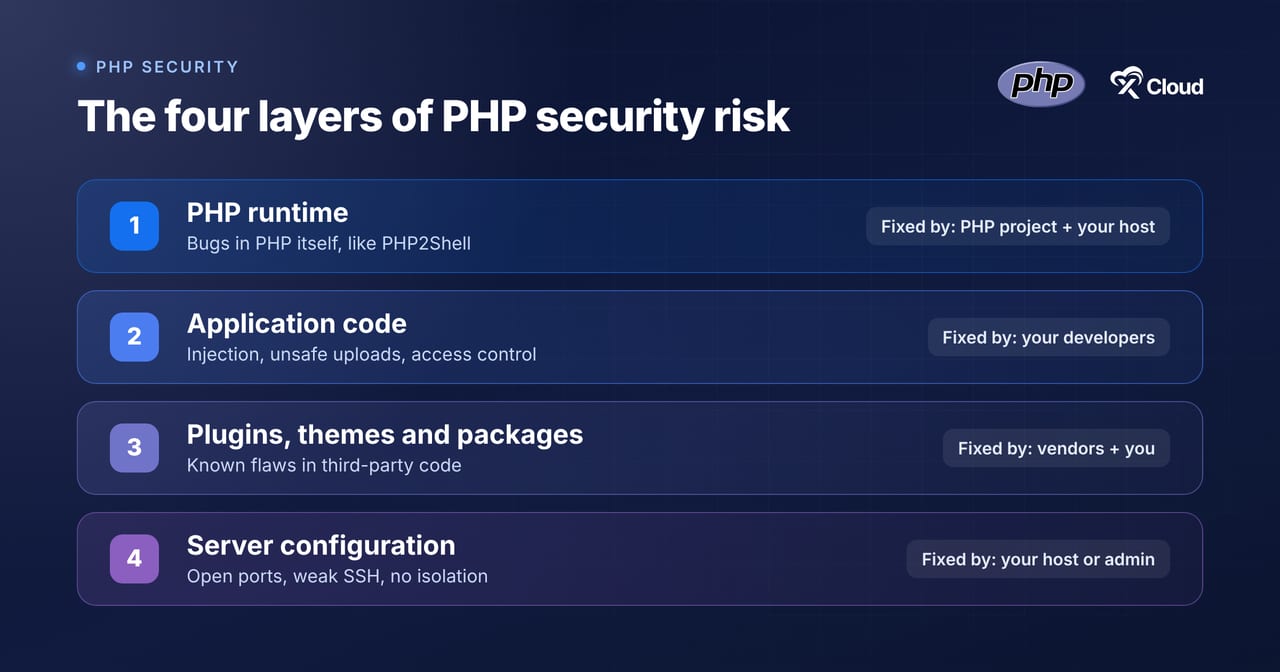
| Layer | Example risk | Who fixes it | How it gets fixed |
|---|---|---|---|
| PHP runtime | PHP2Shell (CVE-2026-109618, CVE-2026-109619) | PHP project then your host or you | Install the patched PHP build |
| Application code | SQL injection, unsafe file uploads | Your developers | Code fixes, input validation, prepared statements |
| Plugins, themes and packages | A plugin with a known vulnerability | The vendor then you | Update or remove the component |
| Server configuration | PHP allowed to run in uploads, open ports, weak SSH | Your host or server admin | Hardening, firewalls, isolation |
1. PHP Runtime Vulnerabilities
These are bugs in PHP itself. They are rare but when they happen they affect every site on the affected versions, no matter how well the site is built. Updating WordPress, plugins or themes does nothing for a runtime bug. Only a patched PHP build fixes it.
The PHP project fixes these in point releases, such as 8.3.36 replacing 8.3.35. That is why checking the full version number matters, not only “PHP 8.3”.
2. Insecure Application Code
This is the classic web security layer: injection, broken access control, unsafe file uploads, cross-site scripting and leaked secrets. The OWASP Top 10 is the standard reference for these risks and the PHP manual’s security chapter covers the PHP-specific side.
No host can fix your code for you. A good host can limit the damage, for example by blocking PHP execution in upload folders but the code still needs fixing.
3. Vulnerable Plugins, Themes and Packages
For WordPress sites, this is where most real-world compromises start. A popular plugin ships a flaw, attackers scan for it and sites that never update get hit. Laravel and custom apps face the same risk through Composer packages.
The fix is boring and effective: update promptly, remove what you do not use and get alerted when something you run has a known issue. For Composer projects, running composer audit lists packages with published security advisories.
4. Server Misconfiguration
A secure PHP version on a badly configured server is still exposed. Common gaps include open ports nobody needs, password-only SSH, sites sharing one system user, PHP errors shown to visitors and PHP allowed to run inside upload folders.
This layer is mostly your host’s job on managed platforms and entirely your job on a raw VPS.
What PHP2Shell Taught Us About PHP Security
PHP2Shell is worth studying because it compresses a whole security lifecycle into about 48 hours.
| When (UTC) | What happened |
|---|---|
| 20 October 2026 | PHP announces a critical security release for the next day. Details of the bugs leak and exploit code circulates. |
| 21 October, from 06:00 | xCloud starts applying a temporary mitigation to PHP on all xCloud servers, Managed and Self-Managed. |
| 21 October, 14:00 | PHP releases 8.5.12, 8.4.27, 8.3.36 and 8.2.35 with the official fix. |
| 21 October, 18:24 | xCloud’s automatic rollout of the patched PHP builds starts on NGINX and OpenLiteSpeed servers. |
| 22 October | More than 95% of xCloud servers run the fixed builds. |
| 23 October | PHP publishes an informational advisory for CVE-2026-115560, a separate, lower-risk issue. Its recommended setting is the same mitigation xCloud applied on 21 October. |
Three lessons stand out:
- Speed matters more than perfection in the first hours. A partial mitigation applied early reduced risk while everyone waited for the real fix.
- Mitigations are not fixes. PHP’s own advisory was clear that only an update is a complete solution so the mitigation had to be followed by the patched builds.
- Old versions are the long tail. PHP 8.1 and older got no fix from the PHP project. Some package maintainers backported it but sites on old PHP were the hardest to protect.
If you run WordPress anywhere, our PHP2Shell checklist for WordPress on any host covers patching and compromise checks step by step.
Why Outdated PHP Versions Are a Security Risk
Every PHP branch gets two years of active support followed by two years of security-only fixes, according to PHP’s supported versions page. After four years, the branch reaches the end of life and gets no fixes at all.
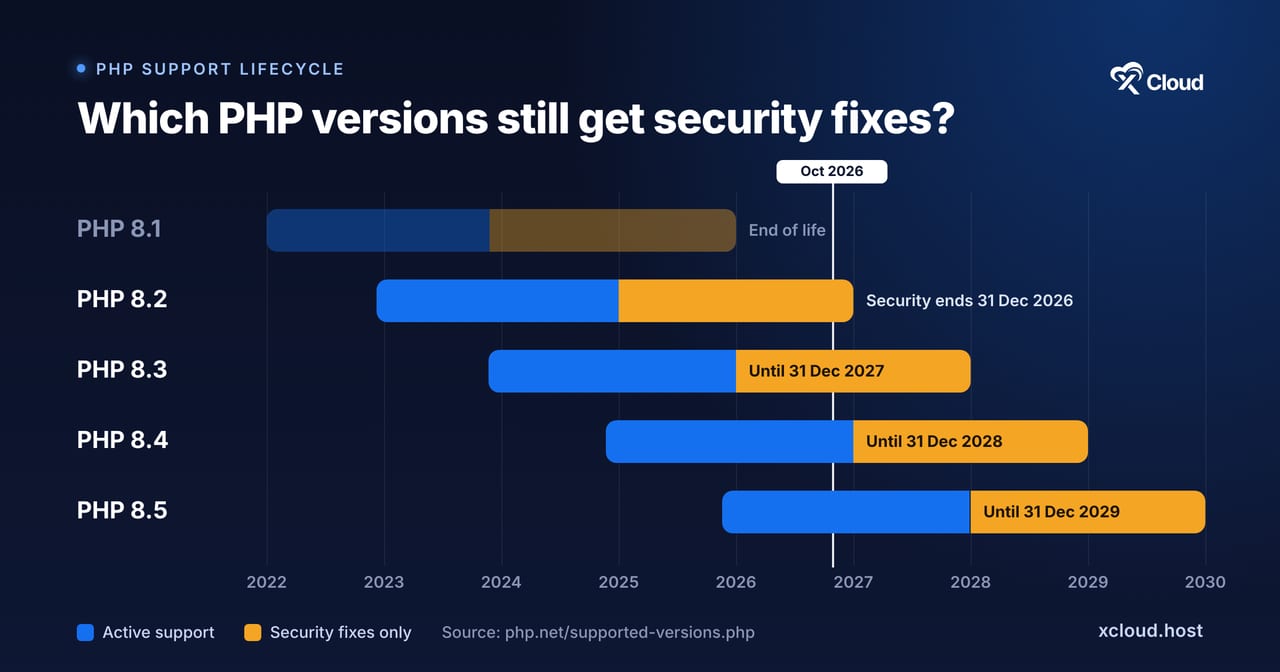
| PHP version | Active support until | Security support until | Status in October 2026 |
|---|---|---|---|
| PHP 8.5 | 31 Dec 2027 | 31 Dec 2029 | ✅ Active support |
| PHP 8.4 | 31 Dec 2026 | 31 Dec 2028 | ✅ Active support |
| PHP 8.3 | Ended 31 Dec 2025 | 31 Dec 2027 | ✅ Security fixes only |
| PHP 8.2 | Ended 31 Dec 2024 | 31 Dec 2026 | ⚠️ Security fixes end in weeks |
| PHP 8.1 and older | Ended | Ended | ❌ End of life |
Here is the part that trips people up: an end-of-life PHP version keeps working. Your site loads, your dashboard looks normal and nothing warns you. The risk only shows up when the next vulnerability is found and no official fix arrives.
Outdated PHP also costs you in other ways:
- Compatibility drift. New plugin and framework releases drop old PHP versions so you get stuck on old plugin versions too. WordPress recommends PHP 8.3 or greater and warns that older versions are end of life.
- Performance. Newer PHP releases bring engine improvements so an upgrade often makes sites faster as well as safer.
- Harder upgrades later. Moving from 8.1 to 8.3 is usually smooth. Moving from 7.4 to 8.4 is a bigger project with more breaking changes.
The rule of thumb for 2026: run PHP 8.3 or 8.4 on production sites. PHP 8.2 is still supported but its security fixes end on 31 December 2026 so a move to 8.2 today means migrating again within weeks.
Are You at Risk? A Five-Minute PHP Security Check
Before you change anything, find out where you stand:
- Check each site’s PHP version. In WordPress, go to Tools → Site Health → Info → Server. Over SSH, run
php -v. On xCloud, see Site → Site Settings → PHP Configurations. - Check the full build number. A patched build for PHP2Shell is 8.2.35, 8.3.36, 8.4.27, 8.5.12 or newer. On xCloud, Management → Manage PHP shows the full release number.
- Check for end-of-life versions. Anything on PHP 8.1 or older needs an upgrade plan.
- Check your operating system. Ubuntu 20.04 reached the end of standard support in May 2025 and current PHP versions are no longer built for it on many stacks.
- Check for containers. PHP inside your own Docker images only changes when you rebuild the image. Host-level patching does not reach it.
If any of these turn up a problem, the next section shows how to fix it without breaking your site.
How to Update PHP Safely: Step by Step
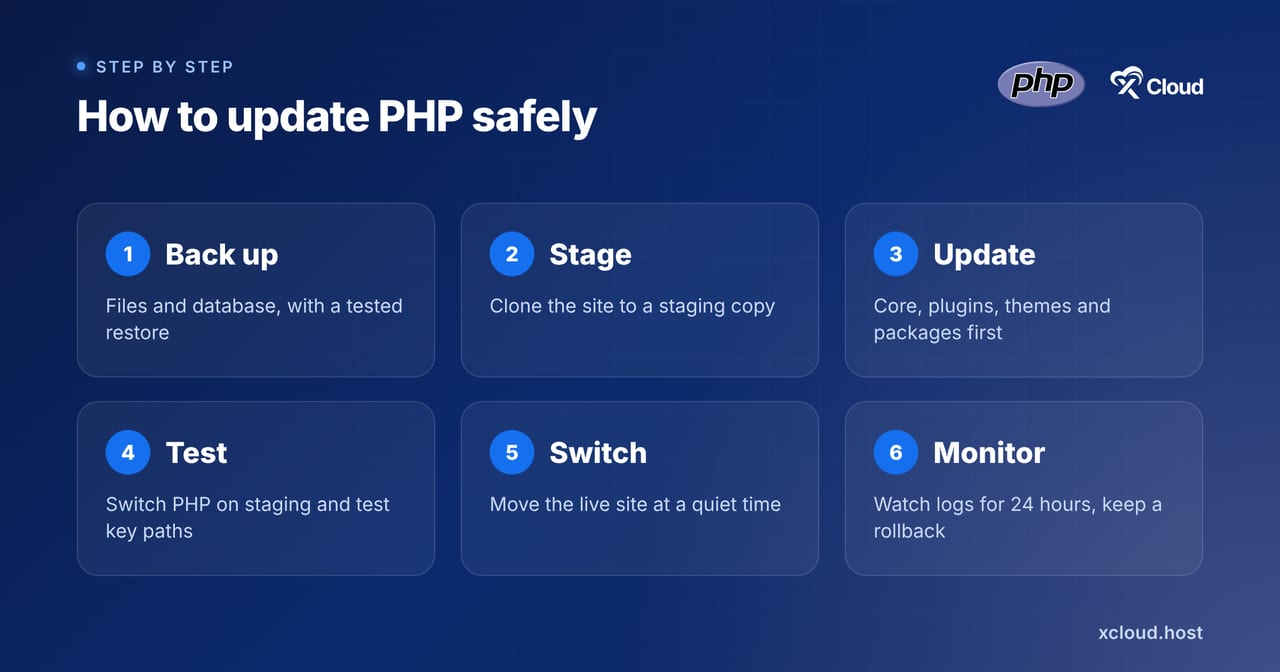
Upgrading PHP is one of the most effective PHP security improvements you can make and also one of the easiest ways to break a site if you rush it. Follow these steps in order.
Step 1: List Every PHP Install You Own
Include staging sites, old side projects, cron scripts and containers. Forgotten installs are where old PHP hides.
Step 2: Take a Full Backup
Back up files and the database and confirm you can restore them. On xCloud, use Site Backup → Backup Now for an on-demand backup.
👉 See site backups in xCloud.
Step 3: Clone the Site to Staging
Never test a PHP upgrade on production. Create a staging copy and run the upgrade there first.
👉 See how to create a staging environment in xCloud.
Step 4: Update Plugins, Themes & Dependencies First
Old plugins are the most common reason a PHP upgrade fails. Update WordPress core, plugins and themes on staging or run composer update for Laravel and custom apps, before you switch PHP.
Step 5: Switch PHP on Staging & Test the Paths That Matter
Switch the staging site to PHP 8.3 or newer then test login, forms, checkout, payments, search, the admin area and anything that runs on a schedule. Watch the error log for warnings and fatal errors.
Step 6: Switch the Live Site & Monitor
Pick a quiet time, switch production to the tested version and check the same paths again. Keep an eye on error logs and uptime for the next 24 hours.
Step 7: Keep a Rollback Plan
If something breaks, switch the site back to the previous PHP version while you fix the cause, as long as that version is still supported. Your backup from Step 2 is the last line of defense.
Step 8: Remove PHP Versions No Site Uses
Every installed PHP version is one more thing to patch. Once your sites have moved, uninstall the old versions. On xCloud, that is Manage PHP → Uninstall.
👉 See how to upgrade PHP and install security patches on xCloud.
PHP Security Best Practices for Website Owners
A current PHP version is the foundation. These practices cover the rest:
- Hide errors from visitors. Set
display_errors = Offandlog_errors = Onin production so stack traces never reach the browser. - Stop advertising your version. Set
expose_php = Offto remove the PHP version from response headers. - Block PHP execution in upload folders. An uploaded
.phpfile inwp-content/uploadsis one of the most common signs of a web shell. - Keep extensions to what you use. Every extra extension is extra code that can have bugs.
- Use prepared statements and validate input. This prevents most injection attacks in custom code.
- Run each site under its own system user. If one site is compromised, isolation stops the attacker from reading the others.
- Use SSH keys and two-factor authentication. Password-only access is still how many servers get taken over.
- Get alerts for known vulnerabilities. A scanner that checks your plugins and themes against published advisories catches problems before attackers do.
Treat this list as a starting point rather than a strict rule. A high-traffic WooCommerce store needs more than a brochure site.
What a Good Host Should Handle for You
Your host controls the layers you cannot reach from inside WordPress or Laravel. When you evaluate hosting security, look for these:
- Fast PHP patching. When a PHP security release lands, patched builds should reach your server in hours, not weeks.
- Mitigations before the fix, when possible. Early protective settings buy time when exploit code appears before the patch.
- Site isolation. Separate system users per site so one compromised site does not expose the rest.
- A hardened baseline. A firewall with only the ports you need, brute-force protection on SSH and secure defaults for PHP.
- Backups you can restore. Scheduled and on-demand, stored where you choose.
- Monitoring and alerts. Vulnerability scanning and clear notifications when something needs attention.
- Plain communication. A clear statement of what the host did, what it could not do and what is left for you.
That last point is easy to overlook. During PHP2Shell, the hosts that earned trust were the ones that said exactly which servers were covered and which were not.
How xCloud Protects Your Servers & Sites
How those practices map to features you can use on xCloud today. Every feature below links to its documentation so you can check the details for yourself.
A Hardened Security Baseline on Every Server
Every xCloud server starts with the UFW firewall, only ports 22, 80 and 443 open by default, Fail2Ban blocking brute-force attacks on SSH and support for SSH key authentication. Site users are limited to their own site and cannot access other sites’ files or server configuration. For WordPress, xCloud blocks PHP execution in uploads and themes directories and offers 7G and 8G WAF rules and security headers.
👉 See server and website security with xCloud.
One-Click PHP Security Patches with Scan Patch
Go to Server → Management → Manage PHP and click Scan Patch. xCloud checks every installed PHP version and shows any available patch release, for example 8.3.35 → 8.3.36. Choose Update to and the patch installs in the background. One update covers every site on that PHP version and your sites stay on the same version.
Automatic PHP Security Updates
By default, automated updates cover Ubuntu security packages. Turn on Security → Security Update → Include PHP, database and Redis updates, pick a quiet time and your server installs PHP patch releases once a day without you clicking anything.
👉 See how automated security updates work in xCloud.
Per-Site PHP Version Management
Install several PHP versions on one server, set a default and choose a version per site under Site → Site Settings → PHP Configurations. New sites use PHP 8.3 by default. The PHP versions compatibility table shows what each Ubuntu version and stack can run.
PHP Updates Through the xCloud AI Assistant (Beta)
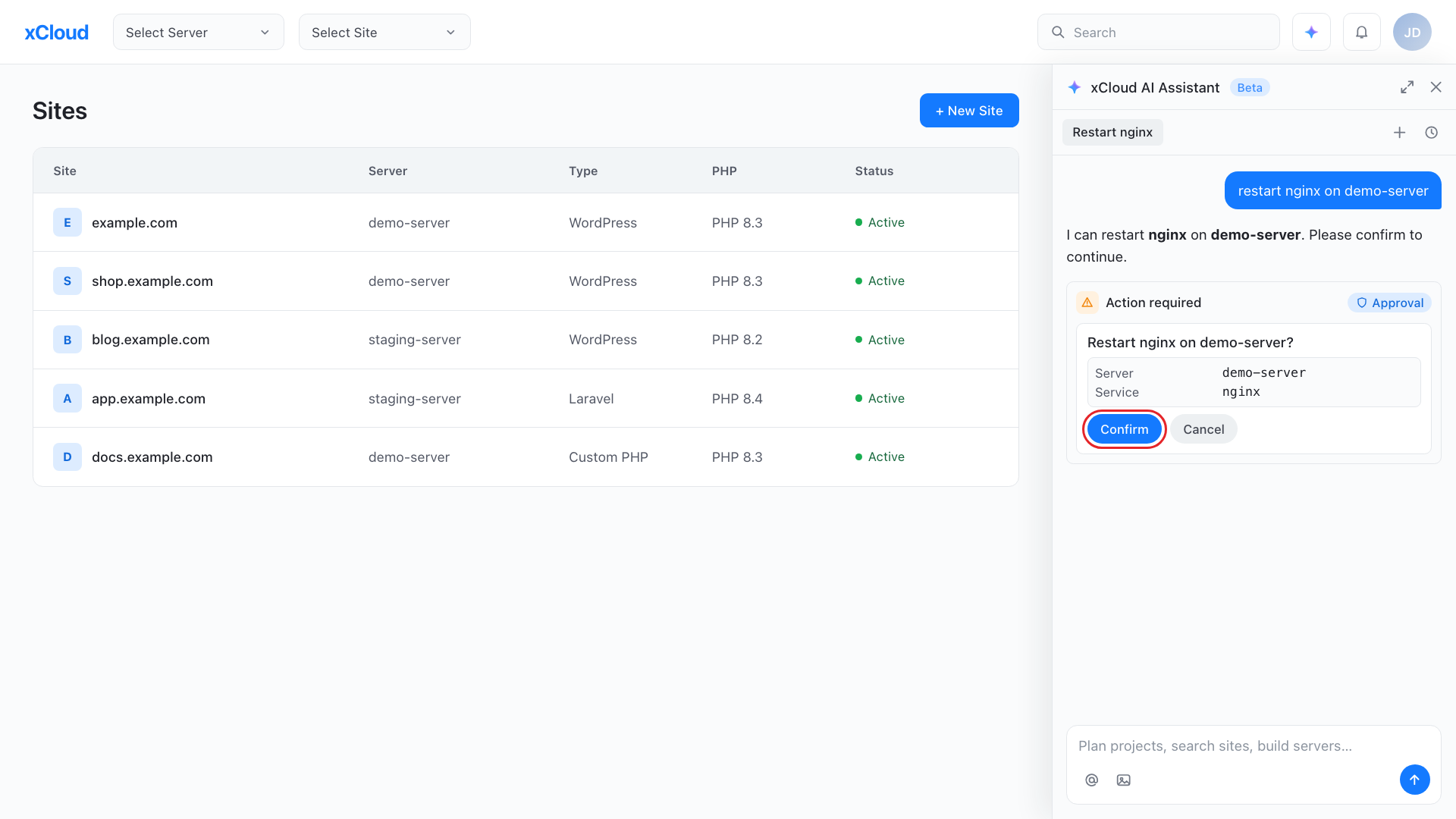
The xCloud AI Assistant opens from the icon in the dashboard header. Since v2.9.5, it can install a PHP version, apply a patch release or set the default PHP version and it reports the exact PHP build each version runs, such as 8.3.36. You can ask it in plain language which servers still need a patch.
It makes no change until you confirm an Action required card. Access starts as read-only and you switch it to Read & Write under My Profile → Developers → API Tokens → Assistant Access. It never goes beyond your team role.
Vulnerability Scanning and Site Security PRO
The Vulnerability Checker, built in partnership with Wordfence, checks WordPress core, plugin and theme versions for known issues and flags each one with a CVSS rating and a fix. You can turn on auto-update and auto-backup and get alerts by email, WhatsApp or Slack.
👉 See the Vulnerability Checker guide.
For extra protection, Site Security PRO adds virtual patching for plugins, themes and core at the server level, real-time vulnerability monitoring and brute-force protection.
Backups, Staging & Full Server Clone
Scheduled and on-demand backups, one-click staging sites and a per-site PHP switch make upgrades low-risk. Still on Ubuntu 20.04? Create a new Ubuntu 24.04 or 26.04 server and move every site with a full server clone.
Two-Factor Protection for Powerful Tools
Since v2.9.5, the web terminal, command runner, sudo users and root cron jobs require two-factor authentication so a stolen password alone cannot reach the most powerful tools on your server.
Why a Fast, Hands-On Hosting Team Makes the Difference
Features matter but the PHP2Shell week showed that the team behind the platform matters more. Here is what that looked like on xCloud, as documented in the v2.9.4 security release notes:
- Early action: a temporary mitigation reached all connected xCloud servers from 06:00 UTC on 21 October, eight hours before PHP released its fix. Nobody had to take a site offline.
- The real fix, rolled out for you: when the usual Ubuntu PHP package source was overloaded, the team switched NGINX servers to Ondřej Surý’s own repository and rolled out patched builds on NGINX and OpenLiteSpeed.
- Clear communication: each team got an email listing its protected servers and teams with old PHP versions got a separate notice explaining what was left for them.
- Follow-through: unreachable servers were retried daily and patching kept running until more than 95% of servers were on the fixed builds.
Customers noticed. In the xCloud Facebook community, David McCan wrote: “Thanks to the xCloud team for lining up and rolling out all of the PHP updates. Fantastic response.” John Aperture added: “Communication is so important for an event like this one. The team did a fantastic job!”
Behind that response is xCloud’s support model: real humans, expert engineers and live chat, 24/7/365. When you are unsure whether a PHP upgrade will break a plugin or how to read a vulnerability alert, you can ask someone who runs servers every day.
The honest caveat: no host can fix your application code. xCloud can patch PHP, harden the server and alert you to vulnerable plugins but a custom plugin with an SQL injection bug still needs a developer.
Who Is Responsible for What in PHP Security
| Task | You | xCloud helps by | Still needs your attention |
|---|---|---|---|
| Patching PHP | Confirm patches applied | Scan Patch, automatic PHP updates, platform-wide rollouts | PHP inside your own Docker images |
| Upgrading PHP versions | Test and switch | Staging, per-site PHP switch, AI Assistant | Plugin and code compatibility |
| Plugins and themes | Update and remove unused ones | Vulnerability Checker, auto-update option | Custom or abandoned plugins |
| Server hardening | Use SSH keys and 2FA | Firewall, Fail2Ban, isolation, WAF rules | Opening extra ports or loosening defaults |
| Backups | Choose schedules and storage | Scheduled and on-demand backups | Testing a restore |
| Application code | Fix bugs | PHP execution blocking in uploads | Injection, access control, logic bugs |
How to Prepare for the Next PHP Vulnerability
PHP2Shell will not be the last critical PHP bug. The sites that handle the next one calmly will be the ones that are prepared now.
For Site Owners
- Move off PHP 8.2 before 31 December 2026 and off PHP 8.1 or older now. Target PHP 8.3 or 8.4.
- Turn on automatic PHP security updates so patch releases install without waiting for you.
- Leave protective settings in place. For example, PHP recommends keeping
session.upload_progress.enabled=0until it ships the fix for CVE-2026-115560. See our CVE-2026-115560 guide. - Retire old servers. Move anything on Ubuntu 20.04 to Ubuntu 24.04 or 26.04.
- Put sites behind a web application firewall such as Cloudflare’s and lock your origin so traffic cannot skip it.
- Know your inventory. Keep a list of every site, its PHP version and who owns it.
For Hosting Teams
These are the priorities we hold ourselves to and the ones we would expect from any host:
- Watch PHP security announcements and act on the advance notice, not only on the release.
- Keep a tested path to apply a mitigation across the whole fleet within hours.
- Have a backup package source for when the usual one is overloaded on release day.
- Make patch status visible to customers, including the exact build number.
- Push customers off end-of-life PHP and operating systems early, with clear dates and migration tools.
- Test new PHP releases early. PHP 8.6 is in release candidate testing, with RC5 planned for 5 November 2026 according to php.net.
Your PHP Security Checklist
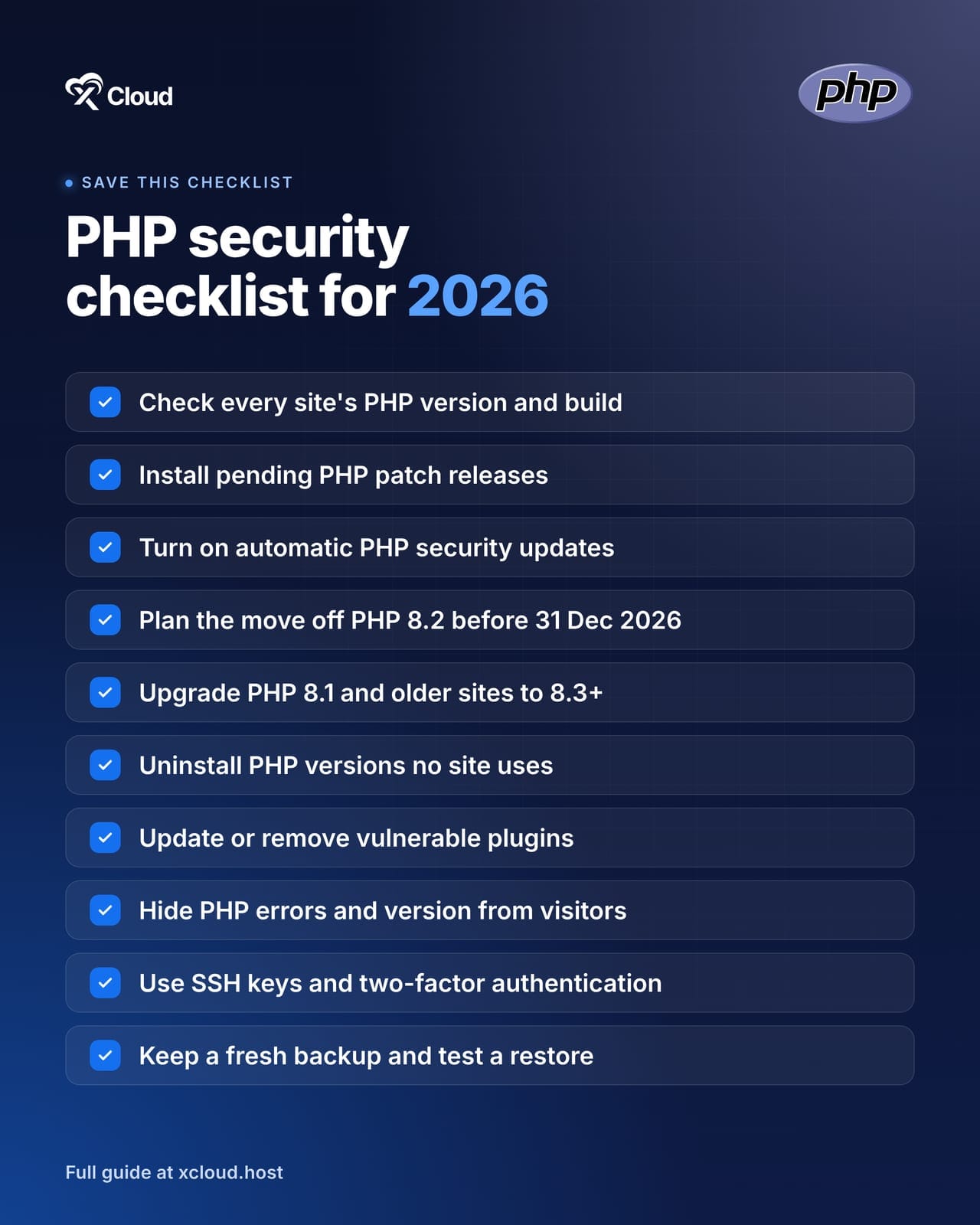
- ✅ Check the PHP version and full build number on every site
- ✅ Install any pending PHP patch release (on xCloud: Manage PHP → Scan Patch)
- ✅ Turn on automatic PHP, database and Redis updates
- ✅ Plan the move off PHP 8.2 before 31 December 2026
- ✅ Move every site on PHP 8.1 or older to PHP 8.3 or newer, testing on staging first
- ✅ Uninstall PHP versions no site uses
- ✅ Update or remove vulnerable plugins and themes and turn on vulnerability alerts
- ✅ Hide PHP errors and the PHP version from visitors
- ✅ Use SSH keys and two-factor authentication
- ✅ Keep a fresh backup and test a restore
- ✅ Rebuild Docker images that bundle their own PHP
Patch Today, Plan for the Next PHP Vulnerability
PHP security comes down to three habits: run a supported PHP version, apply patch releases quickly and keep the layers above PHP clean. None of them is hard on its own. The trouble starts when they are left for later.
This week, check every site’s PHP version, install any pending patch and put the PHP 8.2 deadline in your calendar. Then decide whether you want to handle the next 3 a.m. advisory yourself or have a team that does it for you.
👉 Ready to stop firefighting PHP updates? Explore managed hosting on xCloud or PHP hosting on xCloud and migrate your sites for free.
If you have found this blog helpful, feel free to subscribe to our blogs for valuable tutorials, guides, knowledge and tips on web hosting and server management. You can also join our Facebook community to share insights and engage in discussions.
Frequently Asked Questions
Is PHP secure in 2026?
Yes, when you run a supported version and keep it patched. PHP 8.2, 8.3, 8.4 and 8.5 receive security fixes from the PHP project. Most PHP security problems come from outdated versions, vulnerable plugins or insecure code rather than from PHP itself.
Which PHP versions are still supported?
PHP 8.5 and 8.4 are in active support and PHP 8.3 and 8.2 receive security fixes only. PHP 8.2 security support ends on 31 December 2026. PHP 8.1 and older are at the end of life, according to php.net.
What happens if I keep running an old PHP version?
Your site keeps working but it stops receiving security fixes. When the next vulnerability is found, no official patch arrives for your version. You also fall behind on plugin and framework compatibility, which makes the eventual upgrade harder.
Will updating PHP break my WordPress site?
It can if a plugin or theme is not compatible with the new version. That is why you should update plugins first, test on a staging site and keep a backup. A move from PHP 8.1 to 8.3 is usually smooth and the most common side effect is deprecation warnings.
Does a security plugin protect my site from PHP vulnerabilities?
No. A runtime bug like PHP2Shell is triggered while PHP reads the request, before WordPress or any plugin loads. Only a patched PHP build fixes it though a server-level firewall can reduce exposure in the meantime.
How does xCloud keep PHP secure?
xCloud shows available PHP patch releases with Scan Patch, can install them automatically every day and rolls out platform-wide fixes during critical incidents such as PHP2Shell. It also hardens every server with a firewall, Fail2Ban, site isolation and vulnerability scanning. Details are in our server security guide.
Can the xCloud AI Assistant update PHP for me?
Yes. The AI Assistant (Beta) can install a PHP version, apply a patch release or set the default version and each action waits for you to confirm it. It needs Read & Write access, which you grant under Assistant Access in your profile.
What is the latest PHP version in 2026?
PHP 8.5 is the newest stable branch and its latest release is 8.5.12 from 21 October 2026. PHP 8.6 is in release candidate testing and is not meant for production yet. For most production sites, PHP 8.3 or 8.4 is the safe choice today.
“I’m on PHP 7.4 and my site still works. Do I really need to upgrade?”
Yes. PHP 7.4 reached end of life in November 2022 and gets no fixes from the PHP project. Plan the move to PHP 8.3 or 8.4 on staging, update your plugins first and expect a bigger jump than a minor upgrade.