

A Cloudflare Tunnel is the answer when you want to show a client the site running on your laptop, or let a teammate reach an internal dashboard without opening another port on your server. The usual alternative is a public IP, an open port and a firewall rule you hope you remember to close later.
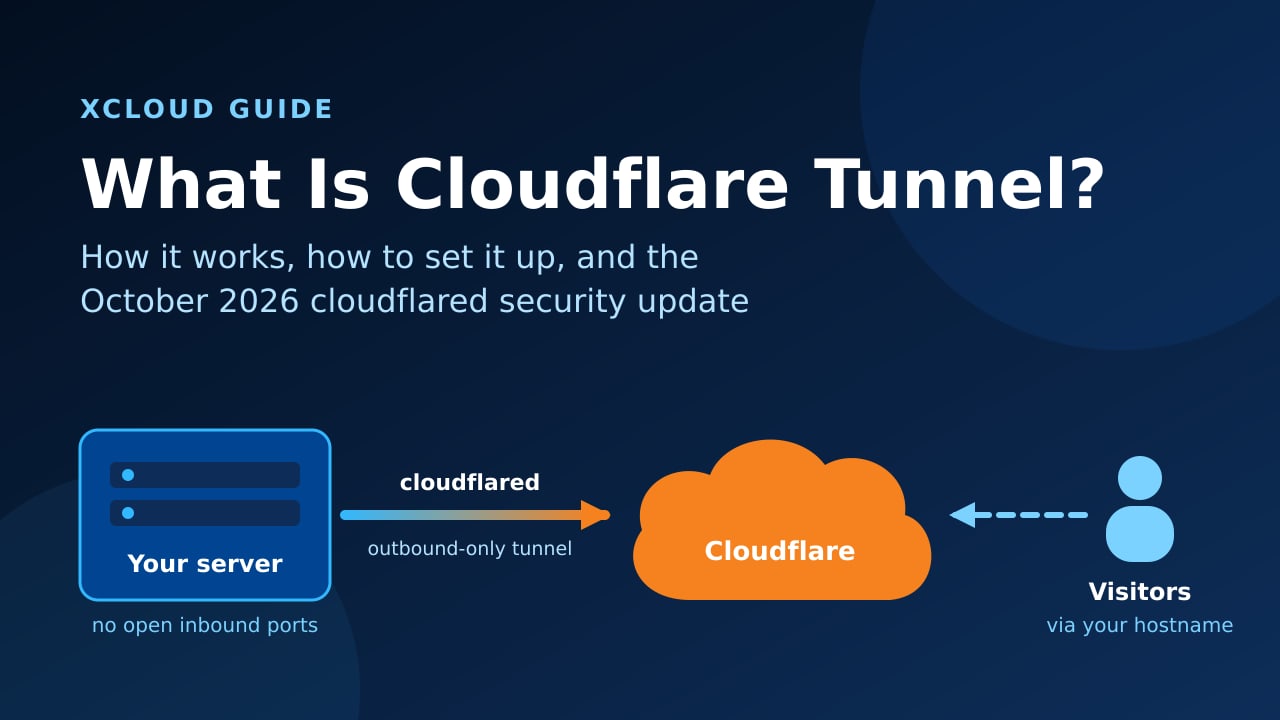
Cloudflare Tunnel solves this the other way around. Your server makes an outbound connection to Cloudflare, and visitors reach your app through Cloudflare, so no inbound port has to be open for that app at all. If you already route your domain through Cloudflare, read our guide to Cloudflare firewall rules for your web app next to this one.
There is also news. On October 20, 2026, Cloudflare asked everyone running a tunnel to upgrade cloudflared to 2026.10.2 or later, because older versions trust compromised certificates. This guide covers what Cloudflare Tunnel is, how it works, how to set one up, how xCloud users can use it safely, and exactly how to apply that update.
TL;DR (Too Long, Didn’t Read?)
Short on time? Here is the whole guide in a few lines:
- Cloudflare Tunnel connects a server to Cloudflare through a small program called
cloudflared, using outbound connections only. - Visitors reach your app through a hostname on your Cloudflare domain. No inbound port has to be open for that app.
- It is free on all Cloudflare plans. It was called Argo Tunnel until 2021.
- Pair it with Cloudflare Access to put a login in front of private tools and SSH.
- Security update: upgrade every
cloudflaredto 2026.10.2 or later (latest is 2026.10.4), then restart it. - On xCloud, keep your sites on their normal setup and use a tunnel for private tools, team SSH and local previews.
What Is Cloudflare Tunnel?
Cloudflare Tunnel is a free Cloudflare service that publishes an app or server to the internet, or to your team, without a public inbound port. A small daemon called cloudflared runs next to your app, dials out to Cloudflare, and keeps that connection open. Cloudflare then sends requests for your hostname down that connection.
Think of it like a hotel phone line. Guests cannot ring your room directly, because the room has no outside number. Instead you call the front desk once, keep the line open, and the desk passes calls through. Nobody outside ever learns your room number.
A Few Things Worth Knowing
- It used to be called Argo Tunnel. Cloudflare renamed it in 2021 when it became free for everyone. Older tutorials and forum posts still use the old name.
- Each tunnel keeps four long-lived connections to two Cloudflare data centers, so a single network hiccup does not take your app offline. You can see this on your own server:
cloudflaredreports four ready connections. - It carries more than websites. Cloudflare lists HTTP, HTTPS, TCP, SSH and RDP among the supported protocols.
- It is not a VPN for your laptop. It publishes services from the server side. Your visitors need nothing installed (except for SSH and other non-HTTP protocols, covered below).
| Term | What it means |
|---|---|
| Tunnel | A named, persistent link between your infrastructure and Cloudflare, identified by a UUID |
cloudflared |
The open-source program that runs on your server and opens the tunnel |
| Connector | One running cloudflared process. Several connectors can serve one tunnel |
| Public hostname | The address visitors use, such as tools.example.com, routed to a local service |
| Cloudflare Access | Zero Trust login in front of a hostname: email codes, Google, GitHub and more |
| Quick Tunnel | A temporary trycloudflare.com URL for testing, no account needed |
How Does Cloudflare Tunnel Work?
Here is the part that trips people up: the connection starts from your server, not from the visitor.
- You install
cloudflaredon the server (or in a container next to your app). cloudflaredauthenticates with a tunnel token and opens outbound connections to the nearest Cloudflare data centers.- You map a public hostname to a local service, for example
tools.example.com→http://localhost:8080. - A visitor opens
tools.example.com. Cloudflare receives the request, applies your rules (WAF, Access login, caching), then passes it down the open tunnel. cloudflaredforwards it tolocalhost:8080and sends the response back the same way.
Because the server only ever dials out, there is no listening port for that app that scanners can find. The trade-off is that Cloudflare sits in the middle of every request. That is exactly what makes tunnels powerful, and also why the security update below matters so much.
Is Cloudflare Tunnel Free?
Yes. Cloudflare documents Tunnel as available on all plans, including Free. Before 2021, Argo Tunnel was billed by bandwidth. Today the costs only appear if you add extras, such as Argo Smart Routing or more Zero Trust seats than the free allowance.
Quick Tunnels vs Named Tunnels
Quick Tunnels give you a random trycloudflare.com address with one command and no account. Cloudflare is clear that they are for testing and development only:
- No uptime guarantee, and the hostname changes every time.
- Up to 200 in-flight requests. More get a
429error. - No Server-Sent Events (SSE).
For anything you want to keep, create a named tunnel on your own domain. That is what the setup steps below do.
Cloudflare Tunnel vs ngrok vs Tailscale Funnel
These three show up together in almost every search, and each is good at something different.
| Cloudflare Tunnel | ngrok | Tailscale Funnel | |
|---|---|---|---|
| Built for | Publishing apps and private tools long-term | Developers testing local apps | Sharing a service from your Tailscale network |
| Your own domain | Yes, any domain on Cloudflare | On paid plans | No, uses your ts.net name |
| Login in front of the app | Cloudflare Access | ngrok traffic policies (OAuth and more) | None built in: Funnel is public, your app handles login |
| Request inspection while debugging | Basic logs | ✅ Excellent built-in inspector | Basic |
| Cost to start | Free on all plans | Free tier with limits | Free tier |
Rule of thumb: use ngrok when you are debugging webhooks on your laptop and want to replay requests. Use Tailscale Funnel when your team already lives on Tailscale. Use Cloudflare Tunnel when the app should stay up, sit on your own domain and get Cloudflare’s protection in front of it.
How to Set Up Cloudflare Tunnel on Ubuntu
This walk-through uses a remotely managed tunnel, meaning you configure routes in the Cloudflare dashboard and the server only holds a token. You need a domain on Cloudflare and SSH access to an Ubuntu server with sudo. On xCloud, create a sudo user first and connect with SSH keys.
Step 1: Install cloudflared from Cloudflare’s Package Repository
Installing through apt means future security updates arrive with a normal apt upgrade, which is the lesson of this month.
sudo mkdir -p --mode=0755 /usr/share/keyrings
curl -fsSL https://pkg.cloudflare.com/cloudflare-main.gpg | sudo tee /usr/share/keyrings/cloudflare-main.gpg >/dev/null
echo 'deb [signed-by=/usr/share/keyrings/cloudflare-main.gpg] https://pkg.cloudflare.com/cloudflared any main' | sudo tee /etc/apt/sources.list.d/cloudflared.list
sudo apt-get update && sudo apt-get install cloudflared
cloudflared --version
The last line should print 2026.10.2 or newer.
Step 2: Create the Tunnel in the Cloudflare Dashboard
In the Cloudflare dashboard, go to Networking → Tunnels and choose Create a tunnel. Pick Cloudflared as the connector type and give the tunnel a clear name, such as prod-tools.
Cloudflare then shows an install command with a long token. Copy the sudo cloudflared service install <TOKEN> line.
Step 3: Run cloudflared as a Service
Paste the command from the dashboard on your server:
sudo cloudflared service install YOUR_TUNNEL_TOKEN
sudo systemctl status cloudflared
This creates a systemd service that starts on boot. Treat the token like a password: anyone who has it can run your tunnel.
Step 4: Route a Public Hostname to Your App
Back in the tunnel settings, add a public hostname: choose a subdomain (for example tools), your domain, and the local service, such as http://localhost:8080. Cloudflare creates the DNS record for you.
Open https://tools.example.com. You should see your app, served over HTTPS with Cloudflare’s certificate.
Step 5: Put Cloudflare Access in Front of Anything Private
A tunnel makes an app reachable. It does not decide who may reach it. For admin panels and internal tools, add a Cloudflare Access application for the hostname and allow only your team’s emails or your Google Workspace. Visitors then see a Cloudflare login before your app ever receives a request.
👉 Cloudflare’s own walk-through: Create your first tunnel.
October 2026: Update cloudflared Now (eMudhra Certificate Issue)
This is where things get serious. On October 19, 2026, Cloudflare learned that eight eMudhra (emSign) intermediate certificates use weak private keys. Anyone who recovers those keys can create a certificate for any website. Every cloudflared released before 2026.10.2 still trusts them.
Cloudflare reports no active exploitation on its services so far. The fix is still worth doing today, because the tunnel is the path all of your traffic takes. Full details are in Cloudflare’s post, 8 eMudhra certificates are compromised.
| Where cloudflared runs | Minimum safe version | How to update |
|---|---|---|
| Linux via apt / yum | 2026.10.2 | Upgrade with the same package manager, then restart the service |
| Linux plain binary | 2026.10.2 | Replace the binary from the latest GitHub release, then restart |
| macOS via Homebrew | 2026.10.2 | brew upgrade cloudflared |
| macOS, not Homebrew | 2026.10.3 | Install the latest release |
| Docker / Kubernetes | 2026.10.3 image | Pull and redeploy cloudflare/cloudflared:2026.10.3 or newer |
Are You Affected?
Run this on every machine with a tunnel, or check the connector versions under Networking → Tunnels:
cloudflared --versionAnything below 2026.10.2 needs the update. The latest release at the time of writing is 2026.10.4.
Upgrade Without Breaking Anything
- Check HTTPS origins first. If a tunnel points at an
https://origin whose certificate chains to an affected eMudhra certificate, the newcloudflaredwill reject it. Replace that certificate before you upgrade. Never “fix” this withnoTLSVerify, because that removes the protection the update restores. Origins on plainhttp://localhostare not affected. - Upgrade the way you installed. For apt, run
sudo apt-get update && sudo apt-get install --only-upgrade cloudflared. For a plain binary, download the new release and replace the old file. - Restart the service:
sudo systemctl restart cloudflared. - Confirm:
cloudflared --versionshows the new version, and the tunnel reports Healthy in the dashboard.
The restart drops a single-connector tunnel for a few seconds. If that matters, add a second replica first and upgrade one connector at a time. In Docker, restarting the old container does nothing: you must redeploy with the new image.
Tip: Plain Binaries Are Where Updates Get Missed
Many people install cloudflared once with --no-autoupdate and forget it. We found exactly that on one of our own machines this week: a hand-installed binary on 2026.10.1, behind by one release. A package manager install (Step 1 above) turns the next security fix into a routine apt upgrade.
How xCloud Users Can Use Cloudflare Tunnel
The honest take first: xCloud does not have a built-in Cloudflare Tunnel feature, and your hosted sites do not need one. xCloud already serves your sites over HTTPS, manages the firewall, and works with Cloudflare for DNS, SSL and the Cloudflare Enterprise CDN. Ports 80 and 443 stay open for your sites and for SSL renewals. If you close them, Cloudflare shows error 522.
Where a tunnel earns its place is everything around your sites.
1. Private Tools on a Docker Server
Running an internal dashboard, a database admin UI or a small automation tool with Custom Docker on xCloud? Add a cloudflared service to the same Docker Compose file and point a hostname at the app’s internal port. With Cloudflare Access in front, only your team can open it, and you never add a firewall rule for it.
services:
  cloudflared:
    image: cloudflare/cloudflared:2026.10.4
    command: tunnel --no-autoupdate run
    environment:
      - TUNNEL_TOKEN=${TUNNEL_TOKEN}
    restart: unless-stopped
Pin a version as above, and bump it when Cloudflare ships a security release.
2. Team SSH Without Opening Port 22 to Everyone
xCloud’s SSH Lockdown limits port 22 to xCloud’s infrastructure and IPs you approve. That is great until a teammate works from a café with a new IP every day.
A tunnel can carry SSH for them instead: route ssh.example.com to ssh://localhost:22, protect it with Cloudflare Access, and teammates connect through cloudflared access ssh. Port 22 stays locked to xCloud and your fixed IPs. Never remove xCloud’s own IPs from the lockdown, or the dashboard loses access to your server.
3. Share a Local Build Before You Deploy It
Building a theme, a plugin or an n8n workflow on your laptop? A Quick Tunnel lets a client or a webhook reach it in seconds:
cloudflared tunnel --url http://localhost:8080When it is ready for real feedback, deploy it to xCloud and use a staging environment. Staging gives you a stable URL and runs on the same server setup as production, which a laptop tunnel never will.
4. Keep the Firewall On Anyway
A tunnel removes the need to open a port for one app. It does not replace Firewall Management for the rest of the server. Our VPS security guide covers the other layers worth keeping.
Common Cloudflare Tunnel Problems and Fixes
| Symptom | Likely cause | Fix |
|---|---|---|
| Error 1033 in the browser | cloudflared is not running or cannot reach Cloudflare |
sudo systemctl status cloudflared, then check outbound network access |
| 502 Bad Gateway | The local service is down or on a different port | Confirm the app answers on the exact localhost:PORT in the route |
| Tunnel Healthy, app shows a TLS error | HTTPS origin with a certificate cloudflared no longer trusts |
Replace the origin certificate. Do not use noTLSVerify |
| Old version after “upgrading” in Docker | Container restarted with the old image | Pull and redeploy with the new image tag |
| Tunnel drops for a few seconds on update | Single connector | Add a replica before upgrading |
Quick Checklist
- Every
cloudflaredreports 2026.10.2 or later - Installed through a package manager, or a reminder set to update plain binaries
- Private hostnames protected by Cloudflare Access
- No HTTPS origin relies on
noTLSVerify - Tunnel token stored like a password
- Firewall still on for everything the tunnel does not serve
Secure Your Tunnel and Your Sites Today
Cloudflare Tunnel is one of the simplest ways to publish a tool or a server without opening a port. It is free, it is fast to set up, and paired with Cloudflare Access it puts a proper login in front of anything private.
This week, do two things. Run cloudflared --version on every machine with a tunnel and upgrade anything older than 2026.10.2. Then look at which tools you expose through open ports and ask whether a tunnel with Access would be safer.
For the sites themselves, let the platform carry the load. xCloud Managed Hosting handles HTTPS, firewall rules, security updates and Cloudflare integration for you, so your time goes into the work, not into the occasional 3 a.m. patch. Prefer to bring your own server? Self-managed hosting gives you the same dashboard on any VPS.
If you have found this blog helpful, feel free to subscribe to our blogs for valuable tutorials, guides, knowledge, and tips on web hosting and server management. You can also join our Facebook community to share insights and engage in discussions.
Frequently Asked Questions
Is Cloudflare Tunnel free?
Yes. Cloudflare Tunnel is available on all Cloudflare plans, including Free. You pay only for optional extras such as paid Zero Trust seats beyond the free allowance or Argo Smart Routing.
Do I need to update cloudflared after the eMudhra certificate issue?
Yes. Every cloudflared older than 2026.10.2 still trusts the eight affected eMudhra intermediate certificates. Upgrade to 2026.10.2 or later (2026.10.3 or later on macOS when you did not install with Homebrew), restart the service and confirm the tunnel shows Healthy.
Is Cloudflare Tunnel the same as Argo Tunnel?
Yes. Argo Tunnel was the original name. Cloudflare renamed it Cloudflare Tunnel in 2021 when it became free for everyone, and the cloudflared software stayed the same.
Can I use Cloudflare Tunnel with my xCloud server?
Yes, for the right jobs. Keep your xCloud sites on their normal setup with ports 80 and 443 open, and use a tunnel for private tools, team SSH access through Cloudflare Access, or sharing a local build before you deploy it to xCloud.
Do I still need a firewall if I use Cloudflare Tunnel?
Yes. A tunnel removes the need to open a port for the app it serves, but your server still runs other services. Keep the firewall on, and only close a port once nothing but the tunnel needs it.
My tunnel stopped working after I upgraded cloudflared. What should I check?
First check whether the tunnel points at an HTTPS origin whose certificate chains to an affected eMudhra certificate, because the new version rejects it. Replace that origin certificate instead of turning on noTLSVerify. Then confirm the service restarted and the tunnel shows Healthy in the dashboard.