


Rybbit is an open-source, cookieless web and product analytics app that replaces Google Analytics with one readable dashboard. It tracks pageviews, sources and goals, then adds session replay, funnels, user journeys and Web Vitals. You can pay for Rybbit Cloud or self-host Rybbit for free on your own server under the AGPL-3.0 licence.
Maybe Google Analytics 4 finally lost you. The reports are hard to find, the cookie banner hurts your numbers, and your visitor data sits on someone else’s servers.
Rybbit is one of the newer answers to that. Its GitHub repository passed 13,000 stars (13.2k on 8 November 2026), and it now sits beside Plausible, Umami and OpenPanel in our self-hosted analytics tools roundup.
This guide explains what Rybbit is, how it works, what a self-hosted install really contains, what it costs, and where it falls short.
TL;DR (Too Long, Didn’t Read?)
Short on time? Here is the whole guide in a few lines:
- Rybbit is open-source, cookieless analytics that tracks pageviews, sources and goals like Google Analytics, plus session replay, funnels, journeys, retention, errors and Web Vitals.
- Self-hosting is free under AGPL-3.0. Rybbit’s guide suggests at least 2 GB of RAM; you also need Docker and a domain with SSL.
- A self-hosted install is four parts: the Rybbit app, PostgreSQL (accounts), ClickHouse (visits and events) and Redis.
- The first account becomes the owner. Sign-up is open after install, so create your account right away, then close sign-up.
- Rybbit Cloud starts at $13/month billed annually for 5 websites and 3 team members. Pro ($26/month billed annually) adds unlimited websites and team members. Self-hosting has no such caps (checked November 2026).
- On xCloud, Rybbit is a One Click App: pick it, choose a server and a domain, and xCloud sets up the databases, passwords and SSL. See Rybbit hosting.
What a Self-Hosted Rybbit Install Actually Contains
Most “what is Rybbit” posts stop at the feature list. Here is what really runs on your server when you self-host it. We read it from the Rybbit One Click App that xCloud ships (Rybbit 2.9.2, checked 7 November 2026).
| Part | What it does | What it means for you |
|---|---|---|
| Rybbit app | The dashboard and the API your tracking script sends visits to | The only part your visitors reach, through your domain |
| ClickHouse | Stores every visit, event and replay | Needs the most memory, and grows with your traffic |
| PostgreSQL | Stores accounts, websites and settings | Small, but you lose your logins without it |
| Redis | Short-lived data the app needs while it runs | Small |
If you only remember one line: your analytics live in ClickHouse, so a backup that skips it saves your settings and loses your history.
Three details in that install surprise people:
- There is no generated login. The first person to open
/signupbecomes the owner. Rybbit’s own guide says the same: open/signupand “create your admin account”. - Sign-up stays open until you close it. You set
DISABLE_SIGNUP=truein the app’s settings and restart it. Skip this and anyone who finds/signupcan make an account. - The databases never face the internet. In the xCloud template they are only reachable by Rybbit itself, and Rybbit is only reachable through your domain, not by server IP and port.
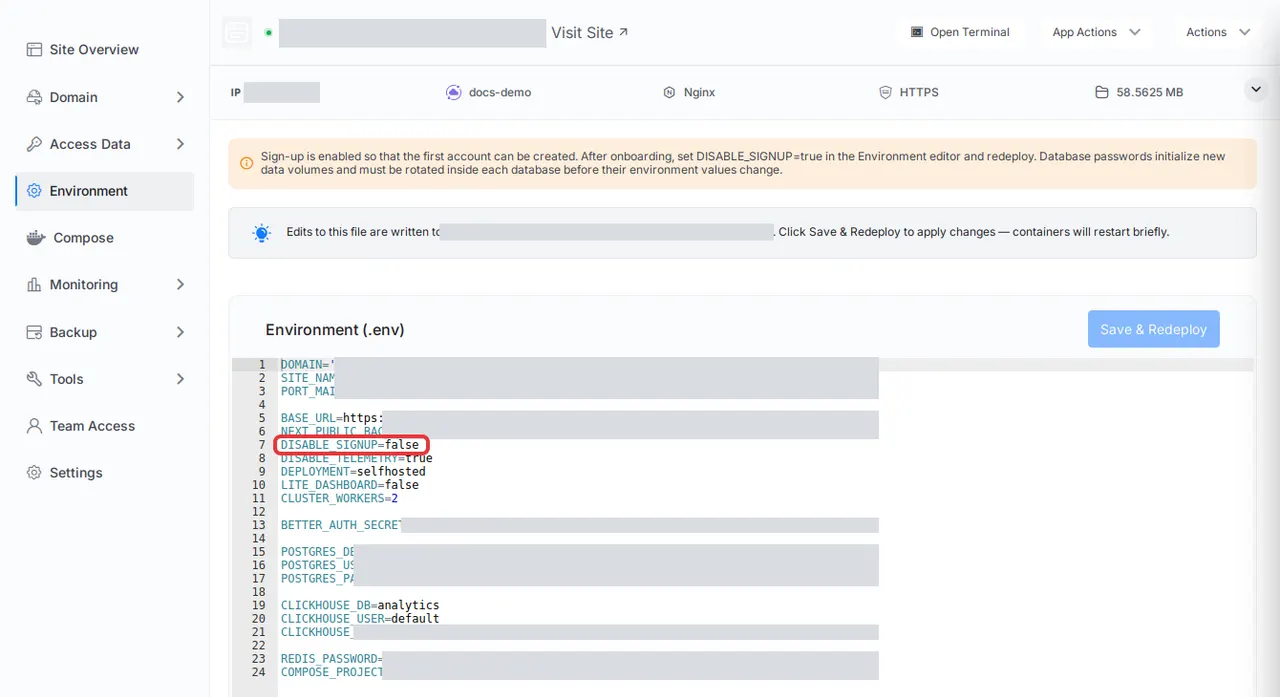
The screenshot shows the Rybbit site’s Environment page right after an install, with DISABLE_SIGNUP=false. Change it to true and click Save & Redeploy once your first account exists.
What Is Rybbit?
Rybbit is a privacy-friendly analytics app that you can run yourself. Its makers describe it as “an open-source, cookieless web and product analytics platform” with “a lightweight 11 KB tracking script” (rybbit.com, read November 2026).
Think of Google Analytics as a large shared office: it is free to sit in, but the landlord sets the rules and keeps the keys. Rybbit is the same kind of desk in a room you own.
A Few Things Worth Knowing
- Cookieless by default. Rybbit does not set tracking cookies, and it says it is GDPR and CCPA compliant.
- Open source, copyleft. The licence is AGPL-3.0. You can run and change it for free; if you change it and offer it to others as a service, you must share your changes.
- Two ways to run it. Rybbit Cloud is the hosted service from the Rybbit team. Self-hosting runs the same app on your server.
- Built on ClickHouse. ClickHouse is a database made for large numbers of events. It is why Rybbit stays fast with lots of data, and why it needs more memory than a simple counter.
What Rybbit Tracks
| Area | What you get |
|---|---|
| Web analytics | Pageviews, sessions, users, bounce rate, traffic sources, campaigns, countries, devices, live visitors |
| Autocapture | Clicks, form submissions, copied text, outbound links and browser errors, without tagging each one |
| Behavior | Session replay, user journeys, funnels, goals, retention reports and user profiles |
| Performance | Core Web Vitals from real visits, by page, country, browser, OS and device |
| Errors | Browser errors linked to the session where they happened |
| For developers | Custom events with JSON properties, a REST API and a hosted MCP server |
Source: the feature list on rybbit.com and the project’s GitHub README, read 8 November 2026.
How Rybbit Works
Rybbit works in three steps, and each one maps to a part of the install above.
1. A Small Script Sends Each Visit
You add one tag to the <head> of every page:
<script src="https://analytics.example.com/api/script.js?siteId=YOUR_SITE_ID" defer></script>Replace analytics.example.com with your Rybbit domain and use the site ID Rybbit gives you. Rybbit’s tracking script docs recommend this URL form over the older data-site-id attribute, because optimizer plugins such as WP Rocket, Perfmatters and FlyingPress can drop data- attributes from script tags.
That tip matters on WordPress. If your visits stop showing after you turn on an optimizer, check the tag first.
2. The Backend Stores the Event
The script sends each pageview or event to the Rybbit backend on your domain. The backend writes it to ClickHouse, and keeps your account and website settings in PostgreSQL.
3. The Dashboard Reads It Back
When you open Rybbit, the dashboard asks ClickHouse for the numbers. The real-time view shows who is on your site now; funnels, journeys and retention are built from the same events.
Rybbit vs Google Analytics vs Rybbit Cloud
Here is the choice most readers are actually making.
| Google Analytics 4 | Rybbit Cloud | Self-hosted Rybbit | |
|---|---|---|---|
| Price | Free | From $13/month billed annually (Standard) | Free software; you pay for a server |
| Cookies | Yes | No | No |
| Where data lives | Rybbit’s cloud | Your server | |
| Websites | Many | Up to 5 on Standard; unlimited on Pro | Unlimited |
| Team members | Many | Up to 3 on Standard; unlimited on Pro | Unlimited |
| Session replay | Not included | Yes | Yes |
| Data retention | Set by Google | 3 years Standard, 5 years Pro | As long as your disk allows |
| Who runs updates | The Rybbit team | You |
Rybbit Cloud prices and limits are from rybbit.com/pricing, read 8 November 2026. The pricing page lists no free plan, only a 7-day free trial.
The honest take: for one small site, Rybbit Cloud is the cheapest way to get Rybbit. Self-hosting starts to win when you have many sites or teammates, or need the data on your own server.
How to Self-Host Rybbit
You have two paths. Both run the same app.
The Manual Way
Rybbit’s self-hosting guide lists these steps:
- Get a server with at least 2 GB of RAM. The guide is tested on Ubuntu 24 LTS (x86_64); ARM servers must be ARMv8.2-A or newer for ClickHouse.
- Point a DNS A record for your domain, such as
analytics.example.com, at the server. - Install Docker Engine.
- Clone the repository and run the setup script:
git clone https://github.com/rybbit-io/rybbit.git
cd rybbit
chmod +x *.sh
./setup.sh analytics.example.com- The script writes a
.envfile and starts Rybbit with Caddy, which gets an SSL certificate for your domain. - Open
https://analytics.example.com/signupand create your account.
Then the work begins: closing sign-up, backing up three databases, and updating each part safely. That is the trade-off, and your time is the hidden cost. If Docker Compose is new to you, read that first.
The One Click Way on xCloud
On xCloud, Rybbit is a One Click App. The full walk-through is in 👉 How to Deploy Rybbit Analytics with xCloud. In short:
- Click New Site, search for Rybbit and click its card.
- Under Where should it run?, click a server with the Nginx stack, then click Continue, or choose Deploy on a new server.
- Add a Site Title, choose Go Live for your own domain or Demo Site for a test domain, and click Next.
- Open
/signupon your domain and create your account. - Set
DISABLE_SIGNUP=trueon the site’s Environment page and click Save & Redeploy.
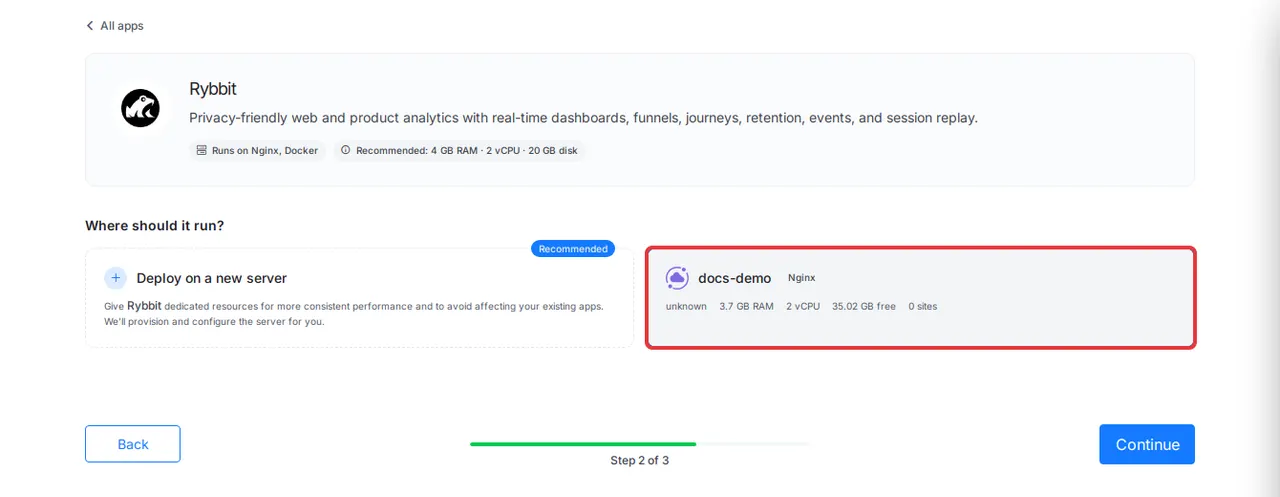
The app page shows Runs on Nginx, Docker and the recommended size, 4 GB RAM · 2 vCPU · 20 GB disk. Each server card shows its free RAM and disk, so you can see if it fits before you continue.
Where Rybbit Falls Short
Rybbit is good, and it is still young. Here is what to know before you switch.
- It needs more server than simple counters. ClickHouse wants memory. Umami runs on a single database and needs less memory.
- AGPL-3.0 is copyleft. Fine for running it yourself; check with a lawyer if you plan to change it and sell it as a service.
- No 3D globe map without a Mapbox token. Rybbit’s setup script takes an optional Mapbox token for 3D maps. The xCloud template does not set one.
- Self-hosting means you own updates. On xCloud, the Rybbit app and its databases are pinned to fixed versions and are never updated on their own. You choose when to update.
- Session replay data adds up. Rybbit caps each recorded session at 50 MB of replay data. Watch your disk if you turn replay on for a busy site.
How to undo it: Rybbit runs beside your site, not inside it. Remove the script tag and your site is back to how it was. On xCloud, you can delete the Rybbit site when you no longer need it.
Run Rybbit on Your Own Server With xCloud
Here is what xCloud does today for Rybbit, and what it does not.
What xCloud does:
- ✅ Deploys Rybbit 2.9.2 with private PostgreSQL, ClickHouse and Redis, from New Site in a few clicks.
- ✅ Creates the app secret and every database password for you. Rybbit has no extra install fields.
- ✅ Sets up free SSL on your domain and renews it. Rybbit is only reachable through your domain.
- ✅ Gives you Backup Now and scheduled site backups that cover all three databases, on paid plans. 👉 Back up and restore Docker apps
- ✅ Lets you change the version and click Save & Redeploy when you are ready. 👉 Update a One Click App
What xCloud does not do:
- ❌ It does not create your Rybbit login. You create the owner account at
/signup. - ❌ It does not update Rybbit on its own.
- ❌ It is not cheaper than Rybbit Cloud for one small site. Rybbit hosting on xCloud is from $24.99/month on a 6 GB Cloud VPS, as listed on the Rybbit hosting page, or you can connect a server you already rent.
- ❌ xCloud has no partnership with the Rybbit project.
To move from a demo domain to your own later, see 👉 Manage One Click App domains.
Deploy Rybbit on xCloud and keep your analytics on a server you control.
Pick Your Analytics Path This Week
Rybbit gives you Google Analytics-style reports plus product analytics, with no cookies and no data leaving your hands. The cost is a server that can feed ClickHouse, and a few minutes of setup you must not skip.
This week, decide one thing: Rybbit Cloud for one small site, or self-hosting for many sites, teammates or full data control. If you self-host, create your account and close sign-up in the same sitting.
Still comparing? Read our OpenPanel guide, our OpenPanel vs PostHog breakdown, or the trade-offs of self-managed vs managed hosting.
If you have found this blog helpful, feel free to subscribe to our blogs for valuable tutorials, guides, knowledge, and tips on web hosting and server management. You can also join our Facebook community to share insights and engage in discussions.
Frequently Asked Questions
Is Rybbit free?
The software is free. Rybbit is open source under the AGPL-3.0 licence, so you can self-host it with no licence fee and pay only for the server. Rybbit Cloud, the hosted service, is paid: the pricing page lists no free plan, only a 7-day free trial (checked November 2026).
Is Rybbit GDPR compliant?
Rybbit says it uses no cookies, needs no consent banner and is GDPR and CCPA compliant. Whether your own site needs a banner still depends on everything else your pages load, so check with whoever signs off your privacy policy.
How much RAM does Rybbit need?
Rybbit’s self-hosting guide asks for a server with at least 2 GB of RAM. ClickHouse, the database that stores your visits, wants more memory as traffic grows, so plan for 4 GB or more on a busy site.
Is Rybbit better than Plausible or Umami?
It does more, not better. Plausible and Umami focus on a simple pageview dashboard and are lighter to run. Rybbit adds session replay, funnels, user journeys and retention, and needs ClickHouse to do it. Our self-hosted analytics comparison ranks all of them.
Can I use Rybbit on a WordPress site?
Yes. Paste Rybbit’s script tag into the head of your site with your theme’s header settings or a header-code plugin. Use the script URL that contains siteId=, because Rybbit notes that optimizer plugins such as WP Rocket can drop data- attributes from script tags.
Who owns the data when I self-host Rybbit?
You do. Every visit is stored in the ClickHouse and PostgreSQL databases on your own server, and nothing goes to Google or to the Rybbit team. That also means backups are your job, so back up before every update.