


The short answer: to deploy an app that needs PostgreSQL on xCloud, paste its repository into Deploy via Git. Since v2.9.17, xCloud reads the repository, sees that the app needs PostgreSQL, preselects it and creates the database for you. If the server has no PostgreSQL yet, you install it from the same form, then deploy.
You have probably seen the other version of this. You paste the repo for an Express + Postgres or Prisma app, the deploy runs, and the app crashes at start because there is no database. Or the form stops and asks for a DATABASE_URL you now have to create somewhere else. If you are new to Git deploys on xCloud, the one-click Git deploy guide covers the basics.
This post covers how xCloud spots the database your app needs, what happens on a server with no PostgreSQL, how container apps connect, and what still needs a DATABASE_URL.
TL;DR
- What’s new in v2.9.17: Deploy via Git spots that your app needs a database and preselects PostgreSQL (or MySQL), with the reason shown.
- No PostgreSQL on the server? Click Install PostgreSQL in the form. Deploy unlocks when the install is ready, a few minutes later.
- Container apps (Python, Ruby, Go, Java, Bun) can now use the server’s managed PostgreSQL, and each app can reach only its own database.
- You stay in control: pick No Database or another database and xCloud creates nothing.
- Still manual: container apps on MySQL and apps from your own
docker-compose.ymlkeep theDATABASE_URLstep. - Also new: AI agents on xCloud MCP can now set up, take and restore backups.
The Finding: The Repository Already Says Which Database It Needs
Most apps tell you what database they want before they run. The driver is in the dependency file, and the example env file names it. xCloud now reads those files during detection, the same step that already picks the app type and start command.
These are the signals xCloud checks in the released code:
| Where xCloud looks | What counts as a PostgreSQL signal | What counts as a MySQL signal |
|---|---|---|
package.json |
pg, postgres |
mysql2, mysql |
prisma/schema.prisma |
provider = "postgresql" |
provider = "mysql" |
| Python dependencies | psycopg, psycopg2, asyncpg |
mysqlclient, pymysql |
Gemfile (Ruby) |
pg |
mysql2 |
go.mod and pom.xml |
A PostgreSQL driver | A MySQL driver |
.env.example |
A postgresql:// URL, DB_CONNECTION=pgsql, POSTGRES_* keys |
A mysql:// URL, MYSQL_* keys |
An app that uses SQLite, or an ORM with no driver, gets no database. An app with both drivers gets a question instead of a guess: “This app uses both PostgreSQL and MySQL. Choose which database to create below.”
How xCloud Spots That Your App Needs PostgreSQL
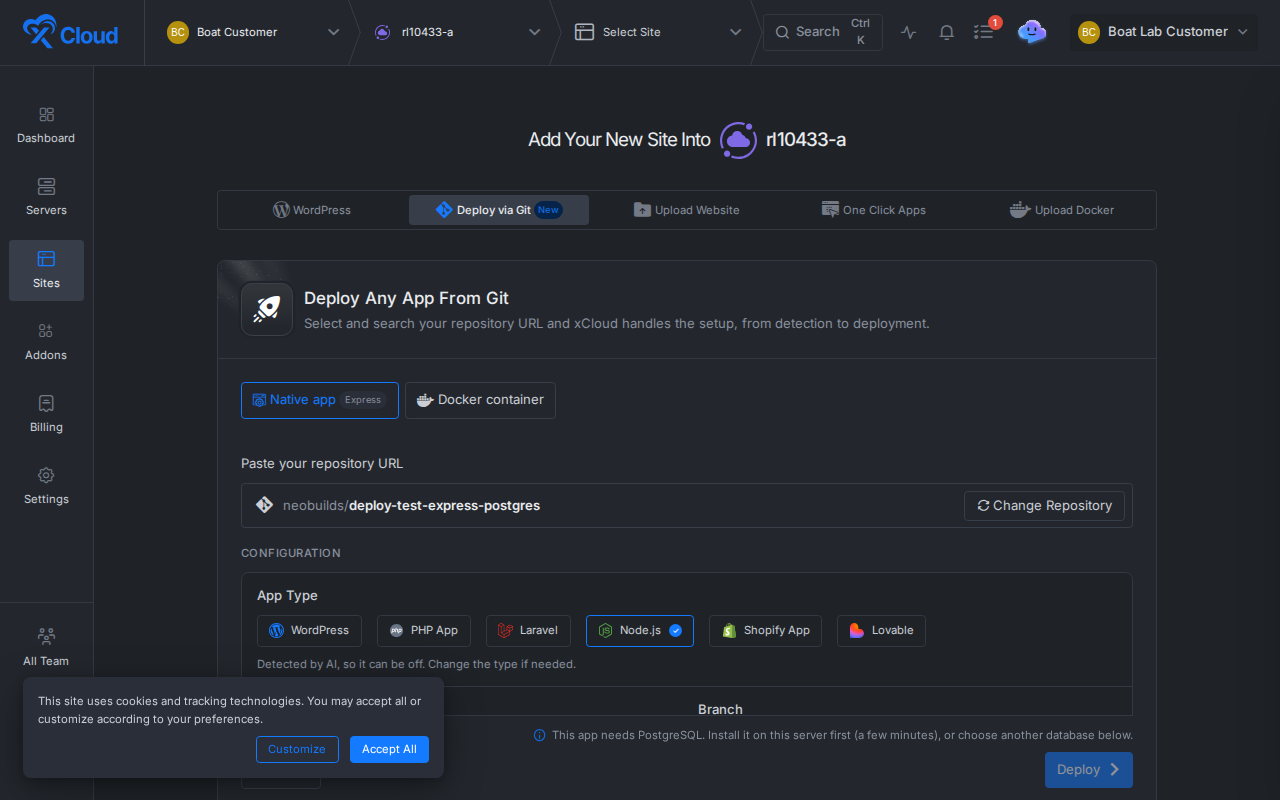
Open Add New Site, pick a server and go to Deploy via Git. Paste the repository URL. When detection finds a PostgreSQL driver, a notice appears above the database options:

The notice reads “This app needs PostgreSQL, we’ll create it. Choose No Database or another database below if you don’t want it.” The Why: line under it names the file and the driver, so you can check the guess in a second.
PostgreSQL is already selected. Deploy, and xCloud creates a database and a login for this site, then writes the connection values to the site’s .env file. The PostgreSQL connection guide lists the exact DB_ lines and DATABASE_URL it writes, and shows how Laravel, Node.js with pg or Prisma, and plain PHP read them.
It is the same work you would do by hand (read the dependencies, create a database, paste a URL), done for you when you deploy.
No PostgreSQL on the Server Yet? Install It From the Form
Managed PostgreSQL is one shared PostgreSQL service per server. If your server does not have it yet, the notice changes: “This app needs PostgreSQL. Install it on this server first (a few minutes), or choose another database below.”
Click Install PostgreSQL. The notice shows “Installing PostgreSQL. This takes a few minutes.” and the footer says “Installing PostgreSQL… Deploy unlocks when it’s ready.” You keep the form as it is. When the install finishes, PostgreSQL is selected and Deploy turns on, with no page reload.
If the install fails, a Try again button appears. You can also pick another database or No Database at any time, and Deploy unlocks at once.
What you need for the install:
- An Nginx server. Managed PostgreSQL is not offered on OpenLiteSpeed.
- Docker Engine 28 or newer on the server.
- Permission to manage the server’s services, if you are a team member.
The full install, pgAdmin and log steps are in Install managed PostgreSQL and pgAdmin.
Container Apps (Python, Ruby, Go, Java, Bun) on Managed PostgreSQL
Until this release, container apps could not use the server’s managed PostgreSQL. Now Django, Rails, Go, Java and Bun apps that xCloud builds for you, or from your repository’s Dockerfile, can.
Choose Docker container in Deploy via Git. When the app needs PostgreSQL, the form shows a ticked box: Create a PostgreSQL database for this app. Leave it ticked and deploy. To skip it, untick the box and add your own DATABASE_URL. If you started a PostgreSQL install and don’t want to wait, tick Deploy without a managed database.
Each app can reach only its own database. Other sites on the same server cannot get to it, and each site has its own database login and password. xCloud writes DATABASE_URL and the DB_ values once, at creation, and never over a value you set yourself.
See Deploy Python, Ruby, Go, Java and Bun apps from Git for the rest of the container flow, and our release post on those stacks for the background.
What Still Needs a DATABASE_URL
Here is the part that trips people up. Three cases still ask you for the connection yourself:
- Container apps that need MySQL. The form says “This app needs a database. Add its DATABASE_URL to the .env below.”
- Apps deployed from your own
docker-compose.yml. These never use the server’s managed PostgreSQL. Set the database in your compose file and.env. - A database that lives somewhere else. If your
.envalready points at an outside database, xCloud keeps it and creates nothing.
Two more limits worth knowing. The first deploy on a server without PostgreSQL waits for the install, so it is not one click. And if you delete a site, xCloud turns off its database login but keeps the data.
For the connection string format, the PostgreSQL connection URI reference is the primary source. Prisma users can check how Prisma reads DATABASE_URL in the Prisma PostgreSQL docs.
Also in v2.9.17: AI Agents Manage Your Backups Over MCP
If you run xCloud from an AI agent through xCloud MCP, the agent can now handle backups end to end:
- Connect, test, edit and remove backup storage (S3 or R2-compatible, and SFTP). Google Drive and pCloud still need the dashboard for the sign-in step.
- Read and change a site’s backup settings, take a backup and follow its progress.
- Restore in place, into another site or into a new site, always after a preview that names the site, the backup time and what will be overwritten.
Storage passwords and keys go in once and are never shown back to the agent.
For Developers: Public API and MCP
git/detectnow returns adatabaseobject withneeded,engineandsignals.git/autocreates the database it detected and says so inwarnings. Senddatabase: "none"to opt out.- A dry run shows
installs_managed_postgresql: truewhen the server needs the install. - On a server without managed PostgreSQL,
git/autostarts the install and answers with a wait-and-retry status; call it again when PostgreSQL is ready.
Our agent pages, such as deploy from Git with Claude, show the prompts that drive this flow.
Deploy Your PostgreSQL App From Git Today
xCloud now does the database step for Git apps that need one: it reads the repository, creates PostgreSQL (or MySQL), connects it and tells you why. You keep every choice, and the limits above tell you when to set DATABASE_URL yourself.
Start on the one-click Git deployment page, or go straight to Node.js hosting if your app is Express or Prisma. Plans are on the pricing page. New to the database itself? Read PostgreSQL vs MySQL and the original managed PostgreSQL and pgAdmin release.
If you have found this blog helpful, feel free to subscribe to our blogs for valuable tutorials, guides, knowledge, and tips on web hosting and server management. You can also join our Facebook community to share insights and engage in discussions.
Frequently Asked Questions
How does xCloud know my app needs PostgreSQL?
It reads the files in your repository. A PostgreSQL driver in package.json, requirements, a Gemfile, go.mod or pom.xml, a Prisma schema with the postgresql provider, or database hints in .env.example all count. The dashboard shows the reason on a Why: line, for example “package.json: pg”.
Can I deploy without the database xCloud picked?
Yes. The database is only preselected. Choose No Database, MySQL, MariaDB or your existing database in the same form, and xCloud creates nothing on its own.
What if my server has no PostgreSQL yet?
The form shows an Install PostgreSQL button. The install takes a few minutes and Deploy unlocks when it is ready, without losing what you typed. Managed PostgreSQL needs an Nginx server with Docker Engine 28 or newer.
Do Docker container apps get PostgreSQL too?
Yes, for Python, Ruby, Go, Java and Bun apps that xCloud builds for you, or from your repository’s Dockerfile. Each app can reach only its own database. Other sites on the same server cannot get to it, and each site has its own database login and password. Apps deployed from your own docker-compose file still need their own DATABASE_URL.
Does this work for apps that need MySQL?
For native apps, yes: the form says “This app needs MySQL, we’ll create it”. Container apps that need MySQL still ask you to add a DATABASE_URL to the .env box in the form.