Cloud VPS 6 GB
Most popularA private Kanban board for you or a small team.
$24.99per month
- 6 GB RAM
- 4 vCPU cores
- 100 GB NVMe SSD
- 30 TB
- Unlimited

Deploy DumbKan hosting and give yourself a simple, private Kanban board on your own domain. xCloud runs the official DumbKan image pinned by immutable digest, mounts a persistent volume for every board and task, asks for a shared PIN at install and publishes the board over HTTPS in minutes — one small container, with no database to run.
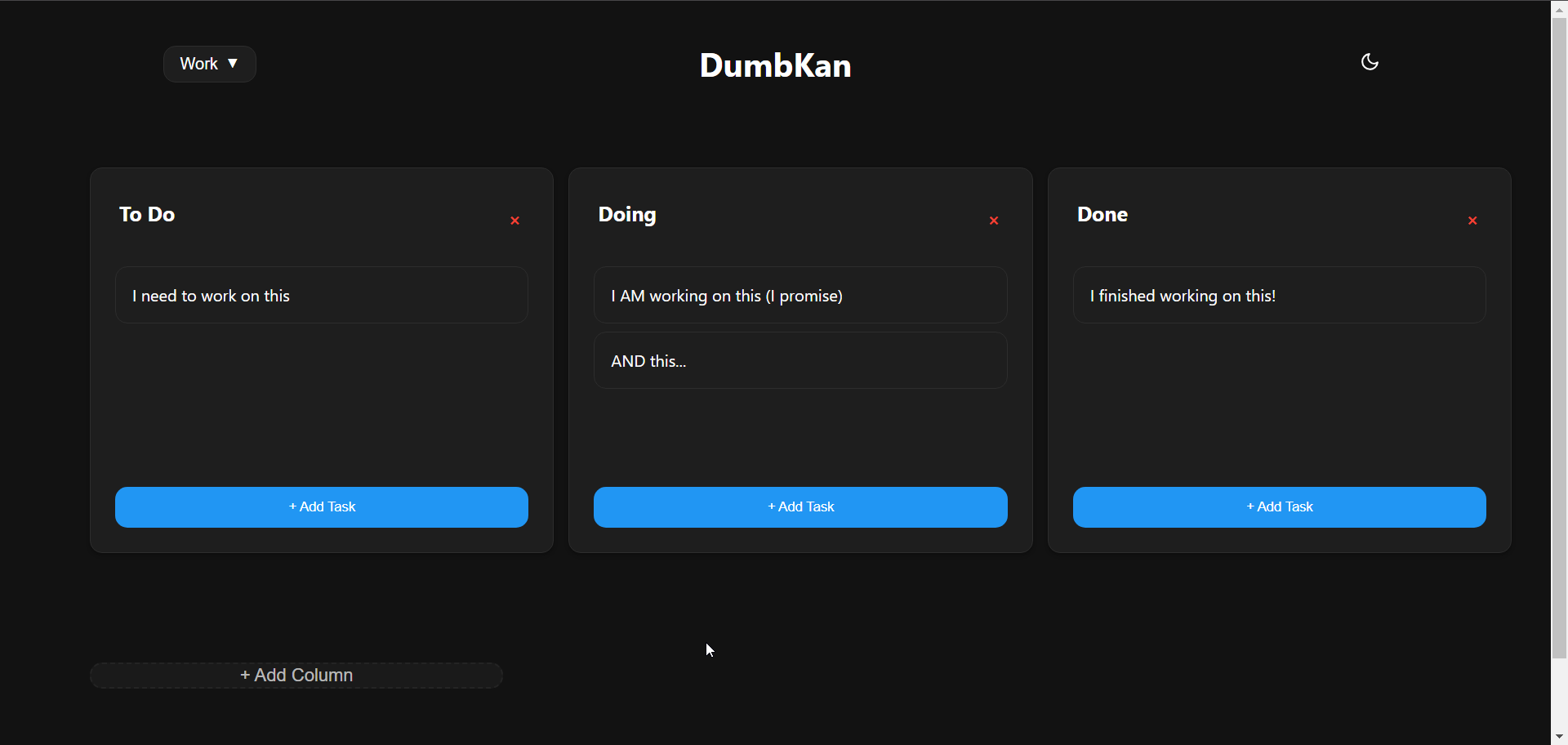
DumbKan is a lightweight, mobile-friendly Kanban board built with vanilla JavaScript and Node.js. You manage tasks as cards in columns, drag them from one column to the next, and keep several boards side by side, such as Work and Personal.
It keeps things deliberately small: all boards and tasks are saved in a single JSON file, so there is no database to run, and access can be protected with one shared PIN. This template deploys the official image built from upstream's main branch at commit a1dc943, because upstream publishes no release tags.
A self-hosted Kanban board normally means a container, a data volume, a PIN or password, a domain and a certificate before the first card. This is the same result without assembling any of it.
Step 01
Create your xCloud account and pick DumbKan from the OneClick catalog. Choose your domain and target server, then enter a Shared PIN of exactly 10 random digits.
Step 02
One click. We bring up the official DumbKan image, pinned by immutable digest, as a single container with no database, mount the dumbkan_data volume that holds tasks.json, and publish it over HTTPS on your domain with the container port bound to loopback.
Step 03
Open your HTTPS DumbKan URL, enter the Shared PIN shown in the protected installation credentials, add your first card and drag it between columns.
DumbKan runs in full here: a minimal Kanban board on your own domain, with every board stored on a volume you control.
Create, edit and delete tasks, and drag them between columns. Double-click on desktop or double-tap on mobile to edit a task.
Keep separate boards such as Work and Personal, create or delete them, and switch between them instantly.
Add columns for your own workflow and rename them inline, so the board matches how you actually work.
Follows your system theme by default, can be switched manually, and remembers your choice across sessions.
A responsive, touch-friendly layout that works on phones and tablets as well as desktop browsers.
Every board and task lives in one tasks.json file on the dumbkan_data volume, so there is no database to run or maintain.
Managed hosting for DumbKan, so the parts that keep it online are not your problem.
Keep your own to-do, doing and done lists on a server you control instead of in someone else's service.
Run several boards side by side and switch between them, so project work and personal errands never share a column.
Give a few people the same PIN and let them move cards across the same boards. There are no individual accounts, so everyone sees and can change everything.
Add and rename columns to fit your own stages, from a simple three-column flow to something longer.
Dedicated Cloud VPS sizes, pre-configured for DumbKan hosting. Pick the one that fits, and resize any time.
A private Kanban board for you or a small team.
$24.99per month
More headroom if DumbKan sits alongside other tools on the same server.
$59.99per month
Every size is a dedicated Cloud VPS we provision, patch, monitor and restore. Billed monthly with no lock-in — delete the server and the unused balance comes back to your account. DumbKan itself is licensed by its maintainers under GPL-3.0.
Connect any VPS — DigitalOcean, Vultr, Linode, AWS, Hetzner or bare metal — and deploy DumbKan on it through the same panel, for a per-server management fee instead of a Cloud VPS rental.
Start your journey without cost.
$0forever
Your rate with 2–5 servers connected.
$5per server / month
The same platform, discounted at 6–10 servers.
$4per server / month
The same platform, discounted at 11+ servers.
$3per server / month
Priced per connected server, so your rate adjusts automatically as you add or remove servers. You pay your own provider for the server itself.
DumbKan on xCloud runs on a dedicated Cloud VPS that we provision, patch, monitor and restore. Deploy faster. Own the server. Stay in control.
Deploy faster using an xCloud Managed Server built with optimized stacks and high-speed SSDs.
Protect your infrastructure with a free SSL certificate and more advanced security features at no additional cost.
From Server creation to application deployment, everything can be managed from our intuitive control panel.
See why agencies, developers, startups, and growing businesses choose xCloud to power their projects.
xCloud works really well, I am surprised by its performance being this the release version, I have tried many paid platforms such as runcloud, cloudpages or serveravatar, as well as free platforms such as CyberPanel, CloudPanel or Hestia Control Panel and direct competitors such as SpinupWP and FlyWP. Of all those that I have tried, the platform that works best for WordPress is SpinupWP and I believe that xCloud can reach and surpass that development, its roadmap is promising. Congratulations to the xCloud team, I hope they become the leading platform in the segment, it has all the potential to achieve it!
 Brian Geovanny
I've been with runcloud for the last 3 years. However, after trying xcloud for the last month, I'm switching over. They are on a roll with their setup.
 Kevin Pineda
I'm moving my servers to xCloud, a cloud control panel by M Asif Rahman and the WPDeveloper team. Their roadmap looks interesting and no, there are no team mates nor API limits with xCloud! #xCloud #wordpress #hosting
 Leo Koo
How Cloud Nine Web Elevated Client Experience While Streamlining Hosting Operations using xCloud
 Ed Ellingham
xCloud is like having an expert server team on call — without the big agency costs. It's given me back my time and given my clients peace of mind. Highly recommended for freelancers and small teams who want reliable performance and security.
 Dumitru Butucel
xCloud isn't just a solution. It's like one of that friend who got your back when you screw things up pretty bad.
 Waqar Ahmed
Trust me when I say, once people explore the potential of xCloud they gonna switch from other panels, just keep delivering the best tech, lots of love for the team 😍😍
 Rahul Singh
So far my experience has been smooth like silk. I didn't imagine that configuring and managing a VPS would be so easy. As of today, I have deployed 8 sites. The support is good, and they treat users with respect, even if they ask stupid questions (myself included). For the future, I hope for greater flexibility in scheduled backups and more comprehensive and consistent documentation. I'm sure that within a few months, xCloud will become the leader in its segment. This community is amazing, and the Staff here is super helpful.
 Massimo Villa
Came from cloudways then to runcloud then to xcloud. Looks like I'm staying here.
 Gerson El
I've recently taken all of my Vultr-hosted sites and gotten rid of cPanel for them to substitute it with xCloud. I have to say, I'm really impressed with xCloud so far! The interface is definitely the standout feature for me.
 Tony Lewis
I came from Cloudways and won't go back. Highly impressed with xCloud. Glad I gave them a chance.
 Jared McDowell
I like xCloud better than RunCloud, but one thing I'll point out is that some years ago RunCloud was hungry for business, the support was outstanding, and the community was active and helped each other. Maybe it was sold, there was a change in management, or they stopped being hungry, but the quality of the RunCloud offering declined and it hasn't been moving forward quickly. My point is that currently the xCloud team has the edge and it is theirs to keep or lose
 David McCan
How Kevin Heinrichs Cut Hosting Costs by 84% While Running WooCommerce & Node.js Sites Efficiently
 Kevin Heinrichs
I had 150 sites on cloudways and am in the process of moving them to xcloud. Much faster and better priced.
 Dan Spinoza
Dear xCloud Team, I have been using xCloud for some time now and am genuinely impressed with its capabilities and the flexibility it offers by allowing users to bring their own VPS for management. It's a fantastic service, and my experience so far has been very positive. Successful migrated 5 sites on a single server. Xcloud migration tool worked great. There were few hiccups with security plugin like MalCare but disabling the plugin prior to migration worked just fine.
 Rahil Maknojia
Came from runcloud. Tried xcloud and never came back.
 Karl Fanega
How Advanced Web Strategies Saved Over $2,000 & Recovered 56 Hours per Month Managing 70+ Client Websites
 Gary Moody
xCloud gave me what no other hosting platform could: the flexibility of a VPS with the convenience of managed WordPress. As a solo founder running an entire business on one server, that combination is an important unfair advantage.
 Jorge de los Reyes Martínez
I use Server Avatar and xCloud and I'll sooner use xCloud than Server Avatar personally.
 Jay Pagano
How Newman Web Solutions Ensured Perfect Uptime and Seamless Scaling For 120+ WordPress Sites with xCloud
 Lori Newman
I too have moved over to xCloud. It's pretty sweet. One click n8n and uptime Kuma apps
 John Aperture
I went from Cloudways to xCloud. No intention on switching in the foreseeable future.
 Blaine Moore
Feel free to contact us with any questions or concerns you may have.
Enter the 10-digit Shared PIN you chose at install. It is also shown in the protected installation credentials.
No. DumbKan has one shared PIN, and everyone who knows it sees and can change the same boards.
Use 10 random digits, not a date or a pattern. Upstream does not rate-limit PIN guesses sent as a request header, so a long random PIN is the main protection. For stronger protection, enable xCloud Basic Authentication on the site yourself; this template does not turn it on.
Upstream's login lockout is shared by all visitors, because the app cannot see real client addresses behind the proxy. Five wrong attempts lock everyone out for 15 minutes, or until the app restarts.
Nothing. It is a single container with no database; the boards are stored in tasks.json on the dumbkan_data volume.
The dumbkan_data volume, which holds tasks.json with every board and task. Back it up before changing the image digest.
Edit DUMBKAN_PIN in the site's environment file, then choose Save & Redeploy. Keep it at 10 random digits: a value shorter than 4 or longer than 10 characters turns PIN protection off.
No, run a single instance. Concurrent saves overwrite each other, and a board larger than 100 KB cannot be saved.
Boards and cards on the dumbkan_data volume. In QA a card moved to Doing was still there after the container was restarted.
No. The template pins the official image by immutable digest, and new installations use the pinned build; existing sites are not automatically upgraded. Back up first, read the upstream changes, then bump the digest on your own schedule. Server-level backups and snapshots are available on every Cloud VPS.
The template's baseline asks for 1 CPU core, 128 MB of RAM and 1 GB of disk; measured idle use in QA was about 20 MiB. This page sells the 6 GB tier as the entry rung, which leaves far more headroom than DumbKan needs.
No. No official partnership or endorsement between xCloud and the DumbKan project has been verified. This is a deployment and server-management option for the open-source DumbKan project.
Yes. There is no lock-in — cancel any time. Hosting is billed monthly and charged for what you actually use, so when you delete the server the unused balance is refunded to your account, less up to 10% in payment-processing fees.
 4ga BoardsSelf-hosted realtime Kanban boards for projects, lists, cards, tasks and attachments, with board import and export and a generated administrator login.
 Affine ProA self-hosted workspace for documents, whiteboards and real-time collaboration, organized into cloud workspaces.
 Apache GuacamoleClientless remote desktop gateway that opens RDP, VNC and SSH sessions in the browser, with per-user permissions on each connection and users and connections stored in PostgreSQL.
 BaïkalA lightweight, self-hosted CalDAV and CardDAV server for private calendar and contact sync over open standards.
 BentoPDFPrivacy-first PDF toolkit for merging, splitting, converting, editing, signing, redacting, and OCR. The simple AGPL edition processes documents locally in your browser.
 Cal.diyOpen-source scheduling with public booking pages, event types, availability and team or round-robin events, backed by a private PostgreSQL database.
 Cal.rsSelf-hosted scheduling with public booking pages, event types, availability rules and team booking, in one container with an embedded SQLite database.
 CryptPadA self-hosted, end-to-end encrypted collaboration suite — rich text, code, kanban, polls, whiteboards, forms and file storage — where content is encrypted in the browser so the server stores pads it cannot read.
Connect your first server in minutes. No credit card required, and no plan you have to grow into.