


The best Nextcloud alternatives in 2026 are Seafile for fast team file sync, OpenCloud for a light single-container server, ownCloud Classic for a familiar PHP setup, Syncthing for device-to-device sync, and FileBrowser Quantum for a simple web file manager. Pick by the one job you actually use Nextcloud for, not by feature count.
A common pattern in “I left Nextcloud” stories: people install it to replace Google Drive, use the Files app and little else, and then run a full collaboration suite to get it. If you still want Nextcloud itself, our guide to self-hosting Nextcloud covers the setup.
This guide compares nine self-hosted alternatives we can run today, with the RAM floor, database and licence of each one taken from xCloud’s own app templates. You get a master table, honest pros and cons, and a clear “stay on Nextcloud” list.
TL;DR: Which Nextcloud Alternative Fits You
Short on time? Here is the whole guide in a few lines:
| If you want to… | Use this | Best for | RAM floor |
|---|---|---|---|
| Sync a team’s files with share links | Seafile | Teams leaving Google Drive or Dropbox | 2 GB |
| Run the lightest server with sync apps | OpenCloud | Small teams, one container, no database | 512 MB |
| Keep a familiar PHP stack | ownCloud Classic | People who know ownCloud or Nextcloud | 2 GB |
| Keep one folder in sync across devices | Syncthing | Solo users and laptops plus phones | 1 GB |
| Browse and share files in a browser | FileBrowser Quantum | Home labs and NAS-style storage | 512 MB |
| Give a company workspaces and permissions | Pydio Cells | Organizations with many groups | 4 GB |
- Best like-for-like swap: Seafile.
- Best when Nextcloud feels heavy: OpenCloud.
- Best when you do not need a server UI at all: Syncthing.
The Finding: Four of the Nine Need a Quarter of the RAM or Less
Here is what other lists skip. Each One Click App on xCloud carries a minimum RAM, CPU and disk size in its template, and those numbers show where the weight really is.
OpenCloud and FileBrowser Quantum start at 512 MB, Cloudreve at 256 MB and Filestash at 128 MB. Syncthing needs 1 GB. Seafile, ownCloud Classic and OxiCloud sit at 2 GB, and Pydio Cells needs 4 GB. xCloud sizes Nextcloud like ownCloud (2 GB).
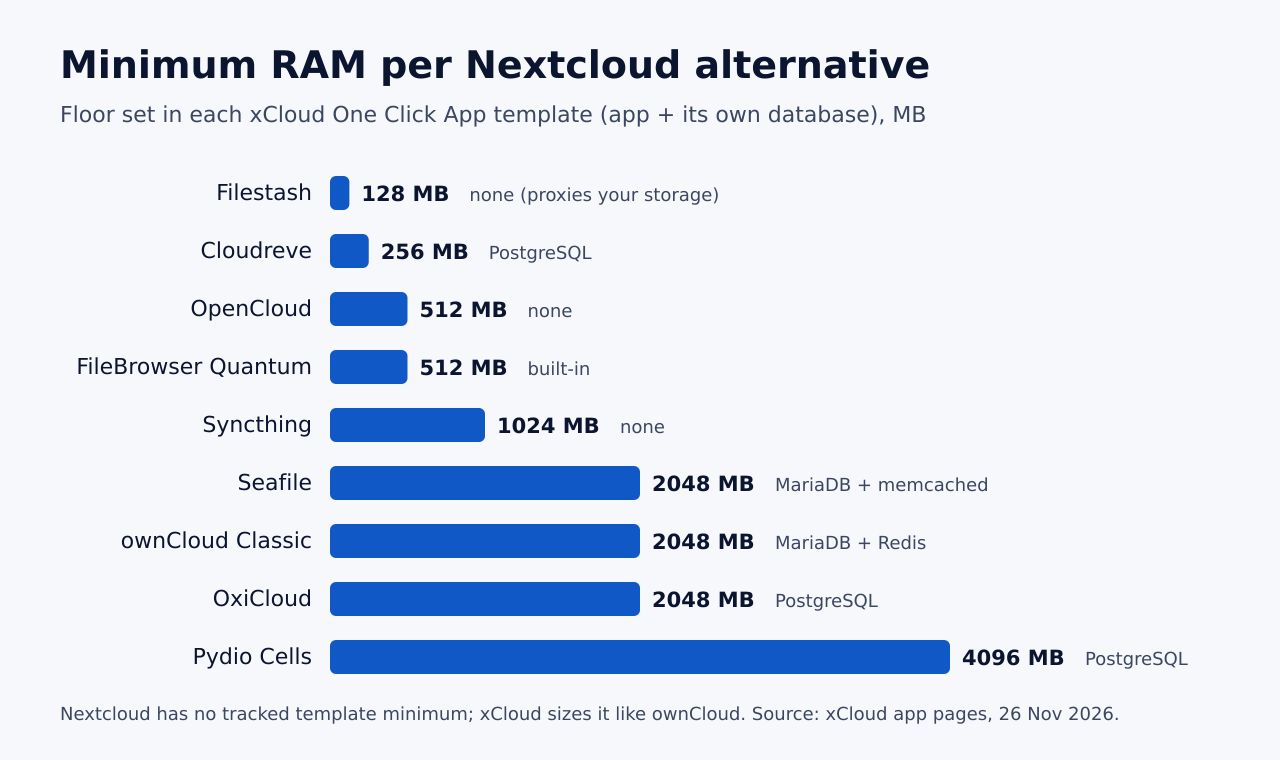
A separate database is one factor, but not the only one: Cloudreve runs its own PostgreSQL and still starts at 256 MB, while Syncthing has no database and needs 1 GB. The templates give the floors, not the reasons. If your server is small, pick from the four lightest (OpenCloud, FileBrowser Quantum, Cloudreve, Filestash).
Nextcloud itself has no tracked minimum in our templates, so xCloud sizes it like ownCloud, its closest relative. Treat these as starting floors, not the size you will need once a team uploads years of files.
Why People Look for a Nextcloud Alternative
Nextcloud describes itself as “a safe home for all your data”: files, contacts, calendars and more on a server you choose (Nextcloud server on GitHub). Its strength is its app store, which adds Calendar, Contacts, Mail and Video Chat.
The catch nobody talks about: you run all of that even when you only use Files. The common complaints are:
- It feels slow on a small server. PHP, background jobs and a growing database all compete for the same memory.
- Upgrades take care. A major version change runs database changes, so you want a backup first.
- Most of the features go unused. Many people only want sync and share links.
None of this makes Nextcloud a bad choice. It makes it the wrong size for some jobs.
Decide What You Are Replacing First
Before you compare apps, write down what you actually open each week. That one list decides the pick.
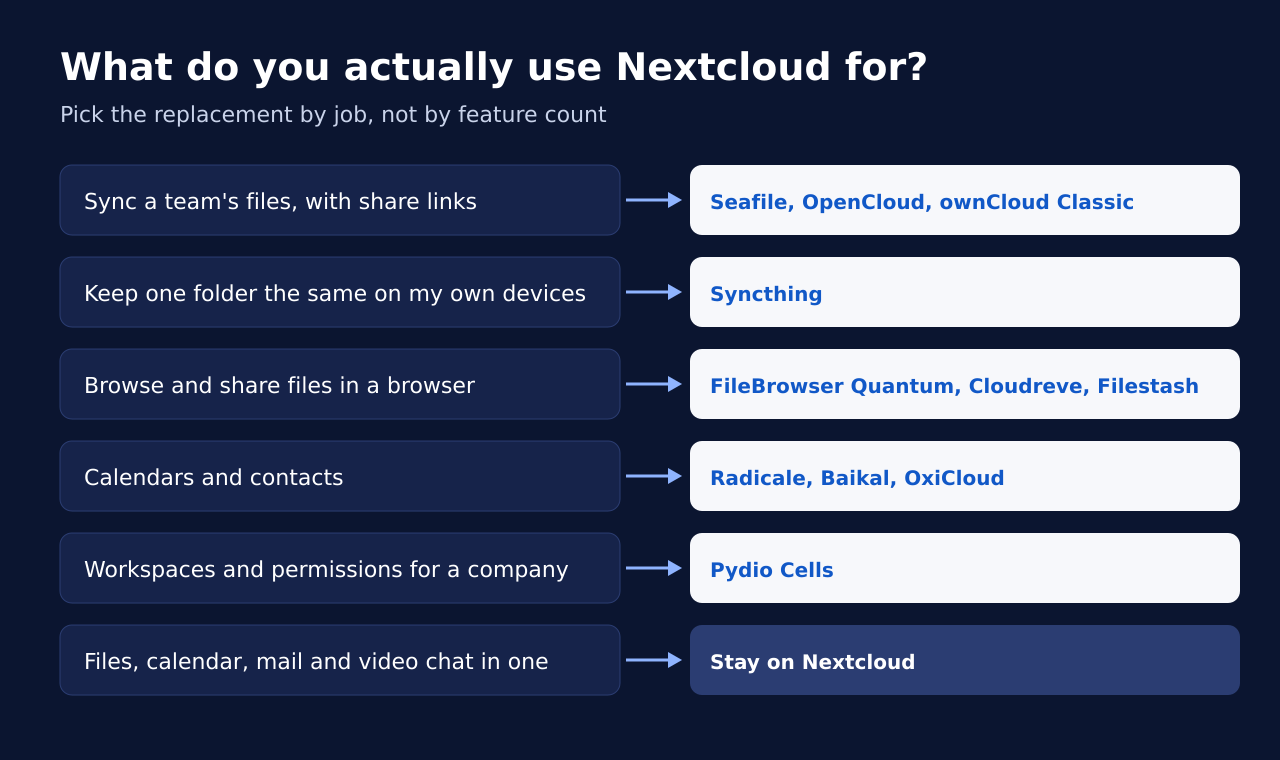
| What you use in Nextcloud | What replaces it |
|---|---|
| Files app, desktop and phone sync | Seafile, OpenCloud, ownCloud Classic |
| One folder mirrored between your own devices | Syncthing |
| A web page to browse, preview and share files | FileBrowser Quantum, Cloudreve, Filestash |
| Calendar and contacts | Radicale, Baikal, OxiCloud |
| Group workspaces and fine-grained permissions | Pydio Cells |
| All of the above in one app | Stay on Nextcloud |
Splitting the jobs is a real option. A file server plus a small calendar server often uses less memory than one large suite.
How We Picked These
- Runs today on xCloud. Every app in the main list is a live One Click App with its own hosting page. Apps we cannot run yet sit in “Also worth a look” with no button.
- Template facts only. RAM floor, database, version and licence come from each app’s xCloud template and upstream repository, read on 26 November 2026.
- Honest about the job. A sync tool and a web file manager are different things, and we say which one each app is.
- No invented numbers. We do not quote GitHub stars, user counts or benchmark speeds we have not checked.
Master Comparison Table
| # | App | Replaces | Best for | Licence | Database | Run it on xCloud |
|---|---|---|---|---|---|---|
| 🥇 1 | Seafile 12 CE | Dropbox, Google Drive | Team file sync | AGPL-3.0 (server core) | MariaDB + memcached | Seafile hosting |
| 🥈 2 | OpenCloud 8.1 | Google Drive | Light file server | Apache-2.0 | None | OpenCloud hosting |
| 🥉 3 | ownCloud Classic 11 | Dropbox | Familiar PHP stack | AGPL-3.0 | MariaDB + Redis | ownCloud hosting |
| 4 | Syncthing 2.1 | Dropbox sync | Device-to-device sync | MPL-2.0 | None | Syncthing hosting |
| 5 | FileBrowser Quantum 2.0 | Google Drive web view | Web file manager | Apache-2.0 | Built in | FileBrowser Quantum hosting |
| 6 | Pydio Cells 5.0 | Box, Dropbox Business | Company workspaces | AGPL-3.0 | PostgreSQL | Pydio Cells hosting |
| 7 | Cloudreve 4.19 | Google Drive | Share links and WebDAV | GPL-3.0 | PostgreSQL | Cloudreve hosting |
| 8 | OxiCloud 0.8 | Google Drive + calendar | Files, CalDAV, CardDAV | MIT | PostgreSQL | OxiCloud hosting |
| 9 | Filestash | A web front for S3 or SFTP | Browsing storage you already have | AGPL-3.0 | None | Filestash hosting |
Every app in this table ships as Docker containers, so you can also run it yourself with Docker Compose.
🥇 1. Seafile: Best Like-for-Like Nextcloud Replacement
Seafile is a file sync and sharing server built around libraries. Each library syncs on its own and can be encrypted with a password you choose, and users share files into groups. Its own site leads with “Fast File Syncing” (seafile.com).
It does one job, files, and does it with desktop and mobile clients.
Key features:
- Libraries: separate synced collections instead of one big folder tree.
- Per-library encryption: a password you set, per library.
- Share links: for single files or whole libraries.
- WebDAV: available at
/seafdav/once you enable it in Seafile’s settings. - Closed sign-up: on xCloud only the admin you define at install exists at first.
On xCloud: the template runs Seafile Community Edition 12.0.14 with a private MariaDB and memcached, a generated 32-character admin password and HTTPS on your domain. The floor is 2 CPU cores, 2 GB of RAM and 10 GB of disk.
| ✅ Pros | ❌ Cons |
|---|---|
| ✅ Focused on file sync, so less to run than a suite | ❌ Runs with MariaDB and memcached; 2 GB RAM floor for the three together |
| ✅ Per-library encryption | ❌ Email (SMTP) is not set up for you; you edit seahub_settings.py |
| ✅ Desktop and mobile clients | ❌ SeaDoc co-editing is not in this Community setup |
Best for: teams leaving Google Drive or Dropbox who mainly need sync and share links.
🥈 2. OpenCloud: Best Lightweight Alternative
OpenCloud calls itself “the open source platform for file management, sharing and collaboration” and its backend “does not use a database. It stores all data in the filesystem” (OpenCloud on GitHub). It is written in Go and licensed Apache-2.0.
Of the apps here with desktop and mobile sync apps, it is the lightest. Files live in personal and project spaces, reachable in the browser and through those apps, which sign in through your OpenCloud web page.
Key features:
- One container: no separate database or cache to look after.
- Spaces: personal and project spaces for team folders.
- Public links: share a file or folder with anyone.
- WebDAV: for tools that mount remote storage, once you turn on password sign-in for it.
- Admin-created users: no open sign-up.
On xCloud: the template runs OpenCloud 8.1.0, from OpenCloud’s fast-moving release line, with a 512 MB RAM floor.
| ✅ Pros | ❌ Cons |
|---|---|
| ✅ Lightest option here with desktop and mobile sync apps | ❌ New versions come out often, so you update more often |
| ✅ No database to back up separately | ❌ Smaller app ecosystem than Nextcloud |
| ✅ Apache-2.0 licence | ❌ No calendar or contacts |
| ✅ Desktop and mobile clients | ❌ WebDAV password sign-in is off by default, so ordinary WebDAV tools cannot sign in until you turn it on |
Best for: small teams that want Nextcloud-style files on a small server.
🥉 3. ownCloud Classic: Best for a Familiar Setup
ownCloud and Nextcloud share their roots, so the ideas will feel familiar. Nextcloud’s own manual says moving from ownCloud to Nextcloud is like a manual update (Nextcloud admin manual). The ownCloud Classic server covers file storage, sync and sharing, with WebDAV, CalDAV and CardDAV servers and a plugin system for apps.
Worth knowing: as of November 2026, ownCloud’s documentation lists Classic server 11.1 next to its newer ownCloud Infinite Scale, and includes a guide for migrating to Infinite Scale (ownCloud docs). Classic is still the PHP version most people mean when they say ownCloud.
On xCloud: the template runs ownCloud Classic Community Server 11.0.0 with a private MariaDB 10.11 and Redis 7.4 for file locking. The floor is 2 CPU cores, 2 GB of RAM and 10 GB of disk.
| ✅ Pros | ❌ Cons |
|---|---|
| ✅ Familiar if you know Nextcloud | ❌ Same weight class as Nextcloud |
| ✅ CalDAV and CardDAV built in | ❌ No enterprise-only features or commercial support in this setup |
| ✅ Mature, well documented |
Best for: people who like how Nextcloud works but want a core focused on files, sync and sharing.
4. Syncthing: Best for Syncing Your Own Devices
Syncthing is continuous file synchronization between two or more computers. There is no central file server in the usual sense: your devices keep each other up to date, and an always-on node on a server makes sure sync still happens when your laptop is closed.
We cover it end to end in how to self-host Syncthing.
On xCloud: Syncthing 2.1.5 runs as one container with a 1 GB RAM floor. You set the dashboard username, the password is generated, and the dashboard is on HTTPS.
| ✅ Pros | ❌ Cons |
|---|---|
| ✅ No database, very little to run | ❌ No web file browser or share links |
| ✅ Encrypted device-to-device sync | ❌ On xCloud your devices connect through Syncthing’s public relay servers, which can be slower than a direct link |
| ✅ Works when one device is offline | ❌ Not a Google Drive replacement for a team |
Best for: one person keeping folders identical on a laptop, desktop and phone.
5. FileBrowser Quantum: Best Web File Manager
FileBrowser Quantum is a web file manager: indexed search, previews, share links, multiple users with per-folder access rules and WebDAV. It is a fork of the original File Browser project.
It is the tool the “I ditched Nextcloud for something lighter” crowd tends to want. You open a page, find a file and share it. There is no desktop sync client.
On xCloud: the template runs the 2.0.8-beta build with a generated admin password and session key, two volumes for your files and its settings, and public sign-up switched off. The floor is 512 MB of RAM.
| ✅ Pros | ❌ Cons |
|---|---|
| ✅ Indexed search | ❌ No sync client or mobile app |
| ✅ Per-folder access rules | ❌ Template uses a beta-tagged build |
| ✅ 512 MB floor | ❌ You add every user yourself |
Best for: home labs and anyone who wants to browse and share files from a browser.
6. Pydio Cells: Best for Company Workspaces
Pydio Cells is a file sharing and collaboration platform for organizations, rewritten in Go. It focuses on workspaces, sync and fine-grained access, the parts a larger team needs when many groups share one server.
On xCloud: Cells 5.0.2 runs with a private PostgreSQL 16.4 and a generated admin password. Its floor is 4 GB of RAM, so its hosting page uses the 16 GB Cloud VPS. Browser and WebDAV uploads are capped at 100 MB per request.
| ✅ Pros | ❌ Cons |
|---|---|
| ✅ Workspaces built for many groups | ❌ Heaviest app in this list |
| ✅ Strong permission model | ❌ As of November 2026, upstream’s README still marks the v5 line as work in progress (Pydio Cells README) |
| ✅ AGPL-3.0 Community edition | ❌ 100 MB per-request upload cap in this template |
Best for: organizations that outgrew simple folders and need structured access.
7. Cloudreve: Best for Share Links and Mixed Storage
Cloudreve is a file management and sharing platform with storage on local disk or S3-compatible providers, share links with expiry, user groups, online preview and WebDAV.
On xCloud: Cloudreve 4.19.1 Community edition runs with PostgreSQL 17.11 and a 256 MB RAM floor. Uploads go up to 1 GB per request.
| ✅ Pros | ❌ Cons |
|---|---|
| ✅ Very light for a full file manager | ❌ The first account to register becomes admin, so register it straight away |
| ✅ Expiring share links | ❌ Its built-in torrent downloader opens extra ports on your server |
| ✅ Local or S3-compatible storage | ❌ No desktop sync client |
Best for: sharing files with clients and friends from storage you control.
8. OxiCloud: Best Light Suite With Calendars
OxiCloud is a self-hosted cloud for files, calendars and contacts, written in Rust. It has WebDAV, CalDAV and CardDAV built in, plus previews, sharing, trash and search.
On xCloud: OxiCloud 0.8.9 runs with PostgreSQL 18.2 and a 2 GB RAM floor.
| ✅ Pros | ❌ Cons |
|---|---|
| ✅ Files plus calendar and contacts in one app | ❌ Pre-1.0 software |
| ✅ MIT licence | ❌ Self-registration is open until you turn it off |
| ✅ No PHP stack | ❌ No email, SSO or office editing set up |
Best for: people who want Nextcloud’s files, calendar and contacts trio without a PHP suite.
9. Filestash: Best Front End for Storage You Already Have
Filestash is a web file manager that does not store your files. It connects to SFTP, S3, FTP, SMB, WebDAV and other backends and gives them one Dropbox-style interface.
On xCloud: the template runs the official image with a generated admin password applied before start, so the setup wizard is closed to visitors. Its floor is 128 MB of RAM.
| ✅ Pros | ❌ Cons |
|---|---|
| ✅ Lightest app in this list | ❌ Not a sync tool |
| ✅ Works with storage you already pay for | ❌ No version number upstream, so xCloud locks it to one tested build |
| ✅ Plugin-driven | ❌ Online document editing is not included |
Best for: a clean web view over an S3 bucket or SFTP server.
Pair These for Calendars and Contacts
File apps do not replace Nextcloud’s Calendar and Contacts. Two small servers cover that job: Radicale, a CalDAV and CardDAV server that stores everything as plain files, and Baikal, which is also a One Click App on xCloud.
Running Seafile or OpenCloud next to Radicale can give you the same daily workflow as Nextcloud with fewer moving parts.
Also Worth a Look
These are not One Click Apps on xCloud today, so there is no button. They still answer some searches well:
- NextExplorer: a Docker-based file manager, not a sync platform.
- rclone with S3 storage: for people who only want an off-site copy of files, not a user interface.
- Nextcloud Office alternatives: OnlyOffice or Collabora if document editing is the one part you need.
When You Should Stay on Nextcloud
The truth is less dramatic than the “ditch it” headlines. Stay on Nextcloud if:
- ✅ You use files, calendar, contacts and chat together every week.
- ✅ Your team depends on Nextcloud apps that no single alternative has.
- ✅ Your server has room and updates are already routine.
In that case the fix is usually a bigger server and a backup before each upgrade, not a new app. Our Nextcloud hosting page and the Nextcloud one-click setup doc cover that path.
What It Actually Costs
The software in this list is free and open source. The cost is the server and your time.
| Cost line | DIY VPS | One Click App on xCloud |
|---|---|---|
| Software licence | Free | Free |
| Server | Whatever your VPS costs | Cloud VPS 6 GB at $24.99 a month for most apps here; Pydio Cells uses the 16 GB plan at $59.99 |
| Setup | Docker Compose, a domain, SSL, a database password | Picked from the catalog, HTTPS and admin password generated |
| Updates | You pull new images and test them yourself | One-click update with a backup first and a 7-day undo |
| Your time | The line item people forget | Mostly the app’s own settings |
Common Mistakes When Leaving Nextcloud
- Picking by feature count. The app with the longest list is usually the heaviest one.
- Forgetting the database. Back up the app’s files and its database together, at the same point in time.
- Sizing the disk for today. Synced files only grow.
- Deleting an app without a backup. Take a backup before you delete an app: deleting it also deletes its data volumes.
- Skipping email setup. Seafile, for example, cannot send invites or password resets until you add SMTP.
- Leaving sign-up open. OxiCloud and Cloudreve need you to close or claim registration first.
Run Your Nextcloud Alternative on xCloud
xCloud runs each of these apps as a One Click App on a server you control. Here is what you get, and what you do not.
What xCloud does today:
- Installs a tested version of the app from the One Click Apps catalog, with HTTPS on your domain.
- Generates the admin password, so upstream default logins are never used.
- Shows tested updates in the dashboard, takes a backup first and lets you undo for 7 days (how updates with backup and undo work).
- Lets you back up and restore the app’s data from the dashboard.
👉 Step by step: Back up and restore Docker apps.
What xCloud does not do:
- It does not manage your users, libraries or share links inside the app.
- It does not set up email (SMTP), SSO or office editing for these apps. If you want one login for the apps that support it, you can run your own sign-on server: see how to deploy Keycloak with xCloud and connect each app yourself.
- Nextcloud has no locked, tested version in our catalog, unlike the others here.
- The 6 GB server is more than the smallest apps need. A small VPS you manage yourself is more affordable if you are happy doing the work.
Pick the app that matches your job, deploy it in a few minutes, and keep your files on your own server.
Start With the One Job You Use Most
Most people do not need a Nextcloud alternative that does everything. They need one that does their main job well on a smaller server.
This week, list what you opened in Nextcloud in the last month. If it is only Files, try Seafile or OpenCloud. If it is one synced folder, try Syncthing. If it is everything, keep Nextcloud and give it a bigger server and a backup routine.
If you have found this blog helpful, feel free to subscribe to our blogs for valuable tutorials, guides, knowledge, and tips on web hosting and server management. You can also join our Facebook community to share insights and engage in discussions.
Frequently Asked Questions
What is the best Nextcloud alternative?
For a team that mostly uses Nextcloud for file sync and share links, Seafile is the closest like-for-like swap. If you want the lightest option here with desktop and mobile sync apps, OpenCloud runs as one container with no database and a 512 MB RAM floor in xCloud’s template. For syncing one folder across your own devices, Syncthing is simpler than any server.
Is there a lighter alternative to Nextcloud?
Yes. In xCloud’s One Click App templates, OpenCloud and FileBrowser Quantum need 512 MB of RAM, Cloudreve 256 MB and Filestash 128 MB. Seafile and ownCloud Classic need 2 GB, and xCloud sizes Nextcloud like ownCloud (2 GB).
Is ownCloud better than Nextcloud?
Not better, narrower. ownCloud Classic covers file storage, sync and sharing with WebDAV, CalDAV and CardDAV, while Nextcloud adds a large app store on top. The two share their roots: Nextcloud’s own manual says moving from ownCloud is like a manual update. ownCloud’s docs list Classic 11.1 next to its newer Infinite Scale server, with a migration guide.
Can Syncthing replace Nextcloud?
Only for one job. Syncthing keeps folders identical across your devices, but it has no web file browser, no share links and no calendar. On xCloud your devices connect through Syncthing’s public relay servers, which can be slower than a direct link.
Do I need Docker to run these Nextcloud alternatives?
Every app in this list ships as Docker images, so you can run it with Docker Compose. On xCloud the One Click App installs a tested version of the app for you, with HTTPS on your domain and a generated admin password.
Can I move my files from Nextcloud to another app?
Yes, but plan it as an import, not a switch. Most alternatives want files uploaded through their own client or web interface, because they keep their own metadata. Calendars and contacts move separately as .ics and .vcf exports.
Last updated November 26, 2026
← All articles