


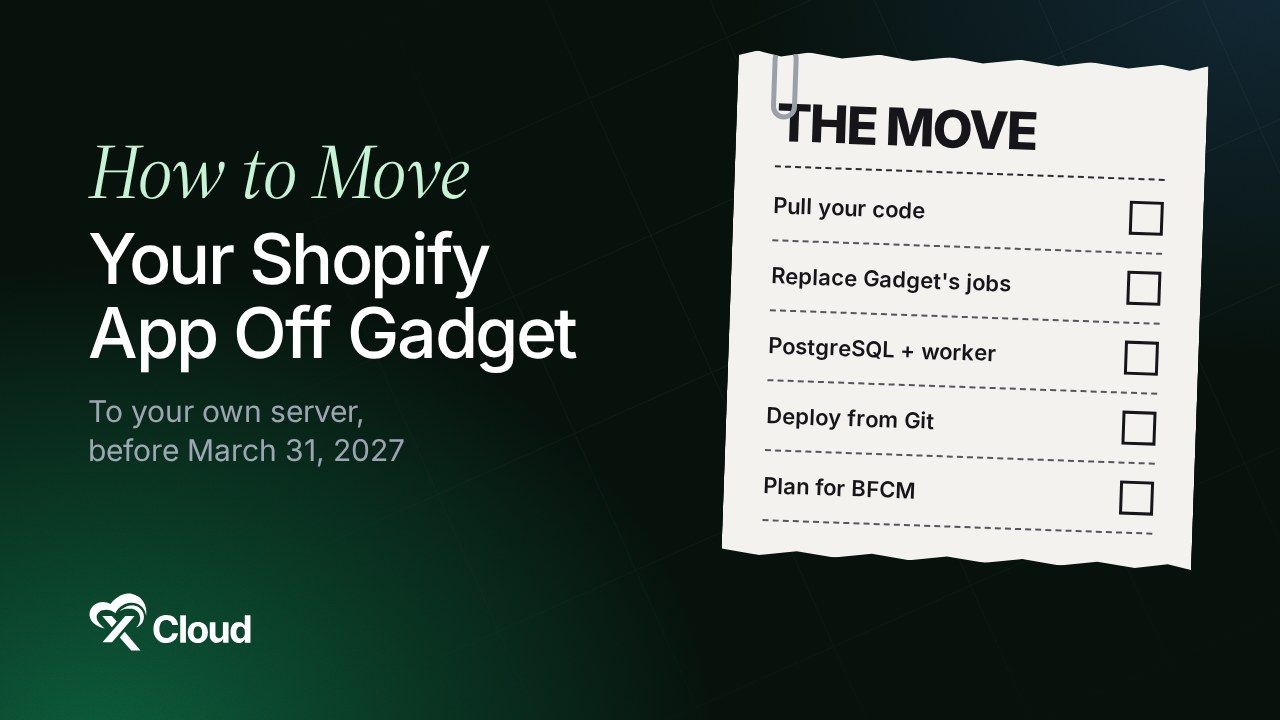
Gadget is shutting down. If you need a Gadget alternative for a Shopify app, the plan has four steps: pull your code out with ggt pull, replace what Gadget did for you (OAuth, webhooks, the data sync, background jobs), rebuild it as a standard Shopify app, and run it on a server you control. You have until March 31, 2027.
Gadget announced the wind-down on November 9, 2026. It is a careful, honest post from a team that built a good product, and it gives everyone time. Use that time well, because hosting is the easy part of this move.
The harder part is everything Gadget quietly did for you. This guide lists each of those jobs, shows what replaces it in a normal Shopify app, and where each piece runs if you move to your own server with xCloud. If you are weighing platforms more broadly, our Heroku alternatives guide covers the same “apps, workers and Postgres” question.
TL;DR
Short on time? Here is the whole move in a few lines:
- Dates: new Gadget apps are blocked now, first production deploys end with November 2026, support ends with 2026, and the platform turns off on March 31, 2027.
- Step 1: export your code with
ggt pull. It copies files only, so plan for your data separately. - Step 2: replace Gadget’s built-in jobs: OAuth and sessions, webhook registration, retries, the daily sync, the copy of Shopify data, and background jobs.
- Step 3: run the result as a Node.js app with PostgreSQL and a worker. On xCloud that is Deploy via Git, Database engine: PostgreSQL, the site’s
.envfile and a Supervisor process. - Step 4: build for webhook bursts before Black Friday: answer fast, queue the work, make handlers safe to run twice.
- Agencies: move one app first, write down what broke, then repeat the checklist for the rest.
Hosting Is the Easy Part: Gadget Did Six Jobs You Now Own
If you only remember one line: moving off Gadget is a rebuild of six platform jobs, not a file copy. The table below maps each one to its standard Shopify replacement and to the place it runs on your own server.
Gadget’s docs describe these jobs plainly. It “handles the OAuth process for merchants installing your application out of the box”, “automatically registers webhooks”, and recovers missed webhooks “using a daily background sync” (all from its Shopify connection docs).
| What Gadget did for you | Standard replacement | Where it runs on xCloud |
|---|---|---|
| OAuth and sessions | Shopify’s React Router app template (@shopify/shopify-app-react-router) with Prisma session storage |
The Node.js site, with sessions in the site’s PostgreSQL database |
| Webhook registration | App-specific subscriptions in shopify.app.toml, released with shopify app deploy |
Your computer or CI, pointing at the site’s domain |
| Retries and duplicates | A job queue plus handlers that skip a webhook ID they have seen (X-Shopify-Webhook-Id) |
A table in PostgreSQL, read by a Supervisor worker |
| Daily sync of missed webhooks | A scheduled job that re-reads recently updated records from the Admin API | A cron job or the worker on the same server |
| A copy of Shopify data in its database | Your own Prisma models, filled by webhooks and Shopify bulk operations | The site’s PostgreSQL database |
| Background actions | A worker process (database queue, or Redis if you prefer) | A Supervisor process on the server |
| API version upgrades | Bump api_version in shopify.app.toml and test on a dev store |
Your Git repository, then a redeploy |
The trade-off is clear. Gadget gave you all of this as one product; a standard app gives you each piece as code you can read, test and move again later. That second property is what this whole exercise is buying.
What Gadget’s Shutdown Means
Gadget will keep existing apps running until March 31, 2027, but you cannot start new ones. Here is every date from the announcement:
| Date | What happens |
|---|---|
| November 9, 2026 | Gadget announces the shutdown |
| Now | “New applications cannot be started effective immediately” |
| End of November 2026 | Last chance for a first-time deploy to production |
| End of 2026 | Gadget support ends; after that the team keeps “the lights on” and handles critical issues |
| March 31, 2027 | The platform shuts down |
Gadget says it will “publish guides and tools for moving your app to other platforms” in the coming weeks and email users when they are ready. Partners will hear from their partner manager; everyone else can write to Gadget support.
The catch worth knowing: as of November 10, 2026, the post says nothing about exporting your data. Don’t wait for it to start the code work.
Step 1: Get Your Code Out
Run ggt pull to copy your app’s files to your computer, then put them in Git. Gadget’s CLI, ggt, syncs your environment’s filesystem with a local folder (source control docs).
npx ggt@latest dev ./my-app --app=my-app   # first time: starts a two-way sync
npx ggt@latest pull                         # later: pull the latest files
Here’s the part that trips people up. The docs say ggt “syncs files to and from a local filesystem, but your Gadget app still runs in the cloud.” Your code comes with you; the records in your app’s database do not.
Once the files are local, mark everything that only works on Gadget:
gadget-serverimports, and the generated API client your frontend calls.@gadgetinc/reactand@gadgetinc/react-shopify-app-bridgein the frontend.- Gelly queries and computed fields.
- Your models and actions folders: each action is a piece of business logic you will move into a route, a webhook handler or a job.
Most of your real business logic lives in those actions. Copy it out function by function, it is the part you keep.
Step 2: Replace What Gadget Did for You
Start a fresh app from Shopify’s React Router template, then move your actions into it one at a time. Shopify CLI creates this template for new apps, and it already handles OAuth, sessions and App Bridge.
Sessions and data in PostgreSQL
The template stores sessions with Prisma in a SQLite file by default. On a server, switch Prisma to PostgreSQL so a worker and the web process can share the data and a redeploy can’t touch it. Then add your own Prisma models for the Shopify data your app used to read from Gadget.
To fill those tables the first time, use Shopify’s bulk operations, which let you “asynchronously fetch data in bulk” instead of paging through results by hand.
Webhooks you declare, not register
Put each webhook topic in shopify.app.toml as an app-specific subscription. Shopify recommends this type because it applies “uniformly across every shop that installs your app.” Run shopify app deploy and Shopify registers them for you.
Retries, duplicates and the daily sync
Shopify expects an answer within five seconds, and retries a failed delivery up to eight times in a four-hour period. It can also deliver the same webhook more than once, so store the X-Shopify-Webhook-Id and skip one you already handled.
Shopify also says “webhook delivery isn’t always guaranteed” and recommends reconciliation jobs. That is exactly what Gadget’s daily sync was. Rebuild it as a scheduled job that asks the Admin API for records updated since its last run.
Step 3: Run It on Your Own Server With xCloud
On xCloud, a Shopify app runs as a native Node.js site deployed from Git, with a PostgreSQL database that xCloud creates for you. You bring the server; xCloud sets up the web server, SSL, PM2 and the database.
The short version of the flow:
- Install managed PostgreSQL on an Nginx server and wait until it shows Ready (how to install it).
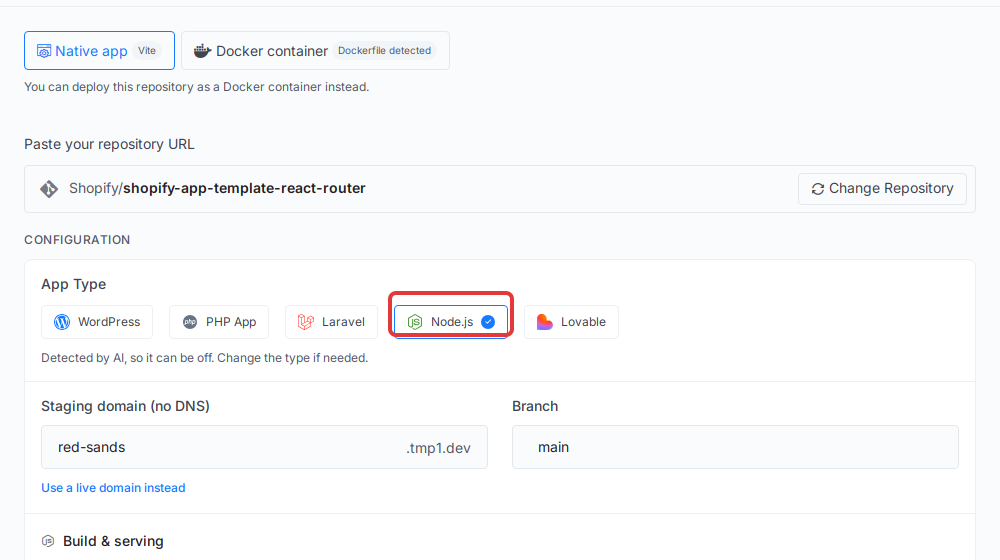
- Add New Site → Deploy via Git, paste the repository, pick Native app and the Node.js App Type.
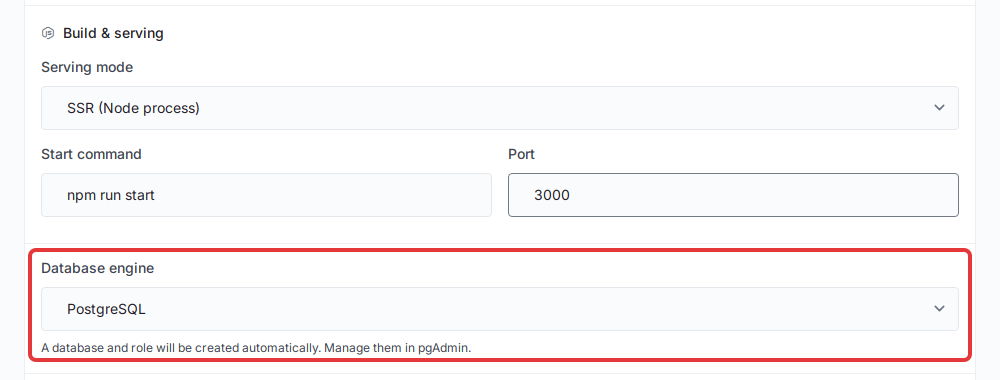
- In Build & serving, set Serving mode to SSR (Node process), the start command and port 3000.
- Set Database engine to PostgreSQL. xCloud creates the database and adds
DATABASE_URLto the site’s environment. - Add
SHOPIFY_API_KEY,SHOPIFY_API_SECRET,SCOPESandSHOPIFY_APP_URLin the Environment file (.env) field. - Add SSL to your domain, point
application_urlinshopify.app.tomlat it, and runshopify app deploy. - Run your worker as a Supervisor process so it restarts if it stops.
👉 Every field and command is in How to Deploy a Shopify App on Your Own Server with xCloud. For the general Node.js flow, see How to Deploy a Node.js Application with xCloud, and for how a deploy treats your secrets, Environment Variables (.env) and Git Deployments.
Step 4: Plan for Webhook Bursts Before Black Friday
Your app now has to absorb peak traffic that Gadget used to absorb for everyone. For a sense of scale, Gadget processed 173,078,683 webhooks over the BFCM 2025 weekend, with a sustained peak of about 52,660 per minute on Cyber Monday (Gadget, December 2025).
That was the whole platform, not one app. But it tells you the shape of the problem: traffic arrives in spikes, and the spikes land on your busiest merchants’ busiest day.
- Answer fast. Verify the HMAC, save the payload, return
200. No slow API calls inside the request. - Queue the work. A jobs table in PostgreSQL is enough for most apps; the worker picks jobs up in order.
- Make handlers idempotent. Skip a webhook ID you have processed, so a retry never charges, emails or syncs twice.
- Size for the peak. Watch CPU and memory in server monitoring during busy days and resize before a big sale.
Moving Many Apps? A Checklist for Agencies
Move one small app first, then reuse what you learned on the rest. Agencies running many Gadget apps have the most work and the same deadline, so a repeatable checklist pays off.
| Per app | Done when |
|---|---|
| Code pulled and in Git | ggt pull output committed to its own repository |
| Gadget-only code listed | Every gadget-server import and action has a planned home |
| Data plan written | You know which records you can rebuild from Shopify and which you cannot |
| Rebuilt on the template | Installs, loads in admin and handles one webhook on a dev store |
| Deployed | Site live with SSL, worker running, logs clean |
| Switched | shopify app deploy points the live app at the new URL |
Keep one server per group of small apps, and give busy apps their own server so one merchant’s sale can’t slow the rest.
What xCloud Does Today, and What It Doesn’t
xCloud runs the standard Shopify app stack on your server; it does not replace Gadget’s framework. Be clear on both sides before you choose.
What xCloud does today:
- ✅ Deploys a Node.js app from GitHub, GitLab or Bitbucket, builds it and runs it with PM2.
- ✅ Creates a PostgreSQL database for the site and writes
DATABASE_URLfor you (on a server with managed PostgreSQL Ready). - ✅ Gives you a
.enveditor, the Node.js Version choice, a custom domain with SSL and the site’s PM2 Log. - ✅ Runs workers as Supervisor processes and scheduled jobs with cron.
What it doesn’t do:
- ❌ No Shopify one-click template and no import tool for Gadget apps. You do the code work in Steps 1 and 2.
- ❌ No built-in webhook queue or data sync. You write them, as you would on any host.
- ❌ You choose and size the server, so a traffic spike is yours to plan for.
If you would rather not run servers at all, a container platform such as Render or Fly.io can run the same app. The code you write in Step 2 works on either; that portability is the point.
Get Your Shopify App Off Gadget Before the Deadline
The shutdown date is fixed, but the work is mostly yours to schedule. Pull your code this week, list what Gadget did for you, and rebuild one app on Shopify’s template with PostgreSQL and a worker.
Then put it on a server you control. If you want the Node.js hosting handled for you on your own server, start with xCloud’s pricing and follow the deploy guide step by step. Read about the database side in Managed PostgreSQL and pgAdmin on xCloud, and if you get stuck, our support team can help.
If you have found this blog helpful, feel free to subscribe to our blogs for valuable tutorials, guides, knowledge, and tips on web hosting and server management. You can also join our Facebook community to share insights and engage in discussions.
Frequently Asked Questions
Is Gadget shutting down?
Yes. Gadget announced on November 9, 2026 that it is shutting down its platform, citing current financial realities. Existing apps keep running until March 31, 2027, and Gadget asks every developer to start planning a move now.
When does Gadget shut down?
The platform stays up until March 31, 2027. New apps can no longer be started, first-time production deploys are allowed until the end of November 2026, and Gadget support stays available until the end of 2026.
What is the best Gadget alternative for Shopify apps?
For most teams, a standard Shopify app built on Shopify’s React Router app template, with PostgreSQL and a worker, running on a server you control. It is the setup Shopify documents, so you are not tied to one platform again. xCloud is one managed way to run it on your own server; Render, Fly.io or a plain VPS are others.
Can I host a Shopify app on a VPS?
Yes. A Shopify app is a web app that Shopify calls over HTTPS, so any server with Node.js, a database and an SSL certificate can run it. With xCloud you deploy it from Git as a Node.js site; the step-by-step guide is How to Deploy a Shopify App on Your Own Server with xCloud.
Do I lose my data when Gadget shuts down?
Plan as if you will. As of November 10, 2026, Gadget has not published a data export, and ggt pull copies files only, not the records in your app’s database. Gadget says guides and tools for moving apps are coming, so watch your email and rebuild what you can from Shopify’s own API in the meantime.
How do I handle Shopify webhooks without Gadget?
Declare them as app-specific subscriptions in shopify.app.toml and release them with shopify app deploy. In your handler, verify the request, store the job, and return 200 within five seconds. A worker does the slow part, skips duplicates by the X-Shopify-Webhook-Id header, and a scheduled job re-reads recent data in case a delivery was missed.