Changelog

xCloud Changelog

We’re constantly making xCloud better with new features and improvements. Look at what we’ve got now and tell us what else you want!

  • No categories

🔥 New Features

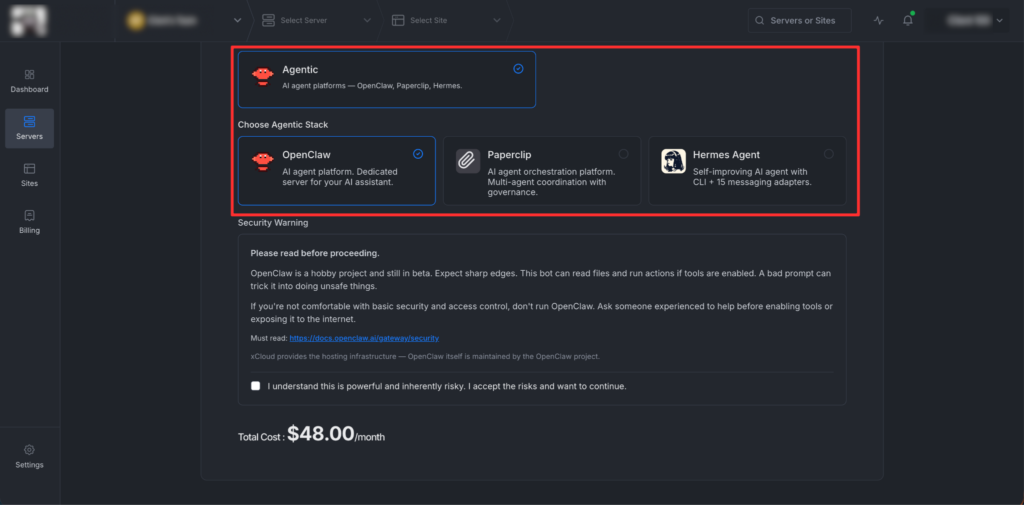
🦀 OpenClaw Hosting — Update.
Big improvements to the OpenClaw one-click hosting on xCloud:

  • Anthropic API Key support added
  • Claude Code Token support — use your Claude Pro/Max subscription with OpenClaw
  • Browser-based token generation — Now, there is no need to install the Claude Code CLI manually. Generate your token directly from your browser. This one is a game changer, and no one has done this yet 👏
    First, select the Claude Code CLI option and then click on Generate Token.

Then a screen will appear, and it will help to generate a Claude OAuth token using the same OAuth flow as Claude Code, and the process is absolutely fluent.

  • Telegram Improvements – Smarter auto-pairing:
    When you provide your Telegram User ID during setup, your account is automatically allowlisted. No more running commands to pair your account!
  • No categories

🔥 New Features

🌟 OpenClaw Hosting (Beta): Launch a fully managed AI agent on xCloud with one-click deployment and zero setup. OpenClaw runs on a dedicated managed server, comes pre-configured with messaging channels like Telegram, and lets you control real tasks, workflows, and integrations entirely through chat.

Ideal for individuals and teams who want a powerful AI assistant without handling infrastructure, updates, or security.

  • Get the environment editor to configure environment variables.
  • Control OpenClaw UI turn on/off right from the xCloud dashboard.
  • Control OpenClaw versions, check for the lates updates easily.
  • AI agent maintains long-term context, executes real tasks, manages files, and connects to external APIs
  • One-click deployment on xCloud Managed Servers with no Docker, SSL, or manual setup
  • Works across Telegram messaging platforms.
  • Bring your own API keys for OpenAI, Gemini and more models. Anthropic is also coming very soon.
  • Manage multiple messaging channels from a single dashboard
  • Scale CPU, RAM, and storage at any time with fully managed updates and security
  • Available only on xCloud Managed Servers and requires more than 4GB RAM.
  • Cannot be installed on external or existing servers and runs OpenClaw only

🔖 Resources

👉 Visit this page to learn more about xCloud Managed OpenClaw Hosting.
👉 Follow the step-by-step guide to deploy OpenClaw with xCloud.
👉 Use this link to purchase and deploy OpenClaw on xCloud instantly.

  • No categories

✨ Improvements

  • Improved Docker server monitoring and container health visibility.
  • Added usable disk space for all type servers.
  • Improved sync monitoring command with a stack-based filter option.
  • Improved site filtering with support for filtering by tags.
  • Improved site deletion process and site state handling.

🔧 Bug Fixes

  • Fixed Hetzner server size availability issues during server creation.
  • Fixed region compatibility errors for Hetzner servers.
  • Fixed notification system errors when integrations are not configured.
  • No categories

🎉Introducing xCloud UI 2.0: Experience Faster & Smarter Dashboard

xCloud UI 2.0 introduces a redesigned dashboard built to make site and server management more intuitive and efficient. This release focuses on faster navigation, clearer visibility, and simpler daily workflows through a more structured and organized xCloud control panel.

Revamped Overview Dashboard

The new Main Overview Dashboard provides a single place to view your overall activities of your team. It shows key information such as servers, sites, vulnerable sites, backups, and billing, helping you manage more quickly.

New Site Lists Dashboard

The All Site Lists Dashboard has been redesigned to simplify managing multiple sites. Site statuses are clearer, and bulk actions allow you to perform common tasks like backups, site enable or disable, and security actions directly from the list without switching between individual sites.

Default View and Grid View for All Sites List

The All Sites List Dashboard opens in Default View, which is designed for managing multiple sites efficiently. In this view, you can use bulk actions and quick controls to perform tasks across many sites at once.

You can switch to Grid View to see each site’s information more clearly. Grid View focuses on visibility, showing site details and status in a more visual layout, making it easier to review individual sites at a glance.

Redesigned Single Site Overview Dashboard

The Single Site Dashboard now displays important site details in a cleaner layout. Resource usage, backups, performance, security, domains, updates, caching, and recent activity are easier to view and manage from one place.

✨Updated Top Bar and Sidebar Navigation

Navigation has been improved with an enhanced Top Bar and Sidebar. Key actions remain accessible, and moving between servers, sites, and settings is more straightforward and consistent.

Bulk Actions, Filters, and Sorting

Bulk actions, filters, and sorting options help reduce repetitive work. These tools make it easier to find, manage, and take action on multiple sites at once.

Improved Dark and Light Modes

Dark and light modes have been updated for better consistency across the platform. Improved contrast and spacing make the interface easier to read during long working sessions.

Standardized Icons and Tooltips

Icons are now consistent across the dashboard, and tooltips provide additional context where needed. This helps reduce confusion and makes actions easier to understand.

Updated Color System

The updated color system improves contrast and visual hierarchy. System and site statuses are easier to identify at a glance, improving overall readability.

🔔 In this first phase, the new UI is available on key pages. Other pages and sections will be updated gradually in upcoming releases. Your feedback is important during this transition. Use the feedback button from the dashboard anytime to help us improve the experience as we continue refining xCloud.

Get more details about the New UI 2.0:
➡️ Introducing xCloud UI 2.0: Built for Faster, Simpler Site & Server Management

  • No categories
  • Mitigated another critical vulnerability (CVE-2026-23800, CVSS 10.0) in the Modular DS (Modular Connector) plugin by force-updating all affected sites to v2.6.0.
  • Issue fixed with Reseller pane’s logo with signup and login pages.