















Site Security PRO Powered by Patchstack is an advanced WordPress vulnerability detection and protection system offered as an xCloud addon. It gives you proactive defense against security issues in plugins, themes, and core files, including early alerts, automated virtual patching, and real-time threat monitoring.
What You Subscribe to Site Security PRO #
Site Security PRO gives you precise, real-time vulnerability detection and automated virtual patching to protect your website from emerging threats. It helps you stay secure even when updates are unavailable, risky, or delayed.
- Automated Virtual Patching that protects against threats even if software isn’t updated yet.
- Early Detection up to 48 hours before vulnerabilities become widely public.
- Identifies exactly which plugin/theme versions are vulnerable.
- Shows whether an official patch is available.
- Alerts when a plugin/theme becomes abandoned or is removed from WordPress.org.
- Maps vulnerabilities across all your sites automatically.
- Reduces noise by alerting only on issues affecting your exact versions.
- Provides detailed CVE info, severity scores, and exploitability context.
- Blocks specific exploit patterns with targeted virtual patching (not generic WAF rules).
- Protects sites even if you can’t update immediately.
- Protects when updates break functionality or require testing.
- Warns you when developers silently stop maintaining a plugin.
- Detects vulnerabilities before widespread exploitation occurs.
- Provides security coverage that hosting firewalls alone cannot.
- Offers detailed remediation guidance (update, replace, patch, remove).
- Tracks changes and security events per site for internal records.
- Maintains historical logs for audits, compliance, and client reporting.
- Central dashboard to monitor and manage security across all sites.
- Real-Time Monitoring & Alerts to catch exploit attempts as they happen.
Step 1: Access the Vulnerability Scan Section #
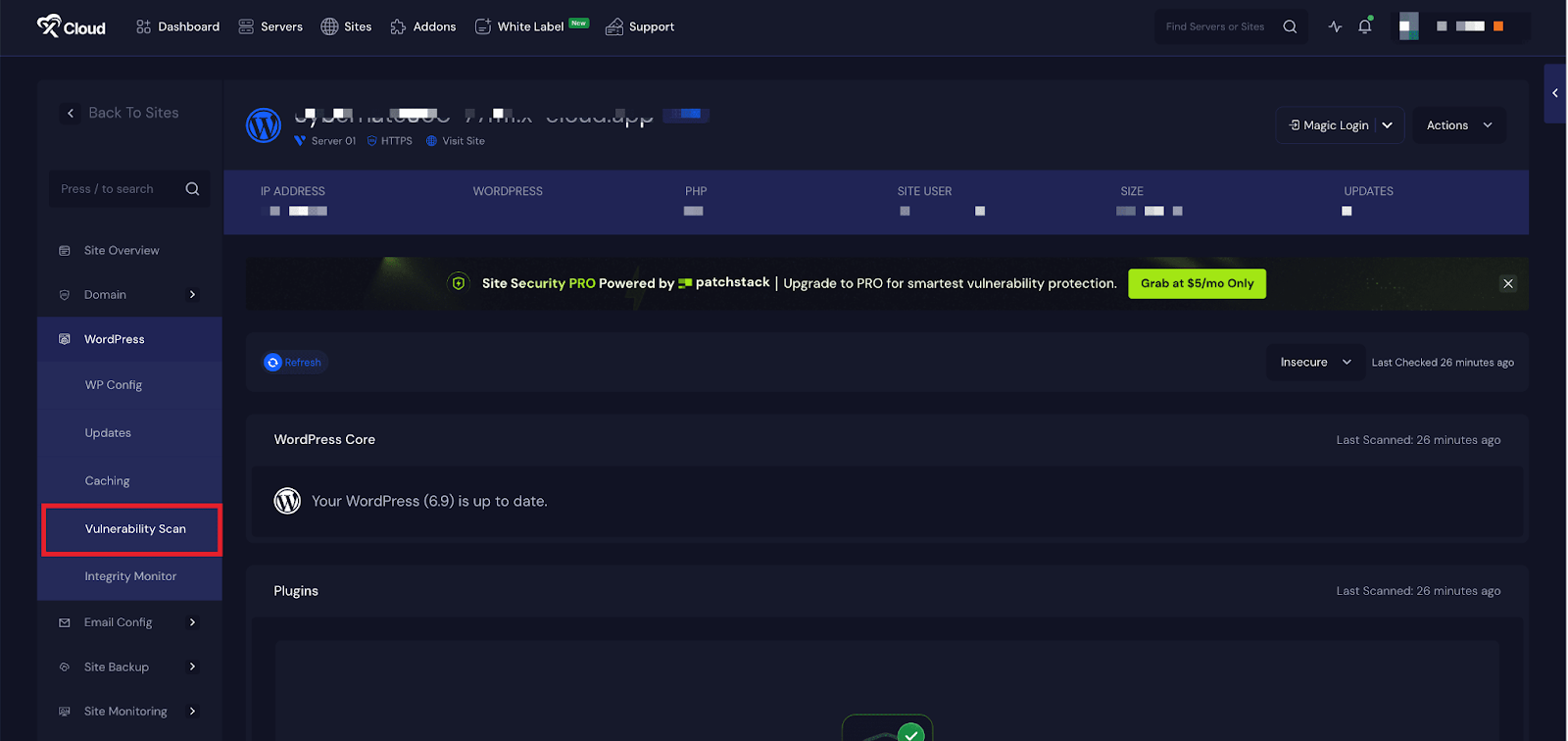
Log into your xCloud dashboard. From the left sidebar, click WordPress. Choose Vulnerability Scan, which will bring you to the dashboard for your site. This section shows you free scanner results and indicates whether you have PRO enabled.
Step 2: Upgrade to Site Security PRO #
If you haven’t already subscribed to the Vulnerability Scan panel, click the Upgrade to PRO button. You will see pricing details ( $2 per month per site). Confirm your payment and complete the checkout. After payment, Site Security PRO will be activated immediately for that site.
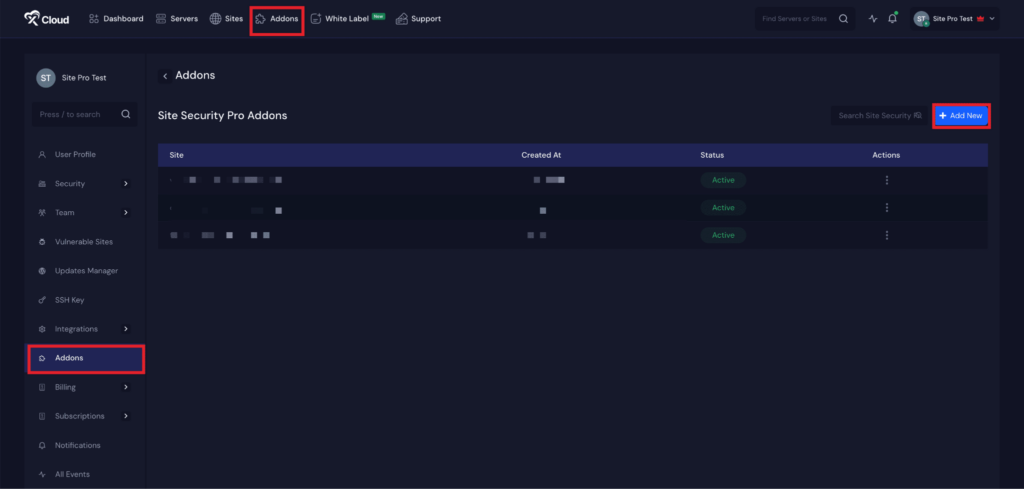
Note: You can also purchase the Addon from the Addons page. Visit the link to access the Addons page.

New addition: Patchstack UI in xCloud Dashboard #
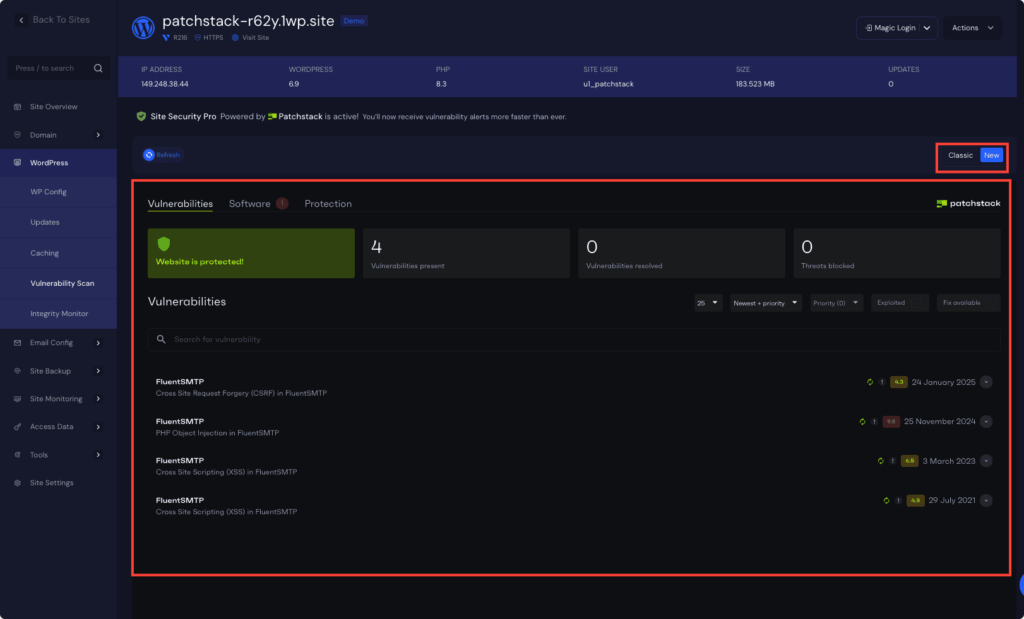
After your subscription is completed, you will be redirected to the new Patchstack UI. Here, under the Vulnerabilities tab, you can see an overview of the total number of vulnerabilities, the number resolved, and the number of threats blocked.
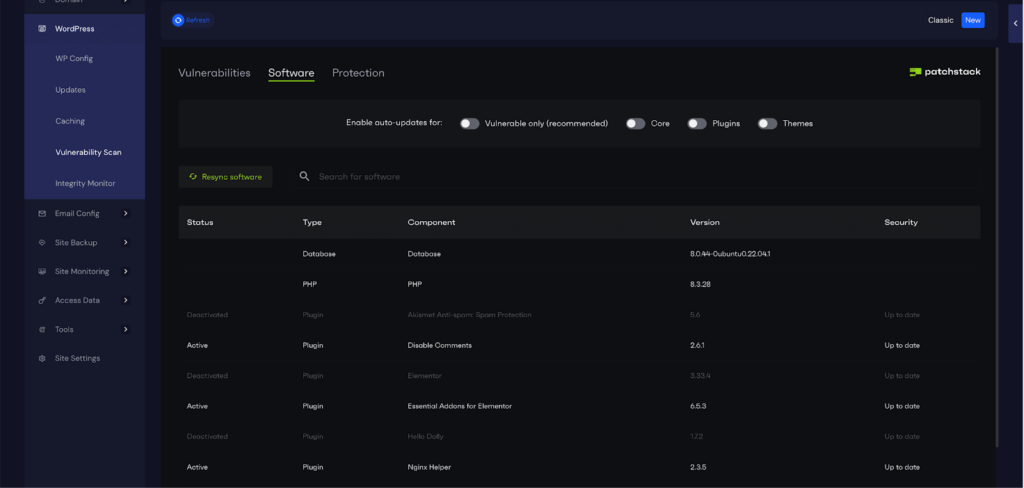
Next, go to the Reports section under the Software tab to view the Status, Type, Component, Version, and Security information.
You can also enable auto-updates for Vulnerable Only, Core, Plugins, and Themes.
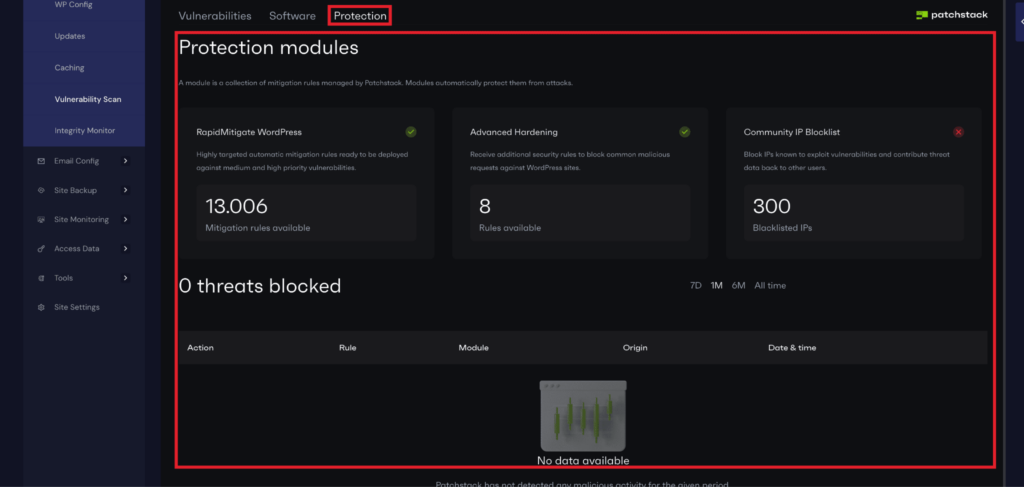
Next, go to the ‘Protection Modules’ tab to get an overview of the protection modules and how many threats have been blocked by the rules.
Step 3: Run a Vulnerability Scan with Classic UI #
Once PRO is active, return to the Vulnerability Scan dashboard. Click ‘Refresh’ to begin a full scan. You’ll see a list of issues found (plugins, themes, core, and more). Click each item for details and remediation recommendations.

How to Manage Your Patchstack Subscription #
Manage From the Addons Page #
You can go to the ‘Addons’ page from the dashboard. Here you will see the sites that are subscribed to the Site Security PRO. Here you can subscribe to new sites for Site Security PRO. Also, remove the subscription for any site and manage the sites.
Manage From the Patchstack Subscriptions Page #
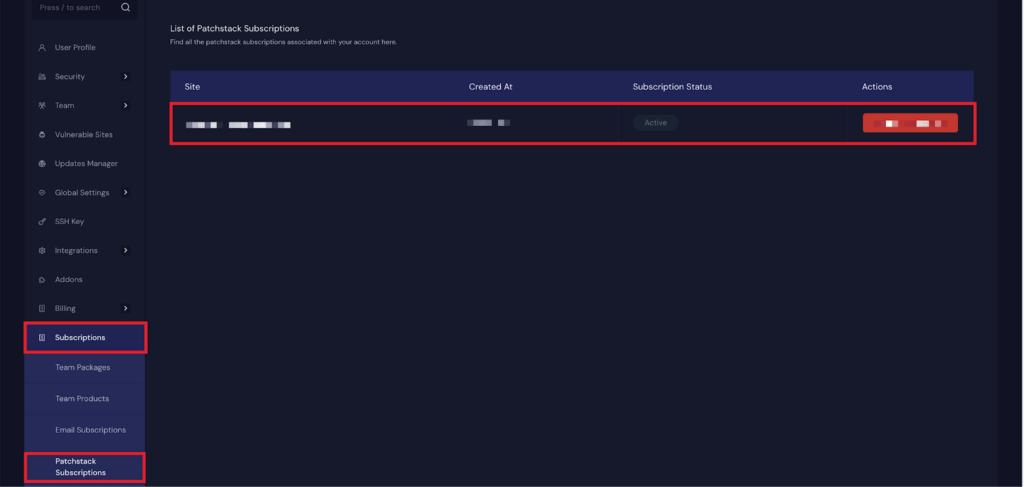
To view or manage your Patchstack Site Security PRO subscription Go to Team Settings → Subscriptions. Click on Patchstack Subscription. Here you can view active subscriptions, renewals, or cancel if needed.
So, Site Security PRO gives you a reliable, automated way to stay ahead of vulnerabilities and protect your WordPress sites with minimal effort. By regularly scanning, monitoring alerts, and managing your subscription, you ensure your website remains secure, stable, and ready to withstand emerging threats. If you ever need help, the support team is always available to as
FAQs #
Q1. What is Site Security Pro? #
Site Security PRO (formerly Vulnerability Shield PRO) is the renamed version of our advanced WordPress security add-on, powered by Patchstack. It protects your websites from vulnerabilities before they become public, using automated virtual patching and real-time threat intelligence.
Q2: Can I use Site Security PRO with other security plugins? #
Yes, it’s built to be lightweight and non-conflicting, and works smoothly alongside firewalls and other security tools.
Q3: Is it compatible with WordPress Multisite? #
Yes, the plugin supports Multisite’s main site.
But for sub-site it is not available now. We will bring it in future for subsites of multisite netowork.
Q4: Can I cancel anytime? #
Yes, manage your subscription in Team Settings → Subscriptions and cancel any time.
Q5: How many sites can I purchase Site Security PRO Powered by Patchstack for at the $2 price? #
We’ve reduced the price of Site Security PRO from $5 to $2 per site. You can purchase as many sites as you want at this discounted rate.
However, this price is available for a limited time and may increase in the future for anyone who purchases sites after this limited-time $2 offer ends.
Q6: I’m an existing Site Security PRO subscriber. Will I also get the $2 price? #
Yes. All existing and new subscribers will receive the $2 per month per site pricing forever.
For existing users, starting next month, the subscription will automatically adjust to $2/month per site.
Q7: Can I use Site Security PRO alongside other security plugins or tools? #
Yes. Site Security PRO is built to be lightweight and non-conflicting. It works smoothly with:
- Hosting-level firewalls.
- Security monitoring tools.
- Other WordPress security plugins.
Q8: Will Site Security PRO slow down my website or affect performance? #
No. Site Security PRO (Powered by Patchstack) is designed for speed and efficiency. It has near-zero performance impact, even on sites with heavy traffic or when managing hundreds of installations.
Q9: Is Site Security PRO compatible with WordPress Multisite’s Subsites? #
No, its now not available for subsites. Currently, for only Main site of Multisite Network.
Q10: Do I need a separate subscription for each site? #
Yes. Each site requires its own subscription. For Multisite networks, each sub-site needs its own license if you want full protection across the entire network.
Q11: What is the new price for Site Security PRO powered by Patchstack? #
All Patchstack-powered Site Security PRO licenses are now $2 per site instead of $5.
Q12: How many sites can I purchase at the discounted $2 rate? #
You can purchase as many sites as you want at the $2 price during the offer period, and any site you buy now will stay locked at $2 forever.
Q13: Will my existing Site Security PRO sites renew at the new $2 price? #
Yes! All your existing Site Security PRO sites will automatically renew at the new $2 price starting next month. You don’t need to take any action.
Q13: Why is Site Security PRO by Patchstack not connecting to my WordPress site? #
Connection issues may occur due to Cloudflare settings, strict firewall rules, or other server restrictions. Read this documentation to restore the connection instantly.
Still stuck? Feel free to reach out to our support team for any of your queries


