

How to Use Cloudflare Enterprise for External Domains
Updated October 19, 2026 · 9 min read
Use this guide to add Cloudflare Enterprise protection to a public domain whose website is hosted outside xCloud. It is for team owners and members who can manage add-ons and billing. You will purchase the add-on, copy the domain-specific DNS records, verify activation, review Cloudflare settings, manage bandwidth, and cancel the subscription when it is no longer needed.
Prerequisites
Before you start, confirm that:
- Your xCloud team can access Addons and purchase Cloudflare Enterprise.
- You have permission to manage the team’s add-ons and billing.
- You know the full public domain you want to protect, such as shop.example.org.
- You can edit DNS at the domain’s authoritative DNS provider.
- The existing website continues to serve the domain from its current origin during setup.
- The domain is not already covered by another Cloudflare Enterprise subscription in xCloud.
- If you expect xCloud to manage DNS automatically, your team has a connected Cloudflare integration that covers the correct DNS zone.
Billing note: The xCloud v2.8.9 interface captured for this guide displays an external domain at $5.00/month. Always confirm the current price and recurring total in your checkout before paying.
Understand the setup flow
An external domain is not attached to an xCloud site or server. xCloud creates the subscription for the team, registers the custom hostname with Cloudflare Enterprise, and shows the exact DNS records required for ownership validation, certificate issuance, and traffic cutover.
Routing and ownership validation are separate requirements. The domain does not become active just because one record resolves. Add every record shown in the domain’s Ownership Verification panel and wait for the certificate and routing checks to complete.
Domain status reference
| Status | What it means | What to do |
|---|---|---|
| Pending Verification | Cloudflare is waiting for one or more ownership, certificate, or routing checks. | Add the displayed DNS records, then select Verify Records or Refresh Status. |
| Domain not Live | The custom hostname is registered, but the domain is not yet serving through the Cloudflare Enterprise edge. | Check the live-traffic records and wait for certificate completion. |
| Active | The custom hostname and SSL status are active. | Verify the public site and continue monitoring bandwidth. |
| Failed | Cloudflare reported a blocked, deleted, or otherwise failed hostname state. | Recheck the records and contact xCloud support if the state does not recover. |
| Disabled | Cloudflare Enterprise is disabled for the domain. | Review the reason and enable the domain only after its DNS and bandwidth requirements are satisfied. |
Add an external domain
1. Open Cloudflare Enterprise Addons
Go to Addons → Cloudflare Enterprise Addons, then select Add New.
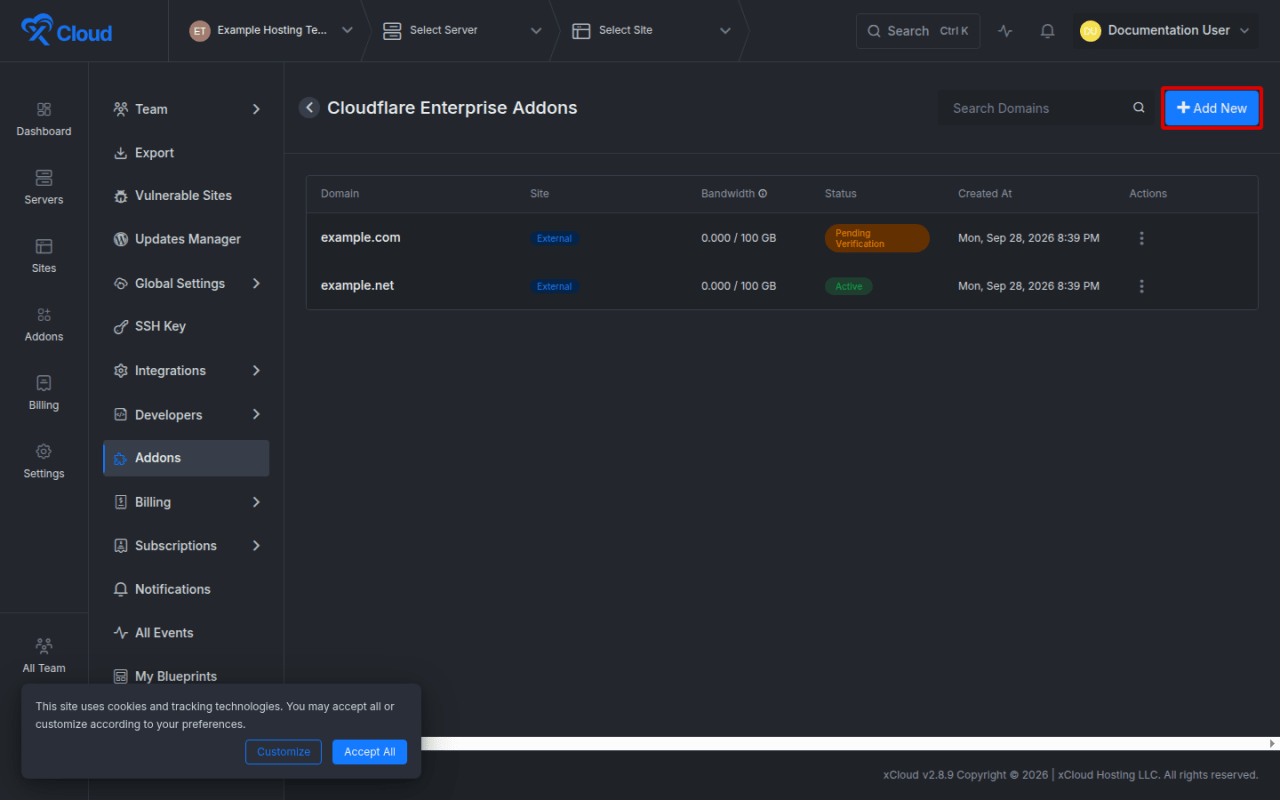
Expected result: The Cloudflare Enterprise domain picker opens.
2. Choose the external-domain entry field
In the picker, use Search sites or enter a domain…. This field supports eligible xCloud-hosted sites and full external domain names.
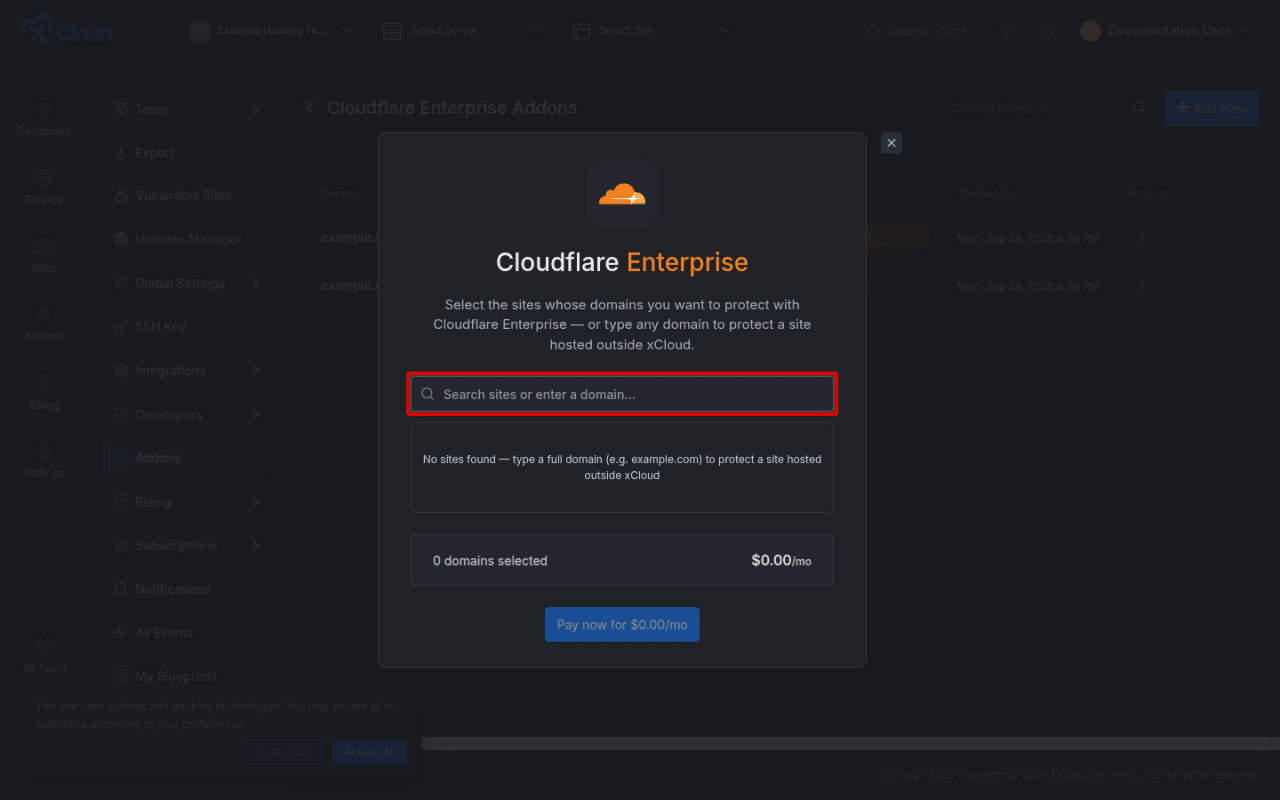
Expected result: The picker is ready for a public domain name.
3. Enter the full domain
Type the exact hostname that should receive Cloudflare Enterprise protection. For example, enter shop.example.org if that subdomain is the public website.
When the domain is valid and available, xCloud displays an Add row showing your domain and its monthly price.
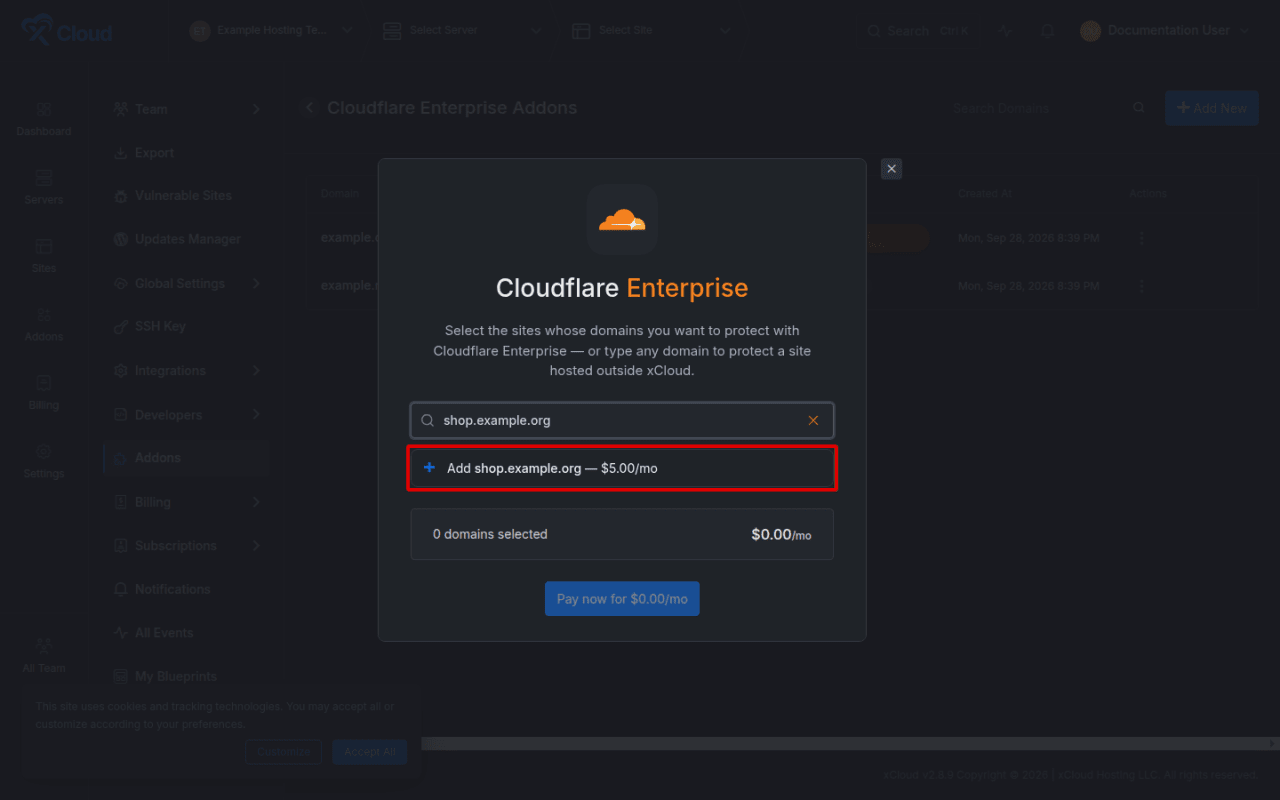
Expected result: The entered hostname appears as a selectable external-domain candidate.
4. Add the domain and review the recurring total
Select the Add row. Confirm the removable domain chip, selected-domain count, and recurring total. Select Pay now for the displayed monthly amount only after the hostname and amount are correct.
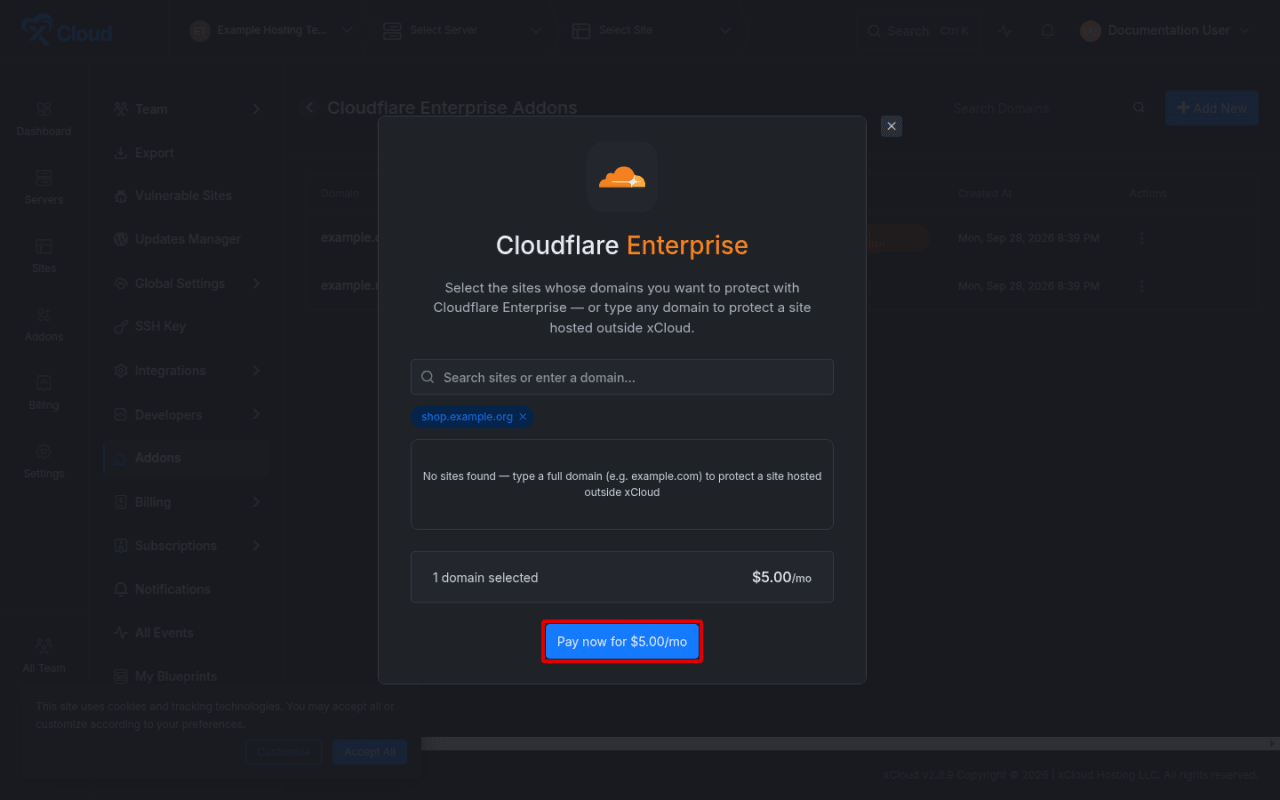
Expected result: The checkout shows one selected domain and the correct monthly total.
Payment is the only part of this flow that creates a charge. Do not continue if the domain or total is wrong.
Find and manage the subscription
5. Locate the external domain row
After checkout completes, return to Addons → Cloudflare Enterprise Addons. The new row is marked External in the Site column. The row also shows bandwidth use, status, creation date, and its actions menu.
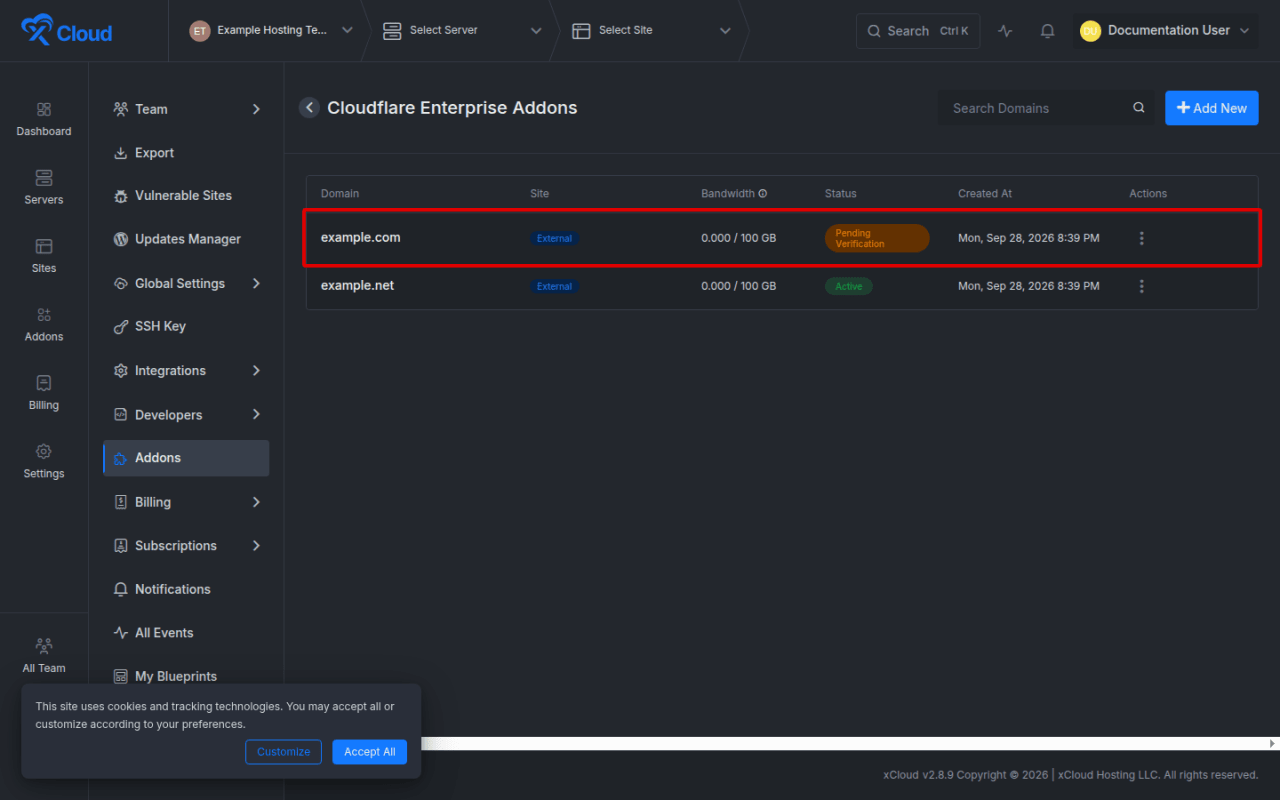
Expected result: The domain appears as an external subscription, commonly with Pending Verification while DNS is incomplete.
6. Open the management page
Open the row’s actions menu and select Manage. The same menu also provides Add bandwidth, Disable, and Cancel Subscription when those actions are available. Cancel Subscription is only in this row menu, not on the management page.
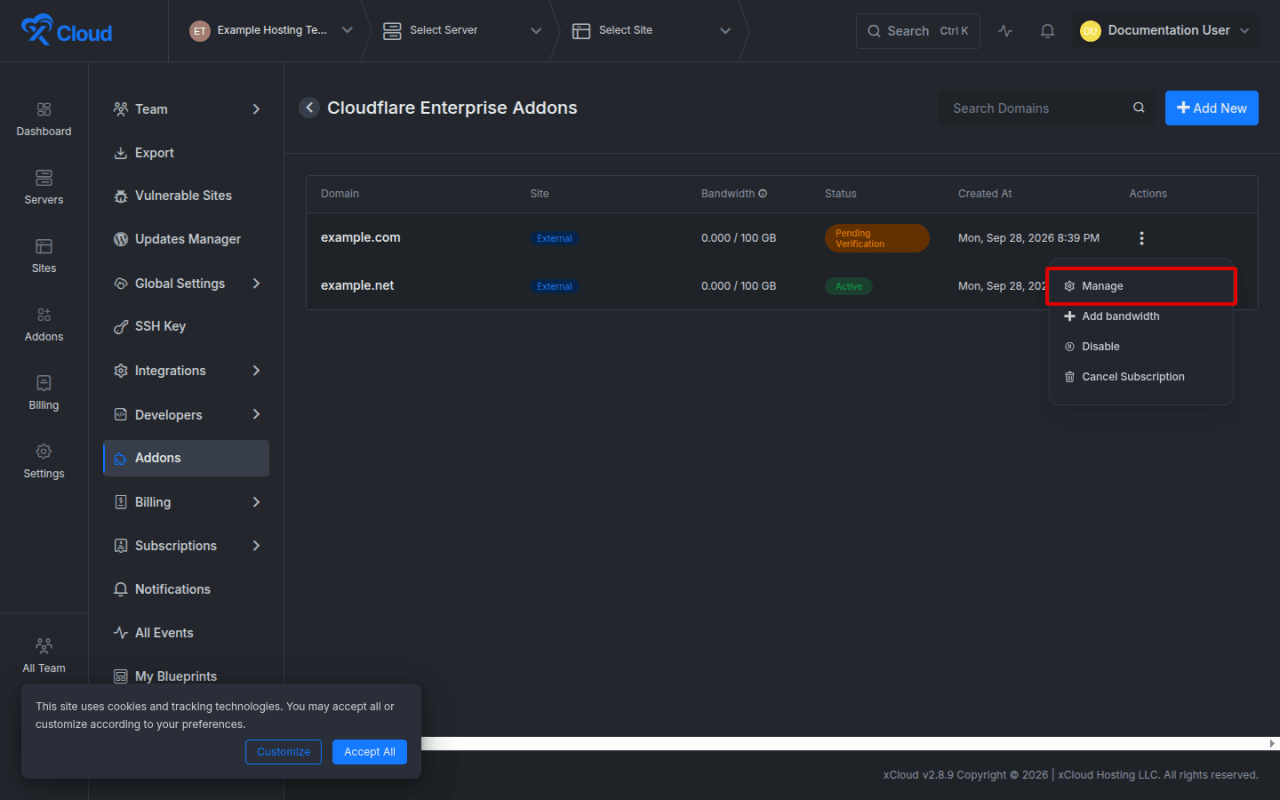
Expected result: The domain management page opens with its status, bandwidth summary, origin server, DNS instructions, and feature tabs.
Check the origin server
The Origin Server card shows where Cloudflare Enterprise sends traffic for the domain. xCloud detects your host automatically. If your domain is proxied in your own Cloudflare account, or the card says Origin server needed, enter your server’s public IPv4 address or hostname and select Save Origin. Without an origin, visitors get a Cloudflare 522 error.
Configure and verify DNS
7. Copy every displayed DNS record
On the Domain tab, review Ownership Verification. Add each displayed record at your DNS provider.
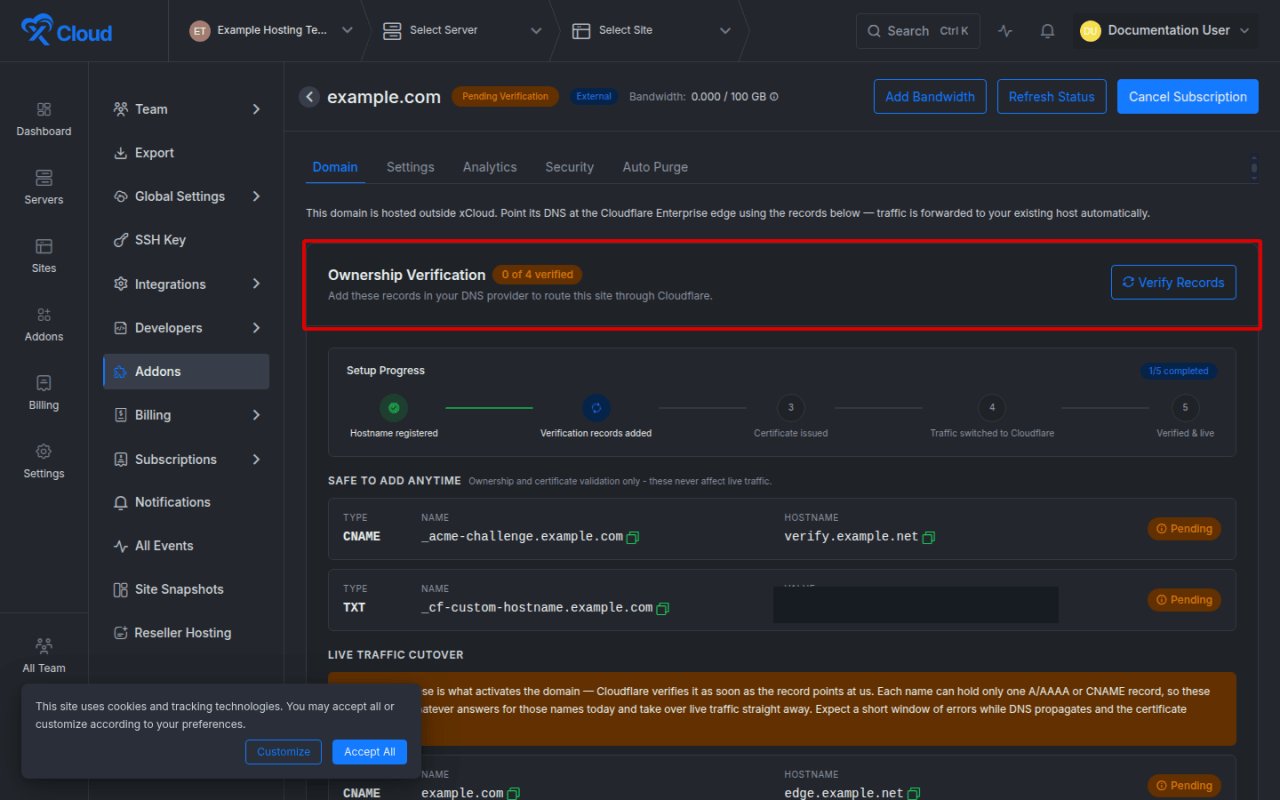
Follow these rules:
- Copy the exact Type, Name, and Value or Hostname shown by xCloud.
- Do not replace a displayed fully qualified name with
@unless your DNS provider explicitly converts the displayed name to its own apex notation. - Preserve the ownership TXT and certificate-validation records. These can be safe to add before traffic cutover.
- Treat live-traffic records separately. Replacing an existing A, AAAA, or CNAME record changes where production traffic goes.
- If a name already has an A, AAAA, or CNAME record, remove or replace the conflicting routing record only when you are ready to cut traffic over.
The panel groups the records under Safe to add anytime and Live traffic cutover. For the root domain, use the record type the panel recommends for your DNS provider. For step-by-step instructions, see the guides for Google Cloud DNS, AWS Route 53, Namecheap, and Cloudflare without an xCloud integration.
Expected result: The DNS provider contains all records shown in xCloud without duplicate or conflicting routing records.
Automatic DNS management
If a connected Cloudflare integration covers the domain’s zone and xCloud can manage the records, the page explains that the records are managed automatically. A connected Cloudflare account alone is not sufficient. The integration must cover the specific zone and be able to write its records.
If the automatic-management message is not present, add the records manually at the authoritative DNS provider.
8. Verify records and wait for Active
Select Verify Records after the records are saved. If the domain’s DNS is on a connected Cloudflare account, the button is called Verify & Add Records. You can also select Refresh Status from the page header. While a non-active domain page remains open, xCloud periodically refreshes its status.
The setup progress can move through hostname registration, verification records, certificate issuance, traffic cutover, and verified-live checks. DNS propagation and certificate completion are not instant, so do not repeatedly replace correct records while providers are still updating.
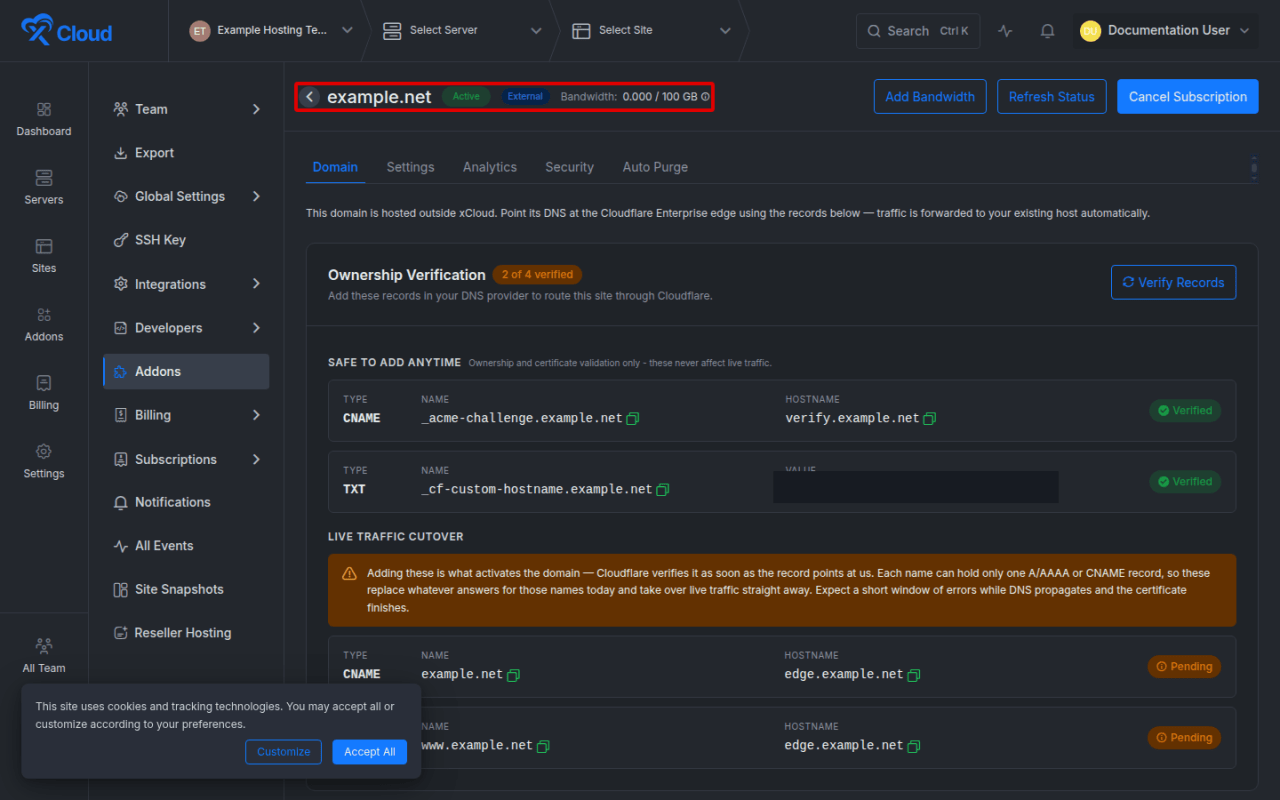
Expected result: The header changes to Active after the custom hostname and SSL checks are active. Confirm the public website separately before considering the cutover complete.
Manage Cloudflare Enterprise settings
9. Review the Settings tab
Open Settings on the domain management page. These settings apply to this domain and its www form. The available controls include performance, security, and cache behavior. When Edge Page Caching is on, Optimizations also shows Cache by Device Type and Cache Bypass Paths. The security group includes Web Application Firewall, Rate Limiting, Browser Integrity Check, Under Attack Mode, and AI Crawler Blocking. To clear cached content, use Purge under Caching. See How to Purge Cloudflare Enterprise Cache by URL or Cache-Tag.
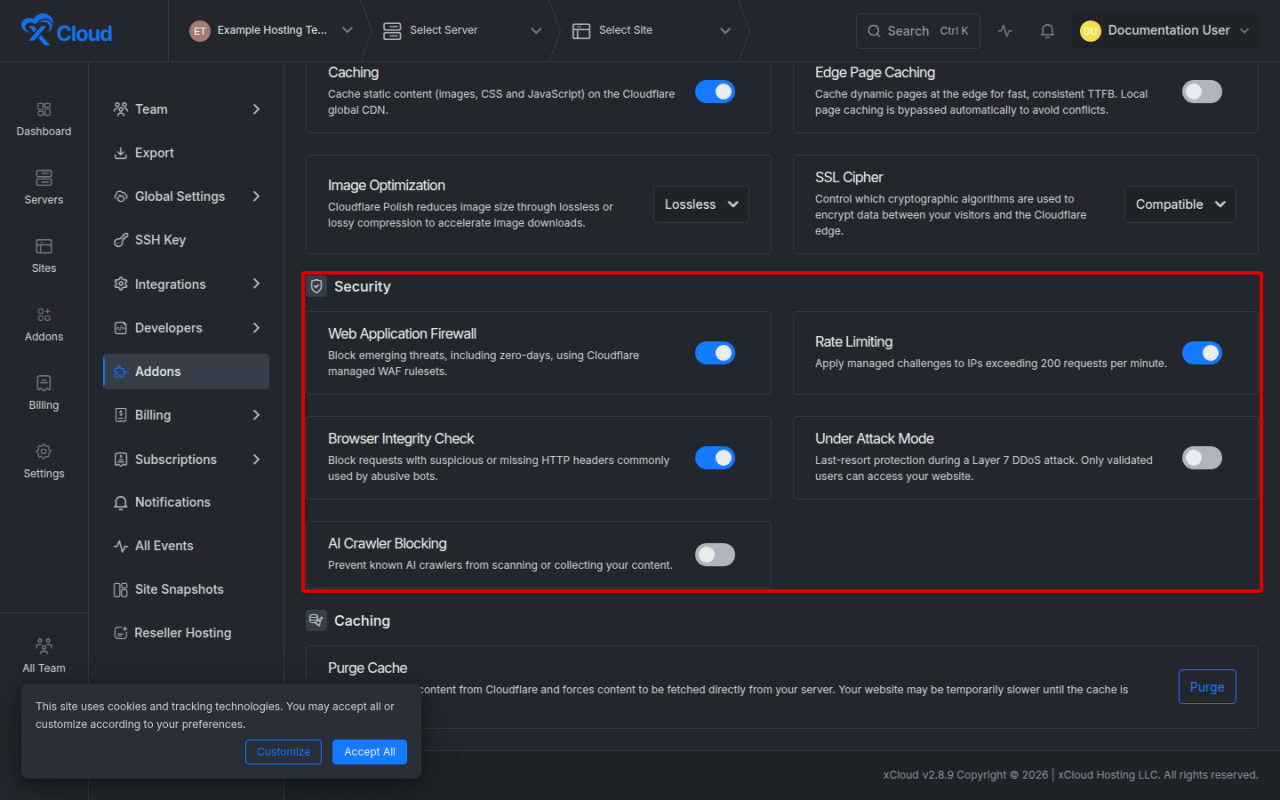
Change one setting at a time and save it. Verify the public website after changes to caching, rate limiting, browser checks, or attack protection because those controls can change visitor behavior.
Expected result: The saved settings continue to appear after the page reloads, and the website behaves as intended.
Monitor bandwidth and refresh status
10. Review bandwidth usage
The domain header and add-on list show current-month usage against the included bandwidth limit. Each domain includes 100 GB per month, shared by the domain, www, and subdomains. xCloud emails you at 80%. After it reaches 100%, once at least 24 hours have passed since the 80% email, Cloudflare Enterprise is turned off for it, and the list shows Out of bandwidth until you add bandwidth or the next month starts.
Select Add Bandwidth when more capacity is required, then review the price and the new allowance before confirming. You can also turn on Auto top-up bandwidth. See How to Add Cloudflare Enterprise Bandwidth.
Expected result: Purchased bandwidth appears in the domain’s total allowance after payment completes.
11. Refresh a stale status
Select Refresh Status when DNS or certificate changes are not reflected in the header. Opening the management page also prompts current domain and origin-health checks.
Expected result: The page returns the current Cloudflare Enterprise state. A refresh does not bypass DNS propagation or certificate processing.
Cancel the subscription
12. Cancel only when protection is no longer required
Go to Addons → Cloudflare Enterprise Addons, open the domain row’s actions menu, select Cancel Subscription, and review the confirmation carefully.
Before confirming:
- Record the origin DNS values needed to serve the website without Cloudflare Enterprise.
- Plan the DNS rollback before removing Cloudflare routing.
- Confirm that the team no longer needs the subscription or its purchased bandwidth.
- Expect the cancellation request to fail safely if xCloud cannot complete it; retry later or contact support instead of assuming the subscription is gone.
Expected result: xCloud confirms that Cloudflare Enterprise was canceled for the domain. Recheck billing and the domain list, then complete the planned DNS rollback.
Options and settings
| Option | Purpose |
|---|---|
| Add New | Opens the mixed picker for eligible xCloud sites and external domains. |
| External label | Identifies a subscription that is attached directly to the team rather than an xCloud site. |
| Verify Records | Rechecks the displayed ownership, certificate, and routing records. |
| Refresh Status | Refreshes the Cloudflare hostname, SSL, DNS, and origin state shown by xCloud. |
| Add Bandwidth | Opens the additional-bandwidth purchase flow. |
| Disable / Enable | Temporarily changes whether the domain uses Cloudflare Enterprise. Both run in the background. Manual-DNS domains may require corresponding DNS changes. A domain that ran out of bandwidth cannot be enabled until you add bandwidth. |
| Origin Server | Shows or sets where traffic for the domain is sent. Use Save Origin. After you set an origin yourself, Detect Automatically switches back to automatic detection. |
| Settings | Controls supported performance, security, and cache features for the selected domain. |
| Purge | Under Settings → Caching. Purges everything, specific URLs, or Cache-Tags. |
| Analytics | Shows available traffic and usage analytics for the external domain. |
| Security | Shows security events and related domain protections when data is available. |
| Auto Purge | Manages automatic cache-purge behavior and its webhook controls. |
| Cancel Subscription | In the add-on list’s row menu. Removes the external domain’s Cloudflare Enterprise subscription after confirmation. |
Limits and edge cases
- The picker accepts valid public domains and subdomains, not URLs with
https://, paths, ports, or query strings. - A domain already represented by an xCloud site, an existing subscription, or another selected chip is not offered as a second external purchase.
- A root domain or
wwwpurchase covers both names and first-level subdomains, so xCloud blocks a separate purchase of the other name in the pair. Other subdomains can still be bought on their own. If your server’s certificate does not cover the other name, xCloud redirects it to the name you bought until your server has a certificate for it. - An external-domain subscription is team-scoped and has no xCloud site or server relationship.
- You can select eligible xCloud-hosted sites and external domains in the same purchase flow.
- Manual DNS remains the customer’s responsibility unless xCloud explicitly shows that a matching Cloudflare integration is managing the records.
- The origin website must stay available while traffic is moved to the Cloudflare Enterprise edge.
- DNS providers use different forms for root records. Copy the fully qualified name shown by xCloud, then follow the provider’s documented input format.
- Activation time depends on authoritative DNS propagation and certificate processing. xCloud does not provide a guaranteed instant activation time.
Verify the complete setup
The setup is complete when all of the following are true:
- The add-on list shows the domain with the External label.
- The management page shows the intended hostname.
- Ownership Verification reports the required records as verified.
- The domain status is Active.
- The website loads over HTTPS on the intended apex or subdomain.
- The certificate presented by the public site is valid for the hostname.
- The page content, login, forms, checkout, and other critical paths still work.
- The expected settings remain saved after a page reload.
- Bandwidth usage begins updating after traffic passes through the service.
Troubleshooting
| Symptom | Likely cause | Fix |
|---|---|---|
| The typed domain is not offered for purchase | The input is not a valid public hostname, it matches an xCloud site, or coverage already exists. | Enter only the hostname. Remove the scheme and path, then check the add-on list for an existing apex or www subscription. |
| The checkout total is higher than expected | More than one site or domain is selected. | Remove unwanted chips and confirm the selected-domain count before paying. |
| Status stays Pending Verification | One or more ownership or certificate records are missing, incorrect, or still propagating. | Compare each displayed Type, Name, and Value with the authoritative DNS zone, then select Verify Records. |
| Status is Domain not Live | Ownership succeeded, but the live-traffic record or SSL state is not active. | Check the cutover records, remove conflicts, wait for certificate completion, and select Refresh Status. |
| A record shows Pending after you added it | The record was added to the wrong DNS provider or wrong zone name. | Confirm the domain’s authoritative nameservers and copy the fully qualified Name shown by xCloud. |
| xCloud does not manage records automatically | The connected Cloudflare integration does not cover the zone or cannot write its records. | Add the records manually, or reconnect the integration with access to the correct zone. |
| The website stops loading after cutover | The routing record is wrong, the origin is unavailable, or the origin rejects the hostname. | Restore the previous routing record, verify origin reachability, then correct the displayed DNS target before retrying. |
| Visitors get Cloudflare error 522 | xCloud could not detect where the site is hosted. | In Origin Server, enter your server’s IP address or hostname and select Save Origin. |
| The site went offline after heavy traffic | The domain used up its monthly bandwidth. | Add bandwidth. The domain is turned back on automatically. |
| The website loads but some actions fail | A security, rate-limit, cache, or attack-mode setting is affecting application traffic. | Revert the most recent setting, purge cache if needed, and retest the affected path. |
| Refresh Status does not change the result | DNS or certificate processing is still incomplete. | Wait for propagation, verify the authoritative response, and refresh again later. |
| Cancellation returns an error | xCloud could not complete the cancellation request. | Leave DNS unchanged, retry later, and contact xCloud support if the subscription remains active. |
Common mistakes
- Entering a full URL instead of only the hostname.
- Copying example DNS records from a guide instead of the domain-specific records shown in xCloud.
- Treating ownership verification as proof that production traffic is already live.
- Replacing production routing records before recording a rollback value.
- Trying to buy
wwwseparately when the root domain purchase already covers it. - Assuming any connected Cloudflare account can manage the zone automatically.
- Changing several security or cache controls at once, which makes failures harder to isolate.
- Canceling before restoring direct-to-origin DNS.
FAQ
Can I protect a domain that is not hosted on xCloud?
Yes. Enter the public hostname in the Cloudflare Enterprise add-on picker. If it is eligible and not already covered, xCloud offers it as an external-domain purchase.
Does the domain need an xCloud site or server?
No. An external-domain subscription belongs directly to the team and is not attached to an xCloud site or server.
Who updates DNS?
You update DNS at the authoritative provider unless the domain page explicitly confirms that a matching xCloud Cloudflare integration manages the records automatically.
Can I add a subdomain instead of the apex domain?
Yes, when the subdomain is a valid public hostname and does not conflict with existing Cloudflare Enterprise coverage. Enter the exact hostname you want to protect.
What does Active confirm?
Active confirms that xCloud sees an active Cloudflare custom hostname and active SSL state. You should still verify the public site and its critical application paths.
Can I buy additional bandwidth?
Yes. Select Add Bandwidth, review the available purchase options, and confirm the billing terms before paying.
Can I temporarily disable the domain?
The actions menu can show Disable and later Enable. Both run in the background. If you manage DNS yourself, follow the records shown in the confirmation and keep rollback values before proceeding.
Can I cancel the subscription?
Yes. Open Addons → Cloudflare Enterprise Addons, open the row’s actions menu, and select Cancel Subscription. Restore direct-to-origin DNS as part of your cancellation plan.
Next steps
After activation, monitor bandwidth and analytics, review security events, and test the website after each settings change. Keep the previous origin DNS values in your change record so you can roll back safely if traffic or application behavior changes.