

How to Configure Cloudflare Enterprise Auto Purge Webhooks in xCloud
Updated October 19, 2026 · 7 min read
xCloud Auto Purge lets an application clear only the Cloudflare Enterprise cache entries that changed. It is designed for active Cloudflare Enterprise domains where xCloud cannot install an automatic purge plugin, including external origins and eligible non-WordPress sites. This guide is for site owners and developers who need to enable the private webhook, connect a publishing system, verify deliveries, and rotate or disable the credential safely.
WordPress sites hosted on xCloud do not need this webhook. xCloud installs an automatic purge plugin that clears each edited page. To purge by hand, see How to Purge Cloudflare Enterprise Cache by URL or Cache-Tag.
Prerequisites
Before you start, confirm that you have:
- An active Cloudflare Enterprise add-on for the domain.
- The domain showing Active on the Cloudflare Enterprise edge.
- Permission to manage the domain or site in xCloud.
- Access to the application, CMS, deployment pipeline, or webhook sender that will call xCloud.
- A secure secret manager where you can save the generated webhook URL immediately.
- A sender that can make an HTTPS
POSTrequest with a JSON body.
1. Open Auto Purge
For an external domain, open Addons → Cloudflare Enterprise, select the domain, and choose the Auto Purge tab. For an eligible non-WordPress xCloud site, open its Cloudflare Enterprise settings and choose Auto Purge.
Select Enable Webhook.
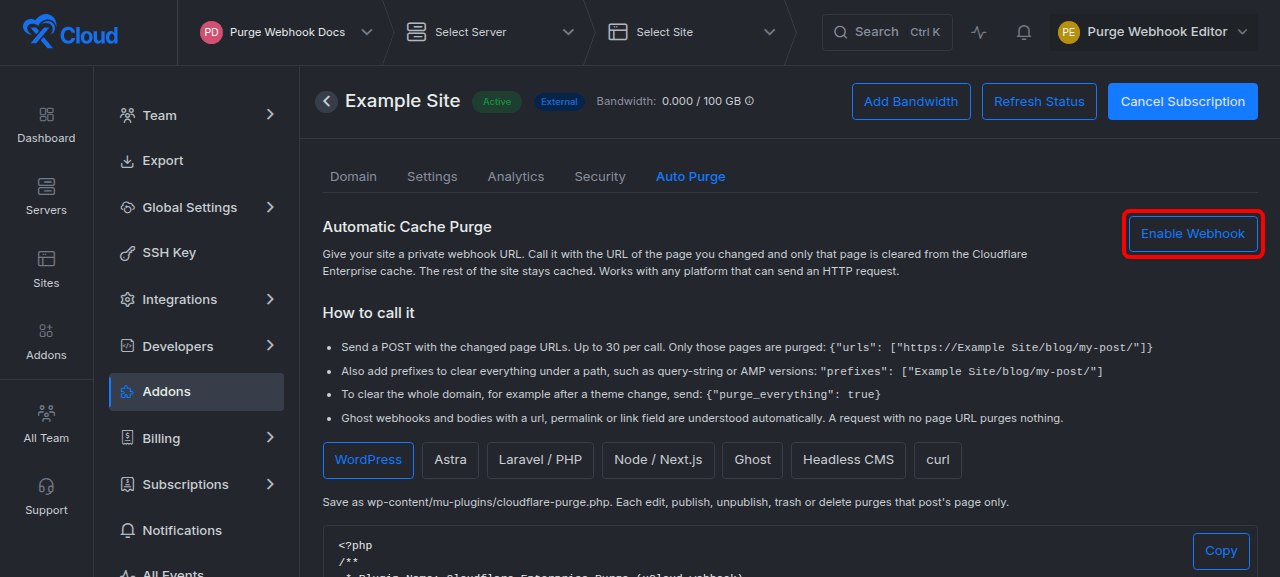
Expected result: xCloud creates one private webhook for the domain and displays its complete URL once.
Auto Purge is available only for a domain that is covered by Cloudflare Enterprise. Purge delivery remains unavailable while the domain is not active on the edge.
2. Save the one-time webhook URL
Copy the generated URL before leaving or refreshing the page. Save it as a secret in the system that will send purge requests.
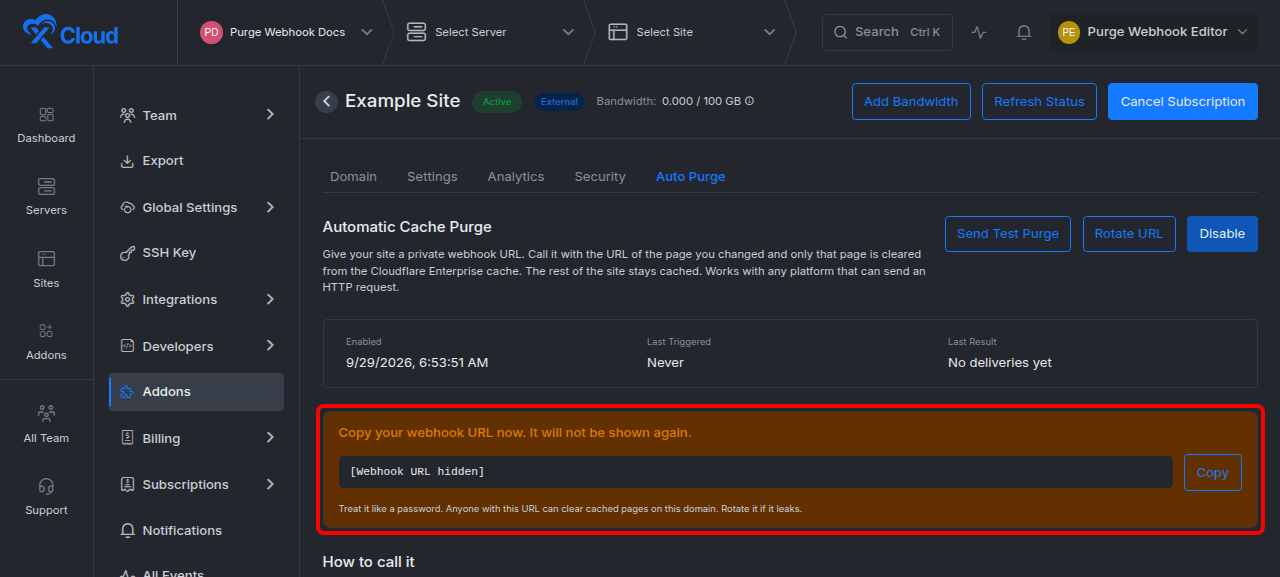
Expected result: your integration has the private webhook URL, and xCloud shows Enabled for Auto Purge.
The URL is a credential. Anyone who has it can request cache purges for that domain. xCloud stores only a SHA-256 hash of the secret token and cannot display the same URL later. If the URL is lost or exposed, rotate it instead of trying to recover it.
3. Send a targeted purge request
Send an HTTPS POST request with a JSON body. Replace YOUR_WEBHOOK_URL and [site-host] with your saved webhook URL and the hostname covered by this Cloudflare Enterprise domain.
curl -X POST 'YOUR_WEBHOOK_URL' \
  -H 'Content-Type: application/json' \
  -d '{"urls":["https://[site-host]/blog/my-post/"]}'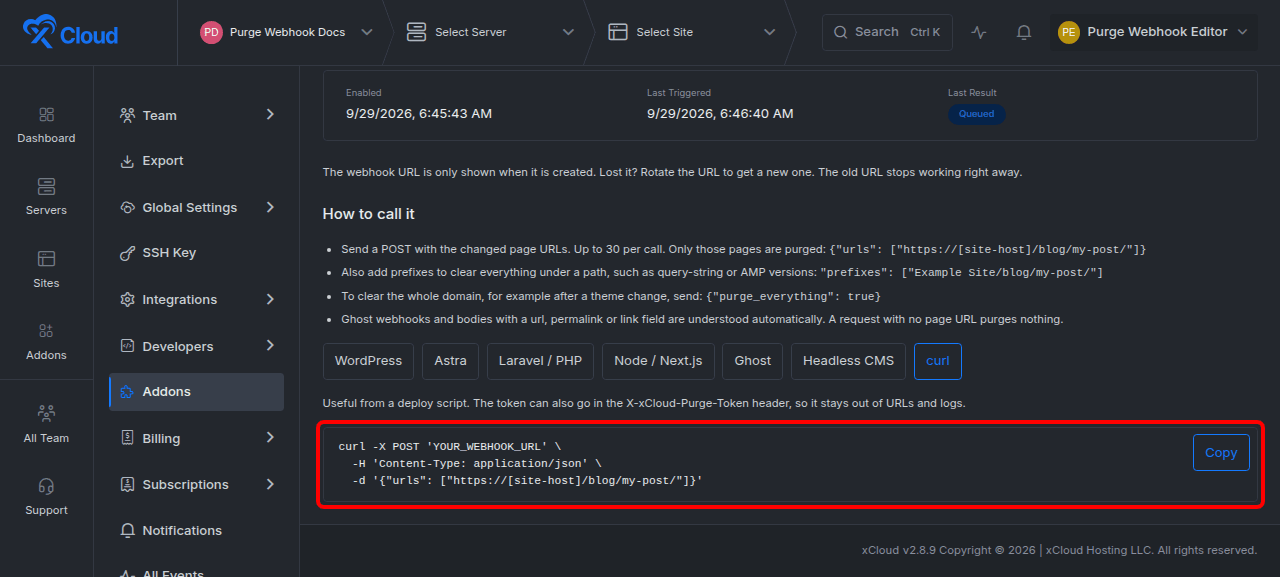
Expected result: xCloud returns HTTP 202 with a queued response:
{
  "success": true,
  "message": "Cache purge queued."
}
The generated URL carries the token in its path. If your sender supports custom headers, you can keep the token out of URL logs by sending it in X-xCloud-Purge-Token. The header value takes precedence over a token in the URL path.
curl -X POST "$XCLOUD_PURGE_ENDPOINT" \
  -H 'Content-Type: application/json' \
  -H 'X-xCloud-Purge-Token: YOUR_PURGE_TOKEN' \
  -d '{"urls":["https://[site-host]/blog/my-post/"]}'
Use the tokenless endpoint path /api/cloudflare-enterprise/purge-hook when authenticating with the header.
4. Choose the correct payload
Use the narrowest purge target that covers the content change. Targeted purges preserve cached pages that did not change.
Purge specific URLs
{
  "urls": [
    "https://[site-host]/blog/first-post/",
    "https://[site-host]/blog/second-post/"
  ]
}
Use this for individual pages, posts, assets, or routes.
Purge a path prefix
{
  "prefixes": [
    "[site-host]/blog/first-post/"
  ]
}
Use a prefix when query-string, AMP, locale, or other variants under the same path must be cleared. A prefix may include http:// or https://, but it cannot contain a query string.
Purge the entire domain
{
  "purge_everything": true
}
Use a whole-domain purge only for changes that affect every page, such as a site-wide theme, header, footer, or typography update. An empty or unrecognized payload never falls back to a whole-domain purge.
Supported sender payloads
| Sender or format | Recognized fields | Behavior |
|---|---|---|
| xCloud native | urls, prefixes, purge_everything |
Purges the specified targets or, when explicitly true, the full domain. |
| Ghost | post.current.url, post.previous.url, page.current.url, page.previous.url |
Purges current and previous URLs, which covers slug changes and removals. |
| Generic CMS or WordPress webhook plugin | Top-level post_permalink, permalink, url, or link |
Purges each recognized HTTP or HTTPS URL. |
Duplicate targets are removed automatically. URL targets must begin with http:// or https://.
5. Test the integration
Select Send Test Purge in the Auto Purge tab. The test sends the domain home page through the same queue used by a real webhook delivery.
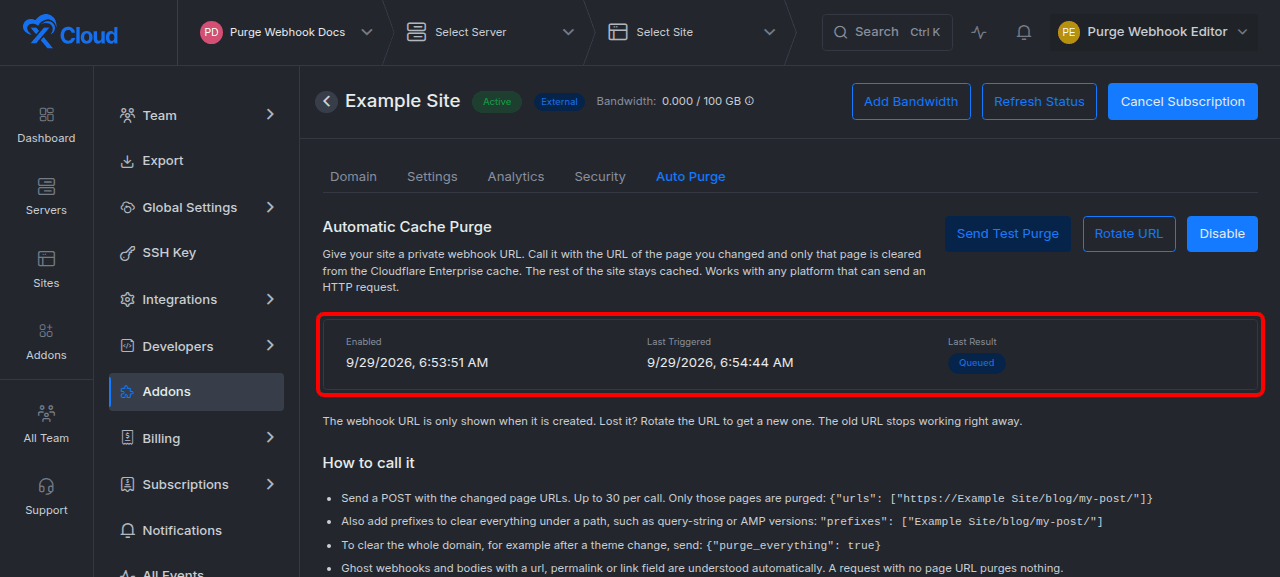
Expected result: Last Triggered updates and Last Result first shows Queued. After the queue processes the request, the result can change to Purged. A queued result confirms acceptance, not completion at Cloudflare.
The status panel can also show:
| Status | Meaning |
|---|---|
| Queued | xCloud accepted the request and scheduled the purge. |
| Purged | Cloudflare accepted the queued purge. |
| Failed at Cloudflare | The queued request could not be completed after the allowed attempts. |
| Rejected | The request did not meet an eligibility or target-scope rule. |
| No page URL in request | The body did not contain a recognized purge target. |
| Too many URLs | A collected batch exceeded its per-batch safety limit. |
6. Rotate a lost or exposed webhook URL
Select Rotate URL, review the warning, and confirm Rotate URL.
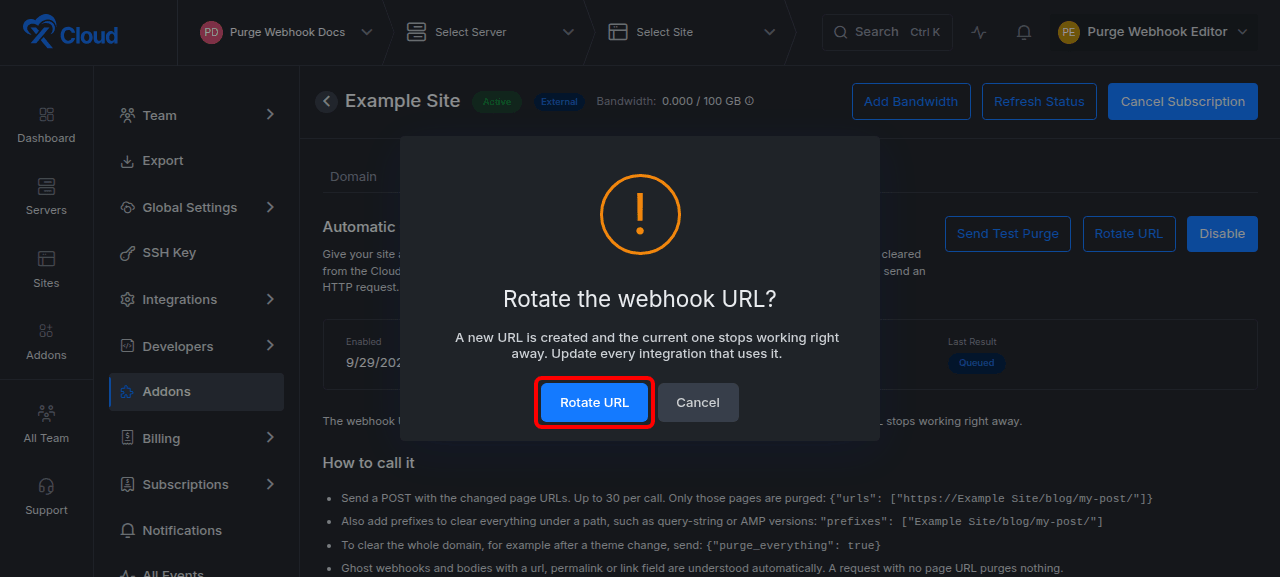
Expected result: xCloud displays a new URL once and immediately invalidates the previous URL. Update every sender before it makes its next request. Calls using the old token return the same not-found response as an unknown token.
Rotation is not a grace-period change. There is no overlap in which both URLs work.
7. Disable Auto Purge
Select Disable, then confirm Disable in the warning dialog.
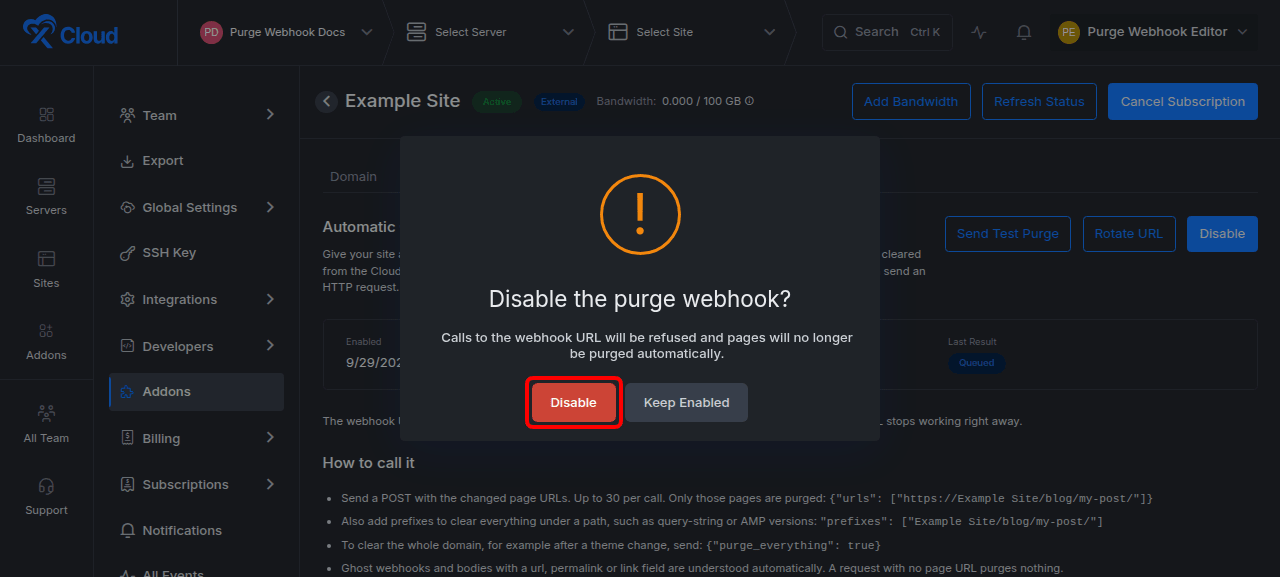
Expected result: the webhook stops accepting calls immediately, pending cached purge state for the revoked webhook is cleared, and the Enable Webhook action returns.
Disable the webhook when the integration is retired. Use rotation instead when the integration should continue with a replacement credential.
Options and limits
| Setting or limit | Behavior |
|---|---|
| Webhooks per domain | One active secret webhook. |
| URLs per delivery | Up to 30. |
| Prefixes per delivery | Up to 30, counted separately from URLs. |
| URLs per collected batch | Up to 300. |
| Prefixes per collected batch | Up to 300, counted separately from URLs. |
| Batch window | 5 seconds per domain. Deliveries in the window are merged and deduplicated. |
| Retry policy | Up to 3 attempts for retryable Cloudflare failures, with a 30-second base delay between retries. |
| Request rate limit | 30 requests per minute for one webhook token and 120 requests per minute for one client IP. |
| Target scope | Every URL or prefix must belong to a hostname served by the same Cloudflare Enterprise domain. |
| Credential storage | Plaintext is shown only when enabling or rotating. xCloud retains a SHA-256 hash. |
| Cache by Device Type | When Edge Page Caching and Cache by Device Type are both on in Settings, each URL purge clears the mobile, tablet, and desktop copies of that page. |
If a collected batch exceeds 300 URLs or 300 prefixes, xCloud drops the batch instead of widening it into an unsafe whole-domain purge. URL and prefix purges are sent to Cloudflare separately because Cloudflare does not accept both target types in the same purge operation.
Response codes
| HTTP status | Code | Meaning and action |
|---|---|---|
| 202 | None | The purge was queued. Check the status panel for completion. |
| 404 | not_found |
The token is unknown or revoked. Confirm the current secret or rotate the URL. xCloud intentionally uses the same response for both cases. |
| 409 | domain_not_active |
The domain is not active on the Cloudflare Enterprise edge. Complete activation before retrying. |
| 422 | no_purge_target |
No recognized URL, prefix, or explicit whole-domain flag was found. Correct the JSON body. |
| 422 | invalid_target |
A URL or prefix is malformed or outside the allowed hostname scope. Send only in-scope targets. |
| 429 | Framework rate-limit response | The token or client IP exceeded its per-minute request limit. Reduce request frequency and allow batching. |
| 503 | unavailable |
xCloud could not queue the purge. Retry later. |
Error responses use this shape:
{
  "success": false,
  "message": "A human-readable explanation.",
  "code": "machine_readable_code"
}
Verification
Confirm all of the following:
- The Auto Purge tab shows Enabled.
- Your sender receives HTTP
202after posting a recognized, in-scope payload. - Last Triggered changes after a delivery.
- Last Result progresses from Queued to Purged for a successful run.
- A page that was changed is refreshed from the origin while unrelated cached pages remain cached.
The xCloud status panel proves the queue and Cloudflare purge result. Validate application behavior separately by requesting the changed page through the normal public site path.
Troubleshooting
| Symptom | Likely cause | Fix |
|---|---|---|
404 not_found |
The token is incorrect, revoked, or was replaced by rotation. | Update the sender with the newest one-time URL or rotate again and save the replacement securely. |
409 domain_not_active |
The domain is not active on the Cloudflare Enterprise edge. | Finish domain activation, then retry after the xCloud status is Active. |
422 no_purge_target |
The body is empty, malformed, or uses an unsupported field. | Send urls, prefixes, purge_everything: true, a supported Ghost body, or a supported top-level URL field. |
422 invalid_target |
A target uses the wrong hostname, is not HTTP or HTTPS, or has an invalid prefix query string. | Send a URL or prefix within the same Cloudflare Enterprise domain and remove query strings from prefixes. |
429 response |
The sender exceeded a token or client-IP limit. | Consolidate changes, rely on the 5-second batch window, and retry after the rate-limit window. |
| Status remains Queued | The batch is still inside the collection window or the queue has not finished. | Wait for processing, refresh the page, and check Last Result again. |
| Failed at Cloudflare | Cloudflare rejected the request or a retryable failure remained after all attempts. | Confirm the domain is active, reduce the target set, and send a new test purge. Escalate with the delivery time and visible status if failures continue. |
| Too many URLs | Merged deliveries exceeded 300 URLs or 300 prefixes in one batch. | Split publication bursts into smaller groups and avoid repeated large prefix sets. |
| The generated URL is no longer visible | The one-time display was closed or the page was refreshed. | Rotate the URL. The original plaintext cannot be recovered. |
Common mistakes
- Treating
202as proof that Cloudflare already purged the cache. It means xCloud queued the work. Check Last Result for completion. - Sending an empty body to request a full purge. xCloud rejects empty and unrecognized bodies. Use
{"purge_everything":true}explicitly. - Putting an unrelated hostname in
urlsorprefixes. Target validation prevents one domain from purging another domain in the shared Cloudflare zone. - Logging the generated URL. It contains the secret. Prefer the
X-xCloud-Purge-Tokenheader when the sender supports it, and redact request logs. - Rotating before every integration is ready. Rotation invalidates the previous URL immediately.
- Using whole-domain purges for normal publishing. Send exact changed URLs to preserve cache efficiency.
FAQ
Can I recover a webhook URL after leaving the page?
No. xCloud shows the plaintext URL only when it is created or rotated. Rotate the URL to receive a replacement.
Can one webhook purge several Cloudflare Enterprise domains?
No. A webhook belongs to one domain, and every target must be within that domain’s allowed hostname scope.
Can I send both URLs and prefixes?
Yes. One delivery can include up to 30 URLs and up to 30 prefixes. xCloud batches and deduplicates them, then sends URL and prefix purges to Cloudflare as separate operations.
Does Auto Purge require normal xCloud API authentication?
The delivery endpoint does not use a user session or API key. Possession of the secret path token, or the same token in X-xCloud-Purge-Token, authorizes the purge request.
What happens if the sender disconnects after submitting the request?
xCloud continues processing the accepted delivery so it can still be queued after the sender disconnects.
Next steps
- Add the webhook call after a successful publish, update, delete, or deployment event in your application.
- Store the URL or token in a secret manager and exclude it from application and proxy logs.
- Review the built-in recipes in the Auto Purge tab: Laravel/PHP, Node/Next.js, Ghost, Headless CMS, and curl. External domains also show WordPress and Astra recipes.
- To purge by hand, see How to Purge Cloudflare Enterprise Cache by URL or Cache-Tag.
- Browse the xCloud documentation for Cloudflare Enterprise setup and domain activation guidance.