

xCloud Server Locations and Regions by Plan
Updated October 27, 2026 · 4 min read
Where you can run a server depends on the plan you buy. Vultr (xCloud Managed Billing) plans are offered in Vultr’s data center locations across several continents, with fewer locations for the larger sizes. xCloud Managed (Cloud VPS) plans, including the AI agent plans, are offered in a smaller set of regions that xCloud keeps ready servers in. A region is fixed once the server is created.
Locations change as providers add or retire data centers and as capacity moves, so this page does not keep a city list. The ‘Region’ section of the server create page always shows the current list for the plan and size you select.
Vultr (xCloud Managed Billing) locations
When you create a Vultr server, you choose a continent first and then the city. The list you see comes from Vultr’s live catalog for the size you selected.
Larger sizes offer fewer locations
Not every location has hardware for every size, so a larger General or Premium size can be missing from some cities that offer the smaller sizes. Which cities offer which size changes with the provider’s capacity.
If the city you want is not listed for a size, pick a smaller size or another nearby city. The region picker shows the exact list for the size you select.
xCloud Managed (Cloud VPS) regions
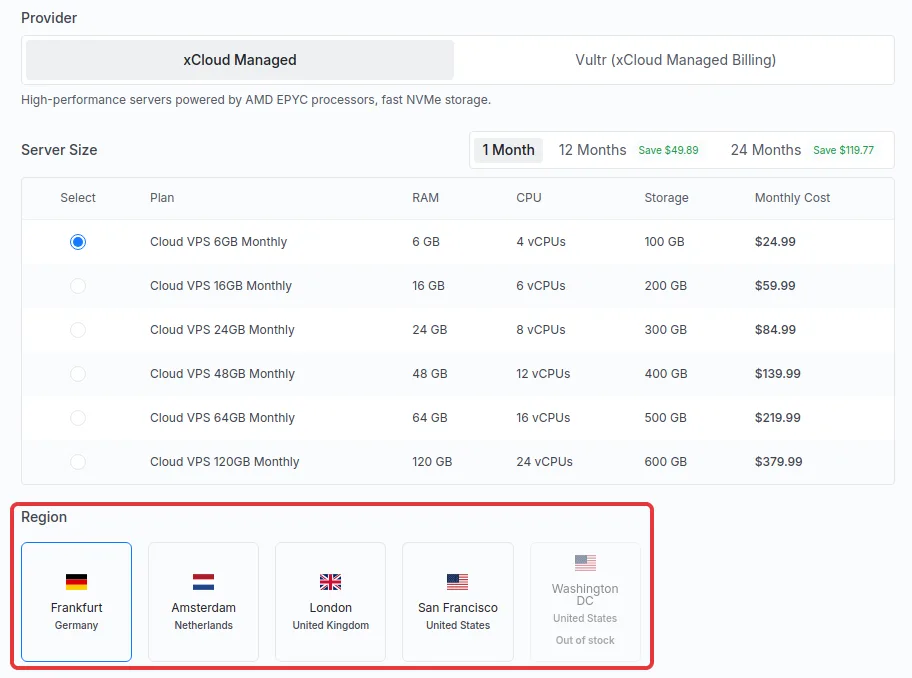
Cloud VPS plans, including the AI agent plans for OpenClaw, Hermes Agent, Paperclip and DeepSeek Harness, are supplied from ready servers that xCloud keeps in each region. The ‘Region’ section lists the regions in that pool.
Regions in the pool stay listed and show ‘Out of stock’ when no ready server of the size you picked is left there. Choose another region or size, or try again later.
Choose a region when you create a server
You pick the region on the server create page, after the plan. Choose the size first: changing the size afterwards can clear or change the region.
Step 1: Open the server create page
Go to ‘Servers’, click ‘New Server’ and choose ‘xCloud Managed’. The ‘Set Up Your Server With xCloud’ page opens.
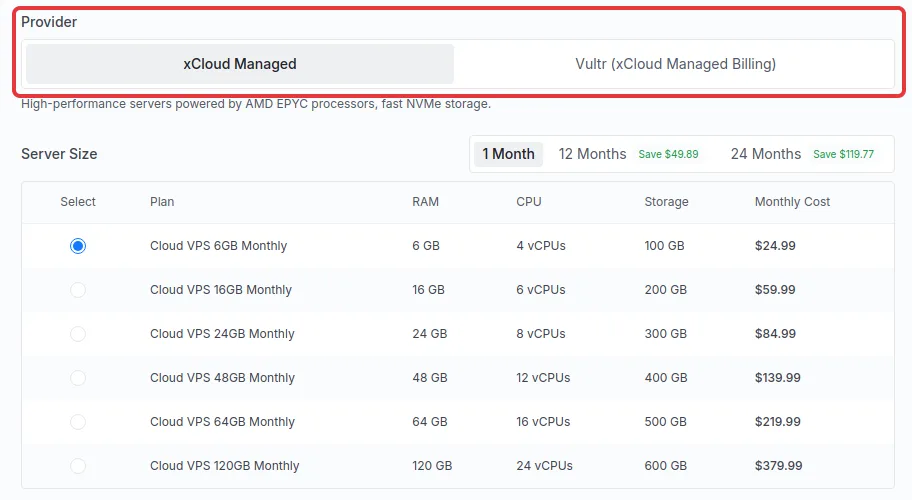
Step 2: Choose the provider and size
Under ‘Provider’, choose ‘xCloud Managed’ for Cloud VPS plans or ‘Vultr (xCloud Managed Billing)’ for General and Premium plans. Then select a plan under ‘Server Size’.
Step 3: Pick the region
Under ‘Region’, click the city where the server should run. On the Vultr tab, first choose a continent in ‘Choose Your Continent’, then click a city. On the xCloud Managed tab, click one of the region tiles that is not marked ‘Out of stock’.
The ‘Order Summary’ shows the plan and the chosen location. Check both before you click ‘Pay & Deploy’, because the region cannot be changed later.
If the plan or region is unavailable
If the page says ‘Your selected plan is temporarily unavailable’ or that it could not find a ready server for your plan, the capacity for that size and region is used up for now. Try again in a few minutes, pick another region or size, or contact support if it persists. If you need a location xCloud does not offer, you can also create the server at your own provider and connect it to xCloud.
Move a server to another region
xCloud cannot move an existing server to another region. To change location:
- Create a new server in the region you want, following the steps above.
- Move your sites to it with Clone Site, or move them all at once with full server migration between xCloud servers.
- Update each domain’s DNS to the new server’s IP address and check the sites.
- Delete the old server once everything works, so you stop paying for it.
To get a bigger server in the same region instead, see how to upgrade your server.
Frequently asked questions
Can I move my server to another region?
No. A server’s region is fixed once it is created. Create a new server in the region you want, then clone or migrate your sites to it, check them, and delete the old server.
Why is a location missing for the plan I picked?
Each location offers only the sizes it has hardware for, so larger General and Premium sizes are available in fewer locations than the smallest sizes. Pick a smaller size or another nearby location, or check the region list again at checkout later.
What does ‘Out of stock’ on a Cloud VPS region mean?
It means there is no ready server of the size you selected in that region right now. The region stays listed. Choose another region, choose another size, or try again later.
Which regions do AI agent plans use?
The AI agent Cloud VPS plans for OpenClaw, Hermes Agent, Paperclip and DeepSeek Harness use the same regions as the other Cloud VPS plans. The ‘Region’ section of the server create page lists them, and marks any region with no ready server of your size as ‘Out of stock’.
If you run into any issues choosing a region or moving a server, feel free to reach out to our support team.