

How to Add Cloudflare Enterprise Bandwidth in xCloud
Updated October 19, 2026 · 6 min read
Each Cloudflare Enterprise domain in xCloud includes a monthly bandwidth allowance. Use this guide to check usage, add more bandwidth, turn on auto top-up, and understand what happens when a domain uses up its allowance.
Pricing note: The xCloud v2.9.3 interface captured for this guide shows Cloudflare Enterprise Bandwidth (100 GB) at $5.00/month. Always confirm the price and the New allowance in the dialog before you pay.
How bandwidth is measured
- Each domain includes 100 GB per calendar month. Usage resets on the 1st.
- The root domain,
www, and every subdomain under the same subscription count together. - xCloud counts the traffic Cloudflare serves to visitors from its edge and checks it every hour.
- Each extra subscription adds 100 GB to the domain’s allowance straight away and renews every month.
What happens at the limit
xCloud enforces the allowance, so plan ahead for traffic peaks:
- At 80%, xCloud emails you that the domain is almost out of bandwidth. You then have about 24 hours to add bandwidth.
- At 100%, if no bandwidth was added in that time, xCloud turns Cloudflare Enterprise off for the domain.
- While it is off, the result depends on your DNS. If xCloud manages the domain’s DNS, traffic goes straight to your server without the Cloudflare CDN, cache, or firewall. If your DNS points at the Cloudflare Enterprise edge, the site goes offline until it is turned back on.
- xCloud sends reminders 1, 3, and 7 days after the domain was turned off.
The domain comes back automatically when you add bandwidth, or when the allowance resets on the 1st of the month. The Enable action stays unavailable while the allowance is still used up.
To avoid an interruption, turn on auto top-up or add bandwidth as soon as you get the 80% email.
Add bandwidth
1. Open the Cloudflare Enterprise page
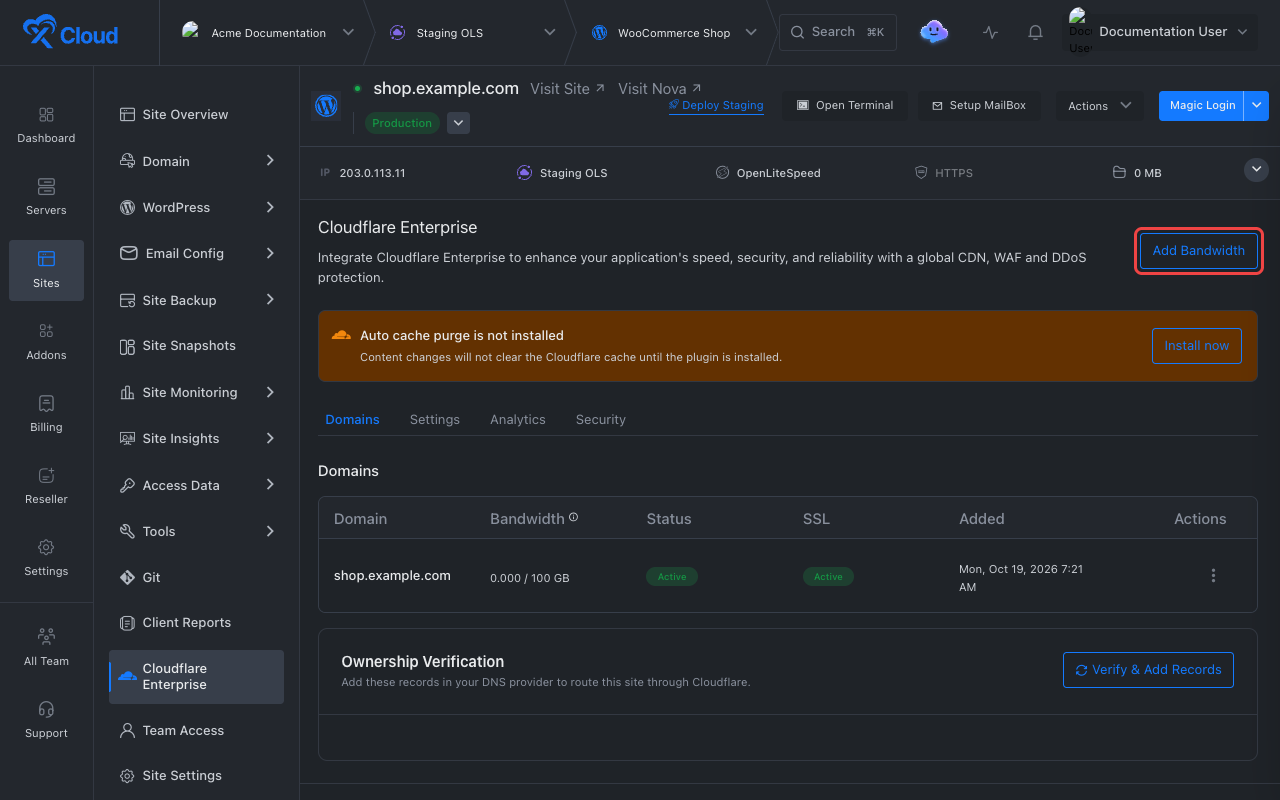
Open the site in xCloud and select Cloudflare Enterprise in the site menu. The Bandwidth column shows each domain’s usage for the month against its allowance.
You can also use the Add bandwidth action in a domain’s row menu, on the site page or under Addons → Cloudflare Enterprise Addons. For an external domain, the button is on the domain’s management page.
2. Review the allowance and price
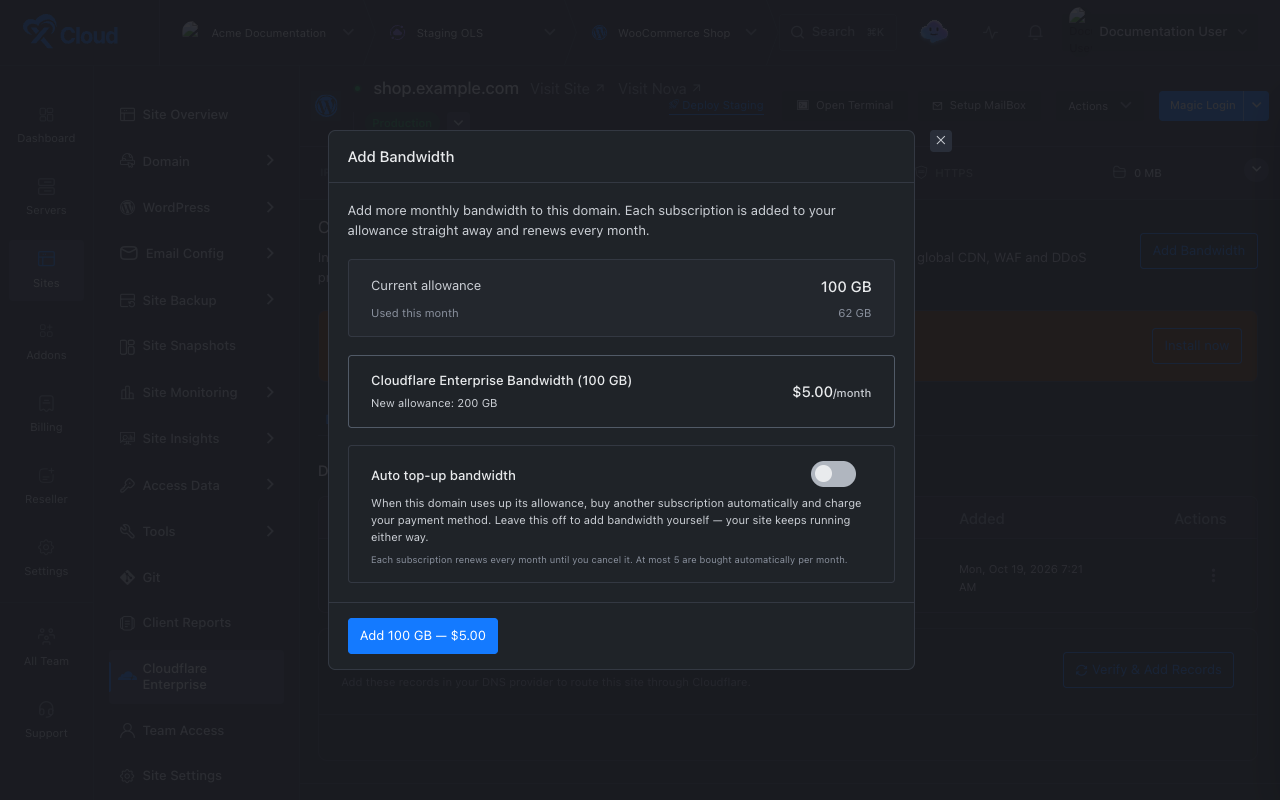
Select Add Bandwidth. The dialog shows:
- Current allowance and Used this month.
- Included + purchased, when the domain already has extra subscriptions.
- The product, its monthly price, and the New allowance after the purchase.
- Your current subscriptions, each marked Added manually or Added automatically.
3. Pay for the subscription
Select the purchase button, which reads Add 100 GB followed by the price. Complete the payment if xCloud asks for it.
Expected result: The new allowance applies straight away. If Cloudflare Enterprise was turned off for the domain because of bandwidth, xCloud turns it back on.
Turn on auto top-up
In the Add Bandwidth dialog, turn on Auto top-up bandwidth. When the domain uses up its allowance, xCloud buys another 100 GB subscription and charges your payment method, so the domain is never turned off for bandwidth.
- Auto top-up buys at most 5 subscriptions per domain per month.
- Each automatic subscription also renews every month until you cancel it.
Cancel a bandwidth subscription
Open Add Bandwidth, find the subscription in the list, and select Cancel. Confirm with Cancel Subscription.
The month you already paid for is not refunded. The allowance drops when the subscription ends, so check the next month’s expected traffic first.
Troubleshooting
| Symptom | Likely cause | Fix |
|---|---|---|
| The dialog says the domain is not live on Cloudflare yet | The domain has not finished DNS verification, so there is no traffic to measure. | Finish activation first. See How to Activate the Cloudflare Enterprise Addon. |
| “Additional bandwidth is not available right now.” | The product is not on sale for your account. | Contact xCloud support. |
| The site went offline at the start of a traffic spike | The domain reached 100% and Cloudflare Enterprise was turned off. | Add bandwidth. The domain is turned back on automatically. |
| Enable does nothing for a disabled domain | The allowance is still used up. | Add bandwidth, or wait for the reset on the 1st. |
| Auto top-up stopped buying | It reached the limit of 5 automatic subscriptions this month. | Add bandwidth manually. |
FAQ
How much bandwidth does a Cloudflare Enterprise domain include?
Each domain includes 100 GB of edge bandwidth per calendar month. The root domain, www, and subdomains count together.
What happens when a domain uses up its bandwidth?
xCloud emails you at 80% of the allowance. If the domain then reaches 100% and you have not added bandwidth within the grace period, Cloudflare Enterprise is turned off for that domain until you add bandwidth or the next month starts.
Is extra bandwidth a one-time purchase?
No. Each 100 GB subscription renews every month until you cancel it.
Can I cancel a bandwidth subscription?
Yes. Open Add Bandwidth and select Cancel next to the subscription. The month you already paid for is not refunded.