

Available Server Stacks in xCloud
Updated October 19, 2026 · 5 min read
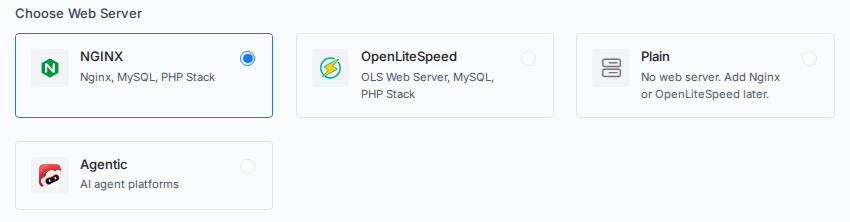
Every server you create or connect in xCloud runs one server stack. The stack decides which application software xCloud installs on top of a hardened Ubuntu server: a web server for PHP sites, nothing at all, or an AI agent platform. You choose it under Choose Web Server when you create or connect a server.
xCloud offers four stacks:
| Stack | Best for | Web server | Database |
|---|---|---|---|
| NGINX | WordPress, Laravel, PHP and Node.js sites, and Docker-based one-click apps | Nginx | MySQL or MariaDB, or none |
| OpenLiteSpeed | WordPress and PHP sites with LiteSpeed Cache | OpenLiteSpeed | MySQL or MariaDB, or none |
| Plain | Your own software on a clean server, or choosing a web server later | None | None |
| Agentic | OpenClaw, Paperclip, Hermes Agent and DeepSeek Harness | Nginx (as a reverse proxy) | None managed by xCloud |
What every stack includes
Every xCloud server starts from the same secured base, whichever stack you pick. New servers run Ubuntu 24.04 LTS or Ubuntu 26.04 LTS (x64).
Installed software:
- UFW firewall with SSH, HTTP and HTTPS open, plus a rule that lets xCloud reach the server over SSH
- Fail2Ban to block SSH brute-force attempts
- Supervisor, Git, curl, zip and unzip, Python 3, build-essential, acl, zsh, ncdu and other base utilities
- Key-only SSH login with password authentication turned off, and an
xclouduser with your SSH keys - A swap file, kernel security mitigations, the latest package upgrades and automatic security updates
- A cleanup job that removes old xCloud task files and trims large logs
NGINX
The NGINX stack is xCloud’s default web server stack. It runs WordPress, Laravel, custom PHP and Node.js sites, and it is the stack for Docker-based one-click apps such as n8n, Nextcloud or Ollama. xCloud installs Docker on the server the first time you deploy one of those apps.
Installed software:
- Nginx from the official nginx.org repository
- Database of your choice: MySQL 8.0, MySQL 8.4, MariaDB 10.6, MariaDB 11, or none
- Redis
- PHP-FPM and Composer, installed with the PHP version your first site needs, then per site when a site needs another version
- Node.js, installed when a site or app needs it
- Docker, installed the first time you deploy a Docker-based one-click app
- xCloud server monitoring
OpenLiteSpeed
The OpenLiteSpeed stack runs WordPress and PHP sites on the OpenLiteSpeed web server with LiteSpeed PHP (LSPHP). It is a good fit if you want server-level page caching through the LiteSpeed Cache plugin. Docker-based one-click apps are not available on OpenLiteSpeed; use NGINX for those.
Installed software:
- OpenLiteSpeed web server
- Database of your choice: MySQL 8.0, MySQL 8.4, MariaDB 10.6, MariaDB 11, or none
- Redis
- LiteSpeed PHP (LSPHP) and Composer, installed with the PHP version your first site needs, then per site when a site needs another version
- Node.js, installed when a site or app needs it
- xCloud server monitoring
For the OpenLiteSpeed admin panel, see How to Access OpenLiteSpeed WebAdmin in xCloud.
Plain
A Plain server is a clean Ubuntu server with no web server, PHP, database, Redis or Docker. Choose it to run your own software, such as a Go or Rust service, a game server, a VPN or a build runner, or when you want to decide on a web server later. xCloud still manages its users, SSH keys, firewall and security updates.
Installed software:
- Only the base software every stack includes
When you need to host sites, open Management, then Install Web Server, and pick NGINX or OpenLiteSpeed. Your sudo users, SSH keys and firewall rules stay as they are. Until then, pages that need a web server, such as Sites, show an Install web server button instead. The full walkthrough is in How to Create a Plain Server with xCloud. For what a Plain server includes and how it compares to an unmanaged VPS, see the Plain server feature page.
Agentic
The Agentic stacks give an AI agent platform its own dedicated server. Pick Agentic, then choose the platform: OpenClaw, Paperclip, Hermes Agent or DeepSeek Harness. Agentic servers need at least 4 GB of RAM.
Installed software:
- Node.js and the agent platform you chose, running as a system service
- Nginx as a reverse proxy in front of the agent
- PostgreSQL, for Paperclip only
- Browser dependencies, for Hermes Agent only
- xCloud server monitoring
An Agentic server does not host PHP sites and has no xCloud-managed database. Setup guides: OpenClaw, Paperclip, Hermes Agent and DeepSeek Harness. For an overview of the agent platforms xCloud runs, see AI agent hosting.
How to choose a stack
Pick the stack based on what the server will run:
- Hosting WordPress or PHP sites now: NGINX or OpenLiteSpeed.
- Running Docker-based one-click apps: NGINX.
- Running your own software, or undecided: Plain. You can still add NGINX or OpenLiteSpeed later.
- Running an AI agent platform: Agentic.
To see which applications run on which stack, read Web Servers Compatibility For Different Applications. For the full package list on NGINX and OpenLiteSpeed, see What Is Installed on Your xCloud Server?.
Frequently asked questions
Which server stack should I choose for WordPress?
Choose NGINX or OpenLiteSpeed. Both install a web server, Redis and the database you pick, and add PHP when you create your first site. OpenLiteSpeed pairs with the LiteSpeed Cache plugin, while NGINX is required for Docker-based one-click apps.
Can I change the stack of an existing server?
Only from Plain. A Plain server can install NGINX or OpenLiteSpeed later from Management, then Install Web Server. A server that already runs NGINX, OpenLiteSpeed or an Agentic stack cannot switch to another stack. Create a new server with the stack you need and migrate your sites to it.
Do all stacks get the same security setup?
Yes. Every stack, including Plain, gets the UFW firewall, Fail2Ban, key-only SSH login, kernel security mitigations and automatic security updates. The stacks differ only in the application software installed on top.
Still stuck? Contact our dedicated support team for any of your queries.