

Shared Files and Folders in Release Mode in xCloud
Updated November 10, 2026 · 5 min read
With Release mode (zero-downtime deployments) on, every deploy in xCloud builds a new release folder from your repository. Files your app writes at runtime, such as uploads, logs or .env, must not be lost when the next release goes live. So they live in one shared place, and xCloud links them into every release.
This guide shows which paths are shared by default and how to add your own. For the basics, read How to use zero-downtime deployments.
The defaults
| Site | Shared by default |
|---|---|
| Laravel | .env, storage |
| Custom PHP | .env |
| Node.js | .env |
| WordPress from Git (classic) | .env, wp-config.php, wp-content/uploads, wp-content/blogs.dir |
| WordPress from Git (Bedrock) | .env, web/app/uploads, web/app/blogs.dir |
| Container (Dockerfile or app recipe) | none |
A default path that doesn’t exist in your site is left out. For example, a PHP site without a .env file shows no shared path until you add one.
Step 1: Add a path
Open the site, click Git, and find Shared between releases on the Release mode card. The section appears while Release mode is on. Paths are relative to the site folder.
- Make sure the folder or file exists in the site. Create it first if needed (for example, upload one file so
public/uploadsexists). - Type the path, for example
public/uploads, in the box. - Click Add path.
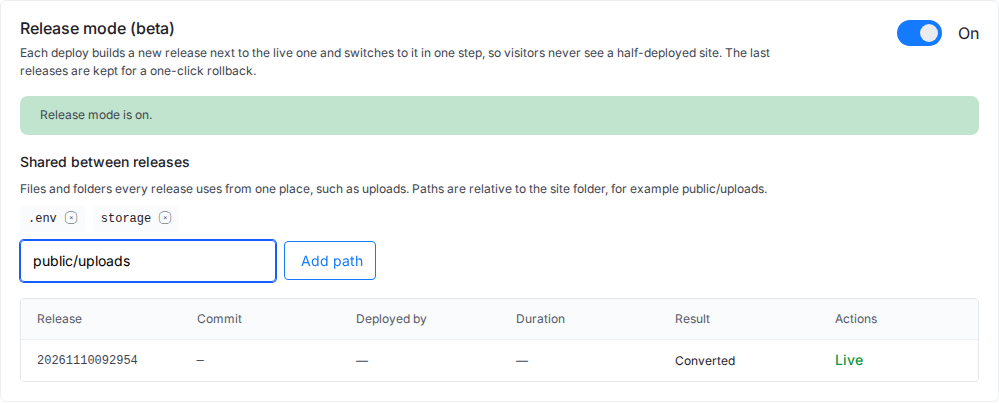
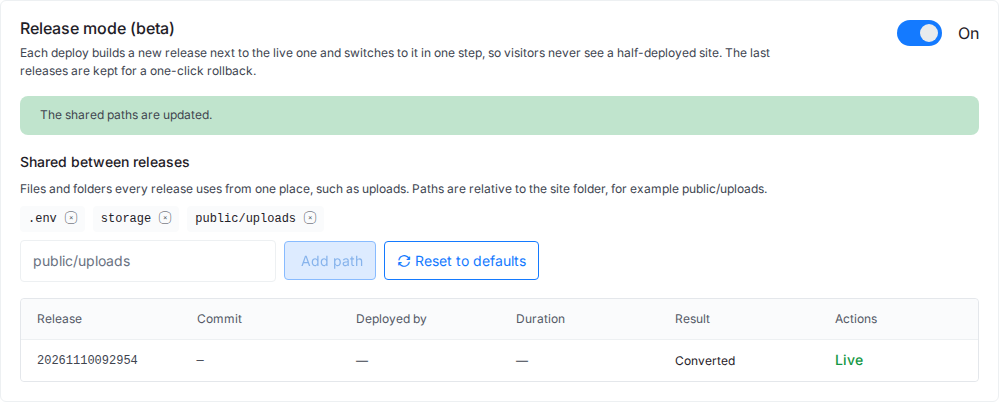
The card shows “Updating the shared paths…” and then The shared paths are updated. The path is moved from the live release into the shared place and linked back at once, and every later deploy links it too.
Rules for a shared path
A path is refused, with the reason on the card, when it:
- is absolute (starts with
/), or contains..,.or an empty part; - uses characters other than letters, numbers, dots, dashes and underscores;
- is
.git, the site’s web root, or a folder that holds the web root; - is listed twice, or sits inside another shared path (“… is inside …, which is shared too. Share one of them.”);
- does not exist in the site yet, or is a file tracked by Git.
A site can share up to 50 paths.
Step 2: Remove a path
Click the × next to the path. The Stop sharing …? dialog explains: “Its current files are copied back into the live release. Releases deployed from now on keep their own copy.” Click Stop sharing.
Step 3: Reset to defaults
After you change the list, a Reset to defaults button appears. Click it to go back to the defaults for your site. The dialog Reset the shared paths? lists them (“The list goes back to the defaults for this site: …”). Click Reset.
Container sites share nothing
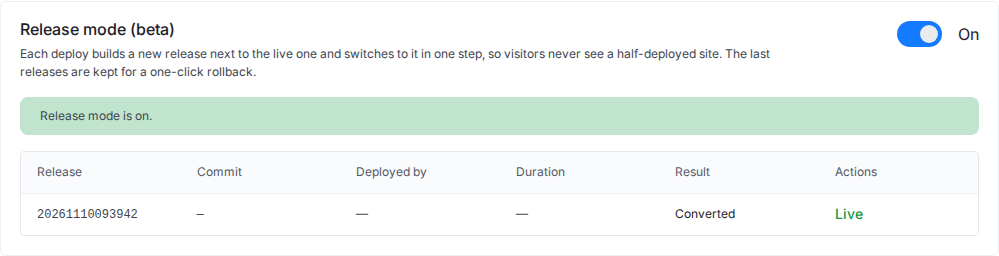
Container sites built from a Dockerfile or an app recipe have no Shared between releases section. Each release’s container reads the site’s .env from its own folder. An attempt to add a path through the API is refused with “A container site shares no paths: each release’s container reads the site’s .env from its own folder.”
Shared files and rollbacks
A rollback switches only the code. Shared files stay as they are, so uploads made after a deploy are still there after you roll back. When you turn Release mode off, every shared path moves back into the site folder as a normal file or folder.
You can also read and change the list with the Public API or MCP: see Manage Release mode with the Public API and MCP.
Frequently asked questions
Why does my uploaded file disappear after a deploy?
The folder it was saved in is not shared, so each new release starts with the copy from your repository. Add the folder, for example public/uploads, under Shared between releases. From then on every release uses the same files.
Can a shared path be a single file?
Yes. A shared path can be a file, such as .env, or a folder, such as storage or public/uploads. It must already exist in the site and must not be a file tracked by Git.
How many paths can I share?
Up to 50 per site.
Related guides
- How to use zero-downtime deployments (Release mode)
- Zero-downtime deployments for Laravel and PHP sites
- Zero-downtime deployments for WordPress from Git
- Release mode messages and fixes
If you run into any issues with shared files in Release mode, feel free to reach out to our support team.